
使用IDEA搭建spring
从前使用eclipse开发,集成jar包,现在使用maven来管理
一:
1.框架
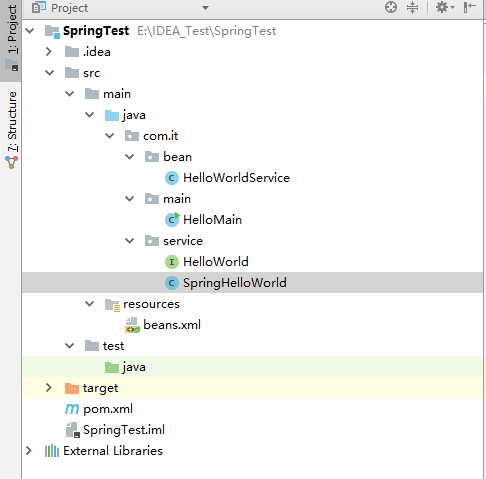
2.pom
需要spring core与spring context。
 <?xml version="1.0" encoding="UTF-8"?>

 <project xmlns="http://maven.apache.org/POM/4.0.0"

          xmlns:xsi="http://www.w3.org/2001/XMLSchema-instance"

          xsi:schemaLocation="http://maven.apache.org/POM/4.0.0 http://maven.apache.org/xsd/maven-4.0.0.xsd">

     <modelVersion>4.0.0</modelVersion>

     <groupId>SpringTest</groupId>

     <artifactId>SpringTest</artifactId>

     <version>1.0-SNAPSHOT</version>

     <dependencies>

         <!-- https://mvnrepository.com/artifact/org.springframework/spring-core -->

         <dependency>

             <groupId>org.springframework</groupId>

             <artifactId>spring-core</artifactId>

             <version>5.0.0.RELEASE</version>

         </dependency>

         <!-- https://mvnrepository.com/artifact/org.springframework/spring-context -->

         <dependency>

             <groupId>org.springframework</groupId>

             <artifactId>spring-context</artifactId>

             <version>5.0.0.RELEASE</version>

         </dependency>

     </dependencies>

 </project>
3.接口HelloWorld
 package com.it.service;

 public interface HelloWorld {

     public void sayHello();

 }
4.实现类
 package com.it.service;

 public class SpringHelloWorld implements HelloWorld {

     public void sayHello() {

         System.out.println("say hello");

     }

 }
5.bean
 package com.it.bean;

 import com.it.service.HelloWorld;

 public class HelloWorldService {

     private HelloWorld helloWorld;

     public HelloWorldService() {

     }

     public void setHelloWorld(HelloWorld helloWorld) {

         this.helloWorld = helloWorld;

     }

     public HelloWorld getHelloWorld() {

         return this.helloWorld;

     }

 }
6.运行main
 package com.it.main;

 import com.it.service.HelloWorld;

 import com.it.bean.HelloWorldService;

 import org.springframework.context.ApplicationContext;

 import org.springframework.context.support.ClassPathXmlApplicationContext;

 public class HelloMain {

     public static void main(String[] args) {

         ApplicationContext context = new ClassPathXmlApplicationContext("beans.xml");

         HelloWorldService service = (HelloWorldService) context.getBean("helloWorldService");

         HelloWorld hw= service.getHelloWorld();

         hw.sayHello();

     }

 }
7.beans.xml
 <?xml version="1.0" encoding="UTF-8"?>

 <beans xmlns="http://www.springframework.org/schema/beans"

        xmlns:xsi="http://www.w3.org/2001/XMLSchema-instance"

        xsi:schemaLocation="http://www.springframework.org/schema/beans http://www.springframework.org/schema/beans/spring-beans.xsd">

     <bean id="helloWorldService" class="com.it.bean.HelloWorldService">

         <property name="helloWorld" ref="springHelloWorld"/>

     </bean>

     <bean id="springHelloWorld" class="com.it.service.SpringHelloWorld"></bean>

 </beans>
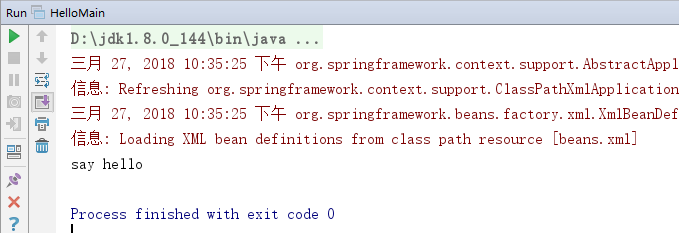
8.效果
使用IDEA搭建spring的更多相关文章
- MAC OS X El CAPITAN 搭建SPRING MVC (1)- 目录、包名、创建web.xml
一. 下载STS(Spring Tool Suite) 官方地址:http://spring.io/tools/sts 下载spring tool suite for mac 最新版本.这个IDE是很 ...
- 从零开始学 Java - 搭建 Spring MVC 框架
没有什么比一个时代的没落更令人伤感的了 整个社会和人都在追求创新.进步.成长,没有人愿意停步不前,一个个老事物慢慢从我们生活中消失掉真的令人那么伤感么?或者说被取代?我想有些是的,但有些东西其实并不是 ...
- 搭建Spring + SpringMVC + Mybatis框架之二(整合Spring和Mybatis)
整合Spring和Mybatis 首先给出完整的项目目录: (1)引入项目需要的jar包 使用http://maven.apache.org作为中央仓库即可. Spring核心包,mybatis核心包 ...
- 搭建Spring、Spring MVC、Mybatis和Freemarker
搭建Spring.Spring MVC.Mybatis和Freemarker 1.pom文件 <project xmlns="http://maven.apache.org/POM/4 ...
- 使用IDEA搭建Spring Boot入门项目
简介 Spring Boot是由Pivotal团队提供的全新框架,其设计目的是用来简化新Spring应用的初始搭建以及开发过程.该框架使用了特定的方式来进行配置,从而使开发人员不再需要定义样板化的配置 ...
- idea搭建spring的demo
这是本人在回顾知识点时记录的内容,如有错误,谢谢指正! 1.先来介绍下spring是什么? spring是一个轻量级的开源框架,是一个大型的容器,也是一个很好的“管家”,可以接管web层,业务层,da ...
- maven 聚合工程 用spring boot 搭建 spring cloud 微服务 模块式开发项目
项目的简单介绍: 项目采用maven聚合工程 用spring boot 搭建 spring cloud的微服务 模块式开发 项目的截图: 搭建开始: 能上图 我少打字 1.首先搭建maven的聚合工程 ...
- Eclipse上搭建Spring的开发环境
一.安装Spring Tool Suite插件 如图: 点击Finish之后等待安装,安装完之后弹窗点击yes重启Eclipse,重启后显示如下界面: 二.搭建Spring开发环境 1.导入jar包到 ...
- 框架:Intellij搭建Spring框架
第二章.Intellij搭建Spring框架 前提条件:jdk.jre已经安装完成 方法一.intellij下载jar 附:自带的jar的版本为4.3[2018/11/22] 第一步:选择File&g ...
- Spring Boot系列学习文章(一) -- Intellij IDEA 搭建Spring Boot项目
前言: 最近做的一个项目是用Spring Boot来做的,所以把工作中遇到的一些知识点.问题点整理一下,做成一系列学习文章,供后续学习Spring Boot的同仁们参考,我也是第一次接触Spring ...
随机推荐
- BZOJ 3167: [Heoi2013]Sao
3167: [Heoi2013]Sao Time Limit: 30 Sec Memory Limit: 256 MBSubmit: 96 Solved: 36[Submit][Status][D ...
- What is SCons?
SCons: A software construction tool What is SCons? SCons is an Open Source software construction too ...
- bzoj1030: [JSOI2007]文本生成器(AC自动机+DP)
第一次写这类题...懵 直接计算答案不好计算,所以补集转化求不合法的方案. 首先考虑朴素的DP,设$f(i, s)$表示前$i$个字符,字符串为$s$的方案数,且任意一个给定串都不存在$s$中. 我们 ...
- 【洛谷P1991】无线通讯网
题目大意:给定一个 N 个顶点的完全图,边有边权,现在要求使得图中所有顶点联通的情况下,第 M-1 大的边最小值是多少. 题解:所有点联通的最小要求是所有点和连接这些点的边构成原图的一棵生成树,那么问 ...
- 使用solrJ操作solr常用方法 【注释非常详细,非常好】
转: 使用solrJ操作solr常用方法 2017年08月07日 22:49:06 成都往右 阅读数:8990 版权声明:本文为博主原创文章,未经博主允许不得转载. https://blog.cs ...
- Java基本语法---个人参考资料
Java语言基础组成:关键字.标识符.注释.常量和变量.运算符.语句.函数.数组 一.标识符 标识符是在程序中自定义的一些名称,由大小写字母[a-zA-Z],数字[0-9],下划线[ _ ],特殊字符 ...
- 蓝桥杯 算法提高 9-3摩尔斯电码 _c++ Map容器用法
//****|*|*-**|*-**|--- #include <iostream> #include <map> #include <vector> #inclu ...
- 无法执行该操作,因为链接服务器 "xxxxx" 的 OLE DB 访问接口 "SQLNCLI" 无法启动分布式事务
在存储过程中使用事务,并且使用链接服务器时,报类似下面的错误 链接服务器"****"的 OLE DB 访问接口 "SQLNCLI10" 返回了消息 " ...
- SQL Server限制IP访问1433端口
1.用系统自带的防火墙,启用防火墙 2.点击[添加端口],名称填1433,端口号填1433 3.协议TCP,点[更改范围],选自定义列表,那个框里就填本机服务器的IP地址.
- Python学习四|变量、对象、引用的介绍
变量 变量创建:一个变量也就是变量名,就像a,当代码第一次赋值时就创建了它.之后的赋值将会改变已创建的变量名的值,从技术上讲,Python在代码运行之前先检测变量名,可以当成是最初的赋值创建了变量. ...