
关于WordCount的作业
一、开发者:201631062418
二、代码地址:https://gitee.com/YsuLIyan/WordCount
三、作业地址:https://edu.cnblogs.com/campus/xnsy/Test/homework/2203
四、基本功能
WordCount.exe -c test.txt //返回文件 test.txt的字符数
WordCount.exe -w test.txt //返回文件 test.txt的单词总数
WordCount.exe -l test.txt //返回文件 test.txt的总行数
WordCount.exe -o outputFile.txt //将结果输出到指定文件outputFile.txt
五、扩展功能
-----------------------------------------------------------------------------------------------------------------------------------------------
已经实现:-c -w -l 可以同时使用,如果没有-o命令(或者说-0之后没有接文件名),则默认outputfile.txt作为输出结果的文件(strPath)。并且扫描-0命令之后的接收结果文件名称,如果接收结果文件在该目标文件夹中不存在,则会报路径错误
-----------------------------------------------------------------------------------------------------------------------------------------------
还未实现:接收结果文件在目标文件夹中不存在时,重新创建一个名为(strPath)的接收结果文件--待后期改善。
在命令读取时,程序对于用户输入的命令进行理解、更多的应答以及合适的补充。
-----------------------------------------------------------------------------------------------------------------------------------------------
六、项目的实现
这是一个专门处理命令的方法类,这也是我比较在意的地方,因为我很注重我写的程序对用户输入的参数的应答。
    class CommandRead

    {

        bool isRows = false;

        bool isChara = false;

        bool isWord = false;

        bool isAimPath = false;

        string[] path = new string[];

        string[] commands;

        public bool IsRows

        {

            get { return isRows; }

        }

        public bool IsChara

        {

            get { return isChara; }

        }

        public bool IsWord

        {

            get { return isWord; }

        }

        public bool IsAimPath

        {

            get { return isAimPath; }

        }

        public string[] Path

        {

            get { return path; }

        }

        public void CommandImport(string[] args)

        {

            commands = args;

            if(commands == null)

            {

                Console.WriteLine("请输入指令");

            }

            else

            {

                int Pas = ;

                for (int i = ; i < commands.Length; i++)

                {

                    if (commands[i] == "-l" || commands[i] == "-L")//行数

                    {

                        isRows = true;

                    }

                    else if (commands[i] == "-w" || commands[i] == "-W")//单词

                    {

                        isWord = true;

                    }

                    else if (commands[i] == "-c" || commands[i] == "-C")//字符

                    {

                        isChara = true;

                    }

                    else if (commands[i] == "-o" || commands[i] == "-O")//输出

                    {

                        if (i +  == commands.Length)

                            isAimPath = true;

                    }

                    else

                    {

                        path[Pas] = commands[i];

                        Pas++;

                    }

                }

            }

        }

    }
这是关于读取文件行数的类
 class Rows //行数

    {

        public string ope;

        public int Line(string filename)

        {

            Encoding encod = Encoding.GetEncoding("GB2312");

            FileStream fs = new FileStream(filename, FileMode.Open);

            StreamReader sr = new StreamReader(fs, encod);

            string line;

            int CountLine = ;//记录行数

            //当前行不为空

            while((line = sr.ReadLine()) != null)

            {

                CountLine++;

            }

            //应该先关闭文件再return

            sr.Close();

            fs.Close();

            return CountLine;//注意函数是有返回值的

        }

    }
这是读取文件符号数的类
class Word//字符

    {

        public int TotalWord(string filename)

        {

            Encoding encod = Encoding.GetEncoding("GB2312");

            FileStream fs = new FileStream(filename, FileMode.Open);

            StreamReader sr = new StreamReader(fs, encod);

            int nchar;

            int WordCount = ;

            char[] symbol = { ' ', '\t', ',', '.', '?', '!', ':', ';', '\'', '\"', '\n', '{', '}', '(', ')', '+', '-', '*', '=' };//间隔符

            while((nchar = sr.Read())!= -)

            {

                foreach(char c in symbol)

                {

                    if(nchar == (int)c)

                    {

                        WordCount++;

                    }

                }

            }

            sr.Close();

            fs.Close();

            return WordCount;

        }

    }
这是读取单词数的类
 class Character//单词

    {

        public string ope;

        public int TotalWord(string filename)

        {

            Encoding encod = Encoding.GetEncoding("GB2312");

            FileStream fs = new FileStream(filename, FileMode.Open);

            StreamReader sr = new StreamReader(fs, encod);

            int charcount = ;

            int nchar;

            while((nchar = sr.Read())!= -) //sr.Read()是以特定的编码方式读取流而获取一个接一个的字符,而ReadLine()是读取一行

            {

                charcount++; // 统计字符数

            }

            //关闭文件

            sr.Close();

            fs.Close();

            return charcount;

        }

    }
这是将得到的信息写入指定文件的方法类
class WriteFile

    {

        public void Write(string theword)

        {

            FileStream fs = new FileStream("outputfile.txt", FileMode.Create);

            //获得字节数

            byte[] data = System.Text.Encoding.Default.GetBytes(theword);

            //写入

            fs.Write(data, , data.Length);

            //清空缓存区,关闭流

            fs.Flush();

            fs.Close();

        }

        public void Write(string path,string theword)

        {

            bool isInFile = false;

            String rootPath = Directory.GetCurrentDirectory();

            DirectoryInfo root = new DirectoryInfo(rootPath);

            foreach(FileInfo f in root.GetFiles())

            {

                if(path == f.Name)

                {

                    isInFile = true;

                }

            }

            if (isInFile != false)

            {

                FileStream fs = new FileStream(path, FileMode.Create);

                //获得字节数

                byte[] data = System.Text.Encoding.Default.GetBytes(theword);

                //写入

                fs.Write(data, , data.Length);

                //清空缓存区,关闭流

                fs.Flush();

                fs.Close();

            }

            else

            {

                Console.WriteLine("Path Error!");

            }

        }

    }
然后就是主函数
class Program

    {

        static void Main(string[] args)

        {

            string[] cmds = args;

            string theWord = "";

            int ope1 = ,ope2 = ,ope3 = ;

            for(int i =; i<args.Length;i++)

            Console.WriteLine(args[i]);

            //新建对象读取命令

            CommandRead cmd = new CommandRead();

            cmd.CommandImport(cmds);

            if (cmd.IsRows==true)

            {

                Rows rows = new Rows();

                ope1 = rows.Line(cmd.Path[]);

                Console.WriteLine("Total Line:{0}", ope1);

                theWord += string.Format("Total Line:{0}\r\n", ope1);

            }

            if (cmd.IsChara==true)

            {

                Character ch = new Character();

                ope2 = ch.TotalWord(cmd.Path[]);

                Console.WriteLine("Total Character:{0}", ope2);

                theWord += string.Format("Total Character:{0}\r\n", ope2);

            }

            if (cmd.IsWord==true)

            {

                Word word = new Word();

                ope2 = word.TotalWord(cmd.Path[]);

                Console.WriteLine("Total Word:{0}", ope3);

                theWord += string.Format("Total Word:{0}\r\n", ope3);

            }

            WriteFile write = new WriteFile();

            if (cmd.IsAimPath)

            {

                write.Write(cmd.Path[], theWord);

            }

            if(cmd.IsAimPath == false)

            {

                write.Write(theWord);

            }

        }

    }
七、项目测试
test.txt文件内容:
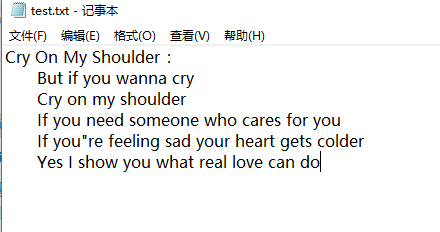
进行测试

测试结果

测试2
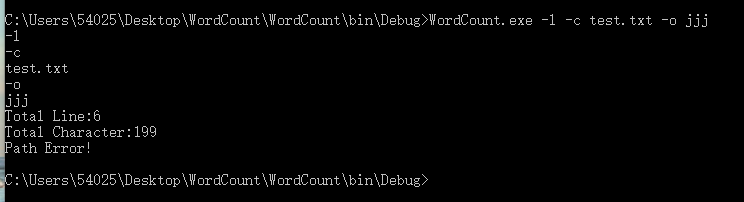
测试结果

心得感悟:其实刚好我在C#方面对于文件的读写这一块并不是很熟练,但是刚好该题就让我去读写文件,而且我并不是很清楚如何在cmd里面调用.exe以及传入参数。

关于WordCount的作业的更多相关文章
- 软件工程:Wordcount程序作业
由于时间的关系,急着交作业,加上这一次也不是那么很认真的去做,草草写了“Wordcount程序”几个功能,即是 .txt文件的读取,能计算出文件内容的单词数,文件内容的字符数,及行数. 这次选用C来做 ...
- HUST软测1504班第2周作业成绩:WordCount
说明 本次公布的成绩为第2周个人作业WordCount的结果: 第2周个人作业:WordCount 如果同学对作业结果存在异议,可以: 在毕博平台讨论区的第2周作业第在线答疑区发帖申诉. 或直接在博客 ...
- 软件测试作业——WordCount的测试
一.代码提交 1.代码地址:https://gitee.com/zst1978805482/WordCount 2.作业地址:https://edu.cnblogs.com/campus/xnsy/T ...
- Jason Wang: 结对编程 CountWord(第三次作业)
本次作业地址: https://edu.cnblogs.com/campus/xnsy/SoftwareEngineeringClass1/homework/2882 学号: 201731072323 ...
- Hadoop Steaming开发之WordCount
简单的WordCount栗子--类似于编程语言中的hello world 1.shell脚本run.sh HADOOP_CMD="/usr/local/src/hadoop-1.2.1/bi ...
- 第三次作业 201731082208 黄亚恒&肖莉
Github项目地址:https://github.com/HYHSTUDEY/WordCount.git 作业地址:https://www.cnblogs.com/hyhhyh090628/p/10 ...
- Ganlia采样、统计及RRD记录周期(频次、间隔)的配置和更改
Ganglia & RRD Ganglia是伯克利开发的一个集群监控软件.可以监视和显示集群中的节点的各种状态信息,比如如:cpu .mem.硬盘利用率, I/O负载.网络流量情况等,同时可以 ...
- Plink v0.1.0 发布——基于Flink的流处理平台
Plink是一个基于Flink的流处理平台,旨在基于 [Apache Flink]封装构建上层平台. 提供常见的作业管理功能.如作业的创建,删除,编辑,更新,保存,启动,停止,重启,管理,多作业模板配 ...
- 第二周个人作业WordCount
1.Github地址 https://github.com/JingzheWu/WordCount 2.PSP表格 PSP2.1 PSP阶段 预估耗时 (分钟) 实际耗时 (分钟) Planning ...
随机推荐
- 【Linux】 Ncures库的介绍与安装
Ncures库的介绍 ncurses(new curses)是一套编程库,它提供了一系列的函数以便使用者调用它们去生成基于文本的用户界面. ncurses名字中的n意味着“new”,因为它是curse ...
- python学习 day18 (3月25日)---( 面向对象浅析)
面向对象思想: 字典表示对象: 不是太好 因为 变量 得一个个的赋值改值 {'name':'alex','blood':20,'attack':1,'sex':'不'} {'name':'太亮','b ...
- 机器学习笔试--LeetCode
#########简单######### 共25道: 1. 两数之和 给定一个整数数组和一个目标值,找出数组中和为目标值的两个数. 你可以假设每个输入只对应一种答案,且同样的元素不能被重复利用. 示例 ...
- 2018.11.06 bzoj2287: 【POJ Challenge】消失之物(背包)
传送门 先假设所有物品都能用,做01背包求出方案数. 然后枚举每个点,分类讨论扣掉它对答案的贡献. 代码: #include<bits/stdc++.h> using namespace ...
- 2018.10.26 NOIP训练 数数树(换根dp)
传送门 换根dpdpdp傻逼题好像不好码啊. 考虑直接把每一个二进制位拆开处理. 先dfsdfsdfs出每个点到1的异或距离. 然后分类讨论一波: 如果一个点如果当前二进制位到根节点异或距离为1,那么 ...
- LOJ-10099(点双联通)
题目链接:传送门 思路: 如果图是点双联通的,即没有割点,直接从图中随意选两个点即可: 如果有一个割点,删除割点,求连通块的个数即可(在每个连通块内新建一个营救点). 如果有多个割点,则可以通过其他割 ...
- CAS 单点登录 服务器整合
概述 现在企业内部的系统越来越多,如果各个应用都有自己的用户系统,那么用户将不得不要记住不同系统的用户名密码,因此独立的用户系统应运而生,各个系统之间通过单点登录的方式,这样内部只需要记住一个用户名和 ...
- Ubuntu 16.04 安装 postgresql 9.3
1.Ctrl+Alt+t 打开终端 2.输入:wget --quiet -O - https://www.postgresql.org/media/keys/ACCC4CF8.asc | sudo a ...
- 利用url传多个参数
刚开始接触jsp,比较偏向于用button标签的onclick方法进行页面的跳转.但是关于页面跳转的各种问题真是叫人头大,以下记录,仅仅为自己以后查看. Qone 用url传参的时候遇到中文怎么办 编 ...
- 安卓4.2用adb 获取屏幕分辨率等信息
在终端输入adb shell dumpsys: 终端会打印出一些service list 用adb shell dumpsys+service名即可查询相应的信息. 屏幕分辨率用adb shell d ...