
关于WordCount的作业
一、开发者:201631062418
二、代码地址:https://gitee.com/YsuLIyan/WordCount
三、作业地址:https://edu.cnblogs.com/campus/xnsy/Test/homework/2203
四、基本功能
WordCount.exe -c test.txt //返回文件 test.txt的字符数
WordCount.exe -w test.txt //返回文件 test.txt的单词总数
WordCount.exe -l test.txt //返回文件 test.txt的总行数
WordCount.exe -o outputFile.txt //将结果输出到指定文件outputFile.txt
五、扩展功能
-----------------------------------------------------------------------------------------------------------------------------------------------
已经实现:-c -w -l 可以同时使用,如果没有-o命令(或者说-0之后没有接文件名),则默认outputfile.txt作为输出结果的文件(strPath)。并且扫描-0命令之后的接收结果文件名称,如果接收结果文件在该目标文件夹中不存在,则会报路径错误
-----------------------------------------------------------------------------------------------------------------------------------------------
还未实现:接收结果文件在目标文件夹中不存在时,重新创建一个名为(strPath)的接收结果文件--待后期改善。
在命令读取时,程序对于用户输入的命令进行理解、更多的应答以及合适的补充。
-----------------------------------------------------------------------------------------------------------------------------------------------
六、项目的实现
这是一个专门处理命令的方法类,这也是我比较在意的地方,因为我很注重我写的程序对用户输入的参数的应答。
    class CommandRead

    {

        bool isRows = false;

        bool isChara = false;

        bool isWord = false;

        bool isAimPath = false;

        string[] path = new string[];

        string[] commands;

        public bool IsRows

        {

            get { return isRows; }

        }

        public bool IsChara

        {

            get { return isChara; }

        }

        public bool IsWord

        {

            get { return isWord; }

        }

        public bool IsAimPath

        {

            get { return isAimPath; }

        }

        public string[] Path

        {

            get { return path; }

        }

        public void CommandImport(string[] args)

        {

            commands = args;

            if(commands == null)

            {

                Console.WriteLine("请输入指令");

            }

            else

            {

                int Pas = ;

                for (int i = ; i < commands.Length; i++)

                {

                    if (commands[i] == "-l" || commands[i] == "-L")//行数

                    {

                        isRows = true;

                    }

                    else if (commands[i] == "-w" || commands[i] == "-W")//单词

                    {

                        isWord = true;

                    }

                    else if (commands[i] == "-c" || commands[i] == "-C")//字符

                    {

                        isChara = true;

                    }

                    else if (commands[i] == "-o" || commands[i] == "-O")//输出

                    {

                        if (i +  == commands.Length)

                            isAimPath = true;

                    }

                    else

                    {

                        path[Pas] = commands[i];

                        Pas++;

                    }

                }

            }

        }

    }
这是关于读取文件行数的类
 class Rows //行数

    {

        public string ope;

        public int Line(string filename)

        {

            Encoding encod = Encoding.GetEncoding("GB2312");

            FileStream fs = new FileStream(filename, FileMode.Open);

            StreamReader sr = new StreamReader(fs, encod);

            string line;

            int CountLine = ;//记录行数

            //当前行不为空

            while((line = sr.ReadLine()) != null)

            {

                CountLine++;

            }

            //应该先关闭文件再return

            sr.Close();

            fs.Close();

            return CountLine;//注意函数是有返回值的

        }

    }
这是读取文件符号数的类
class Word//字符

    {

        public int TotalWord(string filename)

        {

            Encoding encod = Encoding.GetEncoding("GB2312");

            FileStream fs = new FileStream(filename, FileMode.Open);

            StreamReader sr = new StreamReader(fs, encod);

            int nchar;

            int WordCount = ;

            char[] symbol = { ' ', '\t', ',', '.', '?', '!', ':', ';', '\'', '\"', '\n', '{', '}', '(', ')', '+', '-', '*', '=' };//间隔符

            while((nchar = sr.Read())!= -)

            {

                foreach(char c in symbol)

                {

                    if(nchar == (int)c)

                    {

                        WordCount++;

                    }

                }

            }

            sr.Close();

            fs.Close();

            return WordCount;

        }

    }
这是读取单词数的类
 class Character//单词

    {

        public string ope;

        public int TotalWord(string filename)

        {

            Encoding encod = Encoding.GetEncoding("GB2312");

            FileStream fs = new FileStream(filename, FileMode.Open);

            StreamReader sr = new StreamReader(fs, encod);

            int charcount = ;

            int nchar;

            while((nchar = sr.Read())!= -) //sr.Read()是以特定的编码方式读取流而获取一个接一个的字符,而ReadLine()是读取一行

            {

                charcount++; // 统计字符数

            }

            //关闭文件

            sr.Close();

            fs.Close();

            return charcount;

        }

    }
这是将得到的信息写入指定文件的方法类
class WriteFile

    {

        public void Write(string theword)

        {

            FileStream fs = new FileStream("outputfile.txt", FileMode.Create);

            //获得字节数

            byte[] data = System.Text.Encoding.Default.GetBytes(theword);

            //写入

            fs.Write(data, , data.Length);

            //清空缓存区,关闭流

            fs.Flush();

            fs.Close();

        }

        public void Write(string path,string theword)

        {

            bool isInFile = false;

            String rootPath = Directory.GetCurrentDirectory();

            DirectoryInfo root = new DirectoryInfo(rootPath);

            foreach(FileInfo f in root.GetFiles())

            {

                if(path == f.Name)

                {

                    isInFile = true;

                }

            }

            if (isInFile != false)

            {

                FileStream fs = new FileStream(path, FileMode.Create);

                //获得字节数

                byte[] data = System.Text.Encoding.Default.GetBytes(theword);

                //写入

                fs.Write(data, , data.Length);

                //清空缓存区,关闭流

                fs.Flush();

                fs.Close();

            }

            else

            {

                Console.WriteLine("Path Error!");

            }

        }

    }
然后就是主函数
class Program

    {

        static void Main(string[] args)

        {

            string[] cmds = args;

            string theWord = "";

            int ope1 = ,ope2 = ,ope3 = ;

            for(int i =; i<args.Length;i++)

            Console.WriteLine(args[i]);

            //新建对象读取命令

            CommandRead cmd = new CommandRead();

            cmd.CommandImport(cmds);

            if (cmd.IsRows==true)

            {

                Rows rows = new Rows();

                ope1 = rows.Line(cmd.Path[]);

                Console.WriteLine("Total Line:{0}", ope1);

                theWord += string.Format("Total Line:{0}\r\n", ope1);

            }

            if (cmd.IsChara==true)

            {

                Character ch = new Character();

                ope2 = ch.TotalWord(cmd.Path[]);

                Console.WriteLine("Total Character:{0}", ope2);

                theWord += string.Format("Total Character:{0}\r\n", ope2);

            }

            if (cmd.IsWord==true)

            {

                Word word = new Word();

                ope2 = word.TotalWord(cmd.Path[]);

                Console.WriteLine("Total Word:{0}", ope3);

                theWord += string.Format("Total Word:{0}\r\n", ope3);

            }

            WriteFile write = new WriteFile();

            if (cmd.IsAimPath)

            {

                write.Write(cmd.Path[], theWord);

            }

            if(cmd.IsAimPath == false)

            {

                write.Write(theWord);

            }

        }

    }
七、项目测试
test.txt文件内容:
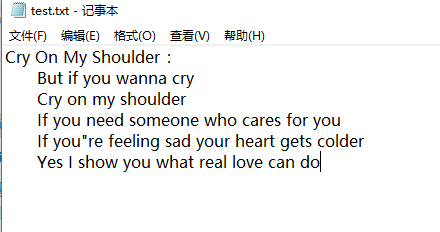
进行测试

测试结果

测试2
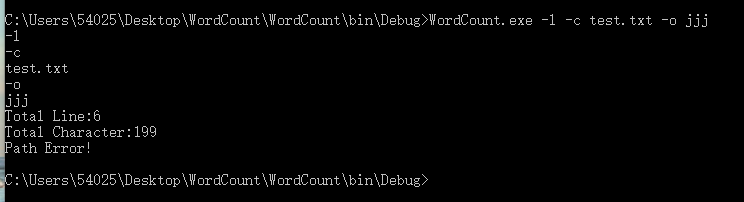
测试结果

心得感悟:其实刚好我在C#方面对于文件的读写这一块并不是很熟练,但是刚好该题就让我去读写文件,而且我并不是很清楚如何在cmd里面调用.exe以及传入参数。

关于WordCount的作业的更多相关文章
- 软件工程:Wordcount程序作业
由于时间的关系,急着交作业,加上这一次也不是那么很认真的去做,草草写了“Wordcount程序”几个功能,即是 .txt文件的读取,能计算出文件内容的单词数,文件内容的字符数,及行数. 这次选用C来做 ...
- HUST软测1504班第2周作业成绩:WordCount
说明 本次公布的成绩为第2周个人作业WordCount的结果: 第2周个人作业:WordCount 如果同学对作业结果存在异议,可以: 在毕博平台讨论区的第2周作业第在线答疑区发帖申诉. 或直接在博客 ...
- 软件测试作业——WordCount的测试
一.代码提交 1.代码地址:https://gitee.com/zst1978805482/WordCount 2.作业地址:https://edu.cnblogs.com/campus/xnsy/T ...
- Jason Wang: 结对编程 CountWord(第三次作业)
本次作业地址: https://edu.cnblogs.com/campus/xnsy/SoftwareEngineeringClass1/homework/2882 学号: 201731072323 ...
- Hadoop Steaming开发之WordCount
简单的WordCount栗子--类似于编程语言中的hello world 1.shell脚本run.sh HADOOP_CMD="/usr/local/src/hadoop-1.2.1/bi ...
- 第三次作业 201731082208 黄亚恒&肖莉
Github项目地址:https://github.com/HYHSTUDEY/WordCount.git 作业地址:https://www.cnblogs.com/hyhhyh090628/p/10 ...
- Ganlia采样、统计及RRD记录周期(频次、间隔)的配置和更改
Ganglia & RRD Ganglia是伯克利开发的一个集群监控软件.可以监视和显示集群中的节点的各种状态信息,比如如:cpu .mem.硬盘利用率, I/O负载.网络流量情况等,同时可以 ...
- Plink v0.1.0 发布——基于Flink的流处理平台
Plink是一个基于Flink的流处理平台,旨在基于 [Apache Flink]封装构建上层平台. 提供常见的作业管理功能.如作业的创建,删除,编辑,更新,保存,启动,停止,重启,管理,多作业模板配 ...
- 第二周个人作业WordCount
1.Github地址 https://github.com/JingzheWu/WordCount 2.PSP表格 PSP2.1 PSP阶段 预估耗时 (分钟) 实际耗时 (分钟) Planning ...
随机推荐
- oracle迁移
#导出scott的数据,排除 table_a table_b expdp system/password schemas=scott directory=datadir dumpfile=scott_ ...
- 如何在Eclipse下安装SVN插件——subclipse
如何在Eclipse下安装SVN插件——subclipse | 浏览:2799 | 更新:2014-09-20 22:39 1 2 3 4 5 6 分步阅读 版本控制是开发人员必不可少的工具,而SVN ...
- clion配置c/c++环境
打开这个界面 点击添加Cygwin选择下载的Cygwin在进行下面的配置 去网站https://www.cygwin.com/选择路径即可(这里只写了配置过程中的关键步骤并且附上IDE的链接直接安装 ...
- MyBatis中log4j 和 参数 和 分页和别名 功能
1.配置全局文件,注意各个配置标签的顺序 properties?, settings?, typeAliases?, typeHandlers?, objectFactory?, objectWr ...
- java笔记--问题总结
1. 垃圾回收算法 标记-清除算法 标记-清除算法是最基本的算法,和他的名字一样,分为两个步骤,一个步骤是标记需要回收的对象.在标记完成后统一回收被标记的对象.这个算法两个问题.一个是效率问题,标记和 ...
- RNN文章总结
1.RNN 基本结构类型 2. RNN 3.零基础入门深度学习(5) - 循环神经网络 4.
- PKG_CONFIG_PATH变量 与 ld.so.conf 文件
一.编译和连接 一般来说,如果库的头文件不在 /usr/include 目录中,那么在编译的时候需要用 -I 参数指定其路径.由于同一个库在不同系统上可能位于不同的目录下,用户安装库的时候也可以将库安 ...
- Linux系统下修改环境变量PATH路径
方法一: PATH=$PATH:/etc/apache/bin 该方法只对当前会话有效,每次注销或者拿出系统,该设置就会无效 方法二: vi /etc/profile 在适当的位置写入:PATH=$P ...
- java编程IO简单回顾和学习
java编程IO操作必不可少的,很久不玩IO,回顾一下,写了几个小程序,记录一下,方便查阅和学习. 1.给出一个整数数组,将其写入一个文件,再从文件中读出,并按整数大小逆序打印. package co ...
- 如何制作一个自适应手机、电脑、ipad的网页方法总结
进入2015年,手机上网的用户已经越来越多,已经赶超PC端.随着2G.3G.4G.免费WIFI和无线基站的不断普及,越来越多的人开始使用手机上网. 移动设备正超过桌面设备,成为访问互联网的最常见终端. ...