
.Net实现Windows服务安装完成后自动启动的两种方法
考虑到部署方便,我们一般都会将C#写的Windows服务制作成安装包。在服务安装完成以后,第一次还需要手动启动服务,这样非常不方便。
方法一:在安装完成事件里面调用命令行的方式启动服务
设置serviceProcessInstaller1控件的Account属性为“LocalSystem”
设置serviceInstaller1控件的StartType属性为"Automatic"
- /// <summary>
- /// 安装后自动启动服务
- /// </summary>
- /// <param name="sender"></param>
- /// <param name="e"></param>
- private void ProjectInstaller_AfterInstall(object sender, InstallEventArgs e)
- {
- Process p = new Process
- {
- StartInfo =
- {
- FileName = "cmd.exe",
- UseShellExecute = false,
- RedirectStandardInput = true,
- RedirectStandardOutput = true,
- RedirectStandardError = true,
- CreateNoWindow = true
- }
- };
- p.Start();
- const string cmdString = "sc start 银医通服务平台1.0"; //cmd命令,银医通服务平台1.0为服务的名称
- p.StandardInput.WriteLine(cmdString);
- p.StandardInput.WriteLine("exit");
- }
查阅了网上的一些资料,这种方式虽可行,但觉得不够完美。好了,下面来看看如何更好地做到服务自动启动。
方法二:使用ServiceController对象
1.重写ProjectInstaller的Commit方法
- using System;
- using System.Collections;
- using System.Collections.Generic;
- using System.ComponentModel;
- using System.Configuration.Install;
- using System.Linq;
- using System.ServiceProcess;
- namespace CleanExpiredSessionSeivice
- {
- [RunInstaller(true)]
- public partial class ProjectInstaller : System.Configuration.Install.Installer
- {
- public ProjectInstaller()
- {
- InitializeComponent();
- }
- public override void Commit(IDictionary savedState)
- {
- base.Commit(savedState);
- ServiceController sc = new ServiceController("银医通服务平台1.0");
- if(sc.Status.Equals(ServiceControllerStatus.Stopped))
- {
- sc.Start();
- }
- }
- }
- }
2、在服务安装项目中添加名为 Commit的 Custome Action
在服务安装项目上右击,在弹出的菜单中选择View — Custom Actions

然后在Commit项上右击,选择Add Custom Action…,在弹出的列表框中选择Application Folder。最终结果如下:
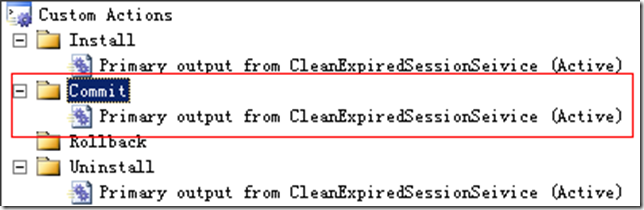
需要注意的是,第二步操作是必不可少的,否则服务无法自动启动。我的个人理解是Commit Custom Action 会自动调用ProjectInstaller的Commit方法,Commit Custom Action 在这里扮演了一个调用者的角色。
.Net实现Windows服务安装完成后自动启动的两种方法的更多相关文章
- Windows服务安装完成后自动启动
public ServiceInstaller() { //... Installer code here this.AfterInstall += new InstallEventHandler(S ...
- [转].Net Windows服务安装完成后自动启动
本文转自:http://www.cnblogs.com/hb_cattle/archive/2011/12/04/2275319.html 考虑到部署方便,我们一般都会将C#写的Windows服务制作 ...
- centos lamp/lnmp阶段复习 以后搬迁discuz论坛不需要重新安装,只需修改配置文件即可 安装wordpress 安装phpmyadmin 定时备份mysql两种方法 第二十五节课
centos lamp/lnmp阶段复习 以后搬迁discuz论坛不需要重新安装,只需修改配置文件即可 安装wordpress 安装phpmyadmin 定时备份mysql两种方法 第二十五节 ...
- Win8.1RTM英文版安装中文语言包的两种方法
Windows 8.1和Windows Server 2012 R2 RTM出来了,下载了个英文版的安装上了,发现远景上有朋友提供中文语言包,以下提供两种语言包的安装方法: 一.使用lpksetup命 ...
- windows 7中添加新硬件的两种方法(本地回环网卡)
最近在windows7上使用VMwareWorkstation7玩一些实验,遇到需要配置不同网络的问题. 因为在windows2003server上习惯使用要本地回环网卡了,那就想着在Windows7 ...
- pip安装使用国内源的两种方法
pip安装后使用pip安装第三方库默认是国外源,一般安装慢连接不稳定,等得花儿都谢了,结果还告诉你安装失败..../(ㄒoㄒ)/~~ 这时我们就要想想其它办法啦,毕竟不能强求 国外不行,就只有国内了赛 ...
- iManager微服务自定义上传数据的两种方法
背景 当数据量大时,通过浏览器上传可能速度较慢,可以使用以下两种方式进行数据导入. 方法一 1.访问k8s主页(31234端口) 找到所创建的微服务的命名空间(例如icloud-native-xxx) ...
- sublime 快速安装多个插件的两种方法[Advanced Install Package]与[Package Control.sublime-settings]
环境 sublime 3,目前官网下载的sublime3 已经支持自动安装 Package Control . 第一种: ctrl+shift+p 调出命令面板以后 以前都是使用 Package Co ...
- 学习windows编程 day3 之 自定义画笔的两种方法
LRESULT CALLBACK WndProc(HWND hwnd, UINT message, WPARAM wParam, LPARAM lParam) { HDC hdc; PAINTSTRU ...
随机推荐
- web接口的开发
老样子,抛出一个问题:什么是接口? 不解释了,百度吧. 了解起来先从HTTP开始说起吧. HTTP协议的特点: 1,无连接,就是指每次连接都仅仅只处理一个请求,服务器处理完客户的请求之后,收到客户的应 ...
- SA9 collections
[定义] 表示object的集合 generic class:可以用于多种object, 抽象类的具体实现: [ArrayList] 动态添加,只能加Non-primitive type,要初始化长 ...
- TabLayout+ViewPager的简单使用
1. build.gradle文件中加入 compile 'com.android.support:design:22.2.0' 2.写Xml文件,注意TabLayout的三个属性 app:tab ...
- Repeater控件添加序号列
在项目开发过程中,会经常遇到ASP.NET repeater控件添加序号列,有些新手可能还不会,网上搜集整理了一些,需要的朋友可以参考下 ASP.NET repeater添加序号列的方法 1.< ...
- springboot报错Unable to start EmbeddedWebApplicationContext due to missing EmbeddedServletContainerFactory bean
springboot项目在启动时需要把servlet容器编译进去,这时候如果你的maven依赖里面没有配置jetty或者tomcat相关依赖就会报错. 解决方法: jetty添加 <depend ...
- 9.29 h5日记
1.CSS中哪些属性可以继承? font系列 text系列 color line-height 2.border-radius的值 值的顺序是左上 右上 右下 左下 则 border-radius:5 ...
- Bonding
一.简介 双网卡配置设置虚拟为一个网卡实现网卡的冗余,其中一个网卡坏掉后网络通信仍可正常使用,实现网卡层面的负载均衡和高可用性 二.原理 网卡工作在混杂(promisc)模式,接收到达网卡的所有数 ...
- javascript 高级程序设计 三
Sorry,前两张介绍的主题还是JavaScript,而第一章介绍了JavaScript和ECMAScript区别,所以前两章介绍的主题应该改为ECMAScript,但是 标题就不改了因为现在人们习惯 ...
- MySQL单行注释和多行释
单行注释:# 或者 -- 多行注释:/* ... */ 使用 # 时,# 和注释的内容之间可以没有空格 使用 -- 时,-- 和注释内容之间必须有空格
- eclipse项目两个红点
Description Resource Path Location Type Unbound classpath container: 'JRE Sy 选中项目右键build path 选择libr ...