
如何干净的卸载docker
先上服务器环境信息:

卸载的原因:
宿主机过段时间就磁盘100%了,导致continart异常退出,后来找了很多解决方案,才发现是安装docker的时候有个配置文件错误(正常的应该是|Storage Driver: overlay2)。
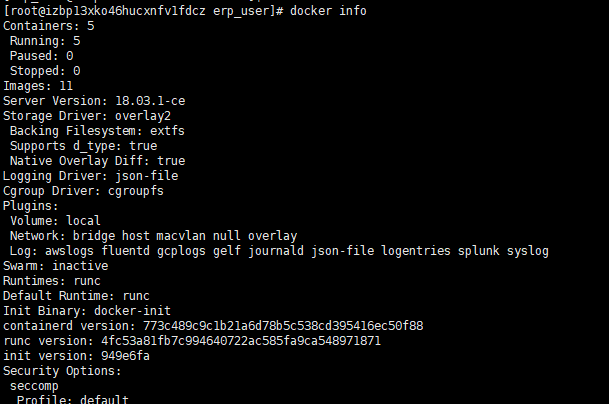
上干货:
①卸载
 yum remove docker \

                   docker-client \

                   docker-client-latest \

                   docker-common \

                   docker-latest \

                   docker-latest-logrotate \

                   docker-logrotate \

                   docker-selinux \

                   docker-engine-selinux \

                   docker-engine

 rm -rf /etc/systemd/system/docker.service.d

 rm -rf /var/lib/docker

 rm -rf /var/run/docker
②安装
#!/bin/sh
set -e # This script is meant for quick & easy install via:
# $ curl -fsSL get.docker.com -o get-docker.sh
# $ sh get-docker.sh
#
# For test builds (ie. release candidates):
# $ curl -fsSL test.docker.com -o test-docker.sh
# $ sh test-docker.sh
#
# NOTE: Make sure to verify the contents of the script
# you downloaded matches the contents of install.sh
# located at https://github.com/docker/docker-install
# before executing.
#
# Git commit from https://github.com/docker/docker-install when
# the script was uploaded (Should only be modified by upload job):
SCRIPT_COMMIT_SHA=36b78b2 # This value will automatically get changed for:
# * edge
# * test
# * experimental
DEFAULT_CHANNEL_VALUE="edge"
if [ -z "$CHANNEL" ]; then
CHANNEL=$DEFAULT_CHANNEL_VALUE
fi DEFAULT_DOWNLOAD_URL="https://download.docker.com"
if [ -z "$DOWNLOAD_URL" ]; then
DOWNLOAD_URL=$DEFAULT_DOWNLOAD_URL
fi DEFAULT_REPO_FILE="docker-ce.repo"
if [ -z "$REPO_FILE" ]; then
REPO_FILE="$DEFAULT_REPO_FILE"
fi SUPPORT_MAP="
x86_64-centos-
x86_64-fedora-
x86_64-fedora-
x86_64-fedora-
x86_64-debian-wheezy
x86_64-debian-jessie
x86_64-debian-stretch
x86_64-debian-buster
x86_64-ubuntu-trusty
x86_64-ubuntu-xenial
x86_64-ubuntu-bionic
x86_64-ubuntu-artful
s390x-ubuntu-xenial
s390x-ubuntu-bionic
s390x-ubuntu-artful
ppc64le-ubuntu-xenial
ppc64le-ubuntu-bionic
ppc64le-ubuntu-artful
aarch64-ubuntu-xenial
aarch64-ubuntu-bionic
aarch64-debian-jessie
aarch64-debian-stretch
aarch64-debian-buster
aarch64-fedora-
aarch64-fedora-
aarch64-fedora-
aarch64-centos-
armv6l-raspbian-jessie
armv7l-raspbian-jessie
armv6l-raspbian-stretch
armv7l-raspbian-stretch
armv7l-debian-jessie
armv7l-debian-stretch
armv7l-debian-buster
armv7l-ubuntu-trusty
armv7l-ubuntu-xenial
armv7l-ubuntu-bionic
armv7l-ubuntu-artful
" mirror=''
DRY_RUN=${DRY_RUN:-}
while [ $# -gt ]; do
case "$1" in
--mirror)
mirror="$2"
shift
;;
--dry-run)
DRY_RUN=
;;
--*)
echo "Illegal option $1"
;;
esac
shift $(( $# > ? : ))
done case "$mirror" in
Aliyun)
DOWNLOAD_URL="https://mirrors.aliyun.com/docker-ce"
;;
AzureChinaCloud)
DOWNLOAD_URL="https://mirror.azure.cn/docker-ce"
;;
esac command_exists() {
command -v "$@" > /dev/null >&
} is_dry_run() {
if [ -z "$DRY_RUN" ]; then
return
else
return
fi
} deprecation_notice() {
distro=$
date=$
echo
echo "DEPRECATION WARNING:"
echo " The distribution, $distro, will no longer be supported in this script as of $date."
echo " If you feel this is a mistake please submit an issue at https://github.com/docker/docker-install/issues/new"
echo
sleep
} get_distribution() {
lsb_dist=""
# Every system that we officially support has /etc/os-release
if [ -r /etc/os-release ]; then
lsb_dist="$(. /etc/os-release && echo "$ID")"
fi
# Returning an empty string here should be alright since the
# case statements don't act unless you provide an actual value
echo "$lsb_dist"
} add_debian_backport_repo() {
debian_version="$1"
backports="deb http://ftp.debian.org/debian $debian_version-backports main"
if ! grep -Fxq "$backports" /etc/apt/sources.list; then
(set -x; $sh_c "echo \"$backports\" >> /etc/apt/sources.list")
fi
} echo_docker_as_nonroot() {
if is_dry_run; then
return
fi
if command_exists docker && [ -e /var/run/docker.sock ]; then
(
set -x
$sh_c 'docker version'
) || true
fi
your_user=your-user
[ "$user" != 'root' ] && your_user="$user"
# intentionally mixed spaces and tabs here -- tabs are stripped by "<<-EOF", spaces are kept in the output
echo "If you would like to use Docker as a non-root user, you should now consider"
echo "adding your user to the \"docker\" group with something like:"
echo
echo " sudo usermod -aG docker $your_user"
echo
echo "Remember that you will have to log out and back in for this to take effect!"
echo
echo "WARNING: Adding a user to the \"docker\" group will grant the ability to run"
echo " containers which can be used to obtain root privileges on the"
echo " docker host."
echo " Refer to https://docs.docker.com/engine/security/security/#docker-daemon-attack-surface"
echo " for more information." } # Check if this is a forked Linux distro
check_forked() { # Check for lsb_release command existence, it usually exists in forked distros
if command_exists lsb_release; then
# Check if the `-u` option is supported
set +e
lsb_release -a -u > /dev/null >&
lsb_release_exit_code=$?
set -e # Check if the command has exited successfully, it means we're in a forked distro
if [ "$lsb_release_exit_code" = "" ]; then
# Print info about current distro
cat <<-EOF
You're using '$lsb_dist' version '$dist_version'.
EOF # Get the upstream release info
lsb_dist=$(lsb_release -a -u >& | tr '[:upper:]' '[:lower:]' | grep -E 'id' | cut -d ':' -f | tr -d '[:space:]')
dist_version=$(lsb_release -a -u >& | tr '[:upper:]' '[:lower:]' | grep -E 'codename' | cut -d ':' -f | tr -d '[:space:]') # Print info about upstream distro
cat <<-EOF
Upstream release is '$lsb_dist' version '$dist_version'.
EOF
else
if [ -r /etc/debian_version ] && [ "$lsb_dist" != "ubuntu" ] && [ "$lsb_dist" != "raspbian" ]; then
if [ "$lsb_dist" = "osmc" ]; then
# OSMC runs Raspbian
lsb_dist=raspbian
else
# We're Debian and don't even know it!
lsb_dist=debian
fi
dist_version="$(sed 's/\/.*//' /etc/debian_version | sed 's/\..*//')"
case "$dist_version" in
)
dist_version="stretch"
;;
|'Kali Linux 2')
dist_version="jessie"
;;
)
dist_version="wheezy"
;;
esac
fi
fi
fi
} semverParse() {
major="${1%%.*}"
minor="${1#$major.}"
minor="${minor%%.*}"
patch="${1#$major.$minor.}"
patch="${patch%%[-.]*}"
} ee_notice() {
echo
echo
echo " WARNING: $1 is now only supported by Docker EE"
echo " Check https://store.docker.com for information on Docker EE"
echo
echo
} do_install() {
echo "# Executing docker install script, commit: $SCRIPT_COMMIT_SHA" if command_exists docker; then
docker_version="$(docker -v | cut -d ' ' -f3 | cut -d ',' -f1)"
MAJOR_W=
MINOR_W= semverParse "$docker_version" shouldWarn=
if [ "$major" -lt "$MAJOR_W" ]; then
shouldWarn=
fi if [ "$major" -le "$MAJOR_W" ] && [ "$minor" -lt "$MINOR_W" ]; then
shouldWarn=
fi cat >& <<-'EOF'
Warning: the "docker" command appears to already exist on this system. If you already have Docker installed, this script can cause trouble, which is
why we're displaying this warning and provide the opportunity to cancel the
installation. If you installed the current Docker package using this script and are using it
EOF if [ $shouldWarn -eq ]; then
cat >& <<-'EOF'
again to update Docker, we urge you to migrate your image store before upgrading
to v1.+. You can find instructions for this here:
https://github.com/docker/docker/wiki/Engine-v1.10.0-content-addressability-migration
EOF
else
cat >& <<-'EOF'
again to update Docker, you can safely ignore this message.
EOF
fi cat >& <<-'EOF' You may press Ctrl+C now to abort this script.
EOF
( set -x; sleep )
fi user="$(id -un 2>/dev/null || true)" sh_c='sh -c'
if [ "$user" != 'root' ]; then
if command_exists sudo; then
sh_c='sudo -E sh -c'
elif command_exists su; then
sh_c='su -c'
else
cat >& <<-'EOF'
Error: this installer needs the ability to run commands as root.
We are unable to find either "sudo" or "su" available to make this happen.
EOF
exit
fi
fi if is_dry_run; then
sh_c="echo"
fi # perform some very rudimentary platform detection
lsb_dist=$( get_distribution )
lsb_dist="$(echo "$lsb_dist" | tr '[:upper:]' '[:lower:]')" case "$lsb_dist" in ubuntu)
if command_exists lsb_release; then
dist_version="$(lsb_release --codename | cut -f2)"
fi
if [ -z "$dist_version" ] && [ -r /etc/lsb-release ]; then
dist_version="$(. /etc/lsb-release && echo "$DISTRIB_CODENAME")"
fi
;; debian|raspbian)
dist_version="$(sed 's/\/.*//' /etc/debian_version | sed 's/\..*//')"
case "$dist_version" in
)
dist_version="stretch"
;;
)
dist_version="jessie"
;;
)
dist_version="wheezy"
;;
esac
;; centos)
if [ -z "$dist_version" ] && [ -r /etc/os-release ]; then
dist_version="$(. /etc/os-release && echo "$VERSION_ID")"
fi
;; rhel|ol|sles)
ee_notice "$lsb_dist"
exit
;; *)
if command_exists lsb_release; then
dist_version="$(lsb_release --release | cut -f2)"
fi
if [ -z "$dist_version" ] && [ -r /etc/os-release ]; then
dist_version="$(. /etc/os-release && echo "$VERSION_ID")"
fi
;; esac # Check if this is a forked Linux distro
check_forked # Check if we actually support this configuration
if ! echo "$SUPPORT_MAP" | grep "$(uname -m)-$lsb_dist-$dist_version" >/dev/null; then
cat >& <<-'EOF' Either your platform is not easily detectable or is not supported by this
installer script.
Please visit the following URL for more detailed installation instructions: https://docs.docker.com/engine/installation/ EOF
exit
fi # Run setup for each distro accordingly
case "$lsb_dist" in
ubuntu|debian|raspbian)
pre_reqs="apt-transport-https ca-certificates curl"
if [ "$lsb_dist" = "debian" ]; then
if [ "$dist_version" = "wheezy" ]; then
add_debian_backport_repo "$dist_version"
fi
# libseccomp2 does not exist for debian jessie main repos for aarch64
if [ "$(uname -m)" = "aarch64" ] && [ "$dist_version" = "jessie" ]; then
add_debian_backport_repo "$dist_version"
fi
fi # TODO: August , delete from here,
if [ "$lsb_dist" = "ubuntu" ] && [ "$dist_version" = "artful" ]; then
deprecation_notice "$lsb_dist $dist_version" "August 31, 2018"
fi
# TODO: August , delete to here, if ! command -v gpg > /dev/null; then
pre_reqs="$pre_reqs gnupg"
fi
apt_repo="deb [arch=$(dpkg --print-architecture)] $DOWNLOAD_URL/linux/$lsb_dist $dist_version $CHANNEL"
(
if ! is_dry_run; then
set -x
fi
$sh_c 'apt-get update -qq >/dev/null'
$sh_c "apt-get install -y -qq $pre_reqs >/dev/null"
$sh_c "curl -fsSL \"$DOWNLOAD_URL/linux/$lsb_dist/gpg\" | apt-key add -qq - >/dev/null"
$sh_c "echo \"$apt_repo\" > /etc/apt/sources.list.d/docker.list"
if [ "$lsb_dist" = "debian" ] && [ "$dist_version" = "wheezy" ]; then
$sh_c 'sed -i "/deb-src.*download\.docker/d" /etc/apt/sources.list.d/docker.list'
fi
$sh_c 'apt-get update -qq >/dev/null'
)
pkg_version=""
if [ ! -z "$VERSION" ]; then
if is_dry_run; then
echo "# WARNING: VERSION pinning is not supported in DRY_RUN"
else
# Will work for incomplete versions IE (17.12), but may not actually grab the "latest" if in the test channel
pkg_pattern="$(echo "$VERSION" | sed "s/-ce-/~ce~.*/g" | sed "s/-/.*/g").*-0~$lsb_dist"
search_command="apt-cache madison 'docker-ce' | grep '$pkg_pattern' | head -1 | cut -d' ' -f 4"
pkg_version="$($sh_c "$search_command")"
echo "INFO: Searching repository for VERSION '$VERSION'"
echo "INFO: $search_command"
if [ -z "$pkg_version" ]; then
echo
echo "ERROR: '$VERSION' not found amongst apt-cache madison results"
echo
exit
fi
pkg_version="=$pkg_version"
fi
fi
(
if ! is_dry_run; then
set -x
fi
$sh_c "apt-get install -y -qq --no-install-recommends docker-ce$pkg_version >/dev/null"
)
echo_docker_as_nonroot
exit
;;
centos|fedora)
yum_repo="$DOWNLOAD_URL/linux/$lsb_dist/$REPO_FILE"
if ! curl -Ifs "$yum_repo" > /dev/null; then
echo "Error: Unable to curl repository file $yum_repo, is it valid?"
exit
fi
if [ "$lsb_dist" = "fedora" ]; then
if [ "$dist_version" -lt "" ]; then
echo "Error: Only Fedora >=26 are supported"
exit
fi pkg_manager="dnf"
config_manager="dnf config-manager"
enable_channel_flag="--set-enabled"
pre_reqs="dnf-plugins-core"
pkg_suffix="fc$dist_version"
else
pkg_manager="yum"
config_manager="yum-config-manager"
enable_channel_flag="--enable"
pre_reqs="yum-utils"
pkg_suffix="el"
fi
(
if ! is_dry_run; then
set -x
fi
$sh_c "$pkg_manager install -y -q $pre_reqs"
$sh_c "$config_manager --add-repo $yum_repo" if [ "$CHANNEL" != "stable" ]; then
$sh_c "$config_manager $enable_channel_flag docker-ce-$CHANNEL"
fi
$sh_c "$pkg_manager makecache"
)
pkg_version=""
if [ ! -z "$VERSION" ]; then
if is_dry_run; then
echo "# WARNING: VERSION pinning is not supported in DRY_RUN"
else
pkg_pattern="$(echo "$VERSION" | sed "s/-ce-/\\\\.ce.*/g" | sed "s/-/.*/g").*$pkg_suffix"
search_command="$pkg_manager list --showduplicates 'docker-ce' | grep '$pkg_pattern' | tail -1 | awk '{print \$2}'"
pkg_version="$($sh_c "$search_command")"
echo "INFO: Searching repository for VERSION '$VERSION'"
echo "INFO: $search_command"
if [ -z "$pkg_version" ]; then
echo
echo "ERROR: '$VERSION' not found amongst $pkg_manager list results"
echo
exit
fi
# Cut out the epoch and prefix with a '-'
pkg_version="-$(echo "$pkg_version" | cut -d':' -f 2)"
fi
fi
(
if ! is_dry_run; then
set -x
fi
$sh_c "$pkg_manager install -y -q docker-ce$pkg_version"
)
echo_docker_as_nonroot
exit
;;
esac
exit
} # wrapped up in a function so that we have some protection against only getting
# half the file during "curl | sh"
do_install
getdocker
 chmod +x getdocker.sh

 ./getdocker.sh -s docker --mirror Aliyun
getdocker.sh 文件内容在上个代码区域
如何干净的卸载docker的更多相关文章
- ubuntu 完全干净的卸载docker
1. 删除某软件,及其安装时自动安装的所有包 sudo apt-get autoremove docker docker-ce docker-engine docker.io containerd r ...
- Centos7下卸载docker
最近发现某台机器上的Docker服务无法开启,报如下错误: [root@localhost ~]# docker ps -a Cannot connect to the Docker daemon. ...
- Centos7下安装与卸载docker应用容器引擎
Docker 是一个开源的应用容器引擎,基于 Go 语言 并遵从Apache2.0协议开源. Docker 可以让开发者打包他们的应用以及依赖包到一个轻量级.可移植的容器中,然后发布到任何流行的 Li ...
- CentOS6安装和卸载docker
系统版本 [root@bogon yum.repos.d]# uname -a Linux bogon 2.6.32-642.el6.x86_64 #1 SMP Tue May 10 17:27:01 ...
- Ubuntu完全卸载Docker步骤
Ubuntu完全卸载Docker步骤:https://www.jianshu.com/p/c03044dbeaaf
- 干净的卸载Oracle
一.在oracle11G以前卸载oracle会存在卸载不干净,导致再次安装失败的情况,在运行services.msc打开服务,停止Oracle的所有服务. 二. oracle11G自带一个卸载批处理\ ...
- Linux环境安装、卸载Docker
安装: 1.Docker要求CentOS系统的内核版本高于 3.10 ,通过 uname -r 命令查看你当前的内核版本是否支持安账docker 2.更新yum包:sudo yum update 3. ...
- 如何卸载docker
1.卸载 (1)yum remove docker \ docker-client \ docker-client-latest \ docker-common \ docker-latest \ d ...
- Centos 7 如何卸载docker
1.[root@localhost ~]# rpm -qa|grep docker docker.x86_64 2:1.12.6-16.el7.centos @extras docker-client ...
随机推荐
- 高通LCD的pwm背光驱动
发生异常的现象: msm8953 lcd在快速亮灭的情况下背光概率性休眠不灭:测量高通pwm,发现正常的时候pwm的管脚LCM_BL_PWM为低电平,失败的时候为高电平: 根据原理图: mpp是什么? ...
- Python编写API接口
要求通过http://192.168.50.74/aptest/calc/?a=aa&c=00&b=bb进行访问,参数a="aa",b="bb" ...
- scp 利用 ssh 协议 复制文件
有时候,我们使用 scp 命令可以解决我们很多问题: NAME scp — secure copy (remote file copy program) 使用举例:拷贝当前文件,到 系统 10.66. ...
- 【项目 · Wonderland】预则立 && 他山之石
[软 工 实 践 · 团 队 作 业] 预则立&&他山之石 标签:WonderLand Part 0 · 简要目录 Part 1 · 团队计划 Part 2 · 团队访谈 Part 3 ...
- 【Git123】Git
https://www.cnblogs.com/jager/p/6684637.html 四.git工作原理 这边文章介绍的不错 Git from the Bottom Up 六.git常用命令 wo ...
- 错误 ORA-01102: cannot mount database in EXCLUSIVE mode 的处理方法
今天启动数据库时报错了! SQL> startup mount ORACLE instance started. Total System Global Area 608174080 byte ...
- shiro实战系列(六)之Authorization(授权)
授权,又称作为访问控制,是对资源的访问管理的过程.换句话说,控制谁有权限在应用程序中做什么. 授权检查的例子是:该用户是否被允许访问这个网页,编辑此数据,查看此按钮,或打印到这台打印机?这些都是 决定 ...
- OpenCV——输入输出XML和YAML文件
- 学习笔记---gson
1.gson变量定义注解 @SerializedName("char") private String charm;//mongo转化char 2.gson中json文件转化成类 ...
- OpenGL笔记(五) 着色器渲染(以Android为例)
一.Android平台上下文环境的创建及初始化 1. 首先实例化Android上下文环境,即EGL的初始化. bool EGLCore::init(EGLContext sharedContext) ...