
Latex插图操作
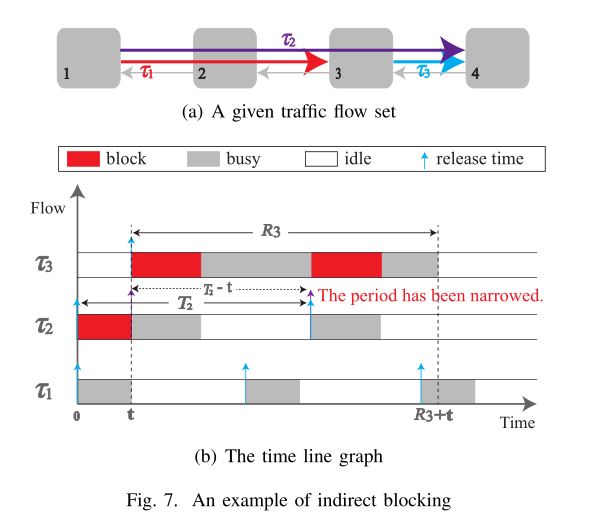
1.竖排插入两张图
 \begin{figure}[h]  //放在当前位置

 \centering

 \subfigure[A given traffic flow set]{

   \includegraphics[width=.2in]{image/7_IndirectBlocking.eps}}

 \centering

 \subfigure[The time line graph]{

   \includegraphics[width=.7in]{image/8_IndirectBlockingTimeGraph.eps}}

 \caption{An example of indirect blocking}

 \end{figure}
2.横排插入两张图
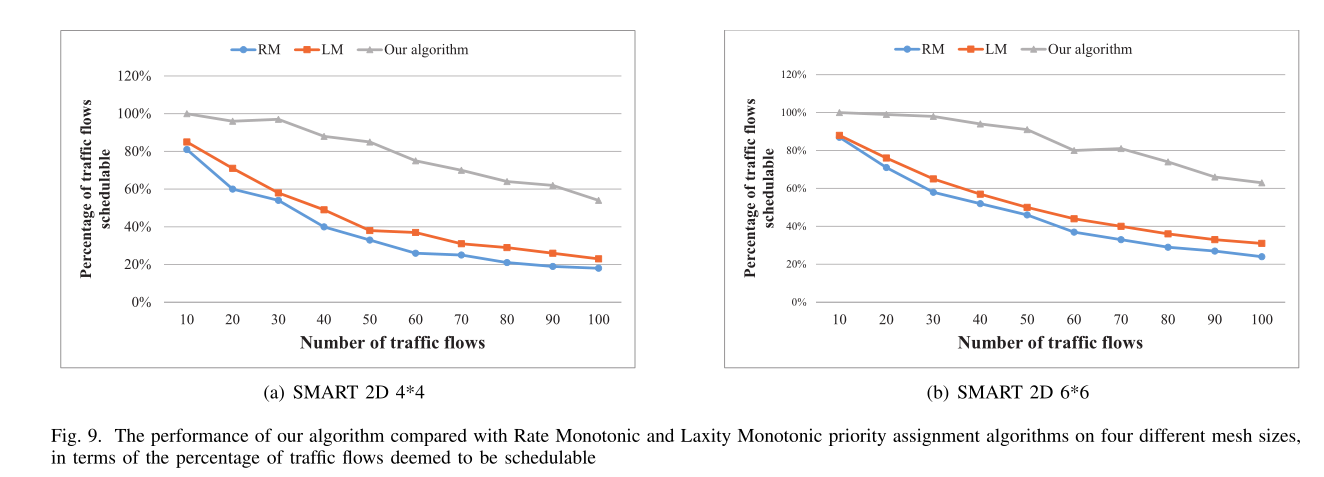
 1 \begin{figure*}[t]   //*表示可跨栏,如果不需要可去掉

 2 \centering

 3 \subfigure[SMART 2D 4*4]{

 4   \includegraphics[width=3.3in]{figure/figure3.eps}}

 5 \hfill

 6 \centering

 7 \subfigure[SMART 2D 6*6]{

 8   \includegraphics[width=3.3in]{figure/figure4.eps}}

 9 \caption{The performance of our algorithm compared with Rate Monotonic and Laxity Monotonic priority assignment algorithms on four different mesh sizes, in terms of the percentage of traffic flows deemed to be schedulable}

10 \end{figure*}
3.插入2*2图
 \begin{figure*}[t]

 \centering

 \subfigure[SMART 2D *]{

   \includegraphics[width=.3in]{figure/figure3.eps}}

 \hfill

 \centering

 \subfigure[SMART 2D *]{

   \includegraphics[width=.3in]{figure/figure4.eps}}

 \vfill

 \centering

 \subfigure[SMART 2D *]{

   \includegraphics[width=.3in]{figure/figure5.eps}}

 \hfill

 \centering

 \subfigure[SMART 2D *]{

   \includegraphics[width=.3in]{figure/figure6.eps}}

 \caption{The performance of our algorithm compared with Rate Monotonic and Laxity Monotonic priority assignment algorithms on four different mesh sizes, in terms of the percentage of traffic flows deemed to be schedulable}

 \end{figure*}

Latex插图操作的更多相关文章
- matlab作图 latex插图
推荐用saveas eps,再用eps2pdf转成pdf.这样可以之间pdflatex编译. if result.savepic saveas(gcf,[ pwd '/picture/right_' ...
- Latex技巧:LaTex插图命令includegraphics参数详解
Latex插图的命令是\includegraphics[选项]{文件} 这里的选项在表 7.1, 7.2, 7.3 中列出. 因为 \includegraphics 不会结束 当前段落,所以它能够在文 ...
- LaTeX技巧012:LaTeX 插图加载宏包
LaTeX 插图加载宏包.支持 LaTeX - DVIPDFMx; pdfLaTeX; XeLaTeX 三种编译方式,支持 eps/pdf/jpg/png 等图片格式. % Put this snip ...
- latex插图续
LaTeX中一般只直接支持插入eps(Encapsulated PostScript)格式的图形文件, 因此在图片插入latex文档之前应先设法得到图片的eps格式的文件. UNIX下的各种应用软件 ...
- [LaTex]插图
1.不错的Latex参考网站 http://www.ctex.org/documents/latex/graphics/node120.html http://www.ctex.org/documen ...
- latex 插图排版
LaTeX的图片插入及排版 LaTeX中一般只直接支持插入eps(Encapsulated PostScript)格式的图形文件, 因此在图片插入latex文档之前应先设法得到图片的eps格式的文 ...
- Latex:入门教程
http://blog.csdn.net/pipisorry/article/details/54571521 总的来说,LaTex是一套排版系统,与word那种所见即所得对排版方式不太,用LaTex ...
- Latex 学习之旅
学习资料 A simple guide to LaTeX - Step by Step LaTeX WikiBook LaTeX 科技排版 TeXdoc Online (TeX and LaTeX d ...
- LaTeX 图片色偏解决方法
本系列文章由 @YhL_Leo 出品,转载请注明出处. 文章链接: http://blog.csdn.net/yhl_leo/article/details/50327113 在LaTeX的编辑模式中 ...
随机推荐
- [剑指Offer]12-矩阵中的路径(回溯)
题目链接 https://www.nowcoder.com/practice/c61c6999eecb4b8f88a98f66b273a3cc?tpId=13&tqId=11218&t ...
- 创建文件指针数组c++
#include<fstream>using namespace std; void main(){ for (int i=0; i<=1; i++) { char szName[1 ...
- ubuntu下安装mysql及常用操作
1.可通过ps -ef | grep mysql命令查看系统中是否有安装mysql 如果出现类似上述的页面,就证明是已经安装过了mysql,否则就是没有. 2.安装mysql 很简单,只需要键入如下命 ...
- equals与“==”的区别
对于值类型,“==”比较的是不是同一数值,equals先比较是不是同一类型,在比较是不是同一数值: 对于引用类型,“==”和equals比较的都是是否引用了同一实例对象
- wget: command not found
支持yum yum -y install wget 不支持yum a.查看当前linux版本 cat /etc/issue && uname -a b.根据版本下载相应的rpm htt ...
- 1S - 平方和与立方和
给定一段连续的整数,求出他们中所有偶数的平方和以及所有奇数的立方和. Input 输入数据包含多组测试实例,每组测试实例包含一行,由两个整数m和n组成. Output 对于每组输入数据,输出一行,应 ...
- L1-027 出租(20)(STL-map代码)
L1-027 出租(20 分) 下面是新浪微博上曾经很火的一张图: 一时间网上一片求救声,急问这个怎么破.其实这段代码很简单,index数组就是arr数组的下标,index[0]=2 对应 arr[2 ...
- Maven 系列 一 :Maven 快速入门及简单使用
开发环境 MyEclipse 2014 JDK 1.8 Maven 3.2.1 1.什么是Maven? Maven是一个项目管理工具,主要用于项目构建,依赖管理,项目信息管理. 2.下载及安装 下载最 ...
- Spring ApplicationContext(五)invokeBeanFactoryPostProcessors
Spring ApplicationContext(六)BeanPostProcessor 产生回顾一下 ApplicationContext 初始化的几个步骤:第一步是刷新环境变量:第二步是刷新 b ...
- Spring 注解(一)Spring 注解编程模型
Spring 注解(一)Spring 注解编程模型 Spring 系列目录(https://www.cnblogs.com/binarylei/p/10198698.html) Spring 注解系列 ...