
{Notes}{Latex}{multirow}
这个文章写的真的太牛比了!
============================================================
在latex文件最前面用这个包\usepackage{multirow}
multirow 宏包提供了 \multirow 命令可以在表格中排版横跨两行以上的文本。命令的格式如下:
\multirow{nrows}[bigstructs]{width}[fixup]{text}
nrows 设定所占用的行数。
bigstructs 此为可选项,主要是在你使用了 bigstruct 宏包时使用。
width 设定该栏文本的宽度。如果想让 LaTeX 自行决定文本的宽度,则用 * 即可。
fixup 此为可选项,主要用来调整文本的垂直位置。
text 所要排版的文本。可用 \\ 来强迫换行。
更多介绍与实例:http://www.ctex.org/documents/packages/table/multirow.htm
补充例子1: http://blog.sina.com.cn/s/blog_5e16f1770100u40t.html
\renewcommand{\multirowsetup}{\centering}
\begin{tabular}{|l|l|l|l|}
\hline
\multirow{4}{2cm}{This is a demo table}
& C2a &
\multirow{4}{2cm}{This is another one} & C4a\\
& C2b & & C4b\\
& C2c & & C4c\\
& C2d & & C4d\\
\hline
\end{tabular}

补充例子2:http://jhengjyun.blogspot.fr/2011/01/latexmulticolumnmultirow.html
通常畫表格需要使用到\multicolumn, \multirow, \hline, \cline四種指令
其中要使用\multirow,必須在前頭先行加入\usepackage{multirow}
直接看例子,Latex程式碼 =>
 de style=""  >\begin{tabular}{|c|c|c|c|c|}
 \hline
 \multirow{2}{*}{Multi-Row}&
 \multicolumn{2}{c|}{Multi-Column}&
 \multicolumn{2}{c|}{\multirow{2}{*}{Multi-RowandCol}} \\
 \cline{2-3}
   & column-1& column-2& \multicolumn{2}{c|}{} \\
 \hline
 label-1& label-2& label-3& label-4& label-5 \\
 \hline
 \end{tabular}de>
 顯示結果 =>
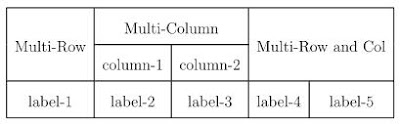
补充个例子3:http://blog.sina.com.cn/s/blog_5e16f1770100h6jl.html
使用宏包multirow,提供了如下命令:参看http://www.ctan.org/tex-archive/macros/latex/contrib/multirow/
效果图:


 演示代码:
 \documentclass{article}
 \usepackage{longtable}
 \usepackage{rotating}
 \usepackage{multirow}
 \begin{document}
 \begin{longtable}{| c | c | c | c
| c | c |}
\hline
& \multicolumn{5}{| c |}{ } \\
& \multicolumn{5}{| c |}{\textbf{\large Father's Occupation}} \\
& \multicolumn{5}{| c |}{ } \\
\hline
& & & & & \\
\multicolumn{1}{|c|}{\textbf{}}
& \multicolumn{1}{|c|}{\textbf{}}
& \multicolumn{1}{c|}{\textbf{Group A}}
& \multicolumn{1}{c|}{\textbf{Group B}}
& \multicolumn{1}{c|}{\textbf{Group C}}
& \multicolumn{1}{c|}{\textbf{Group D}} \\
& & & & & \\
\cline{2-6}
& & & & & \\
\multirow{5}{*}{\begin{sideways}{\textbf{\large Mother's Occupation}}\end{sideways}}
& \textbf{Group A} & $8$ & $3$ & $4$ & $1$ \\
& & & & & \\
\cline{2-6}
& & & & & \\
& \textbf{Group B} & $3$ & $3$ & $0$ & $1$ \\
& & & & & \\
\cline{2-6}
& & & & & \\
& \textbf{Group C} & $0$ & $0$ & $1$ & $0$ \\
& & & & & \\
\cline{2-6}
& & & & & \\
& \textbf{Group D} & $2$ & $0$ & $0$ & $1$ \\
& & & & & \\
\hline
& & & & & \\
& \textbf{Total:} & \textbf{26} & \textbf{10} & \textbf{10} & \textbf{4} \\
& & & & & \\
\hline
\end{longtable}
\end{document}
{Notes}{Latex}{multirow}的更多相关文章
- {Notes}{LaTeX}{enumerate}
\usepackage{enumerate} \begin{enumerate}{(1)} \setcounter{enumi}{2} % begin with 2 \item first \item ...
- CASthesis 模板编译的问题
使用CASthesis模板(https://github.com/xiaoyao9933/UCASthesis,介绍里说这个版本是在ThuThesis的基础上修改的),自带的说明如下. 使用须知 == ...
- [旧版] CASthesis 模板编译的问题
写在前面的话:国科大最新版的模板在这里(https://github.com/mohuangrui/ucasthesis),利用它来写博后出站报告的相关介绍在这里: 本篇博文是针对另一个模板进行介绍的 ...
- Pandas高级教程之:自定义选项
目录 简介 常用选项 get/set 选项 经常使用的选项 最大展示行数 超出数据展示 最大列的宽度 显示精度 零转换的门槛 列头的对齐方向 简介 pandas有一个option系统可以控制panda ...
- LaTex 制作表格 合并行\multirow 合并列\multicolumn
在latex文件最前面用这个包\usepackage{multirow} multirow 宏包提供了 \multirow 命令可以在表格中排版横跨两行以上的文本.命令的格式如下: \multirow ...
- Latex Notes
latex Table of Contents 1. Presentation/Slides with Beamer 2. Drawing in LaTex With TikZ 3. Tracked ...
- Latex 的Table使用multirow and multicolumn
Here are some tips: Use a \multicolumn{1}{|l}{} & \multicolumn{2}{l|}{...} construct; Add anothe ...
- Note | LaTeX
目录 一.TeX家族 1. TeX - LaTeX 2. pdfTeX - pdfLaTeX 3. XeTeX - XeLaTeX 4. CTeX - MiKTeX - TeX Live 二.入门 1 ...
- TeXstudio 编写Latex论文的若干问题
TeXstudio 编写Latex论文的若干问题解决方案总结 问题1: 如何安装TeXstudio 以及 Texstudio当中的中文字体使用问题. 一.如何安装TeXstudio 很 ...
随机推荐
- SQL Server配置管理器”远程过程调用失败“
在设置服务器远程连接的时候,打开SQL server配置管理器时,SQL server服务右侧显示“远程调用失败”. 解决方法: 在控制面板中找到 Microsoft SQL Server 2016 ...
- VC中release和debug版本的区别
DEBUG版本 包含调试信息,编译器生成的代码方便调试 RELEASE版本 算是发布版本,RELEASE下不能调试,生成的文件更小,编译器生成的程序速度更快但是Debug下生成的exe文件在单独运行时 ...
- C++双向循环链表实现
双向循环链表C++实现 1.单链表: 结构图: 2.双向链表: 3.双向循环链表: 对于本程序中,则是给定一个_head 头结点,而不是指针,因为这样更加方便避免一些空判断问题 /* 版权信息:狼 ...
- IOS-如何锁定Xcode的API头文件
如何锁定Xcode的API头文件1, 打开终端2, 前往Xcode.app, 命令: cd /Applications/Xcode.app3, 把头文件修改为只读, 命令: sudo chown -h ...
- tkinter模块常用参数
tkinter模块常用参数 1.使用tkinter.Tk() 生成主窗口(root=tkinter.Tk()):root.title('标题名') 修改框体的名字,也可在创建时使用class ...
- 【lightoj-1024】Eid (高精度)
[题意] 给定n个数,求这n个数的最小公倍数. [题解] 最小公倍数当然不能按常规方法来求,因为最大的数将近是10000^1000级别的.然鹅最小公倍数怎么搞呢? 这里发现了一个规律: 4 5 6 3 ...
- hdu 6092 Rikka with Subset(逆向01背包+思维)
Rikka with Subset Time Limit: 2000/1000 MS (Java/Others) Memory Limit: 65536/65536 K (Java/Others ...
- sql中exists,Intersect ,union 与union All的用法
熟练使用SQL Server中的各种用法会给查询带来很多方便.今天就介绍一下EXCEPT和INTERSECT.注意此语法仅在SQL Server 2005及以上版本支持. EXCEPT是指在第一个集合 ...
- 前端url传递编码问题
JAVASCRIPT中URL 传递参数(特殊字符)解决方法及转码解码的介绍 有些符号在URL中是不能直接传递的,如果要在URL中传递这些特殊符号,那么就要使用他们的编码了.下表中列出了一些URL特殊符 ...
- 【HTML5】使用 JavaScript 来获取电池状态(Battery Status API)
HTML5 规范已经越来越成熟,可以让你访问更多来自设备的信息,其中包括最近提交的 "Battery Status API".如其名称所示,该 API 允许你通过 JavaScri ...