
mac os版本Intellij IDEA 搭建spring mvc的maven工程(新手教学)
由于近期换了新公司,又换mac pro作为新电脑,打算把用了很多年的eclipse换成IDEA(IDEA比eclipse的好处我就不多说了),由于mac os和IDEA刚开始用不久,所以专门用一篇博客记录下用IDEA搭建springMVC的maven工程。
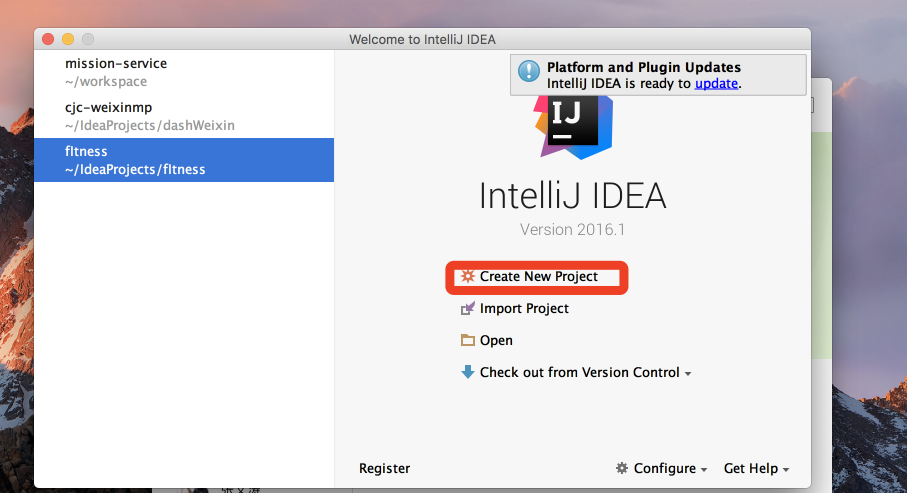
一、打开IDEA--->Create New Project
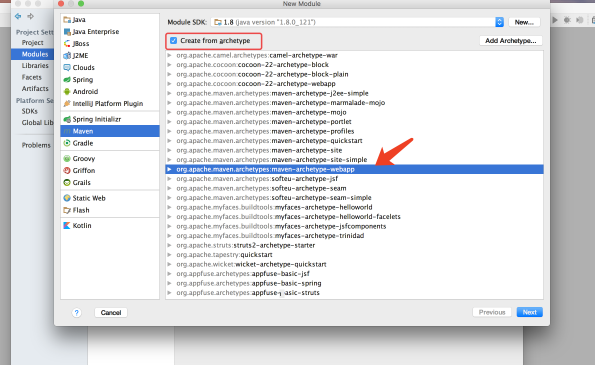
二、选择MAVEN---->勾选 Create from archeType-------->选中maven-archeType-webapp--->next
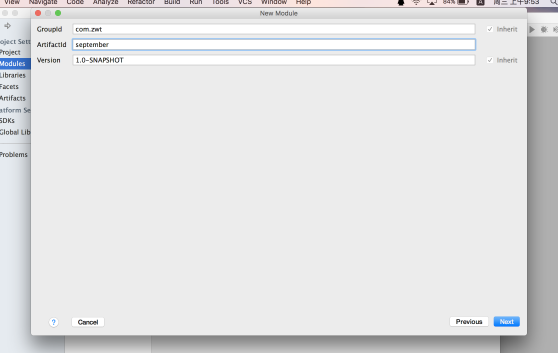
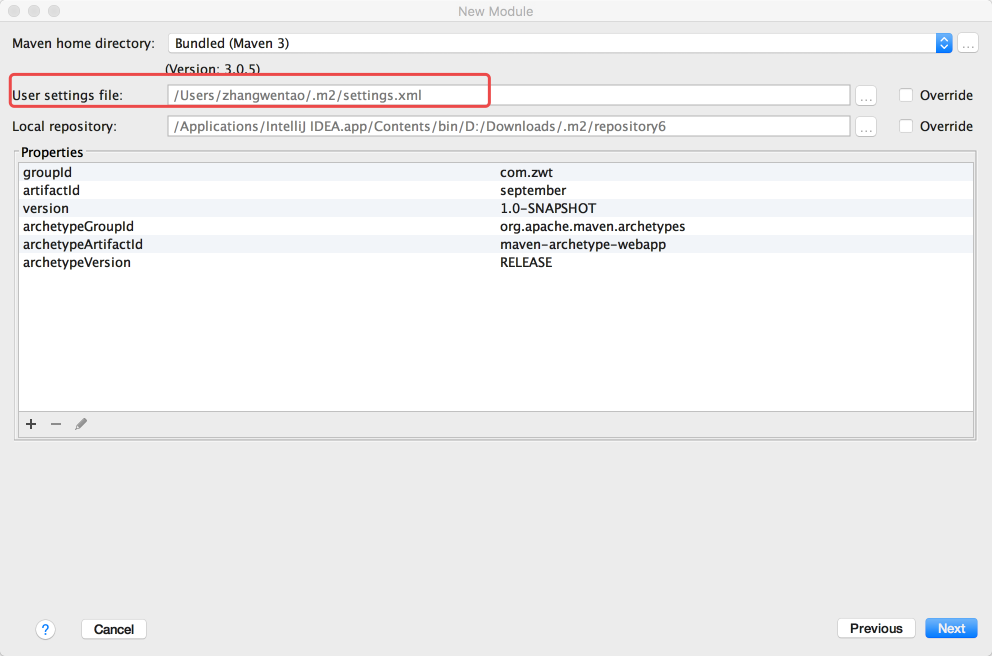
三、填写groupId和artifactId(用过maven的都懂的)--->next------>设置maven的配置文件(如有自己的mave的setting.xml文件的需要修改,我们第一次就用默认的)----》next
四、修改工程的结构,现在我们的工程的src下是没有java目录的,需要我们自己添加进去
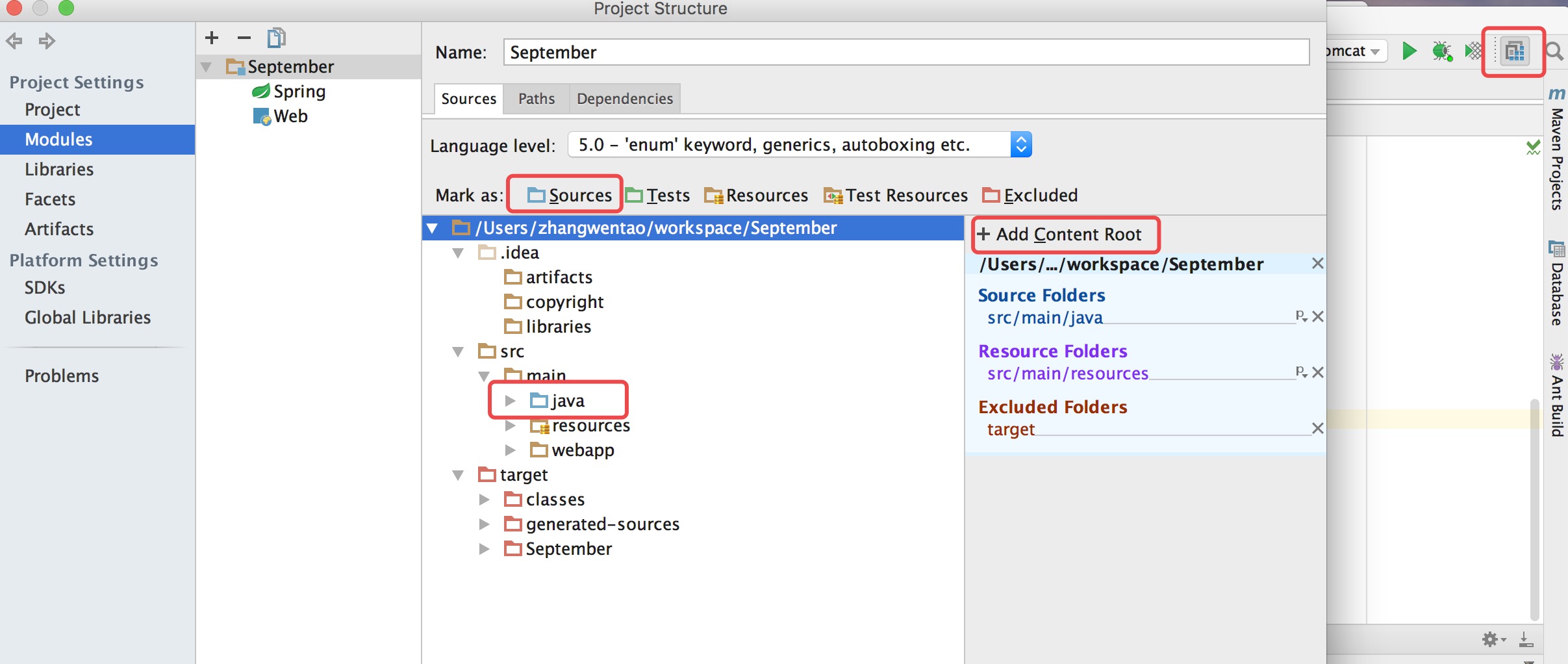
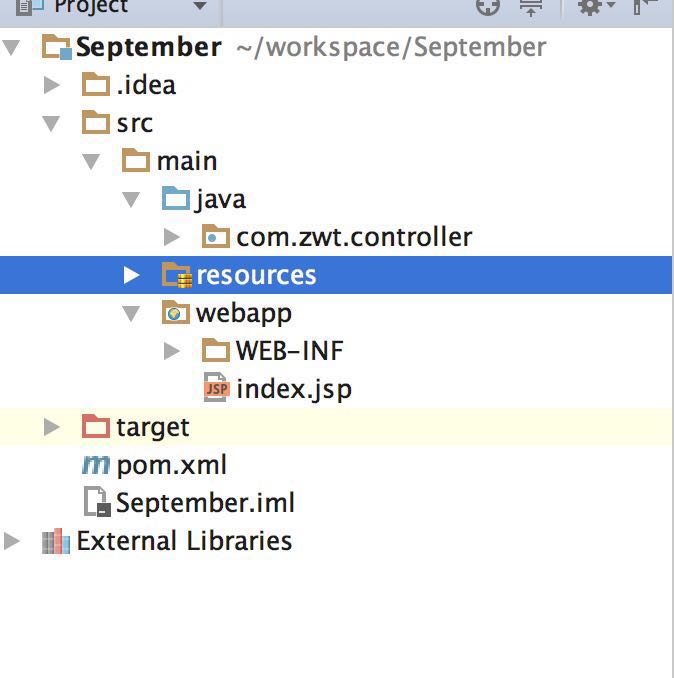
五、以上四步完成后就基本搭建完成了简单的maven工程,下面我们需要添加spring mvc功能,在pom.xml添加spring mvc的依赖包
<!--j2ee相关包 servlet、jsp、jstl-->

    <dependency>

      <groupId>javax.servlet</groupId>

      <artifactId>javax.servlet-api</artifactId>

      <version>3.1.0</version>

    </dependency>

    <dependency>

      <groupId>javax.servlet.jsp</groupId>

      <artifactId>jsp-api</artifactId>

      <version>2.2</version>

    </dependency>

    <dependency>

      <groupId>javax.servlet</groupId>

      <artifactId>jstl</artifactId>

      <version>1.2</version>

    </dependency>

<!--spring相关包-->

    <dependency>

      <groupId>org.springframework</groupId>

      <artifactId>spring-web</artifactId>

      <version>4.3.1.RELEASE</version>

    </dependency>

    <dependency>

      <groupId>org.springframework</groupId>

      <artifactId>spring-webmvc</artifactId>

      <version>4.3.1.RELEASE</version>

    </dependency>
六、在web.xml里面加入代码用于配置springmvc DispatcherServlet的路劲
<?xml version="1.0" encoding="UTF-8"?>

<web-app xmlns="http://java.sun.com/xml/ns/javaee"

         xmlns:xsi="http://www.w3.org/2001/XMLSchema-instance"

         xsi:schemaLocation="http://java.sun.com/xml/ns/javaee

          http://java.sun.com/xml/ns/javaee/web-app_3_0.xsd"

         version="3.0">

  <!--welcome pages-->

  <welcome-file-list>

    <welcome-file>index.jsp</welcome-file>

  </welcome-file-list>

  <!--配置springmvc DispatcherServlet-->

  <servlet>

    <servlet-name>springMVC</servlet-name>

    <servlet-class>org.springframework.web.servlet.DispatcherServlet</servlet-class>

    <init-param>

      <!--resources目录下需要新建一个spring文件夹-->

      <param-name>contextConfigLocation</param-name>

      <param-value>classpath:spring/spring-mvc.xml</param-value>

    </init-param>

    <load-on-startup>1</load-on-startup>

    <async-supported>true</async-supported>

  </servlet>

  <servlet-mapping>

    <servlet-name>springMVC</servlet-name>

    <url-pattern>/</url-pattern>

  </servlet-mapping>

</web-app>
七、在resources目录下新建一个spring-mvc.xml文件用于配置spring mvc
<?xml version="1.0" encoding="UTF-8"?>

<beans xmlns="http://www.springframework.org/schema/beans"

       xmlns:xsi="http://www.w3.org/2001/XMLSchema-instance"

       xmlns:context="http://www.springframework.org/schema/context"

       xmlns:mvc="http://www.springframework.org/schema/mvc"

       xsi:schemaLocation="http://www.springframework.org/schema/beans

                        http://www.springframework.org/schema/beans/spring-beans-3.2.xsd

                         http://www.springframework.org/schema/context

                        http://www.springframework.org/schema/context/spring-context-3.2.xsd

                        http://www.springframework.org/schema/mvc

                        http://www.springframework.org/schema/mvc/spring-mvc.xsd">

    <!--启用spring的一些annotation -->

    <context:annotation-config/>

    <!-- 自动扫描该包,使SpringMVC认为包下用了@controller注解的类是控制器 -->

    <context:component-scan base-package="com.zwt.*">

        <context:include-filter type="annotation" expression="org.springframework.stereotype.Controller"/>

    </context:component-scan>

    <!-- 配置注解驱动 可以将request参数与绑定到controller参数上 -->

    <mvc:annotation-driven/>

    <!-- 默认的视图解析器 在上边的解析错误时使用 (默认使用html)- -->

    <bean id="defaultViewResolver" class="org.springframework.web.servlet.view.InternalResourceViewResolver">

        <property name="viewClass" value="org.springframework.web.servlet.view.JstlView"/>

        <property name="prefix" value="/WEB-INF/views/"/><!--设置JSP文件的目录位置-->

        <property name="suffix" value=".jsp"/>

    </bean>

</beans>
八、第五-第七步,我们完成了springMvc的配置工具,下面我们开始一个简答的编码来测试springMvc,在WEB-INFO下新建一个views目录,新建一个简单的JSP页面,在com.zwt.controller目如下新建一个TestController.java
index.html
html>

<body>

<h2>Hello September!</h2>

</body>

</html>
TestController.java
package com.zwt.controller;

import org.springframework.stereotype.Controller;

import org.springframework.web.bind.annotation.RequestMapping;

/**

 * Created by zhangwentao on 2017/4/12.

 */

@Controller

public class TestController {

    @RequestMapping("/index")

    public String helloWord(){

        System.out.print("访问index后台。。。");

        return "index";

    }

}
九、我们现在完成了所有的编码工作,接下来我们需要配置Tomcat,用Tomcat来启动服务,看看我们的工程是否可以搭建正确
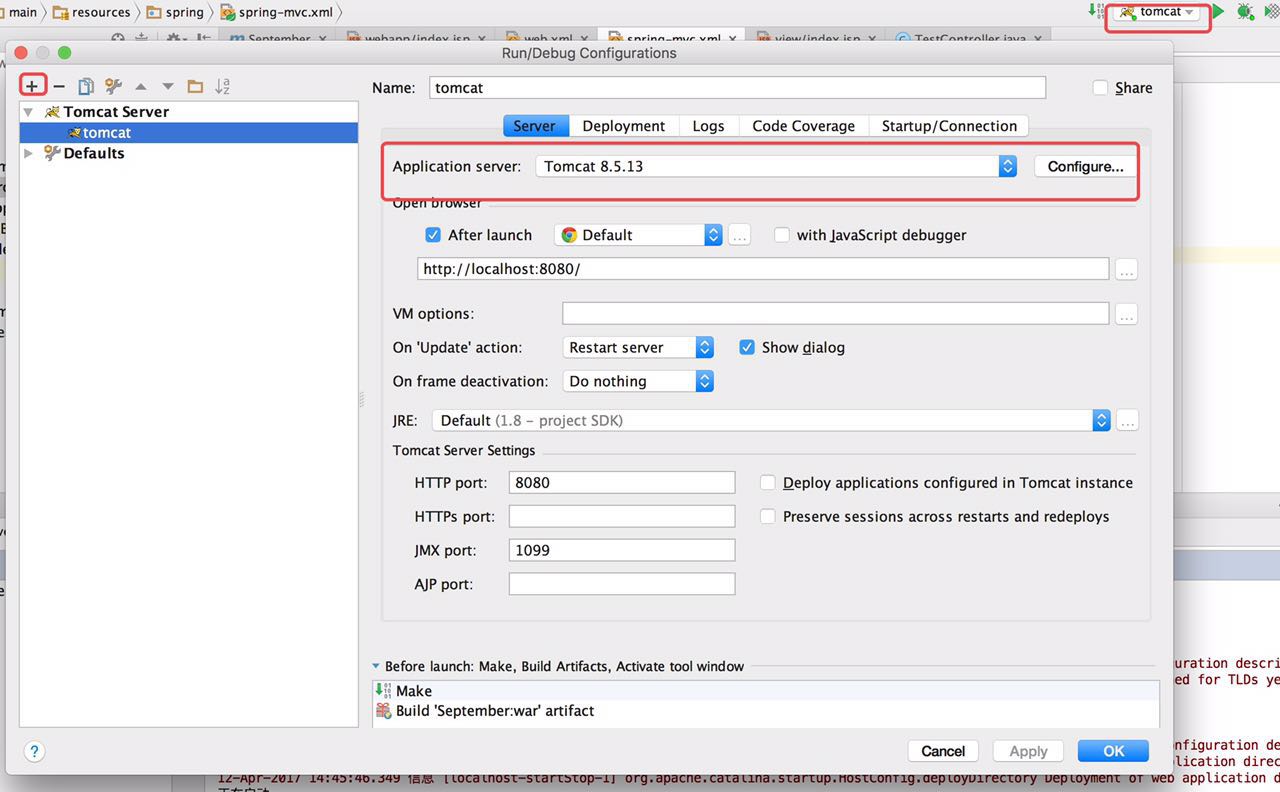
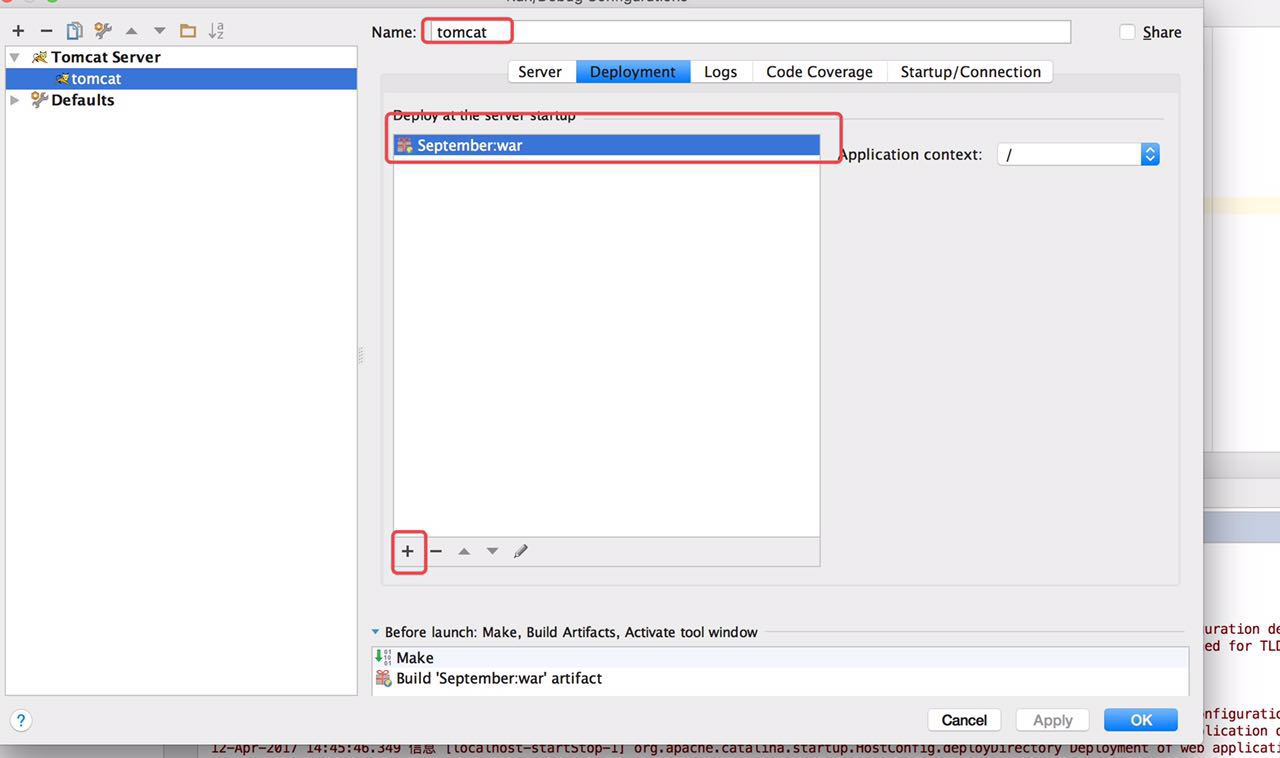
十、所以前置工作都已经完成,我们启动Tomcat,在浏览器输入http://localhost:8080/index 出现以下结果说明我们的springmvc项目搭建成功了

总结:这样只要10个步骤,我们就完成了在mac上用idea完成springmvc的搭建,有没有感觉比eclipse方便多了? 下一篇,我将介绍在此基础上集成mybatis和git使用。
mac os版本Intellij IDEA 搭建spring mvc的maven工程(新手教学)的更多相关文章
- MAC OS X El CAPITAN 搭建SPRING MVC (1)- 目录、包名、创建web.xml
一. 下载STS(Spring Tool Suite) 官方地址:http://spring.io/tools/sts 下载spring tool suite for mac 最新版本.这个IDE是很 ...
- 一、Spring MVC起步——IntelliJ IDEA 搭建Spring MVC环境(手把手搭建)
本机环境: JDK 1.7 IntelliJ IDEA 2017.2 1.新建项目 Create New Project 选择Spring MVC 填写项目名和项目存放位置 然后点击Fin ...
- IntelliJ idea创建Spring MVC的Maven项目
参考:http://my.oschina.net/gaussik/blog/385697?fromerr=Pie9IlFV 创建Maven Web项目 菜单File->New Project可进 ...
- 使用IntelliJ IDEA 搭建 spring mvc开发环境
填好GroupId.ArtifactId,一路Next创建工程,在main 目录创建 java文件夹并转换为Sources Root,创建好工程目录结构如下: 配置工程 配置 pom.xml,引入相关 ...
- 从零开始学 Java - 搭建 Spring MVC 框架
没有什么比一个时代的没落更令人伤感的了 整个社会和人都在追求创新.进步.成长,没有人愿意停步不前,一个个老事物慢慢从我们生活中消失掉真的令人那么伤感么?或者说被取代?我想有些是的,但有些东西其实并不是 ...
- Mac OS X下环境搭建 Sublime Text 2 环境变量配置 开发工具配置Golang (Go语言)
Golang (Go语言) Mac OS X下环境搭建 环境变量配置 开发工具配置 Sublime Text 2 一.安装Golang的SDK 在官网http://golang.org/ 直接下载安装 ...
- Spring Boot系列学习文章(一) -- Intellij IDEA 搭建Spring Boot项目
前言: 最近做的一个项目是用Spring Boot来做的,所以把工作中遇到的一些知识点.问题点整理一下,做成一系列学习文章,供后续学习Spring Boot的同仁们参考,我也是第一次接触Spring ...
- 零基础搭建 spring mvc 4 项目(本文基于 Servlet 3.0)
作者各必备工具的版本如下: Tomcat:apache-tomcat-7.0.63 (下载链接) Java EE - Eclipse:Luna Service Release 1 v4.4.1 (下载 ...
- Atitit mac os 版本 新特性 attilax大总结
Atitit mac os 版本 新特性 attilax大总结 1. Macos概述1 2. 早期2 2.1. Macintosh OS (系统 1.0) 1984年2 2.2. Mac OS 7. ...
随机推荐
- 【TopCoder10697】RabbitNumbering
[TopCoder10697]RabbitNumbering 题面 Vjudge 给定\(n\)个数,每个数的范围是\([1,ai]\),求所有数都不同的方案数. 题解 把这个直接当做一个套路来用 对 ...
- C内存对齐问题-bus error!总线错误!其实是 字符串字面量修改问题!
最近写个小程序,出现bus error! int main(void) { /** * char :1个字节 * char*(即指针变量): 4个字节(32位的寻址空间是2^32, 即32个bit,也 ...
- bzoj5055: 膜法师(BIT)
大水题WA了两发T T 记录一下a[i]的前缀和,a[i]*a[j]就是sigma(a[j]*sumi[j-1]) 记录一下a[i]*a[j]的前缀和,a[i]*a[j]*a[k]就是sigma(a[ ...
- Ciesz się Polską
SZKOpułPoi at BZOJPA at BZOJONTAK at BZOJ Chinese Solution of Poi
- c++常量详解
概念 常量是存放固定且不可变值的,一旦确定初始值则在程序其它地方不可改变, 所以const对象必须初始化.常量一般使用const关键字来修饰. const 对象可以大致分为三类: 1. const i ...
- 【题解】征途 SDOI 2016 BZOJ 4518
传送门:http://www.lydsy.com/JudgeOnline/problem.php?id=4518 首先推式子,我们用$x_i$表示第$i$段的路程,$sum$表示总路程,根据方差和平均 ...
- 多重检验_LSD方法不准确性
sklearn实战-乳腺癌细胞数据挖掘(博客主亲自录制视频教程) https://study.163.com/course/introduction.htm?courseId=1005269003&a ...
- 简单实现VUE的双向数据绑定
<!DOCTYPE html> <html> <head> <title>vue-双向数据绑定的简单实现</title> </head ...
- HTML+css零碎小知识
1.设置了float浮动的元素和绝对定位position:absolute的元素会脱离正常的文档流.但是设置absolute的元素不会占据空间,相当于隐形了. 2.相对定位position:rel ...
- JS-DOM-随时更新
DOM里有三种节点:元素节点.文本节点和属性节点 getElmentById(); //id选择器 在JS中用此方法来查找获取 建议大小写 以免不兼容 有时候查找不到 DOM操作必须等到HTML ...