
ansible modules开发(一)
一 模块说明
- 官方是否有提供的类似功能模块?
可从下面两个连接确定官方提供的模块,以免重复造轮子
官方已发布的模块 http://docs.ansible.com/ansible/modules.html
官方正在开发的模块 https://github.com/ansible/ansible/labels/module - 你需要开发一个action 插件么?
action插件是在ansible主机上运行,而不是在目标主机上运行的。对于类似file/copy/template功能的模块,在模块执行前需要在ansible主机上做一些操作的。
- 模块是传送到目标主机上运行的。

- 模块的返回值必须是json dumps的字符串。
1 模块执行的过程
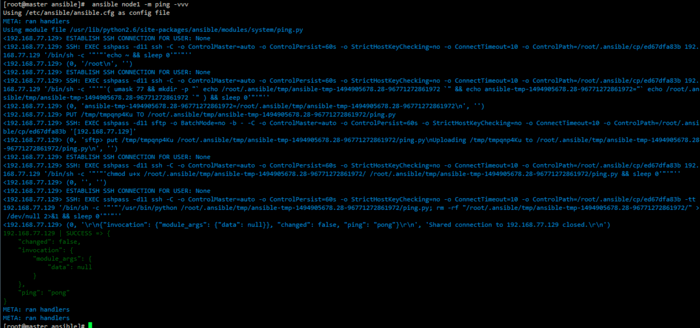
首先,将模块文件读入内存,然后添加传递给模块的参数,最后将模块中所需要的类添加到内存,由zipfile压缩后,再由base64进行编码,写入到模版文件内。

通过默认的连接方式,一般是ssh。ansible通过ssh连接到远程主机,创建临时目录,并关闭连接。然后将打开另外一个ssh连接,将模版文件以sftp方式传送到刚刚创建的临时目录中,写完后关闭连接。然后打开一个ssh连接将任务对象赋予可执行权限,执行成功后关闭连接。

最后,ansible将打开第三个连接来执行模块,并删除临时目录及其所有内容。模块的结果是从标准输出stdout中获取json格式的字符串。ansible将解析和处理此字符串。如果有任务是异步控制执行的,ansible将在模块完成之前关闭第三个连接,并且返回主机后,在规定的时间内检查任务状态,直到模块完成或规定的时间超时。
使用了管道连接后,与远程主机只有一个连接,命令通过数据流的方式发送执行。
配置方式
vim /etc/ansible/ansible.cfg

pipelining = True
执行过程
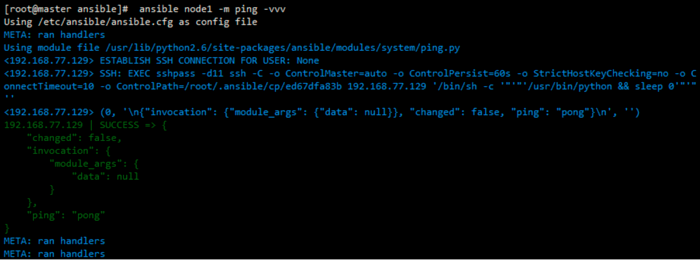
Ansible提供了许多模块实用程序,它们提供了在开发自己的模块时可以使用的辅助功能。 basic.py模块为程序提供访问Ansible库的主要入口点,所有Ansible模块必须至少从basic.py导入:
from ansible.module_utils.basic import *
其他模块工具
a10.py - Utilities used by the a10_server module to manage A10 Networks devices.

api.py - Adds shared support for generic API modules.

aos.py - Module support utilities for managing Apstra AOS Server.

asa.py - Module support utilities for managing Cisco ASA network devices.

azure_rm_common.py - Definitions and utilities for Microsoft Azure Resource Manager template deployments.

basic.py - General definitions and helper utilities for Ansible modules.

cloudstack.py - Utilities for CloudStack modules.

database.py - Miscellaneous helper functions for PostGRES and MySQL

docker_common.py - Definitions and helper utilities for modules working with Docker.

ec2.py - Definitions and utilities for modules working with Amazon EC2

eos.py - Helper functions for modules working with EOS networking devices.

f5.py - Helper functions for modules working with F5 networking devices.

facts.py - Helper functions for modules that return facts.

gce.py - Definitions and helper functions for modules that work with Google Compute Engine resources.

ios.py - Definitions and helper functions for modules that manage Cisco IOS networking devices

iosxr.py - Definitions and helper functions for modules that manage Cisco IOS-XR networking devices

ismount.py - Contains single helper function that fixes os.path.ismount

junos.py - Definitions and helper functions for modules that manage Junos networking devices

known_hosts.py - utilities for working with known_hosts file

mysql.py - Allows modules to connect to a MySQL instance

netapp.py - Functions and utilities for modules that work with the NetApp storage platforms.

netcfg.py - Configuration utility functions for use by networking modules

netcmd.py - Defines commands and comparison operators for use in networking modules

network.py - Functions for running commands on networking devices

nxos.py - Contains definitions and helper functions specific to Cisco NXOS networking devices

openstack.py - Utilities for modules that work with Openstack instances.

openswitch.py - Definitions and helper functions for modules that manage OpenSwitch devices

powershell.ps1 - Utilities for working with Microsoft Windows clients

pycompat24.py - Exception workaround for Python 2.4.

rax.py - Definitions and helper functions for modules that work with Rackspace resources.

redhat.py - Functions for modules that manage Red Hat Network registration and subscriptions

service.py - Contains utilities to enable modules to work with Linux services (placeholder, not in use).

shell.py - Functions to allow modules to create shells and work with shell commands

six/init.py - Bundled copy of the Six Python library to aid in writing code compatible with both Python 2 and Python 3.

splitter.py - String splitting and manipulation utilities for working with Jinja2 templates

urls.py - Utilities for working with http and https requests

vca.py - Contains utilities for modules that work with VMware vCloud Air

vmware.py - Contains utilities for modules that work with VMware vSphere VMs

vyos.py - Definitions and functions for working with VyOS networking
二 构建一个简单的模块
1 基本步骤
1) 创建目录
将这个模块放在library目录下,命名为remote_reach.py
可以使用 ANSIBLE_LIBRARY环境变量来指定模块的存放位置。也可以在playbook当前目录下创建library目录
2) 创建模块
#!/usr/bin/python env

# coding:utf-8

def can_reach(module,host):

    ping_path =  module.get_bin_path('ping', required=True)

    args = [ping_path, '-c 4',host]

    (rc,stdout,stderr) = module.run_command(args)

    return rc == 0

def main():

    module = AnsibleModule(

        argument_spec=dict(

            host = dict(required=True,type='str'),

        ),

        supports_check_mode=True,

    )

    if module.check_mode:

        module.exit_json(changed=False)

    host = module.params['host']

    if can_reach(module,host):

        module.exit_json(changed=True)

    else:

        msg = 'Could not reach %s' %(host)

        module.fail_json(msg=msg)

from ansible.module_utils.basic import *

if __name__ == '__main__':

    main()
3) 编写yaml文件使用模块
编写yaml文件使用这个模块
---

- name: test remote_copy module

  hosts: webserver01

  gather_facts: false

  tasks:

    - name: do a remote host

      remote_copy: host=172.20.1.100
4) 测试模块
可以使用test-module.py 进行模块测试
5) 执行这个yaml文件
ansible-playbook remote_copy.yml # 执行这个yaml
2 module提供facts数据
与作为模块退出的一部分返回的数据类似,模块也可以直接创建fact数据,通过名为ansible_facts键返回数据到主机。无需为任务register一个变量来获取数值。
remote_facts = {'rc_source': module.params['source'], 'rc_dest': module.params['dest'] }
module.exit_json(changed=True, ansible_facts=remote_facts)
在playbook中添加查看fact的任务
- name: show a fact

     debug: var=rc_dest
3 检查模式
模块可以选择支持检查模式http://docs.ansible.com/ansible/playbooks_checkmode.html。 如果用户在检查模式下运行可执行安全性,则模块应该尝试预测和报告是否发生更改,但实际上不会进行任何更改(不支持检查模式的模块也不会采取任何动作,但只是不会报告其可能的更改)。
对于您的模块支持检查模式,您必须在实例化AnsibleModule对象时传递supports_check_mode = True。 当启用检查模式时,AnsibleModule.check_mode属性将计算为True。 例如:
module = AnsibleModule( argument_spec = dict( source=dict(required=True, type='path'), dest=dict(required=True, type='path') ), supports_check_mode=True )

if not module.check_mode:

    shutil.copy(module.params['source'], module.params['dest'])
在进行检查模式的时候,不执行拷贝动作,看下列运行状态。
ansible-playbook remote_copy.yml -C
三 添加module文档说明
所有模块必须按以下顺序定义以下部分:
- ANSIBLE_METADATA
- DOCUMENTATION
- EXAMPLES
- RETURNS
- Python imports
1. 定义ANSIBLE_METADATA,该变量描述有关其他工具使用的模块的信息
ANSIBLE_METADATA = {'metadata_version': '1.0',

                    'status': ['preview'],

                    'supported_by': 'community'}
2. 定义DOCUMENTATION,该变量描述模块的描述信息,参数,作者和许可信息。
DOCUMENTATION = '''

---

module: remote_copy

version_added: "2.3"

short_description: Copy a file on the remote host

description:

    - The remote_copy module copies a file on the remote host from a given source to a provided destination.

options:

    source:

        description:

          - Path to a file on the source file on the remote host

        required: true

     dest:

        description:

          - Path to the destination on the remote host for the copy

        required: true

author:

        - "Lework" '''
3. 定义EXAMPLES,该变量用来描述模块的一个或多个示例使用
EXAMPLES = '''

# Example from Ansible Playbooks

- name: backup a config file

    remote_copy:
    source: /etc/herp/derp.conf
    dest: /root/herp-derp.conf.bak '''
4. 定义RETURN,该变量用来描述模块的返回数据信息
添加参数source和dest返回信息
module.exit_json(changed=True, source=module.params['source'], dest=module.params['dest'])
定义RETURN
RETURN = ''' source: description: source file used for the copy returned: success type: string sample: "/path/to/file.name" dest: description: destination of the copy returned: success type: string sample: "/path/to/destination.file" gid: description: group id of the file, after execution returned: success type: int sample: 100 group: description: group of the file, after execution returned: success type: string sample: "httpd" owner: description: owner of the file, after execution returned: success type: string sample: "httpd" uid: description: owner id of the file, after execution returned: success type: int sample: 100 mode: description: permissions of the target, after execution returned: success type: string sample: "0644" size: description: size of the target, after execution returned: success type: int sample: 1220 state: description: state of the target, after execution returned: success type: string sample: "file" '''
字符串的格式为yaml格式。
可以通过ansible-doc 来查看这些信息
ansible-doc -M library remote_copy
用于格式化字符串的一些选项,用于DOCUMENTATION
|函数| 描述 |例子|

|:---|:---|

|U() |格式化url |Required if I(state=present)|

|I() |格式化选项名称 |Mutually exclusive with I(project_src) and I(files)|

|M() |格式化模块名称 |See also M(win_copy) or M(win_template).|

|C() |格式化文件和选项值 |Or if not set the environment variable C(ACME_PASSWORD) will be used.|
Documentation 加载外部的文档
某些类别的模块有共同的文档信息,就可以使用docs_fragments共享出来。
所有的docs_fragments都可以在lib/ansible/utils/module_docs_fragments/ 目录下找到
在Documentation 字符串中添加下列字段,就可以添加外部的文档信息
extends_documentation_fragment:

  - files

   - validate
ansible modules开发(一)的更多相关文章
- ansible modules开发(二)
四 使用其他语言发开module cd /etc/ansible cat library/touch.sh #!/bin/sh args_file=$1 [ ! -f "$args_file ...
- 074——VUE中vuex之模块化modules开发实例
<!DOCTYPE html> <html lang="en"> <head> <meta charset="UTF-8&quo ...
- [系统开发] 基于Ansible的产品上线系统
前言: 应部门急需,开发了一套基于Ansible Playbook的产品上线系统.由于时间很紧,UI直接套用了之前开发的一套perl cgi模板,后续计划用 django 重新编写. 个人感觉该系统的 ...
- 如何在Mac系统里面更新 Ansible 的 Extra Modules
最近遇到一个问题 seport is not a legal parameter in an Ansible task or handler 原因是我本地 Ansible 的 Extra Module ...
- Ansible playbook API 开发 调用测试
Ansible是Agentless的轻量级批量配置管理工具,由于出现的比较晚(13年)基于Ansible进行开发的相关文档较少,因此,这里通过一些小的实验,结合现有资料以及源码,探索一下Ansible ...
- Ansible 开发调试 之【模块调试】
本地调试 需要安装jinja2 库 yum -y install python-jinja2 使用官方提供的测试脚本调试 git clone git://github.com/ansible/ansi ...
- windows下使用pycharm开发基于ansible api的python程序
Window下python安装ansible,基于ansible api开发python程序 在windows下使用pycharm开发基于ansible api的python程序时,发现ansible ...
- Ansible@一个有效的配置管理工具--Ansible configure management--翻译(十)
未经书面许可,.请勿转载 Custom Modules Until now we have been working solely with the tools provided to us by A ...
- ansible服务部署与使用
第1章 ssh+key实现基于密钥连接(ansible使用前提) 说明: ansible其功能实现基于SSH远程连接服务 使用ansible需要首先实现ssh密钥连接 1.1 部署ssh ...
随机推荐
- 下拉刷新&上拉加载
效果演示 核心codehtml <ion-view view-title="学生list"> <ion-content > <ion-refreshe ...
- Python面试题之Python迭代器
要理解迭代器,首先要从字面意思来说. 迭代 重复 下一次重复基于上一次的结果 软件开发就是典型的迭代更新. 讲迭代,我们就先来模拟一下迭代: 现在让我们使用while循环来遍历出一个列表list1 = ...
- windows忘记密码
方法一 在开机时,按下F8进入”带命令提示符的安全”模式 输入”NET USER+用户名+123456/ADD”可把某用户的密码强行设置为”123456″ 方法二 如用户忘记登入密码可按下列方法解决 ...
- 聊一聊HTML <!--…-->标签
定义 注释标签用于在html源代码中插入注释.注释不会在浏览器上显示. 用法 根据定义的基本用法,代码如下 <!-- 这是一段注释,我不会显示在页面上 --> 浏览器的支持情况 所有浏览器 ...
- Response attachment filename 中文乱码
Response.setHeader("Content-Disposition", "attachment; filename=" + fileName+&qu ...
- bat(续五)-获取批处理文件所在路径
获取批处理文件所在路径 在开发时,经常需要使用批处理运行一些程序,java程序 犹其是这样,往往需要运行时根路径.Hardcode一个路径总是令自己觉得不自在,例如一个java程序从一台 ...
- MongoDB 副本集和C#交互,简单测试
MongoDB 副本集和C#交互,简单测试 primary节点宕机: 模拟primary节点宕机的情况,这时查看监控: 可以看到37018已经成了primary节点.主界面宕机导致了整个集群发生一次e ...
- ASP.NET.Identity 加密算法
public static string HashPassword(string password) { if (password == null) { throw new ArgumentNullE ...
- Hue的安装与部署
Hue的安装与部署 hadoop hue Hue 简介 Hue是一个开源的Apache Hadoop UI系统,最早是由Cloudera Desktop演化而来,由Cloudera贡献给开源社区,它是 ...
- 使用httpclient提交表单数据加号(+)会被自动替换成空格的坑
坑的场景: 今天使用httpclient-4.5.3版本,发送如下报文: { "idNo": "7+6+0+2ce722a546b39463bd62817fe57f8&q ...