
CentOS 7.2安装zabbix 3.0 LTS
1、zabbix简介
更多详细信息请访问zabbix官网:https://www.zabbix.com/
2、zabbix版本选择
企业使用建议选择zabbix的LTS版本(Long Time Support),尝鲜的可以选择官方的最新版本。
3、zabbix安装
本篇随笔基于CentOS 7.2编写。适用于CentOS 7所有版本及RedHat系列。
[root@zabbix-server ~]# rpm -ivh http://repo.zabbix.com/zabbix/3.2/rhel/7/x86_64/zabbix-release-3.2-1.el7.noarch.rpm

Retrieving http://repo.zabbix.com/zabbix/3.2/rhel/7/x86_64/zabbix-release-3.2-1.el7.noarch.rpm

warning: /var/tmp/rpm-tmp.PutPhp: Header V4 RSA/SHA512 Signature, key ID a14fe591: NOKEY

Preparing...                          ################################# [100%]

Updating / installing...

   1:zabbix-release-3.2-1.el7         ################################# [100%]

[root@zabbix-server ~]#
查看都安装了什么
[root@zabbix-server ~]# rpm -ql zabbix-release

/etc/pki/rpm-gpg/RPM-GPG-KEY-ZABBIX

/etc/yum.repos.d/zabbix.repo

/usr/share/doc/zabbix-release-3.0

/usr/share/doc/zabbix-release-3.0/GPL

[root@zabbix-server ~]#
安装zabbix及其他必须的软件
[root@zabbix-server ~]# yum install -y zabbix-server-mysql zabbix-web-mysql
由于CentOS 7比较特殊,MySQL已经没了,只能安装mariadb:
[root@zabbix-server ~]# yum install -y mariadb-server
启动并设置开机自启动数据库
[root@zabbix-server bin]# systemctl enable mariadb.service

Created symlink from /etc/systemd/system/multi-user.target.wants/mariadb.service to /usr/lib/systemd/system/mariadb.service.

[root@zabbix-server bin]# systemctl start mariadb.service

[root@zabbix-server bin]#
初始化数据库
[root@zabbix-server ~]# find / -type f -name "mysql_secure_installation"

/usr/bin/mysql_secure_installation    #mariadb数据库自带的初始化脚本

[root@zabbix-server ~]#

[root@zabbix-server bin]# mysql_secure_installation

NOTE: RUNNING ALL PARTS OF THIS SCRIPT IS RECOMMENDED FOR ALL MariaDB

      SERVERS IN PRODUCTION USE!  PLEASE READ EACH STEP CAREFULLY!

In order to log into MariaDB to secure it, we'll need the current

password for the root user.  If you've just installed MariaDB, and

you haven't set the root password yet, the password will be blank,

so you should just press enter here.

Enter current password for root (enter for none):

OK, successfully used password, moving on...

Setting the root password ensures that nobody can log into the MariaDB

root user without the proper authorisation.

Set root password? [Y/n] y

New password:    #

Re-enter new password:    #

Password updated successfully!

Reloading privilege tables..

... Success!

By default, a MariaDB installation has an anonymous user, allowing anyone

to log into MariaDB without having to have a user account created for

them.  This is intended only for testing, and to make the installation

go a bit smoother.  You should remove them before moving into a

production environment.

Remove anonymous users? [Y/n] y

... Success!

Normally, root should only be allowed to connect from 'localhost'.  This

ensures that someone cannot guess at the root password from the network.

Disallow root login remotely? [Y/n] y

... Success!

By default, MariaDB comes with a database named 'test' that anyone can

access.  This is also intended only for testing, and should be removed

before moving into a production environment.

Remove test database and access to it? [Y/n] y

- Dropping test database...

... Success!

- Removing privileges on test database...

... Success!

Reloading the privilege tables will ensure that all changes made so far

will take effect immediately.

Reload privilege tables now? [Y/n] y

... Success!

Cleaning up...

All done!  If you've completed all of the above steps, your MariaDB

installation should now be secure.

Thanks for using MariaDB!

[root@zabbix-server bin]#
创建zabbix数据库
[root@zabbix-server ~]# mysql -uroot -p

Enter password:

Welcome to the MariaDB monitor.  Commands end with ; or \g.

Your MariaDB connection id is 10

Server version: 5.5.52-MariaDB MariaDB Server

Copyright (c) 2000, 2016, Oracle, MariaDB Corporation Ab and others.

Type 'help;' or '\h' for help. Type '\c' to clear the current input statement.

MariaDB [(none)]> create database zabbix character set utf8 collate utf8_bin;

Query OK, 1 row affected (0.01 sec)

MariaDB [(none)]> grant all privileges on zabbix.* to zabbix@localhost identified by '';

Query OK, 0 rows affected (0.00 sec)

MariaDB [(none)]> \q

Bye

[root@zabbix-server ~]#
导入zabbix库的数据
[root@zabbix-server ~]# ll /usr/share/doc/zabbix-server-mysql-3.2.7/create.sql.gz

-rw-r--r-- 1 root root 1161488 Jul 19 00:09 /usr/share/doc/zabbix-server-mysql-3.2.7/create.sql.gz

[root@zabbix-server ~]# zcat /usr/share/doc/zabbix-server-mysql-3.2.7/create.sql.gz|mysql -uzabbix -p zabbix

Enter password:

[root@zabbix-server ~]# mysql -uzabbix -p123456 -e "use zabbix;show tables;"

+----------------------------+

| Tables_in_zabbix           |

+----------------------------+

| acknowledges               |

| actions                    |

| alerts                     |

| application_discovery      |

| application_prototype      |

| application_template       |

| applications               |

| auditlog                   |

| auditlog_details           |

| autoreg_host               |

| conditions                 |

| config                     |

| corr_condition             |

| corr_condition_group       |

| corr_condition_tag         |

| corr_condition_tagpair     |

| corr_condition_tagvalue    |

| corr_operation             |

| correlation                |

| dbversion                  |

| dchecks                    |

| dhosts                     |

| drules                     |

| dservices                  |

| escalations                |

| event_recovery             |

| event_tag                  |

| events                     |

| expressions                |

| functions                  |

| globalmacro                |

| globalvars                 |

| graph_discovery            |

| graph_theme                |

| graphs                     |

| graphs_items               |

| group_discovery            |

| group_prototype            |

| groups                     |

| history                    |

| history_log                |

| history_str                |

| history_text               |

| history_uint               |

| host_discovery             |

| host_inventory             |

| hostmacro                  |

| hosts                      |

| hosts_groups               |

| hosts_templates            |

| housekeeper                |

| httpstep                   |

| httpstepitem               |

| httptest                   |

| httptestitem               |

| icon_map                   |

| icon_mapping               |

| ids                        |

| images                     |

| interface                  |

| interface_discovery        |

| item_application_prototype |

| item_condition             |

| item_discovery             |

| items                      |

| items_applications         |

| maintenances               |

| maintenances_groups        |

| maintenances_hosts         |

| maintenances_windows       |

| mappings                   |

| media                      |

| media_type                 |

| opcommand                  |

| opcommand_grp              |

| opcommand_hst              |

| opconditions               |

| operations                 |

| opgroup                    |

| opinventory                |

| opmessage                  |

| opmessage_grp              |

| opmessage_usr              |

| optemplate                 |

| problem                    |

| problem_tag                |

| profiles                   |

| proxy_autoreg_host         |

| proxy_dhistory             |

| proxy_history              |

| regexps                    |

| rights                     |

| screen_user                |

| screen_usrgrp              |

| screens                    |

| screens_items              |

| scripts                    |

| service_alarms             |

| services                   |

| services_links             |

| services_times             |

| sessions                   |

| slides                     |

| slideshow_user             |

| slideshow_usrgrp           |

| slideshows                 |

| sysmap_element_url         |

| sysmap_url                 |

| sysmap_user                |

| sysmap_usrgrp              |

| sysmaps                    |

| sysmaps_elements           |

| sysmaps_link_triggers      |

| sysmaps_links              |

| task                       |

| task_close_problem         |

| timeperiods                |

| trends                     |

| trends_uint                |

| trigger_depends            |

| trigger_discovery          |

| trigger_tag                |

| triggers                   |

| users                      |

| users_groups               |

| usrgrp                     |

| valuemaps                  |

+----------------------------+

[root@zabbix-server ~]#
修改zabbix-server配置文件
[root@zabbix-server ~]# vim /etc/zabbix/zabbix_server.conf

# This is a configuration file for Zabbix server daemon

# To get more information about Zabbix, visit http://www.zabbix.com

############ GENERAL PARAMETERS #################

### Option: ListenPort

#       Listen port for trapper.

#

# Mandatory: no

# Range: 1024-32767

# Default:

# ListenPort=10051

### Option: SourceIP

#       Source IP address for outgoing connections.

#

# Mandatory: no

# Default:

# SourceIP=

### Option: LogType

#       Specifies where log messages are written to:

#               system  - syslog

#               file    - file specified with LogFile parameter

#               console - standard output

#

# Mandatory: no

# Default:

# LogType=file

### Option: LogFile

#       Log file name for LogType 'file' parameter.

#

# Mandatory: no

# Default:

# LogFile=

LogFile=/var/log/zabbix/zabbix_server.log

### Option: LogFileSize

#       Maximum size of log file in MB.

#       0 - disable automatic log rotation.

/DBHost

#       1 - critical information

#       2 - error information

#       3 - warnings

#       4 - for debugging (produces lots of information)

#       5 - extended debugging (produces even more information)

#

# Mandatory: no

# Range: 0-5

# Default:

# DebugLevel=3

### Option: PidFile

#       Name of PID file.

#

# Mandatory: no

# Default:

# PidFile=/tmp/zabbix_server.pid

PidFile=/var/run/zabbix/zabbix_server.pid

### Option: DBHost

#       Database host name.

#       If set to localhost, socket is used for MySQL.

#       If set to empty string, socket is used for PostgreSQL.

#

# Mandatory: no

# Default:

# DBHost=localhost

### Option: DBName

#       Database name.

#       For SQLite3 path to database file must be provided. DBUser and DBPassword are ignored.

#

# Mandatory: yes

# Default:

# DBName=

DBName=zabbix

### Option: DBSchema

#       Schema name. Used for IBM DB2 and PostgreSQL.

#

# Mandatory: no

# Default:

# DBSchema=

### Option: DBUser

#       Database user. Ignored for SQLite.

#

# Mandatory: no

# Default:

# DBUser=

DBUser=zabbix

### Option: DBPassword

#       Database password. Ignored for SQLite.

#       Comment this line if no password is used.

#

# Mandatory: no

# Default:

# DBPassword=

DBPassword=123456

### Option: DBSocket

#       Path to MySQL socket.

#

# Mandatory: no

# Default:

# DBSocket=/tmp/mysql.sock

### Option: DBPort

"/etc/zabbix/zabbix_server.conf" 642L, 14894C written

[root@zabbix-server ~]#
启动zabbix-server服务
[root@zabbix-server ~]# systemctl start zabbix-server

[root@zabbix-server ~]# systemctl enable zabbix-server

Created symlink from /etc/systemd/system/multi-user.target.wants/zabbix-server.service to /usr/lib/systemd/system/zabbix-server.service.

[root@zabbix-server ~]#
设置正确的时区
[root@zabbix-server conf.d]# vim /etc/httpd/conf.d/zabbix.conf

#

# Zabbix monitoring system php web frontend

#

Alias /zabbix /usr/share/zabbix

<Directory "/usr/share/zabbix">

    Options FollowSymLinks

    AllowOverride None

    Require all granted

    <IfModule mod_php5.c>

        php_value max_execution_time 300

        php_value memory_limit 128M

        php_value post_max_size 16M

        php_value upload_max_filesize 2M

        php_value max_input_time 300

        php_value always_populate_raw_post_data -1

        php_value date.timezone Asia/Shanghai

    </IfModule>

</Directory>

<Directory "/usr/share/zabbix/conf">

    Require all denied

</Directory>

<Directory "/usr/share/zabbix/app">

    Require all denied

</Directory>

<Directory "/usr/share/zabbix/include">

    Require all denied

</Directory>

<Directory "/usr/share/zabbix/local">

    Require all denied

</Directory>

~

~

~

~

~

"zabbix.conf" 37L, 831C written

[root@zabbix-server conf.d]#
启动httpd
[root@zabbix-server conf.d]# systemctl start httpd

[root@zabbix-server conf.d]# systemctl enable httpd

Created symlink from /etc/systemd/system/multi-user.target.wants/httpd.service to /usr/lib/systemd/system/httpd.service.

[root@zabbix-server conf.d]#
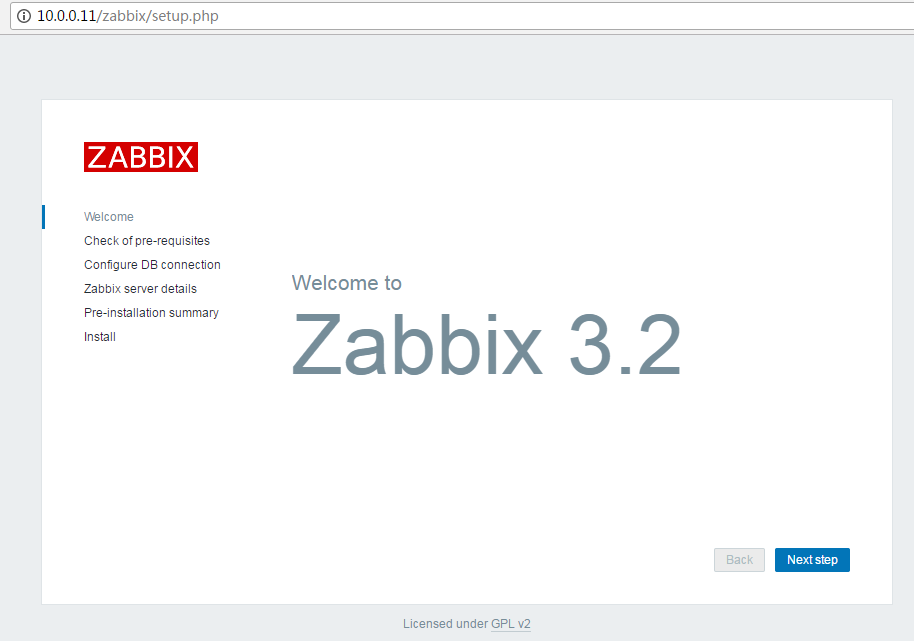
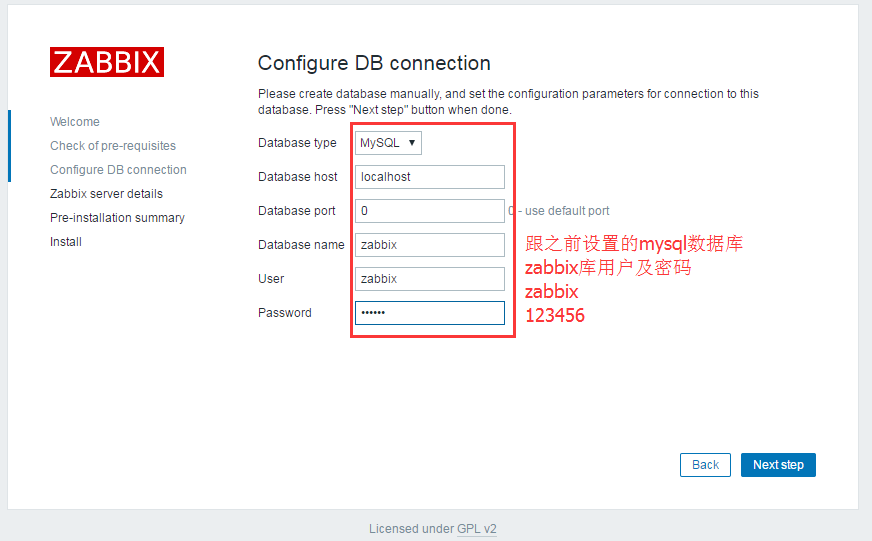
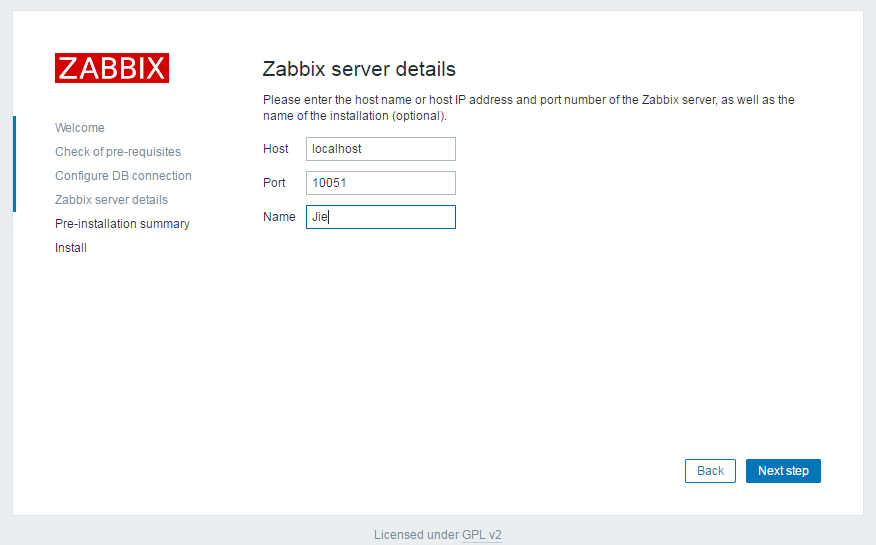
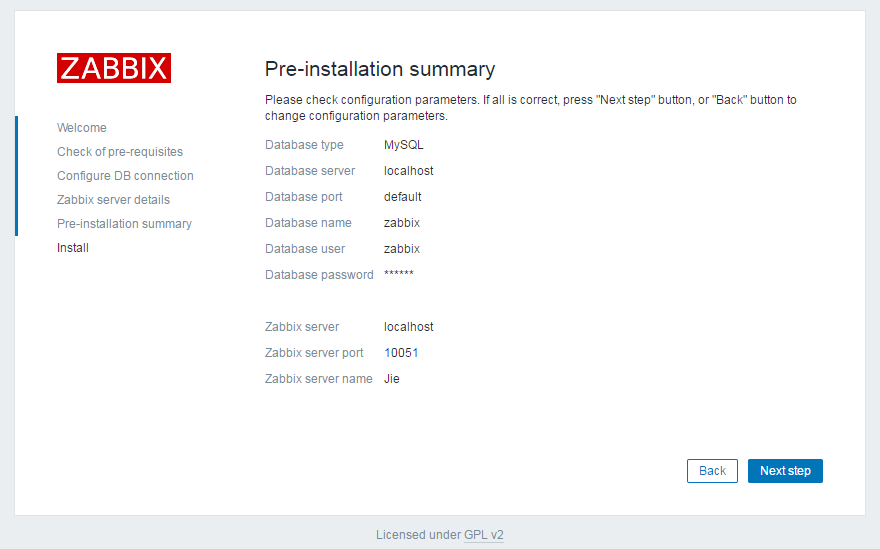
浏览器访问:http://10.0.0.11/zabbix

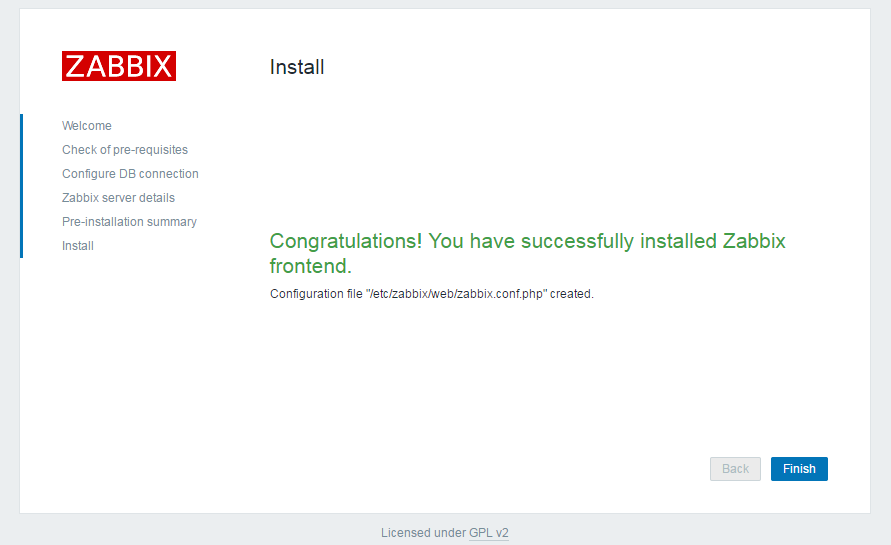
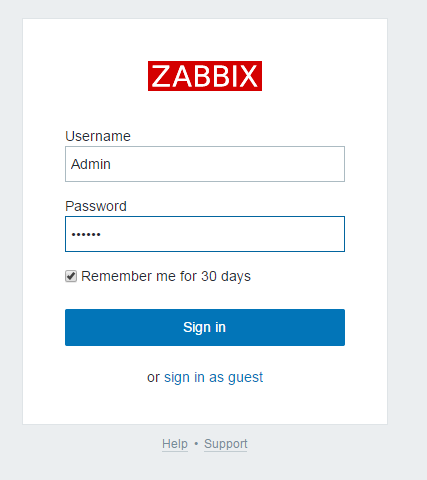
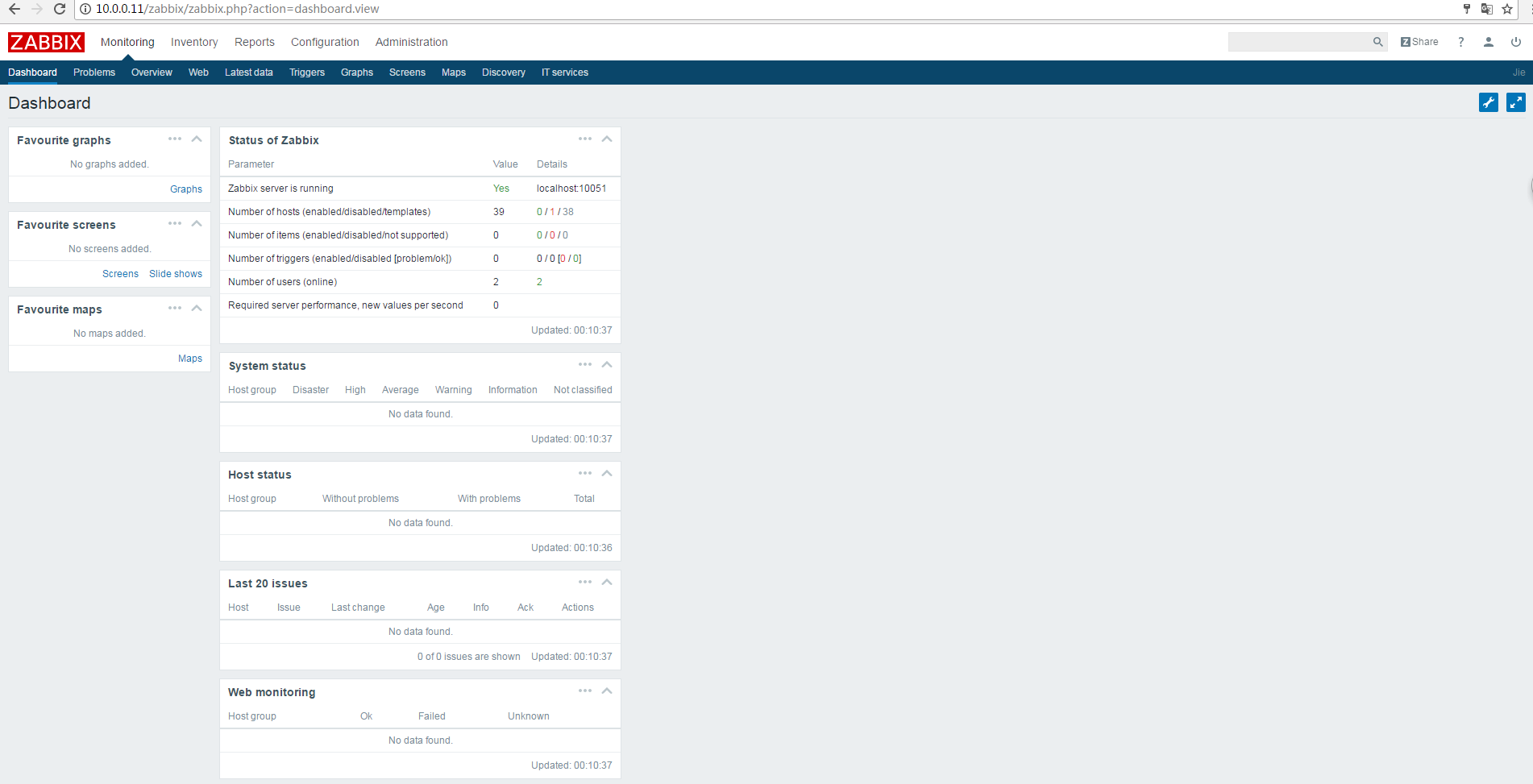

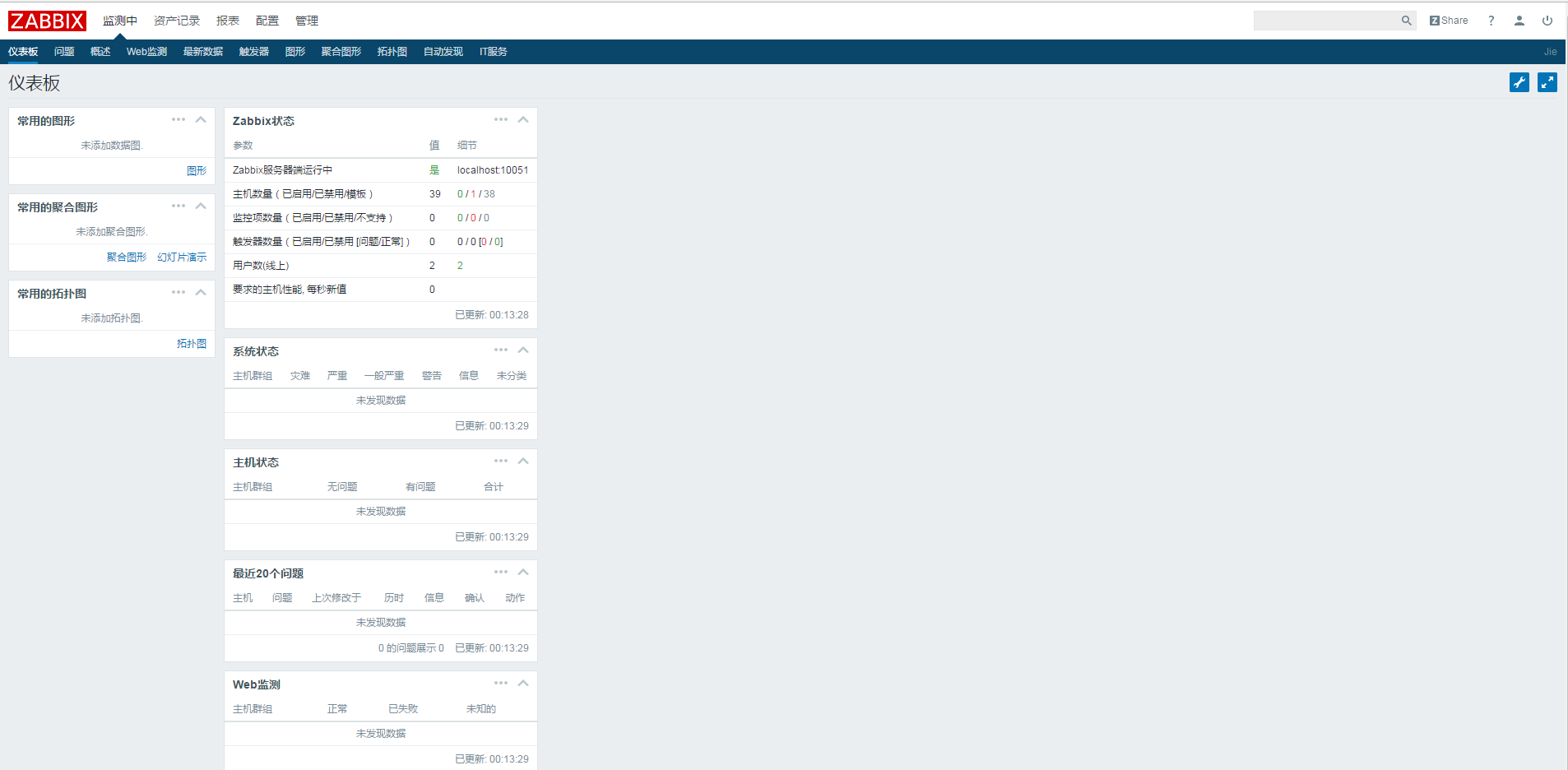
zabbix-agent客户端安装
[root@zabbix-server~]# yum install -y zabbix-get zabbix-agent #其中zabbix-agent负责数据收集,zabbix-get是一个server端模拟数据收集的命令,常用语部署自定义监控前的测试工具
启动zabbix-agent
[root@zabbix-server conf.d]# systemctl start zabbix-agent.service

[root@zabbix-server conf.d]# systemctl enable zabbix-agent.service

Created symlink from /etc/systemd/system/multi-user.target.wants/zabbix-agent.service to /usr/lib/systemd/system/zabbix-agent.service.
检查
[root@zabbix-server conf.d]# netstat -lnutp

Active Internet connections (only servers)

Proto Recv-Q Send-Q Local Address           Foreign Address         State       PID/Program name

tcp        0      0 0.0.0.0:3306            0.0.0.0:*               LISTEN      4398/mysqld

tcp        0      0 0.0.0.0:22              0.0.0.0:*               LISTEN      1465/sshd

tcp        0      0 127.0.0.1:25            0.0.0.0:*               LISTEN      1774/master

tcp        0      0 0.0.0.0:10050           0.0.0.0:*               LISTEN      5293/zabbix_agentd

tcp        0      0 0.0.0.0:10051           0.0.0.0:*               LISTEN      4538/zabbix_server

tcp6       0      0 :::80                   :::*                    LISTEN      4685/httpd

tcp6       0      0 :::22                   :::*                    LISTEN      1465/sshd

tcp6       0      0 ::1:25                  :::*                    LISTEN      1774/master

tcp6       0      0 :::10050                :::*                    LISTEN      5293/zabbix_agentd

tcp6       0      0 :::10051                :::*                    LISTEN      4538/zabbix_server

udp        0      0 127.0.0.1:323           0.0.0.0:*                           3293/chronyd

udp6       0      0 ::1:323                 :::*                                3293/chronyd

[root@zabbix-server conf.d]#
CentOS 7.2安装zabbix 3.0 LTS的更多相关文章
- centos 6.9安装zabbix 3.0
Linux下常用的系统监控软件有Nagios.Cacti.Zabbix.Monit等,这些开源的软件,可以帮助我们更好的管理机器,在第一时间内发现,并警告系统维护人员. 今天开始研究下Zabbix,使 ...
- Zabbix系列-REHL6.10离线方式安装Zabbix 4.0 LTS
环境 第零步:关闭系统默认防火墙 setenforce 0 sed -i -r "/^SELINUX=/c SELINUX=disabled" /etc/selinux/confi ...
- Zabbix 5.0 LTS版本的安装小结
Zabbix 5.0 LTS版本的安装小结 1:准备Zabbix的服务器. 这里可能需要一台或多台服务器,视需求和资源而定.也可以将Zabbix_Server.MySQL.Zabbix Web等安 ...
- 解决CentOS 7安装zabbix 3.0 无法启动zabbix-server的问题[segfault at 18 ip 00007f78842b4bd0 sp 00007fff1995a818 error 4 in libpthread-2.17.so[7f78842ab000+16000]]
解决CentOS 7安装zabbix 3.0 无法启动zabbix-server的问题 [root@localhost sbin]# service zabbix-server start Redir ...
- 部署Zabbix 6.0 LTS
Blog:博客园 个人 本部署文档适用于CentOS 8.X/RHEL 8.X/Anolis OS 8.X/AlmaLinux 8.X. Zabbix 6.0 LTS于2022年2月15日发布,本次大 ...
- Centos 7.3 安装Grafana 6.0
grafana简介 Grafana是一个完全开源的度量分析与可视化平台,可对来自各种各种数据源的数据进行查询.分析.可视化处理以及配置告警. Grafana支持的数据源: 官方:Graphite,In ...
- CentOS 6.6 搭建Zabbix 3.0.3 过程
分享CentOS 6.6下搭建Zabbix 3.0.3 的过程,希望都大家有所帮助. 环境安装 系统环境: # cat /etc/RedHat-release CentOS release 6.6 ( ...
- Centos7下安装zabbix 3.0.19
参考网站: https://www.cnblogs.com/xiewenming/p/7732144.html https://www.cnblogs.com/clsn/p/7885990.html ...
- CentOS 7.3 安装redis 4.0.2服务
CentOS 7.3 安装redis 4.0.2服务 1.下载解压 下载地址:/home/xiaoming/ wget http://download.redis.io/releases/redis- ...
随机推荐
- CCNode作为容器实现显示区域剪裁
一直把ccnode当做ui元素的容器使用,比如一段带下划线的文字,我会在一个ccnode中加入一个label和一个sprite,然后作为一个整体传出. 在主界面聊天的时候遇到一个问题,一段聊天信息需要 ...
- 深入浅出 Java Concurrency (12): 锁机制 part 7 信号量(Semaphore)
Semaphore 是一个计数信号量.从概念上讲,信号量维护了一个许可集.如有必要,在许可可用前会阻塞每一个 acquire(),然后再获取该许可.每个 release() 添加一个许可,从而可能 ...
- php Reflection
<?php function title($title, $name) { return sprintf("%s. %s\r\n", $title, $name); } $f ...
- Tkinter Dimensions
Tkinter Dimensions: 各种长度,宽度,和其他部件的尺寸可以在许多不同的单位描述 各种长度,宽度,和其他部件的尺寸可以在许多不同的单位描述. 如果您设置了尺寸为整数,它被假定为 ...
- Rhel5.5配置Centos yum源
ruiy哥,抛砖引玉 当你使用rhel系统时,[大部分数据库中心及政府企业选择linux服务器时通常考虑采购的版本一般不外乎是Rhel红帽及Suse,理由你懂的EcoSystem!]你没有一个红帽网络 ...
- Python实践练习:strip()的正则表达式版本
题目: 写一个函数,它接受一个字符串,做的事情和 strip()字符串方法一样.如果只传入了要去除的字符串,没有其他参数,那么就从该字符串首尾去除空白字符.否则,函数第二个参数指定的字符将从该字符串中 ...
- 开始使⽤ZooKeeper的API
在之前的章节中,我们使用zkCli工具介绍了ZooKeeper的基本操作.从本章开始,我们将会看到在应用中如何通过API来进行操作.首先介绍一下如何使用ZooKeeper的API进行开发,展示如何创建 ...
- **利用列表和super实现有序字典
class MyDict(dict): def __init__(self): self.temp_list = [] super(MyDict,self).__init__() def __seti ...
- tomcat的中的Apache的apr是个啥东东???
这东西的作用说白了就是让我们的项目在其他系统中也可以正常运行!!!!
- mysql varchar类型转换int类型
select * from gyzd_yysinfo order by cast(yysid as SIGNED INTEGER) 或者 select * from gyzd_yysinfo orde ...