
objective-c NSMutableAttributedString
本人开发的开发者技术变现资源聚集地,大家支持下,下面是网址
https://www.baiydu.com
NSMutableAttributedString 是一个很强悍的富文本处理字符串,可以方便的实现一个字符串中某个字符的样式处理。我把我下面代码实现的功能步骤说一下:首先拼接两个字符串,然后给前前半部分和后半部分字符串分别实现不同样式,最后在给后半部分的字符串增加删除线.... 如果不用到NSMutableAttributedString 实现起来不但麻烦不说,而且不能保证百分之百的准确: 下面先截图 然后上代码
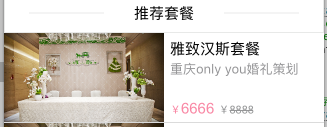
 (←就是它了)
NSDictionary *singleDictionary=[[NSDictionary alloc]initWithObjectsAndKeys:@"pic1",@"imagePath",@"雅致汉斯套餐",@"title",@"重庆only you婚礼策划",@"content",@"6666",@"currentPrice",@"8888",@"truePrice", nil];

//价格

UILabel *PriceLabel=[[UILabel alloc]initWithFrame:CGRectMake(DEVICE_Width*0.5+6,89-22,DEVICE_Width*0.5-6, 15)];

PriceLabel.textColor=COLOR(249, 135, 164);

PriceLabel.font=[UIFont systemFontOfSize:15];

PriceLabel.text= [NSString stringWithFormat:@"%@%@%@%@",@"¥",[singleDictionary objectForKey:@"currentPrice"],@" ¥",[singleDictionary objectForKey:@"truePrice"]];

NSMutableAttributedString *str = [[NSMutableAttributedString alloc] initWithString: PriceLabel.text];

[str addAttribute:NSForegroundColorAttributeName value:COLOR(249, 135, 164) range:NSMakeRange(0,str.length)]; //设置字体颜色

[str addAttribute:NSFontAttributeName value:[UIFont fontWithName:@"Arial" size:15] range:NSMakeRange(0, str.length)]; //设置字体大小

[str addAttribute:NSFontAttributeName value:[UIFont fontWithName:@"Arial" size:11]range:NSMakeRange(0, 1)];

NSString *getCutStr= [singleDictionary objectForKey:@"currentPrice"];

[str addAttribute:NSFontAttributeName value:[UIFont fontWithName:@"Arial" size:11] range:NSMakeRange(getCutStr.length+2, str.length-(getCutStr.length+2))]; //设置字体大小

[str addAttribute:NSForegroundColorAttributeName value:COLOR(149,150,151) range:NSMakeRange(getCutStr.length+2, str.length-(getCutStr.length+2))]; //设置字体颜色

//删除线

int beginThroughIndex= [NSString stringWithFormat:@"%@", [singleDictionary objectForKey:@"currentPrice"]].length+3;

[str addAttribute:NSStrikethroughStyleAttributeName value:@(NSUnderlinePatternSolid|NSUnderlineStyleSingle) range:NSMakeRange(beginThroughIndex, str.length-beginThroughIndex)];

[str addAttribute:NSStrikethroughColorAttributeName value:COLOR(149,150,151) range:NSMakeRange(beginThroughIndex, str.length-beginThroughIndex)];
PriceLabel.attributedText = str;

PriceLabel.textAlignment=NSTextAlignmentLeft;

PriceLabel.numberOfLines = 0;

[cell addSubview:PriceLabel];
本人创业做的一款androidApp, 下载量已经有2000多万,各种当前热门的网络手机奖励红包全部集成,另外还有热门电影和淘宝高额优惠券!很适合各类型的用户。

objective-c NSMutableAttributedString的更多相关文章
- Automake
Automake是用来根据Makefile.am生成Makefile.in的工具 标准Makefile目标 'make all' Build programs, libraries, document ...
- iOS - NSMutableAttributedString富文本的实现
NSMutableAttributedString继承于NSAttributedString(带属性的字符串)能够简单快速实现富文本的效果;不多说直接上效果图和代码,通俗易懂: (一)效果图: (二) ...
- iOS中富文本NSMutableAttributedString的用法
NSMutableAttributedString *attrString = [[NSMutableAttributedString alloc]initWithString:@"我是富文 ...
- Objective C中的ARC的修饰符的使用---- 学习笔记九
#import <Foundation/Foundation.h> @interface Test : NSObject /** * 默认的就是__strong,这里只是做示范,实际使用时 ...
- NSMutableAttributedString(转)
NSMutableAttributedString计算高度的问题 _label_page2_1 = [[UILabel alloc] init]; _label_page2_1.numberOfLin ...
- NSMutableAttributedString常用代码
NSTextAttachment *attachment = [[NSTextAttachment alloc] init]; attachment.image = [UIImage imageNam ...
- Objective的字符串拼接 似乎没有Swift方便,但也可以制做一些较为方便的写法
NSString *str1 = @"字符串1"; NSString *str2 = @"字符串2"; //在同样条件下,Objective的字符串拼接 往往只 ...
- [转] 从 C 到 Objective C 入门1
转自: http://blog.liuhongwei.cn/iphone/objective-c/ 进军iPhone开发,最大的难点之一就是怪异的Objective C语法了.不过,了解之后才发现,原 ...
- Objective C运行时(runtime)
#import <objc/runtime.h> void setBeingRemoved(id __self, SEL _cmd) { NSLog(@"------------ ...
- Objective C ARC 使用及原理
手把手教你ARC ,里面介绍了ARC的一些特性, 还有将非ARC工程转换成ARC工程的方法 ARC 苹果官方文档 下面用我自己的话介绍一下ARC,并将看文档过程中的疑问和答案写下来.下面有些是翻译,但 ...
随机推荐
- EF架构~数据分批批量提交
回到目录 对于大数据量提交,包括插入,更新和删除,我始终不建议用EF自带的方法,因为它会增加与数据库的交互次数,一般地,EF的一个上下文在提交时会打开一个数据连接,然后把转换成的SQL语句一条一条的发 ...
- 批处理集锦——(5)使用dir查找文件
eg dir /a-d /s /b *.bat -d表示不显示.bat结尾的文件夹
- HTML 5.1的新增特性
相对于HTML5,HTML 5.1又带来以下改变,这些可以作为以后的参考. 新增的特性 <picture>和scrset属性允许响应式图片选择: <details>和<s ...
- 关于 fir.im 你可能不知道的实用小工具
大家可能都知道 fir.im 是做测试发包的,上传你的 IPA/APK, 测试用户可以通过一个短链接和二维码就可快速安装测试. 除了基本的发包功能即应用上传下载外,fir.im 还为提高发包体验提供了 ...
- iOS-Objective-C内存管理
内存管理: 栈区 [stack]:由编译器自动分配并释放,一般存放函数的参数值,局部变量等 堆区 [heap]:由程序员分配和释放,如果程序员不释放,程序结束时,可能会由操作系统回收 全局区(静态区) ...
- java 线程安全 Lock
java.util.concurrent.locks 对于线程安全我们前面使用了synchronized关键字,对于线程的协作我们使用Object.wait()和Object.notify().在JD ...
- 开源、免费功能全面的Chart图
简介: 每个前端都有一个Chart梦,至于真正去做的寥寥无几,无怪乎几个原因: 浏览器兼容问题 数据处理的一些算法,如自动计算坐标轴.自动排列文本等 流畅的动画 丰富的交互功能 去年一年的时间里,我一 ...
- 新手入门:史上最全Web端即时通讯技术原理详解
前言 有关IM(InstantMessaging)聊天应用(如:微信,QQ).消息推送技术(如:现今移动端APP标配的消息推送模块)等即时通讯应用场景下,大多数都是桌面应用程序或者native应用较为 ...
- :after和:before炫酷用法总结
引入 提到伪类,在我的印象中最常用的不过是:hover.:active.:link.:visited,还有css3里的常用伪类选择器:last-child.:first-child.nth-child ...
- echart饼状图使用,打发时间。
新公司,刚来几天,闲着没事,领导让我做些无关痛痒的活,优化报表统计!!!之前是用flash做的,现在要改成echart实现.好吧,之前没用过,抱着学习态度,研究了下.写点东西打发下时间,能帮到需要帮助 ...