
Hibernate之全面认识
Hibernate体系架构
Hibernate通过配置文件管理底层的JDBC连接,将用户从原始的JDBC释放出来,使得用户无需再关注底层的JDBC操作,而是以面向对象的方式进行持久化操作。这种全面的解决方案架构如下(插图来自官方文档 manual:Comprehensive architecture)
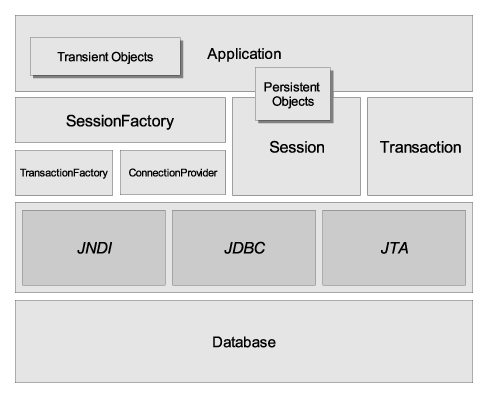
大致解释一下上面的关键分层模块
SessionFactory: 是单个数据库映射关系经过编译后的内存镜像,是线程安全的。该对象可在进程或者集群的级别上,为事务直接可重用数据提供二级缓存。
Session:是应用程序与持久层交互的一个单线程的对象,所有持久化的对象都必须在Session管理下才可以进行持久化操作。Session封装了JDBC,也是Transaction工厂。
持久化对象:是一个与Session关联的普通对象(POJO)
瞬态和脱管:未与Session关联的POJO处于瞬态。如果关联之后,Session如果关闭了,则此POJO转为脱管状态。
ConnectionProvider:是生成JDBC连接的工厂。将应用程序与底层的DataSource及DriverManager隔离开。应用程序一般无需直接访问这个对象。
TransactionFactory:生成Transaction对象的工厂。应用程序一般无需直接访问这个对象。
Hibernate的配置文件
Hibernate持久化操作离不开SessionFactory对象,而SessionFactory对象是由Configuration对象创建的(build)。每一个Hibernate配置文件对应一个Configuration对象,创建Configuration对象的方式有三种:
1.使用hibernate.properties配置文件——这种方式不能在配置文件中直接添加映射文件,而是需要写到java code里面,所以比较麻烦
在Hibernate发布包的\project\etc下有一个hibernate.properties的用例,比较全面,部分配置如下,
 ## HypersonicSQL

 hibernate.dialect org.hibernate.dialect.HSQLDialect

 hibernate.connection.driver_class org.hsqldb.jdbcDriver

 hibernate.connection.username sa

 hibernate.connection.password

 hibernate.connection.url jdbc:hsqldb:./build/db/hsqldb/hibernate

 #hibernate.connection.url jdbc:hsqldb:hsql://localhost

 #hibernate.connection.url jdbc:hsqldb:test

 ....
有了这个配置文件还不够,还需要在java code中写明映射文件名称,通过addResource("xxx.xml")方式可以添加映射文件,
 Configuration cfg = new Configuration()

 .addResource("a.hbm.xml")

 .addResource("b.hbm.xml");
另外,也可以通过addClass("xxx.class")的方式直接添加实体类的Class实例,hibernate会自动搜索对应的映射文件,但是要求将映射文件和实体类放在同一个目录下。
这种方式有个好处就是消除了系统对文件名的硬编码耦合。
 Configuration cfg = new Configuration()

 .addClass(hib.a.class)

 .addClass(hib.b.class);
2.使用hibernate.cfg.xml配置文件
即前面的例子,在hibernate.cfg.xml中配置hibernate连接信息,数据池等信息,另外还需要将映射文件名也添加进去,配置如下,
<?xml version="1.0" encoding="UTF-8"?>
<!DOCTYPE hibernate-configuration PUBLIC "-//Hibernate/Hibernate Configuration DTD 3.0//EN"
"http://hibernate.sourceforge.net/hibernate-configuration-3.0.dtd"> <hibernate-configuration>
<session-factory>
<property name="connection.driver_class">com.mysql.jdbc.Driver</property>
<property name="connection.url">jdbc:mysql://127.0.0.1:3306/test?useUnicode=true&characterEncoding=UTF-8</property> <!-- 指定字符集的方式-->
<property name="connection.username">root</property>
<property name="connection.password"></property> <property name="hibernate.c3p0.max_size">20</property>
<property name="hibernate.c3p0.min_size">1</property> <property name="hibernate.c3p0.timeout">5000</property> <property name="hibernate.c3p0.max_statements">100</property>
<property name="hibernate.c3p0.idle_test_period">3000</property>
<property name="hibernate.c3p0.acquire_increment">2</property>
<property name="hibernate.c3p0.validate">true</property>
<property name="dialect">org.hibernate.dialect.MySQLDialect</property> <property name="hbm2ddl.auto">update</property>
<property name="show_sql">true</property>
<mapping resource="hib/News.hbm.xml" />
</session-factory>
</hibernate-configuration>
配置文件中,需要注意以下几项配置:
1).编码:可以在url中指定,
例如在hibernate.property中,setProperty("hibernate.connection.url","jdbc:mysql://127.0.0.1:3306/test?useUnicode=true&characterEncoding=utf-8")
在hibernate.cfg.xml中, <property name="connection.url">jdbc:mysql://127.0.0.1:3306/test?useUnicode=true&characterEncoding=UTF-8</property> ,注意在xml文件中&符号要用 &转义
2).数据库方言hibernate.dialect,可以在官方手册中查找对应的选项
3).自动建表 hibernate.hbm2ddl.auto有三种取值,update, create, create-drop
4).hibernate.show_sql和hibernate.format_sql有助于调试sql,前者可以打印sql到控制台,后者进行格式化
映射文件News.hbm.xml
 <?xml version="1.0"  encoding="UTF-8"?>

 <!DOCTYPE hibernate-mapping PUBLIC "-//Hibernate/Hibernate Mapping DTD 3.0//EN"

 "http://hibernate.sourceforge.net/hibernate-mapping-3.0.dtd">

 <hibernate-mapping package="hib">

     <class name="News" table="news_table">

         <id name="id" column="id" type="int">

             <generator class="identity" />

         </id>

         <property name="title" type="string" column="title" />

         <property name="content" type="string" column="content" />

     </class>

 </hibernate-mapping>
3.不使用任何配置文件,所有配置都以编码方式(.setProperty(key,value))来创建Configuration对象
 public static void noConfigFile() {

     Configuration cfg = new Configuration()

             .addClass(hib.News.class)

             .setProperty("hibernate.connection.driver_class","com.mysql.jdbc.Driver")

             .setProperty("hibernate.connection.url","jdbc:mysql://127.0.0.1:3306/test?useUnicode=true&characterEncoding=utf-8")

             .setProperty("hibernate.connection.username", "root")

             .setProperty("hibernate.connection.password", "")

             .setProperty("hibernate.c3p0.max_size", "20")

             .setProperty("hibernate.c3p0.min_size", "1")

             .setProperty("hibernate.c3p0.max_statements", "100")

             .setProperty("hibernate.c3p0.timeout", "5000")

             .setProperty("hibernate.c3p0.idle_test_period", "3000")

             .setProperty("hibernate.c3p0.acquire_increment", "2")

             .setProperty("hibernate.validate", "true")

             .setProperty("hibernate.dialect", "org.hibernate.dialect.MySQLDialect")

             .setProperty("hibernate.hbm2dll.auto", "create")

             .setProperty("hibernate.show_sql", "true");

     SessionFactory sf = cfg.buildSessionFactory();

     Session sess = sf.openSession();

     Transaction tx = sess.beginTransaction();

     News n = new News();

     n.setTitle("举头望明月");

     n.setContent("低头思故乡");

     sess.save(n);

     tx.commit();

     sess.close();

 }
Hibernate之全面认识的更多相关文章
- hibernate多对多关联映射
关联是类(类的实例)之间的关系,表示有意义和值得关注的连接. 本系列将介绍Hibernate中主要的几种关联映射 Hibernate一对一主键单向关联Hibernate一对一主键双向关联Hiberna ...
- 解决 Springboot Unable to build Hibernate SessionFactory @Column命名不起作用
问题: Springboot启动报错: Caused by: org.springframework.beans.factory.BeanCreationException: Error creati ...
- hibernate多对一双向关联
关联是类(类的实例)之间的关系,表示有意义和值得关注的连接. 本系列将介绍Hibernate中主要的几种关联映射 Hibernate一对一主键单向关联Hibernate一对一主键双向关联Hiberna ...
- Hibernate中事务的隔离级别设置
Hibernate中事务的隔离级别,如下方法分别为1/2/4/8. 在Hibernate配置文件中设置,设置代码如下
- Hibernate中事务声明
Hibernate中JDBC事务声明,在Hibernate配置文件中加入如下代码,不做声明Hibernate默认就是JDBC事务. 一个JDBC 不能跨越多个数据库. Hibernate中JTA事务声 ...
- spring applicationContext.xml和hibernate.cfg.xml设置
applicationContext.xml配置 <?xml version="1.0" encoding="UTF-8"?> <beans ...
- [原创]关于Hibernate中的级联操作以及懒加载
Hibernate: 级联操作 一.简单的介绍 cascade和inverse (Employee – Department) Casade用来说明当对主对象进行某种操作时是否对其关联的从对象也作类似 ...
- hibernate的基本xml文件配置
需要导入基本的包hibernate下的bin下的required和同bin下optional里的c3p0包下的所有jar文件,当然要导入mysql的驱动包了.下面需要注意的是hibernate的版本就 ...
- Maven搭建SpringMVC+Hibernate项目详解 【转】
前言 今天复习一下SpringMVC+Hibernate的搭建,本来想着将Spring-Security权限控制框架也映入其中的,但是发现内容太多了,Spring-Security的就留在下一篇吧,这 ...
- 1.Hibernate简介
1.框架简介: 定义:基于java语言开发的一套ORM框架: 优点:a.方便开发; b.大大减少代码量; c.性能稍高(不能与数据库高手相比,较一般数据库使用者 ...
随机推荐
- xcode中使用正则表达式来搜索替换代码
有这样的需求: 类似于 GLOBAL_STR(@"请继续添加"); 这样的代码,需要批量修改为: GLOBAL_STR(@"请继续添加", nil); 这里使用 ...
- scala中的Actor
1.介绍 2.简单示例 3.第二个程序 4.通信程序 package day01 import scala.actors.Actor case class Message(content: Strin ...
- css 居中问题
水平居中有text-align:center 和 margin:0 auto,前者是针对父元素进行设置而后者则是对子元素.margin:0 auto; 这里实现的前提是子元素没有float 浮动起来, ...
- CentOS - FTP server
1. install vsftpd.(PS:procedure 1-4 under the circumstance that the firewall is closed and the iptab ...
- error: RPC failed; result=22, HTTP code = 411
git config http.postBuffer 524288000orgit config --system http.postBuffer 524288000
- sed 引入shell变量
双单引号即可 1.eval sed ’s/$a/$b/’ filename2.sed "s/$a/$b/" filename3.sed ’s/’$a’/’$b’/’ filenam ...
- 如何删除NSDictionary或NSArray中的NSNull
前段时间与某公司的技术交流,被问到一个问题,如何删除NSDictionary中的NSNull.当时在纸上写,以前太依赖Xcode编译器了,以至于方法名都写不全,最终也没写出来,我想我肯定被鄙视的体无完 ...
- nexus
下载地址:http://pan.baidu.com/s/1nvwIoa9 (Jfrog/Nexus) maven 仓库: http://mvnrepository.com/ 用户名密码分别是:ad ...
- AngularJS Best Practices: resource
A factory which creates a resource object that lets you interact with RESTful server-side data sourc ...
- Java 中 ThreadLocal 内存泄露的实例分析
前言 之前写了一篇深入分析 ThreadLocal 内存泄漏问题是从理论上分析ThreadLocal的内存泄漏问题,这一篇文章我们来分析一下实际的内存泄漏案例.分析问题的过程比结果更重要,理论结合实际 ...