
上层建筑——DOM元素的特性与属性(dojo/dom-attr)
上一篇返本求源中,我们从DOM基础的角度出发,总结了特性与属性的关系。本文中,我们来看看dojo框架是如何处理特性与属性的。dojo框架中特性的处理位于dojo/dom-attr模块属性的处理为与dojo/dom-prop模块中。
attr.set()
方法的函数签名为:
require(["dojo/dom-attr"], function(domAttr){

  result = domAttr.set("myNode", "someAttr", "value");

});
“someAttr”代表特性名称,但有时候也可以是一些特殊的属性名,如:‘textContent’:
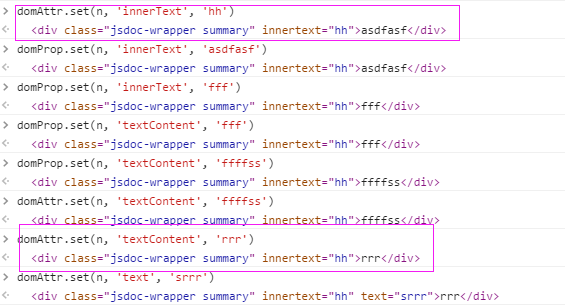
可以看到上图中使用attr设置innerText只会在html标签中增加innerText这个自定义特性,而无法改变文本,使用textContent却能够达到改变文本的目的。其中缘由就是因为在attr模块建立了forceProps字典,在此字典中的key全部使用prop模块来设置:
        forcePropNames = {

            innerHTML:    ,

            textContent:,

            className:    ,

            htmlFor:    has("ie"),

            value:

        }
set()方法中主要处理以下几件事:
- “someAttr”除了可以是字符串外,还可以是key-value对象,所以对于key-value对象我们首先要进行参数分解。
- 如果someAttr等于style,就交给dojo/dom-style模块来处理
- 上篇文章中我们说过,特性值只能是字符串,所以对于函数,默认是作为事件绑定到元素上,这部分交给dojo/dom-prop来处理;另外对于disabled、checked等无状态的属性,在通过属性设置时,只能传递布尔值,所以这部分也交给prop来处理
- 剩下的交给原生api,setAttribute来处理,这个方法会自动调用value的toString方法
exports.set = function setAttr(/*DOMNode|String*/ node, /*String|Object*/ name, /*String?*/ value){

        node = dom.byId(node);

        if(arguments.length == ){ // inline'd type check

            // the object form of setter: the 2nd argument is a dictionary

            for(var x in name){

                exports.set(node, x, name[x]);

            }

            return node; // DomNode

        }

        var lc = name.toLowerCase(),

            propName = prop.names[lc] || name,

            forceProp = forcePropNames[propName];

        if(propName == "style" && typeof value != "string"){ // inline'd type check

            // special case: setting a style

            style.set(node, value);

            return node; // DomNode

        }

        if(forceProp || typeof value == "boolean" || lang.isFunction(value)){

            return prop.set(node, name, value);

        }

        // node's attribute

        node.setAttribute(attrNames[lc] || name, value);

        return node; // DomNode

    };
attr.get()
方法的函数签名为:
// Dojo 1.7+ (AMD)

require(["dojo/dom-attr"], function(domAttr){

  result = domAttr.get("myNode", "someAttr");

});
为了解释方便,我们要先看一下get方法的源码:
exports.get = function getAttr(/*DOMNode|String*/ node, /*String*/ name){

        node = dom.byId(node);

        var lc = name.toLowerCase(),

            propName = prop.names[lc] || name,

            forceProp = forcePropNames[propName],

            value = node[propName];        // should we access this attribute via a property or via getAttribute()?

        if(forceProp && typeof value != "undefined"){

            // node's property

            return value;    // Anything

        }

        if(propName == "textContent"){

            return prop.get(node, propName);

        }

        if(propName != "href" && (typeof value == "boolean" || lang.isFunction(value))){

            // node's property

            return value;    // Anything

        }

        // node's attribute

        // we need _hasAttr() here to guard against IE returning a default value

        var attrName = attrNames[lc] || name;

        return _hasAttr(node, attrName) ? node.getAttribute(attrName) : null; // Anything

    };
- 先得到的是三个变量:propName、forceProp、value,
- 如果attrName属于forceProps集合,直接返回DOM节点的属性
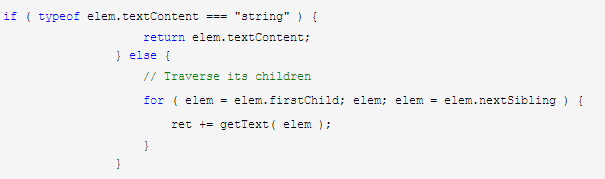
- textContent明显位于forceProps中,为什么还要单独拿出来做判断?因为有的低版本的浏览器不支持textContent,我们需要利用深度优先算法,利用文本的节点的nodeValue由父到子依次拼接文本,这一点jQuery与dojo的思路都是一致的:
- dojo:
function getText(/*DOMNode*/node){

        var text = "", ch = node.childNodes;

        for(var i = , n; n = ch[i]; i++){

            //Skip comments.

            if(n.nodeType != ){

                if(n.nodeType == ){

                    text += getText(n);

                }else{

                    text += n.nodeValue;

                }

            }

        }

        return text;

} - jQuery:
- dojo:
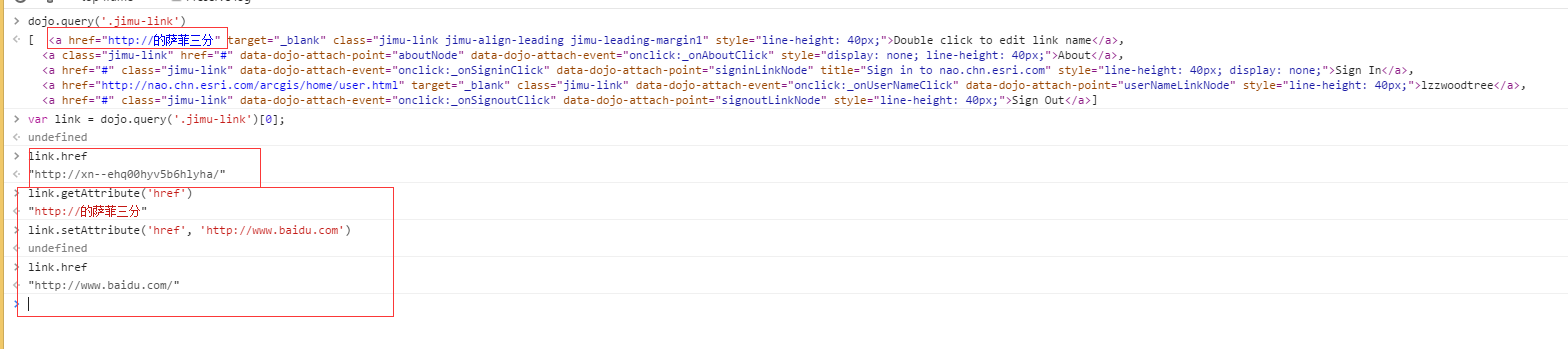
- set方法中提到过,对于布尔跟函数,交给prop来设置,那么取值时当然也要从prop中来取;至于为什么要单独拿出href,在“返本求源”中已经说过,通过属性得到的href属性跟getAttribute方法得到的值并不一定相同,尤其是非英文字符:
- 由prop模块该做的都做完了,所以这里判断node中是否存在该特性时,无需理会forceProps字典;如果存在则调用getAttribute方法。
attr.has
既然可以使用attr来set这些属性,那在attr.has方法中,位于此字典中属性当然也要返回true,所以attr.has(node, attrName)方法主要判断两个方面:
- attrName是否是forceProps中的key
- attrName是否是一个特性节点。特性节点为与元素的attributes属性中,可以通过:attributes[attrName] && attributes[attrName].specified 来判断
exports.has = function hasAttr(/*DOMNode|String*/ node, /*String*/ name){

        var lc = name.toLowerCase();

        return forcePropNames[prop.names[lc] || name] || _hasAttr(dom.byId(node), attrNames[lc] || name);    // Boolean

    };

function _hasAttr(node, name){

        var attr = node.getAttributeNode && node.getAttributeNode(name);

        return !!attr && attr.specified; // Boolean

    }
attr.remove
这个方法比较简单,直接调用了removeAttribute方法
exports.remove = function removeAttr(/*DOMNode|String*/ node, /*String*/ name){

        // summary:

        //        Removes an attribute from an HTML element.

        // node: DOMNode|String

        //        id or reference to the element to remove the attribute from

        // name: String

        //        the name of the attribute to remove

        dom.byId(node).removeAttribute(attrNames[name.toLowerCase()] || name);

    };
如果您觉得这篇文章对您有帮助,请不吝点击右下方“推荐”,谢谢~
上层建筑——DOM元素的特性与属性(dojo/dom-attr)的更多相关文章
- 返本求源——DOM元素的特性与属性
抛砖引玉 很多前端类库(比如dojo与JQuery)在涉及dom操作时都会见到两个模块:attr.prop.某天代码复查时,见到一段为某节点设置文本的代码: attr.set(node, 'inner ...
- 上层建筑——DOM元素的特性与属性(dojo/dom-prop)
上一篇讲解dojo/dom-attr的文章中我们知道在某些情况下,attr模块中会交给prop模块来处理.比如: textContent.innerHTML.className.htmlFor.val ...
- js便签笔记(2)——DOM元素的特性(Attribute)和属性(Property)
1.介绍: 上篇js便签笔记http://www.cnblogs.com/wangfupeng1988/p/3626300.html最后提到了dom元素的Attribute和Property,本文简单 ...
- 使用jQuery匹配文档中所有的li元素,返回一个jQuery对象,然后通过数组下标的方式读取jQuery集合中第1个DOM元素,此时返回的是DOM对象,然后调用DOM属性innerHTML,读取该元素 包含的文本信息
<!DOCTYPE html PUBLIC "-//W3C//DTD XHTML 1.0 Transitional//EN" "http://www.w3.org/ ...
- JavaScript Dom基础-9-Dom查找方法; 设置DOM元素的样式; innerHTML属性的应用; className属性的应用; DOM元素上添加删除获取属性;
JavaScript Dom基础 学习目标 1.掌握基本的Dom查找方法 domcument.getElementById() Domcument.getElementBy TagName() 2.掌 ...
- dom元素上添加断点(使用dom breakpoint找到修改属性的javascript代码)
使用dom breakpoint能快速找到修改了某一个dom element的JavaScript code位于何处.在Chrome development tool里,选中想要inspect的dom ...
- DOM元素的Attribute(特性)和Property(属性) 【转载】
1.介绍: 上篇js便签笔记http://www.cnblogs.com/wangfupeng1988/p/3626300.html最后提到了dom元素的Attribute和Property,本文简单 ...
- jQuery 数据 DOM 元素 核心 属性
jQuery 参考手册 - 数据 .clearQueue() 从序列中删除仍未运行的所有项目 .clearQueue(queueName) $("div").clearQueue( ...
- 获取或操作DOM元素特性的几种方式
1. 通过元素的属性 可以直接通过元素属性获取或操作特性,但是只有公认的特性(非自定义的特性),例如id.title.style.align.className等,注意,因为在ECMAScript中, ...
随机推荐
- 第一课1、ROS
---恢复内容开始--- 1.什么是ROS ROS起源于2007年,斯坦福大学的人工智能实验室与机器人技术公司Willow Garage针对其个人机器人项目开发了ROS的雏形. ROS大致每年发布一个 ...
- windows下mongodb权限设置解决方法
mongodb简介: MongoDB 是一个跨平台的,面向文档的数据库,提供高性能,高可用性和可扩展性方便. MongoDB工作在收集和文件的概念. MongoDB默认设置为无权限访问限制,所以可以直 ...
- Jmeter学习
网址: http://www.ltesting.net/ceshi/open/kyxncsgj/jmeter/ http://www.cnblogs.com/TankXiao/p/4059378.ht ...
- HDU2471_History of Languages
有意思的题目,给出两个自动机,判断这个两个自动机是否是等价的? 两个自动机是等价的,那么他们可接受的字符串集合一定是完全一样的. 于是我们可以从(0,0)开始bfs,每次看看在两个自动机上走到的两个点 ...
- discuz MVC结构分析
Discuz软件经解压后产生的三个文件夹中的一个叫upload的成为网站的根目录.里面的内容可以在某些网站上在线阅读,如用好库编程网.也可以离线在本地阅读,如用VS.Php for Visual St ...
- sqlserver中的表值函数和标量值函数
顾名思义:表值函数返回的是表,而标量值函数可以返回基类型 一.表值函数 用户定义表值函数返回 table 数据类型.对于内联表值函数,没有函数主体:表是单个 SELECT 语句的结果集. 以下示例创建 ...
- svn 在linux 下的一些常用命令
最近在Linux系统下玩一些svn的东西,感觉脑袋很乱, 于是整理了一下一些初学者必须弄明白的基本命令: 1. svn --version: 查看Linux系统下的svn client版本. Clie ...
- 【13-Annotation】
Annotation 5个基本的Annotation •@Override •@Deprecated •@SuppressWarnings •@SafeVarargs •@FunctionalInte ...
- 使用CSS设置行间距,字间距.
字间距1.text-indent设置抬头距离css缩进即对,对应div设置css样式text-indent : 20px; 缩进了20px 2.letter-spacing来设置字与字间距_字符间距离 ...
- A List of Social Tagging Datasets Made Available for Research
This list is not exhaustive - help expand it! Social Tagging Systems Research Group Source Year Obta ...