
win32 - 匿名管道的使用
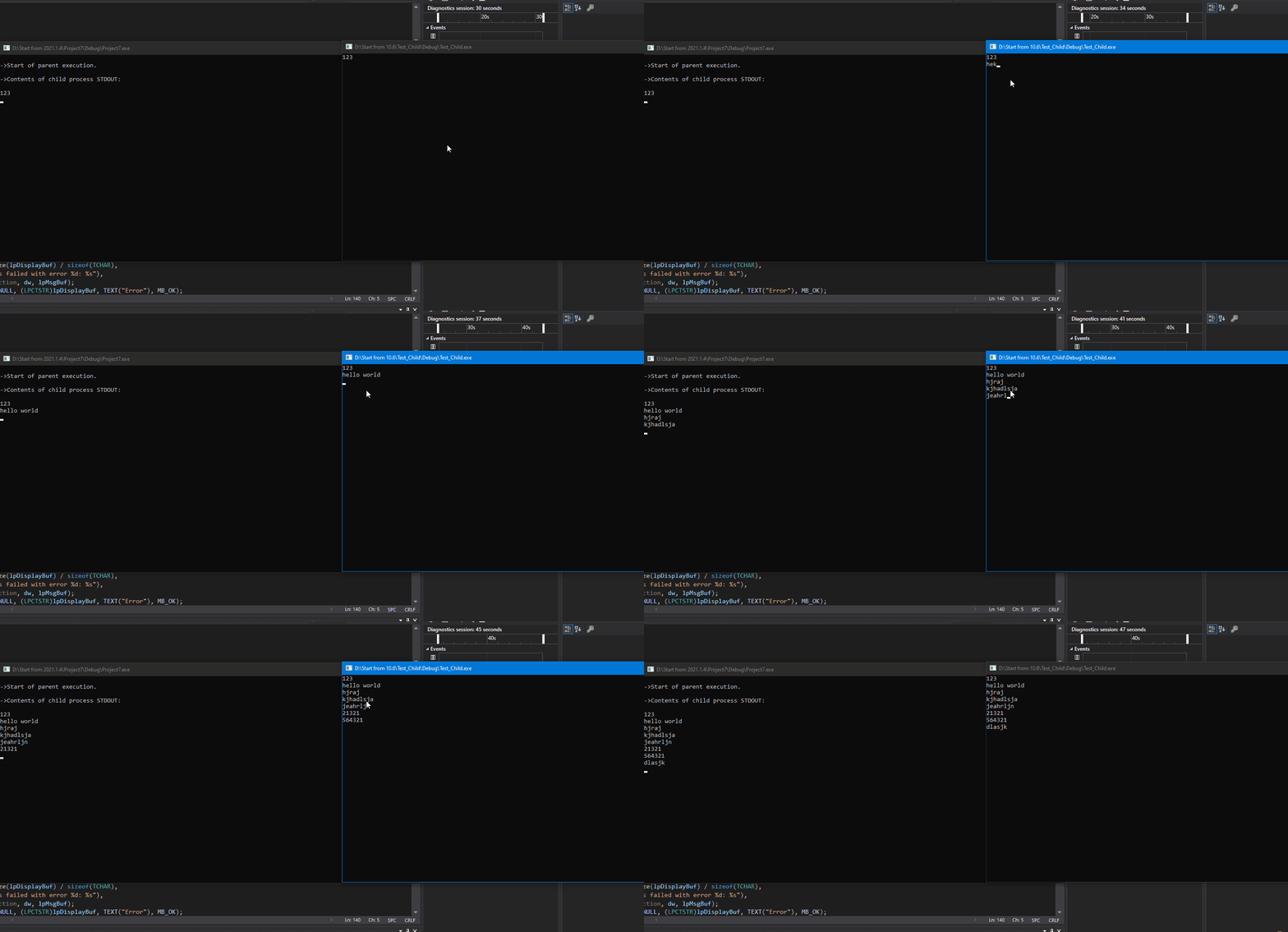
目标: 创建一个父进程和子进程,在子进程的控制台窗口输入数据,数据通过管道发送给父进程,父进程的控制台窗口读取数据,最后将数据打印出来。
Parent.cpp
//CMD.exe

#include <windows.h>

#include <tchar.h>

#include <stdio.h>

#include <strsafe.h>

#define BUFSIZE 4096

HANDLE g_hChildStd_Rd = NULL;

HANDLE g_hChildStd_Wr = NULL;

HANDLE g_hInputFile = NULL;

void CreateChildProcess(void);

void ReadFromPipe(void);

void ErrorExit(LPCWSTR);

int _tmain(int argc, TCHAR* argv[])

{

    SECURITY_ATTRIBUTES saAttr;

    printf("\n->Start of parent execution.\n");

    // Set the bInheritHandle flag so pipe handles are inherited.

    saAttr.nLength = sizeof(SECURITY_ATTRIBUTES);

    saAttr.bInheritHandle = TRUE;

    saAttr.lpSecurityDescriptor = NULL;

    // Create a pipe for the child process's STDOUT.

    if (!CreatePipe(&g_hChildStd_Rd, &g_hChildStd_Wr, &saAttr, 0))

        ErrorExit(L"StdoutRd CreatePipe");

    // Ensure the read handle to the pipe for STDOUT is not inherited.

    if (!SetHandleInformation(g_hChildStd_Rd, HANDLE_FLAG_INHERIT, 0))

        ErrorExit(L"Stdout SetHandleInformation");

    CreateChildProcess();

    // Read from pipe that is the standard output for child process.

    printf("\n->Contents of child process STDOUT:\n\n");

    ReadFromPipe();

    printf("\n->End of parent execution.\n");

    return 0;

}

void CreateChildProcess()

{

    TCHAR szCmdline[] = TEXT("Child.exe");

    PROCESS_INFORMATION piProcInfo;

    STARTUPINFO siStartInfo;

    BOOL bSuccess = FALSE;

    // Set up members of the PROCESS_INFORMATION structure.

    ZeroMemory(&piProcInfo, sizeof(PROCESS_INFORMATION));

    ZeroMemory(&siStartInfo, sizeof(STARTUPINFO));

    siStartInfo.cb = sizeof(STARTUPINFO);

    siStartInfo.hStdError = g_hChildStd_Wr;

    siStartInfo.hStdOutput = g_hChildStd_Wr;

    siStartInfo.dwFlags |= STARTF_USESTDHANDLES;

    // Create the child process.

    bSuccess = CreateProcess(NULL,

        szCmdline,     // command line

        NULL,          // process security attributes

        NULL,          // primary thread security attributes

        TRUE,          // handles are inherited

        CREATE_NEW_CONSOLE,             // creation flags

        NULL,          // use parent's environment

        NULL,          // use parent's current directory

        &siStartInfo,  // STARTUPINFO pointer

        &piProcInfo);  // receives PROCESS_INFORMATION

     // If an error occurs, exit the application.

    if (!bSuccess)

        ErrorExit(L"CreateProcess");

    else

    {

        CloseHandle(piProcInfo.hProcess);

        CloseHandle(piProcInfo.hThread);

        CloseHandle(g_hChildStd_Wr);

    }

}

void ReadFromPipe(void)

// Read output from the child process's pipe for STDOUT

// and write to the parent process's pipe for STDOUT.

// Stop when there is no more data.

{

    DWORD dwRead, dwWritten;

    CHAR chBuf[BUFSIZE];

    BOOL bSuccess = FALSE;

    HANDLE hParentStdOut = GetStdHandle(STD_OUTPUT_HANDLE);

    for (;;)

    {

        bSuccess = ReadFile(g_hChildStd_Rd, chBuf, BUFSIZE, &dwRead, NULL);

        if (!bSuccess || dwRead == 0) break;

        bSuccess = WriteFile(hParentStdOut, chBuf,

            dwRead, &dwWritten, NULL);

        if (!bSuccess) break;

    }

}

void ErrorExit(LPCWSTR lpszFunction)

// Format a readable error message, display a message box,

// and exit from the application.

{

    LPVOID lpMsgBuf;

    LPVOID lpDisplayBuf;

    DWORD dw = GetLastError();

    FormatMessage(

        FORMAT_MESSAGE_ALLOCATE_BUFFER |

        FORMAT_MESSAGE_FROM_SYSTEM |

        FORMAT_MESSAGE_IGNORE_INSERTS,

        NULL,

        dw,

        MAKELANGID(LANG_NEUTRAL, SUBLANG_DEFAULT),

        (LPTSTR)&lpMsgBuf,

        0, NULL);

    lpDisplayBuf = (LPVOID)LocalAlloc(LMEM_ZEROINIT,

        (lstrlen((LPCTSTR)lpMsgBuf) + lstrlen((LPCTSTR)lpszFunction) + 40) * sizeof(TCHAR));

    StringCchPrintf((LPTSTR)lpDisplayBuf,

        LocalSize(lpDisplayBuf) / sizeof(TCHAR),

        TEXT("%s failed with error %d: %s"),

        lpszFunction, dw, lpMsgBuf);

    MessageBox(NULL, (LPCTSTR)lpDisplayBuf, TEXT("Error"), MB_OK);

    LocalFree(lpMsgBuf);

    LocalFree(lpDisplayBuf);

    ExitProcess(1);

}
Child.cpp
#include <windows.h>

#include <stdio.h>

#define BUFSIZE 4096

#pragma warning(disable:4996)

int main(void)

{

    CHAR chBuf[BUFSIZE] = {};

    DWORD dwRead, dwWritten;

    HANDLE hStdin, hStdout;

    BOOL bSuccess;

    hStdout = GetStdHandle(STD_OUTPUT_HANDLE);

    hStdin = GetStdHandle(STD_INPUT_HANDLE);

    if (

        (hStdout == INVALID_HANDLE_VALUE) ||

        (hStdin == INVALID_HANDLE_VALUE)

        )

        ExitProcess(1);

    // Send something to this process's stdout using printf.

    printf("\n ** This is child process. ** \n");

    // This simple algorithm uses the existence of the pipes to control execution.

    // It relies on the pipe buffers to ensure that no data is lost.

    // Larger applications would use more advanced process control.

    for (;;)

    {

        ReadFile(hStdin, chBuf, strlen(chBuf) + 2, &dwRead, NULL);

        // Write to standard output and stop on error.

        bSuccess = WriteFile(hStdout, chBuf, strlen(chBuf)+2, &dwWritten, NULL);

        memset(chBuf, NULL, BUFSIZE);

        if (!bSuccess)

            break;

    }

    return 0;

}
效果:
win32 - 匿名管道的使用的更多相关文章
- Linux学习笔记(12)-进程间通信|匿名管道
Linux的进程间通信有几种方式,包括,管道,信号,信号灯,共享内存,消息队列和套接字等-- 现在一个个的开始学习! ----------------------------------------- ...
- Linux进程间通信(三):匿名管道 popen()、pclose()、pipe()、close()、dup()、dup2()
在前面,介绍了一种进程间的通信方式:使用信号,我们创建通知事件,并通过它引起响应,但传递的信息只是一个信号值.这里将介绍另一种进程间通信的方式——匿名管道,通过它进程间可以交换更多有用的数据. 一.什 ...
- linux进程通信之使用匿名管道进行父子进程通信
管道:是指用于连接一个读进程和一个写进程,以实现它们之间通信的共享文件,又称pipe文件. 管道是单向的.先进先出的.无结构的.固定大小的字节流,它把一个进程的标准输出和另一个进程的标准输入连接在一起 ...
- [C++] socket -9[匿名管道]
::怎么弄都不能读取信息....先把代码放着.... #include<windows.h> #include<stdio.h> int main() { HANDLE rea ...
- 匿名管道读取CMD回显信息
之前用了很坑爹的做法去读取了cmd命令的回显信息,现在发现了用匿名管道的实现方法,由于楼主没有学过Windows核心编程,找了一个代码来凑数 存下来以后研究 #include <windows. ...
- Windows下 C++ 实现匿名管道的读写操作
由于刚弄C++没多久,部分还不熟练,最近又由于开发需求要求实现与其他程序进行通信,瞬间就感觉想到了匿名通信.于是自己查阅了一下资料,实现了一个可读可写的匿名管道: 源代码大部分都有注释: Pipe.h ...
- Linux进程间通信-匿名管道
前面我们讲了进程间通信的一种方式,共享内存.下面看一看另一种机制,匿名管道.1.什么是管道管道是一个进程的数据流到另一个进程的通道,即一个进程的数据输出作为另一个进程的数据输入,管道起到了桥梁的作用. ...
- IPC——匿名管道
Linux进程间通信——使用匿名管道 在前面,介绍了一种进程间的通信方式:使用信号,我们创建通知事件,并通过它引起响应,但传递的信息只是一个信号值.这里将介绍另一种进程间通信的方式——匿名管道,通过它 ...
- 使用匿名管道在进程间通信 (System.IO.Pipes使用)(转)
原文地址:http://www.cnblogs.com/yukaizhao/archive/2011/08/04/system-io-pipes.html 管道的用途是在同一台机器上的进程之间通信,也 ...
- Linux进程通信----匿名管道
Linux进程通信中最为简单的方式是匿名管道 匿名管道的创建需要用到pipe函数,pipe函数参数为一个数组表示的文件描述字.这个数组有两个文件描 述字,第一个是用于读数据的文件描述符第二个是用于写数 ...
随机推荐
- 多种数据库获取最近一天记录的SQL整理
多种数据库获取最近一天记录的SQL整理 背景 纯粹当笔记. 数据库种类太多,记不住,每次都需要现查,效率实在是太低了 将获取最近一天记录的SQL整理好 方便后续直接his用 简单总结 Oracle + ...
- Nginx arm编译安装
Nginx arm编译安装 背景 计划编译一套产品. 能够比较方便快捷的进行 nginx的交付. 主要思想是源码编译 不仅能够在arm上面运行 也可以在x86上面编译 考虑性能还有一些扩展性. 高效处 ...
- [转帖]jmeter压力测试
使用jmeter 进行并发压力测试. 首先需要安装好jmeter,下面以widows操作平台为例: 1.确保电脑安装并配置好java环境:具体怎么下载和配置请自行百度: 2.登录jmeter官网htt ...
- 感受 Vue3 的魔法力量
作者:京东科技 牛至伟 近半年有幸参与了一个创新项目,由于没有任何历史包袱,所以选择了Vue3技术栈,总体来说感受如下: • setup语法糖<script setup lang=" ...
- elementUI自定义单选框内容
<template> <div> <div class="heng-div"> <el-radio v-model="radio ...
- 2022美亚杯个人wp
检材文件下载链接:https://pan.baidu.com/s/1kg8FMeMaj6BIBmuvUZHA3Q?pwd=ngzs 提取码:ngzs 个人赛与团队赛下载文件解压密码:MeiyaCup2 ...
- 2.4 CE修改器:代码替换功能
代码替换功能,需要使用 Cheat Engine 工具的"代码查找"功能,来查找游戏数据存储在内存中的地址.首先找到当前数值的存储地址,并将其添加到下方地址列表中.然后右键单击该地 ...
- 19.8 Boost Asio 异或加密传输
异或加密是一种对称加密算法,通常用于加密二进制数据.异或操作的本质是对两个二进制数字进行比较,如果它们相同则返回0,如果不同则返回1.异或加密使用一把密钥将明文与密文进行异或运算,从而产生密文.同时, ...
- Flask 框架实现自定义分页
手撸的表格分页: Flask框架下的分页,我研究了很久,自带的分页方法不稳定,还不如自己手撸的好使. <!--name:ndex.html--> <!DOCTYPE html> ...
- C/C++ 内存转储与获取DLL加载
CREATE_PROCESS_DEBUG_EVENT 创建进程的调试事件.CREATE_PROCESS_DEBUG_INFO结构体描述了该类调试事件的详细信息 OUTPUT_DEBUG_STRING_ ...