
CentOS文件备份|还原
CentOS文件备份|还原
dump备份
restore还原
dd数据备份
mkisofs镜像文件制作
dump备份
dump主要用于备份真个文件系统备份,虽然也可以备份单一目录,但是对目录的支持不足,单一目录还是建议使用打包压缩的方式进行备份
dump另一个只要功能就是制定等级,也就是可以进行增量备份。
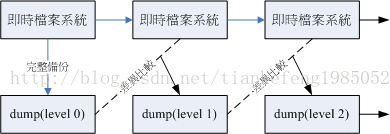
dump等级分为0~9 10个等级,0是完全备份,1是在0的基础上进行增量备份,依次类推
当待备份的数据为单一文件系统
可以利用了level 0~9进行备份,同时可以使用dump完整功能
当待备份的数据只是目录,并非单一文件系统
限制:
所有备份数据必须都在该目录下
仅能使用level 0 进行数据备份
不支持-u参数,即无法创建/etc/dumpdates这个level备份的时间记录文件
语法:dump [-Suvj] [-level] [-f备份文件]待备份数据
dump -W
选项与参数:
-S:仅列出后面的待备份数据需要多少磁盘空间才能够备份完毕
-u:将这次备份记录到/etc/dumpdates文件中
-v:将dump文件过程显示出来
-j:加入bzip2的支持,将数据进行压缩,默认压缩等级2
-level:备份等级0~9
-f:备份文件
-W:列出在/etc/fstab里面的具有dump设置的分区是否有过备份
举例1:备份挂载到/boot文件系统 level -0
[root@localhost ~]# dump -S /boot

16752640

[root@localhost ~]# dump -u -0 -f /root/boot.dump.0 /boot

  DUMP: Date of this level 0 dump: Fri Feb 28 15:05:56 2014

  DUMP: Dumping /dev/sda1 (/boot) to /root/boot.dump.0

  DUMP: Label: /boot

  DUMP: Writing 10 Kilobyte records

  DUMP: mapping (Pass I) [regular files]

  DUMP: mapping (Pass II) [directories]

  DUMP: estimated 16360 blocks.

  DUMP: Volume 1 started with block 1 at: Fri Feb 28 15:05:56 2014

  DUMP: dumping (Pass III) [directories]

  DUMP: dumping (Pass IV) [regular files]

  DUMP: Closing /root/boot.dump.0

  DUMP: Volume 1 completed at: Fri Feb 28 15:05:58 2014

  DUMP: Volume 1 16440 blocks (16.05MB)

  DUMP: Volume 1 took 0:00:02

  DUMP: Volume 1 transfer rate: 8220 kB/s

  DUMP: 16440 blocks (16.05MB) on 1 volume(s)

  DUMP: finished in 2 seconds, throughput 8220 kBytes/sec

  DUMP: Date of this level 0 dump: Fri Feb 28 15:05:56 2014

  DUMP: Date this dump completed:  Fri Feb 28 15:05:58 2014

  DUMP: Average transfer rate: 8220 kB/s

  DUMP: DUMP IS DONE

[root@localhost ~]# cat /etc/dumpdates

/dev/sda1 0 Fri Feb 28 15:05:56 2014 +0800

=>可以看出etc/dumpdates记录着这次备份信息
举例2:查看文件系统备份记录
[root@localhost ~]# dump -W

Last dump(s) done (Dump '>' file systems):

> /dev/sda2     (     /) Last dump: never

> /dev/sda3     ( /home) Last dump: never

  /dev/sda1     ( /boot) Last dump: Level 0, Dat

> /dev/sda6     (/mnt/sda6) Last dump: never

=>可以看出sda1已经进行了level0备份,其他还未备份
举例3:增量备份 level 1
[root@localhost ~]# dd if=/dev/zero of=/boot/bigfile.img bs=1M count=20

20+0 records in

20+0 records out

20971520 bytes (21 MB) copied, 0.320717 seconds, 65.4 MB/s

=>先创建一个20M左右的文件

[root@localhost ~]# dump -u -1 -f /root/boot.dump.1 /boot

  DUMP: Date of this level 1 dump: Fri Feb 28 15:17:51 2014

  DUMP: Date of last level 0 dump: Fri Feb 28 15:05:56 2014

  DUMP: Dumping /dev/sda1 (/boot) to /root/boot.dump.1

  DUMP: Label: /boot

  DUMP: Writing 10 Kilobyte records

  DUMP: mapping (Pass I) [regular files]

  DUMP: mapping (Pass II) [directories]

  DUMP: estimated 20543 blocks.

  DUMP: Volume 1 started with block 1 at: Fri Feb 28 15:17:52 2014

  DUMP: dumping (Pass III) [directories]

  DUMP: dumping (Pass IV) [regular files]

  DUMP: Closing /root/boot.dump.1

  DUMP: Volume 1 completed at: Fri Feb 28 15:17:53 2014

  DUMP: Volume 1 20580 blocks (20.10MB)

  DUMP: Volume 1 took 0:00:01

  DUMP: Volume 1 transfer rate: 20580 kB/s

  DUMP: 20580 blocks (20.10MB) on 1 volume(s)

  DUMP: finished in 1 seconds, throughput 20580 kBytes/sec

  DUMP: Date of this level 1 dump: Fri Feb 28 15:17:51 2014

  DUMP: Date this dump completed:  Fri Feb 28 15:17:53 2014

  DUMP: Average transfer rate: 20580 kB/s

  DUMP: DUMP IS DONE

[root@localhost ~]# cat /etc/dumpdates

/dev/sda1 0 Fri Feb 28 15:05:56 2014 +0800

/dev/sda1 1 Fri Feb 28 15:17:51 2014 +0800

=>这次配备写入备份记录中

[root@localhost ~]# dump -W

Last dump(s) done (Dump '>' file systems):

> /dev/sda2     (     /) Last dump: never

> /dev/sda3     ( /home) Last dump: never

  /dev/sda1     ( /boot) Last dump: Level 1, Date Fri Feb 28 15:17:51 2014

> /dev/sda6     (/mnt/sda6) Last dump: never

[root@localhost ~]# ll /root/boot*

-rw-r--r-- 1 root root 16834560 02-28 15:05 /root/boot.dump.0

-rw-r--r-- 1 root root 21073920 02-28 15:17 /root/ boot.dump.1

=> boot.dump.1大小约为20M,可见是增量备份
举例4:单一目录进行备份
[root@localhost ~]# dump -0 -f /root/etc.dump /etc

  DUMP: Date of this level 0 dump: Fri Feb 28 15:23:39 2014

  DUMP: Dumping /dev/sda2 (/ (dir etc)) to /root/etc.dump

DUMP: Label: /

  DUMP: Writing 10 Kilobyte records

  DUMP: mapping (Pass I) [regular files]

  DUMP: mapping (Pass II) [directories]

  DUMP: estimated 177675 blocks.

  DUMP: Volume 1 started with block 1 at: Fri Feb 28 15:23:41 2014

  DUMP: dumping (Pass III) [directories]

  DUMP: dumping (Pass IV) [regular files]

  DUMP: Closing /root/etc.dump

  DUMP: Volume 1 completed at: Fri Feb 28 15:24:23 2014

  DUMP: Volume 1 188600 blocks (184.18MB)

  DUMP: Volume 1 took 0:00:42

  DUMP: Volume 1 transfer rate: 4490 kB/s

  DUMP: 188600 blocks (184.18MB) on 1 volume(s)

  DUMP: finished in 42 seconds, throughput 4490 kBytes/sec

  DUMP: Date of this level 0 dump: Fri Feb 28 15:23:39 2014

  DUMP: Date this dump completed:  Fri Feb 28 15:24:23 2014

  DUMP: Average transfer rate: 4490 kB/s

  DUMP: DUMP IS DONE

[root@localhost ~]# ll /root/etc.dump

-rw-r--r-- 1 root root 193126400 02-28 15:24 /root/etc.dump
restore还原
dump备份的文件由restore进行还原
语法:
查看dump文件:restore –t [-f dumpfile] [-h]
比较dump与实际文件:restore –C [-f dumpfile] –D挂载点
进入互动模式(还原单个文件):restore –i [-f dumpfile]
还原整个文件系统:restore –r [-f dumpfile]
选项与参数:
相关的各种模式,各种模式无法混用.例如不可以写 -tC
-t:此模式用在察看 dump起来的备份档中含有什么重要数据!类似 tar -t功能;
-C:此模式可以将 dump内的数据拿出来跟实际的文件系统做比较,最终会列出[在 dump文件内有记录的,且目前文件系统不一样]的文件;
-i:进入互动模式,可以仅还原部分文件,用在 dump目录时的还原
-r:将整个 filesystem还原的一种模式,用在还原针对文件系统的 dump备份;
其他较常用到的选项功能:
-h:察看完整备份数据中的 inode与文件系统 label等信息
-f:后面就接你要处理的那个 dump文件
-D:与 -C进行搭配,可以查出后面接的挂载点与 dump内有不同的文件
举例1:查看dump备份文件
[root@localhost ~]# restore -t -f /root/boot.dump.0

Dump   date: Fri Feb 28 15:05:56 2014

Dumped from: the epoch

Level 0 dump of /boot on localhost.localdomain:/dev/sda1

Label: /boot

         2      .

        11      ./lost+found

     10041      ./grub

     10059      ./grub/grub.conf

…….

        14      ./System.map-2.6.18-371.el5

        15      ./config-2.6.18-371.el5

        16      ./symvers-2.6.18-371.el5.gz

        17      ./vmlinuz-2.6.18-371.el5
举例2:比较文件差异
[root@localhost ~]# mv /boot/message /boot/message-back

[root@localhost ~]# restore -C -f /root/boot.dump.0 -D /boot

Dump   date: Fri Feb 28 15:05:56 2014

Dumped from: the epoch

Level 0 dump of /boot on localhost.localdomain:/dev/sda1

Label: /boot

filesys = /boot

restore: unable to stat ./message: No such file or directory

Some files were modified!  1 compare errors
举例3:还原整个文件系统
[root@localhost ~]# dd if=/dev/zero of=/home/newfile bs=1M count=200

200+0 records in

200+0 records out

209715200 bytes (210 MB) copied, 3.83857 seconds, 54.6 MB/s

[root@localhost ~]# mkfs -t ext3 /home/newfile

mke2fs 1.39 (29-May-2006)

/home/newfile is not a block special device.

……

180 days, whichever comes first.  Use tune2fs -c or -i to override.

[root@localhost ~]# mount -o loop /home/newfile /mnt

[root@localhost ~]# df -h

文件系统              容量  已用 可用 已用% 挂载点

/dev/sda2             9.5G  4.4G  4.7G  49% /

/dev/sda3             4.8G  339M  4.2G   8% /home

/dev/sda1              99M   42M   53M  45% /boot

tmpfs                1014M     0 1014M   0% /dev/shm

/home/newfile         194M  5.6M  179M   4% /mnt

=>创建一个文件挂载到mnt下

[root@localhost ~]# cd /mnt

[root@localhost mnt]# restore -r -f /root/boot.dump.0

restore: ./lost+found: File exists

[root@localhost mnt]# ll

总计 16149

-rw-r--r-- 1 root root    70400 10-01 21:10 config-2.6.18-371.el5

drwxr-xr-x 2 root root     1024 02-18 09:51 grub

-rw------- 1 root root  2748313 02-18 09:46 initrd-2.6.18-371.el5.img

drwx------ 2 root root    12288 02-14 18:00 lost+found

-rw-r--r-- 1 root root    80032 2009-03-13 message

-rw------- 1 root root    27676 02-28 15:54 restoresymtable

-rw-r--r-- 1 root root   117436 10-01 21:10 symvers-2.6.18-371.el5.gz

-rw-r--r-- 1 root root   996296 10-01 21:10 System.map-2.6.18-371.el5

-rw-r--r-- 1 root root 10485760 02-28 13:25 testing.img

-rw-r--r-- 1 root root  1912148 10-01 21:10 vmlinuz-2.6.18-371.el5

=>还原level 0备份

[root@localhost mnt]# restore -r -f /root/boot.dump.1

[root@localhost mnt]# ll

总计 36711

-rw-r--r-- 1 root root 20971520 02-28 15:17 bigfile.img

-rw-r--r-- 1 root root    70400 10-01 21:10 config-2.6.18-371.el5

drwxr-xr-x 2 root root     1024 02-18 09:51 grub

-rw------- 1 root root  2748313 02-18 09:46 initrd-2.6.18-371.el5.img

drwx------ 2 root root    12288 02-14 18:00 lost+found

-rw-r--r-- 1 root root    80032 2009-03-13 message

-

------- 1 root root    27724 02-28 15:55 restoresymtable

-rw-r--r-- 1 root root   117436 10-01 21:10 symvers-2.6.18-371.el5.gz

-rw-r--r-- 1 root root   996296 10-01 21:10 System.map-2.6.18-371.el5

-rw-r--r-- 1 root root 10485760 02-28 13:25 testing.img

-rw-r--r-- 1 root root  1912148 10-01 21:10 vmlinuz-2.6.18-371.el5

=>还原level 1备份可以看到多了bigfile.img这个增量文件
dd
dd功能不仅限于创建文件,更多功能在于“备份”,cp,dump只是简单的文件数据拷贝,而dd可以读取设备的所有内容,比如superblock ,boot sector,mete data等
语法:dd if=”input file” of=”output file” bs=”block” count=”number”
选项与参数:
if:输入文件,也可以是设备
of:输出文件,也可以是设备
bs:每个block的大小,默认是512K
count:block数量
举例1.文件备份
[root@localhost ~]# dd if=~/.bashrc of=/tmp/bashrc

0+1 records in

0+1 records out

176 bytes (176 B) copied, 7.3142e-05 seconds, 2.4 MB/s

[root@localhost ~]# ll /tmp/bashrc

-rw-r--r-- 1 root root 176 02-28 16:17 /tmp/bashrc
举例2:文件系统备份
[root@localhost ~]# dd if=/dev/sda1 of=/tmp/boot.dd bs=1M

101+1 records in

101+1 records out

106896384 bytes (107 MB) copied, 9.60492 seconds, 11.1 MB/s

[root@localhost ~]# ll /tmp/boot.dd

-rw-r--r-- 1 root root 106896384 02-28 16:19 /tmp/boot.dd
举例3:文件系统还原
[root@localhost ~]# dd if=/tmp/boot.dd of=/dev/sda1 bs=1M
举例4.文件系统完全复制
Dump备份时,我们需要先用Dump将文件系统备份,然后创建新的文件系统,格式化,再将备份文件还原到新的文件系统。
使用dd可以不用格式化,就可以完全复制一个文件系统,因为dd将uperblock ,boot sector,mete data等信息都进行复制,格式化要做的不也正是这些事吗
[root@bogon ~]# fdisk /dev/sda

…….

Command (m for help): n

……

Command (m for help): P

……

   Device Boot      Start         End      Blocks   Id  System

/dev/sda1   *           1          13      104391   83  Linux

……

/dev/sda7            2116        2134      152586   83  Linux

Command (m for help): w

……

[root@bogon ~]# partprobe

=>创建完分区

[root@bogon ~]# dd if=/dev/sda1 of=/dev/sda7

208782+0 records in

208782+0 records out

106896384 bytes (107 MB) copied, 23.5363 seconds, 4.5 MB/s

[root@bogon ~]# mount /dev/sda7 /mnt

[root@bogon ~]# ll /mnt

总计 5838

-rw-r--r-- 1 root root   70400 10-01 21:10 config-2.6.18-371.el5

drwxr-xr-x 2 root root    1024 02-18 20:26 grub

-rw------- 1 root root 2748762 02-27 19:45 initrd-2.6.18-371.el5.img

drwx------ 2 root root   12288 02-19 03:59 lost+found

-rw-r--r-- 1 root root   80032 2009-03-13 message

-rw-r--r-- 1 root root  117436 10-01 21:10 symvers-2.6.18-371.el5.gz

-rw-r--r-- 1 root root  996296 10-01 21:10 System.map-2.6.18-371.el5

-rw-r--r-- 1 root root 1912148 10-01 21:10 vmlinuz-2.6.18-371.el5

=> /mnt和/boot下的内容一样 并且没有进行格式化
mkisofs(镜像文件备份)
语法:mkisofs [-o镜像文件] [-rv] [-m file]待备份的文件 [-V vol] –graft-point isodir=sysdir
选项与参数:
-o:镜像文件
-r:产生UNIX/Linux支持的文件数据
-v:显示构建ISO的过程
-m:排除的文件
-V:卷标名称
-graft-point:目录对照名称,如果不进行指定所以的信息都会保持在根目录
举例:
[root@bogon ~]# mkisofs -o /tmp/system.img -r -m /home/lost+found -V 'tkf_file' -graft-point /root=/root /home=/home /etc=/etc

[root@bogon ~]# mount -o loop /tmp/system.img /mnt

[root@bogon ~]# ll /mnt

dr-xr-xr-x 114 root root 34816 03-01 14:31 etc

dr-xr-xr-x   3 root root  2048 03-01 14:31 home

dr-xr-xr-x  18 root root  4096 03-01 14:31 root
CentOS文件备份|还原的更多相关文章
- linux centos 恢复 还原 备份 Snapper 快照说明
为什么要使用Snapper快照? 我们可以想像以下场景: 1. 场景一:系统发生意外宕机,工程师无法快速定位问题,业务受到中断,客户十分不满意. 2. 场景二:项目会议上,就是否升级某软件到最新版本, ...
- Centos 备份 还原
備份: tar cvpzf backup.tgz / --exclude=/backup.tgz --exclude=/mnt 記得一定要排除備份文件本身哦! 還原: tar xvpfz backup ...
- 《SQL Server企业级平台管理实践》读书笔记——关于SQL Server数据库的还原方式
本篇是继上篇的备份方式,本篇介绍的是还原方案,在SQL Server在2005以上现有的还原方案一般分为以下4个级别的数据还原: 1.数据库完整还原级别: 还原和恢复整个数据库.数据库在还原和恢复操作 ...
- sql server 备份与恢复系列六 文件组备份与还原
一. 概述 文件备份是指备份一个或多个文件或文件组中的所有数据.使用文件备份能够只还原损坏的文件,而不用还原数据库的其余部份,从而加快恢复速度.例如,如果数据库由位于不同磁盘上的若干文件组成,在其中一 ...
- 备份和还原 Linux 上的 SQL Server 数据库
备份数据库 在下面的示例sqlcmd连接到本地 SQL Server 实例,并采用完整备份的名为的用户数据库demodb. sqlcmd -S localhost -U SA -Q "BAC ...
- SQL Server中的高可用性(2)----文件与文件组
在谈到SQL Server的高可用性之前,我们首先要谈一谈单实例的高可用性.在单实例的高可用性中,不可忽略的就是文件和文件组的高可用性.SQL Server允许在某些文件损坏或离线的情况下,允 ...
- 选择一个利于SEO的空间
大家好.今天蜗牛将给大家分享怎么选择一个利于SEO的站点空间. 一.什么是站点空间? 站点空间,是用来存你的站点的HTML,.图片.文件等的一个远程硬盘空间(就像你的电脑里面的空间一回事儿).依据不同 ...
- Elasitcsearch7.X集群/索引备份与恢复实战
文章转载自:https://mp.weixin.qq.com/s/_0RlojDsE30CeDSyLNP44w 1.问题引出 ES中文社区中,有如下问题: 问题1:存储数据,data目录从一个机器直接 ...
- mysql通过centos本地命令行还原数据库出现乱码问题
将sql文件上传到centos系统中,还原mysql数据库,发现是乱码 mysql -h10.11.8.62 -uroot -p dbtest </data/dbsql/dbtest.sql 数 ...
- centos中yum命令删除还原的补救方法介绍
前言 yum,是Yellow dog Updater Modified的简称,起初是由yellow dog这一发行版的开发者Terra Soft研发,用python写成,那时还叫做yup(yellow ...
随机推荐
- Tomcat8.5简介
1. Tomcat简介[1] Apache Tomcat是Servlet/JSP的容器.Tomcat8.5 实现了由 JCP 组织 (Java Community Process) 制定的Servle ...
- jQuery 框架
jQuery 框架 目录 jQuery 框架 一. 概述 二. jQuery 安装引用 2.1 安装 2.2 本地导入使用 2.3 jQuery CDN引入 三. jQuery基本语法 四. 查找标签 ...
- Zabbix6.0使用教程 (四)—zabbix6.0从源代码安装
接上篇zabbix部署安装前置要求,本期我们将先讲讲如何从源代码安装zabbix6.0,还在为如何安装使用zabbix的小伙伴可以仔细看看. 一. 安装Zabbix守护进程 1 下载源代码压缩包 前往 ...
- vscode 切换页签快捷键 自定义 Ctrl+H Ctrl+L 左右切换
今天需要整理写资料,需要在多个页签之间切换,发现自定义了快捷. 好久不用这个快捷键,都快忘了. vscode 切换页签快捷键 自定义 Ctrl+H Ctrl+L 左右切换
- 用python生成正玄波信号源码解析
一 前记 项目需要生成不同频点的正玄波信号,没找到现成的软件,只能自己写一个了.顺便温习一下python. 二 源码解析: #!/usr/bin/python import numpy as np f ...
- C#中的For与Foreach循环:一场性能对话与实战解析
引言 在C#编程实践中,选择适当的循环结构对程序性能至关重要,尤其是在处理大量数据或追求极致运行效率时.本文将深入探讨C#中的两种主要迭代机制--传统的for循环和基于集合迭代器的foreach循环之 ...
- C++ malloc、calloc、realloc
1. malloc 函数原型: extern void *malloc(unsigned int num_bytes); 如果分配成功:则返回指向被分配内存空间的指针,不然返回指针NULL .同时,当 ...
- Android 经典笔记之七:CountDownTimer解读
CountDownTimer(倒计时计数器) 1.1 介绍 1.2 参数 1.3 公共方法 1.4 使用方法 1.5 源码分析 **0.本人写的综合案例**[案例](https://github.co ...
- 记录--一行代码修复100vh bug
这里给大家分享我在网上总结出来的一些知识,希望对大家有所帮助 你知道奇怪的移动视口错误(也称为100vh bug)吗?或者如何以正确的方式创建全屏块? 一.100vh bug 什么是移动视口错误? 你 ...
- 【FastDFS】面试官:如何实现文件的大规模分布式存储?(全程实战)
写在前面 在<[FastDFS]小伙伴们说在CentOS 8服务器上搭建FastDFS环境总报错?>一文中,详细的介绍了如何在CentOS 8服务器行搭建FastDFS环境.在生产环境中, ...