
【Lua】ToLua逻辑热更新
1 前言
Lua基础语法 中系统介绍了 Lua 的语法体系,xLua逻辑热更新 中介绍了 xLua 的应用,本文将进一步介绍 Unity3D 中基于 ToLua 实现逻辑热更新。
逻辑热更新是指:在保持程序正常运行的情况下,在后台修改代码逻辑,修改完成并推送到运行主机上,主机无缝接入更新后的代码逻辑。Unity3D 中,基于 Lua 的逻辑热更新方案主要有 ToLua、xLua、uLua、sLua,本文将介绍 ToLua 逻辑热更新方案。
1)热更新的好处
- 不用浪费流量重新下载;
- 不用通过商店审核,版本迭代更加快捷;
- 不用重新安装,用户可以更快体验更新的内容。
2)ToLua 插件下载
3)ToLua 插件导入
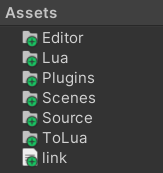
将插件的 Assets 目录下的所有文件拷贝到项目的 Assets 目录下,如下:
4) 生成 Wrap 文件
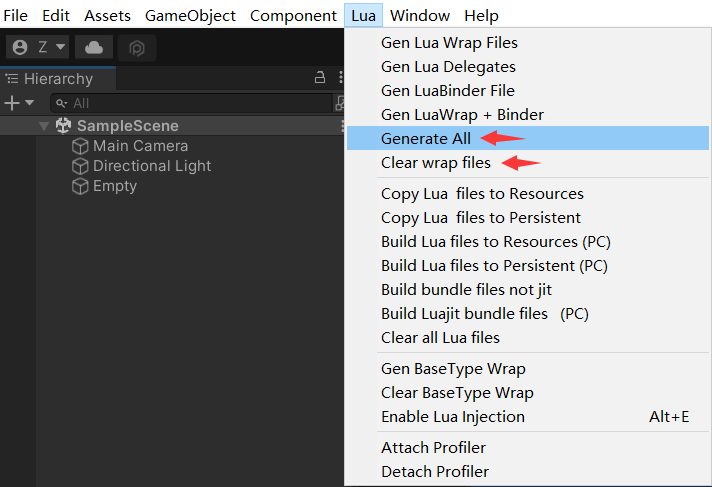
导入插件后,菜单栏会多一个 Lua 窗口,点击 Generate All 会生成一些 Wrap 文件,生成路径见【Assets\Source\Generate】,这些 Wrap 文件是 C# 与 Lua 沟通的桥梁。每次生成文件时,建议先点击下 Clear wrap files,再点击 Generate All。
5)配置 wrap 文件
用户如果想添加新的 wrap 配置,可以在【Assets\Editor\CustomSettings.cs】文件里添加,并且需要在菜单栏里重新点击 Generate All,在【Assets\Source\Generate】中查看是否生成了相应的文件。
6)官方Demo
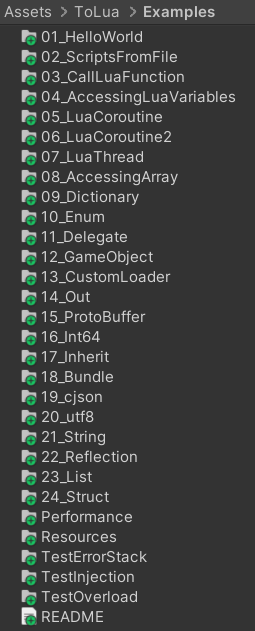
本文基于官方 Demo 讲解 ToLua 的使用。
2 ToLua 应用
2.1 C# 中执行 Lua 代码串
HelloWorld.cs
using UnityEngine;

using LuaInterface;

public class HelloWorld : MonoBehaviour {

    void Awake()

    {

        LuaState lua = new LuaState();

        lua.Start();

        string luaStr = @"print('Hello World')";

        lua.DoString(luaStr, "HelloWorld.cs");

        lua.CheckTop();

        lua.Dispose();

        lua = null;

    }

}
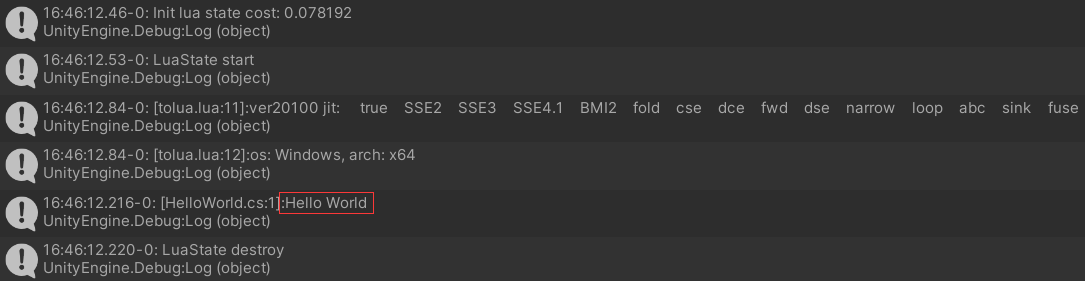
运行如下:
2.2 C# 中调用 Lua 文件
ScriptFromFile.cs
using UnityEngine;

using LuaInterface;

public class ScriptFromFile : MonoBehaviour {

    private LuaState lua = null;

    private void Start() {

        lua = new LuaState();

        lua.Start();

        lua.AddSearchPath(Application.dataPath + "\\Scenes\\02");

        lua.DoFile("LuaScript.lua");

        lua.CheckTop();

    }

    private void OnApplicationQuit() {

        lua.Dispose();

        lua = null;

    }

}
LuaScript.lua
print("Load lua script")
2.3 C# 中调用 Lua 函数
CallLuaFunction.cs
using UnityEngine;

using LuaInterface;

using System;

public class CallLuaFunction : MonoBehaviour {

    private LuaState lua = null;

    private LuaFunction luaFunc = null;

    private void Start() {

        lua = new LuaState();

        lua.Start();

        lua.AddSearchPath(Application.dataPath + "\\Scenes\\03");

        lua.DoFile("LuaScript.lua");

        GetFunc();

        print("Invoke1: " + Invoke1());

        print("Invoke2: " + Invoke2());

        print("PCall: " + PCall());

        print("Delegate: " + Delegate());

        lua.CheckTop();

    }

    private void GetFunc() {

        //luaFunc = lua["luaFunc"] as LuaFunction; // 方式一

        luaFunc = lua.GetFunction("luaFunc"); // 方式二

    }

    private string Invoke1() { // 方法一

        string res = luaFunc.Invoke<int, string>(123456);

        return res;

    }

    private string Invoke2() { // 方法二

        string res = lua.Invoke<int, string>("luaFunc", 123456, true);

        return res;

    }

    private string PCall() { // 方法三

        luaFunc.BeginPCall();

        luaFunc.Push(123456);

        luaFunc.PCall();

        string res = luaFunc.CheckString();

        luaFunc.EndPCall();

        return res;

    }

    // 需要在CustomSettings.cs的customDelegateList里面添加"_DT(typeof(System.Func<int, string>))", 并且重新点击菜单窗口的Lua->Generate All

    private string Delegate() { // 方法四

        DelegateFactory.Init();

        Func<int, string> func = luaFunc.ToDelegate<Func<int, string>>();

        string res = func(123456);

        return res;

    }

    private void Call() { // 方法五(lua中无返回值的函数可以调用此方法)

        luaFunc.Call(123456);

    }

    private void OnApplicationQuit() { // 退出应用回调

        if (luaFunc != null) {

            luaFunc.Dispose();

            luaFunc = null;

        }

        lua.Dispose();

        lua = null;

    }

}
LuaScript.lua
function luaFunc(num)

	return "num=" .. num

end
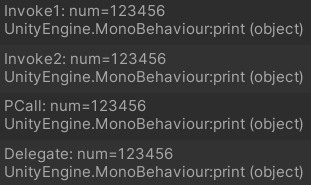
打印如下:
2.4 C# 中调用 Lua 变量
AccessLuaVar.cs
using UnityEngine;

using LuaInterface;

public class AccessLuaVar : MonoBehaviour {

    private LuaState lua = null;

    private void Start() {

        lua = new LuaState();

        lua.Start();

        lua.AddSearchPath(Application.dataPath + "\\Scenes\\04");

        InitValue();

        AccessTab();

        lua.CheckTop();

    }

    private void InitValue() { // 在执行lua脚本前, 给lua脚本中变量赋值

        lua["var"] = 5;

        lua.DoFile("LuaScript.lua");

    }

    private void AccessTab() { // 访问tab

        LuaTable tab = lua.GetTable("tab"); // 获取table

        object[] list = tab.ToArray(); // 遍历table元素

        for (int i = 0; i < list.Length; i++)

        {

            print("tab[" + i + "]=" + list[i]);

        }

        print("a=" + tab["a"]);

        tab["a"] = "yyy";

        print("a=" + tab["a"]);

        LuaTable map = (LuaTable) tab["map"];

        print("name=" + map["name"] + ", age=" + map["age"]);

        map.Dispose();

        tab.Dispose();

    }

    private void OnApplicationQuit() { // 退出应用回调

        lua.Dispose();

        lua = null;

    }

}
LuaScript.lua
print('var='..var)

tab = {1, 2, 3, a = "xxx"}

tab.map = {name = "zhangsan", age = 23}
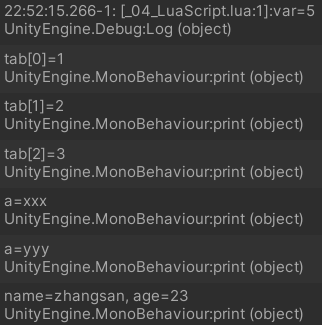
打印如下:
2.5 Lua 中使用协程
1)方法一
TestCoroutine.cs
using UnityEngine;

using LuaInterface;

//方法一和方法二展示的两套协同系统勿交叉使用,此为推荐方案

public class TestCoroutine : MonoBehaviour {

    private LuaState lua = null;

    private LuaLooper looper = null;

    private LuaFunction func = null;

	private void Awake() {

        lua  = new LuaState();

        lua.Start();

        lua.AddSearchPath(Application.dataPath + "\\Scenes\\05");

        LuaBinder.Bind(lua);

        looper = gameObject.AddComponent<LuaLooper>();

        looper.luaState = lua;

        lua.DoFile("LuaScript.lua");

        func = lua.GetFunction("TestCortinue");

        func.Call();

    }

    private void OnApplicationQuit() {

        if (func != null) {

            func.Dispose();

            func = null;

        }

        looper.Destroy();

        lua.Dispose();

        lua = null;

    }

}
LuaScript.lua
function CortinueFunc()

	local www = UnityEngine.WWW("http://www.baidu.com")

	coroutine.www(www)

	local str = tolua.tolstring(www.bytes)

	print(str:sub(1, 128))

	print("current frameCount: "..Time.frameCount)

	coroutine.step() --挂起协程, 下一帧继续执行

	print("yield frameCount: "..Time.frameCount)

end

function TestCortinue()

    coroutine.start(CortinueFunc)

end
打印如下:

2)方法二
TestCoroutine.cs
using UnityEngine;

using LuaInterface;

//方法一和方法二展示的两套协同系统勿交叉使用,类unity原生,大量使用效率低

public class TestCoroutine : LuaClient {

    protected override void OnLoadFinished() {

        base.OnLoadFinished();

        luaState.AddSearchPath(Application.dataPath + "\\Scenes\\05");

        luaState.DoFile("LuaScript.lua");

        LuaFunction func = luaState.GetFunction("TestCortinue");

        func.Call();

        func.Dispose();

    }

    private new void OnApplicationQuit() {

        base.OnApplicationQuit();

    }

}
说明: LuaClient 继承 MonoBehaviour。
LuaScript.lua
function CortinueFunc()

    WaitForSeconds(1)

    print('WaitForSeconds end time: '.. UnityEngine.Time.time)

    WaitForFixedUpdate()

    print('WaitForFixedUpdate end frameCount: '..UnityEngine.Time.frameCount)

    WaitForEndOfFrame()

    print('WaitForEndOfFrame end frameCount: '..UnityEngine.Time.frameCount)

    Yield(null)

    print('yield null end frameCount: '..UnityEngine.Time.frameCount)

    Yield(0)

    print('yield(0) end frameCime: '..UnityEngine.Time.frameCount)

    local www = UnityEngine.WWW('http://www.baidu.com')

    Yield(www)

    print('yield(www) end time: '.. UnityEngine.Time.time)

    local str = tolua.tolstring(www.bytes)

    print(str:sub(1, 128))

end

function TestCortinue()

    StartCoroutine(CortinueFunc)

end
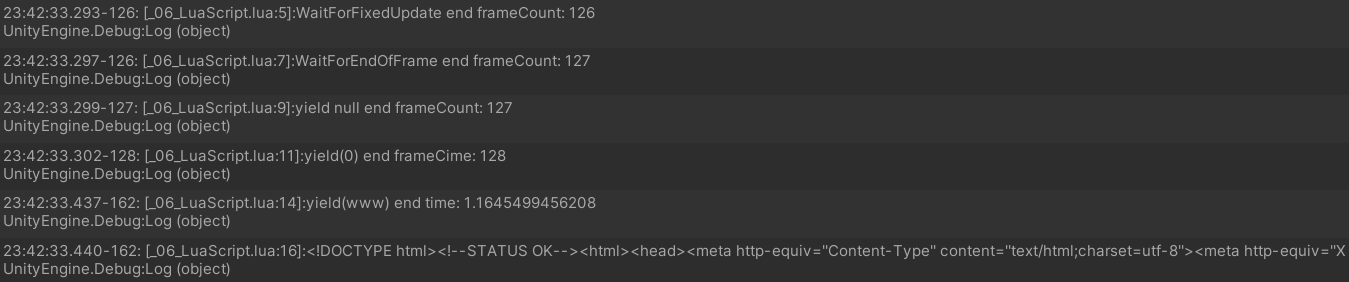
打印如下:
2.6 C# 给 Lua 传递数组
TestArray.cs
using UnityEngine;

using LuaInterface;

public class TestArray : MonoBehaviour {

    private LuaState lua = null;

    private LuaFunction func = null;

	private void Start() {

        lua  = new LuaState();

        lua.Start();

        lua.AddSearchPath(Application.dataPath + "\\Scenes\\06");

        lua.DoFile("LuaScript.lua");

        int[] array = {1, 2, 3};

        func = lua.GetFunction("TestArray");

        Call(array);

        //LazyCall(array);

        lua.CheckTop();

    }

    private void Call(int[] array) { // 方式一

        func.BeginPCall();

        func.Push(array);

        func.PCall();

        double arg1 = func.CheckNumber();

        string arg2 = func.CheckString();

        bool arg3 = func.CheckBoolean();

        func.EndPCall();

        print("arg1: " + arg1 + ", arg2: " + arg2 + ", arg3: " + arg3);

    }

    private void LazyCall(int[] array) { // 方式二

        object[] objs = func.LazyCall((object)array);

        if (objs != null) {

            print("objs[0]: " + objs[0] + ", objs[1]: " + objs[1] + ", objs[2]: " + objs[2]);

        }

    }

    private void OnApplicationQuit() {

        if (func != null) {

            func.Dispose();

            func = null;

        }

        lua.Dispose();

        lua = null;

    }

}
LuaScript.lua
function TestArray(array)

    local len = array.Length

    --通过下标遍历数组

    for i = 0, len - 1 do

        print('Array: '..tostring(array[i]))

    end

    --通过迭代器遍历数组

    local iter = array:GetEnumerator()

    while iter:MoveNext() do

        print('iter: '..iter.Current)

    end

    --通过表格遍历数组

    local t = array:ToTable()

    for i = 1, #t do

        print('table: '.. tostring(t[i]))

    end

    --二分查找数组元素, 返回元素下标, 若数组中不存在该元素, 返回负数

    local pos = array:BinarySearch(3)

    print('array BinarySearch, pos='..pos..', value='..array[pos])

    --查找数组元素下标

    pos = array:IndexOf(4)

    print('array indexof, pos='..pos)

    --返回多值

    return 1, '123', true

end
2.7 C# 给 Lua 传递字典
TestDictionary.cs
using System.Collections.Generic;

using UnityEngine;

using LuaInterface;

public sealed class Account {

    public int id;

    public string name;

    public int sex;

    public Account(int id, string name, int sex) {

        this.id = id;

        this.name = name;

        this.sex = sex;

    }

}

public class TestDictionary : MonoBehaviour {

    private LuaState lua = null;

    private LuaFunction func = null;

    private Dictionary<int, Account> map = new Dictionary<int, Account>();

	private void Awake() {

        InitDirec();

        lua = new LuaState();

        lua.Start();

        LuaBinder.Bind(lua);

        lua.AddSearchPath(Application.dataPath + "\\Scenes\\07");

        lua.DoFile("LuaScript.lua");

        func = lua.GetFunction("TestDict");

        Call();

    }

    private void Call() {

        func.BeginPCall();

        func.Push(map);

        func.PCall();

        func.EndPCall();

    }

    private void InitDirec() {

        map.Add(1, new Account(1, "张三", 0));

        map.Add(2, new Account(2, "李四", 1));

        map.Add(3, new Account(3, "王五", 0));

    }

    private void OnApplicationQuit() {

        if (func != null) {

            func.Dispose();

            func = null;

        }

        lua.Dispose();

        lua = null;

    }

}
LuaScript.lua
function TestDict(map)

    --遍历map的所有value元素

    local iter = map:GetEnumerator()

    while iter:MoveNext() do

        local v = iter.Current.Value

        print('id: '..v.id ..', name: '..v.name..', sex: '..v.sex)

    end

    --遍历map的key集

    local keys = map.Keys

    iter = keys:GetEnumerator()

    print('------------print dictionary keys---------------')

    while iter:MoveNext() do

        print(iter.Current)

    end

    --遍历map的value集

    local values = map.Values

    iter = values:GetEnumerator()

    print('------------print dictionary values---------------')

    while iter:MoveNext() do

        print(iter.Current.name)

    end

    --根据key查找value元素

    local flag, account = map:TryGetValue(1, nil)

    if flag then

        print('TryGetValue result ok: '..account.name)

    end

    print('kick '..map[2].name)

    --移除元素, 并打印剩余的value

    map:Remove(2)

    iter = map:GetEnumerator()

    while iter:MoveNext() do

        local v = iter.Current.Value

        print('id: '..v.id ..' name: '..v.name..' sex: '..v.sex)

    end

end
补充:CustomSettings.cs 里需要配置 Account 如下:
    //在这里添加你要导出注册到lua的类型列表

    public static BindType[] customTypeList = {

        //------------------------为例子导出--------------------------------

        _GT(typeof(Account)),

        _GT(typeof(Dictionary<int, Account>)).SetLibName("AccountMap"),

        _GT(typeof(KeyValuePair<int, Account>)),

        _GT(typeof(Dictionary<int, Account>.KeyCollection)),

        _GT(typeof(Dictionary<int, Account>.ValueCollection)),

        //-------------------------------------------------------------------

        ...

    }
配置后,需要点击 Generate All 生成相关 Wrap 文件,如果出现以下报错:
LuaException: LuaScript.lua:12: field or property MoveNext does not exist
修改 System_Collections_Generic_Dictionary_int_Account_KeyCollectionWrap.cs 和 System_Collections_Generic_Dictionary_int_Account_ValueCollectionWrap.cs 文件,将 ToLua.PushValue(L, o) 替换为 ToLua.Push(L, o),如下:
//ToLua.PushValue(L, o);

ToLua.Push(L, o);
2.8 C# 给 Lua 传递列表
TestList.cs
using UnityEngine;

using LuaInterface;

using System.Collections.Generic;

public class TestList : MonoBehaviour {

    private LuaState lua = null;

    private void Awake() {

        lua = new LuaState();

        lua.Start();

        LuaBinder.Bind(lua);

        lua.AddSearchPath(Application.dataPath + "\\Scenes\\08");

        lua.DoFile("LuaScript.lua");

        DelegateFactory.Init();

        List<string> list = GetList();

        Call(list);

    }

    private void Call(List<string> list) {

        LuaFunction func = lua.GetFunction("TestList");

        func.BeginPCall();

        func.Push(list);

        func.PCall();

        func.EndPCall();

        func.Dispose();

        func = null;

    }

    private List<string> GetList() {

        List<string> list = new List<string>();

        list.Add("zhang");

        list.Add("li");

        list.Add("wang");

        return list;

    }

    private void OnApplicationQuit() {

        lua.Dispose();

        lua = null;

    }

}
LuaScript.lua
function printList(list)

    str = ""

    for i = 0, list.Count - 1 do

        str = str..(list[i])..", "

    end

    print(str)

end

function TestList(list)

    printList(list) --zhang, li, wang,

    list:Add("chen")

    printList(list) --zhang, li, wang, chen,

    list:Sort()

    printList(list) --chen, li, wang, zhang,

    print("index="..list:IndexOf("wang")) --index=2

    list:Remove("li")

    printList(list) --chen, wang, zhang,

end
2.9 Lua 中创建 GameObject 并获取和添加组件
TestGameObject.cs
using UnityEngine;

using LuaInterface;

public class TestGameObject : MonoBehaviour {

    private LuaState lua = null;

	private void Awake() {

        lua = new LuaState();

        lua.Start();

        LuaBinder.Bind(lua);

        lua.AddSearchPath(Application.dataPath + "\\Scenes\\09");

        lua.DoFile("LuaScript.lua");

    }

    private void OnApplicationQuit() {

        lua.Dispose();

        lua = null;

    }

}
LuaScript.lua
local GameObject = UnityEngine.GameObject

local PrimitiveType = UnityEngine.PrimitiveType --需要在CustomSettings.cs里添加"_GT(typeof(PrimitiveType))"

local MeshRenderer = UnityEngine.MeshRenderer

local Color = UnityEngine.Color

local Rigidbody = UnityEngine.Rigidbody

go = GameObject.CreatePrimitive(PrimitiveType.Cube)

go:GetComponent("MeshRenderer").sharedMaterial.color = Color.red

rigidbody = go:AddComponent(typeof(Rigidbody))

rigidbody.mass = 1000
3 Lua Hook MonoBehaviour 生命周期方法
MonoBehaviour 生命周期方法见→MonoBehaviour的生命周期。
TestLife.cs
using UnityEngine;

using LuaInterface;

using System.Collections.Generic;

public class TestLife : MonoBehaviour {

    private LuaState lua = null;

    private Dictionary<string, LuaFunction> func;

    private void Awake() {

        lua = new LuaState();

        lua.Start();

        LuaBinder.Bind(lua);

        lua.AddSearchPath(Application.dataPath + "\\Scenes\\10");

        lua.DoFile("LuaScript.lua");

        GetFunc();

        CallFunc("awake");

    }

    private void OnEnable() {

        CallFunc("onEnable");

    }

    private void Start() {

        CallFunc("start");

    }

    private void Update() {

        CallFunc("update");

    }

    private void OnDisable() {

        CallFunc("onDisable");

    }

    private void OnDestroy() {

        CallFunc("onDestroy");

    }

    private void GetFunc() {

        func = new Dictionary<string, LuaFunction>();

        AddFunc("awake");

        AddFunc("onEnable");

        AddFunc("start");

        AddFunc("update");

        AddFunc("onDisable");

        AddFunc("onDestroy");

    }

    private void AddFunc(string funcName) {

        LuaFunction fun = lua.GetFunction(funcName);

        if (fun != null) {

            func.Add(funcName, fun);

        }

    }

    private void CallFunc(string funcName) {

        if (func.ContainsKey(funcName)) {

            LuaFunction fun = func[funcName];

            fun.Call();

        }

    }

    private void OnApplicationQuit() {

        foreach(var fun in func.Values)

        {

            fun.Dispose();

        }

        func.Clear();

        func = null;

        lua.Dispose();

        lua = null;

    }

}
LuaScript.lua
function awake()

    print("awake")

end

function onEnable()

    print("onEnable")

end

function start()

    print("start")

end

function update()

    print("update")

end

function onDisable()

    print("onDisable")

end

function onDestroy()

    print("onDestroy")

end
声明:本文转自【Lua】ToLua逻辑热更新
【Lua】ToLua逻辑热更新的更多相关文章
- Unity3D逻辑热更新,第二代舒爽解决方案,L#使用简介
热更新 天下武功,无坚不破,唯快不破 热更新就是为了更快的把内容推到用户手中. 之前,我设计了C#Light,经过半年多的持续修补,勉强可用,磕磕绊绊.感谢那些,试过,骂过,用过的朋友,在你们的陪伴下 ...
- C#Light Unity逻辑热更新解决方案0.20 发布
之前一直是Beta,这次已经实际运用到项目中间了,去掉beta状态 在项目中使用面对一些新的问题,还有以前没注意的bug. 更新列表 一.增加类中类的支持 二.增加对foreach的支持,同C#语法 ...
- Unity逻辑热更新
http://www.xuanyusong.com/archives/3075 http://www.unitymanual.com/thread-36503-1-1.html http://www. ...
- 腾讯开源手游热更新方案,Unity3D下的Lua编程
原文:http://www.sohu.com/a/123334175_355140 作者|车雄生 编辑|木环 腾讯最近在开源方面的动作不断:先是微信跨平台基础组件Mars宣布开源,腾讯手游又于近期开源 ...
- (原创)cocos lua 热更新从零开始(一)最简单demo
开发环境:WIN7 + cocos2dx 3.10 lua版本 0.学习这篇内容的基础是你要会创建并运行一个cocos lua项目 1.热更新的思想所谓的热更新,就是在线更新代码和资源.热更新的过程首 ...
- 手游热更新方案--Unity3D下的CsToLua技术
WeTest 导读 CsToLua工具将客户端 C#源码自动转换为Lua,实现热更新,本文以麻将项目为例介绍客户端技术细节. 麻将项目架构 其中ChinaMahjong-CSLua为C#工程,实现麻将 ...
- Unity3D热更新之LuaFramework篇[10]--总结篇
背景 19年年初的时候,进到一家新单位,公司正准备将现有的游戏做成支持热更的版本.于是寻找热更方案的任务就落在了我头上. 经过搜索了解,能做Unity热更的方案是有好几种,但是要么不够成熟,要么不支持 ...
- 热更新 && 增量更新
Unity中SLua.Tolua.XLua和ILRuntime效率评测 http://blog.csdn.net/u011467512/article/details/72716376 如何阅读lua ...
- Unity 热更新XLua
什么是冷更新 开发者将测试好的代码,发布到应用商店的审核平台,平台方会进行稳定性及性能 测试.测试成功后,用户即可在AppStore看到应用的更新信息,用户点击应用更 新后,需要先关闭应用,再进行更新 ...
- Unity3D热更新全书-何谓热更新,为何热更新,如何热更新
首先来赞叹一下中文,何谓为何如何,写完才发现这三个词是如此的有规律. 为何赞叹中文?因为这是一篇针对新手程序员的文字,是一节语文课. 然后来做一下说文解字,也就是 何谓热更新 热更新,每个程序员一听就 ...
随机推荐
- bootstrap : 响应式导航
<!DOCTYPE html> <html lang="en"> <head> <meta charset="utf-8&quo ...
- [转帖]060-轻量级基于curl的seafile上传脚本
https://anjia0532.github.io/2021/04/07/seafile-client-curl/ 这是坚持技术写作计划(含翻译)的第 60 篇,定个小目标 999,每周最少 2 ...
- [转帖]使用 TiFlash
TiDB试用 来源:TiDB 浏览 490 扫码 分享 2021-04-20 20:57:48 使用 TiFlash 按表构建 TiFlash 副本 查看表同步进度 使用 TiDB 读取 TiFla ...
- [转帖]Redis各版本特性汇总
redis4 redis5 redis6 redis6.2 重大特性 1.模块系统 2.PSYNC2 3.LFU淘汰策略 4.混合RDB-AOF持久化 5.LAZY FREE延迟释放 6.MEMORY ...
- [转帖]JVM-工具-jcmd
http://events.jianshu.io/p/011f0e3a39ff 一.jcmd 用法 1.1 基本知识 jcmd 是在 JDK1.7 以后,新增了一个命令行工具. jcmd 是一个多功能 ...
- [转帖] 使用uniq命令求并集交集差集
原创:打码日记(微信公众号ID:codelogs),欢迎分享,转载请保留出处. uniq# uniq是linux上非常有用的一个命令,从字面意思上就能看出来,它可以用来去重. 但使用uniq的前提 ...
- JVM内存学习 2.0
先说一下结果 1. Linux的内存分配是惰性分配的. APP申明了 kernel并不会立即进行初始化和使用. 2. JVM的内存主要分为, 堆区, 非堆区, 以及jvm使用的其他内存. 比如直接内存 ...
- Redis 菜鸟进阶
Redis 菜鸟进阶 背景 最近产品一直要优化性能,加强高可用. 有一个课题是Redis高可用与性能调优. 我这边其实获取到的内容很有限. 最近济南疫情严重,自己锁骨骨折. 然后通勤时间基本上都用来查 ...
- Vue基础系列文章05----babel安装与使用
1.安装babel-node包,运行: 1) npm install --save-dev @babel/core @babel/cli @babel/preset-env @babel/node 2 ...
- chrome谷歌浏览器多开(独立环境 独立cookie)
复制下面代码(路径) "C:\Program Files\Google\Chrome\Application\chrome.exe" --user-data-dir="D ...