
.net通用RSA加密工具类
目前最流行的加密算法莫过于RSA了,以下是我们.net/.net core C#生成环境用的RSA加密工具类,在此分享给大家。
using System;

using System.IO;

using System.Security.Cryptography;

using System.Text;

namespace Common

{

    /// <summary>

    /// RSA加密工具类

    /// </summary>

    public class RSACryptoUtil

    {

        /// <summary>

        /// rsa私钥

        /// </summary>

        private static readonly RSACryptoServiceProvider _privateKeyRsaProvider;

        /// <summary>

        /// rsa公钥

        /// </summary>

        private static readonly RSACryptoServiceProvider _publicKeyRsaProvider;

        static RSACryptoUtil()

        {

            //string root = AppDomain.CurrentDomain.RelativeSearchPath;

            string publicKey = @"MIIBIjANBgkqhkiG9w0BAQEFAAOCAQ8AMIIBCgKCAQEAqc7Mgsct5yaU+Ihxwz28luI/0xJe/uZQPwkMyOJpz+tDi5p9V0JYaYg3SrhIqkNQFluBBSRCnp1NNzfT3qUn93eJ1g9/8wwBloiK+W0s6DuSQj93+T8ZM1+qnnBOUiNrHBmynjR1frN4CJVmdXP1+w3CqLoMaHkw46Vy5UvEf9yedetjcCwIbmjRJzE2Mv3qQz67HbgQIDAQAB";//File.ReadAllText($"公钥位置", Encoding.ASCII);

            string privateKey = @"MIIEpAIBAAKCAQEAqc7Mgsct5yaU+Ihxwz28luI/0xJe/uZQPwkMyOJpz+tDi5p9V0JYaYg3SrhIqkNQFluBBSRCnp1NNzfT3qUn93eJ1g9/8wwBloiK+W0s6DuSQj9picqP0n5bEDxPzfd7kTM1+Cf4SZDpzz7BPDGt2qQc9bE8Cmwj3PSCu0pDo3baIxiz0sWaprYEP/YvLYaJN/5+2mQ0q+yogzSt8WthlTGbMO6IRFre467s/pQbQOzSNPMQsL5lbmtNThUlg3+T8ZM1+qnnBOUiNrHBmynjR1frN4CJVmdXP1+w3CqLoMaHkw46Vy5UvEf9yedetjcCwIbmjRJzE2Mv3qQz67HbgQIDAQABAoIBACWmb5vzk87ztAYjIq46iw0dXy9qnFuCL3q6g/YqlXF/Z+So87wp81pTUKxwv2Fl0CpPyMkQA6Jx2bApf2eN7JMMo4xuY5nOaf9/1zfG1f/3UQZJaB0LPqHsdQrtHN19qn0vzU4m+d2JP0CgYEA5wtsWb17ORg8Dv0ndOHQGIaNzrmKNyaCMz9sph9GKuB7lnASotXfJmk3piyf9D4qj+++j5FKVlnew49SGlUU/SQyD0FvW1w0mAmB5VHTa8qEP5EtB8x2hfrAh0Z1dAqnc6Oo+TWbID1tLR6xfR2UBKiIKI7N6vz543wbjmeQ7uMCgYEAvCYgZ3LBONDioM/VAxHNnvWsJKIRH6Pu1gPfhdt6ATR6z4baZV0SpzjzA2D7hjasIwvT7ZM6HdCjzdgfeDuFnr9xk4q50YIHKyiQeK5J+hyv7doDJaMHpv8rJ9IfJgLl4pvBxxxEu2S4gET/RubvRSFAo2fOkARPl2+gdpTz1UsCgYEAg+ZLlvfLbw7cypnPerSnfjjioA/gThfX4LXmqvfTsQqyw3F70iZS3LTYpi93qZIL7lwp6ABD9gQcXnxlnM7RyqptQbRThE6hX+Kdm3MZRcI5uaiBkqAxUc+TNicNSpAChMv73TmzM7adq1KIdSr7o6UrBixwdiSx7CKgAK4zWY0CgYBTM3T+6hMiAdVGEcH7soLAOZmfNX/nAwJZ56qPsgeYwtFQNi0bx/W4twlXxCpWJpUmhlN4arO3fY0COQFplMC4+6XI/f6/9AUhg7WneENEdC0kPFVJ7ncy1QILgPK/R2bLN9+QIiMOzzJ7nodYnkTOyC6iVARXUWC08er+pU3SUwKBgQDaxEpdU3T92xgAE2Pw3H4gD0rs02xV0nlX6c+KvDHBH5iFdKh82FB5kGrsVG+KrLSN/VH7ZYtGCj0reudbvYA1dIuTsMyc8DnjV7u4sCXQEVbGJVeODuMnEJXvqn5LnXyPRUWy8XyZzZI/Lp7OWXpqgzx0I8YDEcXG0SAqWzhUvQ==";//File.ReadAllText($"私钥位置", Encoding.ASCII);

            if (!string.IsNullOrWhiteSpace(publicKey))

            {

                _publicKeyRsaProvider = CreateRsaProviderFromPublicKey(publicKey);

            }

            if (!string.IsNullOrWhiteSpace(privateKey))

            {

                _privateKeyRsaProvider = CreateRsaProviderFromPrivateKey(privateKey);

            }

        }

        /// <summary>

        /// 解密

        /// </summary>

        /// <param name="cipherText"></param>

        /// <returns></returns>

        public static string Decrypt(string cipherText)

        {

            if (_privateKeyRsaProvider == null)

            {

                LogUtil.Logger.Error("_privateKeyRsaProvider is null");

                return string.Empty;

            }

            try

            {

                return Encoding.UTF8.GetString(_privateKeyRsaProvider.Decrypt(Convert.FromBase64String(cipherText), false));

            }

            catch (Exception ex)

            {

                LogUtil.Logger.Error(ex, $"RSA解密失败:{cipherText}");

                return string.Empty;

            }

        }

        /// <summary>

        /// 加密

        /// </summary>

        /// <param name="text"></param>

        /// <returns></returns>

        public static string Encrypt(string text)

        {

            if (_publicKeyRsaProvider == null)

            {

                LogUtil.Logger.Error("_publicKeyRsaProvider is null");

                return string.Empty;

            }

            return Convert.ToBase64String(_publicKeyRsaProvider.Encrypt(Encoding.UTF8.GetBytes(text), false));

        }

        /// <summary>

        /// 创建rsa公钥对象

        /// </summary>

        /// <param name="publicKeyString"></param>

        /// <returns></returns>

        private static RSACryptoServiceProvider CreateRsaProviderFromPublicKey(string publicKeyString)

        {

            // encoded OID sequence for  PKCS #1 rsaEncryption szOID_RSA_RSA = "1.2.840.113549.1.1.1"

            byte[] SeqOID = { 0x30, 0x0D, 0x06, 0x09, 0x2A, 0x86, 0x48, 0x86, 0xF7, 0x0D, 0x01, 0x01, 0x01, 0x05, 0x00 };

            byte[] x509key = Convert.FromBase64String(publicKeyString);

            // ---------  Set up stream to read the asn.1 encoded SubjectPublicKeyInfo blob  ------

            using (MemoryStream mem = new MemoryStream(x509key))

            {

                using (BinaryReader binr = new BinaryReader(mem))  //wrap Memory Stream with BinaryReader for easy reading

                {

                    ushort twobytes = binr.ReadUInt16();

                    if (twobytes == 0x8130) //data read as little endian order (actual data order for Sequence is 30 81)

                        binr.ReadByte();    //advance 1 byte

                    else if (twobytes == 0x8230)

                        binr.ReadInt16();   //advance 2 bytes

                    else return null;

                    byte[] seq = binr.ReadBytes(15);       //read the Sequence OID

                    if (!CompareBytearrays(seq, SeqOID))    //make sure Sequence for OID is correct

                        return null;

                    twobytes = binr.ReadUInt16();

                    if (twobytes == 0x8103) //data read as little endian order (actual data order for Bit String is 03 81)

                        binr.ReadByte();    //advance 1 byte

                    else if (twobytes == 0x8203) binr.ReadInt16();   //advance 2 bytes

                    else return null;

                    byte bt = binr.ReadByte();

                    if (bt != 0x00)     //expect null byte next

                        return null;

                    twobytes = binr.ReadUInt16();

                    if (twobytes == 0x8130) //data read as little endian order (actual data order for Sequence is 30 81)

                        binr.ReadByte();    //advance 1 byte

                    else if (twobytes == 0x8230) binr.ReadInt16();   //advance 2 bytes

                    else return null;

                    twobytes = binr.ReadUInt16();

                    byte lowbyte = 0x00;

                    byte highbyte = 0x00;

                    if (twobytes == 0x8102) //data read as little endian order (actual data order for Integer is 02 81)

                        lowbyte = binr.ReadByte();  // read next bytes which is bytes in modulus

                    else if (twobytes == 0x8202)

                    {

                        highbyte = binr.ReadByte(); //advance 2 bytes

                        lowbyte = binr.ReadByte();

                    }

                    else return null;

                    byte[] modint = { lowbyte, highbyte, 0x00, 0x00 };   //reverse byte order since asn.1 key uses big endian order

                    int modsize = BitConverter.ToInt32(modint, 0);

                    int firstbyte = binr.PeekChar();

                    if (firstbyte == 0x00)

                    {   //if first byte (highest order) of modulus is zero, don't include it

                        binr.ReadByte();    //skip this null byte

                        modsize -= 1;   //reduce modulus buffer size by 1

                    }

                    byte[] modulus = binr.ReadBytes(modsize);   //read the modulus bytes

                    if (binr.ReadByte() != 0x02)            //expect an Integer for the exponent data

                        return null;

                    int expbytes = binr.ReadByte();        // should only need one byte for actual exponent data (for all useful values)

                    byte[] exponent = binr.ReadBytes(expbytes);

                    // ------- create RSACryptoServiceProvider instance and initialize with public key -----

                    RSACryptoServiceProvider RSA = new RSACryptoServiceProvider();

                    RSAParameters RSAKeyInfo = new RSAParameters();

                    RSAKeyInfo.Modulus = modulus;

                    RSAKeyInfo.Exponent = exponent;

                    RSA.ImportParameters(RSAKeyInfo);

                    return RSA;

                }

            }

        }

        /// <summary>

        /// 创建rsa私钥对象

        /// </summary>

        /// <param name="privateKey"></param>

        /// <returns></returns>

        private static RSACryptoServiceProvider CreateRsaProviderFromPrivateKey(string privateKey)

        {

            var privateKeyBits = Convert.FromBase64String(privateKey);

            var RSA = new RSACryptoServiceProvider();

            var RSAparams = new RSAParameters();

            using (BinaryReader binr = new BinaryReader(new MemoryStream(privateKeyBits)))

            {

                ushort twobytes = binr.ReadUInt16();

                if (twobytes == 0x8130) binr.ReadByte();

                else if (twobytes == 0x8230) binr.ReadInt16();

                else throw new Exception("Unexpected value read binr.ReadUInt16()");

                twobytes = binr.ReadUInt16();

                if (twobytes != 0x0102) throw new Exception("Unexpected version");

                byte bt = binr.ReadByte();

                if (bt != 0x00) throw new Exception("Unexpected value read binr.ReadByte()");

                RSAparams.Modulus = binr.ReadBytes(GetIntegerSize(binr));

                RSAparams.Exponent = binr.ReadBytes(GetIntegerSize(binr));

                RSAparams.D = binr.ReadBytes(GetIntegerSize(binr));

                RSAparams.P = binr.ReadBytes(GetIntegerSize(binr));

                RSAparams.Q = binr.ReadBytes(GetIntegerSize(binr));

                RSAparams.DP = binr.ReadBytes(GetIntegerSize(binr));

                RSAparams.DQ = binr.ReadBytes(GetIntegerSize(binr));

                RSAparams.InverseQ = binr.ReadBytes(GetIntegerSize(binr));

            }

            RSA.ImportParameters(RSAparams);

            return RSA;

        }

        private static int GetIntegerSize(BinaryReader binr)

        {

            int count;

            byte bt = binr.ReadByte();

            if (bt != 0x02) return 0;

            bt = binr.ReadByte();

            if (bt == 0x81) count = binr.ReadByte();

            else if (bt == 0x82)

            {

                byte highbyte = binr.ReadByte();

                byte lowbyte = binr.ReadByte();

                byte[] modint = { lowbyte, highbyte, 0x00, 0x00 };

                count = BitConverter.ToInt32(modint, 0);

            }

            else count = bt;

            while (binr.ReadByte() == 0x00) count -= 1;

            binr.BaseStream.Seek(-1, SeekOrigin.Current);

            return count;

        }

        private static bool CompareBytearrays(byte[] a, byte[] b)

        {

            if (a.Length != b.Length) return false;

            int i = 0;

            foreach (byte c in a)

            {

                if (c != b[i]) return false;

                i++;

            }

            return true;

        }

    }

}
以上公钥私钥不可用,如需生成请使用“支付宝开放平台密钥工具”,官方下载链接:密钥工具下载 - 支付宝文档中心 (alipay.com)
以下是工具使用步骤:
第一步:选择RSA2算法,生成密钥
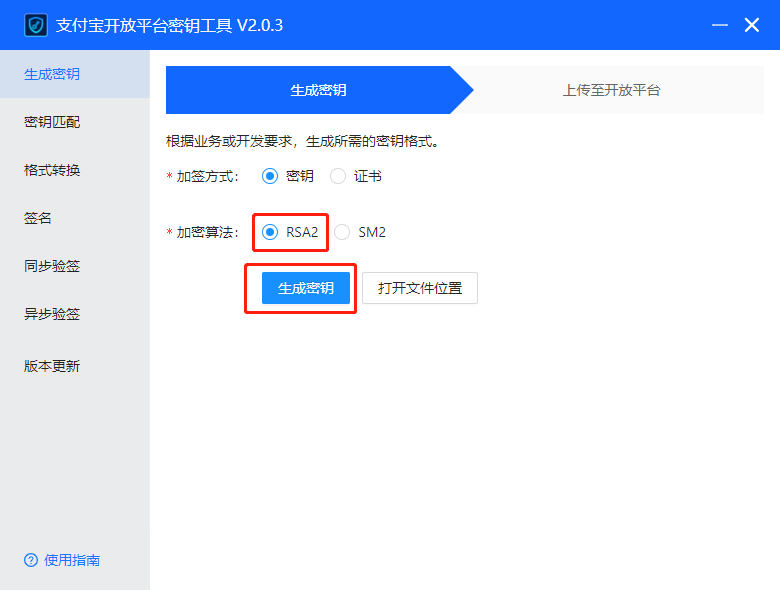
第二步:复制公钥,直接赋值给工具类变量“publicKey”,复制私钥,进行下一步使用

第三步:到“格式转换”栏,把私钥粘贴到“应用私钥”,点击“转换”,我们可以看到下边有“PKCS1”字样,这就是.net环境中RSA算法支持的私钥格式,复制“输出”,赋值给“privateKey”即可。

以上就是工具使用步骤,快来用最安全的对称加密算法加密你的内容吧!
.net通用RSA加密工具类的更多相关文章
- RSA加密工具类(非对称加密算法)
import com.jfinal.log.Log;import org.apache.commons.codec.binary.Base64; import javax.crypto.Cipher; ...
- java 加密工具类(MD5、RSA、AES等加密方式)
1.加密工具类encryption MD5加密 import org.apache.commons.codec.digest.DigestUtils; /** * MD5加密组件 * * @autho ...
- Java中使用最频繁及最通用的Java工具类
在Java中,工具类定义了一组公共方法,Java中使用最频繁及最通用的Java工具类. 一. org.apache.commons.io.IOUtils closeQuietly:关闭一个IO流.so ...
- App开发流程之加密工具类
科技优家 2016-09-08 18:10 从这篇记录开始,记录的都算是干货了,都是一些编程日常的积累. 我建议先将基础的工具加入项目,后续的开发效率会呈指数增长.如果在专注功能开发过程中,才发现缺少 ...
- 加密工具类 - CryptoUtils.java
加密工具类,包含MD5,BASE64,SHA,CRC32的加密与解密方法. 源码如下:(点击下载 - CryptoUtils.java.commons-io-2.4.jar.commons-code ...
- android开发MD5加密工具类(一)
MD5加密工具类整理: package com.gzcivil.utils; import java.io.UnsupportedEncodingException; import java.secu ...
- wemall app商城源码android开发MD5加密工具类
wemall-mobile是基于WeMall的android app商城,只需要在原商城目录下上传接口文件即可完成服务端的配置,客户端可定制修改.本文分享android开发MD5加密工具类主要代码,供 ...
- Java AES 加密工具类
package com.microwisdom.utils; import java.security.NoSuchAlgorithmException; import java.security.S ...
- c# 加密工具类
using System; using System.Collections.Generic; using System.IO; using System.Linq; using System.Sec ...
- java MD5Utils 加密工具类
package com.sicdt.library.core.utils; import java.io.File; import java.io.FileInputStream; import ja ...
随机推荐
- dede网站flash中图片不能正常显示解决办法
专业微信开发 网站制作 就在西安格创网络 联系电话:18009249661 原因:因为服务器或虚拟主机用了CDN加速,导致图片是调用远程缓存,只能显示FLASH控件,但图片不能正常显示,常见于西 ...
- SQL语句获取数据表结构定义,适合导出EXCEL为文档
SELECT 表名 = Case When A.colorder=1 Then D.name Else '' End, 表说明 = Case When A.colorder=1 Then isnull ...
- 使用STM32CubeMX生成ThreadX实时操作系统工程模板
博客主页:链接.转载请注明出处! 由于需要在stm32上使用USB Host CDC-ECM,连接EC20发送数据到服务器,接触到了ThreadX实时操作系统. 在调研过程中,发现stm32官方USB ...
- 2022-02-12:k8s安装es,yaml如何写?
2022-02-12:k8s安装es,yaml如何写? yaml如下: apiVersion: v1 kind: Service metadata: labels: app: elasticsearc ...
- 浅谈如何使用 github.com/yuin/gopher-lua
最近熟悉 go 项目时,发现项目中有用到 github.com/yuin/gopher-lua这个包,之前并没有接触过,特意去看了官方文档和找了些网上的资料,特此记录下. 本次介绍计划分为两篇文章,这 ...
- Python中json.dump()和json.dumps()的区别
一.图解 json.dumps(dict, indent):将Python对象转换成json字符串 json.dump(dict, file_pointer):将Python对象写入json文件 二. ...
- Rocky 9 Linux 平台 vim 9.0 源码包编译安装踩坑记录
目录 vim 9.0 部署准备环境 vim 9.0 源码包正式部署 vim 9.0 初体验 plug-vim 安装插件 在上一篇 <vim入门实战> 篇,我并没有介绍 Linux 平台源码 ...
- react-router-dom 6.0路由详解
React react-router-dom 6.0路由使用 由于react路由版本的更新迭代,记录路由知识点 新react-router-dom地址,点击查看详情. 下面为使用的例子 Install ...
- javascript5 定时器功能
定时器功能: 定时器功能是window对象方法,涉及到 定时器和延时器,具体 看代码 定时器 timer=setInterval(function (){},300) 清除定时器: clearInte ...
- 1.1. Java简介与安装
Java简介 Java是一种广泛使用的计算机编程语言,由James Gosling和他的团队在Sun Microsystems公司开发,于1995年首次发布.Java的设计理念是"一次编写, ...