
【JS 逆向百例】层层嵌套!某加速商城 RSA 加密
声明
本文章中所有内容仅供学习交流,敏感网址、数据接口均已做脱敏处理,严禁用于商业用途和非法用途,否则由此产生的一切后果均与作者无关,若有侵权,请联系我立即删除!
逆向目标
目标:某加速商城登录接口
主页:aHR0cDovL3d3dy4xNXl1bm1hbGwuY29tL3BjL2xvZ2luL2luZGV4
接口:aHR0cDovL3d3dy4xNXl1bm1hbGwuY29tL3BjL2xvZ2luL2NoZWNr
逆向参数:
Cookie:PHPSESSID=g9jp7sfpukg99v03gj69nr9r56
Form Data:
u[password]: 7aad70a547b016a07f2e20bee7b4936111e650aa5c419fafdfb28322......

_csrfToken: 4bea63330c5ccdd37588321d027f4c40129687b0
逆向过程
抓包分析
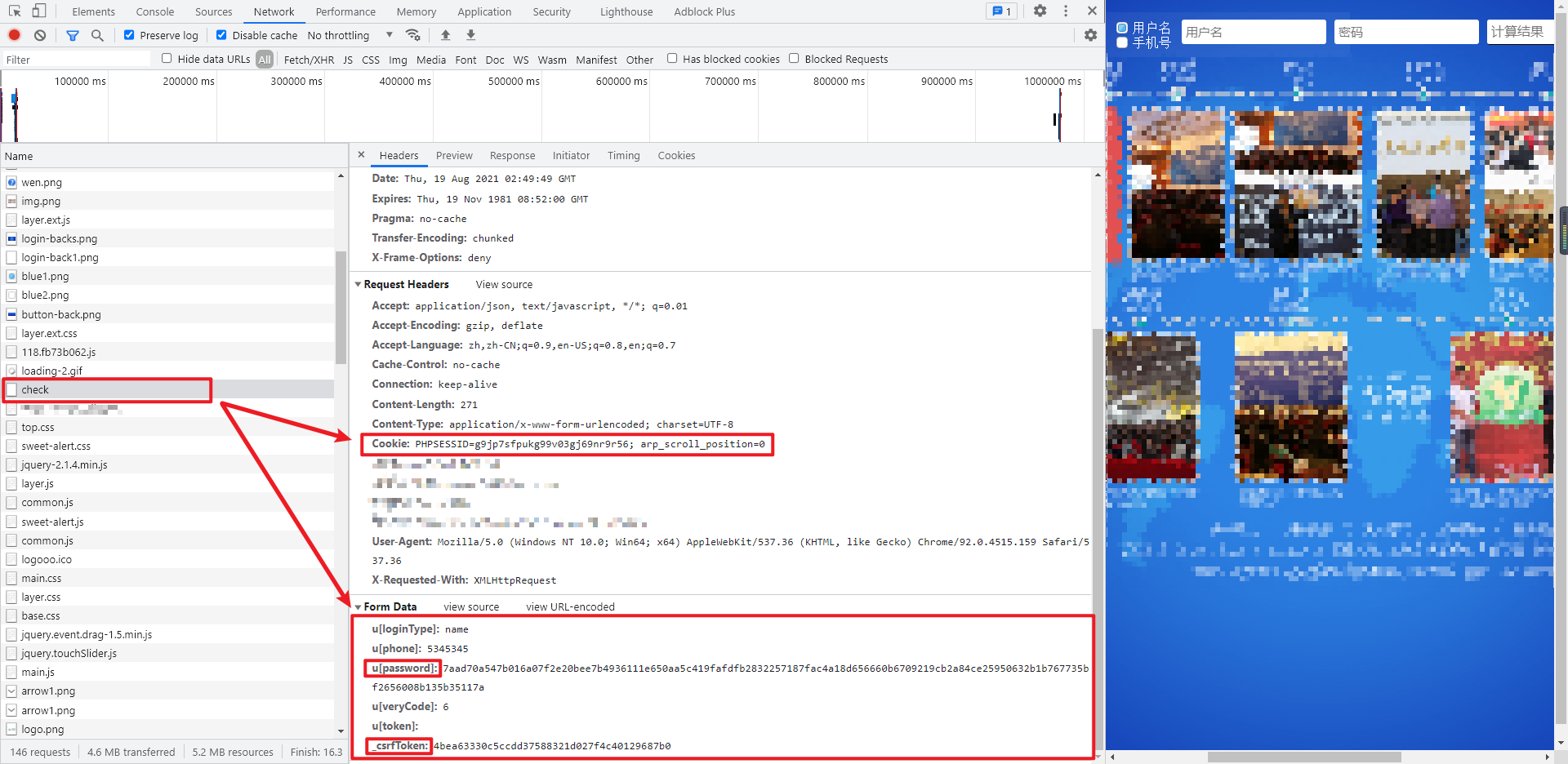
在首页点击登陆,来到登录页面,随便输入一个账号密码登陆,抓包定位到登录接口为 aHR0cDovL3d3dy4xNXl1bm1hbGwuY29tL3BjL2xvZ2luL2NoZWNr ,POST 请求,Form Data 里,密码 u[password] 被加密处理了,此外还有一个 _csrfToken 也是需要我们解决的,cookie 里面有一个 PHPSESSID,经过测试,如果不带此参数,最终的请求也是失败的。
参数逆向
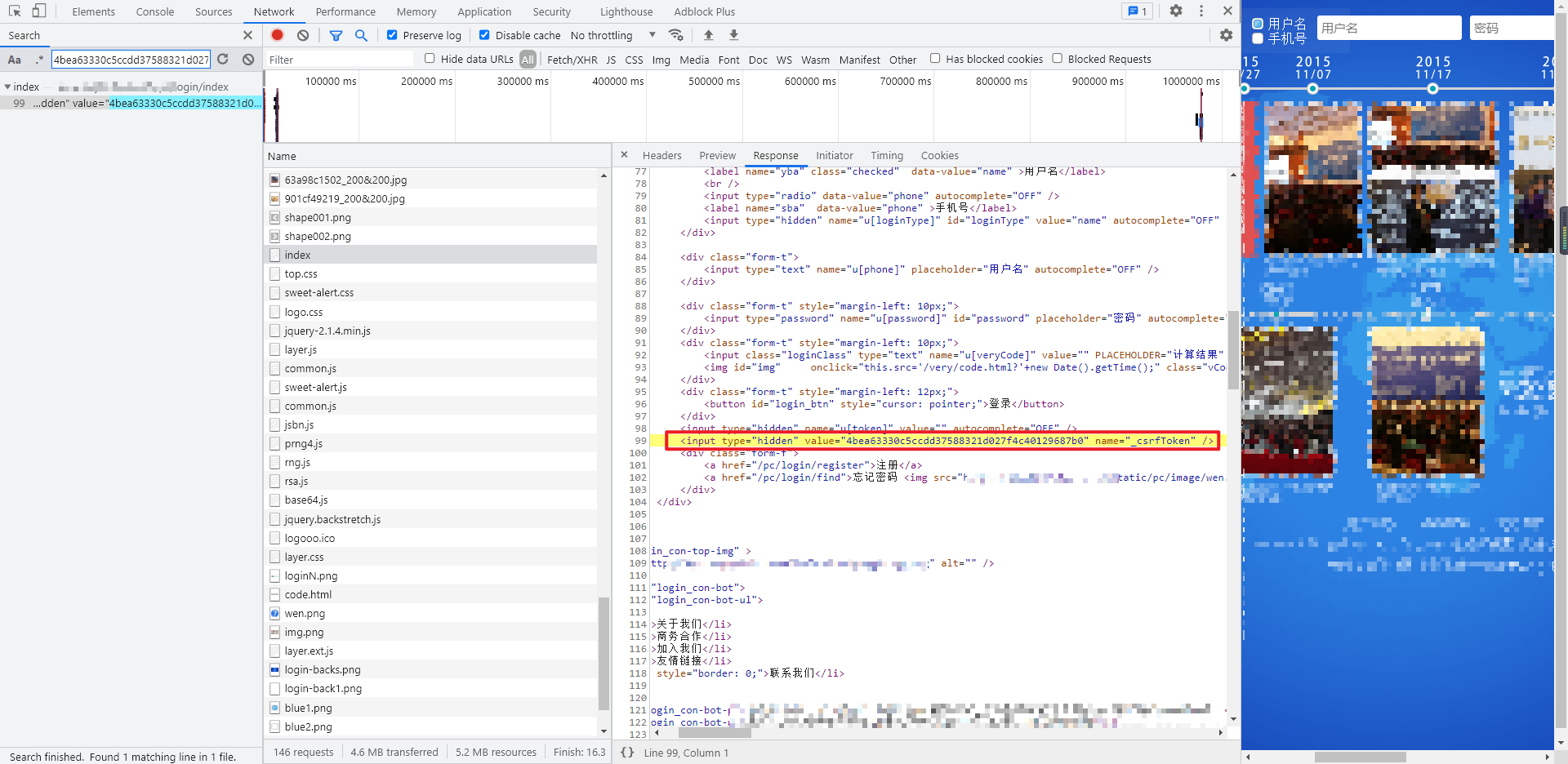
首先看看 _csrfToken,先尝试直接搜索一下它的值,可以发现其实在首页的源码里面就有,直接匹配拿过来即可:
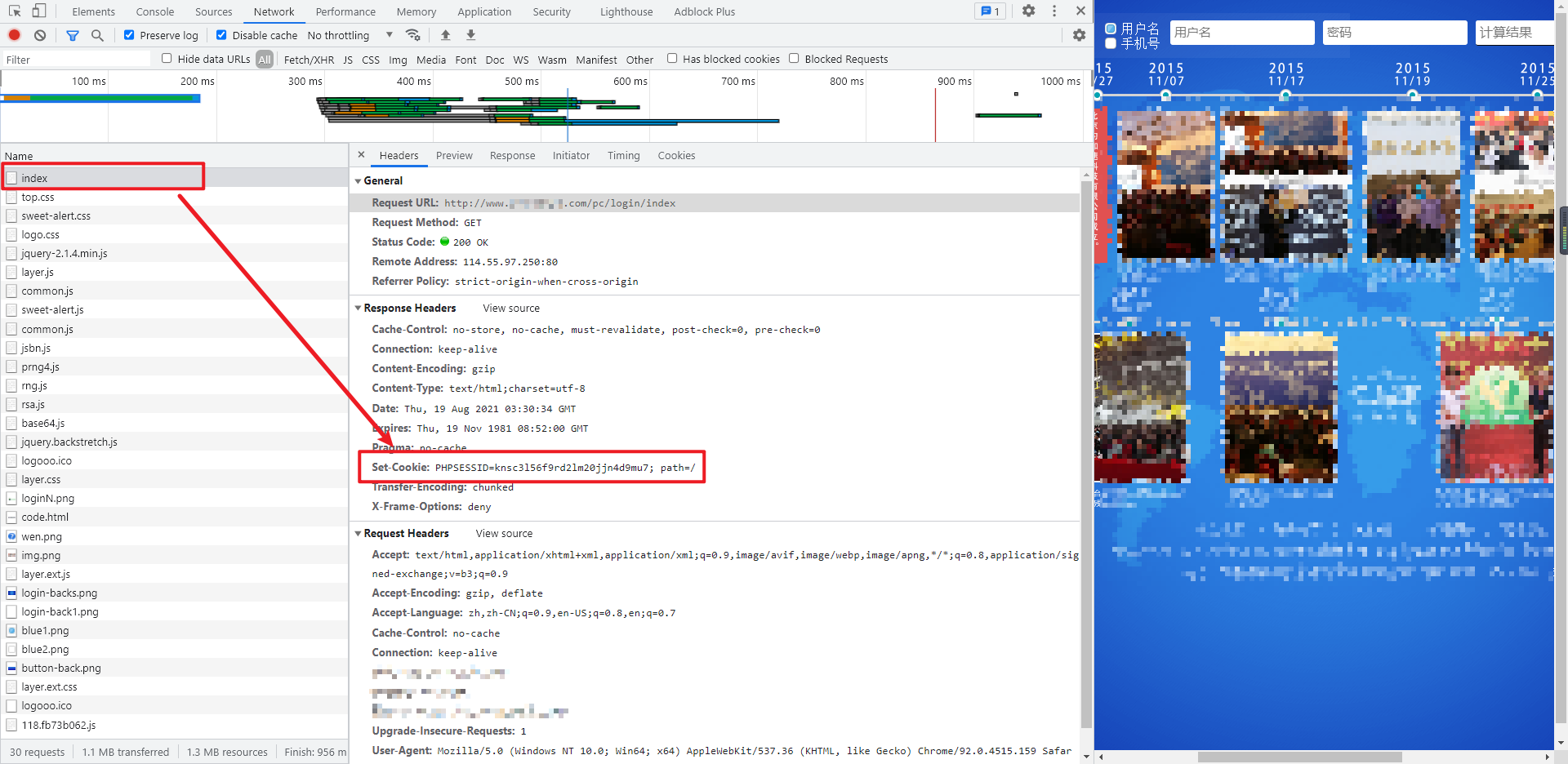
再看一下 cookie 里面的 PHPSESSID,首先想到的,可能是第一次访问页面,Response Headers 返回的 Set-Cookie 得到的,查看第一次请求,确实是的,如果没有的话,需要清除缓存再访问(开发者工具 ——> Application ——> Storage ——> Clear site data)。
最后一个密码参数 u[password],肯定是通过 JS 加密得到的,直接 Ctrl+Shift+F 全局搜索,可以直接在 index 首页找到 RSA 加密的地方,埋下断点进行调试,最后的 res 正是加密后的密码:
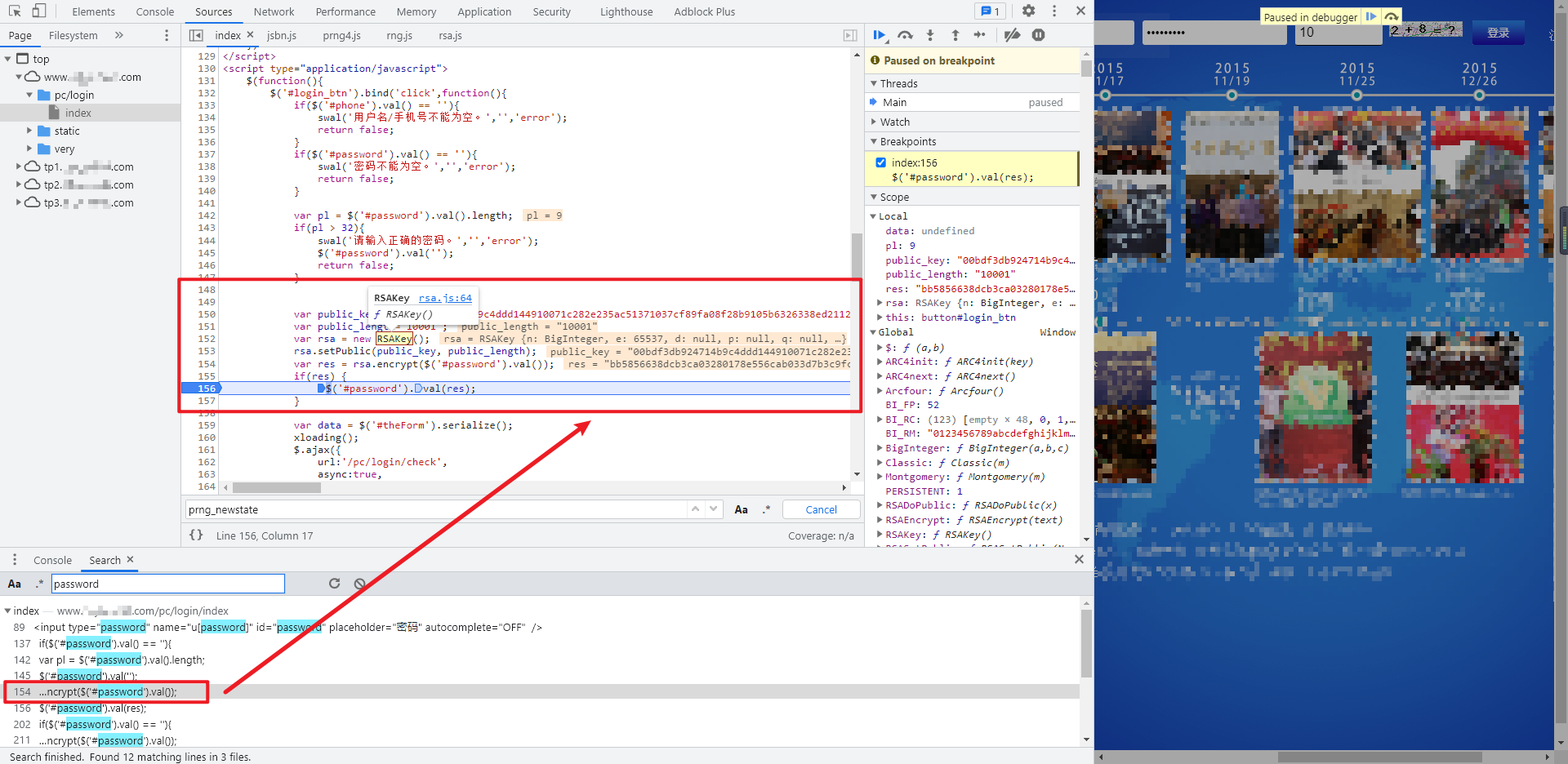
我们将这段关键代码进行改写,封装成一个函数:
function getEncryptedPassword(password) {

    var public_key = "00bdf3db924714b9c4ddd144910071c282e235ac51371037cf89fa08f28b9105b6326338ed211280154c645bf81bae4184c2b52e2b02b0953e7aa8b25a8e212a0b";

    var public_length = "10001";

    var rsa = new RSAKey();

    rsa.setPublic(public_key, public_length);

    return rsa.encrypt(password);

}
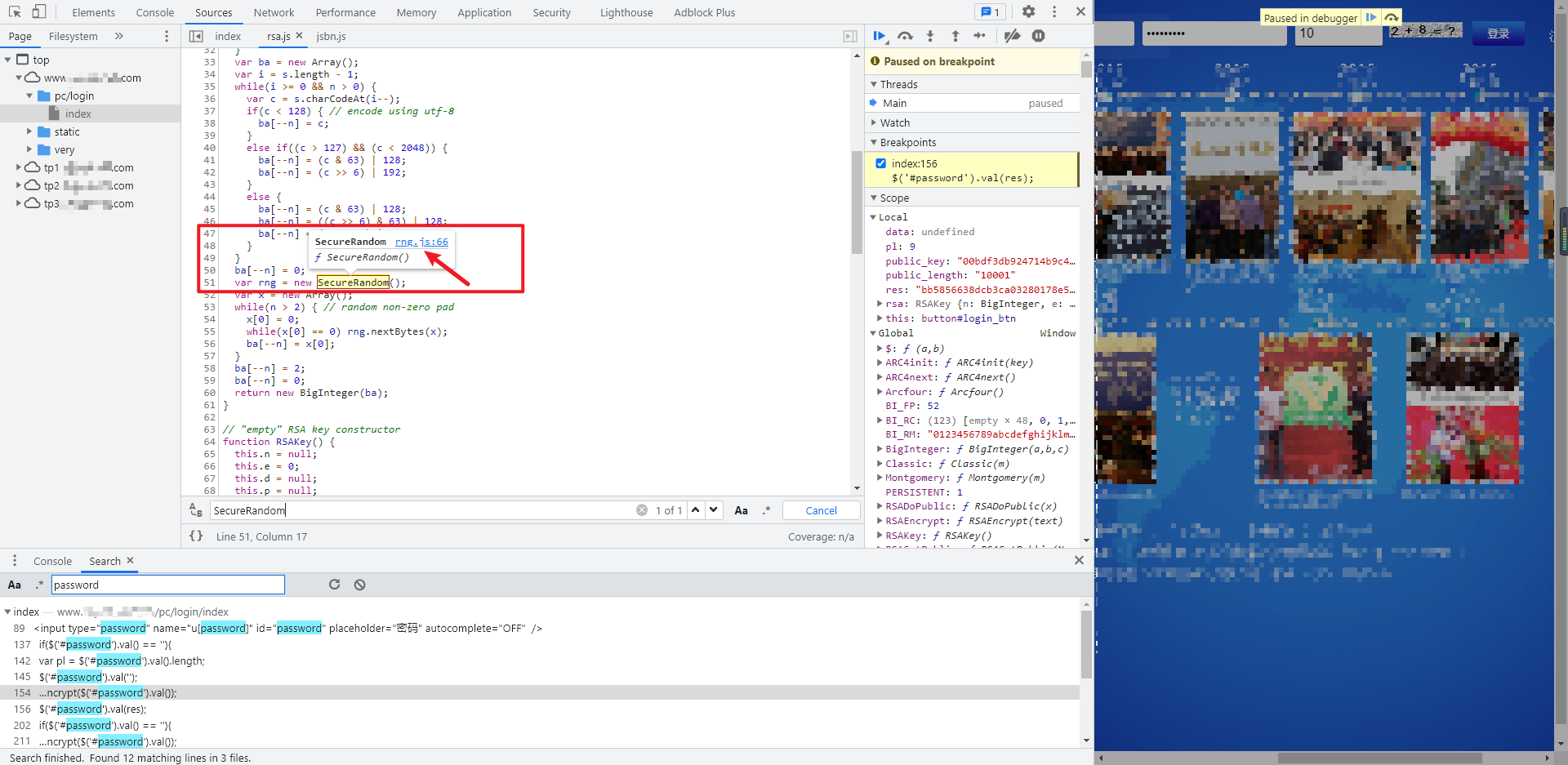
这里主要用到的三个函数 RSAKey()、setPublic()、encrypt(),在开发者工具中,鼠标放到函数上,可以看到这里都是调用的 rsa.js 里面的方法,我们直接将整个文件剥离下来进行本地调试:
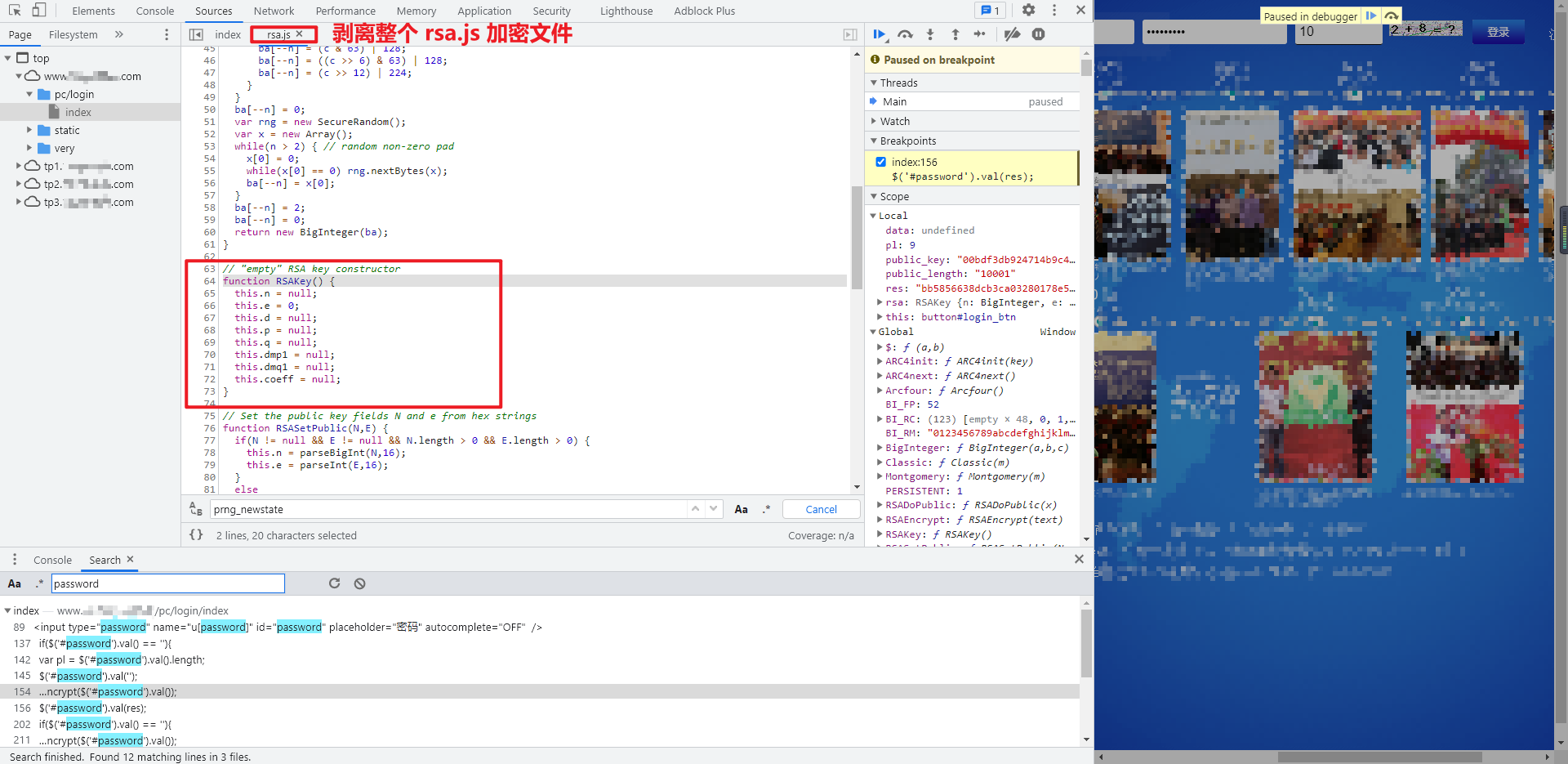
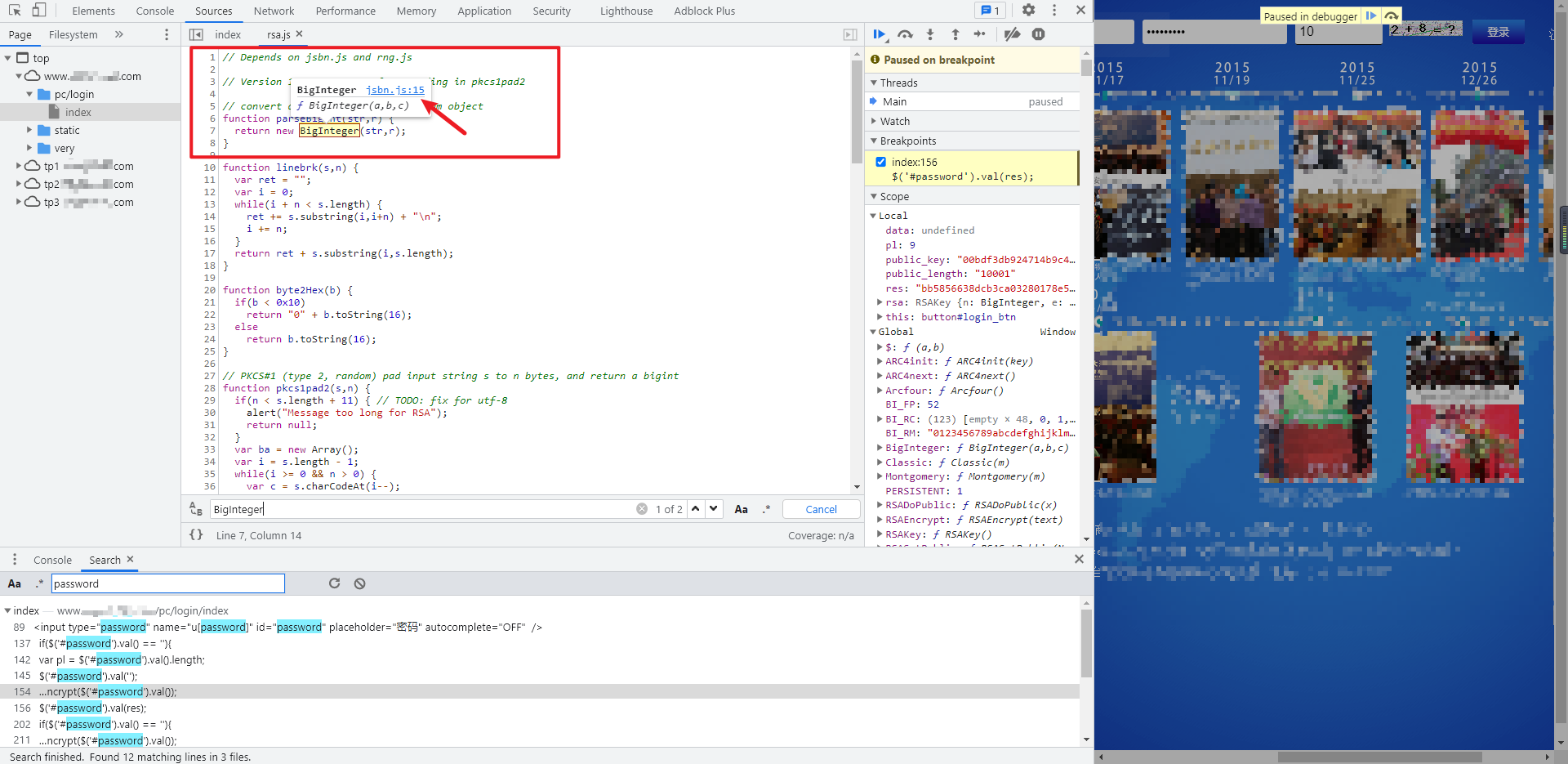
本地调试会发现提示 BigInteger 未定义,鼠标移到这个函数上面,可以发现是调用了 jsbn.js 里面的方法,同样的,直接将整个 jsbn.js 文件剥离下来进行本地调试。
这里其实在 rsa.js 文件的第一行有一句注释:// Depends on jsbn.js and rng.js,我们可以猜测 rsa.js 是可能依赖 jsbn.js 和 rng.js 这两个文件的。
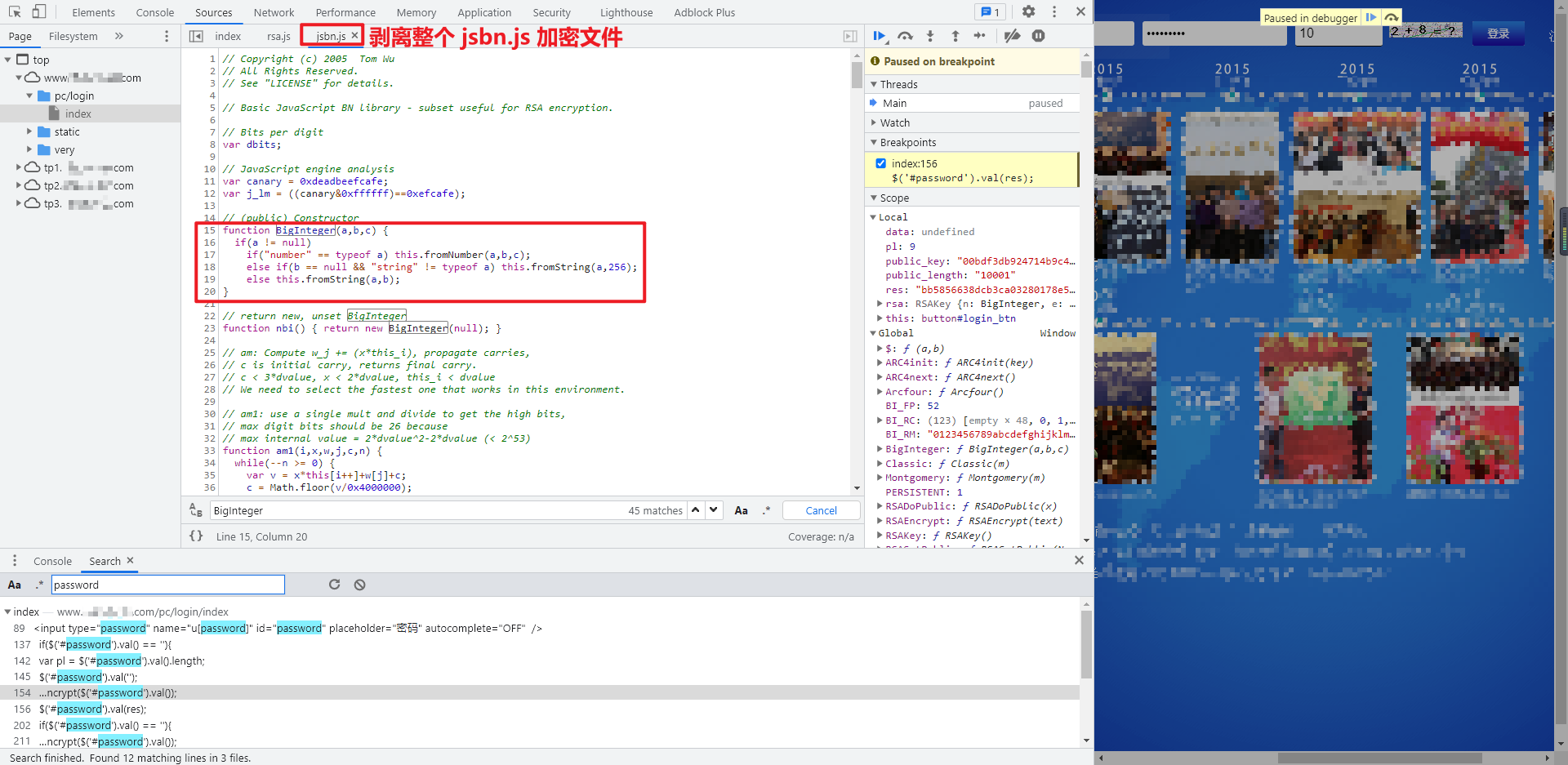
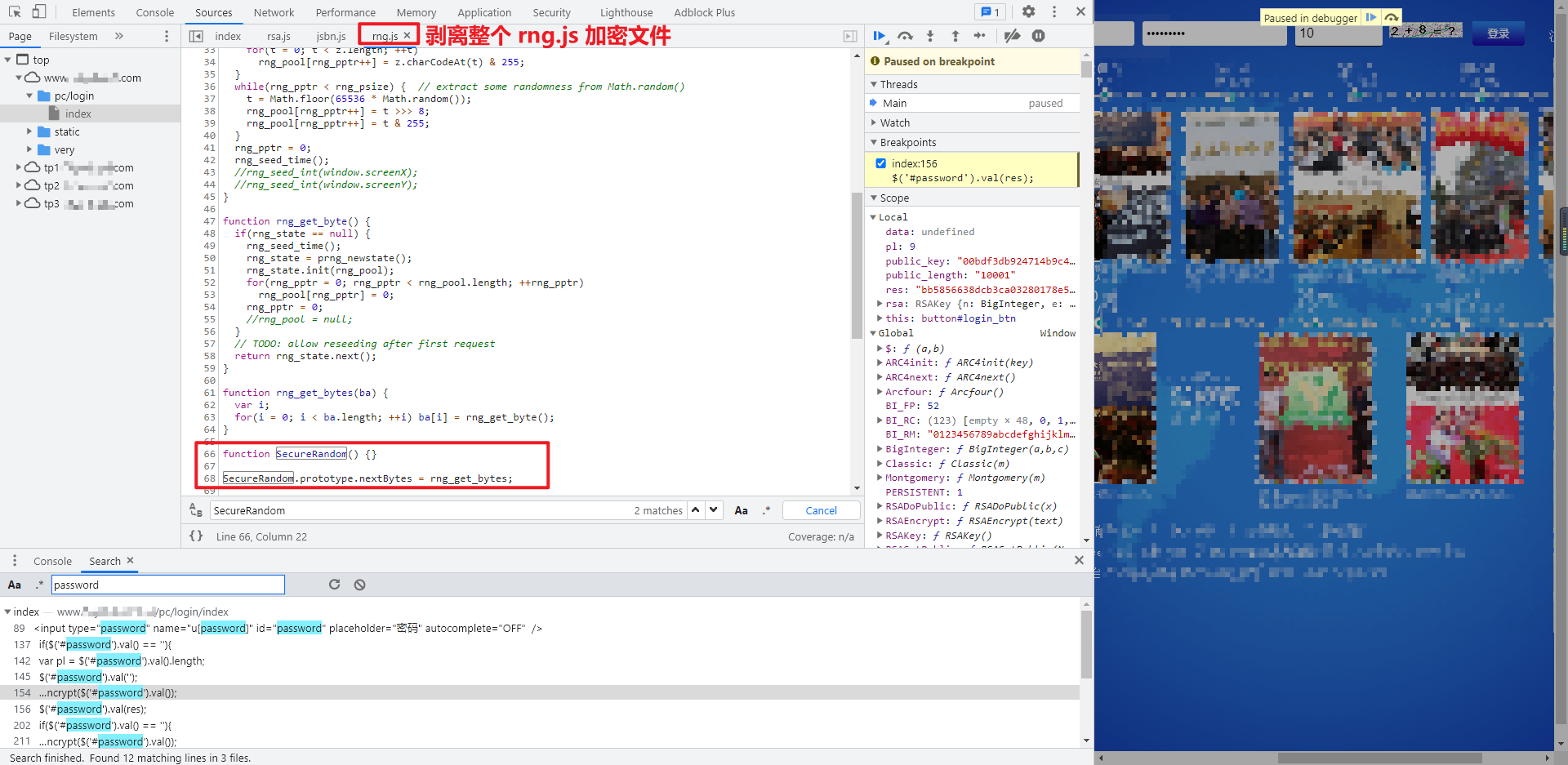
有了 jsbn.js 的代码,再次进行调试,会发现又提示 navigator 和 SecureRandom 未定义,navigator 我们已经非常熟悉了,是浏览器的相关信息,一般情况下直接定义为空即可(navigator = {};);将鼠标移到 SecureRandom 函数上面,可以发现是调用了 rng.js 里面的方法,同样的,直接将整个 rng.js 文件剥离下来进行本地调试。这里就证实了前面我们的猜想,rsa.js 确实是依赖 jsbn.js 和 rng.js 的。
我们注意到,这里在 rng.js 文件的第一行,同样有一句注释:// Random number generator - requires a PRNG backend, e.g. prng4.js,表明 rng.js 是随机数生成器,需要 PRNG 后端,例如 prng4.js,在密码学中,PRNG 全称是 pseudorandom number generator,即伪随机数生成器,是指通过特定算法生成一系列的数字,使得这一系列的数字看起来是随机的,但是实际是确定的,所以叫伪随机数,感兴趣的朋友可以深入研究一下,在这里我们知道 rng.js 可能还依赖于 prng4.js,需要进一步调试才清楚。
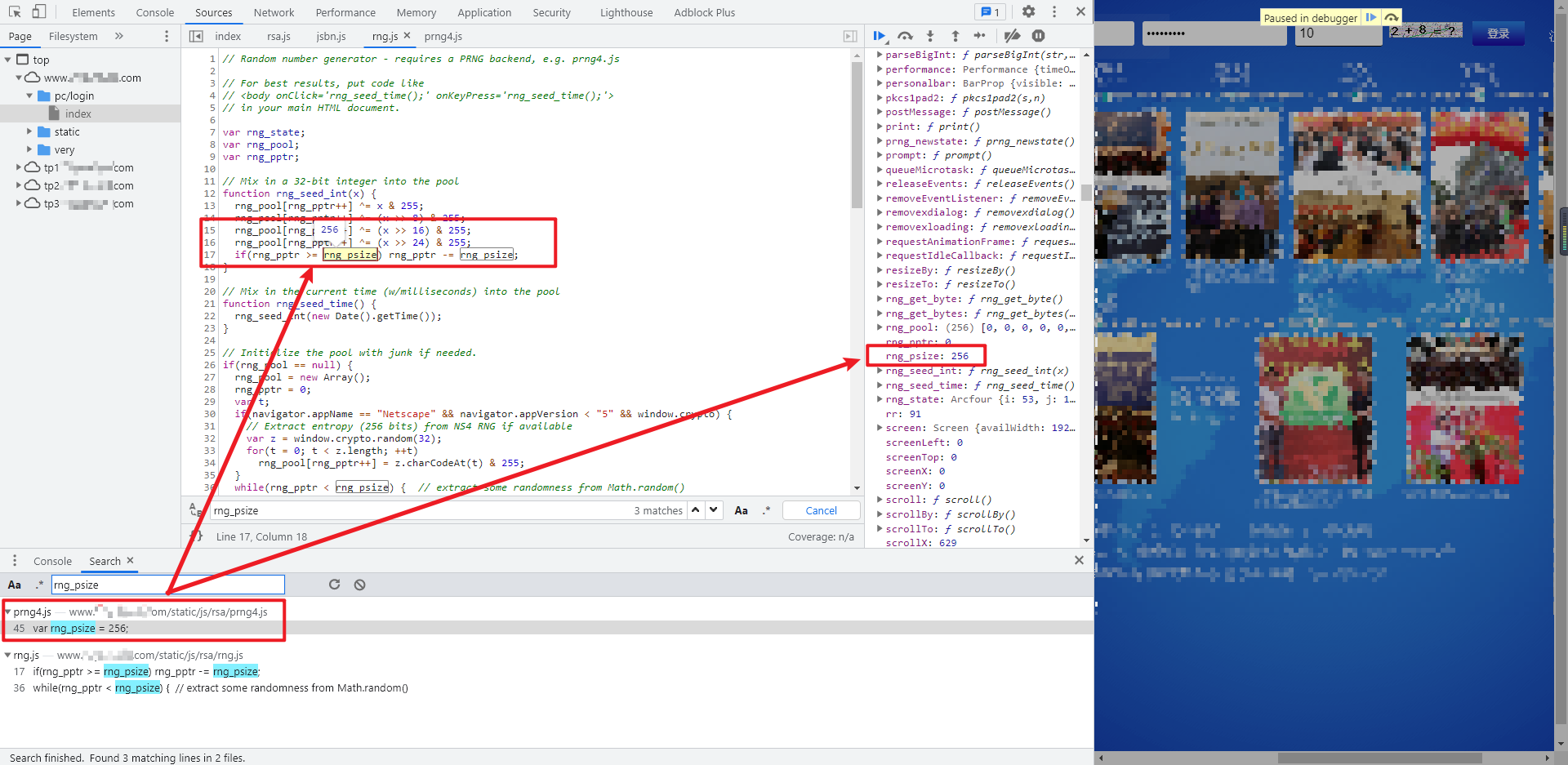
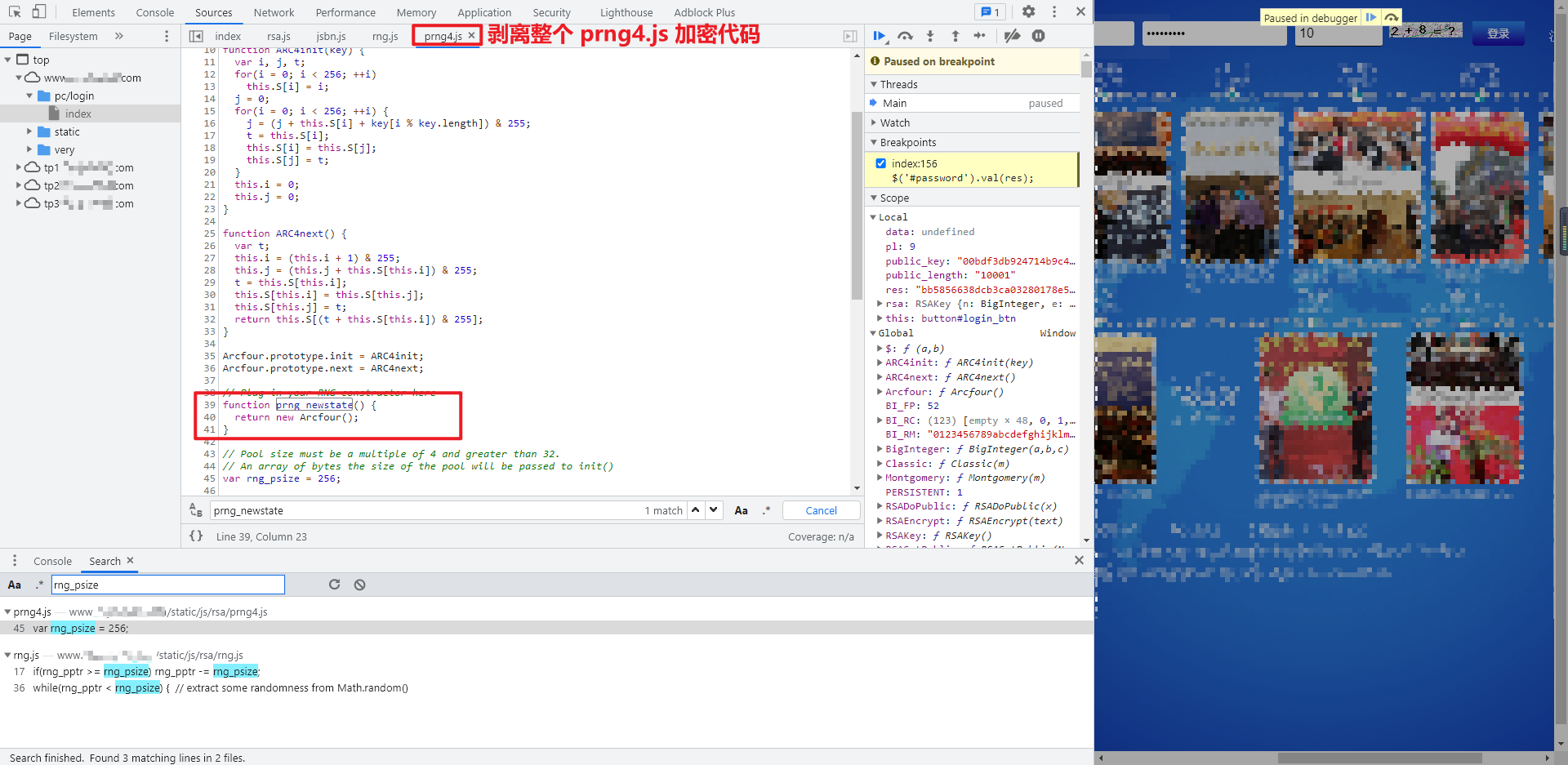
rsa.js、jsbn.js、rng.js 都齐全了,再次本地调试,会发现 rng.js 里面的 rng_psize 未定义,鼠标放上去看到 rng_psize 就是一个定值 256,在右边的 Global 全局变量里也可以看到值为 256,尝试搜索一下 rng_psize,可以发现在 prng4.js 里面有定义 var rng_psize = 256;,果然和注释说得一样,rng.js 是依赖 prng4.js 的,但是这里似乎直接定义一下 rng_psize 就行了。
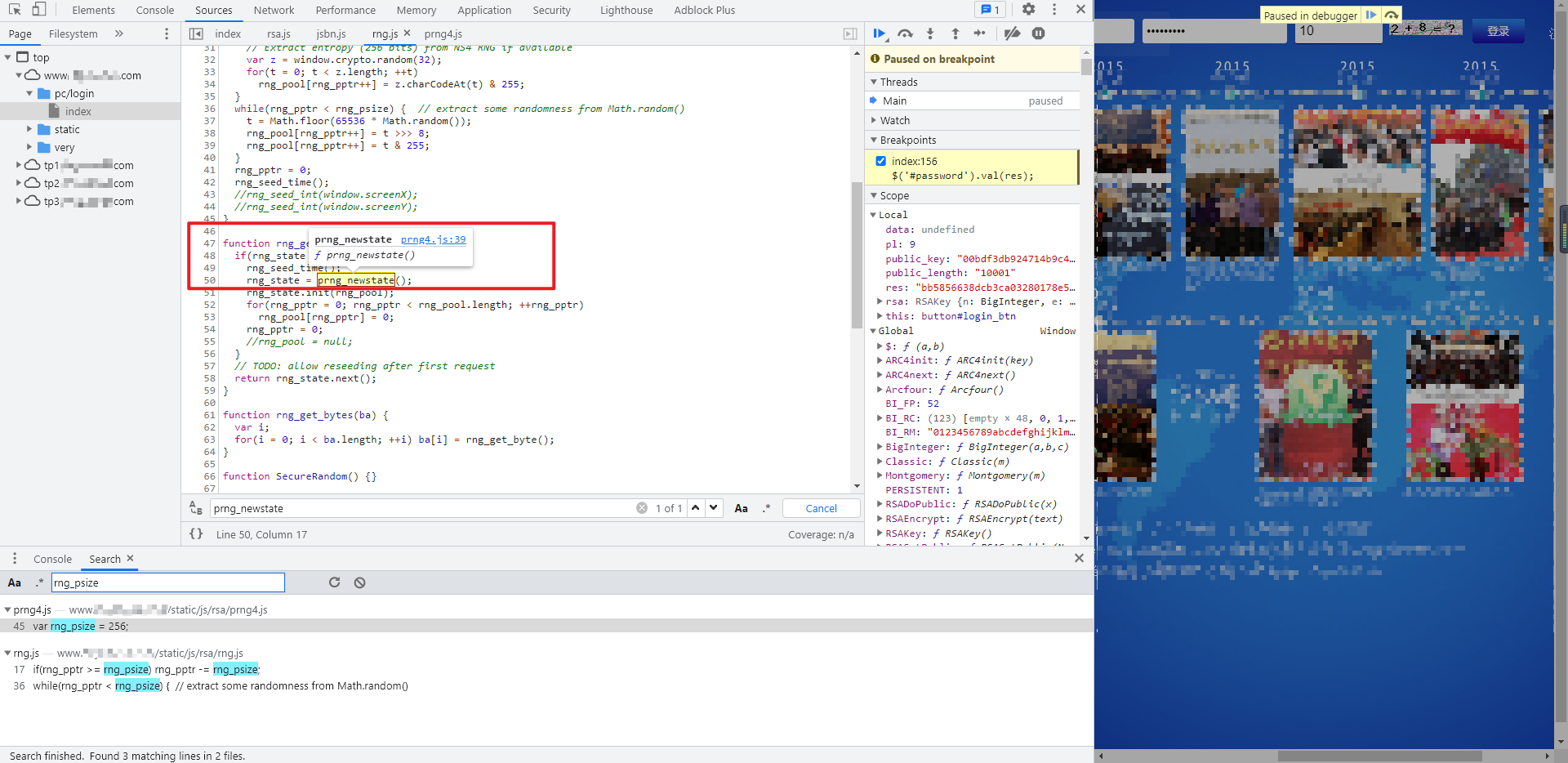
直接在本地代码定义一下 var rng_psize = 256;,再次进行调试,此时又会提示 rng.js 里缺少 prng_newstate() 对象,再次回到开发者工具,可以看到 prng_newstate() 是 prng4.js 里面的方法,果然 rng.js 和 prng4.js 的关系并不简单,同样的,我们也直接将整个 prng4.js 文件剥离下来进行本地调试。
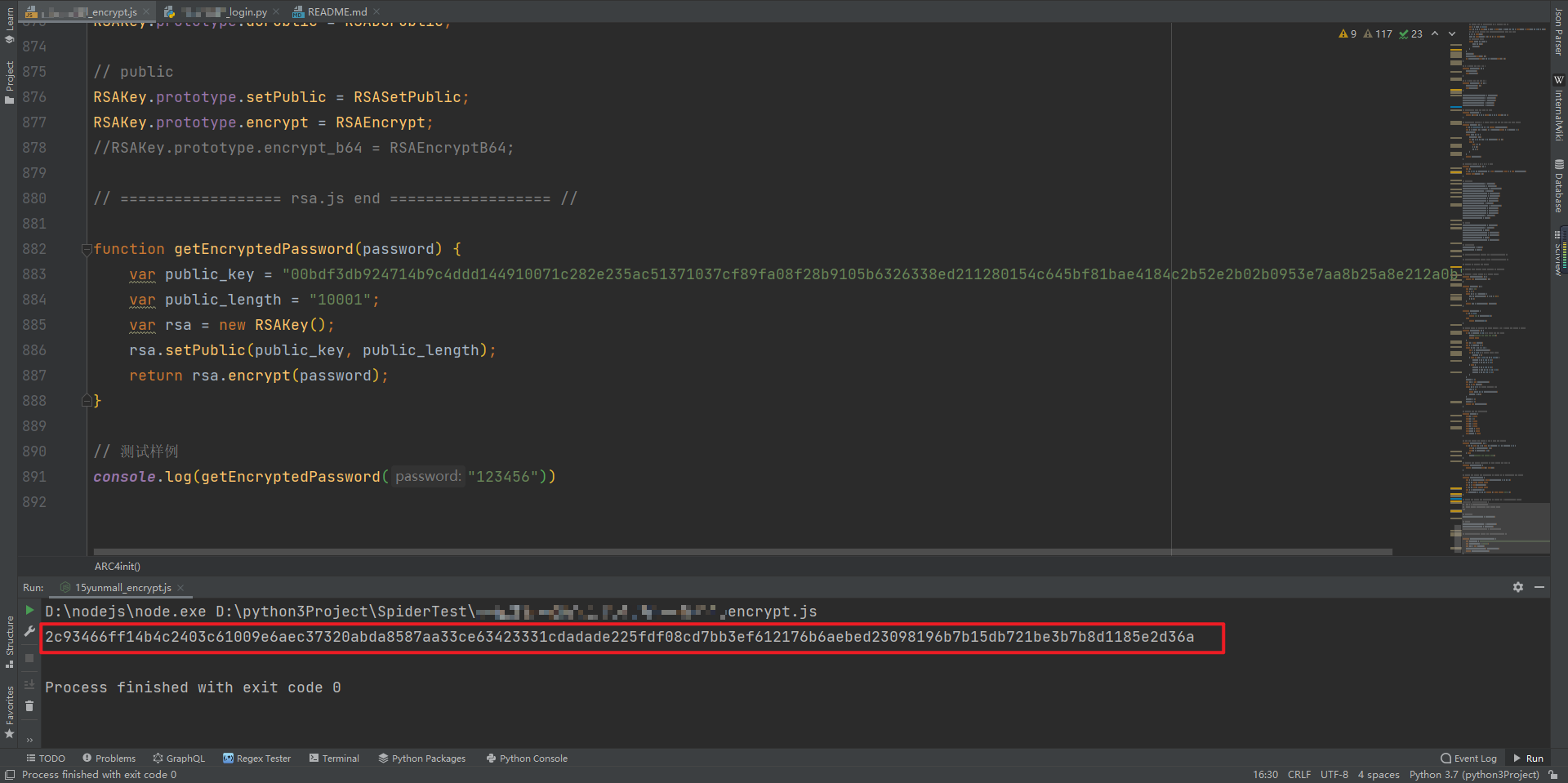
再次调试,运行无误,可以成功拿到加密后的密码了:
逻辑总结
加密入口可以在 index 首页找到,用到了 rsa.js 里面的三个加密函数
RSAKey()、setPublic()、encrypt();rsa.js 里的
BigInteger()函数依赖 jsbn.js,SecureRandom()函数依赖 rng.js;rng.js 里的变量
rng_psize在 prng4.js 中定义,prng_newstate()函数也依赖 prng4.js;
要将 rsa.js、jsbn.js、rng.js、prng4.js 这四个 JS 加密文件完整的剥离下来才能还原整个加密过程。
完整代码
GitHub 关注 K 哥爬虫:https://github.com/kuaidaili,持续分享爬虫相关代码!欢迎 star !
以下只演示部分关键代码,完整代码仓库地址:https://github.com/kuaidaili/crawler/
参数 JS 加密关键代码
navigator = {};

// ================== prng4.js begin ================== //

function Arcfour() {}

function ARC4init(key) {}

function ARC4next() {}

// 此处省略 N 个函数

var rng_psize = 256;

// ================== prng4.js end ================== //

// ================== rng.js begin ================== //

var rng_state;

var rng_pool;

var rng_pptr;

function rng_seed_int(x) {}

function rng_seed_time() {}

// 此处省略 N 个函数

function SecureRandom() {}

SecureRandom.prototype.nextBytes = rng_get_bytes;

// ================== rng.js end ================== //

// ================== jsbn.js begin ================== //

var dbits;

var canary = 0xdeadbeefcafe;

var j_lm = ((canary & 0xffffff) == 0xefcafe);

function BigInteger(a, b, c) {}

function nbi() {}

// 此处省略 N 个函数

// protected

BigInteger.prototype.copyTo = bnpCopyTo;

BigInteger.prototype.fromInt = bnpFromInt;

BigInteger.prototype.fromString = bnpFromString;

BigInteger.prototype.clamp = bnpClamp;

BigInteger.prototype.dlShiftTo = bnpDLShiftTo;

BigInteger.prototype.drShiftTo = bnpDRShiftTo;

BigInteger.prototype.lShiftTo = bnpLShiftTo;

BigInteger.prototype.rShiftTo = bnpRShiftTo;

BigInteger.prototype.subTo = bnpSubTo;

BigInteger.prototype.multiplyTo = bnpMultiplyTo;

BigInteger.prototype.squareTo = bnpSquareTo;

BigInteger.prototype.divRemTo = bnpDivRemTo;

BigInteger.prototype.invDigit = bnpInvDigit;

BigInteger.prototype.isEven = bnpIsEven;

BigInteger.prototype.exp = bnpExp;

// public

BigInteger.prototype.toString = bnToString;

BigInteger.prototype.negate = bnNegate;

BigInteger.prototype.abs = bnAbs;

BigInteger.prototype.compareTo = bnCompareTo;

BigInteger.prototype.bitLength = bnBitLength;

BigInteger.prototype.mod = bnMod;

BigInteger.prototype.modPowInt = bnModPowInt;

// "constants"

BigInteger.ZERO = nbv(0);

BigInteger.ONE = nbv(1);

// ================== jsbn.js end ================== //

// ================== rsa.js begin ================== //

function parseBigInt(str, r) {}

function linebrk(s, n) {}

function byte2Hex(b) {}

function pkcs1pad2(s, n) {}

function RSAKey() {}

function RSASetPublic(N, E) {}

function RSADoPublic(x) {}

function RSAEncrypt(text) {}

// protected

RSAKey.prototype.doPublic = RSADoPublic;

// public

RSAKey.prototype.setPublic = RSASetPublic;

RSAKey.prototype.encrypt = RSAEncrypt;

//RSAKey.prototype.encrypt_b64 = RSAEncryptB64;

// ================== rsa.js end ================== //

function getEncryptedPassword(password) {

    var public_key = "00bdf3db924714b9c4ddd144910071c282e235ac51371037cf89fa08f28b9105b6326338ed211280154c645bf81bae4184c2b52e2b02b0953e7aa8b25a8e212a0b";

    var public_length = "10001";

    var rsa = new RSAKey();

    rsa.setPublic(public_key, public_length);

    return rsa.encrypt(password);

}

// 测试样例

console.log(getEncryptedPassword("123456"))
Python 登录关键代码
#!/usr/bin/env python3

# -*- coding: utf-8 -*-

import execjs

import requests

from lxml import etree

from PIL import Image

index_url = '脱敏处理,完整代码关注 GitHub:https://github.com/kuaidaili/crawler/'

login_url = '脱敏处理,完整代码关注 GitHub:https://github.com/kuaidaili/crawler/'

code_url = '脱敏处理,完整代码关注 GitHub:https://github.com/kuaidaili/crawler/'

headers = {

    'Host': '脱敏处理,完整代码关注 GitHub:https://github.com/kuaidaili/crawler/',

    'Referer': '脱敏处理,完整代码关注 GitHub:https://github.com/kuaidaili/crawler/',

    'Origin': '脱敏处理,完整代码关注 GitHub:https://github.com/kuaidaili/crawler/',

    'User-Agent': 'Mozilla/5.0 (Windows NT 10.0; Win64; x64) AppleWebKit/537.36 (KHTML, like Gecko) Chrome/91.0.4472.114 Safari/537.36'

}

session = requests.session()

def get_encrypted_password(password):

    with open('encrypt.js', 'r', encoding='utf-8') as f:

        yunmall_js = f.read()

    encrypted_password = execjs.compile(yunmall_js).call('getEncryptedPassword', password)

    return encrypted_password

def get_csrf_token_cookie():

    response = session.get(url=index_url, headers=headers)

    tree = etree.HTML(response.text)

    csrf_token = tree.xpath("//input[@name='_csrfToken']/@value")[0]

    cookies = response.cookies.get_dict()

    # print(csrf_token, cookies)

    return csrf_token, cookies

def get_very_code(cookies):

    response = session.get(url=code_url, cookies=cookies, headers=headers)

    with open('code.png', 'wb') as f:

        f.write(response.content)

    image = Image.open('code.png')

    image.show()

    very_code = input('请输入验证码: ')

    return very_code

def login(csrf_token, very_code, cookies, username, encrypted_password):

    data = {

        'u[loginType]': 'name',

        'u[phone]': username,

        'u[password]': encrypted_password,

        'u[veryCode]': very_code,

        'u[token]': '',

        '_csrfToken': csrf_token

    }

    header_info = {

        'X-Requested-With': 'XMLHttpRequest',

    }

    headers.update(header_info)

    response = session.post(url=login_url, data=data, cookies=cookies, headers=headers)

    response.encoding = 'utf-8-sig'

    response_code = response.text

    # print(response_code)

    status_code = {

        '31': '恭喜,登陆成功。',

        '32': '登陆失败。',

        '33': '用户名或密码错误。',

        '35': '该用户已被管理员锁定。',

        '311': '该账号已绑定设备,请在绑定的设备登陆。',

        '20001': '验证码填写错误!'

    }

    try:

        print(status_code[response_code])

    except KeyError:

        print('请求超时!')

def main():

    username = input('请输入登录账号: ')

    password = input('请输入登录密码: ')

    if len(password) > 32:

        raise Exception('请输入正确的密码!')

    encrypted_password = get_encrypted_password(password)

    csrf_token, cookies = get_csrf_token_cookie()

    very_code = get_very_code(cookies)

    login(csrf_token, very_code, cookies, username, encrypted_password)

if __name__ == '__main__':

    main()
【JS 逆向百例】层层嵌套!某加速商城 RSA 加密的更多相关文章
- 网络爬虫之记一次js逆向解密经历
1 引言 数月前写过某网站(请原谅我的掩耳盗铃)的爬虫,这两天需要重新采集一次,用的是scrapy-redis框架,本以为二次爬取可以轻松完成的,可没想到爬虫启动没几秒,出现了大堆的重试提示,心里顿时 ...
- JS逆向之浏览器补环境详解
JS逆向之浏览器补环境详解 "补浏览器环境"是JS逆向者升职加薪的必备技能,也是工作中不可避免的操作. 为了让大家彻底搞懂 "补浏览器环境"的缘由及原理,本文将 ...
- 【算法】C语言趣味程序设计编程百例精解
C语言趣味程序设计编程百例精解 C/C++语言经典.实用.趣味程序设计编程百例精解(1) https://wenku.baidu.com/view/b9f683c08bd63186bcebbc3c. ...
- 通过JS逆向ProtoBuf 反反爬思路分享
前言 本文意在记录,在爬虫过程中,我首次遇到Protobuf时的一系列问题和解决问题的思路. 文章编写遵循当时工作的思路,优点:非常详细,缺点:文字冗长,描述不准确 protobuf用在前后端传输,在 ...
- 我去!爬虫遇到JS逆向AES加密反爬,哭了
今天准备爬取网页时,遇到『JS逆向AES加密』反爬.比如这样的: 在发送请求获取数据时,需要用到参数params和encSecKey,但是这两个参数经过JS逆向AES加密而来. 既然遇到了这个情况,那 ...
- JS逆向之补环境过瑞数详解
JS逆向之补环境过瑞数详解 "瑞数" 是逆向路上的一座大山,是许多JS逆向者绕不开的一堵围墙,也是跳槽简历上的一个亮点,我们必须得在下次跳槽前攻克它!! 好在现在网上有很多讲解瑞数 ...
- 拥抱基于jquery.deferred的ajax,和层层嵌套回调的ajax说拜拜
前言 在项目中,无论是维护自己的代码,还是重构他人的项目代码,看到层层嵌套,异常冗余的某个function,那时我们的内心肯定是奔溃的! 在jquery1.5版本之前,如果我们某个操作需要多个ajax ...
- Java使用正则表达式取网页中的一段内容(以取Js方法为例)
关于正则表达式: 表1.常用的元字符 代码 说明 . 匹配除换行符以外的任意字符 \w 匹配字母或数字或下划线或汉字 \s 匹配任意的空白符 \d 匹配数字 \b 匹配单词的开始或结束 ^ 匹配字符串 ...
- 关于Promise层层嵌套可读性差问题
Promise 是异步编程的一种解决方案,比传统的解决方案——回调函数和事件——更合理和更强大.它由社区最早提出和实现,ES6 将其写进了语言标准,统一了用法,原生提供了Promise对象 ES6 规 ...
- Java设计模式百例 - 观察者模式
观察者(Observer)模式定义了一种一对多的依赖关系,让多个观察者对象同时监听某一个主题对象,主体对象的状态变化会通知所有观察者对象.观察者模式又叫做发布-订阅(Publish/Subscribe ...
随机推荐
- 顶级加密混淆混淆工具测评:ipagurd
顶级加密混淆混淆工具测评:ipagurd 摘要 JavaScript代码安全需求日益增长,因此JavaScript混淆工具的使用变得广泛.本文将对专业.商业JavaScript混淆工具ipagur ...
- 7z压缩测试
注意: CompressionLevel 选择
- LinkedBlockingQueue实现的生产者和消费者模型
首先 LinkedBlockingQueue 是线程安全的阻塞队列,LinkedBlockingQueue实现的生产者和消费者模型 阻塞队列与我们平常接触的普通队列(LinkedList或ArrayL ...
- Vue2--入门学习
看了慕课网的教学视频,觉得挺不错的,在此做个随堂记录,有兴趣的可以去看视频 vue版本:2.5 文档链接:https://v2.cn.vuejs.org/v2/guide/installation.h ...
- 在 macOS 通过 SSH 访问 Windows 的 WSL2 Ubuntu
配置 Windows 和 WSL2,使得能通过其他电脑远程 SSH 到 WSL2 Ubuntu. 一.Win10 安装 WSL2 Ubuntu 注意,是安装 WSL2,方法参考这个 WSL2 配置 C ...
- #2035:人见人爱A^B
实现代码 #include<iostream> using namespace std; int main() { int n, m, t; while (cin >> n & ...
- KYOCERA Programming Contest 2021(AtCoder Beginner Contest 200)(AB水题,C思维,D搜索,E DP)
补题链接:Here A - Century 整除 \(200\) 并且判断能否整除完全 B - 200th ABC-200 按题意即可 C - Ringo's Favorite Numbers 2 求 ...
- Codeforces Round #712 (Div. 2) 个人题解
这一场打的又很差(掉分预定),D题想不出来. A. Déjà Vu 这题首先判断字符串是否全由 a 组成,如果是的话输出 NO int main() { ios_base::sync_with_std ...
- idea调式技巧汇总
调式进阶1: https://blog.csdn.net/future_god_qr/article/details/121250865 调式进阶2:(evaluate用法:)快捷键:alt+f8 ...
- Spring Boot 自动配置注解源码解析
前言 为什么Spring Boot这么火?因为便捷,开箱即用,但是你思考过为什么会这么便捷吗?传统的SSM架构配置文件至少要写半天,而使用Spring Boot之后只需要引入一个starter之后就能 ...