
FireWall2
配置防火墙步骤: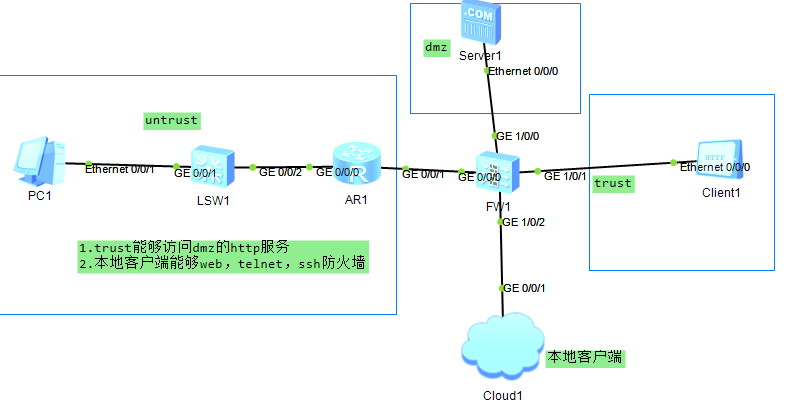
1.给接口配置ip,开 service-manage 服务
2.把接口画在zone区域
3.配置策略
4.服务器一定要开启服务
1.
interface GigabitEthernet1/0/0
undo shutdown
ip address 200.1.1.1 255.255.255.0
service-manage http permit
service-manage https permit
service-manage ping permit
service-manage ssh permit
service-manage snmp permit
service-manage telnet permit
#
interface GigabitEthernet1/0/1
undo shutdown
ip address 100.1.1.1 255.255.255.0
service-manage http permit
service-manage https permit
service-manage ping permit
service-manage ssh permit
service-manage snmp permit
service-manage telnet permit
firewall zone trust
set priority 85
add interface GigabitEthernet0/0/0
add interface GigabitEthernet1/0/1
firewall zone dmz
set priority 50
add interface GigabitEthernet1/0/0
security-policy
rule name permit_trust_dmz
source-zone trust
destination-zone dmz
source-address 100.1.1.0 mask 255.255.255.0
destination-address 200.1.1.0 mask 255.255.255.0
service http
service icmp
action permit
2.都在防火墙配置
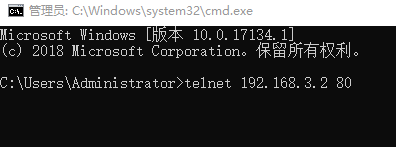
通过Telnet方式管理
security-policy
rule name permit_trust_local
source-zone trust
destination-zone local
service icmp
service ssh
service telnet
action permit
[USG6000V1]user-interface vty 0 4              #配置vty,允许5个终端使用telnet功能

[USG6000V1-ui-vty0-4]authentication-mode aaa    #配置telnet使用AAA身份验证

[USG6000V1-ui-vty0-4]protocol inbound telnet         #允许AAA验证telnet

[USG6000V1-ui-vty0-4]quit             #保存退出

[USG6000V1]aaa                 #进入AAA验证

[USG6000V1-aaa]manager-user benet           #AAA验证账户是benet

[USG6000V1-aaa-manager-user-benet]password cipher pwd@1234  #AAA验证密码是pwd@1234

[USG6000V1-aaa-manager-user-benet]service-type telnet    #AAA给telnet提供验证功能

[USG6000V1-aaa-manager-user-benet]level 15    #设置telnet账户Benet为管理员权限

#“0”是参观级别,啥都做不了;“1”是监控级别,可以查看相关配置;“2”为配置级别,可以配置部分参数;“3-15”是管理级别,拥有最大的权限
通过SSH方式管理
[USG6000V1]rsa local-key-pair create          #设置ssh密钥对,最长2048

The key name will be: USG6000V1_Host

The range of public key size is (512 ~ 2048).

NOTES: If the key modulus is greater than 512,

       it will take a few minutes.

Input the bits in the modulus[default = 2048]:2048       #输入

Generating keys...

..+++++

........................++

....++++

...........++

[USG6000V1]user-interface vty 0 4        #配置vty,允许5个终端

[USG6000V1-ui-vty0-4]authentication-mode aaa     #ssh使用AAA验证

[USG6000V1-ui-vty0-4]protocol inbound ssh            #允许ssh使用AAA验证

[USG6000V1-ui-vty0-4]quit

[USG6000V1]ssh user test              #创建验证账户test

[USG6000V1]ssh user test authentication-type password   #使用密码验证

[USG6000V1]ssh user test service-type stelnet         #配置验证服务类型为ssh

[USG6000V1]aaa              #进入AAA

[USG6000V1-aaa]manager-user test      #AAA验证用户名为test

[USG6000V1-aaa-manager-user-test]password cipher pwd@1234    #AAA验证test账户密码为pwd@1234

[USG6000V1-aaa-manager-user-test]service-type ssh     #AAA给ssh提供验证

[USG6000V1-aaa-manager-user-test]level 15       #设置ssh验证账户为管理员

[USG6000V1-aaa-manager-user-test]quit

[USG6000V1-aaa]quit

[USG6000V1]stelnet server enable                 #开启ssh

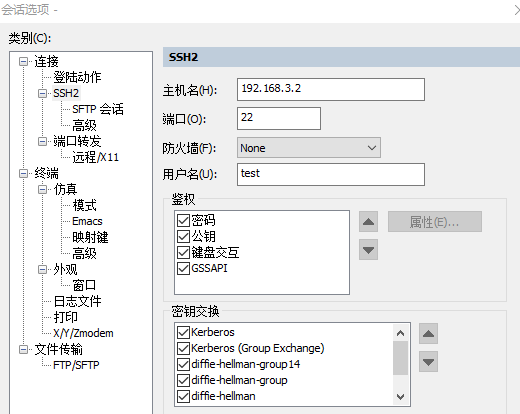
这个端口为22,用CRT测试:
通过Web方式管理:
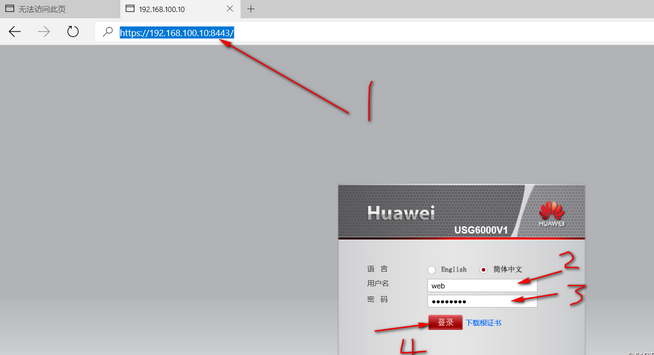
[USG6000V1]web-manager security enable        #开启web管理功能

[USG6000V1]aaa       #进入AAA配置

[USG6000V1-aaa]manager-user web       #配置验证账户名为web

[USG6000V1-aaa-manager-user-web]password  #设置AAA验证密码

Enter Password:         #输入密码

Confirm Password:         #重复输入

[USG6000V1-aaa-manager-user-web]service-type web   #允许使用web验证

[USG6000V1-aaa-manager-user-web]level 15         #设置为管理员权限
应使用 https://192.168.3.2:8443 进行访问(下面这个图是网上下载的)
FireWall2的更多相关文章
随机推荐
- Springboot 2.x 如何解决重复提交 (本地锁的实践)
有没有遇到过这种情况:网页响应很慢,提交一次表单后发现没反应,然后你就疯狂点击提交按钮(12306就经常被这样怒怼),如果做过防重复提交还好,否则那是什么级别的灾难就不好说了... 本文主要是应用 自 ...
- selenium请求豆瓣网
#请求豆瓣网 from selenium import webdriverimport timedriver = webdriver.Chrome() driver.get("http:// ...
- [De1CTF 2019]SSRF Me-MD5长度扩展攻击&CVE-2019-9948
0x00 打开题目查看源代码,开始审计 这里贴上网上师傅的博客笔记: https://xz.aliyun.com/t/6050 #! /usr/bin/env python #encoding=utf ...
- 用CNN及MLP等方法识别minist数据集
用CNN及MLP等方法识别minist数据集 2017年02月13日 21:13:09 hnsywangxin 阅读数:1124更多 个人分类: 深度学习.keras.tensorflow.cnn ...
- "Mathematical Analysis of Algorithms" 阅读心得
"Mathematical Analysis of Algorithms" 阅读心得 "Mathematical Analysis of Algorithms" ...
- vim 马哥
VIM编辑器 编辑模式 默认 输入模式 i 末行模式 : vim +# file #打开文件后直接跳到第#行 vim + file 直接跳到尾行 vim +/关键字 跳转到 ...
- share团队冲刺6
团队冲刺第六天 昨天:进行各种原件的自定义样式,进行界面布局 登陆界面: 今天:进行后台的代码编写,实现各种按钮的功能 问题:在不同的型号手机上,界面会发生不兼容的问题.
- 正确返回Unicode码点大于0xFFFF的字符串长度
如下: function codePointLength(text){ var result = text.match(/[\s\S]/gu); return result? result.lengt ...
- PAT Advanced 1132 Cut Integer (20) [数学问题-简单数学]
题目 Cutting an integer means to cut a K digits long integer Z into two integers of (K/2) digits long ...
- C++数组常用操作
1. 遍历数组 使用基于范围的for循环来遍历整个数组 用_countof()来得到数组中的元素个数 #include <iostream> #include <cstdio> ...