
FireWall2
配置防火墙步骤: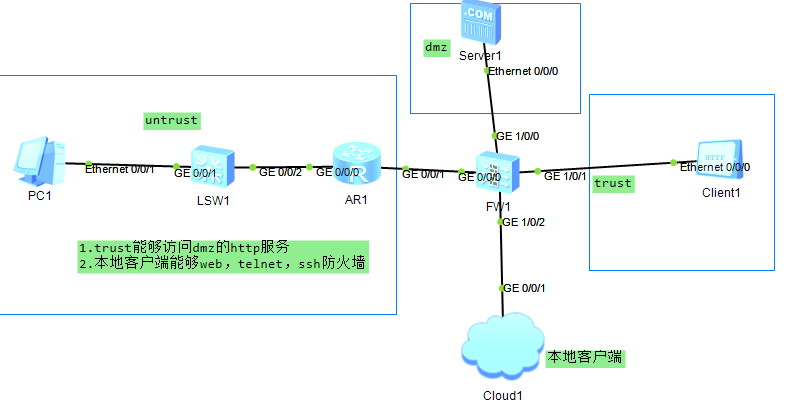
1.给接口配置ip,开 service-manage 服务
2.把接口画在zone区域
3.配置策略
4.服务器一定要开启服务
1.
interface GigabitEthernet1/0/0
undo shutdown
ip address 200.1.1.1 255.255.255.0
service-manage http permit
service-manage https permit
service-manage ping permit
service-manage ssh permit
service-manage snmp permit
service-manage telnet permit
#
interface GigabitEthernet1/0/1
undo shutdown
ip address 100.1.1.1 255.255.255.0
service-manage http permit
service-manage https permit
service-manage ping permit
service-manage ssh permit
service-manage snmp permit
service-manage telnet permit
firewall zone trust
set priority 85
add interface GigabitEthernet0/0/0
add interface GigabitEthernet1/0/1
firewall zone dmz
set priority 50
add interface GigabitEthernet1/0/0
security-policy
rule name permit_trust_dmz
source-zone trust
destination-zone dmz
source-address 100.1.1.0 mask 255.255.255.0
destination-address 200.1.1.0 mask 255.255.255.0
service http
service icmp
action permit
2.都在防火墙配置
通过Telnet方式管理
security-policy
rule name permit_trust_local
source-zone trust
destination-zone local
service icmp
service ssh
service telnet
action permit
[USG6000V1]user-interface vty 0 4              #配置vty,允许5个终端使用telnet功能

[USG6000V1-ui-vty0-4]authentication-mode aaa    #配置telnet使用AAA身份验证

[USG6000V1-ui-vty0-4]protocol inbound telnet         #允许AAA验证telnet

[USG6000V1-ui-vty0-4]quit             #保存退出

[USG6000V1]aaa                 #进入AAA验证

[USG6000V1-aaa]manager-user benet           #AAA验证账户是benet

[USG6000V1-aaa-manager-user-benet]password cipher pwd@1234  #AAA验证密码是pwd@1234

[USG6000V1-aaa-manager-user-benet]service-type telnet    #AAA给telnet提供验证功能

[USG6000V1-aaa-manager-user-benet]level 15    #设置telnet账户Benet为管理员权限

#“0”是参观级别,啥都做不了;“1”是监控级别,可以查看相关配置;“2”为配置级别,可以配置部分参数;“3-15”是管理级别,拥有最大的权限
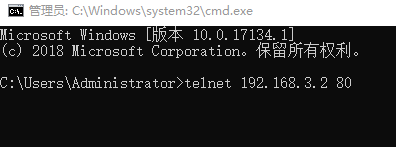
通过SSH方式管理
[USG6000V1]rsa local-key-pair create          #设置ssh密钥对,最长2048

The key name will be: USG6000V1_Host

The range of public key size is (512 ~ 2048).

NOTES: If the key modulus is greater than 512,

       it will take a few minutes.

Input the bits in the modulus[default = 2048]:2048       #输入

Generating keys...

..+++++

........................++

....++++

...........++

[USG6000V1]user-interface vty 0 4        #配置vty,允许5个终端

[USG6000V1-ui-vty0-4]authentication-mode aaa     #ssh使用AAA验证

[USG6000V1-ui-vty0-4]protocol inbound ssh            #允许ssh使用AAA验证

[USG6000V1-ui-vty0-4]quit

[USG6000V1]ssh user test              #创建验证账户test

[USG6000V1]ssh user test authentication-type password   #使用密码验证

[USG6000V1]ssh user test service-type stelnet         #配置验证服务类型为ssh

[USG6000V1]aaa              #进入AAA

[USG6000V1-aaa]manager-user test      #AAA验证用户名为test

[USG6000V1-aaa-manager-user-test]password cipher pwd@1234    #AAA验证test账户密码为pwd@1234

[USG6000V1-aaa-manager-user-test]service-type ssh     #AAA给ssh提供验证

[USG6000V1-aaa-manager-user-test]level 15       #设置ssh验证账户为管理员

[USG6000V1-aaa-manager-user-test]quit

[USG6000V1-aaa]quit

[USG6000V1]stelnet server enable                 #开启ssh

这个端口为22,用CRT测试:
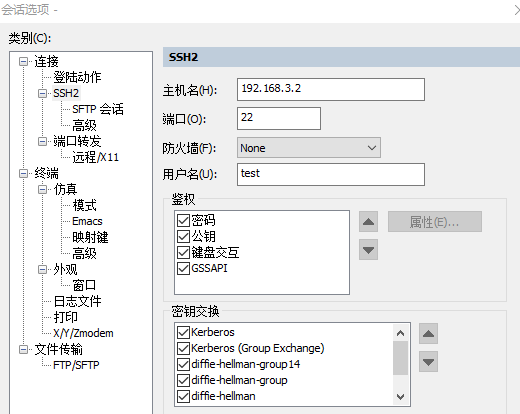
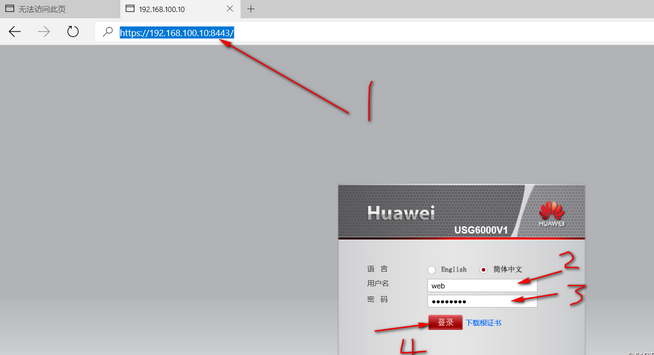
通过Web方式管理:
[USG6000V1]web-manager security enable        #开启web管理功能

[USG6000V1]aaa       #进入AAA配置

[USG6000V1-aaa]manager-user web       #配置验证账户名为web

[USG6000V1-aaa-manager-user-web]password  #设置AAA验证密码

Enter Password:         #输入密码

Confirm Password:         #重复输入

[USG6000V1-aaa-manager-user-web]service-type web   #允许使用web验证

[USG6000V1-aaa-manager-user-web]level 15         #设置为管理员权限
应使用 https://192.168.3.2:8443 进行访问(下面这个图是网上下载的)
FireWall2的更多相关文章
随机推荐
- 强大的代码生成器——T4模板
T4 Editor工具下载地址 tangible T4 Editor 2.5.0 plus modeling tools for VS 2019 https://marketplace.visuals ...
- python中的单元测试模块unittest
unittest的属性: 该文以思维导图的形式描述unittest的重要属性. 其中前四个是unittest最核心的三个属性. testcase:测试用例: testsuite:测试套件,多个测试用例 ...
- Java IO流操作(III)——File类&案例一:输出制定目录下所有java文件名(包含子目录)&案例二:删除指定的目录(包含子目录)
1. File常用的构造 File file = new File("字符串路径"); File f = new File("D:\\a\\b.txt"); F ...
- Tomcat导入工程
Windows->Preference->Server->Runtime environment->Add浏览路径(选择Workbench default JRE)
- xhell ctrl+s 假死
如题. ctrl+q 即可接触 假死状态. 记录下
- UML-活动图及其建模
1.目标:UML活动图标示法. 2.定义:一个UML活动图标示一个过程中的多个顺序活动和并行活动.这些活动有助于对业务过程.工作流.数据流和复杂算法进行建模. 3.作用:既能表示控制流又能标示数据流. ...
- squid完全攻略
squid完全攻略 http://blog.sina.com.cn/s/blog_7572cf8e0100rl99.html squid,nginx,lighttpd反向代理的区别 [root@loc ...
- java加解密算法--对称加密工作模式
对称加密又分为分组加密和序列密码.分组密码,也叫块加密(block cyphers),一次加密明文中的一个块.是将明文按一定的位长分组,明文组经过加密运算得到密文组,密文组经过解密运算(加密运算的逆运 ...
- C++对象数组与对象指针
(一)对象数组 将具有相同类类型的对象有序地集合在一起便构成了对象数组,以一维对象数组为例,其定义形式为: 类名 对象数组名[]; Point points[100]; 关于对象数组的几点说明: (1 ...
- 打水滴(BFS)
在一个n行m列的网格中,某些位置存在一些水滴.嘟嘟进行q次打水滴操作,每次嘟嘟在某一个网格当中添加一个水滴,当某一网格中的水滴数量超过L时,该网格中的水滴变为四个水滴,并分别向上下左右四个方向飞出,每 ...