
Linux centosVMware运行告警系统、分发系统-expect讲解、自动远程登录后,执行命令并退出、expect脚本传递参数、expect脚本同步文件、指定host和要同步的文件、shell项目-分发系统-构建文件分发系统、分发系统-命令批量执行
一运行告警系统
创建一个任务计划crontab -e

每一分钟都执行一次

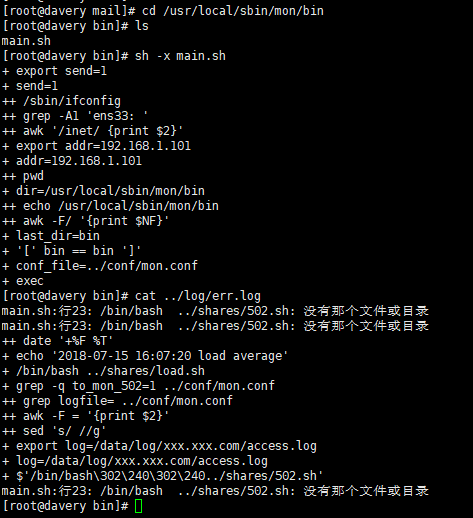
调试时把主脚本里边log先注释掉

再次执行
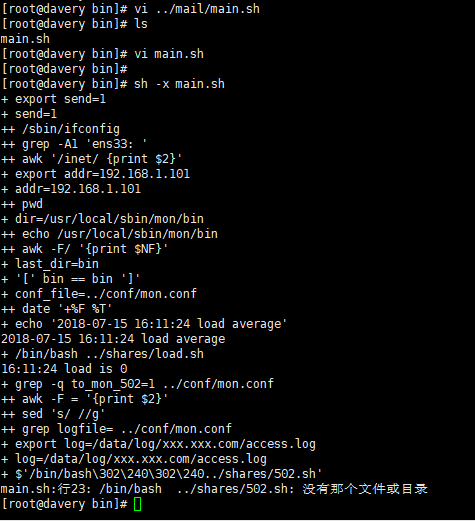
没有发现502文件说明执行成功了,每日有错误,本机IP 负载不高
二、分发系统-expect讲解
yum install -y expect
自动远程登录
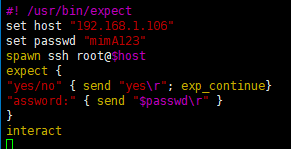
#! /usr/bin/expect
set host "192.168.1.106"
set passwd "mimA123"
spawn ssh root@$host 指向106
expect {
"yes/no" { send "yes\r"; exp_continue}
"assword:" { send "$passwd\r" }
}
interact 停留在客户机不退出
路径/usr/local/sbin/dl.expect

vim dl.expect
[root@davery sbin]# chmod a+x df.expect 更改权限
[root@davery sbin]# ./dl.expect 执行脚本就直接登陆106了
三、 自动远程登录后,执行命令并退出
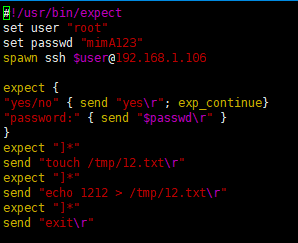
#!/usr/bin/expect
set user "root"
set passwd "123456"
spawn ssh $user@192.168.133.132
expect {
"yes/no" { send "yes\r"; exp_continue}
"password:" { send "$passwd\r" }
}
expect "]*"
send "touch /tmp/12.txt\r" 这些文件可以自己改动
expect "]*"
send "echo 1212 > /tmp/12.txt\r" 这些文件可以自己改动
expect "]*"
send "exit\r"
路径:/usr/local/sbin/tc.expect
[root@davery sbin]# chmod a+x tc.expect 更改权限
[root@davery sbin]# ./tc.expect 登陆
spawn ssh root@192.168.1.106
四、expect脚本传递参数
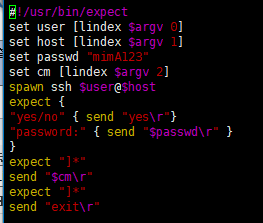
/usr/local/sbin/cd.expect
#!/usr/bin/expect
set user [lindex $argv 0]
set host [lindex $argv 1]
set passwd "123456"
set cm [lindex $argv 2]
spawn ssh $user@$host
expect {
"yes/no" { send "yes\r"}
"password:" { send "$passwd\r" }
}
expect "]*"
send "$cm\r"
expect "]*"
send "exit\r"
路径:/usr/local/sbin/cd.expect
[root@davery sbin]# chmod a+x cd.expect
[root@davery sbin]# ./cd.expect root 192.168.1.106 ls 写用户,ip 传递的命令,
spawn ssh root@192.168.1.106
五、expect脚本同步文件
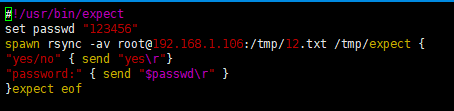
#!/usr/bin/expect
set passwd "123456"
spawn rsync -av root@192.168.1.106:/tmp/12.txt /tmp/
expect {
"yes/no" { send "yes\r"}
"password:" { send "$passwd\r" }
}
expect eof 这个命令停留有传输时间
[root@davery sbin]# chmod a+x tb.expect
[root@davery sbin]# ./tb.expect
六、指定host和要同步的文件
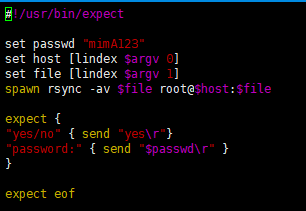
#!/usr/bin/expect
set passwd "mimA123"
set host [lindex $argv 0]
set file [lindex $argv 1]
spawn rsync -av $file root@$host:$file
expect {
"yes/no" { send "yes\r"}
"password:" { send "$passwd\r" }
}
expect eof
路径:/usr/local/sbin/zd.expect
[root@davery sbin]# chmod a+x zd.expect
[root@davery sbin]#
[root@davery sbin]# ./zd.expect 192.168.1.106 "/tmp/12.txt'
七、shell项目-分发系统-构建文件分发系统
需求背景
对于大公司而言,肯定时不时会有网站或者配置文件更新,而且使用的机器肯定也是好多台,少则几台,多则几十甚至上百台。所以,自动同步文件是至关重要的。
实现思路
首先要有一台模板机器,把要分发的文件准备好,然后只要使用expect脚本批量把需要同步的文件分发到目标机器即可。
核心命令
rsync -av --files-from=list.txt / root@host:/
vim rsync.expect
#!/usr/bin/expect
set passwd "123456"
set host [lindex $argv 0]
set file [lindex $argv 1]
spawn rsync -av --files-from=$file / root@$host:/
expect {
"yes/no" { send "yes\r"}
"password:" { send "$passwd\r" }
}
expect eof rsync.expect
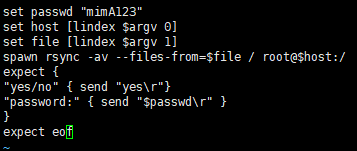
chmod a+x
[root@davery sbin]# vi /tmp/list.txt
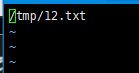
[root@davery sbin]# vim /tmp/ip.txt

[root@davery sbin]# vi rsync.sh
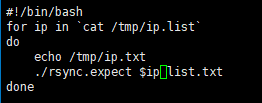
[root@davery sbin]# chmod a+x rsync.expect
[root@davery sbin]# sh -x rsync.sh
八、分发系统-命令批量执行
vim exe.expect
#!/usr/bin/expect
set host [lindex $argv 0]
set passwd "123456"
set cm [lindex $argv 1]
spawn ssh root@$host
expect {
"yes/no" { send "yes\r"}
"password:" { send "$passwd\r" }
}
expect "]*"
send "$cm\r"
expect "]*"
send "exit\r"
vim exe.sh
#!/bin/bash
for ip in `cat ip.list`
do
echo $ip
./exe.expect $ip "w;free -m;ls /tmp"
done
Linux centosVMware运行告警系统、分发系统-expect讲解、自动远程登录后,执行命令并退出、expect脚本传递参数、expect脚本同步文件、指定host和要同步的文件、shell项目-分发系统-构建文件分发系统、分发系统-命令批量执行的更多相关文章
- iTerm 使用expect实现自动远程登录,登录跳板机
#!/usr/bin/expect set timeout 10 spawn ssh -p [lindex $argv 0] [lindex $argv 1]@[lindex $argv 2] exp ...
- centos shell编程4【分发系统】 服务器标准化 mkpasswd 生成密码的工具 expect讲解 expect传递参数 expect自动同步文件 expect指定host和要同步的文件 expect文件分发系统 expect自动发送密钥脚本 Linux脚本执行方式 第三十八节课
centos shell编程4[分发系统] 服务器标准化 mkpasswd 生成密码的工具 expect讲解 expect传递参数 expect自动同步文件 expect指定host和要 ...
- 分发系统介绍 expect脚本远程登录 expect脚本远程执行命令 expect脚本传递参数
expect脚本远程登录 yum install -y expect yum install -y tcl tclx tcl-devel 自动远程登录 #! /usr/bin/expect set h ...
- expect脚本同步文件、expect脚本指定host和要同步的文件、构建文件分发系统、批量远程执行命令
7月20日任务 20.31 expect脚本同步文件20.32 expect脚本指定host和要同步的文件20.33 构建文件分发系统20.34 批量远程执行命令扩展:shell多线程 http:// ...
- expect脚本同步文件 expect脚本指定host和要同步的文件 构建文件分发系统 批量远程执行命令
自动同步文件 #!/usr/bin/expect set " spawn rsync -av root@.txt /tmp/ expect { "yes/no" { se ...
- 分发系统介绍、expect脚本远程登录、expect脚本远程执行命令、expect脚本传递参数
7月19日任务 20.27 分发系统介绍20.28 expect脚本远程登录20.29 expect脚本远程执行命令20.30 expect脚本传递参数 20.27 分发系统介绍 公司业务逐渐扩大时, ...
- linux下开启SSH,并且允许root用户远程登录,允许无密码登录
参考:http://blog.csdn.net/jia0511/article/details/8237698 1. 允许root用户远程登录 修改ssh服务配置文件 sudo vi /etc/ssh ...
- linux shell编程指南第二十章------向脚本传递参数
前面已经讲到如何使用特定变量$ 1 . . $ 9向脚本传递参数.$ #用于统计传递参数的个数.可 以创建一个u s a g e语句,需要时可通知用户怎样以适当的调用参数调用脚本或函数. 简单地说,下 ...
- 系统的讲解 - SSO单点登录
目录 概念 好处 技术实现 小结 扩展 概念 SSO 英文全称 Single Sign On,单点登录. 在多个应用系统中,只需要登录一次,就可以访问其他相互信任的应用系统. 比如:淘宝网(www.t ...
随机推荐
- PowerDesigner 16.5安装、激活
PowerDesigner安装 PowerDesigner激活 PowerDesigner运行
- MongoDB - 用户名密码认证
参考 offical doc medium Mongo roles说明 https://docs.mongodb.com/manual/reference/built-in-roles/#userAd ...
- CentOS7.6配置ip
查看CentOS版本信息 [root@localhost ~]# cat /etc/redhat-release CentOS Linux release (Core) 配置ip [root@loca ...
- 定位布局 Stack 层叠组件 Stack 与 Align Stack 与 Positioned 实现
一.Flutter Stack 组件 Stack 表示堆的意思,我们可以用 Stack 或者 Stack 结合 Align 或者 Stack 结合 Positiond 来实现页面的定位布局 align ...
- 【C语言】创建一个函数,判断某一正整数是否为完数,并调用这个函数找出1000以内所有完数
什么是完数? 如果一个数等于它的因子之和,则称该数为“完数”(或“完全数”). 例如,6的因子为1.2.3,而 6=1+2+3,因此6是“完数”. 问题分析 根据完数的定义,解决本题的关键是计算出所 ...
- ELK日志分析系统部署
======================================================================================= 操作系统 IP地址 主机 ...
- Java入门笔记 04-异常处理
一. 异常概述: 1. 异常体系结构图: java.lang.Throwable |-----java.lang.Error:一般不编写针对性的代码进行处理. |- ...
- spring security 方法权限使用
前面我们讲过了使用<security:intercept-url>配置url的权限访问,下面我们讲解一下基于方法的权限使用默认情况下, Spring Security 并不启用方法级的安全 ...
- Spark Streaming实践和优化
发表于:<程序员>杂志2016年2月刊.链接:http://geek.csdn.net/news/detail/54500 作者:徐鑫,董西成 在流式计算领域,Spark Streamin ...
- Linux 常用命令——查看系统
有的时候别人给你一个登录方式,但是不知道是啥系统,看图就知道了 1.uname -a 查看电脑以及操作系统 2.cat /proc/version 正在运行的内核版本 3.cat /etc/is ...