
iperf压测linux网卡带宽
1.安装
yum install iperf --enablerepo=epel
2.启动服务端
iperf -s -i 1
3.启动客户端测试10分钟
iperf -c 172.16.3.153 -i 1 -t 600
-w窗口越小带宽越不能体现
4.客户端显示
Connecting to host 172.16.3.145, port 5201

[  4] local 172.16.3.153 port 36895 connected to 172.16.3.145 port 5201

[ ID] Interval           Transfer     Bandwidth       Retr  Cwnd

[  4]   0.00-1.00   sec   789 MBytes  6.61 Gbits/sec  138   1.95 MBytes

[  4]   1.00-2.00   sec  1.08 GBytes  9.24 Gbits/sec   23   1.39 MBytes

[  4]   2.00-3.00   sec  1.08 GBytes  9.25 Gbits/sec    0   1.46 MBytes

[  4]   3.00-4.00   sec  1.08 GBytes  9.25 Gbits/sec   10   1.08 MBytes
5.服务端显示
Server listening on 5201

-----------------------------------------------------------

Accepted connection from 172.16.3.153, port 36894

[  5] local 172.16.3.145 port 5201 connected to 172.16.3.153 port 36895

[ ID] Interval           Transfer     Bandwidth

[  5]   0.00-1.00   sec   743 MBytes  6.23 Gbits/sec

[  5]   1.00-2.00   sec  1.07 GBytes  9.23 Gbits/sec

[  5]   2.00-3.00   sec  1.08 GBytes  9.25 Gbits/sec

[  5]   3.00-4.00   sec  1.08 GBytes  9.27 Gbits/sec

[  5]   4.00-5.00   sec  1.08 GBytes  9.28 Gbits/sec
6.网卡速度
[root@slave01 ~]# ethtool eth0

        Supported link modes:   1000baseT/Full

                                10000baseT/Full

        Supported pause frame use: No

        Supports auto-negotiation: No

        Advertised link modes:  Not reported

        Advertised pause frame use: No

        Advertised auto-negotiation: No

        Speed: 10000Mb/s
7.zabbix图形趋势
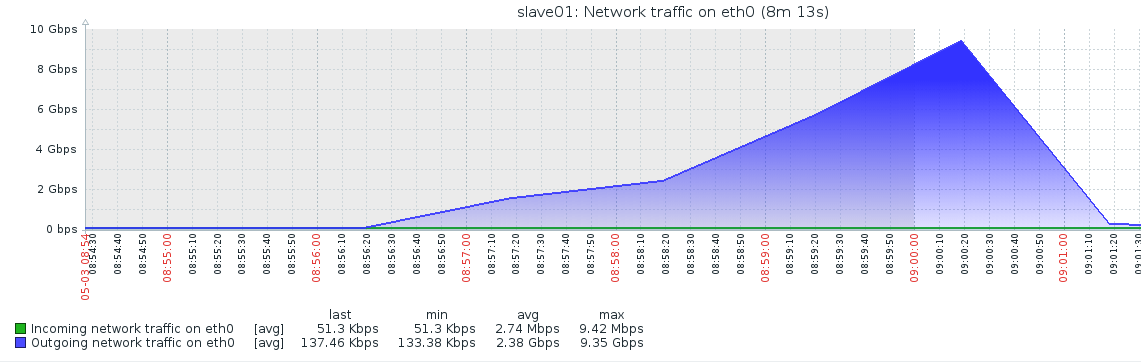
https://blog.csdn.net/aaa1050070637/article/details/53539713
8.windows压测工具
http://blog.163.com/semar@126/blog/static/2323311620108205126230/
iperf压测linux网卡带宽的更多相关文章
- 压测 linux + jexus + mono + asp.net mvc
环境: 1.centos 7 + jexus 5.8.1 + mono 4.4.2 + asp.net mvc 4 做了一点小优化: 一.调整文件描述符数量限制编辑 /etc/security/lim ...
- 实现理论上无tps上限的分布式压测(基于Jmeter+InfluxDB+Grafana+Spring Boot)
JMeter自身带有Master-Slave压测框架,对于并发量不是很高的压力情况下(比如tps低于5000),该方案是可行的,并且使用起来非常方便,只要在配置文件或者命令行工具的参数做一些补充,即可 ...
- 阿里云linux安装jmeter并进行压测
一.阿里云linux安装JDK 1.下载安装JDK jdk官网,选择linux版本,下载并保存. (一)yum安装 安装epel的yumyuan yum install epel-release -y ...
- Linux环境下进行分布式压测踩过的坑
背景:公司为了满足大并发的情况,需要测试组配合,就需要分布式压测,这里我把我踩过坑都记录下来: 环境:Linux + jmeter-v.5.1.1;使用3台2核4G的压力机: Q1: Server f ...
- jmeter 分布式压测(Linux)
之前一篇博文写的是如何在Linux上使用jmeter压测,这篇介绍下Linux上jmeter的分布式压测. 和windows上的分布式类似,需要配置agent节点和控制机 一.Agent节点配置 1. ...
- 使用tcpreply对DPDK进行压力测试(一台主机,2张网卡压测)
使用tcpreply对DPDK进行压力测试 过往风萤 关注 2018.05.18 14:35* 字数 273 阅读 2评论 0喜欢 0 小公司没有testcenter之类的打流工具,并且内网流量比较小 ...
- jmeter压测、操作数据库、分布式linux下运行、webservice接口测试、charles抓包
一.jmeter压测 在线程组中设置好,然后添加http请求,t添加聚合报告查看压力测试结果,如图: 一般压测时间10-15分钟,如果是稳定性测试,一般n*12小时,这些并发用户一直在请求. tps: ...
- linux测试带宽命令,Linux服务器网络带宽测试iperf
linux测试带宽命令,Linux服务器网络带宽测试iperf必须先运行iperf serveriperf -s -i 2客户端iperf -c 服务端IP地址 iperf原理解析 iperf工具可以 ...
- Jmeter 在linux下的分布式压测
Jmeter 在linux下的分布式压测 0.将 windows机器作为master 控制机(同时也兼做负载机slave), linux机器作为 负载机 slave. 1.linux环境安装 : (1 ...
随机推荐
- KVM基本功能管理
一.KVM基础功能管理 1.查看命令帮助 virsh -h 2.查看 KVM 的配置文件存放目录(CENTOS7.0.xml是虚拟系统实例的配置文件) ls /etc/libvirt/qemu ...
- 手把手教你用Rancher创建产品质量数据库设置
目标:在本文中,我们将介绍如何运行一个分布式产品质量数据库设置,它由Rancher进行管理,并且保证持久性.为了部署有状态的分布式Cassandra数据库,我们将使用Stateful Sets (有状 ...
- Java 数组 之 二维数组
转载于 : http://www.verejava.com/?id=16992693216433 public class BinaryArray { public static void main( ...
- pfSense®2.4.4发布后,原pfSense 黄金会员的服务将免费使用!
2018年7月16日,Doug McIntire 从即将发布的pfSense®2.4.4开始,之前在"pfSense Gold"下提供的所有服务都将继续,但所有pfSense用户都 ...
- Tomcat的设置4——Tomcat的体系结构与设置基于端口号的虚拟主机
一.Tomcat体系结构 从conf/server.xml可体现Tomcat的体系.一个Server可有多个service,一个service可以有多个连接器connector,每个连接器暴露出不同的 ...
- 数学--数论--HDU 2104 丢手绢(离散数学 mod N+ 剩余类 生成元)+(最大公约数)
The Children's Day has passed for some days .Has you remembered something happened at your childhood ...
- bzoj 4152[AMPPZ2014]The Captain
bzoj 4152[AMPPZ2014]The Captain 给定平面上的n个点,定义(x1,y1)到(x2,y2)的费用为min(|x1-x2|,|y1-y2|),求从1号点走到n号点的最小费用. ...
- 【K8S】K8S 1.18.2安装dashboard(基于kubernetes-dashboard 2.0.0版本)
[K8S]K8S 1.18.2安装dashboard(基于kubernetes-dashboard 2.0.0版本) 写在前面 K8S集群部署成功了,如何对集群进行可视化管理呢?别着急,接下来,我们一 ...
- 【Python】Django2.0集成Celery4.1详解
环境准备 Python3.6 pip install Django==2.0.1 pip install celery==4.1.0 pip install eventlet (加入协程支持) 安装e ...
- C++中const的特性
目录(作用): 1:修饰变量,说明该变量不可以被改变: 2:修饰指针,分为只想常量的指针和自身是常量的指针 3:修饰引用,指向常量的引用,用于修饰形参,即避免了拷贝,有避免了函数对值的修改: 4:修改 ...