
玩转SpringBoot之捣鼓 Redis
我们都知道,把首页数据放到Redis里,能够加快首页数据的访问速度。但是我们要如何准确又快速的将 Redis 整合到自己的 SpringBoot2.x 项目中呢?今天阿淼就带大家爬一爬其中的门门道道。
序、Redis 介绍
Redis 使用了浪费流量的文本协议,但因为它数据存储在内存中的,相对而言,依然可以取得极高的访问性能。并且 Redis 是线程安全的。
RESP 就是 Redis 序列化协议的简称。它是一种直观的文本协议,优势在于实现异常简单,解析性能极好。
Redis 协议里面虽然有大量冗余的回车换行符,但是这不影响它成为技术领域非常受欢迎的一个文本协议。在技术领域,性能并不总是一切,还有简单性、易理解性和易实现性,这些都需要进行适当权衡。
一、Redis 基础数据结构
1、字符串:(缓存)
- key:value
value 可以是对象转换成的 JSON 字符串,也可以是对象序列化后的二进制字符串
2、列表:(异步队列)
类似linkedlist
- 右边进左边出:队列
- 右边进右边出:栈
3、字典(哈希)
类似hashmap:数组+链表
不过rehash是渐进式hash策略
4、集合:(去重)
- 无序 set: 类似hashset
- 有序 zset:类似SortedSet和HashMap的结合体,内部是现实现是跳跃列表
二、Lettuce
随着 Spring Boot2.x 的到来,支持的组件越来越丰富,也越来越成熟,其中对 Redis 的支持不仅仅是丰富了它的API,更是替换掉底层 Jedis 的依赖,取而代之换成了 Lettuce。
虽然 Lettuce 和 Jedis 的都是连接 Redis Server 的客户端程序,但是 Jedis 在实现上是直连 redis server,多线程环境下非线程安全,除非使用连接池,为每个Jedis实例增加物理连接。而 Lettuce 基于 Netty 的连接实例(StatefulRedisConnection),可以在多个线程间并发访问,且线程安全,满足多线程环境下的并发访问,同时它是可伸缩的设计,一个连接实例不够的情况也可以按需增加连接实例。
Lettuce是可扩展的Redis客户端,用于构建无阻塞的Reactive应用程序.
Luttuce官网:https://lettuce.io/

谷歌翻译后的页面是:
原来这玩意儿叫生菜,你别说,看着图标还真有点像。

三、实操
项目中使用的 SpringBoot2.x 实现,如果之前是 SpringBoot1.x 则需要注意,底层已经由 Jedis 升级成了 Lettuce 。
3.1、引入依赖
除去 SpringBoot 项目需要的 jar 包外,另外还需要引入 redis 相关的依赖:
<dependency>

    <groupId>org.springframework.boot</groupId>

    <artifactId>spring-boot-starter-data-redis</artifactId>

</dependency>

<dependency>

    <groupId>org.apache.commons</groupId>

    <artifactId>commons-pool2</artifactId>

</dependency>
3.2、application.yml 配置文件
此处用到的 application.yml 文件,配置如下:
spring:

  redis:

    # Redis默认情况下有16个分片,这里配置具体使用的分片。默认是索引为0的分片

    database: 1

    # Redis服务器地址

    host: 127.0.0.1

    # Redis服务器连接端口

    port: 6379

    # Redis服务器连接密码(默认为空)

    password: mmzsblog

    # 连接超时时间(毫秒)

    timeout: 2000s

    # 配置文件中添加 lettuce.pool 相关配置,则会使用到lettuce连接池

    lettuce:

      pool:

        # 连接池最大阻塞等待时间(使用负值表示没有限制) 默认 -1

        max-wait: 60s

        # 连接池中的最大空闲连接 默认 8

        max-idle: 10

        # 连接池中的最小空闲连接 默认 0

        min-idle: 10

        # 连接池最大连接数(使用负值表示没有限制) 默认 8

        max-activ: 8
如果项目是由 SpringBoot1.x 升级到 SpringBoot2.x 的,要沿用 jedis 连接池配置时会用到配置 jedis 相关的属性:
    # 配置文件中添加 jedis.pool 相关配置,则会使用到 jedis 连接池

    jedis:

      pool:

        max-active: 10

        max-idle: 8

        min-idle: 0

        max-wait: 60s
并且引用的 jar 包也需要调整:
<dependency>

    <groupId>org.springframework.boot</groupId>

    <artifactId>spring-boot-starter-data-redis</artifactId>

    <exclusions>

        <exclusion>

            <groupId>io.lettuce</groupId>

            <artifactId>lettuce-core</artifactId>

        </exclusion>

    </exclusions>

</dependency>

<dependency>

    <groupId>redis.clients</groupId>

    <artifactId>jedis</artifactId>

</dependency>
另外,这里再贴一下 Spring Boot 关于 RedisProperties 的所有配置项
# REDIS RedisProperties

spring.redis.cluster.max-redirects= # Maximum number of redirects to follow when executing commands across the cluster.

spring.redis.cluster.nodes= # Comma-separated list of "host:port" pairs to bootstrap from.

spring.redis.database=0 # Database index used by the connection factory.

spring.redis.url= # Connection URL. Overrides host, port, and password. User is ignored. Example: redis://user:password@example.com:6379

spring.redis.host=localhost # Redis server host.

spring.redis.jedis.pool.max-active=8 # Maximum number of connections that can be allocated by the pool at a given time. Use a negative value for no limit.

spring.redis.jedis.pool.max-idle=8 # Maximum number of "idle" connections in the pool. Use a negative value to indicate an unlimited number of idle connections.

spring.redis.jedis.pool.max-wait=-1ms # Maximum amount of time a connection allocation should block before throwing an exception when the pool is exhausted. Use a negative value to block indefinitely.

spring.redis.jedis.pool.min-idle=0 # Target for the minimum number of idle connections to maintain in the pool. This setting only has an effect if it is positive.

spring.redis.lettuce.pool.max-active=8 # Maximum number of connections that can be allocated by the pool at a given time. Use a negative value for no limit.

spring.redis.lettuce.pool.max-idle=8 # Maximum number of "idle" connections in the pool. Use a negative value to indicate an unlimited number of idle connections.

spring.redis.lettuce.pool.max-wait=-1ms # Maximum amount of time a connection allocation should block before throwing an exception when the pool is exhausted. Use a negative value to block indefinitely.

spring.redis.lettuce.pool.min-idle=0 # Target for the minimum number of idle connections to maintain in the pool. This setting only has an effect if it is positive.

spring.redis.lettuce.shutdown-timeout=100ms # Shutdown timeout.

spring.redis.password= # Login password of the redis server.

spring.redis.port=6379 # Redis server port.

spring.redis.sentinel.master= # Name of the Redis server.

spring.redis.sentinel.nodes= # Comma-separated list of "host:port" pairs.

spring.redis.ssl=false # Whether to enable SSL support.

spring.redis.timeout= # Connection timeout.
3.3、自定义一个 RedisTemplate
这个看你自己,不自定义也不影响使用,只是说可能不那么顺手,所以阿淼习惯自定义一个。因为 Spring Boot 在 RedisAutoConfiguration 中默认配置了 RedisTemplate<Object, Object>、StringRedisTemplate两个模板类,然而RedisTemplate<Object, Object>并未指定key、value的序列化器。
@Configuration

public class RestTemplateConfig {

    @Bean

    public RedisTemplate<String, Serializable> redisCacheTemplate(LettuceConnectionFactory redisConnectionFactory) {

        RedisTemplate<String, Serializable> template = new RedisTemplate<>();

        template.setKeySerializer(new StringRedisSerializer());

        template.setValueSerializer(new GenericJackson2JsonRedisSerializer());

        template.setConnectionFactory(redisConnectionFactory);

        return template;

    }

}
3.4、Person 实体类
声明一个 Person 实体类:
/**

 * @author :created by mmzsblog

 * @date :created at 2020/06/23 16:41

 */

@Data

@NoArgsConstructor

@AllArgsConstructor

public class Person implements Serializable {

    private static final long serialVersionUID = -8183942491930372236L;

    private Long userId;

    private String username;

    private String password;

}
3.5、测试
通过编写一个 UserController 来进行测试:
@RestController

public class UserController {

    @Resource

    private RedisTemplate redisTemplate;

    @Resource

    private StringRedisTemplate stringRedisTemplate;

    @GetMapping("/set")

    public String set() {

        stringRedisTemplate.opsForValue().set("one", "1");

        // redisTemplate 保存的是字节序列,因为 RestTemplateConfig 自定义的时候指定了 key 和 value 的序列化器。

        redisTemplate.opsForValue().set("two", "2");

        redisTemplate.opsForValue().set("person", new Person(1L, "luffy", "123456789"));

        // 测试线程安全

        ExecutorService executorService = Executors.newFixedThreadPool(1000);

        IntStream.range(0, 1000).forEach(i -> {

            executorService.execute(() -> stringRedisTemplate.opsForValue().increment("num", 1));

        });

        return "Ok!";

    }

    @GetMapping("/get")

    public String get() {

        String one = stringRedisTemplate.opsForValue().get("one");

        if ("1".equals(one)) {

            System.out.println("key: one" + " || value: " + one);

        }

        Object two = redisTemplate.opsForValue().get("two");

        if ("2".equals(two.toString())) {

            System.out.println("key: two" + " || value: " + two);

        }

        Person user = (Person) redisTemplate.opsForValue().get("person");

        if ("luffy".equals(user.getUsername())) {

            System.out.println("key: person" + " || value: " + user);

        }

        return "Ok!";

    }

}
用RedisDesktopManager工具查看,数据如下:
用 StringRedisTemplate 设置的键值是String类型的:
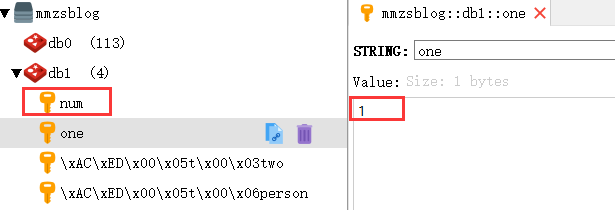
用 RedisTemplate 设置的键值是二进制的字节流形式存储的,从截图中的 [Binary] 标识符也能看出:
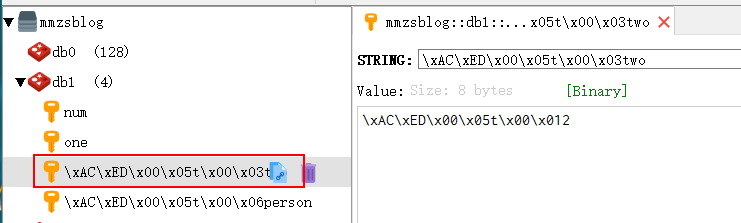
自定义的 RedisTemplate 和 StringRedisTemplate 并不会有什么冲突,想用 String 存储还是二进制的字节流形式存储完全取决于你自己。
参考
- https://lettuce.io/
- Spring Boot官方文档 91.4
- 《Redis深度历险:核心原理和应用实践》
- http://blog.battcn.com/2018/05/11/springboot/v2-nosql-redis/
- https://www.jianshu.com/p/f7d11e7109b7
玩转SpringBoot之捣鼓 Redis的更多相关文章
- 好久没发贴了,最近捣鼓了个基于node的图片压缩小网站解析。
看了下,距离上次发帖都是去年10月份的事,忙于工作的我很少跑博客园里面来玩了. 做这个小网站的初衷是 https://tinypng.com/ 这个网站有时候访问很慢,然后自己去研究了下图片压缩. 网 ...
- 玩转 SpringBoot 2 之整合 JWT 下篇
前言 在<玩转 SpringBoot 2 之整合 JWT 上篇> 中介绍了关于 JWT 相关概念和JWT 基本使用的操作方式.本文为 SpringBoot 整合 JWT 的下篇,通过解决 ...
- 【玩转SpringBoot】用好条件相关注解,开启自动配置之门
自动配置隐含两层含义,要搞清楚 上帝让程序员的发量减少,是为了让他变得更聪明,如果有一天聪明到了极点,那就是绝顶聪明. 据说在大脑高速运转下,这样更有利于散热,不至于核心温度过高而产生告警. 聪明的大 ...
- 【玩转SpringBoot】给自动配置来个整体大揭秘
上一篇文章中提到的条件注解,只是自动配置整体解决方案中的一个环节而已,可以说是管中窥豹. 本文就逐步擦除迷雾,让整体浮现出来,这样就会有一个宏观的认识. 除了写代码之外,还能干点什么? 提到“配置”这 ...
- 【玩转SpringBoot】看似复杂的Environment其实很简单
喜欢写代码,讨厌配环境 我相信这十个字的小标题代表了大多数码农的心声. 十年前读大学时,学校开设了C语言还有C++.但是学习这两种语言,对于新手来说非常没有成就感. 于是我就在校门口买个光盘,装个VS ...
- 【玩转SpringBoot】翻身做主人,一统web服务器
寄人篱下的日子 一直以来受传统影响,我们的web工程总是打成war包,然后放入tomcat的webapps目录下面. 如下图01: 当tomcat启动时,会去解压war包,然后运行web工程.这大家都 ...
- 【玩转SpringBoot】让错误处理重新由web服务器接管
其实web服务器是会处理错误的 在web.xml还是随处可见的年代时(确实有点老黄历了),下面的这些配置应该都不陌生. 根据错误代码处理错误,如下图01: 根据异常类型处理错误,如下图02: 不过我们 ...
- 【玩转SpringBoot】通过事件机制参与SpringBoot应用的启动过程
生命周期和事件监听 一个应用的启动过程和关闭过程是归属到“生命周期”这个概念的范畴. 典型的设计是在启动和关闭过程中会触发一系列的“事件”,我们只要监听这些事件,就能参与到这个过程中来. 要想监听事件 ...
- 【玩转SpringBoot】异步任务执行与其线程池配置
同步代码写起来简单,但就是怕遇到耗时操作,会影响效率和吞吐量. 此时异步代码才是王者,但涉及多线程和线程池,以及异步结果的获取,写起来颇为麻烦. 不过在遇到SpringBoot异步任务时,这个问题就不 ...
随机推荐
- 结合 AOP 轻松处理事件发布处理日志
结合 AOP 轻松处理事件发布处理日志 Intro 前段时间,实现了 EventBus 以及 EventQueue 基于 Event 的事件处理,但是没有做日志(EventLog)相关的部分,原本想增 ...
- Java实现 LeetCode 336 回文对
336. 回文对 给定一组唯一的单词, 找出所有不同 的索引对(i, j),使得列表中的两个单词, words[i] + words[j] ,可拼接成回文串. 示例 1: 输入: ["abc ...
- java实现 蓝桥杯 算法提高 Problem S4: Interesting Numbers 加强版
1 问题描述 Problem Description We call a number interesting, if and only if: 1. Its digits consists of o ...
- java实现第四届蓝桥杯有理数类
有理数类 题目描述 有理数就是可以表示为两个整数的比值的数字.一般情况下,我们用近似的小数表示.但有些时候,不允许出现误差,必须用两个整数来表示一个有理数. 这时,我们可以建立一个"有理数类 ...
- 认识OSI七层模型
概述: OSI全名(Open System Interconnect),是指定的开放系统互连参考模型,为开放式互连信息系统提供了一种功能结构的框架.层次:从低到高的层级:物理层.数据链路层.网络层.传 ...
- 安装 KubeSphere DevOps 系统
1. 安装KubeSphere 安装了一夜,终于看到了期待已久的画面 第一步.硬件配置(PS:VirtualBox虚拟机): 操作系统:Ubuntu 18.04 CPU:4核 内存:8G 磁盘:60 ...
- # 详细了解HTML5中的form表单
4.规范使用 <form>元素用于组织所有表单部件(也称为控件或字段),负责告诉浏览器把数据提交到哪里,方法是在action属性中提供一个URL.加入你只是想在客户端使用JavaScrip ...
- Openshift 4.4 静态 IP 离线安装系列:初始安装
上篇文章准备了离线安装 OCP 所需要的离线资源,包括安装镜像.所有样例 Image Stream 和 OperatorHub 中的所有 RedHat Operators.本文就开始正式安装 OCP( ...
- Tensorflow从0到1(4)之神经网络
一维数据集上的神经网络 # 1 引入包,创建会话 import tensorflow as tf import numpy as np sess = tf.Session() # 2 初始化数据 da ...
- (六)maven 聚合和继承
项目目录 my_test 聚合pom <?xml version="1.0" encoding="UTF-8"?> <project xmln ...