
吴裕雄--python学习笔记:爬虫基础
一、什么是爬虫

爬虫:一段自动抓取互联网信息的程序,从互联网上抓取对于我们有价值的信息。
二、Python爬虫架构

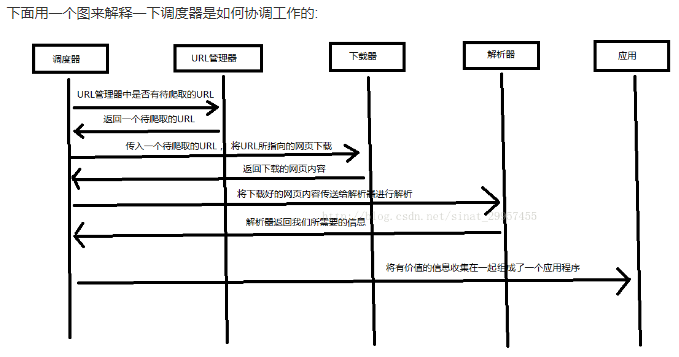
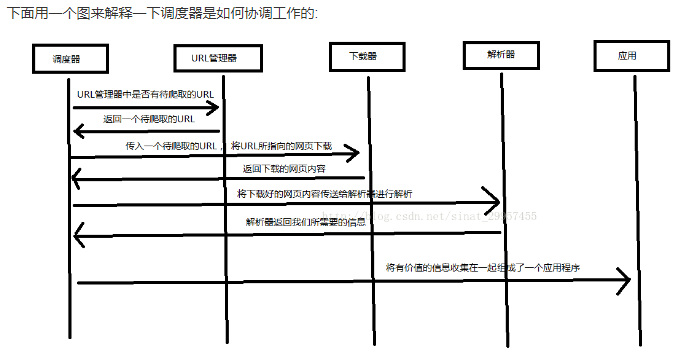
Python 爬虫架构主要由五个部分组成,分别是调度器、URL管理器、网页下载器、网页解析器、应用程序(爬取的有价值数据)。

调度器:相当于一台电脑的CPU,主要负责调度URL管理器、下载器、解析器之间的协调工作。

URL管理器:包括待爬取的URL地址和已爬取的URL地址,防止重复抓取URL和循环抓取URL,实现URL管理器主要用三种方式,通过内存、数据库、缓存数据库来实现。

网页下载器:通过传入一个URL地址来下载网页,将网页转换成一个字符串,网页下载器有urllib2(Python官方基础模块)包括需要登录、代理、和cookie,requests(第三方包)

网页解析器:将一个网页字符串进行解析,可以按照我们的要求来提取出我们有用的信息,也可以根据DOM树的解析方式来解析。网页解析器有正则表达式(直观,将网页转成字符串通过模糊匹配的方式来提取有价值的信息,当文档比较复杂的时候,该方法提取数据的时候就会非常的困难)、html.parser(Python自带的)、beautifulsoup(第三方插件,可以使用Python自带的html.parser进行解析,也可以使用lxml进行解析,相对于其他几种来说要强大一些)、lxml(第三方插件,可以解析 xml 和 HTML),html.parser 和 beautifulsoup 以及 lxml 都是以 DOM 树的方式进行解析的。

应用程序:就是从网页中提取的有用数据组成的一个应用。
import urllib.request

import http.cookiejar

url = "http://www.baidu.com"

response1 = urllib.request.urlopen(url)

print("第一种方法")

#获取状态码,200表示成功

print(response1.getcode())

#获取网页内容的长度

print(len(response1.read()))
第一种方法

200

156265
print("第二种方法")

request = urllib.request.Request(url)

#模拟Mozilla浏览器进行爬虫

request.add_header("user-agent","Mozilla/5.0")

response2 = urllib.request.urlopen(request)

print(response2.getcode())

print(len(response2.read()))
第二种方法

200

156328
print("第三种方法")

cookie = http.cookiejar.CookieJar()

#加入urllib.request处理cookie的能力

opener = urllib.request.build_opener(urllib.request.HTTPCookieProcessor(cookie))

urllib.request.install_opener(opener)

response3 = urllib.request.urlopen(url)

print(response3.getcode())

print(len(response3.read()))

print(cookie)
第三种方法

200

156488

<CookieJar[<Cookie BAIDUID=CA8C47A224EE898DC34E66D0182C70C3:FG=1 for .baidu.com/>, <Cookie BIDUPSID=CA8C47A224EE898D968EF5993499742B for .baidu.com/>, <Cookie H_PS_PSSID=1446_21123 for .baidu.com/>, <Cookie PSTM=1575029972 for .baidu.com/>, <Cookie delPer=0 for .baidu.com/>, <Cookie BDSVRTM=0 for www.baidu.com/>, <Cookie BD_HOME=0 for www.baidu.com/>]>
四、第三方库 Beautiful Soup 的安装

Beautiful Soup: Python 的第三方插件用来提取 xml 和 HTML 中的数据,官网地址 https://www.crummy.com/software/BeautifulSoup/

1、安装 Beautiful Soup
pip install bs4
2、测试是否安装成功

编写一个 Python 文件,输入:

import bs4

print(bs4)
<module 'bs4' from 'e:\\python\\lib\\site-packages\\bs4\\__init__.py'>
五、使用 Beautiful Soup 解析 html 文件
import re

from bs4 import BeautifulSoup

html_doc = """

<html><head><title>The Dormouse's story</title></head>

<body>

<p class="title"><b>The Dormouse's story</b></p>

<p class="story">Once upon a time there were three little sisters; and their names were

<a href="http://example.com/elsie" class="sister" id="link1">Elsie</a>,

<a href="http://example.com/lacie" class="sister" id="link2">Lacie</a> and

<a href="http://example.com/tillie" class="sister" id="link3">Tillie</a>;

and they lived at the bottom of a well.</p>

<p class="story">...</p>

"""

#创建一个BeautifulSoup解析对象

soup = BeautifulSoup(html_doc,"html.parser",from_encoding="utf-8")

#获取所有的链接

links = soup.find_all('a')

print("所有的链接")

for link in links:

    print(link.name,link['href'],link.get_text())
所有的链接

a http://example.com/elsie Elsie

a http://example.com/lacie Lacie

a http://example.com/tillie Tillie
print("获取特定的URL地址")

link_node = soup.find('a',href="http://example.com/elsie")

print(link_node.name,link_node['href'],link_node['class'],link_node.get_text())

print("正则表达式匹配")

link_node = soup.find('a',href=re.compile(r"ti"))

print(link_node.name,link_node['href'],link_node['class'],link_node.get_text())

print("获取P段落的文字")

p_node = soup.find('p',class_='story')

print(p_node.name,p_node['class'],p_node.get_text())
获取特定的URL地址

a http://example.com/elsie ['sister'] Elsie

正则表达式匹配

a http://example.com/tillie ['sister'] Tillie

获取P段落的文字

p ['story'] Once upon a time there were three little sisters; and their names were

Elsie,

Lacie and

Tillie;

and they lived at the bottom of a well.
吴裕雄--python学习笔记:爬虫基础的更多相关文章
- 吴裕雄--python学习笔记:爬虫包的更换
python 3.x报错:No module named 'cookielib'或No module named 'urllib2' 1. ModuleNotFoundError: No module ...
- 吴裕雄--python学习笔记:爬虫
import chardet import urllib.request page = urllib.request.urlopen('http://photo.sina.com.cn/') #打开网 ...
- 吴裕雄--python学习笔记:sqlite3 模块
1 sqlite3.connect(database [,timeout ,other optional arguments]) 该 API 打开一个到 SQLite 数据库文件 database 的 ...
- 吴裕雄--python学习笔记:os模块函数
os.sep:取代操作系统特定的路径分隔符 os.name:指示你正在使用的工作平台.比如对于Windows,它是'nt',而对于Linux/Unix用户,它是'posix'. os.getcwd:得 ...
- 吴裕雄--python学习笔记:os模块的使用
在自动化测试中,经常需要查找操作文件,比如说查找配置文件(从而读取配置文件的信息),查找测试报告(从而发送测试报告邮件),经常要对大量文件和大量路径进行操作,这就依赖于os模块. 1.当前路径及路径下 ...
- 吴裕雄--python学习笔记:BeautifulSoup模块
import re import requests from bs4 import BeautifulSoup req_obj = requests.get('https://www.baidu.co ...
- 吴裕雄--python学习笔记:通过sqlite3 进行文字界面学生管理
import sqlite3 conn = sqlite3.connect('E:\\student.db') print("Opened database successfully&quo ...
- 吴裕雄--python学习笔记:sqlite3 模块的使用与学生信息管理系统
import sqlite3 cx = sqlite3.connect('E:\\student3.db') cx.execute( '''CREATE TABLE StudentTable( ID ...
- Python学习笔记之基础篇(-)python介绍与安装
Python学习笔记之基础篇(-)初识python Python的理念:崇尚优美.清晰.简单,是一个优秀并广泛使用的语言. python的历史: 1989年,为了打发圣诞节假期,作者Guido开始写P ...
随机推荐
- 操作实践,IDEA自定义toString()方法模板
声明:迁移自本人CSDN博客https://blog.csdn.net/u013365635 Java POJO在日志中常会用于打印,经常会将POJO的内容全部或部分打印出来,所以POJO类的toSt ...
- Windows Java桌面应用程序集成slf4j实现日志持久化
声明:迁移自本人CSDN博客https://blog.csdn.net/u013365635 Windows上一般的应用程序也可以通过日志系统打印日志到指定文件.通过这个例子想说明,问题处理的方法是多 ...
- 201503-1 图像旋转 Java
思路: 观察输入和输出可以发现,第三列输出为第一行,第二列输出为第二行,第一列输出为第三行.循环即可 import java.util.Scanner; //得分80,本题最高需要输入100W次,因为 ...
- ruoyi ShiroUtils
package com.ruoyi.framework.util; import org.apache.shiro.SecurityUtils; import org.apache.shiro.cry ...
- MySQL--事务控制和锁定语句
MySQL 支持对 MyISAM 和 MEMORY 存储引擎的表进行表级锁定,对 BDB 存储引擎的表进行页级锁定,对 InnoDB 存储引擎的表进行行级锁定.默认情况下,表锁和行锁都是自动获得的,不 ...
- POJ 1845 Sumdiv [素数分解 快速幂取模 二分求和等比数列]
传送门:http://poj.org/problem?id=1845 大致题意: 求A^B的所有约数(即因子)之和,并对其取模 9901再输出. 解题基础: 1) 整数的唯一分解定理: 任意正整数都有 ...
- iOS中代理属性为什么要用Weak修饰?
一.写在前面 代理设计模式,在iOS开发过程中,是一个非常常见的设计模式,可以说用的范围非常广泛,而对初学者来讲,常常对代理的属性修饰用weak存在疑惑,因此下面就解释一下其中非常简单的道理. 二.必 ...
- mysql only_full_group_by
下载安装的是最新版的mysql5.7.x版本,默认是开启了 only_full_group_by 模式的,但开启这个模式后,原先的 group by 语句就报错,然后又把它移除了. 一旦开启 only ...
- Qt OpenCV 在界面显示图片 通过Lable方式 和GraphicsView 方式
1. 通过lable方式打开图片. 代码如下: void MainWindow::on_pushButton_clicked() { Mat srcImage,gray_image,srcImage1 ...
- 基于Dijsktra算法的最短路径求解
基于Dijsktra算法的最短路径求解 描述 一张地图包括n个城市,假设城市间有m条路径(有向图),每条路径的长度已知.给定地图的一个起点城市和终点城市,利用Dijsktra算法求出起点到终点之间 ...