
Android中的AlertDialog和ProgressDialog用法
手机APP对话框是很多APP都有的下面来看下怎么实现的吧,
打开Android studio 然他自动创建好布局和类;
下面我们修改activity_main.xml中的代码
<?xml version="1.0" encoding="utf-8"?>

<LinearLayout

    xmlns:android="http://schemas.android.com/apk/res/android"

    xmlns:tools="http://schemas.android.com/tools"

    xmlns:app="http://schemas.android.com/apk/res-auto"

    android:layout_width="match_parent"

    android:layout_height="match_parent"

    android:orientation="vertical">

    <Button

        android:id="@+id/btn1"

        android:layout_width="wrap_content"

        android:layout_height="wrap_content"

        android:text="Hello World!"

        android:layout_gravity="center"

        android:layout_marginTop="60pt"

        android:textAllCaps="false"

        />

    <Button

        android:id="@+id/btn2"

        android:layout_width="wrap_content"

        android:layout_height="wrap_content"

        android:layout_gravity="center"

        android:text="Button"

        android:layout_marginTop="3pt"

        android:textAllCaps="false"

        />

</LinearLayout>
再activity_main.xml添加了两个按钮 分别是用于 AlertDialog 和 ProgressDialog的
下面我们再看ActivityMain中的代码
package com.example.administrator.myappalertdialog;

import android.app.ProgressDialog;

import android.content.DialogInterface;

import android.preference.DialogPreference;

import android.support.v7.app.ActionBar;

import android.support.v7.app.AlertDialog;

import android.support.v7.app.AppCompatActivity;

import android.os.Bundle;

import android.view.View;

import android.widget.Button;

import android.widget.Toast;

public class MainActivity extends AppCompatActivity implements View.OnClickListener {

    private Button mBtn1;

    private Button mBtn2;  //声明控件

    @Override

    protected void onCreate(Bundle savedInstanceState) {

        super.onCreate(savedInstanceState);

        setContentView(R.layout.activity_main);

        ActionBar actionbar = getSupportActionBar();  // 去除标题栏

        if(actionbar!= null)

        {

            actionbar.hide();

        }

        mBtn1 = (Button) findViewById(R.id.btn1);  //查找控件

        mBtn1.setOnClickListener(this);   //创建点击事件

        mBtn2 = (Button) findViewById(R.id.btn2);

        mBtn2.setOnClickListener(this);

    }

    public void onClick(View view)  //点击事件

    {

        switch(view.getId())

        {

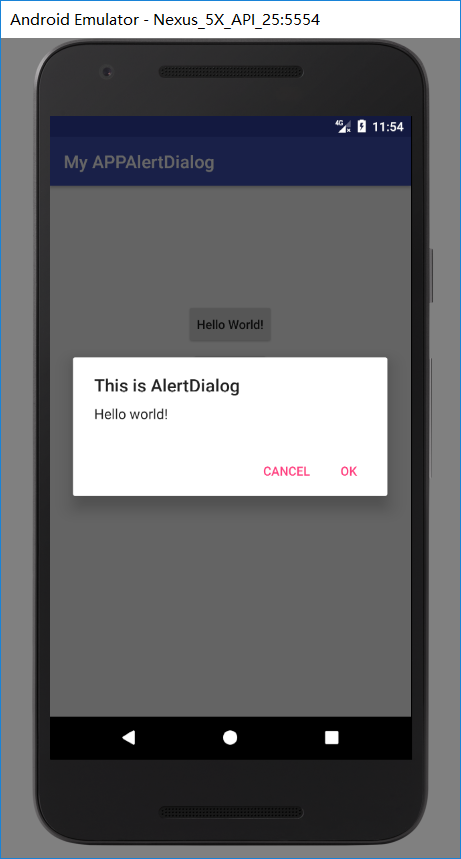
            case R.id.btn1:AlertDialog.Builder dialog = new AlertDialog.Builder(MainActivity.this);

                dialog.setTitle("This is AlertDialog");  //对话框标题

                dialog.setMessage("Hello world!");  //内容

                dialog.setCancelable(true);    //可撤销性

                dialog.setPositiveButton("OK", new DialogInterface.OnClickListener() {

                    @Override

                    public void onClick(DialogInterface dialog, int which) {

                        Toast.makeText(MainActivity.this,"OK",Toast.LENGTH_SHORT).show();  //提示内容

                    }   //确定按钮的点击事件

                });

                dialog.setNegativeButton("Cancel", new DialogInterface.OnClickListener() {

                    @Override

                    public void onClick(DialogInterface dialog, int which) {

                        Toast.makeText(MainActivity.this,"Cancel",Toast.LENGTH_SHORT).show();  //提示内容

                    }//取消按钮的点击事件

                });

                dialog.show();  //全部显示出来

                break;

//下面的原理一样。

            case R.id.btn2:

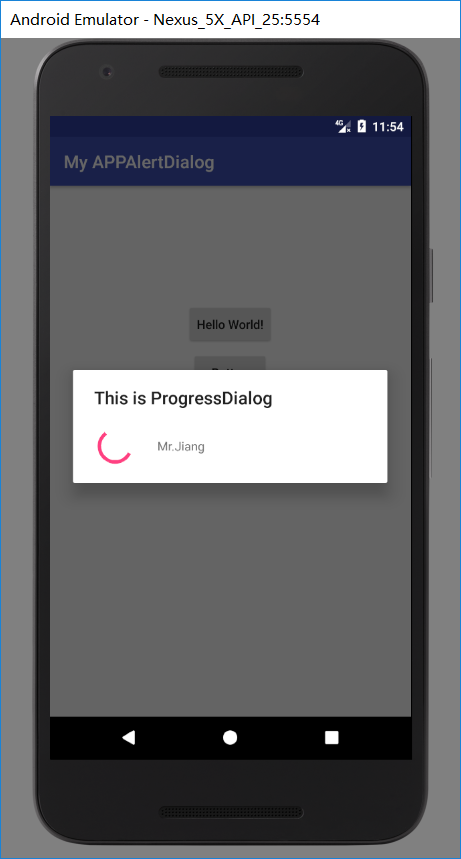
                ProgressDialog progressdialog = new ProgressDialog(MainActivity.this);

                progressdialog.setTitle("This is ProgressDialog");

                progressdialog .setMessage("Mr.Jiang");

                progressdialog.setCancelable(false);

                progressdialog.show();

                break;

            default: Toast.makeText(MainActivity.this,"ERROR",Toast.LENGTH_SHORT).show();break;

        }

    }

}
上面ProgressDialog 没有确定和取消按钮,我们可以把progressdialog.setCancelable里面的值改成true,按下BACK键即可退出,还有可以用progressdialog.dismiss();来去取消关闭对话框;
下面附上第一个和第二个效果图.
Android中的AlertDialog和ProgressDialog用法的更多相关文章
- Android 中的AlertDialog使用自定义布局
Android使用指定的View开发弹窗功能 Android开发中进程会使用到我们的AlertDialog,但是比较可惜的是我们的Android原生的AlertDialog的效果又比较的简陋,这个时候 ...
- Android中的Handler的具体用法
Android UI操作并不是线程安全的并且这些操作必须在UI线程中执行.Android利用Handler来实现UI线程的更新的. Handler是Android中的消息发送器,其在哪个Activit ...
- Android中Parcelable与Serializable接口用法
转自: Android中Parcelable接口用法 1. Parcelable接口 Interface for classes whose instances can be written to a ...
- Android中Parcelable和Serializable接口用法
1. Parcelable接口 Interface for classes whose instances can be written to and restored from a Parcel. ...
- Android中Context的总结及其用法
在android中我们经常遇到这样的情况,在创建一个对象的时候往往需要传递一个this参数,比如:语句 MyView mView = new MyView(this),要求传递一个this参数,这个t ...
- Android中的AlertDialog使用示例五(自定义对话框)
在Android开发中,我们经常会需要在Android界面上弹出一些对话框,比如询问用户或者让用户选择.这些功能我们叫它Android Dialog对话框,AlertDialog实现方法为建造者模式. ...
- Android中的AlertDialog使用示例四(多项选择确定对话框)
在Android开发中,我们经常会需要在Android界面上弹出一些对话框,比如询问用户或者让用户选择.这些功能我们叫它Android Dialog对话框,AlertDialog实现方法为建造者模式. ...
- Android中的AlertDialog使用示例三(单向选择确定对话框)
在Android开发中,我们经常会需要在Android界面上弹出一些对话框,比如询问用户或者让用户选择.这些功能我们叫它Android Dialog对话框,AlertDialog实现方法为建造者模式. ...
- Android中的AlertDialog使用示例二(普通选项对话框)
在Android开发中,我们经常会需要在Android界面上弹出一些对话框,比如询问用户或者让用户选择.这些功能我们叫它Android Dialog对话框,AlertDialog实现方法为建造者模式. ...
随机推荐
- 吴裕雄--天生自然 JAVA开发学习:流(Stream)、文件(File)和IO
BufferedReader br = new BufferedReader(new InputStreamReader(System.in)); //使用 BufferedReader 在控制台读取 ...
- python数据预处理for knn
机器学习实战 一书中第20页数据预处理,从文本中解析数据的程序. import numpy as np def dataPreProcessing(fileName): with open(fileN ...
- Maven--仓库的分类
对于 Maven 仓库来说,仓库只分为两类:本地仓库和远程仓库. 当 Maven 根据坐标寻找构件的时候,它首先会查看本地仓库,如果本地仓库存在此构件,则直接使用:如果本地仓库不存在此构件,或者需要查 ...
- win10下安装cygwin全过程
简单讲:cygwin就是在windows系统上跑linux和unix的环境,跨平台移植的应用程序移植. 安装步骤: 下载cygwin: 打开官网https://cygwin.com/install.h ...
- 进程同步multiprocess.Lock
进程同步multiprocess.Lock 我们千方百计实现了程序的异步,让多个任务可以同时在几个进程中并发处理,他们之间的运行没有顺序,一旦开启也不受我们控制.尽管并发编程让我们能更加充分的利用IO ...
- nm命令介绍
一.参考文章 网址1:https://linuxtools-rst.readthedocs.io/zh_CN/latest/tool/nm.html 参考2: man nm 参考3:<linux ...
- numpy 加速 以及 ipython
先安装openblas, 然后用pip 安装numpy sudo ln -s /usr/lib64/libopenblas-r0.2.14.so /usr/lib64/libopenblas.so 为 ...
- Eova 怎么放在 Docker中,使用阿里云流水线构建Eova!!
Eova 快速开发框架不做过多解释,使用起来超级爽提高了我们的开发效率. 有要了解的可以去官网看下http://www.eova.cn/ 最近我们想在docker中运行并且使用阿里云的云效工具去构建部 ...
- debian8修改kde桌面语言
apt-get install kde-l10n-zhcn, language里面改中文 亲测可用 来源:http://tieba.baidu.com/p/2489771177
- cmake target_link_libraries() 中<PUBLIC|PRIVATE|INTERFACE> 的区别
如果目标的头文件中包含了依赖的头文件(源文件间接包含),那么这里就是PUBLIC 如果目标仅源文件中包含了依赖的头文件,那么这里就是PRIVATE 如果目标的头文件包含依赖,但源文件未包含,那么这里就 ...