
【Hadoop离线基础总结】HDFS的API操作
HDFS的API操作
创建maven工程并导入jar包
- 注意
由于cdh版本的所有的软件涉及版权的问题,所以并没有将所有的jar包托管到maven仓库当中去,而是托管在了CDH自己的服务器上面,所以我们默认去maven的仓库下载不到,需要自己手动的添加repository去CDH仓库进行下载。
要用CDH的jar包,要先添加一个repository:https://www.cloudera.com/documentation/enterprise/release-notes/topics/cdh_vd_cdh5_maven_repo.html
  <repositories>

    <repository>

      <id>cloudera</id>

      <url>https://repository.cloudera.com/artifactory/cloudera-repos/</url>

    </repository>

  </repositories>
再从这里找需要的jar包:https://www.cloudera.com/documentation/enterprise/release-notes/topics/cdh_vd_cdh5_maven_repo_514x.html
<dependencies>

    <dependency>

        <groupId>org.apache.hadoop</groupId>

        <artifactId>hadoop-client</artifactId>

        <version>2.6.0-mr1-cdh5.14.0</version>

    </dependency>

    <dependency>

        <groupId>org.apache.hadoop</groupId>

        <artifactId>hadoop-common</artifactId>

        <version>2.6.0-cdh5.14.0</version>

    </dependency>

    <dependency>

        <groupId>org.apache.hadoop</groupId>

        <artifactId>hadoop-hdfs</artifactId>

        <version>2.6.0-cdh5.14.0</version>

    </dependency>

    <dependency>

        <groupId>org.apache.hadoop</groupId>

        <artifactId>hadoop-mapreduce-client-core</artifactId>

        <version>2.6.0-cdh5.14.0</version>

    </dependency>

    <!-- https://mvnrepository.com/artifact/junit/junit -->

    <dependency>

        <groupId>junit</groupId>

        <artifactId>junit</artifactId>

        <version>4.11</version>

        <scope>test</scope>

    </dependency>

    <dependency>

        <groupId>org.testng</groupId>

        <artifactId>testng</artifactId>

        <version>RELEASE</version>

    </dependency>

</dependencies>

<build>

    <plugins>

        <plugin>

            <groupId>org.apache.maven.plugins</groupId>

            <artifactId>maven-compiler-plugin</artifactId>

            <version>3.0</version>

            <configuration>

                <source>1.8</source>

                <target>1.8</target>

                <encoding>UTF-8</encoding>

                <!--    <verbal>true</verbal>-->

            </configuration>

        </plugin>

        <plugin>

            <groupId>org.apache.maven.plugins</groupId>

            <artifactId>maven-shade-plugin</artifactId>

            <version>2.4.3</version>

            <executions>

                <execution>

                    <phase>package</phase>

                    <goals>

                        <goal>shade</goal>

                    </goals>

                    <configuration>

                        <minimizeJar>true</minimizeJar>

                    </configuration>

                </execution>

            </executions>

        </plugin>

      <!--  <plugin>

            <artifactId>maven-assembly-plugin </artifactId>

            <configuration>

                <descriptorRefs>

                    <descriptorRef>jar-with-dependencies</descriptorRef>

                </descriptorRefs>

                <archive>

                    <manifest>

                        <mainClass>cn.itcast.hadoop.db.DBToHdfs2</mainClass>

                    </manifest>

                </archive>

            </configuration>

            <executions>

                <execution>

                    <id>make-assembly</id>

                    <phase>package</phase>

                    <goals>

                        <goal>single</goal>

                    </goals>

                </execution>

            </executions>

        </plugin>-->

    </plugins>

</build>
使用URL的方式访问数据(重在了解)
import org.apache.commons.io.IOUtils;

import org.apache.hadoop.fs.FsUrlStreamHandlerFactory;

import org.junit.Test;

import java.io.*;

import java.net.MalformedURLException;

import java.net.URL;

public class demo {

    @Test

    public void demo1() throws IOException {

        //第一步:注册HDFS的URL,让java代码能够识别HDFS的URL形式

        URL.setURLStreamHandlerFactory(new FsUrlStreamHandlerFactory());

        InputStream inputStream = null;

        FileOutputStream outputStream =null;

        //URL地址可以在hadoop配置文件core-site.xml中查看

        String url = "hdfs://192.168.0.10:8020/test/yum.log";

        //打开文件输入流

        try {

            inputStream =new URL(url).openStream();

            outputStream = new FileOutputStream(new File("/Users/zhaozhuang/Downloads/hello.txt"));

            IOUtils.copy(inputStream,outputStream);

        }catch (IOException e){

            e.printStackTrace();

        }finally {

            IOUtils.closeQuietly(inputStream);

            IOUtils.closeQuietly(outputStream);

        }

    }

}
上述代码中String url的出处
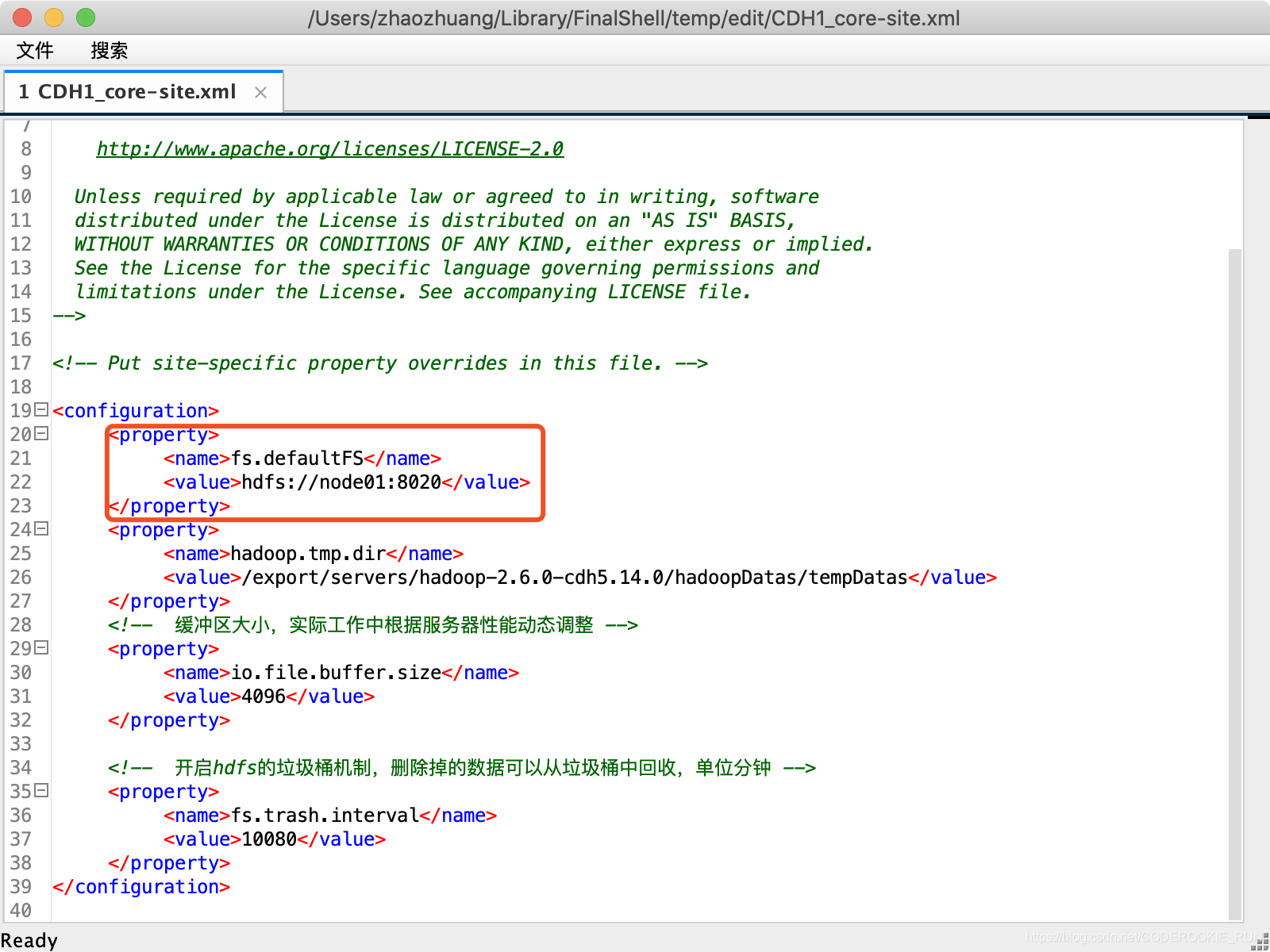
获取FileSystem的几种方式
- 第一种方式获取FileSystem
	@Test

    public void getFileSystem1() throws IOException {

        /*

        FileSystem是一个抽象类,获取抽象类的实例有两种方式

        第一种,看看这个抽象类有没有提供什么方法,返回它本身

        第二种,找子类

         */

        Configuration configuration = new Configuration();

        //如果这里不加任何配置,这里获取到的就是本地文件系统

        configuration.set("fs.defaultFS","hdfs://node01:8020");

        FileSystem fileSystem = FileSystem.get(configuration);

        System.out.println(fileSystem.toString());

        fileSystem.close();

    }
- 第二种方式获取FileSystem
	@Test

    public void getFileSystem2() throws URISyntaxException, IOException {

        Configuration configuration = new Configuration();

        FileSystem fileSystem = FileSystem.get(new URI("hdfs://node01:8020"), configuration);

        System.out.println(fileSystem.toString());

        fileSystem.close();

    }
- 第三种方式获取FileSystem
	@Test

    public void getFileSystem3() throws IOException {

        Configuration configuration = new Configuration();

        configuration.set("fs.defaultFS","hdfs://node01:8020");

        FileSystem fileSystem = FileSystem.newInstance(configuration);

        System.out.println(fileSystem.toString());

        fileSystem.close();

    }
- 第四种方式获取FileSystem
	@Test

    public void getFileSystem4() throws URISyntaxException, IOException {

        Configuration configuration = new Configuration();

        FileSystem fileSystem = FileSystem.newInstance(new URI("hdfs://node01:8020"), configuration);

        System.out.println(fileSystem.toString());

        fileSystem.close();

    }
递归遍历HDFS的所有文件
- 通过递归遍历hdfs文件系统
	@Test

    public void getAllFiles() throws URISyntaxException, IOException {

        //获取HDFS

        FileSystem fileSystem = FileSystem.get(new URI("hdfs://node01:8020"), new Configuration());

        //获取文件的状态,可以通过fileStatuses来判断究竟是文件夹还是文件

        FileStatus[] fileStatuses = fileSystem.listStatus(new Path("hdfs://node01:8020/"));

        /**

        循环遍历FileStatus,判断文件究竟是文件夹还是文件

        如果是文件,直接输出路径

        如果是文件夹,继续遍历

         */

        for (FileStatus fileStatus : fileStatuses) {

            if (fileStatus.isDirectory()){

                //如果是文件夹,继续遍历(需要再写一个方法来获取文件夹中的文件)

                getDirFiles(fileStatus.getPath(),fileSystem);

            } else {

                Path path = fileStatus.getPath();

                System.out.println(path.toString());

            }

        }

    }

    public void getDirFiles(Path path,FileSystem fileSystem) throws IOException {

        //还是先获取文件的状态

        FileStatus[] fileStatuses = fileSystem.listStatus(path);

        //循环遍历fileStatus

        for (FileStatus fileStatus : fileStatuses) {

            if (fileStatus.isDirectory()){

                getDirFiles(fileStatus.getPath(),fileSystem);

            } else {

                System.out.println(fileStatus.getPath().toString());

            }

        }

    }
- 官方提供的API直接遍历
	/**

     * 通过hdfs直接提供的API进行遍历

     */

    @Test

    public void getAllFiles2() throws URISyntaxException, IOException {

        //获取HDFS

        FileSystem fileSystem = FileSystem.get(new URI("hdfs://node01:8020"), new Configuration());

        //获取RemoteIterator 得到所有的文件或者文件夹,第一个参数指定遍历的路径,第二个参数表示是否要递归遍历

        RemoteIterator<LocatedFileStatus> locatedFileStatusRemoteIterator = fileSystem.listFiles(new Path("hdfs://node01:8020/"), true);

        //while循环遍历

        while (locatedFileStatusRemoteIterator.hasNext()){

            LocatedFileStatus next = locatedFileStatusRemoteIterator.next();

            System.out.println(next.getPath().toString());

        }

        fileSystem.close();

    }
下载文件到本地
	@Test

    public void downloadFileToLocal() throws URISyntaxException, IOException {

        //获取HDfS

        FileSystem fileSystem = FileSystem.get(new URI("hdfs://node01:8020"), new Configuration());

        //打开输入流,读取HDfS上的文件

        FSDataInputStream inputStream = fileSystem.open(new Path("hdfs://node01:8020/test/yum.log"));

        //用输出流,确定下载到本地的路径

        FileOutputStream outputStream = new FileOutputStream(new File("/Users/zhaozhuang/Downloads/hello2.txt"));

        //用IOUtils把文件下载下来

        IOUtils.copy(inputStream,outputStream);

        //关闭输入流和输出流

        IOUtils.closeQuietly(inputStream);

        IOUtils.closeQuietly(outputStream);

        fileSystem.close();

    }
在HDFS上创建文件夹
	@Test

    public void mkdirs() throws URISyntaxException, IOException {

        //获取HDFS

        FileSystem fileSystem = FileSystem.get(new URI("hdfs://node01:8020"), new Configuration());

        //创建文件夹

        boolean mkdirs = fileSystem.mkdirs(new Path("/hello/mydir/test"));

        //关闭系统

        fileSystem.close();

    }
HDFS文件上传
	@Test

    public void uploadFileFromLocal() throws URISyntaxException, IOException {

        //获取HDfS

        FileSystem fileSystem = FileSystem.get(new URI("hdfs://node01:8020"), new Configuration());

        //上传文件

        fileSystem.copyFromLocalFile(new Path("/Users/zhaozhuang/Downloads/hello2.txt"),new Path("/"));

        //关闭系统

        fileSystem.close();

    }
HDFS权限问题以及伪造用户
- 首先停止hdfs集群,在node01机器上执行以下命令
cd /export/servers/hadoop-2.6.0-cdh5.14.0

stop-dfs.sh
- 修改node01机器上的hdfs-site.xml当中的配置文件
<property>

   <name>dfs.permissions</name>

   <value>true</value>

</property>
- 修改完成之后配置文件发送到其他机器上面去
scp hdfs-site.xml node02:$PWD

scp hdfs-site.xml node03:$PWD
- 重启hdfs集群
start-dfs.sh
- 随意上传一些文件到我们hadoop集群当中准备测试使用
cd /export/servers/hadoop-2.6.0-cdh5.14.0/etc/hadoop

hdfs dfs -mkdir /config

hdfs dfs -put *.xml /config

hdfs dfs -chmod 600 /config/core-site.xml
- Java伪造root用户下载
	@Test

    public void getConfig() throws URISyntaxException, IOException, InterruptedException {

        //获取HDFS(第三个参数为伪造的用户)

        FileSystem fileSystem = FileSystem.get(new URI("hdfs://node01:8020"), new Configuration(),"root");

        //下载文件

        fileSystem.copyToLocalFile(new Path("/config/core-site.xml"),new Path("/Users/ZhaoZhuang/Downloads/hello3.txt"));

        //关闭系统

        fileSystem.close();

    }
HDFS的小文件合并
- 在linux进行小文件合并
cd /export/servers

hdfs dfs -getmerge /config/*.xml ./hello.xml
- 在java进行小文件合并
	@Test

    public void mergeFiles() throws URISyntaxException, IOException, InterruptedException {

        //获取HDFS

        FileSystem fileSystem = FileSystem.get(new URI("hdfs://node01:8020"), new Configuration(), "root");

        //创建输出流,在HDFS端创建一个合并文件

        FSDataOutputStream outputStream = fileSystem.create(new Path("/bigFile.xml"));

        //获取本地文件系统

        LocalFileSystem local = FileSystem.getLocal(new Configuration());

        //通过本地文件系统获取文件列表,为一个集合

        FileStatus[] fileStatuses = local.listStatus(new Path("/Volumes/赵壮备份/大数据离线课程资料/3.大数据离线第三天/上传小文件合并"));

        //遍历FileStatus

        for (FileStatus fileStatus : fileStatuses) {

            FSDataInputStream inputStream = local.open(fileStatus.getPath());

            IOUtils.copy(inputStream,outputStream);

            IOUtils.closeQuietly(inputStream);

        }

        IOUtils.closeQuietly(outputStream);

        local.close();

        fileSystem.close();

    }
【Hadoop离线基础总结】HDFS的API操作的更多相关文章
- 【Hadoop离线基础总结】oozie的安装部署与使用
目录 简单介绍 概述 架构 安装部署 1.修改core-site.xml 2.上传oozie的安装包并解压 3.解压hadooplibs到与oozie平行的目录 4.创建libext目录,并拷贝依赖包 ...
- 【Hadoop离线基础总结】impala简单介绍及安装部署
目录 impala的简单介绍 概述 优点 缺点 impala和Hive的关系 impala如何和CDH一起工作 impala的架构及查询计划 impala/hive/spark 对比 impala的安 ...
- 【Hadoop离线基础总结】Hive调优手段
Hive调优手段 最常用的调优手段 Fetch抓取 MapJoin 分区裁剪 列裁剪 控制map个数以及reduce个数 JVM重用 数据压缩 Fetch的抓取 出现原因 Hive中对某些情况的查询不 ...
- 【Hadoop离线基础总结】Hue的简单介绍和安装部署
目录 Hue的简单介绍 概述 核心功能 安装部署 下载Hue的压缩包并上传到linux解压 编译安装启动 启动Hue进程 hue与其他框架的集成 Hue与Hadoop集成 Hue与Hive集成 Hue ...
- 【Hadoop离线基础总结】流量日志分析网站整体架构模块开发
目录 数据仓库设计 维度建模概述 维度建模的三种模式 本项目中数据仓库的设计 ETL开发 创建ODS层数据表 导入ODS层数据 生成ODS层明细宽表 统计分析开发 流量分析 受访分析 访客visit分 ...
- 客户端操作 2 HDFS的API操作 3 HDFS的I/O流操作
2 HDFS的API操作 2.1 HDFS文件上传(测试参数优先级) 1.编写源代码 // 文件上传 @Test public void testPut() throws Exception { Co ...
- HDFS03 HDFS的API操作
HDFS的API操作 目录 HDFS的API操作 客户端环境准备 1.下载windows支持的hadoop 2.配置环境变量 3 在IDEA中创建一个Maven工程 HDFS的API实例 用客户端远程 ...
- 【Hadoop离线基础总结】Sqoop常用命令及参数
目录 常用命令 常用公用参数 公用参数:数据库连接 公用参数:import 公用参数:export 公用参数:hive 常用命令&参数 从关系表导入--import 导出到关系表--expor ...
- hadoop hdfs java api操作
package com.duking.util; import java.io.IOException; import java.util.Date; import org.apache.hadoop ...
随机推荐
- 杭电 How far away ?
There are n houses in the village and some bidirectional roads connecting them. Every day peole alwa ...
- 原创Hbase1.2.1集群安装
[hadoop@Hmaster install]$ tar -zxvf hbase-1.2.1-bin.tar.gz -C ~ [hadoop@Hmaster install]$vi ~/.bash_ ...
- CVE-2019-0193 Apache solr velocity模块漏洞
Solr简单介绍 Solr是建立在Apache Lucene ™之上的一个流行.快速.开放源代码的企业搜索平台. Solr具有高度的可靠性,可伸缩性和容错能力,可提供分布式索引,复制和负载平衡查询,自 ...
- 看完肯定懂的 Java 字符串常量池指南
字符串问题可谓是 Java 中经久不衰的问题,尤其是字符串常量池经常作为面试题出现.可即便是看似简单而又经常被提起的问题,还是有好多同学一知半解,看上去懂了,仔细分析起来却又发现不太明白. 背景说明 ...
- Java工作流程引擎系统的退回规则 专题说明
概述 说明:流程引擎的退回与发送,分别是前进与后退,它是流程引擎的基础功能操作,流程的退回根据不同的应用场景,也是需要不同的方式来控制,我们把这些方式叫做规则处理. 退回工作的场景相对复杂,由于与审核 ...
- discuz-目录
由于工作原因,开始学习discuz,0基础开发,学了一会总结了一些
- fedora 21下Virtual Box安装Windows XP SP3
Installing Virtual Box and Windows XP SP3 during Fedora 21 The first step:Download and Install Virtu ...
- 运用jieba库统计词频及制作词云
一.对中国十九大报告做词频分析 import jieba txt = open("中国十九大报告.txt.txt","r",encoding="utf ...
- c语言----- 冒泡排序 for while do-while 递归练习
1. 冒泡排序简介(默认从小到大排序) 核心思想:只比较相邻的两个元素,如果满足条件就交换 5 8 2 1 6 9 4 3 7 0 目标:0 1 2 3 4 5 6 7 8 9 第一次排序: 5 ...
- qemu-img 整理
qemu-img命令语法: qemu-img command [command options] check命令: check [-f fmt < qcow2 | qed | vdi >] ...