
实验3- 熟悉常用的 HBase 操作
石家庄铁道大学信息科学与技术学院
实验报告
2018年----2019年 第一学期
题目: 熟悉常用的 HBase 操作
课程名称: 大型数据库应用技术
班 级: 信1605-2班
姓 名: XX 学号: XXXXXXXX
指导教师: XXX
一、实验内容与完成情况:(实验具体步骤和实验截图说明)
实验说明:
1、 本次实验是第三次上机,属于验证性实验。实验报告上交截止日期为2018年9月29日上午12点之前。
2、 实验报告命名为:信1605-1班学号姓名实验三.doc。
实验环境:
1、 操作系统:Linux(建议Ubuntu16.04);
2、 Hadoop版本:2.7.1;
3、 JDK版本:1.7或以上版本;
4、 Java IDE:Eclipse。
实验目的:
1、 理解HBase在Hadoop体系结构中的角色;
2、 熟练使用HBase操作常用的Shell命令;
 3、 熟悉HBase操作常用的Java API。
实验步骤:
(一)编程实现以下指定功能,并用 Hadoop 提供的 HBase Shell 命令完成相同任务:
l 列出 HBase 所有的表的相关信息,例如表名;
l 在终端打印出指定的表的所有记录数据;
l 向已经创建好的表添加和删除指定的列族或列;
l 清空指定的表的所有记录数据;
l 统计表的行数。
1.列出 HBase 所有的表的相关信息,例如表名
HBase Shell:List
截图: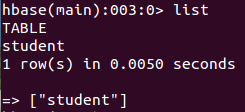
Java API
package homework;

import java.io.IOException;

import org.apache.hadoop.conf.Configuration;

import org.apache.hadoop.hbase.*;

import org.apache.hadoop.hbase.client.*;

import java.io.IOException;

public class Test_1 {

    public static Configuration configuration;

    public static Connection connection;

    public static Admin admin;

    /**

     * @param args

     */

    //建立连接

    public static void init(){

        configuration  = HBaseConfiguration.create();

        configuration.set("hbase.rootdir","hdfs://localhost:9000/hbase");

        try{

            connection = ConnectionFactory.createConnection(configuration);

            admin = connection.getAdmin();

        }catch (IOException e){

            e.printStackTrace();

        }

    }

    //关闭连接

    public static void close(){

        try{

            if(admin != null){

                admin.close();

            }

            if(null != connection){

                connection.close();

            }

        }catch (IOException e){

            e.printStackTrace();

        }

    }

    /**

     * 查看已有表

     * @throws IOException

     */

    public static void listTables() throws IOException {

        init();

        HTableDescriptor hTableDescriptors[] = admin.listTables();

        for(HTableDescriptor hTableDescriptor :hTableDescriptors){

            System.out.println(hTableDescriptor.getNameAsString());

        }

        close();

    }

    public static void main(String[] args) {

        // TODO Auto-generated method stub

        Test_1 t =new Test_1();

        try {

            System.out.println("以下为Hbase 数据库中所存的表信息");

            t.listTables();

        } catch (IOException e) {

            // TODO Auto-generated catch block

            e.printStackTrace();

        }

    }

}
Hbase shell查看所有表的信息
截图: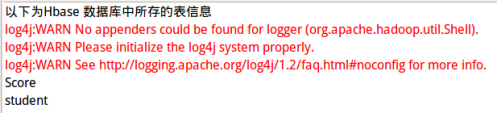
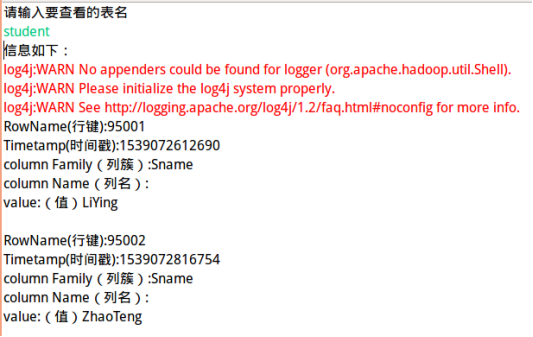
2.在终端打印出指定的表的所有记录数据;
Hbase shell scan 'student'
截图:
Java API:
package homework;

import java.io.IOException;

import org.apache.hadoop.conf.Configuration;

import org.apache.hadoop.hbase.*;

import org.apache.hadoop.hbase.client.*;

import java.io.IOException;

import java.util.Scanner;

public class Test_2 {

    public static Configuration configuration;

    public static Connection connection;

    public static Admin admin;

    /**

     * @param args

     */

  //建立连接

    public static void init(){

        configuration  = HBaseConfiguration.create();

        configuration.set("hbase.rootdir","hdfs://localhost:9000/hbase");

        try{

            connection = ConnectionFactory.createConnection(configuration);

            admin = connection.getAdmin();

        }catch (IOException e){

            e.printStackTrace();

        }

    }

    //关闭连接

    public static void close(){

        try{

            if(admin != null){

                admin.close();

            }

            if(null != connection){

                connection.close();

            }

        }catch (IOException e){

            e.printStackTrace();

        }

    }

    /**

     * 根据表名查找表信息

     */

    public static void getData(String tableName)throws  IOException{

        init();

        Table table = connection.getTable(TableName.valueOf(tableName));

        Scan scan = new Scan();

       ResultScanner scanner = table.getScanner(scan);

        for(Result result:scanner)

        {

            showCell((result));

        }

        close();

    }

    /**

     * 格式化输出

     * @param result

     */

    public static void showCell(Result result){

        Cell[] cells = result.rawCells();

        for(Cell cell:cells){

            System.out.println("RowName(行键):"+new String(CellUtil.cloneRow(cell))+" ");

            System.out.println("Timetamp(时间戳):"+cell.getTimestamp()+" ");

            System.out.println("column Family(列簇):"+new String(CellUtil.cloneFamily(cell))+" ");

            System.out.println("column Name(列名):"+new String(CellUtil.cloneQualifier(cell))+" ");

            System.out.println("value:(值)"+new String(CellUtil.cloneValue(cell))+" ");

            System.out.println();

        }

    }

    public static void main(String[] args) throws IOException {

        // TODO Auto-generated method stub

        Test_2 t =new Test_2();

        System.out.println("请输入要查看的表名");

        Scanner scan = new Scanner(System.in);

        String tableName=scan.nextLine();

        System.out.println("信息如下:");

        t.getData(tableName);

    }

}
查看表记录
截图:
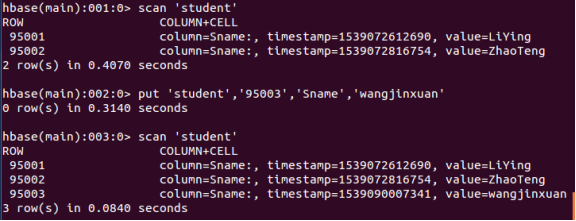
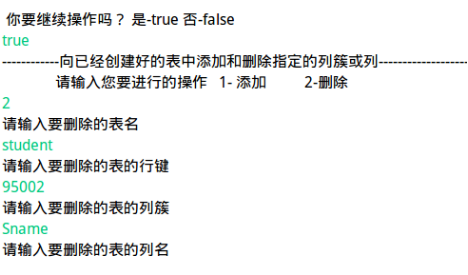
③.(向已经创建好的表添加和删除指定的列族或列)
Hbase shell(添加列族): put 'student','95003','Sname','wangjinxuan'
截图 :
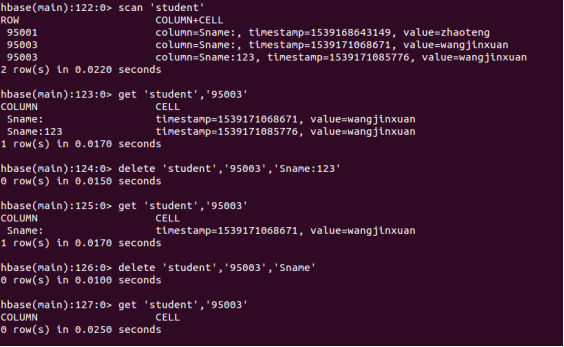
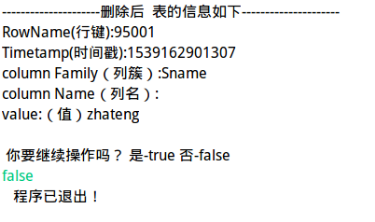
HBase Shell:(删除列族)
delete 'student' ,’95003’,’Sname:123’
delete 'student' ,’95003’,’Sname’
student为表名,95003为行键,Sname为列族名,123为列名
(因为hbase中没有删除shell命令直接删除指定行的列族信息(包括其中的列的信息),所以需要先将所有指定行的列族信息的所有信息,然后使用delete一个一个作删除)
截图:
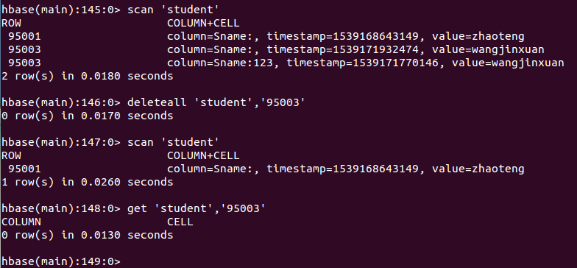
删除补充
删除整个行记录
Deleteall 'student' ,’95003’
student为表名,95003为行键
Java API
package homework;

import java.io.IOException;

import java.util.Scanner;

import org.apache.hadoop.conf.Configuration;

import org.apache.hadoop.hbase.Cell;

import org.apache.hadoop.hbase.CellUtil;

import org.apache.hadoop.hbase.HBaseConfiguration;

import org.apache.hadoop.hbase.TableName;

import org.apache.hadoop.hbase.client.Admin;

import org.apache.hadoop.hbase.client.Connection;

import org.apache.hadoop.hbase.client.ConnectionFactory;

import org.apache.hadoop.hbase.client.Delete;

import org.apache.hadoop.hbase.client.Put;

import org.apache.hadoop.hbase.client.Result;

import org.apache.hadoop.hbase.client.ResultScanner;

import org.apache.hadoop.hbase.client.Scan;

import org.apache.hadoop.hbase.client.Table;

public class Test_3 {

    public static Configuration configuration;

    public static Connection connection;

    public static Admin admin;

      //建立连接

    public static void init(){

        configuration  = HBaseConfiguration.create();

        configuration.set("hbase.rootdir","hdfs://localhost:9000/hbase");

        try{

            connection = ConnectionFactory.createConnection(configuration);

            admin = connection.getAdmin();

        }catch (IOException e){

            e.printStackTrace();

        }

    }

    //关闭连接

    public static void close(){

        try{

            if(admin != null){

                admin.close();

            }

            if(null != connection){

                connection.close();

            }

        }catch (IOException e){

            e.printStackTrace();

        }

    }

    /**

     * 向某一行的某一列插入数据

     * @param tableName 表名

     * @param rowKey 行键

     * @param colFamily 列族名

     * @param col 列名(如果其列族下没有子列,此参数可为空)

     * @param val 值

     * @throws IOException

     */

    public static void insertRow(String tableName,String rowKey,String colFamily,String col,String val) throws IOException {

        init();

        Table table = connection.getTable(TableName.valueOf(tableName));

        Put put = new Put(rowKey.getBytes());

        put.addColumn(colFamily.getBytes(), col.getBytes(), val.getBytes());

        table.put(put);

        table.close();

        close();

    }

    /**

     * 根据表名查找表信息

     */

    public static void getData(String tableName)throws  IOException{

        init();

        Table table = connection.getTable(TableName.valueOf(tableName));

        Scan scan = new Scan();

       ResultScanner scanner = table.getScanner(scan);

        for(Result result:scanner)

        {

            showCell((result));

        }

        close();

    }

    /**

     * 格式化输出

     * @param result

     */

    public static void showCell(Result result){

        Cell[] cells = result.rawCells();

        for(Cell cell:cells){

            System.out.println("RowName(行键):"+new String(CellUtil.cloneRow(cell))+" ");

            System.out.println("Timetamp(时间戳):"+cell.getTimestamp()+" ");

            System.out.println("column Family(列簇):"+new String(CellUtil.cloneFamily(cell))+" ");

            System.out.println("column Name(列名):"+new String(CellUtil.cloneQualifier(cell))+" ");

            System.out.println("value:(值)"+new String(CellUtil.cloneValue(cell))+" ");

            System.out.println();

        }

    }

    /**

     * 删除数据

     * @param tableName 表名

     * @param rowKey 行键

     * @param colFamily 列族名

     * @param col 列名

     * @throws IOException

     */

    public static void deleteRow(String tableName,String rowKey,String colFamily,String col) throws IOException {

        init();

        Table table = connection.getTable(TableName.valueOf(tableName));

        Delete delete = new Delete(rowKey.getBytes());

        boolean flag2 =true;

        while(flag2)

        {

        System.out.println("请输入你的选择 1-删除列族的所有数据  2-指定列的数据");

        Scanner scanner=new Scanner(System.in);

        String chooseString = scanner.nextLine();

        switch (chooseString) {

        case "1":

        {

            //删除指定列族的所有数据

            delete.addFamily(colFamily.getBytes());

            table.delete(delete);

            table.close();

            close();

            break;

        }

        case "2":

        {

            //删除指定列的数据

            delete.addColumn(colFamily.getBytes(), col.getBytes());

            table.delete(delete);

            table.close();

            close();

            break;

        }

        default:

        {

            System.out.println("   你的输入有误 !!!    ");

            table.close();

            close();

            break;

        }

        }

        System.out.println(" 你要继续操作吗? 是-true 否-false ");

        flag2=scanner.nextBoolean();

        }

    }

    /**

     * @param args

     */

    public static void main(String[] args) {

        // TODO Auto-generated method stub

        Test_3 t =new Test_3();

        boolean flag =true;

        while(flag)

        {

        System.out.println("------------向已经创建好的表中添加和删除指定的列簇或列--------------------");

        System.out.println("              请输入您要进行的操作   1- 添加          2-删除                       ");

        Scanner scan = new Scanner(System.in);

        String choose1=scan.nextLine();

        switch (choose1) {

        case "1":

        {

            System.out.println("请输入要添加的表名");

            String tableName=scan.nextLine();

            System.out.println("请输入要添加的表的行键");

            String rowKey=scan.nextLine();

            System.out.println("请输入要添加的表的列簇");

            String colFamily=scan.nextLine();

            System.out.println("请输入要添加的表的列名");

            String col=scan.nextLine();

            System.out.println("请输入要添加的值");

            String val=scan.nextLine();

            try {

                t.insertRow(tableName, rowKey, colFamily, col, val);

                System.out.println("插入成功:");

                t.getData(tableName);

            } catch (IOException e) {

                // TODO Auto-generated catch block

                e.getMessage();

            }

            break;

        }

         case "2":

         {

                System.out.println("请输入要删除的表名");

                String tableName=scan.nextLine();

                System.out.println("请输入要删除的表的行键");

                String rowKey=scan.nextLine();

                System.out.println("请输入要删除的表的列簇");

                String colFamily=scan.nextLine();

                System.out.println("请输入要删除的表的列名");

                String col=scan.nextLine();

                try {

                    System.out.println("----------------------表的原本信息如下---------------------");

                    t.getData(tableName);

                    System.out.println("____________________________正在执行删除操作........\n");

                    t.deleteRow(tableName, rowKey, colFamily, col);

                    System.out.println("____________________________删除成功_______________\n");

                    System.out.println("---------------------删除后  表的信息如下---------------------");

                    t.getData(tableName);

                } catch (IOException e) {

                    // TODO Auto-generated catch block

                    e.getMessage();

                }

            break;

         }

        default:

        {

            System.out.println("   你的操作有误 !!!    ");

            break;

        }

        }

        System.out.println(" 你要继续操作吗? 是-true 否-false ");

        flag=scan.nextBoolean();

        }

        System.out.println("   程序已退出!    ");

    }

}
添加和删除指定的列族和列
截图 :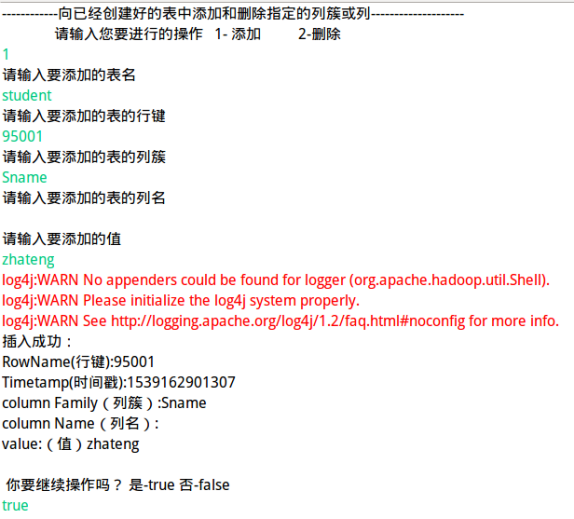
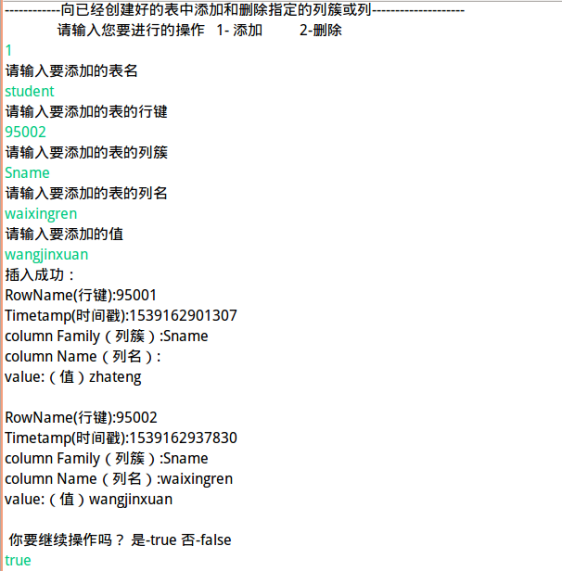
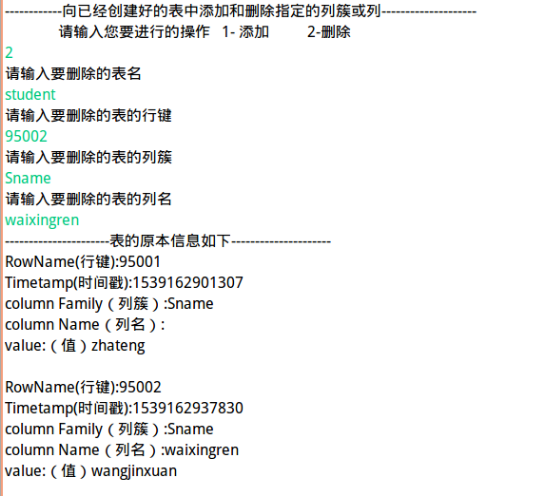
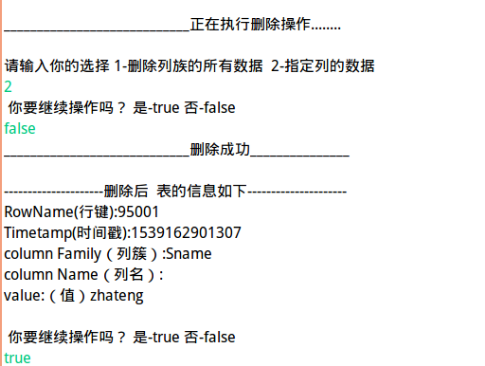
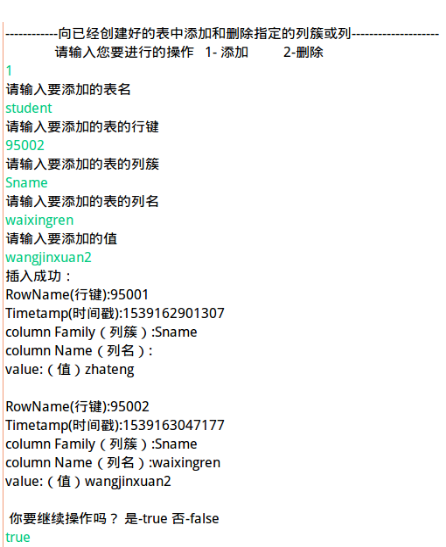
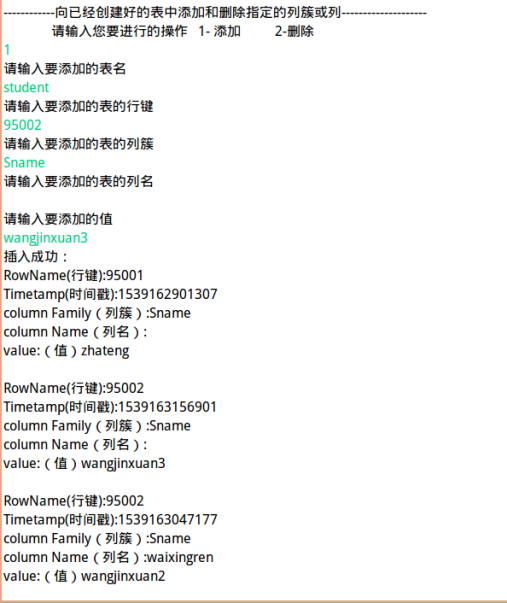

备注:
delete 'student’,’95003’,’Sname’仅能删除Sname列下的数据,并不能删除Sname列簇下的别的列名的数据,因为它默认删除删除Sname:空下的数据,作字符串相等,并不是包含。暂时依靠两次删除来删除数据。
④.清空指定的表的所有记录数据
Hbase Shell命令 truncate 'student'
截图 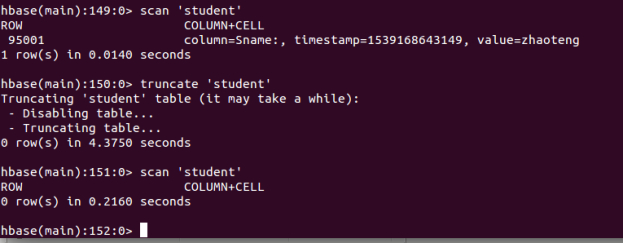
Java API
package homework;

import java.io.IOException;

import java.util.Scanner;

import org.apache.hadoop.conf.Configuration;

import org.apache.hadoop.hbase.Cell;

import org.apache.hadoop.hbase.CellUtil;

import org.apache.hadoop.hbase.HBaseConfiguration;

import org.apache.hadoop.hbase.HColumnDescriptor;

import org.apache.hadoop.hbase.HTableDescriptor;

import org.apache.hadoop.hbase.TableName;

import org.apache.hadoop.hbase.client.Admin;

import org.apache.hadoop.hbase.client.Connection;

import org.apache.hadoop.hbase.client.ConnectionFactory;

import org.apache.hadoop.hbase.client.HBaseAdmin;

import org.apache.hadoop.hbase.client.Result;

import org.apache.hadoop.hbase.client.ResultScanner;

import org.apache.hadoop.hbase.client.Scan;

import org.apache.hadoop.hbase.client.Table;

import org.apache.hadoop.hbase.util.Bytes;

public class Test_4 {

    public static Configuration configuration;

    public static Connection connection;

    public static Admin admin;

    /**

     * @param args

     */

  //建立连接

    public static void init(){

        configuration  = HBaseConfiguration.create();

        configuration.set("hbase.rootdir","hdfs://localhost:9000/hbase");

        try{

            connection = ConnectionFactory.createConnection(configuration);

            admin = connection.getAdmin();

        }catch (IOException e){

            e.printStackTrace();

        }

    }

    //关闭连接

    public static void close(){

        try{

            if(admin != null){

                admin.close();

            }

            if(null != connection){

                connection.close();

            }

        }catch (IOException e){

            e.printStackTrace();

        }

    }

    /**

     * 清空制定的表的所有记录数据

     * @param args

     * @throws IOException

     */

    public static void clearRows(String tableName) throws IOException{

        init();

        HBaseAdmin admin1=new HBaseAdmin(configuration);

        HTableDescriptor tDescriptor =admin1.getTableDescriptor(Bytes.toBytes(tableName));//读取了之前表的表名 列簇等信息,然后再进行删除操作。 总思想是先将原表结构保留下来,然后进行删除,再重新依据保存的信息重新创建表。

        TableName tablename=TableName.valueOf(tableName);

        //删除表

        admin.disableTable(tablename);

        admin.deleteTable(tablename);

        //重新建表

         admin.createTable(tDescriptor);

        close();

    }

    /**

     * 根据表名查找表信息

     */

    public static void getData(String tableName)throws  IOException{

        init();

        Table table = connection.getTable(TableName.valueOf(tableName));

        Scan scan = new Scan();

       ResultScanner scanner = table.getScanner(scan);

        for(Result result:scanner)

        {

            showCell((result));

        }

        close();

    }

    /**

     * 格式化输出

     * @param result

     */

    public static void showCell(Result result){

        Cell[] cells = result.rawCells();

        for(Cell cell:cells){

            System.out.println("RowName(行键):"+new String(CellUtil.cloneRow(cell))+" ");

            System.out.println("Timetamp(时间戳):"+cell.getTimestamp()+" ");

            System.out.println("column Family(列簇):"+new String(CellUtil.cloneFamily(cell))+" ");

            System.out.println("column Name(列名):"+new String(CellUtil.cloneQualifier(cell))+" ");

            System.out.println("value:(值)"+new String(CellUtil.cloneValue(cell))+" ");

            System.out.println();

        }

    }

    public static void main(String[] args) {

        // TODO Auto-generated method stub

        Test_4 test_4=new Test_4();

        Scanner scan = new Scanner(System.in);

        System.out.println("请输入要清空的表名");

        String tableName=scan.nextLine();

        try {

            System.out.println("表原来的信息:");

            test_4.getData(tableName);

            test_4.clearRows(tableName);

            System.out.println("表已清空:");

        } catch (IOException e) {

            // TODO Auto-generated catch block

            e.printStackTrace();

        }

    }

}
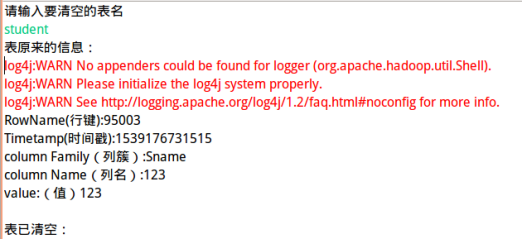
清空表
截图:
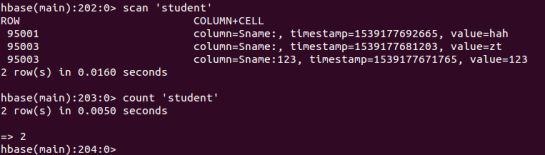
⑤统计表的行数。
Hbase shell 命令
命令:count 'student'
截图:
Java API
package homework;

import java.io.IOException;

import java.util.Scanner;

import org.apache.hadoop.conf.Configuration;

import org.apache.hadoop.hbase.HBaseConfiguration;

import org.apache.hadoop.hbase.TableName;

import org.apache.hadoop.hbase.client.Admin;

import org.apache.hadoop.hbase.client.Connection;

import org.apache.hadoop.hbase.client.ConnectionFactory;

import org.apache.hadoop.hbase.client.Result;

import org.apache.hadoop.hbase.client.ResultScanner;

import org.apache.hadoop.hbase.client.Scan;

import org.apache.hadoop.hbase.client.Table;

public class Test_5 {

    public static Configuration configuration;

    public static Connection connection;

    public static Admin admin;

    //建立连接

    public static void init(){

        configuration  = HBaseConfiguration.create();

        configuration.set("hbase.rootdir","hdfs://localhost:9000/hbase");

        try{

            connection = ConnectionFactory.createConnection(configuration);

            admin = connection.getAdmin();

        }catch (IOException e){

            e.printStackTrace();

        }

    }

    //关闭连接

    public static void close(){

        try{

            if(admin != null){

                admin.close();

            }

            if(null != connection){

                connection.close();

            }

        }catch (IOException e){

            e.printStackTrace();

        }

    }

     public static void countRows (String tableName) throws IOException

     {

         init();

         Table table = connection.getTable(TableName.valueOf(tableName));

         Scan scan = new Scan();

         ResultScanner scanner =table.getScanner(scan);

         int num = 0;

         for(Result result = scanner.next();result!=null;result=scanner.next())

         {

             num++;

         }

         System.out.println("行数:"+num);

         scanner.close();

         close();

     }

    /**

     * @param args

     * @throws IOException

     */

    public static void main(String[] args) throws IOException {

        // TODO Auto-generated method stub

        Test_5 test_5=new Test_5();

        Scanner scan = new Scanner(System.in);

        System.out.println("请输入要统计行数的表名");

        String tableName=scan.nextLine();

        test_5.countRows(tableName);

    }

}
统计表的行数
(二)HBase 数据库操作
(1) 现有以下关系型数据库中的表和数据,要求将其转换为适合于 HBase 存储的表并插入数据:
学生表(Student)
|
学号(S_No) |
姓名(S_Name) |
性别(S_Sex) |
年龄(S_Age) |
|
2015001 |
Zhangsan |
male |
23 |
|
2015003 |
Mary |
female |
22 |
|
2015003 |
Lisi |
male |
24 |
课程表(Course)
|
课程号(C_No) |
课程名(C_Name) |
学分(C_Credit) |
|
123001 |
Math |
2.0 |
|
123002 |
Computer Science |
5.0 |
|
123003 |
English |
3.0 |
选课表(SC)
|
学号(SC_Sno) |
课程号(SC_Cno) |
成绩(SC_Score) |
|
2015001 |
123001 |
86 |
|
2015001 |
123003 |
69 |
|
2015002 |
123002 |
77 |
|
2015002 |
123003 |
99 |
|
2015003 |
123001 |
98 |
|
2015003 |
123002 |
95 |
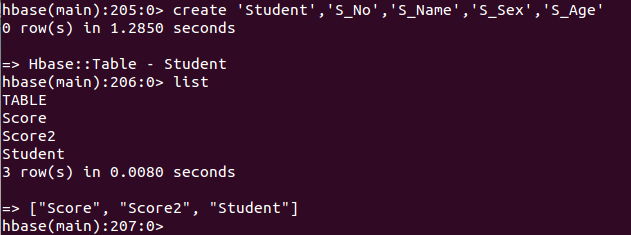
①学生Student表(主键的列名是随机分配的,因此无需创建主键列)
创建表: create 'Student','S_No','S_Name','S_Sex','S_Age'
插入数据:
|
插入shell命令 |
|
|
第一行数据 |
put 'Student','s001','S_No','2015001' put 'Student','s001','S_Name','Zhangsan' put 'Student','s001','S_Sex','male' put 'Student','s001','S_Age','23' |
|
第二行数据 |
put 'Student','s002','S_No','2015002' put 'Student','s002','S_Name','Mary' put 'Student','s002','S_Sex','female' put 'Student','s002','S_Age','22' |
|
第三行数据 |
put 'Student','s003','S_No','2015003' put 'Student','s003','S_Name','Lisi' put 'Student','s003','S_Sex','male' put 'Student','s003','S_Age','24' |
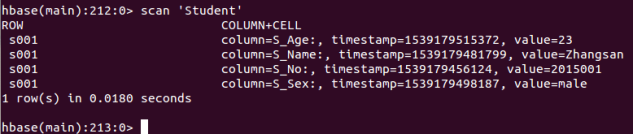
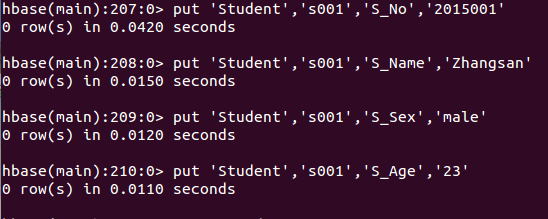
添加数据并查看
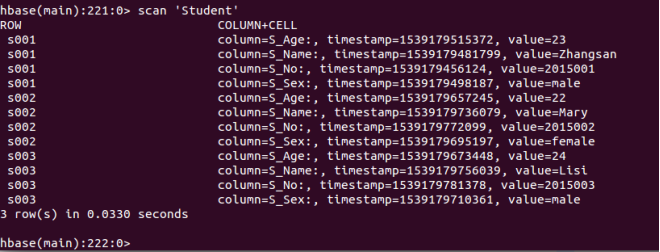
添加3个学生
② 课程Course表
创建表:create 'Course','C_No','C_Name','C_Credit'
创建Course表
|
插入shell命令 |
|
|
第一行数据 |
put 'Course','c001','C_No','123001' put 'Course','c001','C_Name','Math' put 'Course','c001','C_Credit','2.0' |
|
第二行数据 |
put 'Course','c001','C_No','123002' put 'Course','c001','C_Name','Computer Science' put 'Course','c001','C_Credit','5.0' |
|
第三行数据 |
put 'Course','c001','C_No','123003' put 'Course','c001','C_Name','English' put 'Course','c001','C_Credit','3.0' |
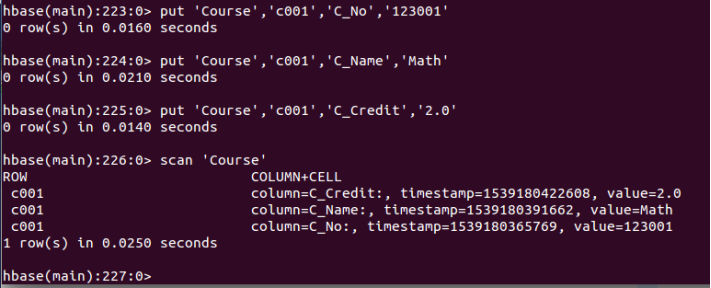
添加数据
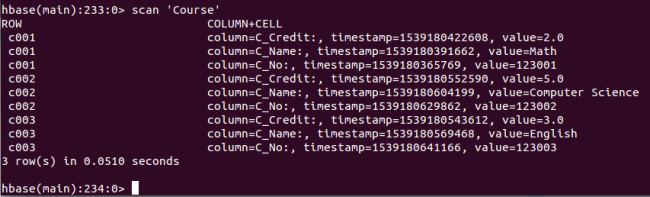
添加三个课程
③选课表
创建表:create 'SC','SC_Sno','SC_Cno','SC_Score'

创建表SC
插入数据:
|
插入shell命令 |
|
|
第一行数据 |
put 'SC','sc001','SC_Sno','2015001' put 'SC','sc001','SC_Cno','123001' put 'SC','sc001','SC_Score','86' |
|
第二行数据 |
put 'SC','sc002','SC_Sno','2015001' put 'SC','sc002','SC_Cno','123003' put 'SC','sc002','SC_Score','69' |
|
第三行数据 |
put 'SC','sc003','SC_Sno','2015002' put 'SC','sc003','SC_Cno','123002' put 'SC','sc003','SC_Score','77' |
|
第四行数据 |
put 'SC','sc004','SC_Sno','2015002' put 'SC','sc004','SC_Cno','123003' put 'SC','sc004','SC_Score','99' |
|
第五行数据 |
put 'SC','sc005','SC_Sno','2015003' put 'SC','sc005','SC_Cno','123001' put 'SC','sc005','SC_Score','98' |
|
第六行数据 |
put 'SC','sc006','SC_Sno','2015003' put 'SC','sc006','SC_Cno','123002' put 'SC','sc006','SC_Score','95' |
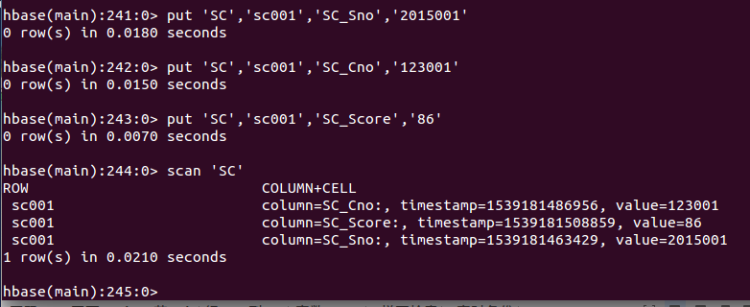
插入数据

数据显示
|
二、按要求编程。 |
|
|
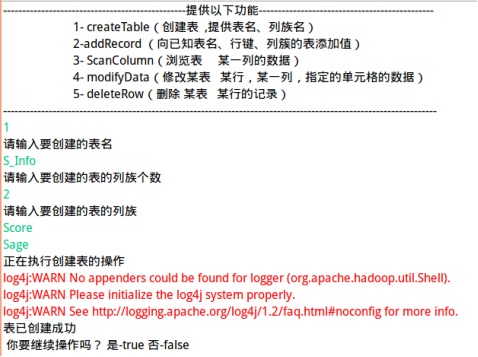
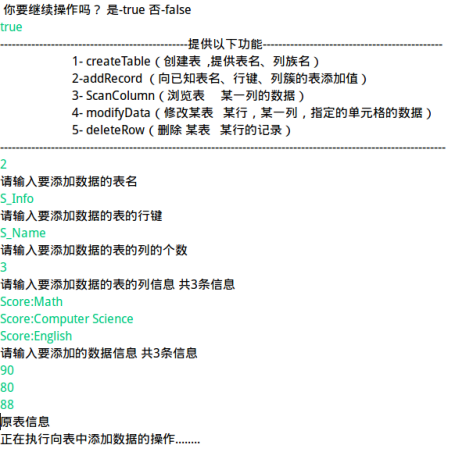
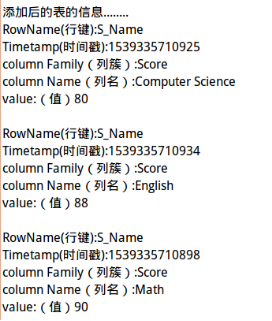
1.createTable(String tableName, String[] fields) 创建表,参数 tableName 为表的名称,字符串数组 fields 为存储记录各个字段名称的数组。要求当 HBase 已经存在名为 tableName 的表的时候,先删除原有的表,然后再创建新的表。 2.addRecord(String tableName, String row, String[] fields, String[] values) 向表 tableName、行 row(用 S_Name 表示)和字符串数组 fields 指定的单元格中添加对应的数据 values。其中,fields 中每个元素如果对应的列族下还有相应的列限定符的话,用“columnFamily:column”表示。例如,同时向“Math”、“Computer Science”、“English”三列添加成绩时,字符串数组 fields 为{“Score:Math”, ”Score:Computer Science”, ”Score:English”},数组 values 存储这三门课的成绩。 3.scanColumn(String tableName, String column) 浏览表 tableName 某一列的数据,如果某一行记录中该列数据不存在,则返回 null。要求当参数 column 为某一列族名称时,如果底下有若干个列限定符,则要列出每个列限定符代表的列的数据;当参数 column 为某一列具体名称(例如“Score:Math”)时,只需要列出该列的数据。 4.modifyData(String tableName, String row, String column) 修改表 tableName,行 row(可以用学生姓名 S_Name 表示),列 column 指定的单元格的数据。 5.deleteRow(String tableName, String row) 删除表 tableName 中 row 指定的行的记录。 |
|
|
方式 |
代码+截图 |
|
Java API 命令 (集成了所有功能) |
代码: package homework;
import java.io.BufferedReader;
import java.io.IOException;
import java.io.InputStreamReader;
import java.util.Scanner;
import org.apache.hadoop.conf.Configuration;
import org.apache.hadoop.hbase.Cell;
import org.apache.hadoop.hbase.CellUtil;
import org.apache.hadoop.hbase.HBaseConfiguration;
import org.apache.hadoop.hbase.HColumnDescriptor;
import org.apache.hadoop.hbase.HTableDescriptor;
import org.apache.hadoop.hbase.TableName;
import org.apache.hadoop.hbase.client.Admin;
import org.apache.hadoop.hbase.client.Connection;
import org.apache.hadoop.hbase.client.ConnectionFactory;
import org.apache.hadoop.hbase.client.Delete;
import org.apache.hadoop.hbase.client.Put;
import org.apache.hadoop.hbase.client.Result;
import org.apache.hadoop.hbase.client.ResultScanner;
import org.apache.hadoop.hbase.client.Scan;
import org.apache.hadoop.hbase.client.Table;
import org.apache.hadoop.hbase.util.Bytes;
public class Test_Two {
public static Configuration configuration;
public static Connection connection;
public static Admin admin;
//建立连接
public static void init(){
configuration = HBaseConfiguration.create();
configuration.set("hbase.rootdir","hdfs://localhost:9000/hbase");
try{
connection = ConnectionFactory.createConnection(configuration);
admin = connection.getAdmin();
}catch (IOException e){
e.printStackTrace();
}
}
//关闭连接
public static void close(){
try{
if(admin != null){
admin.close();
}
if(null != connection){
connection.close();
}
}catch (IOException e){
e.printStackTrace();
}
}
/**
* 建表。参数tableName为表的名称,字符串数组fields为存储记录各个域名称的数组。
* 要求当HBase已经存在名为tableName的表时,先删除原有的表,然后再
* 创建新的表 field:列族
* @param myTableName 表名
* @param colFamily 列族名
* @throws IOException
*/
public static void createTable(String tableName,String[] fields) throws IOException {
init();
TableName tablename = TableName.valueOf(tableName);
if(admin.tableExists(tablename)){
System.out.println("表已存在,将执行删除原表,重建新表!");
admin.disableTable(tablename);
admin.deleteTable(tablename);//删除原来的表
}
HTableDescriptor hTableDescriptor = new HTableDescriptor(tableName);
for(String str:fields){
HColumnDescriptor hColumnDescriptor = new HColumnDescriptor(str);
hTableDescriptor.addFamily(hColumnDescriptor);
}
admin.createTable(hTableDescriptor);
System.out.println("表已创建成功");
close();
}
/**
* 向表 tableName、行 row(用 S_Name 表示)和字符串数组 fields 指定的单元格中
* 添加对应的数据 values。
* 其中,fields 中每个元素如果对应的列族下还有相应的列限定符的话,
* 用“columnFamily:column”表示。
* 例如,同时向“Math”、“Computer Science”、“English”三列添加成绩时,
* 字符串数组 fields 为{“Score:Math”, ”Score:Computer Science”, ”Score:English”},
* 数组values 存储这三门课的成绩。
*/
public static void addRecord(String tableName,String rowKey,String []fields,String [] values) throws IOException {
init();
Table table = connection.getTable(TableName.valueOf(tableName));
for (int i = 0; i < fields.length; i++) {
Put put = new Put(rowKey.getBytes());
String [] cols = fields[i].split(":");
if(cols.length==1)
{
put.addColumn(cols[0].getBytes(), "".getBytes(), values[i].getBytes());//因为当输入的是单列族,split仅读出一个字符字符串,即cols仅有一个元素
}
else {
put.addColumn(cols[0].getBytes(), cols[1].getBytes(), values[i].getBytes());
}
table.put(put);
}
table.close();
close();
}
/**
* 根据表名查找表信息
*/
public static void getData(String tableName)throws IOException{
init();
Table table = connection.getTable(TableName.valueOf(tableName));
Scan scan = new Scan();
ResultScanner scanner = table.getScanner(scan);
for(Result result:scanner)
{
showCell((result));
}
close();
}
/**
* 格式化输出
* @param result
*/
public static void showCell(Result result){
Cell[] cells = result.rawCells();
for(Cell cell:cells){
System.out.println("RowName(行键):"+new String(CellUtil.cloneRow(cell))+" ");
System.out.println("Timetamp(时间戳):"+cell.getTimestamp()+" ");
System.out.println("column Family(列簇):"+new String(CellUtil.cloneFamily(cell))+" ");
System.out.println("column Name(列名):"+new String(CellUtil.cloneQualifier(cell))+" ");
System.out.println("value:(值)"+new String(CellUtil.cloneValue(cell))+" ");
System.out.println();
}
}
/**
* 浏览表 tableName 某一列的数据,如果某一行记录中该列数据不存在,则返回 null。
* 要求当参数 column 为某一列族名称时,如果底下有若干个列限定符,则要列出每个列限定符代表的列的数据;
* 当参数 column 为某一列具体名称(例如“Score:Math”)时,只需要列出该列的数据。
* @param tableName
* @param column
* @throws IOException
*/
public static void scanColumn (String tableName,String column) throws IOException
{
init();
Table table = connection.getTable(TableName.valueOf(tableName));
Scan scan = new Scan();
String [] cols = column.split(":");
if(cols.length==1)
{
scan.addFamily(Bytes.toBytes(column));
}
else {
scan.addColumn(Bytes.toBytes(cols[0]),Bytes.toBytes(cols[1]));
}
ResultScanner scanner = table.getScanner(scan);
for (Result result = scanner.next(); result !=null;result = scanner.next()) {
showCell(result);
}
table.close();
close();
}
/**
* 修改表 tableName,行 row(可以用学生姓名 S_Name 表示),列 column 指定的单元格的数据。
* @throws IOException
*/
public static void modifyData(String tableName,String rowKey,String column,String value) throws IOException
{
init();
Table table = connection.getTable(TableName.valueOf(tableName));
Put put = new Put(rowKey.getBytes());
String [] cols = column.split(":");
if(cols.length==1)
{
put.addColumn(column.getBytes(),"".getBytes() , value.getBytes());//qualifier:列族下的列名
}
else {
put.addColumn(cols[0].getBytes(),cols[1].getBytes() , value.getBytes());//qualifier:列族下的列名
}
table.put(put);
table.close();
close();
}
/**
* 删除表 tableName 中 row 指定的行的记录。
* @throws IOException
*/
public static void deleteRow(String tableName,String rowKey) throws IOException
{
init();
Table table = connection.getTable(TableName.valueOf(tableName));
Delete delete = new Delete(rowKey.getBytes());
table.delete(delete);
table.close();
close();
}
/**
* @param args
* @throws IOException
*/
public static void main(String[] args) throws IOException {
// TODO Auto-generated method stub
Test_Two test_Two = new Test_Two();
boolean flag =true;
while(flag)
{
System.out.println("------------------------------------------------提供以下功能----------------------------------------------");
System.out.println(" 1- createTable(创建表 ,提供表名、列族名) ");
System.out.println(" 2-addRecord (向已知表名、行键、列簇的表添加值) ");
System.out.println(" 3- ScanColumn(浏览表 某一列的数据) ");
System.out.println(" 4- modifyData(修改某表 某行,某一列,指定的单元格的数据) ");
System.out.println(" 5- deleteRow(删除 某表 某行的记录) ");
System.out.println("------------------------------------------------------------------------------------------------------------------");
Scanner scan = new Scanner(System.in);
String choose1=scan.nextLine();
switch (choose1) {
case "1":
{
System.out.println("请输入要创建的表名");
String tableName=scan.nextLine();
System.out.println("请输入要创建的表的列族个数");
int Num=scan.nextInt();
String [] fields = new String[Num];
System.out.println("请输入要创建的表的列族");
/* Scanner scanner = new Scanner(System.in); scanner.next 如不是全局,即会记得上一次输出。相同地址读入值时*/
for(int i=0;i< fields.length;i++)
{
/*BufferedReader in = new BufferedReader(new InputStreamReader(System.in));
fields[i] = in.readLine();*/
/*fields[i]=scan.next(); 因为之前没有输入过,所以可以读入新值*/
scan = new Scanner(System.in);
fields[i]=scan.nextLine();
}
System.out.println("正在执行创建表的操作");
test_Two.createTable(tableName,fields);
break;
}
case "2":
{
System.out.println("请输入要添加数据的表名");
String tableName=scan.nextLine();
System.out.println("请输入要添加数据的表的行键");
String rowKey=scan.nextLine();
System.out.println("请输入要添加数据的表的列的个数");
int num =scan.nextInt();
String fields[]=new String[num];
System.out.println("请输入要添加数据的表的列信息 共"+num+"条信息");
for(int i=0;i< fields.length;i++)
{
BufferedReader in3= new BufferedReader(new InputStreamReader(System.in));
fields[i] = in3.readLine();
/*fields[i]=scan.next(); 因为之前没有输入过,所以可以读入新值*/
}
System.out.println("请输入要添加的数据信息 共"+num+"条信息");
String values[]=new String[num];
for(int i=0;i< values.length;i++)
{
BufferedReader in2 = new BufferedReader(new InputStreamReader(System.in));
values[i] = in2.readLine();
}
System.out.println("原表信息");
test_Two.getData(tableName);
System.out.println("正在执行向表中添加数据的操作........\n");
test_Two.addRecord(tableName, rowKey, fields, values);
System.out.println("\n添加后的表的信息........");
test_Two.getData(tableName);
break;
}
case "3":
{
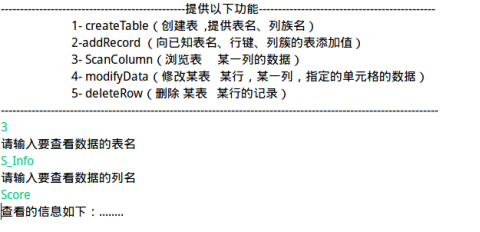
System.out.println("请输入要查看数据的表名");
String tableName=scan.nextLine();
System.out.println("请输入要查看数据的列名");
String column=scan.nextLine();
System.out.println("查看的信息如下:........\n");
test_Two.scanColumn(tableName, column);
break;
}
case "4":
{
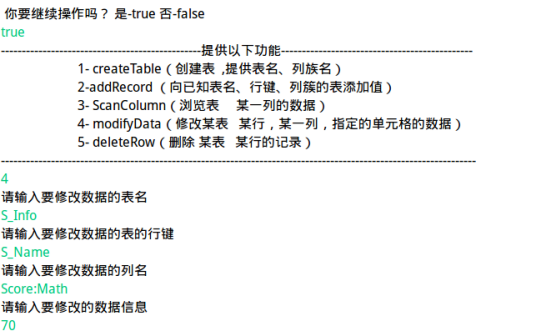
System.out.println("请输入要修改数据的表名");
String tableName=scan.nextLine();
System.out.println("请输入要修改数据的表的行键");
String rowKey=scan.nextLine();
System.out.println("请输入要修改数据的列名");
String column=scan.nextLine();
System.out.println("请输入要修改的数据信息 ");
String value=scan.nextLine();
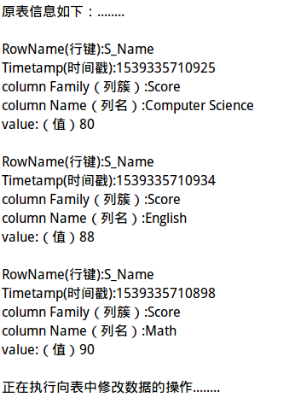
System.out.println("原表信息如下:........\n");
test_Two.getData(tableName);
System.out.println("正在执行向表中修改数据的操作........\n");
test_Two.modifyData(tableName, rowKey, column, value);
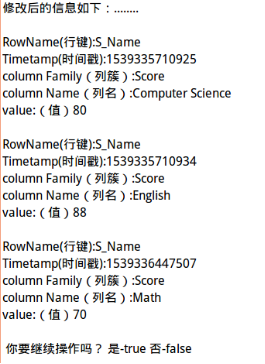
System.out.println("\n修改后的信息如下:........\n");
test_Two.getData(tableName);
break;
}
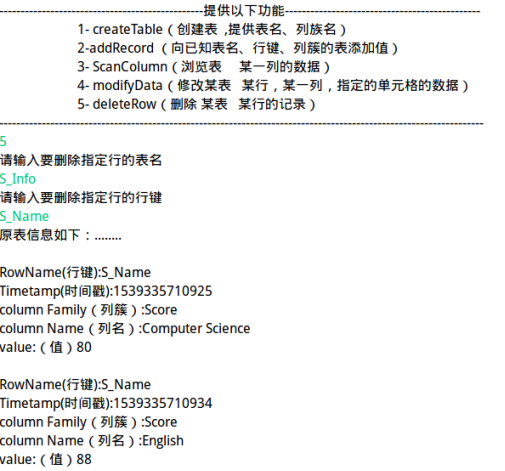
case "5":
{
System.out.println("请输入要删除指定行的表名");
String tableName=scan.nextLine();
System.out.println("请输入要删除指定行的行键");
String rowKey=scan.nextLine();
System.out.println("原表信息如下:........\n");
test_Two.getData(tableName);
System.out.println("正在执行向表中删除数据的操作........\n");
test_Two.deleteRow(tableName, rowKey);
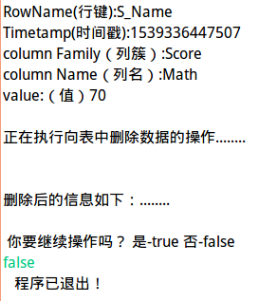
System.out.println("\n删除后的信息如下:........\n");
test_Two.getData(tableName);
break;
}
default:
{
System.out.println(" 你的操作有误 !!! ");
break;
}
}
System.out.println(" 你要继续操作吗? 是-true 否-false ");
flag=scan.nextBoolean();
}
System.out.println(" 程序已退出! ");
}
}
|
|
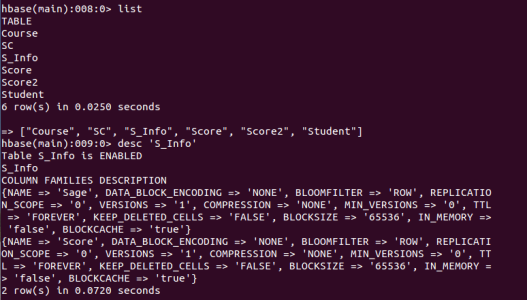
截图1 (CreateTable) |
创建表&列族
查看创建结果 |
|
截图2 addRecord(String tableName, String row, String[] fields, String[] values) |
|
|
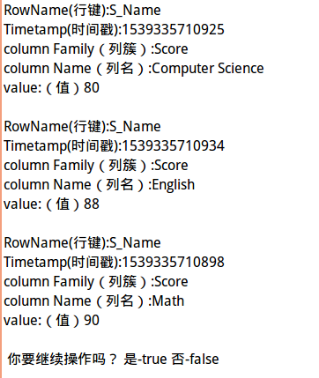
截图3 scanColumn(String tableName, String column) |
参数 column 为某一列族名称时:
当参数 column 为某一列具体名称
|
|
截图4 modifyData(String tableName, String row, String column) |
|
|
截图5 deleteRow(String tableName, String row) |
|

二 实验中出现问题:(说明和截图)
|
问题1 |
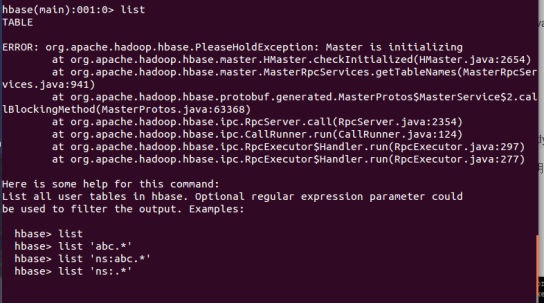
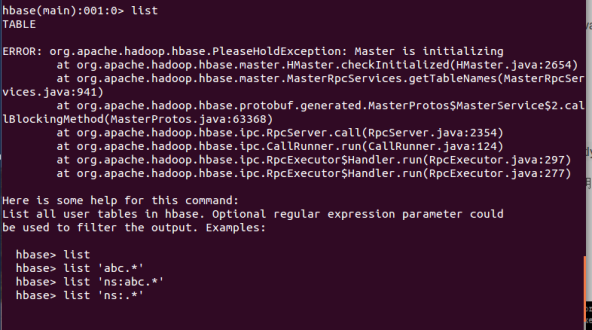
PleaseHoldException异常(Master is initializing) |
|
原因 |
(由于正在操作Hbase时,电脑突然关机,未正常关闭hbase,故导致shell无法正常显示)如下图:
|
|
解决过程: |
先在网上百度了一个教程: https://blog.csdn.net/liulang12580/article/details/77841699 ,可能是因为出错原因不同,所以使用教程并不能完全解决问题,还导致出了别的问题详见以下问题。 然后解决以上问题后,又回到了最初的错误。
然后找到了和我一样的情况的博客:https://blog.csdn.net/qq_41665356/article/details/80271562 参考它解决了问题。
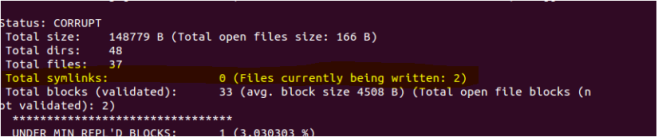
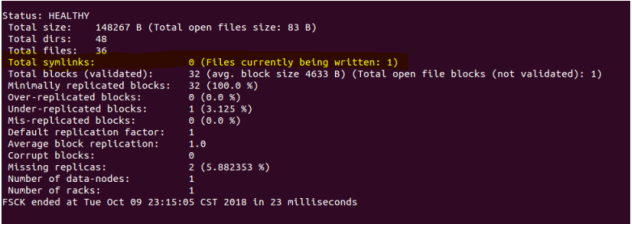
① 检查文件 : hdfs fsck / -locations -blocks -files 出现以下结果:
图 1
图 2(删除一个文件后) 以上黄色的部分表明: 图 1 有2个文件处于打开状态,说明当时正在写文件时断电了,因此需要删除这2个文件,才可正常启动HBase。 图 2 有1个文件处于打开状态,说明当时正在写文件时断电了,因此需要删除这1个文件,才可正常启动HBase。(因为删除了前一个文件的过程没截图,直接从这个文件开始解释。)
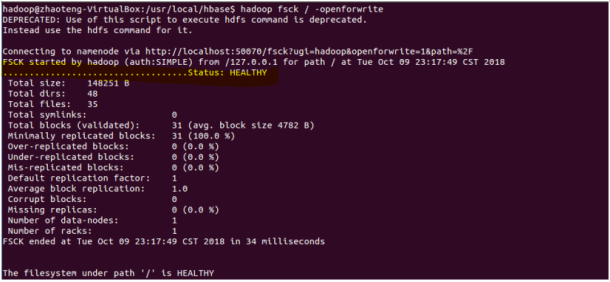
② 查看哪些文件正在打开中: hdfs fsck / -openforwrite 如下图所示:
③黄色部分即为打开的文件,执行删除文件:(删除的文件与你的上一步结果相对应) Hadoop dfs -rm /hbase/WALs/zhaoteng-virtualbox,16201,1539096368516/zhaoteng-virtualbox%2C16201%2C1539096368516.meta.1539096385044 再次检查: hadoop fsck / -openforwrite
黄色部分没有文件即可。 然后重启hbase即解决问题。 |
|
建议: |
百度纠错时,尽量找与自己出错原因相近的教程解决问题,否则会给自己带来很多麻烦。 |

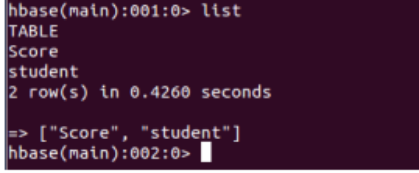
|
问题1.1 |
Can't get master address from ZooKeeper; znode data == null
|
|
解决方法: |
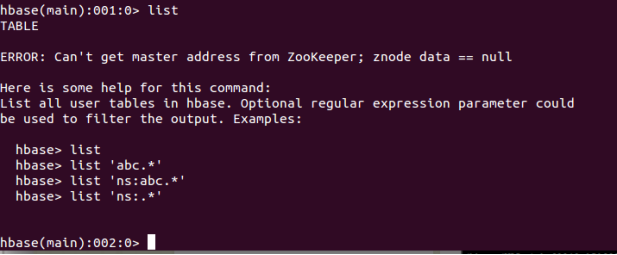
|
问题1.2 |
(pid文件(在stop-all.sh stop-dfs.sh,stop-yarn.sh脚本,发现原理都是通过一个pid文件来停止集群的。这些进程的pid文件默认都是保存在系统的/tmp目录下面,)不存在。
|
|
解决方法: |
参考教程: https://blog.csdn.net/YonJarLuo/article/details/78252637 有时也因为Hbase shell意外终止,会出现以上问题,重启Hbase即可解决。 |
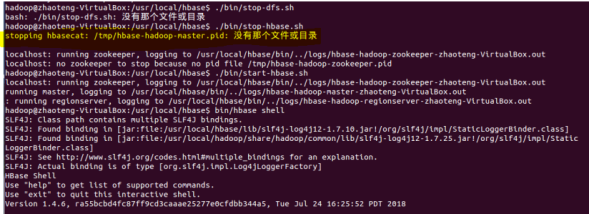
|
问题2 |
create 建表没有传列族的信息
|
|
解决方法: |
创建表时至少要有一个列簇。 Create创建时,传1个以上的列族信息 |
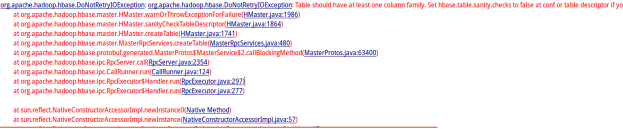
|
补充内容:HBase 常用类介绍。 |
|
|
举例说明 |
1.HBaseAdmin 关系:org.apache.hadoop.hbase.client.HBaseAdmin 作用:提供接口关系HBase 数据库中的表信息 用法:HBaseAdmin admin = new HBaseAdmin(config); 2.HTableDescriptor 关系:org.apache.hadoop.hbase.HTableDescriptor 作用:HTableDescriptor 类包含了表的名字以及表的列族信息 用法:HTableDescriptor htd =new HTableDescriptor(tablename); Htd.addFamily(new HColumnDescriptor(“myFamily”)); 详细数据参考:http://mrpengpengda.iteye.com/blog/1832595 |
|
个人理解:HBase 关于单元格数据的存取 |
|
|
具体过程 |
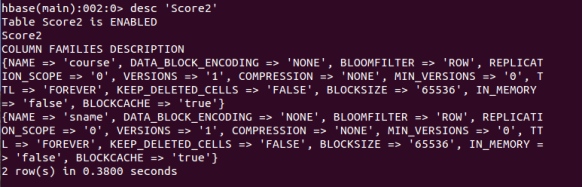
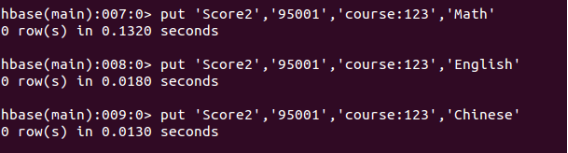
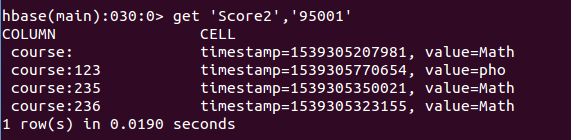
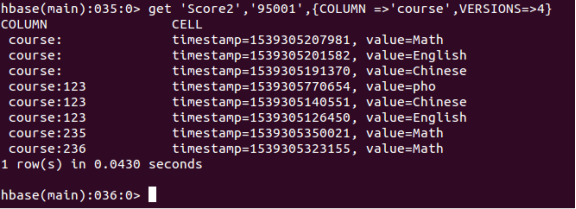
1. 查看表列(单元格中不同版本(不同时间戳)的数据) 因为Hbase某列的VERSIONS是1,就是默认情况下,该列仅会存取一个版本的列数据,当再次插入时,后面的值会覆盖前面的值。使用get或scan得到的都是最新的数据。在Hbase中对同一条数据的修改或插入都只是put操作,最终看到的都是最新的数据,其它的数据在不同的version中保存。 如何显示多个版本的值,修改表的列结构,让Hbase表支持3个VERSIONS的版本列数据,通过设置列簇的版本个数,即列族下面的列也是同样的版本个数存储。 alter ‘Score2’,{NAME = > ‘course’,VERSION=>3} 2. 再次查看表结构:
插入三条数据(在同一个单元格)
使用get命令来获取这一行的数据,发现只返回了最新的一行数据。
获取多行数据的方法:
查看列族时情况相同:
获取多行数据的方法:
|


三、未解决问题:(列出没有解决的问题)

使用以上命令后出现了hbase(main):行数:1 输入exit,无法退出
Ctrl +SHift+Z:停止Hbase shell ,
具体问题并没有搞清楚,猜想是过滤器的某处出问题,后续继续修改。
实验3- 熟悉常用的 HBase 操作的更多相关文章
- 熟悉常用的HBase操作,编写MapReduce作业
1. 以下关系型数据库中的表和数据,要求将其转换为适合于HBase存储的表并插入数据: 学生表(Student) 学号(S_No) 姓名(S_Name) 性别(S_Sex) 年龄(S_Age) 201 ...
- 熟悉常用的HBase操作
1. 以下关系型数据库中的表和数据,要求将其转换为适合于HBase存储的表并插入数据: 学生表(Student)(不包括最后一列) 学号(S_No) 姓名(S_Name) 性别(S_Sex) 年龄(S ...
- Tutorial 01_熟悉常用的Linux操作和Hadoop操作
(一)熟悉常用的Linux 操作cd 命令:切换目录 (1) 切换到目录“/usr/local” (2) 切换到当前目录的上一级目录 (3) 切换到当前登录Linux 系统的用户的自己的主文件夹 ...
- Tutorial 02_熟悉常用的HDFS操作
Shell命令实现: (1)向HDFS 中上传任意文本文件,如果指定的文件在HDFS 中已经存在,则由用户来指定是追加到原有文件末尾还是覆盖原有的文件: (2) 从HDFS 中下载指定文件,如果本地文 ...
- 熟悉常用的HDFS操作
编程实现以下指定功能,并利用Hadoop提供的Shell命令完成相同任务: 在本地Linux文件系统的“/home/hadoop/”目录下创建一个文件txt,里面可以随意输入一些单词. 在本地查看文件 ...
- 第三章 熟悉常用的HDFS操作
一.Hadoop提供的Shell命令完成相同任务: 1.在本地Linux文件系统的“/home/hadoop/”目录下创建一个文件txt,里面可以随意输入一些单词. mkdir hadoop 在本地查 ...
- 熟悉常用的Linux操作
请按要求上机实践如下linux基本命令. cd命令:切换目录 (1)切换到目录 /usr/local cd /usr/local (2)去到目前的上层目录 cd .. (3)回到自己的主文件夹 ...
- 课程作业——熟悉常用的Linux操作
cd命令:切换目录 (1) 切换到目录 /usr/local cd /usr/local (2) 去到目前的上层目录 cd .. (3) 回到自己的主文件夹 cd ~ ls命令:查看文件与目录 (4) ...
- 必须熟悉的vim快捷键操作
转载请表明出处http://www.dabu.info/?p=801 Vim/Vi 没有菜单,只有命令 Vim/Vi 工作模式介绍:插入模式 和 命令模式 是vi的两个基本模式.——插入模式 ,是用 ...
随机推荐
- axios设置请求头失效的问题
前言:因为在使用vue-element-admin框架时遇到了设置请求头失效的问题,在后来发现是代理跨域问题,所以又简单理解了一下跨域. 出现的问题是我在axios拦截器上设置了请求头token,但是 ...
- redis api-set
- 全文索引-ElasticSearch
ElasticSearch 官方文档 Elasticsearch是一个开源的搜索引擎,建立在一个全文搜索引擎库Apache Lucene™基础之上. Lucene可以说是当下最先进,高性能,全功能的搜 ...
- [LuoguP1025][数据加强]数的划分
原题连接:Click 加强数据:Click Solution 参考博客:Click 题目意思非常明确了,这是一道组合数学的题目.我就直接讲dp解法了. dp 题意可以转化为将\(n\)个苹果放进\(k ...
- 强制找回GitLab管理员账户密码的方法
为了开发运维工具,我们采用自行搭建的GitLab来管理所有代码.悲催的是最近忘记了管理员账户的密码,而且没有邮件服务器,因此无法接收密码找回的邮件,导致无法新建用户或者项目,这样一来,岂不就成为了一个 ...
- Ubuntu 19.10将使用GCC 9作为默认编译器
作为我们这一周期一直期待的变化,Ubuntu 19.10升级到GCC 9作为GCC 8的默认系统编译器. Ubuntu 19.10(和Ubuntu 20.04 LTS)将使用GCC 9 stable作 ...
- Ubuntu安装Orcale
Linux_Ubuntu安装oracle总结 ---------转自 https://www.2cto.com/database/201305/215338.html 话说我花了一晚上才在ubuntu ...
- HDU1054-Strategic Game
Strategic Game Time Limit: 20000/10000 MS (Java/Others) Memory Limit: 65536/32768 K (Java/Others) ...
- angular.js开发 将多页面开发成单页面
用angulara.js做单页面开发时,由于不能跨页面取数据,又需要传参,可以采用:$scope.step=0/1来解决这个问题,设置初始值为想要的页面即可.
- uniapp 小程序 flex布局 v-for 4栏展示
注:本项目的图片资源来源于后端接口,所以使用的是v-for. 关键词:uniapp 小程序 flex布局 v-for 4栏展示 自适应 <view style="display: fl ...