
Springboot以Tomcat为容器实现http重定向到https的两种方式
1 简介
本文将介绍在Springboot中如何通过代码实现Http到Https的重定向,本文仅讲解Tomcat作为容器的情况,其它容器将在以后一一道来。
建议阅读之前的相关文章:
(2)HTTPS之密钥知识与密钥工具Keytool和Keystore-Explorer
2 相关概念
2.1 什么叫重定向
所谓重定向,就是本来你想浏览地址A的,但是到达服务端后,服务端认为地址A的界面不在了或者你没权限访问等原因,不想你访问地址A;就告诉你另一个地址B,然后你再去访问地址B。
对于重定向一般有两个返回码:
- 301:永久性重定向;
- 302:暂时性重定向。
通过Chrome查看网络详情,记录了几个网站的重定向情况:
| 网站 | 域名 | 重定向代码 | 重定向后的网址 |
|---|---|---|---|
| 南瓜慢说 | www.pkslow.com | 301 | https://www.pkslow.com |
| www.google.com | 307 | https://www.google.com | |
| Apple | www.apple.com | 307 | https://www.apple.com |
| 支付宝 | www.alipay.com | 301 | https://www.alipay.com |
| www.qq.com | 302 | https://www.qq.com | |
| 百度 | www.baidu.com | 307 | https://www.baidu.com |
注:307也是重定向的一种,是新的状态码。
2.2 为什么要重定向
结合我上面特意列的表格,是不是大概想到了为何要做这种重定向?不难发现上面的重定向都在做一件事,就是把http重定向为https。原因如下:
(1)http是不安全的,应该使用安全的https网址;
(2)但不能要求用户每次输入网站都输入https:// 吧,这也太麻烦了,所以大家都是习惯于只输入域名,甚至连www. 都不愿意输入。因此,用户的输入其实都是访问http的网页,就需要重定向到https以达到安全访问的要求。
2.3 如何做到重定向
首先,服务器必须要同时支持http和https,不然也就没有重定向一说了。因为https是必须提供支持的,那为何还要提供http的服务呢?直接访问https不就行了,不是多此一举吗?原因之前已经讲过了,大家是习惯于只输入简单域名访问的,这时到达的就是http,如果不提供http的支持,用户还以为你的网站已经挂了呢。
两种协议都提供支持,所以是需要打开两个Socket端口的,一般http为80,而https为443。然后就需要把所有访问http的请求,重定向到https即可。不同的服务器有不同的实现,现在介绍Springboot+Tomcat的实现。
3 Springboot Tomcat实现重定向
Springboot以Tomcat作为Servlet容器时,有两种方式可以实现重定向,一种是没有使用Spring Security的,另一种是使用了Spring Security的。代码结构如下:
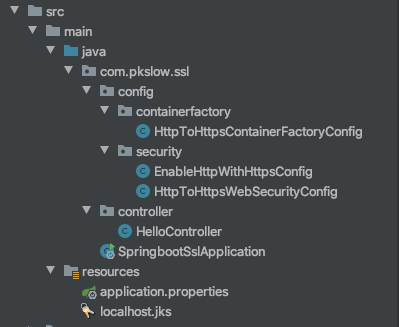
主类的代码如下:
package com.pkslow.ssl;

import com.pkslow.ssl.config.containerfactory.HttpToHttpsContainerFactoryConfig;

import com.pkslow.ssl.config.security.EnableHttpWithHttpsConfig;

import com.pkslow.ssl.config.security.HttpToHttpsWebSecurityConfig;

import org.springframework.boot.SpringApplication;

import org.springframework.boot.autoconfigure.SpringBootApplication;

import org.springframework.context.annotation.ComponentScan;

import org.springframework.context.annotation.Import;

@SpringBootApplication

@Import({EnableHttpWithHttpsConfig.class, HttpToHttpsWebSecurityConfig.class})

//@Import(HttpToHttpsContainerFactoryConfig.class)

@ComponentScan(basePackages = "com.pkslow.ssl.controller")

public class SpringbootSslApplication {

	public static void main(String[] args) {

		SpringApplication.run(SpringbootSslApplication.class, args);

	}

}
@ComponentScan(basePackages = "com.pkslow.ssl.controller"):没有把config包扫描进来,是因为想通过@Import来控制使用哪种方式来进行重定向。当然还可以使用其它方式来控制,如@ConditionalOnProperty,这里就不展开讲了。
当没有使用Spring Security时,使用@Import(HttpToHttpsContainerFactoryConfig.class);
当使用Spring Security时,使用@Import({EnableHttpWithHttpsConfig.class, HttpToHttpsWebSecurityConfig.class})。
配置文件application.properties内容如下:
server.port=443

http.port=80

server.ssl.enabled=true

server.ssl.key-store-type=jks

server.ssl.key-store=classpath:localhost.jks

server.ssl.key-store-password=changeit

server.ssl.key-alias=localhost
需要指定两个端口,server.port为https端口;http.port为http端口。注意在没有https的情况下,server.port指的是http端口。
3.1 配置Container Factory实现重定向
配置的类为HttpToHttpsContainerFactoryConfig,代码如下:
package com.pkslow.ssl.config.containerfactory;

import org.apache.catalina.Context;

import org.apache.tomcat.util.descriptor.web.SecurityCollection;

import org.apache.tomcat.util.descriptor.web.SecurityConstraint;

import org.springframework.boot.web.embedded.tomcat.TomcatServletWebServerFactory;

import org.springframework.context.annotation.Bean;

import org.apache.catalina.connector.Connector;

import org.springframework.beans.factory.annotation.Value;

import org.springframework.context.annotation.Configuration;

@Configuration

public class HttpToHttpsContainerFactoryConfig {

    @Value("${server.port}")

    private int httpsPort;

    @Value("${http.port}")

    private int httpPort;

    @Bean

    public TomcatServletWebServerFactory servletContainer() {

        TomcatServletWebServerFactory tomcat =

                new TomcatServletWebServerFactory() {

                    @Override

                    protected void postProcessContext(Context context) {

                        SecurityConstraint securityConstraint = new SecurityConstraint();

                        securityConstraint.setUserConstraint("CONFIDENTIAL");

                        SecurityCollection collection = new SecurityCollection();

                        collection.addPattern("/*");

                        securityConstraint.addCollection(collection);

                        context.addConstraint(securityConstraint);

                    }

                };

        tomcat.addAdditionalTomcatConnectors(createHttpConnector());

        return tomcat;

    }

    private Connector createHttpConnector() {

        Connector connector =

                new Connector(TomcatServletWebServerFactory.DEFAULT_PROTOCOL);

        connector.setScheme("http");

        connector.setSecure(false);

        connector.setPort(httpPort);

        connector.setRedirectPort(httpsPort);

        return connector;

    }

}
createHttpConnector():这个方法主要是实现了在有https前提下,打开http的功能,并配置重定向的https的端口。
3.2 配置Spring security实现重定向
有两个配置类,一个为打开http服务,一个为实现重定向。
EnableHttpWithHttpsConfig主要作用是在已经有https的前提下,还要打开http服务。
package com.pkslow.ssl.config.security;

import org.apache.catalina.connector.Connector;

import org.springframework.beans.factory.annotation.Value;

import org.springframework.boot.web.embedded.tomcat.TomcatServletWebServerFactory;

import org.springframework.boot.web.server.WebServerFactoryCustomizer;

import org.springframework.context.annotation.Configuration;

import org.springframework.stereotype.Component;

@Configuration

public class EnableHttpWithHttpsConfig {

    @Value("${http.port}")

    private int httpPort;

    @Component

    public class CustomContainer implements WebServerFactoryCustomizer<TomcatServletWebServerFactory> {

        @Override

        public void customize(TomcatServletWebServerFactory factory) {

            Connector connector = new Connector(TomcatServletWebServerFactory.DEFAULT_PROTOCOL);

            connector.setPort(httpPort);

            connector.setScheme("http");

            connector.setSecure(false);

            factory.addAdditionalTomcatConnectors(connector);

        }

    }

}
HttpToHttpsWebSecurityConfig主要是针对Spring Security的配置,众所周知,Spring Security是功能十分强大,但又很复杂的。代码中已经写了关键的注释:
package com.pkslow.ssl.config.security;

import org.springframework.beans.factory.annotation.Value;

import org.springframework.context.annotation.Configuration;

import org.springframework.security.config.annotation.web.builders.HttpSecurity;

import org.springframework.security.config.annotation.web.builders.WebSecurity;

import org.springframework.security.config.annotation.web.configuration.WebSecurityConfigurerAdapter;

@Configuration

public class HttpToHttpsWebSecurityConfig extends WebSecurityConfigurerAdapter {

    @Value("${server.port}")

    private int httpsPort;

    @Value("${http.port}")

    private int httpPort;

    @Override

    protected void configure(HttpSecurity http) throws Exception {

        //redirect to https - 用spring security实现

        http.portMapper().http(httpPort).mapsTo(httpsPort);

        http.requiresChannel(

                channel -> channel.anyRequest().requiresSecure()

        );

        //访问路径/hello不用登陆获得权限

        http.authorizeRequests()

                .antMatchers("/hello").permitAll()

                .anyRequest().authenticated().and();

    }

    @Override

    public void configure(WebSecurity web) throws Exception {

        //过滤了actuator后,不会重定向,也不用权限校验,这个功能非常有用

        web.ignoring()

                .antMatchers("/actuator")

                .antMatchers("/actuator/**");

    }

}
4 总结
最后实现了重定向,结果展示:

本文详细代码可在南瓜慢说公众号回复<SpringbootSSLRedirectTomcat>获取。
参考链接:
Spring Security: https://docs.spring.io/spring-security/site/docs/5.3.2.BUILD-SNAPSHOT/reference/html5/#servlet-http-redirect
Springboot 1.4重定向:https://jonaspfeifer.de/redirect-http-https-spring-boot/
欢迎访问南瓜慢说 www.pkslow.com获取更多精彩文章!
欢迎关注微信公众号<南瓜慢说>,将持续为你更新...

Springboot以Tomcat为容器实现http重定向到https的两种方式的更多相关文章
- nginx开启ssl并把http重定向到https的两种方式
1 简介 Nginx是一个非常强大和流行的高性能Web服务器.本文讲解Nginx如何整合https并将http重定向到https. https相关文章如下: (1)Springboot整合https原 ...
- Springboot以Jetty为容器实现http重定向到https
1 简介 之前讲解的Springboot整合https用的是tomcat作为容器,tomcat也是一个流行多年的老牌Java容器了.但针对不同的场景,还是会有不同的选择,如Jetty.Jetty是架构 ...
- Springboot 创建的maven获取resource资源下的文件的两种方式
Springboot 创建的maven项目 打包后获取resource下的资源文件的两种方式: 资源目录: resources/config/wordFileXml/wordFileRecord.xm ...
- SpringBoot定时任务 - 集成quartz实现定时任务(单实例和分布式两种方式)
最为常用定时任务框架是Quartz,并且Spring也集成了Quartz的框架,Quartz不仅支持单实例方式还支持分布式方式.本文主要介绍Quartz,基础的Quartz的集成案例本,以及实现基于数 ...
- 在CentOS下的docker容器中部署spring boot应用的两种方式
我们通常在 windows 环境下开发 Java,而通常是部署在Linux的服务器中,而CentOS通常是大多数企业的首选,基于Docker的虚拟化容器技术,多数Java应用选择这种方式部署服务.本文 ...
- SpringBoot集成Mybatis实现多表查询的两种方式(基于xml)
下面将在用户和账户进行一对一查询的基础上进行介绍SpringBoot集成Mybatis实现多表查询的基于xml的两种方式. 首先我们先创建两个数据库表,分别是user用户表和account账户表 ...
- 引入springboot的两种方式以及springboot容器的引入
一.在项目中引入springboot有两种方式: 1.引入spring-boot-starter-parent 要覆盖parent自带的jar的版本号有两种方式: (1)在pom中重新引入这个jar, ...
- springboot 注册服务注册中心(zk)的两种方式
在使用springboot进行开发的过程中,我们经常需要处理这样的场景:在服务启动的时候,需要向服务注册中心(例如zk)注册服务状态,以便当服务状态改变的时候,可以故障摘除和负载均衡. 我遇到过两种注 ...
- springboot打成jar包和war包的两种方式,并引入第三方jar包!
springboot打成jar包和war包的两种方式,并引入第三方jar包! 首先把需要引入的第三方jar包引入到本地项目中,在引用的模块下加一个lib文件夹 一.打成jar包 1.修改pom文件里的 ...
随机推荐
- 【Net】ABP框架学习之正面硬钢
前言 本文介绍另一种学习ABP框架的方法,该方法为正面硬钢学习法... 我们不去官网下载模板,直接引用DLL,直接使用. WebApi项目创建 首先创建一个WebApi项目,结构如下. 然后Nuget ...
- Js,JQuery不同方式绑定的同一事件可以同时触发,互不干扰
比如,onclick绑定,然后jquery.on("click", function(){})绑定等
- JS中this指向问题和改变this指向
首先必须要说的是,this的指向在函数定义的时候是确定不了的,只有函数执行的时候才能确定this到底指向谁,实际上this的最终指向的是那个调用它的对象(这句话有些问题,后面会解释为什么会有问题,虽然 ...
- HDU1158:Employment Planning(暴力DP)
Employment Planning Time Limit: 2000/1000 MS (Java/Others) Memory Limit: 65536/32768 K (Java/Othe ...
- Jenkins中管道案例脚本(生命式语法)
pipeline { agent any parameters { choice( choices: 'feature\nmaster\npercent10', description: '选择要发布 ...
- mybatis源码配置文件解析之一:解析properties标签
mybatis作为日常开发的常用ORM框架,在开发中起着很重要的作用,了解其源码对日常的开发有很大的帮助.源码版本为:3-3.4.x,可执行到github进行下载. 从这篇文章开始逐一分析mybati ...
- javascript入门 之 bind() (二)
<!DOCTYPE html> <HTML> <HEAD> <script type="text/javascript" src=&quo ...
- 19cRAC增删节点
由于测试环境打19c补丁失败,导致节点2 d2 crs无法启动!打补丁没有有效备份,亲人两行泪 先删再加节点. 一.删除节点 1.1 删除实例 参考 https://www.cnblogs.com/ ...
- JAVA debug 调试demo
1.设置断点,在代码的行号后面鼠标左键即可2.想要看调用方法的执行流程,那么调用方法也要加断点. package day6_debug; /* * 1.设置断点,在代码的行号后面鼠标左键即可 * 2. ...
- Google 浏览器 离线包下载方式
最近因工作需要,需要安装google浏览器,并且安装在系统固定目录,用360软件管理下载后发现默认安装在C:\Users\administrator\AppData\Local\Google\Chro ...