
Android GridView 一行显示数据(包括图片和文本),解决的办法是计算数据占该行的宽度是多少
最近在做图片的浏览功能,开始是使用Gallery做,但是,达不到我想要的效果,关于使用Gallery显示缩略图的缺点和优点,不在详述了。以下是一个完整的Demo代码,注意我的模拟器是640*960。
- package com.treasure.ui;
- import android.app.Activity;
- import android.os.Bundle;
- import android.widget.GridView;
- import android.widget.LinearLayout;
- import android.widget.LinearLayout.LayoutParams;
- import com.treasure.adapter.Album1Adapter;
- import com.treasure.utils.DisplayUtil;
- public class TestGallery extends Activity
- {
- private Album1Adapter albumAdapter;
- private GridView albumGallery;
- private int[] resIds = new int[]
- {R.drawable.a, R.drawable.b, R.drawable.c,
- R.drawable.d, R.drawable.e, R.drawable.f,
- R.drawable.g, R.drawable.h, R.drawable.i,
- R.drawable.j, R.drawable.k, R.drawable.l,
- R.drawable.m};
- private String[] titles = new String[]
- {"a", "b", "c", "d", "e", "f", "g", "h", "i",
- "j", "k", "l", "m"};
- @Override
- public void onCreate(Bundle savedInstanceState)
- {
- super.onCreate(savedInstanceState);
- setContentView(R.layout.display_image);
- albumAdapter = new Album1Adapter(this, resIds, titles);
- albumGallery = (GridView)findViewById(R.id.album_gallery);
- albumGallery.setAdapter(albumAdapter);
- albumGallery.setNumColumns(resIds.length);
- // 计算一行显示图片需要的宽度
- LinearLayout layout = (LinearLayout)findViewById(R.id.linear_id);
- android.view.ViewGroup.LayoutParams params = layout.getLayoutParams();
- // 注意:根据自己程序使用什么为单位进行设置,我使用的是dp,所以需要将dp转换成px,这样才能得到实现的宽度
- // 如果你不转换单位的话,它默认的是px的
- // 95 * (resIds.length + 1)
- // 其中95表示的是android:columnWidth="95dp"
- // (resIds.length + 1)表示的是获得相册的个数加1
- params.width = DisplayUtil.dip2px(this, 95 * (resIds.length + 1));
- params.height = LayoutParams.WRAP_CONTENT;
- layout.setLayoutParams(params);
- albumGallery.setSelection(0);
- }
- }
- package com.treasure.utils;
- import android.content.Context;
- /**
- * 转换手机分辨率的类
- * @author Treasure
- *
- */
- public class DisplayUtil
- {
- /**
- * 根据手机的分辨率从 dp 的单位 转成为 px(像素)
- */
- public static int dip2px(Context context, float dpValue)
- {
- final float scale = context.getResources().getDisplayMetrics().density;
- return (int) (dpValue * scale + 0.5f);
- }
- /**
- * 根据手机的分辨率从 px(像素) 的单位 转成为 dp
- */
- public static int px2dip(Context context, float pxValue)
- {
- final float scale = context.getResources().getDisplayMetrics().density;
- return (int) (pxValue / scale + 0.5f);
- }
- }
- package com.treasure.adapter;
- import java.util.ArrayList;
- import com.treasure.ui.R;
- import android.content.Context;
- import android.view.LayoutInflater;
- import android.view.View;
- import android.view.ViewGroup;
- import android.widget.BaseAdapter;
- import android.widget.ImageView;
- import android.widget.TextView;
- /**
- * 自定义相册的适配器类
- * @author Treasure
- *
- */
- public class Album1Adapter extends BaseAdapter
- {
- private int[] images;
- private String[] titles;
- private ArrayList<GalleryInfo> list;
- private LayoutInflater inflater;
- public Album1Adapter(Context context, int[] images, String[] titles)
- {
- this.images = images;
- this.titles = titles;
- list = new ArrayList<GalleryInfo>();
- inflater = LayoutInflater.from(context);
- for (int i = 0; i < images.length; i++)
- {
- GalleryInfo info = new GalleryInfo();
- info.title = this.titles[i];
- info.drawable = this.images[i];
- if (i == 0)
- {
- info.isSelect = true;
- }
- else
- {
- info.isSelect = false;
- }
- list.add(info);
- }
- }
- @Override
- public int getCount()
- {
- return titles.length;
- }
- @Override
- public Object getItem(int position)
- {
- return position;
- }
- @Override
- public long getItemId(int position)
- {
- return position;
- }
- @Override
- public View getView(int position, View convertView, ViewGroup parent)
- {
- ViewHolder holder;
- if (convertView == null)
- {
- convertView = inflater.inflate(R.layout.album_gallery_item, null);
- holder = new ViewHolder();
- holder.photoFrameImg =
- (ImageView)convertView.findViewById(R.id.photo_frame_column_02);
- holder.imageImg =
- (ImageView)convertView.findViewById(R.id.image_column_02);
- holder.titleTxt =
- (TextView)convertView.findViewById(R.id.photo_name_column_02);
- convertView.setTag(holder);
- }
- else
- {
- holder = (ViewHolder)convertView.getTag();
- }
- holder.photoFrameImg.setImageResource(R.drawable.photo_frame);
- holder.imageImg.setImageResource(list.get(position).drawable);
- holder.titleTxt.setText(list.get(position).title);
- if (list.get(position).isSelect)
- {
- holder.imageImg.setBackgroundResource(R.drawable.gallery_select);
- }
- else
- {
- holder.imageImg.setBackgroundDrawable(null);
- }
- return convertView;
- }
- public void changeStatus(int select)
- {
- for (int i = 0; i < list.size(); i++)
- {
- list.get(i).isSelect = false;
- }
- list.get(select).isSelect = true;
- }
- private class ViewHolder
- {
- ImageView photoFrameImg;
- ImageView imageImg;
- TextView titleTxt;
- }
- private class GalleryInfo
- {
- public String title;
- public int drawable;
- private boolean isSelect;
- }
- }
res/layout/album_gallery_item.xml
- <?xml version="1.0" encoding="utf-8"?>
- <RelativeLayout xmlns:android="http://schemas.android.com/apk/res/android"
- android:layout_width="wrap_content"
- android:layout_height="wrap_content">
- <ImageView
- android:id="@+id/photo_frame_column_02"
- android:layout_width="86dp"
- android:layout_height="90dp" />
- <ImageView
- android:id="@+id/image_column_02"
- android:layout_width="65dp"
- android:layout_height="60dp"
- android:layout_marginLeft="11dp"
- android:layout_marginTop="14dp"
- android:scaleType="fitXY"/>
- <TextView
- android:id="@+id/photo_name_column_02"
- android:layout_width="wrap_content"
- android:layout_height="wrap_content"
- android:layout_below="@id/photo_frame_column_02"
- android:layout_centerHorizontal="true"
- android:paddingTop="2dp"
- android:textColor="@color/white" />
- </RelativeLayout>
res/layout/display_image.xml
- <?xml version="1.0" encoding="utf-8"?>
- <LinearLayout xmlns:android="http://schemas.android.com/apk/res/android"
- android:layout_width="fill_parent"
- android:layout_height="fill_parent"
- android:orientation="vertical"
- android:background="@color/white" >
- <RelativeLayout android:layout_width="fill_parent"
- android:layout_height="wrap_content">
- <LinearLayout android:layout_width="wrap_content"
- android:layout_height="wrap_content"
- android:orientation="vertical"
- android:layout_marginTop="84dp"
- android:layout_marginLeft="3dp">
- <ImageView android:layout_width="wrap_content"
- android:layout_height="wrap_content"
- android:src="@drawable/table_top" />
- <ImageView android:layout_width="wrap_content"
- android:layout_height="wrap_content"
- android:src="@drawable/table_under" />
- </LinearLayout>
- <HorizontalScrollView
- android:id="@+id/galleryScroll"
- android:layout_width="fill_parent"
- android:layout_height="wrap_content"
- android:scrollbars="none"
- android:focusable="false"
- >
- <FrameLayout
- android:layout_width="fill_parent"
- android:layout_height="wrap_content"
- android:focusable="false"
- >
- <LinearLayout
- android:id="@+id/linear_id"
- android:layout_width="1330dp"
- android:layout_height="wrap_content"
- android:orientation="horizontal"
- android:focusable="false"
- android:paddingLeft="12dp"
- >
- <GridView android:id="@+id/album_gallery"
- android:layout_width="fill_parent"
- android:gravity="center"
- android:layout_height="wrap_content"
- android:horizontalSpacing="1.0dp"
- android:verticalSpacing="1.0dp"
- android:stretchMode="spacingWidthUniform"
- android:numColumns="auto_fit"
- android:columnWidth="95dp"
- android:focusable="false"
- >
- </GridView>
- </LinearLayout>
- </FrameLayout>
- </HorizontalScrollView>
- </RelativeLayout>
- </LinearLayout>
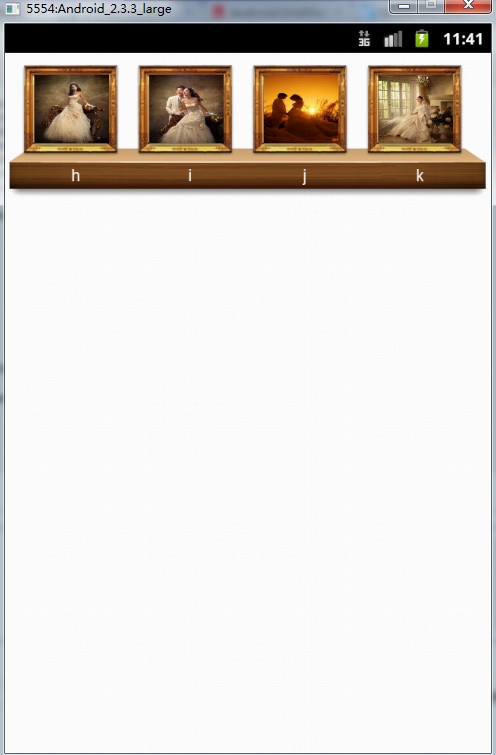
效果图:
未滚动,如图所示:
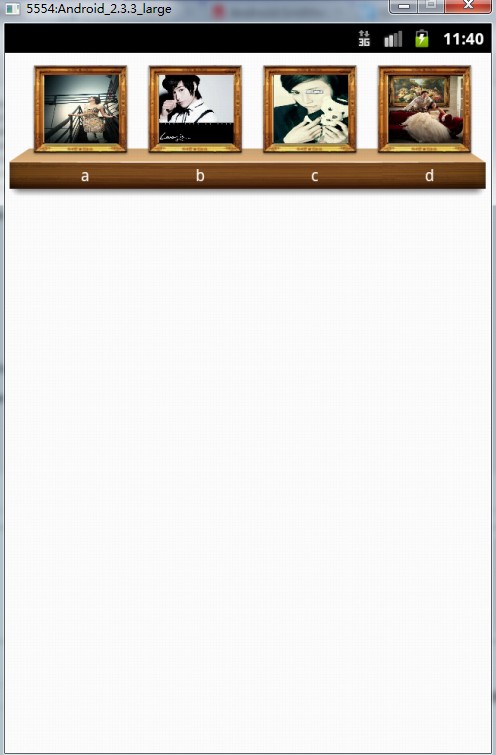
滚动到中间,如图所示:

滚动到结尾,如图所示:
Android GridView 一行显示数据(包括图片和文本),解决的办法是计算数据占该行的宽度是多少的更多相关文章
- Android—基于GifView显示gif动态图片
android中显示gif动态图片用到了开源框架GifView 1.拷GifView.jar到自己的项目中. 2.将自己的gif图片拷贝到drawable文件夹 3.在xml文件中设置基本属性: &l ...
- 只 一行显示可左右滚动的文本(UITextField中文限制)
// // ViewController.m // 一行显示可滚动的文本 // // Created by apple on 15-5-8. // Copyright (c) 2015年 apple. ...
- javascript DOM(2) 一个网页上切换显示不同的图片或文本
摘自: javascript DOM 编程艺术 1. 在一个网页上切换显示不同的图片 <!DOCTYPE html PUBLIC "-//W3C//DTD XHTML 1.0 Tran ...
- Android——GridView(显示文字)
activity_test9的layout文件: <?xml version="1.0" encoding="utf-8"?> <Linear ...
- Android中 在显示ImageView时图片上面和下面都出现一段空白区间的解决办法
开始的时候是在ScrollView中显示ImageView的时候出现这样的问题,以为是要对ScrollView进行设置的,后来发现单独显示一个ImageView的时候也会出现这样的问题,由此才知道是应 ...
- android 不失真 显示 超高清 图片 长图
韩梦飞沙 韩亚飞 313134555@qq.com yue31313 han_meng_fei_sha 通过计算 位图工厂.选项 对象的 inSamleSize 值 等比压缩 图片. 使用 ...
- Android MPAndroidChart LineChart 显示数据格式化
最近帮助同学,使用MPAndroidChart 控件,在图表显示时候, class MyValueFormatter implements IValueFormatter { @RequiresApi ...
- android 学习随笔七(网络:图片及文本传输及线程关系 )
主线程.子线程.UI的关系 简单的HTTP请求 -------------------------------------------------------- public class MainAc ...
- 关于asp.net mvc中 weiui gallery中IOS 下不显示预览图片问题的解决方式
IOS 下面不显示预览. 结果去掉了红框中的缓存部分 就可以显示了 备忘,也帮助一下需要的朋友 @*<meta http-equiv="pragma" content=&qu ...
随机推荐
- fedora22 无法联网的情况下rpm安装gcc5.1
前天发生件很不幸的事.我在给ubuntu14.04安装NVIDIA显卡驱动的时候,想清空下一个目录,什么目录我也忘了,当时我正好切到root身份(平常我很少切root的),命令格式如下 rm -fr ...
- AngularJS初体验
最近突然发现,Coding.net真是一个神奇的网站.这各网站90%的请求都是通过ajax完成的.可以发现,不管你点任何链接,网页都不会刷新,点击浏览器的返回或前进按钮也是这样,打开chrome的开发 ...
- 【python】由一个小例子看出python的灵活性,IF ELSE一例
temp = input("请输入1到100之间的数字:") num = int(temp) if 1 <= num <= 100: ...
- nRF52系列——Get started
Install Jlink Install MDK 这里的使用的是MDK 5.14 Install SDK https://developer.nordicsemi.com/nRF52_SDK/ 这里 ...
- 关于CMD命令行两三事
1.返回盘符:
- uoj164. 【清华集训2015】V 统计
坑爹题面:http://uoj.ac/problem/164 正常题面: 对于一个序列支持下列5个操作: 1.区间加x 2.区间减x并与0取max 3.区间覆盖 4.单点查询 5.单点历史最大值查询 ...
- PC硬件之我见——CPU篇
写在最前面: 最近身边很多朋友都购置电脑的想法,往往也会选择性价比较高的DIY攒机方式.不幸的是,并不是所有人都对电脑硬件有一定的了解的,何况在现在这种社会风气下,盲目的相信商家是不明智的.所 ...
- POOL
#ifndef POOL_HHH #define POOL_HHH #include "common.h" /* simple and fast obj pool without ...
- 自己总结的一些android公共库
本文主要介绍自己在android开发中总结的一些公共库,目前包括下拉刷新ListView.可以响应各个方向CompoundDrawables点击操作的TextView.图片缓存,不断更新,欢迎交流 ? ...
- 李洪强iOS开发之-环信01_iOS SDK 前的准备工作
李洪强iOS开发之-环信01_iOS SDK 前的准备工作 1.1_注册环信开发者账号并创建后台应用 详细步骤: 注册并创建应用 注册环信开发者账号 第 1 步:在环信官网上点击“即时通讯云”,并点 ...