
【转】Android中EditText中的InputType类型含义与如何定义
原文网址:http://www.crifan.com/summary_android_edittext_inputtype_values_and_meaning_definition/
经过一些Android中EditText方面的折腾:
【已解决】android中的EditText控件没有获得焦点但是输入法却弹出显示->Activity中不要默认就显示输入法
【暂未去解决】Android中EditText如何在失去焦点后让输入法消失
【已解决】Android中EditText点击获得焦点后无法显示输入法键盘
【已解决】Android中代码出现警告提示:android:phoneNumber is deprecated: Use inputType instead
然后对于EditText(或TextView)中的InputType的值的含义和类型,以及如何定义,有了个更清晰点的认识。
现在整理如下:
EditText的InputType属性,可以在代码中设置,也可以预先在xml中定义
设置EditText的InputType属性,最简单省事的办法就是在定义EditText的xml中直接设置。
比如:
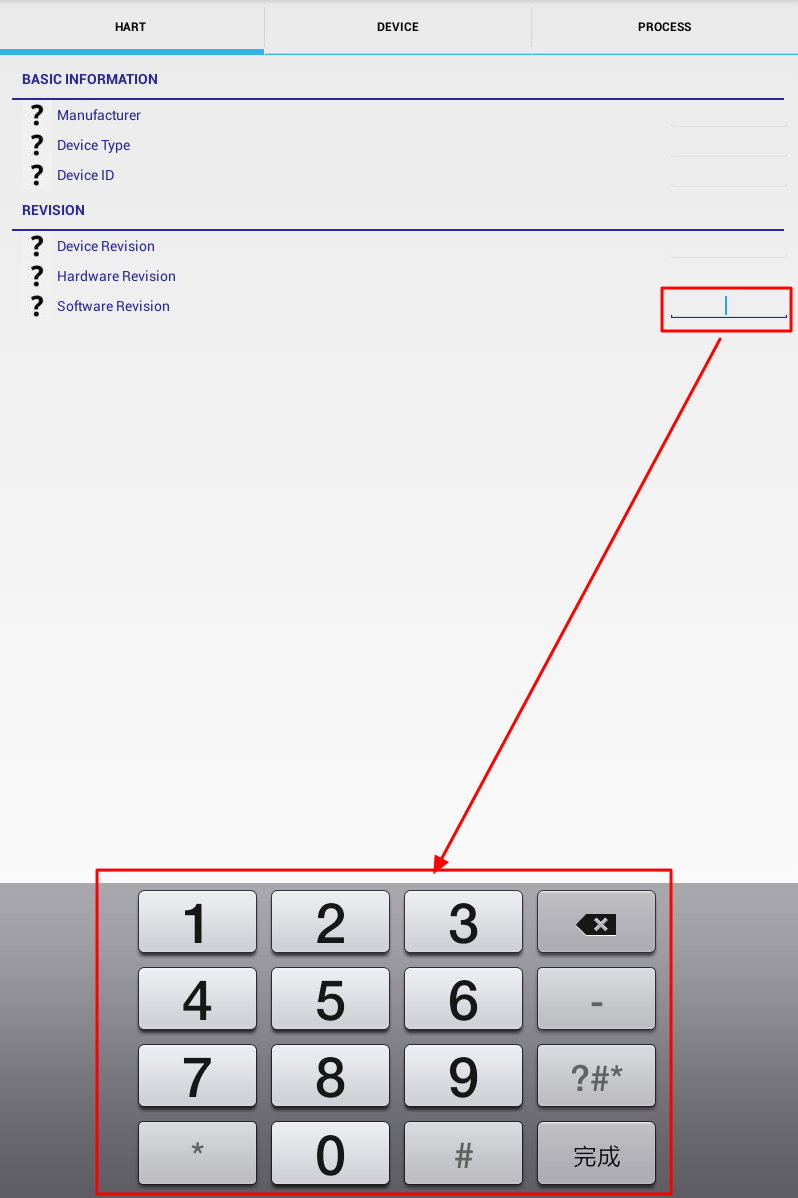
想要设置一个可编辑的文本框的输入内容为只能输入数字,则就可以:
(1)xml中定义InputType为number
|
1
2
3
4
|
<EditText android:id="@+id/variableValue" ...... android:inputType="number" /> |
(2)代码中设置InputType为TYPE_CLASS_NUMBER | TYPE_NUMBER_VARIATION_NORMAL
|
1
2
3
|
EditText variableValueView = (EditText) variableLayout.findViewById(R.id.variableValue);int inputType = InputType.TYPE_CLASS_NUMBER | InputType.TYPE_NUMBER_VARIATION_NORMAL;variableValueView.setInputType(inputType); |
这样的话,之后界面中生成的EditText,当点击后要输入内容的时候,弹出的输入法,自动变成那种只能输入数字的小键盘类型的了:
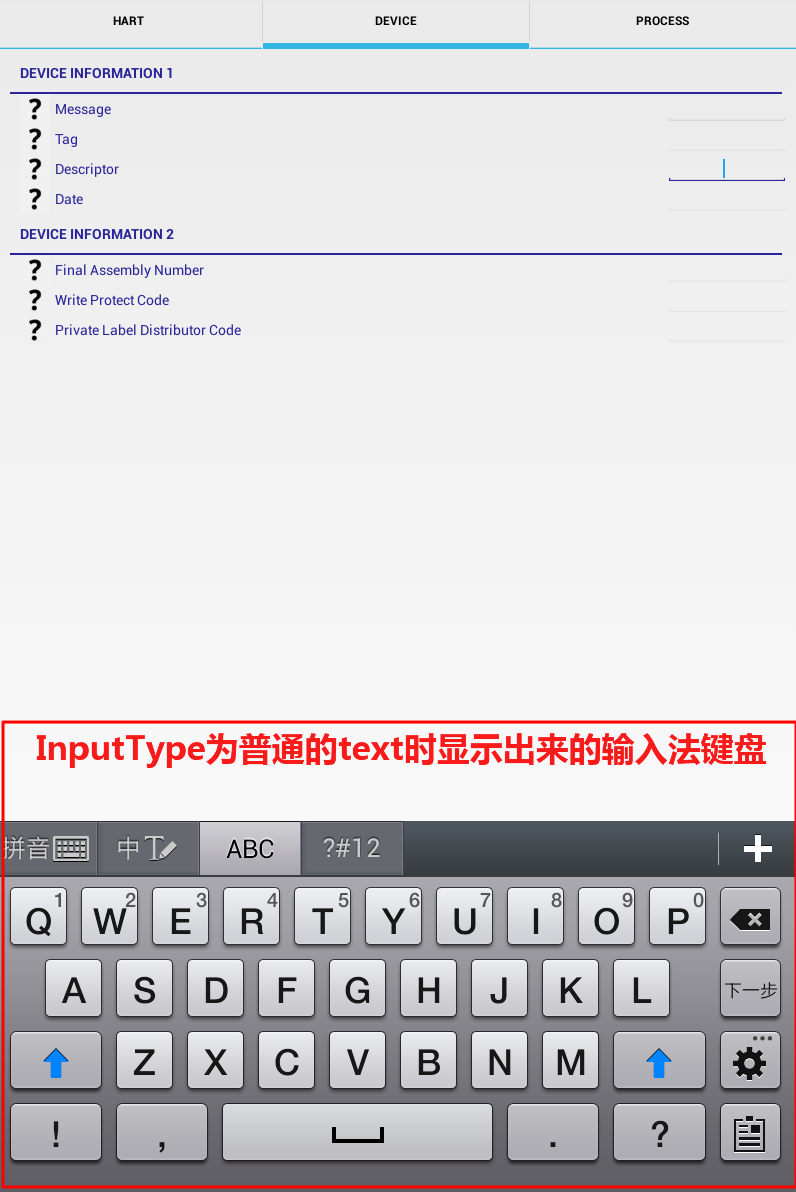
另外,附上,正常的普通字符串,即:
xml中:
|
1
|
android:inputType="text" |
或代码中:
|
1
|
someEditText.setInputType(InputType.TYPE_CLASS_TEXT | InputType.TYPE_TEXT_VARIATION_NORMAL); |
时,显示出来的输入法键盘的效果:
EditText的InputType属性对应的xml定义有哪些,以及代码中设置的InputType类型有哪些
知道了设置EditText的InputType属性值,既可以通过xml中定义,也可以在代码中设置为InputType的某种值,但是到底这些值有哪些,以及分别对应的含义是啥,则可以参考官网:
TextView | Android Developers – android:inputType
中的完整的列表:
|
Constant |
Value |
Description |
|
none |
0x00000000 |
There is no content type. The text is not editable. |
|
text |
0x00000001 |
Just plain old text. Corresponds toTYPE_CLASS_TEXT |TYPE_TEXT_VARIATION_NORMAL. |
|
textCapCharacters |
0x00001001 |
Can be combined with text and its variations to request capitalization of all characters. Corresponds toTYPE_TEXT_FLAG_CAP_CHARACTERS. |
|
textCapWords |
0x00002001 |
Can be combined with text and its variations to request capitalization of the first character of every word. Corresponds toTYPE_TEXT_FLAG_CAP_WORDS. |
|
textCapSentences |
0x00004001 |
Can be combined with text and its variations to request capitalization of the first character of every sentence. Corresponds toTYPE_TEXT_FLAG_CAP_SENTENCES. |
|
textAutoCorrect |
0x00008001 |
Can be combined with text and its variations to request auto-correction of text being input. Corresponds toTYPE_TEXT_FLAG_AUTO_CORRECT. |
|
textAutoComplete |
0x00010001 |
Can be combined with text and its variations to specify that this field will be doing its own auto-completion and talking with the input method appropriately. Corresponds toTYPE_TEXT_FLAG_AUTO_COMPLETE. |
|
textMultiLine |
0x00020001 |
Can be combined with text and its variations to allow multiple lines of text in the field. If this flag is not set, the text field will be constrained to a single line. Corresponds toTYPE_TEXT_FLAG_MULTI_LINE. |
|
textImeMultiLine |
0x00040001 |
Can be combined with text and its variations to indicate that though the regular text view should not be multiple lines, the IME should provide multiple lines if it can. Corresponds toTYPE_TEXT_FLAG_IME_MULTI_LINE. |
|
textNoSuggestions |
0x00080001 |
Can be combined with text and its variations to indicate that the IME should not show any dictionary-based word suggestions. Corresponds to TYPE_TEXT_FLAG_NO_SUGGESTIONS. |
|
textUri |
0x00000011 |
Text that will be used as a URI. Corresponds toTYPE_CLASS_TEXT | TYPE_TEXT_VARIATION_URI. |
|
textEmailAddress |
0x00000021 |
Text that will be used as an e-mail address. Corresponds to TYPE_CLASS_TEXT |TYPE_TEXT_VARIATION_EMAIL_ADDRESS. |
|
textEmailSubject |
0x00000031 |
Text that is being supplied as the subject of an e-mail. Corresponds to TYPE_CLASS_TEXT |TYPE_TEXT_VARIATION_EMAIL_SUBJECT. |
|
textShortMessage |
0x00000041 |
Text that is the content of a short message. Corresponds to TYPE_CLASS_TEXT |TYPE_TEXT_VARIATION_SHORT_MESSAGE. |
|
textLongMessage |
0x00000051 |
Text that is the content of a long message. Corresponds to TYPE_CLASS_TEXT |TYPE_TEXT_VARIATION_LONG_MESSAGE. |
|
textPersonName |
0x00000061 |
Text that is the name of a person. Corresponds to TYPE_CLASS_TEXT |TYPE_TEXT_VARIATION_PERSON_NAME. |
|
textPostalAddress |
0x00000071 |
Text that is being supplied as a postal mailing address. Corresponds to TYPE_CLASS_TEXT |TYPE_TEXT_VARIATION_POSTAL_ADDRESS. |
|
textPassword |
0x00000081 |
Text that is a password. Corresponds toTYPE_CLASS_TEXT |TYPE_TEXT_VARIATION_PASSWORD. |
|
textVisiblePassword |
0x00000091 |
Text that is a password that should be visible. Corresponds to TYPE_CLASS_TEXT |TYPE_TEXT_VARIATION_VISIBLE_PASSWORD. |
|
textWebEditText |
0x000000a1 |
Text that is being supplied as text in a web form. Corresponds to TYPE_CLASS_TEXT |TYPE_TEXT_VARIATION_WEB_EDIT_TEXT. |
|
textFilter |
0x000000b1 |
Text that is filtering some other data. Corresponds to TYPE_CLASS_TEXT |TYPE_TEXT_VARIATION_FILTER. |
|
textPhonetic |
0x000000c1 |
Text that is for phonetic pronunciation, such as a phonetic name field in a contact entry. Corresponds to TYPE_CLASS_TEXT |TYPE_TEXT_VARIATION_PHONETIC. |
|
textWebEmailAddress |
0x000000d1 |
Text that will be used as an e-mail address on a web form. Corresponds to TYPE_CLASS_TEXT |TYPE_TEXT_VARIATION_WEB_EMAIL_ADDRESS. |
|
textWebPassword |
0x000000e1 |
Text that will be used as a password on a web form. Corresponds to TYPE_CLASS_TEXT |TYPE_TEXT_VARIATION_WEB_PASSWORD. |
|
number |
0x00000002 |
A numeric only field. Corresponds toTYPE_CLASS_NUMBER |TYPE_NUMBER_VARIATION_NORMAL. |
|
numberSigned |
0x00001002 |
Can be combined with number and its other options to allow a signed number. Corresponds to TYPE_CLASS_NUMBER |TYPE_NUMBER_FLAG_SIGNED. |
|
numberDecimal |
0x00002002 |
Can be combined with number and its other options to allow a decimal (fractional) number. Corresponds to TYPE_CLASS_NUMBER |TYPE_NUMBER_FLAG_DECIMAL. |
|
numberPassword |
0x00000012 |
A numeric password field. Corresponds toTYPE_CLASS_NUMBER |TYPE_NUMBER_VARIATION_PASSWORD. |
|
phone |
0x00000003 |
For entering a phone number. Corresponds toTYPE_CLASS_PHONE. |
|
datetime |
0x00000004 |
For entering a date and time. Corresponds toTYPE_CLASS_DATETIME |TYPE_DATETIME_VARIATION_NORMAL. |
|
date |
0x00000014 |
For entering a date. Corresponds toTYPE_CLASS_DATETIME |TYPE_DATETIME_VARIATION_DATE. |
|
time |
0x00000024 |
For entering a time. Corresponds toTYPE_CLASS_DATETIME |TYPE_DATETIME_VARIATION_TIME. |
如此,就可以自己去在xml或代码中,分别试试,每种不同的InputType对应的都是什么效果了。
注意:通过代码给InputType赋值时,不是设置TYPE_XXX_VARIATION_YYY,而是要设置TYPE_CLASS_XXX | TYPE_XXXX_VARAITION_YYY
之前在代码中给InputType设置值,错写成:
|
1
|
inputType = InputType.TYPE_DATETIME_VARIATION_TIME; |
导致,EditText点击后,不显示输入法键盘,改为正确的:
|
1
|
inputType = InputType.TYPE_CLASS_DATETIME | InputType.TYPE_DATETIME_VARIATION_TIME; |
就可以正常的显示键盘了。
而后,也注意到官网
InputType | Android Developers
的解释中的示例:
|
以及
TextView | Android Developers – android:inputType
中提示的:
“Must be one or more (separated by ‘|’) of the following constant values.”
即:
需要一个或多个值,中间通过竖杠"|"去抑或(按位或)的。
详见:
【已解决】Android中EditText点击获得焦点后无法显示输入法键盘
【转】Android中EditText中的InputType类型含义与如何定义的更多相关文章
- 【整理】Android中EditText中的InputType类型含义与如何定义( 转 )
转自:[整理]Android中EditText中的InputType类型含义与如何定义 用到的时候查到了这篇文章觉得很不错,就在此记录下. [背景] 经过一些Android中EditText方面的折腾 ...
- Android下EditText中的字体不统一问题
Android下EditText中的字体不统一问题 好久没写,今天心情好略记下解决的某bug 在一个登录界面有帐号和密码两个EditText,但是却发现两个EditText的hint的英文字体不同,看 ...
- 隐藏android中EditText中的下划线以及修改光标颜色
在android开发中 EditTextText是我们经常用到的,我们使用时会有一些小问题,当我们点击输入文字时,EditText中的光标和下划线会变成粉红色. 解决方法很简单,我们只要在EditTe ...
- android 在EditText中显示表情图片
public class MainActivity extends Activity { protected void onCreate(Bundle savedInstanceState) { su ...
- 自定义ANDROID中EDITTEXT中的HINT文本的大小
EditText editText = (EditText) rootView.findViewById(R.id.et); // 新建一个可以添加属性的文本对象 SpannableString ss ...
- <Android>关于EditText中setInputType和setSingleLine的冲突
近期自己开发了一个带有删除button的EditText,一方面须要设置为SingleLine,还有一方面又须要设置输入类型,起先在xml文件里设置了android:inputType类型,在自己定义 ...
- Android资料之-EditText中的inputType
在编写有EditText的自定义控件的时候可能会用到EditText的inputType属性,直接在xml里写这个属性的时候是用字符串型的,不过动态设置的时候就变成int型了,InputType里有定 ...
- Android中Edittext的属性
//此为转载别人的,挺不错的 1.EditText输入的文字为密码形式的设置 (1)通过.xml里设置: 把该EditText设为:android:password="true" ...
- Android中EditText设置输入条件
一.应用场景 之前做商城应用时,会有对用户资料的设置情况进行限制,如下: (1)用户邮箱,应当只允许输入英文字母,数字和@.两个符号, (2)用户手机,应当只能输入数字,禁止输入其他字符. (3)用户 ...
随机推荐
- Java并发学习之二——获取和设置线程信息
本文是学习网络上的文章时的总结,感谢大家无私的分享. Thread类的对象中保存了一些属性信息可以帮助我们辨别每个线程.知道它的一些信息 ID:每一个线程的独特标示: Name:线程的名称: Prio ...
- 在安装twincat plc时,出现 there are some files marked for deletion on next reboot.please reboot first then
在注冊表内"HKEY_LOCAL_MACHINE\System\CurrentControlSet\Control\Session Manager\ "中删除注冊表值 " ...
- [Angular 2] Use Service use Typescript
When creating a service, need to inject the sercive into the bootstrap(): import {bootstrap, Compone ...
- PHP CodeBase: 判断用户是否手机访问(转)
随着移动设备的普及,网站也会迎来越来越多移动设备的访问.用适应PC的页面,很多时候对手机用户不友好,那么有些时候,我们需要判断用户是否用手机访问,如果是手机的话,就跳转到指定的手机友好页面.这里就介绍 ...
- ubuntu下安装tomcat和配置mysql
1.到官网 http://jakarta.apache.org/tomcat-7.0.2.tar.gz 安装文件,JDK假设已经安装完毕,接下来直接安装tomcat-7.0.2.tar.gz # ls ...
- 一行代码实现iOS序列化与反序列化
一.变量声明 为便于下文讨论,提前创建父类Biology以及子类Person: Biology: @interface Biology : NSObject { NSInteger *_hairCou ...
- 《CODE》讲了什么?
本书首先从黑夜中用手电筒开关灯的方式来与小伙伴交流从而引出了编码与组合的概念,并阐明了编码的本质就是交流,是一种用来在机器与人之间传递信息的方式.然后在第 2~3 章中讲述了编码与组合的应用,如电报机 ...
- linux (ubuntu) 下设置 tomcat 随系统自动启动
网上说的有很多, 我只记录一种 1. 切换到 /etc/init.d/ 目录下 2. sudo vim tomcat 3. 在打开的文件里写入以下内容 #!/bin/sh # chkconfig: # ...
- codevs 2541 幂运算(迭代加深搜索)
/* 一开始想到了简单的深搜 维护当前可用的mi数组 然后回溯用哪个 不断更新新产生的mi 这样的问题是 由于mi不断产生 搜索规模扩大 不好 不好 下面是奇丑的WA掉的代码 做个反面教材 */ #i ...
- VB编程技巧推荐
VB编程技巧推荐 1.zyl910的专栏——理论水平高 用VB写高效的图像处理程序 V2.0 优化分支代码——避免跳转指令堵塞流水线 2.Laviewpbt的专栏 —— 有很多算法的代码,实用性高 ...