
Spring Data MongoDB example with Spring MVC 3.2
Spring Data MongoDB example with Spring MVC 3.2
Here is another example web application built with Spring MVC 3.2 and Spring Data 1.2, integrating with the MongoDB document database.
STEP 1: Create new webapp project, I will use maven for this. (Note: I am on my macbook with Maven 3 and Java 6 installed.)
mvn archetype:generate
-DgroupId=com.manishchhabra.blog
-DartifactId=HelloSpringWithMongoDB
-DarchetypeArtifactId=maven-archetype-webapp
-DinteractiveMode=false
You could create the maven project directly in your IDE as well. But I usually create it on the terminal and import it in eclipse by using the following command (Note: The following command is run within your newly created project directory, i.e. run -> cd HelloSpringWithMongoDB)
mvn eclipse:eclipse -Dwtpversion=2.0
STEP 2: Add Spring Framework 3.2 and Spring Data 1.2 dependencies to your pom.xml
|
1
2
3
4
5
6
7
8
9
10
11
12
13
14
15
16
17
|
<dependency> <groupId>org.springframework</groupId> <artifactId>spring-orm</artifactId> <version>3.2.0.RELEASE</version></dependency><dependency> <groupId>org.springframework</groupId> <artifactId>spring-webmvc</artifactId> <version>3.2.0.RELEASE</version></dependency><dependency> <groupId>org.springframework.data</groupId> <artifactId>spring-data-mongodb</artifactId> <version>1.2.0.RELEASE</version></dependency> |
STEP 3: Update your web.xml (src/main/webapp/WEB-INF/web.xml) to use Spring’s DispatcherServlet
|
1
2
3
4
5
6
7
8
9
10
11
12
13
14
15
16
17
18
19
20
21
22
23
24
25
26
27
28
|
<web-app xmlns="http://java.sun.com/xml/ns/javaee" xmlns:xsi="http://www.w3.org/2001/XMLSchema-instance" xsi:schemaLocation="http://java.sun.com/xml/ns/javaee http://java.sun.com/xml/ns/javaee/web-app_2_5.xsd" version="2.5"> <display-name>Spring With MongoDB Web Application</display-name> <servlet> <servlet-name>dispatcher</servlet-name> <servlet-class>org.springframework.web.servlet.DispatcherServlet</servlet-class> <load-on-startup>1</load-on-startup> </servlet> <servlet-mapping> <servlet-name>dispatcher</servlet-name> <url-pattern>/</url-pattern> </servlet-mapping> <context-param> <param-name>contextConfigLocation</param-name> <param-value>/WEB-INF/dispatcher-servlet.xml</param-value> </context-param> <listener> <listener-class>org.springframework.web.context.ContextLoaderListener</listener-class> </listener></web-app> |
STEP 4: Add your spring configuration to the dispatcher-servlet.xml
- Use MongoFactoryBean to connect to the MongoDB instance.
- Use MongoTemplate to connect and make queries to the database.
|
1
2
3
4
5
6
7
8
9
10
11
12
13
14
15
16
17
18
19
20
21
22
23
24
25
26
27
28
29
30
|
<?xml version="1.0" encoding="UTF-8"?><beans xmlns="http://www.springframework.org/schema/beans" xmlns:xsi="http://www.w3.org/2001/XMLSchema-instance" xmlns:context="http://www.springframework.org/schema/context" xmlns:p="http://www.springframework.org/schema/p" xsi:schemaLocation="http://www.springframework.org/schema/beans http://www.springframework.org/schema/beans/spring-beans-3.2.xsd http://www.springframework.org/schema/context http://www.springframework.org/schema/context/spring-context-3.2.xsd"> <context:component-scan base-package="com.manishchhabra.blog" /> <!-- Factory bean that creates the Mongo instance --> <bean id="mongo" class="org.springframework.data.mongodb.core.MongoFactoryBean"> <property name="host" value="localhost" /> </bean> <!-- MongoTemplate for connecting and quering the documents in the database --> <bean id="mongoTemplate" class="org.springframework.data.mongodb.core.MongoTemplate"> <constructor-arg name="mongo" ref="mongo" /> <constructor-arg name="databaseName" value="test" /> </bean> <!-- Use this post processor to translate any MongoExceptions thrown in @Repository annotated classes --> <bean class="org.springframework.dao.annotation.PersistenceExceptionTranslationPostProcessor" /> <bean id="jspViewResolver" class="org.springframework.web.servlet.view.InternalResourceViewResolver" p:prefix="/WEB-INF/jsp/" p:suffix=".jsp" /> </beans> |
STEP 5: Create a model (using Person as an example), service and controller in the new source directory src/main/java
Model
|
1
2
3
4
5
6
7
8
9
10
11
12
13
14
15
16
17
18
19
20
21
22
23
24
25
|
package com.manishchhabra.blog.model;import org.springframework.data.annotation.Id;import org.springframework.data.mongodb.core.mapping.Document;@Documentpublic class Person { @Id private String id; private String name; public String getId() { return id; } public void setId(String id) { this.id = id; } public String getName() { return name; } public void setName(String name) { this.name = name; }} |
Service
|
1
2
3
4
5
6
7
8
9
10
11
12
13
14
15
16
17
18
19
20
21
22
23
24
25
26
27
28
29
30
31
32
33
34
35
36
37
38
39
|
package com.manishchhabra.blog.service;import java.util.List;import java.util.UUID;import org.springframework.beans.factory.annotation.Autowired;import org.springframework.data.mongodb.core.MongoTemplate;import org.springframework.stereotype.Repository;import com.manishchhabra.blog.model.Person;@Repositorypublic class PersonService { @Autowired private MongoTemplate mongoTemplate; public static final String COLLECTION_NAME = "person"; public void addPerson(Person person) { if (!mongoTemplate.collectionExists(Person.class)) { mongoTemplate.createCollection(Person.class); } person.setId(UUID.randomUUID().toString()); mongoTemplate.insert(person, COLLECTION_NAME); } public List<Person> listPerson() { return mongoTemplate.findAll(Person.class, COLLECTION_NAME); } public void deletePerson(Person person) { mongoTemplate.remove(person, COLLECTION_NAME); } public void updatePerson(Person person) { mongoTemplate.insert(person, COLLECTION_NAME); }} |
Controller for the CRUD operations
|
1
2
3
4
5
6
7
8
9
10
11
12
13
14
15
16
17
18
19
20
21
22
23
24
25
26
27
28
29
30
31
32
33
34
35
36
37
38
39
40
41
42
43
|
package com.manishchhabra.blog.controller;import org.springframework.beans.factory.annotation.Autowired;import org.springframework.stereotype.Controller;import org.springframework.ui.ModelMap;import org.springframework.util.StringUtils;import org.springframework.web.bind.annotation.ModelAttribute;import org.springframework.web.bind.annotation.RequestMapping;import org.springframework.web.bind.annotation.RequestMethod;import org.springframework.web.servlet.View;import org.springframework.web.servlet.view.RedirectView;import com.manishchhabra.blog.model.Person;import com.manishchhabra.blog.service.PersonService; @Controller public class PersonController { @Autowired private PersonService personService; @RequestMapping(value = "/person", method = RequestMethod.GET) public String getPersonList(ModelMap model) { model.addAttribute("personList", personService.listPerson()); return "output"; } @RequestMapping(value = "/person/save", method = RequestMethod.POST) public View createPerson(@ModelAttribute Person person, ModelMap model) { if(StringUtils.hasText(person.getId())) { personService.updatePerson(person); } else { personService.addPerson(person); } return new RedirectView("/HelloSpringWithMongoDB/person"); } @RequestMapping(value = "/person/delete", method = RequestMethod.GET) public View deletePerson(@ModelAttribute Person person, ModelMap model) { personService.deletePerson(person); return new RedirectView("/HelloSpringWithMongoDB/person"); } } |
STEP 5: Create a JSP Page in the folder WEB-INF/jsp called output.jsp (This will currently invoke create and delete).
|
1
2
3
4
5
6
7
8
9
10
11
12
13
14
15
16
17
18
19
20
21
|
<%@ taglib prefix="c" uri="http://java.sun.com/jsp/jstl/core" %><html><body> <h2>Here is a simple CRUD using Spring MVC and MongoDB.</h2> <form action="person/save" method="post"> <input type="hidden" name="id"> <label for="name">Person Name</label> <input type="text" id="name" name="name"/> <input type="submit" value="Submit"/> </form> <table border="1"> <c:forEach var="person" items="${personList}"> <tr> <td>${person.name}</td><td><input type="button" value="delete" onclick="window.location='person/delete?id=${person.id}'"/></td> </tr> </c:forEach> </table> </body></html> |
STEP 6: That’s it! Its time to run your project. You could either run directly from eclipse or you could run “mvn package” to build a war file and deploy it to your application server. I tested this on tomcat running on port 8080 (http://localhost:8080/HelloSpringWithMongoDB/person) and I could store and delete person with provided names. Working! yeah.. Here is a picture of me playing with the app 
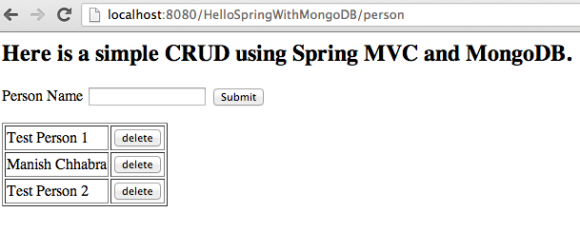
Spring Data MongoDB Spring MVC 3.2 Example App
You can view or download the full project code athttps://github.com/manishchhabra/HelloSpringWithMongoDB
Spring Data MongoDB example with Spring MVC 3.2的更多相关文章
- spring data mongodb 配置遇到的几个问题
一. mongodb 2.2版本以上的配置 spring.data.mongodb.uri = mongodb://newlook:newlook@192.168.0.109:27017/admin ...
- spring data mongodb中,如果对象中的属性不想加入到数据库字段中
spring data mongodb中,如果对象中的属性不想加入到数据库字段中,可加@Transient注解,声明为透明属性 spring data mongodb 官网帮助文档 http://ww ...
- 使用Spring访问Mongodb的方法大全——Spring Data MongoDB查询指南
1.概述 Spring Data MongoDB 是Spring框架访问mongodb的神器,借助它可以非常方便的读写mongo库.本文介绍使用Spring Data MongoDB来访问mongod ...
- Spring data mongodb 聚合,投射,内嵌数组文档分页.
尽量别直接用 DBObject ,Spring data mongodb 的api 本来就没什么多大用处,如果还直接用 DBObject 那么还需要自己去解析结果,说动做个对象映射,累不累 Spri ...
- JAVA 处理 Spring data mongodb 时区问题
Spring data mongodb 查询出结果的时候会自动 + 8小时,所以我们看起来结果是对的 但是我们查询的时候,并不会自动 + 8小时,需要自己处理 解决方法 1 @JsonFormat ...
- Spring data mongodb ObjectId ,根据id日期条件查询,省略@CreatedDate注解
先看看ObjectId 的json 结构,非常丰富,这里有唯一机器码,日期,时间戳等等,所以强烈建议ID 使用 ObjectId 类型,并且自带索引 Spring data mongodb 注解 @C ...
- Spring data mongodb @CreatedBy@LastModifiedBy@CreatedBy@LastModifiedBy SpringSecurityAuditorAware,只记录用户名
要在Spring data mongodb 中使用@CreatedBy@LastModifiedBy@CreatedBy@LastModifiedBy 这四个注解 必须实现 SpringSecuri ...
- Spring Data MongoDB 三:基本文档查询(Query、BasicQuery)(一)
一.简单介绍 Spring Data MongoDB提供了org.springframework.data.mongodb.core.MongoTemplate对MongoDB的CRUD的操作,上一 ...
- Introduction to Spring Data MongoDB
Introduction to Spring Data MongoDB I just announced the new Spring 5 modules in REST With Spring: & ...
随机推荐
- fedora安装sublime text教程
下载 http://pan.baidu.com/s/1eRkEegM 解压 终端中切换到下载文件的目录下,执行以下命令: sudo tar -jxvf sublime_text_3_build_308 ...
- mysql-积累管理sql语句
//连接数据库 mysql -h xxx -u root -p; //查看数据库 show databases //查看数据表 show tables //查看某数据表结构 desc xxx表 //修 ...
- dotnet core 开发体验之Routing
开始 回顾上一篇文章:dotnet core开发体验之开始MVC 里面体验了一把mvc,然后我们知道了aspnet mvc是靠Routing来驱动起来的,所以感觉需要研究一下Routing是什么鬼. ...
- Python 基础 字符串拼接 + if while for循环
注释单行注释 #多行注释 ''' 三个单引号或者三个双引号 """ ''' 用三引号引住可以多行赋值 用户交互 input 字符串拼接 + ""%( ...
- 支付宝集成SDK 报错
1.打开Demo中的错误 这是路径错误导致 解决办法:在Build Settings 中找到 Library Search Paths ,去掉其中的 /// 2.自己集成支付宝SDK时的错误 这个也是 ...
- 使用spring的jdbcTemplate-----用JDBC模板查询数据库
JdbcTemplate类声明了几个重载的query()模板方法来控制整个查询过程,就像进行更新数据操作一样,通过实现PreparedStatementCreator和PreparedStatemen ...
- 关于Java(常用数据类型)
工作中,除非特殊需要,一般使用的数据类型较为单一. int int 是最常用的类型之一,一般能满足判断或循环的需求 float 或 double 两个浮点类型,可以在一定程度上确保数据的精度 BigD ...
- list.h
#ifndef LISTHHHHHHH #define LISTHHHHHHH #include "common.h" /* stolen from kernel */ typed ...
- spm使用之六安装别人写好的spm文档主题模板
上回说到有个nico-one的文档主题模板, https://github.com/lepture/nico-one 把他可以下载了, 放到 C:\Documents and Settings\Adm ...
- HDUOJ Clear All of Them I 状压DP
Clear All of Them I Time Limit: 2000/1000 MS (Java/Others) Memory Limit: 122768/62768 K (Java/Oth ...