
C#当中的多线程_任务并行库(中)
发现自己有点懒了!也可能是越往后越难了,看书理解起来有点费劲,所以这两天就每天更新一点学习笔记吧。
4.5 将APM模式转化为任务
书上提供的三种方式
方式一:
  class Program

         {

                 //定义一个委托

                 private delegate string AsynchronousTask(string threadName);

                 static void Main(string[] args)

                 {

                         //实例化一个委托对象,绑定Test函数

                         AsynchronousTask d = Test;

                       Console.WriteLine("Option 1");

                       //调用TaskFactory<TResult> Factory.FromAsync()方法,这个方法有很多重载函数

                       //这个方法是 public Task<TResult> FromAsync(IAsyncResult asyncResult, Func<IAsyncResult, TResult> endMethod);

                       Task<string> task = Task<string>.Factory.FromAsync(

                       d.BeginInvoke("AsyncTaskThread", Callback, "a delegate asynchronous call"), d.EndInvoke);

                       //绑定任务执行完的后续操作

                       task.ContinueWith(t => Console.WriteLine("Callback is finished, now running a continuation! Result: {0}",

                                 t.Result));

                         //循环打印状态信息

                         while (!task.IsCompleted)

                         {

                                 Console.WriteLine(task.Status);

                                 Thread.Sleep(TimeSpan.FromSeconds(0.5));

                         }

                         Console.WriteLine(task.Status);

                         Thread.Sleep(TimeSpan.FromSeconds());

                         Console.WriteLine("----------------------------------------------");

                         Console.WriteLine();

                 }

                 //定义一个回调函数

                 private static void Callback(IAsyncResult ar)

                 {

                         Console.WriteLine("Starting a callback...");

                         Console.WriteLine("State passed to a callbak: {0}", ar.AsyncState);

                         Console.WriteLine("Is thread pool thread: {0}", Thread.CurrentThread.IsThreadPoolThread);

                         Console.WriteLine("Thread pool worker thread id: {0}", Thread.CurrentThread.ManagedThreadId);

                 }

                 //定义一个委托函数

                 private static string Test(string threadName)

                 {

                         Console.WriteLine("Starting...");

                         Console.WriteLine("Is thread pool thread: {0}", Thread.CurrentThread.IsThreadPoolThread);

                         Thread.Sleep(TimeSpan.FromSeconds());

                         Thread.CurrentThread.Name = threadName;

                         return string.Format("Thread name: {0}", Thread.CurrentThread.Name);

                 }
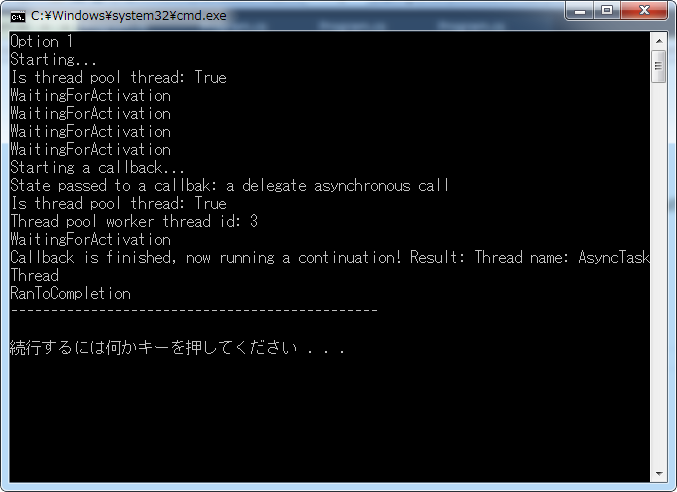
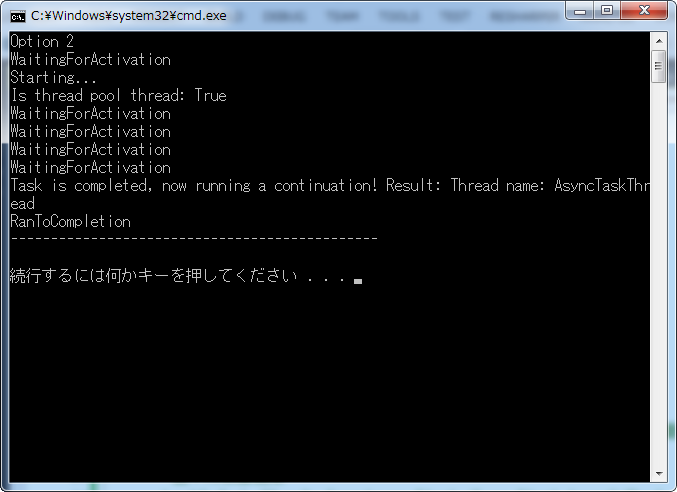
方式二:
与方式一差不多,但是使用了TaskFactory<TResult> Factory.FromAsync()方法的另一种重载,该重载并不允许指定一个将会在异步委托调用后被调用的回调函数。但是可以使用后续操作替代它。如果回调函数非常重要,建议使用第一种。
  class Program

         {

                 //定义一个委托

                 private delegate string AsynchronousTask(string threadName);

                 static void Main(string[] args)

                 {

                          //实例化一个委托对象,绑定Test函数

                          AsynchronousTask d = Test;

                        Console.WriteLine("Option 2");

                        //调用TaskFactory<TResult> Factory.FromAsync()方法,这个方法有很多重载函数

                        /*

14                         * 这个方法重载是

15                         * public Task<TResult> FromAsync<TArg1>(Func<TArg1, AsyncCallback, object, IAsyncResult> beginMethod,

16                         * Func<IAsyncResult, TResult> endMethod,

17                         * TArg1 arg1,

18                         * object state);

19                         */

                       Task<string> task= Task<string>.Factory.FromAsync(d.BeginInvoke,d.EndInvoke,

                                                                                                     "AsyncTaskThread",

                                                                                                     "a delegate asynchronous call");


                         //绑定任务执行完的后续操作

                       task.ContinueWith(t => Console.WriteLine("Task is completed, now running a continuation! Result: {0}",

                               t.Result));

                         //循环打印状态信息

                         while (!task.IsCompleted)

                         {

                                 Console.WriteLine(task.Status);

                                 Thread.Sleep(TimeSpan.FromSeconds(0.5));

                         }

                         Console.WriteLine(task.Status);

                         Thread.Sleep(TimeSpan.FromSeconds());

                         Console.WriteLine("----------------------------------------------");

                         Console.WriteLine();

                 }

                 //定义一个委托函数

                 private static string Test(string threadName)

                 {

                         Console.WriteLine("Starting...");

                         Console.WriteLine("Is thread pool thread: {0}", Thread.CurrentThread.IsThreadPoolThread);

                         Thread.Sleep(TimeSpan.FromSeconds());

                         Thread.CurrentThread.Name = threadName;

                         return string.Format("Thread name: {0}", Thread.CurrentThread.Name);

                 }
方式三:
  class Program

         {

                 private delegate string IncompatibleAsynchronousTask(out int threadId);

                 static void Main(string[] args)

                 {

                         int threadId;

                         IncompatibleAsynchronousTask e = Test;

                         Console.WriteLine("Option 3");


                         IAsyncResult ar = e.BeginInvoke(out threadId, Callback, "a delegate asynchronous call");

                         /*这是一个小技巧,EndMethod使用了out参数,与FromAsync的方法重载并不兼容。

15                          * 然而,可以很轻松地将EndMethod调用封装到一个lambda表达式当中,从而适合

16                          * 工厂方法。

17                          */

                         Task<string> task = Task<string>.Factory.FromAsync(ar, _ => e.EndInvoke(out threadId, ar));

                         task.ContinueWith(t =>

                                 Console.WriteLine("Task is completed, now running a continuation! Result: {0}, ThreadId: {1}",

                                         t.Result, threadId));

                         while (!task.IsCompleted)

                         {

                                 Console.WriteLine(task.Status);

                                 Thread.Sleep(TimeSpan.FromSeconds(0.5));

                         }

                         Console.WriteLine(task.Status);

                         Thread.Sleep(TimeSpan.FromSeconds());

                 }

                 private static void Callback(IAsyncResult ar)

                 {

                         Console.WriteLine("Starting a callback...");

                         Console.WriteLine("State passed to a callbak: {0}", ar.AsyncState);

                         Console.WriteLine("Is thread pool thread: {0}", Thread.CurrentThread.IsThreadPoolThread);

                         Console.WriteLine("Thread pool worker thread id: {0}", Thread.CurrentThread.ManagedThreadId);

                 }

                 private static string Test(out int threadId)

                 {

                         Console.WriteLine("Starting...");

                         Console.WriteLine("Is thread pool thread: {0}", Thread.CurrentThread.IsThreadPoolThread);

                         Thread.Sleep(TimeSpan.FromSeconds());

                         threadId = Thread.CurrentThread.ManagedThreadId;

                         return string.Format("Thread pool worker thread id was: {0}", threadId);

                 }
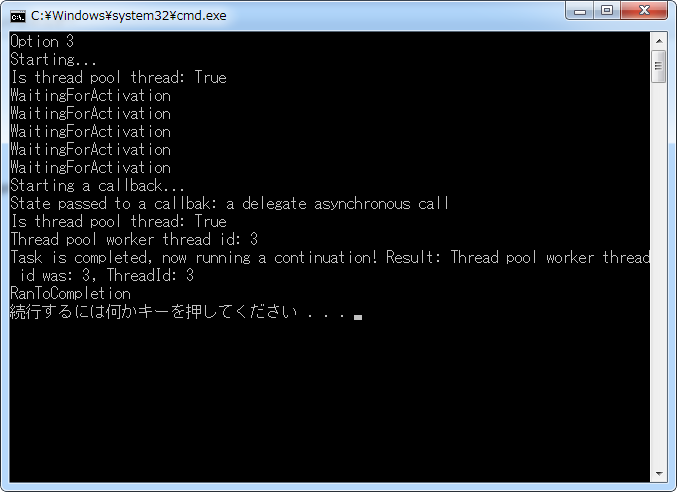
总结:感觉这个在日常工作当中使用的真的不是很多,比较晦涩难懂,暂且记住有TaskFactory<TResult> Factory.FromAsync()这个方法,通过这个方法可以将APM转化成TPL
4.6 将EAP模式转换成任务
例子先上:
 class Program

     {

         static void Main(string[] args)

         {

             //实例化一个TaskCompletionSource<TResult>,它是实现EAP转化成TPL的关键

             var tcs = new TaskCompletionSource<int>();

             var worker = new BackgroundWorker();

             worker.DoWork += (sender, eventArgs) =>

             {

                 eventArgs.Result = TaskMethod("Background worker", );

             };

             worker.RunWorkerCompleted += (sender, eventArgs) =>

             {

                  //如果有错就抛出异常

                 if (eventArgs.Error != null)

                 {

                     tcs.SetException(eventArgs.Error);

                 }

                  //如果是取消操作,就取消操作

                 else if (eventArgs.Cancelled)

                 {

                     tcs.SetCanceled();

                 }

                 else

                 {

                     //正常情况返回结果

                     tcs.SetResult((int)eventArgs.Result);

                 }

             };

             //运行任务

             worker.RunWorkerAsync();

             //获取结果

             int result = tcs.Task.Result;

             Console.WriteLine("Result is: {0}", result);

         }

         static int TaskMethod(string name, int seconds)

         {

             Console.WriteLine("Task {0} is running on a thread id {1}. Is thread pool thread: {2}",

                 name, Thread.CurrentThread.ManagedThreadId, Thread.CurrentThread.IsThreadPoolThread);

             Thread.Sleep(TimeSpan.FromSeconds(seconds));

             return  * seconds;

         }

4.7 实现取消选项
我们在前面说过线程工作的取消需要依靠两个类来实现,分别是CancellationTokenSource和CancellationToken这两个类
     class Program

     {

         private static void Main(string[] args)

         {

               //定义一个CancellationTokenSource类

               var cts = new CancellationTokenSource();

               //创建第一个任务,这里有个很奇怪的第地方,cts.Token被传了两次

               //分别传给了TaskMethod方法个Task的构造函数,为什么这么做呢?

               var longTask = new Task<int>(() => TaskMethod("Task 1", , cts.Token), cts.Token);

             //打印任务状态

             Console.WriteLine(longTask.Status);

             //取消任务

             cts.Cancel();

             //再次打印任务状态

             Console.WriteLine(longTask.Status);

             Console.WriteLine("First task has been cancelled before execution");

             //创建第二个任务

             cts = new CancellationTokenSource();

             longTask = new Task<int>(() => TaskMethod("Task 2", , cts.Token), cts.Token);

             //启动任务

             longTask.Start();

             for (int i = ; i < ; i++ )

             {

                 Thread.Sleep(TimeSpan.FromSeconds(0.5));

                 Console.WriteLine(longTask.Status);

             }

             //取消任务

             cts.Cancel();

             //打印任务状态

             for (int i = ; i < ; i++)

             {

                 Thread.Sleep(TimeSpan.FromSeconds(0.5));

                 Console.WriteLine(longTask.Status);

             }

             Console.WriteLine("A task has been completed with result {0}.", longTask.Result);

         }

         private static int TaskMethod(string name, int seconds, CancellationToken token)

         {

             Console.WriteLine("Task {0} is running on a thread id {1}. Is thread pool thread: {2}",

                 name, Thread.CurrentThread.ManagedThreadId, Thread.CurrentThread.IsThreadPoolThread);

             for (int i = ; i < seconds; i ++)

             {

                 Thread.Sleep(TimeSpan.FromSeconds());

                 //如果任务被取消,就返回-1

                 if (token.IsCancellationRequested) return -;

             }

             return *seconds;

          }

    }

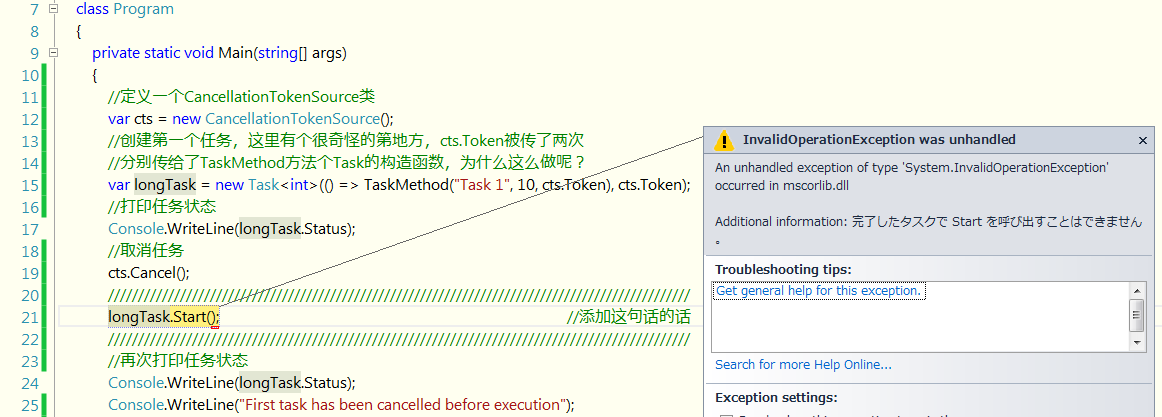
cts.Token被传了两次为什么呢?如果在任务实际启动前取消它,该任务的TPL基础设施有责任处理该取消操作,因为这些代码根本不会被执行,通过得到第一个任务的状态可以知道它被取消了。如果尝试对该任务调用Start方法,将会得到InvalidOperationException异常。
解释:
如果在Task构造函数当中取消了,cts.Token这个参数,那么在Cts.Cancel()后面执行longTask.Start(); 会出现什么情况呢?
如下图所示,任务只有在运行操作的时候才能检查到取消操作。所以才会有WaitingToRun这个状态出现。

如果添加了这个参数,结果如下:
这个时候,在取消操作执行完后,执行开始操作就会抛出异常。
C#当中的多线程_任务并行库(中)的更多相关文章
- C#当中的多线程_任务并行库(上)
复习: 第三章内容中我们提到了三种异步编程模型,这里简单复习一下,分别如下 1.APM(异步编程模式):形如Beginxxx,Endxxx. 2.EAP(基于事件的异步编程模式):这个我们在.net中 ...
- C#当中的多线程_任务并行库(下)
4.8 处理任务中的异常 下面这个例子讨论了任务当中抛出异常,以及任务异常的获取 class Program { static void Main(string[] a ...
- C#多线程开发-任务并行库04
你好,我是阿辉. 之前学习了线程池,知道了它有很多好处. 使用线程池可以使我们在减少并行度花销时节省操作系统资源.可认为线程池是一个抽象层,其向程序员隐藏了使用线程的细节,使我们可以专心处理程序逻辑, ...
- C#当中的多线程_线程池
3.1 简介 线程池主要用在需要大量短暂的开销大的资源的情形.我们预先分配一些资源在线程池当中,当我们需要使用的时候,直接从池中取出,代替了重新创建,不用时候就送回到池当中. .NET当中的线程池是受 ...
- C#当中的多线程_线程同步
第2章 线程同步 原来以为线程同步就是lock,monitor等呢,看了第二章真是大开眼界啊! 第一章中我们遇到了一个叫做竞争条件的问题.引起的原因是没有进行正确的线程同步.当一个线程在执行操作时候, ...
- C#当中的多线程_线程基础
前言 最近工作不是很忙,想把买了很久了的<C#多线程编程实战>看完,所以索性把每一章的重点记录一下,方便以后回忆. 第1章 线程基础 1.创建一个线程 using System; usin ...
- Python GUI之tkinter窗口视窗教程大集合(看这篇就够了) JAVA日志的前世今生 .NET MVC采用SignalR更新在线用户数 C#多线程编程系列(五)- 使用任务并行库 C#多线程编程系列(三)- 线程同步 C#多线程编程系列(二)- 线程基础 C#多线程编程系列(一)- 简介
Python GUI之tkinter窗口视窗教程大集合(看这篇就够了) 一.前言 由于本篇文章较长,所以下面给出内容目录方便跳转阅读,当然也可以用博客页面最右侧的文章目录导航栏进行跳转查阅. 一.前言 ...
- C#多线程编程系列(五)- 使用任务并行库
目录 1.1 简介 1.2 创建任务 1.3 使用任务执行基本的操作 1.4 组合任务 1.5 将APM模式转换为任务 1.6 将EAP模式转换为任务 1.7 实现取消选项 1.8 处理任务中的异常 ...
- C#并行库(TaskParallelLibrary)用法小结
今天有空,总结一下.NET 4.5并行库(TaskParallelLibrary)用法. 也许C和C++的程序员刚刚开始写C#还习惯于new Thread来新建一个线程,但新建线程需要内存和CPU上下 ...
随机推荐
- 通过Microsoft Azure服务设计网络架构的经验分享
作者 王枫 发布于 2014年4月8日 本文从产品设计和架构角度分享了Microsoft Azure网络服务方面的使用经验,希望你在阅读本文之后能够了解这些服务之间,从而更好地设计你的架构. Mic ...
- 新浪微博授权时出现"关注 *** 的微博"
基本设置完成后, 保证scope是 "all" 或 至少 包含 "follow_app_official_microblog". 测试时, 保证你的测试账号没有 ...
- IE浏览器Ajax缓存问题小结
IE浏览器Ajax缓存问题 在IE下使用ajax的get方法向后台请求数据时,如果请求URL与之前完全一样,则根本不想后台获取,直接返回上一次请求缓存的数据(在缓存过期之前,针对相同地址发起的多个Aj ...
- (转载)javascript经典例子
(转载)http://www.blogjava.net/hadeslee/archive/2007/11/24/161778.html 一.验证类1.数字验证内1.1 整数1.2 大于0的整数 (用于 ...
- LR使用
1.协议的选择 Loadrunner的协议选择众多,想正确的选择脚本协议,首先要从Loadrunner的工作原理上深入的理解协议的作用和意义, Loadrunner启动后,在任务栏上有一个loadru ...
- Bootstrap框架中的字形图标的理解
最近项目中准备使用 Bootstrap 框架,看中了Ace Admin 这套皮肤,看其代码的时候,发现使用了字形图标.下面内容来源于网络,根据自己对新知识的学习曲线重新整合了一下: 一,字形图标的定义 ...
- 2D游戏编程5—锁定频率
核心利用win心跳函数GetTickCount利用差量锁定fps,如下代码锁定30fps,缺点为如果计算机不能以30fps运行,程序将低于30fps #define WIN32_LEAN_AND_ME ...
- 为虚拟机搭建MacOSX系统
发现一篇正确的安装文章,转载自:http://blog.imqyc.com/2013/05/29/vritual-MacOS/ 今年新买了一个笔记本电脑,本打算购入心仪已久的Macbook Pro 1 ...
- 一步一步写一个简单通用的makefile(四)--写一个通用的makefile编译android可执行文件
通常要把我们自己的的代码编译成在android里面编译的可执行文件,我们通常是建一个文件夹 . ├── Android.mk ├── Application.mk ├── convolve.cl ├─ ...
- 3 weekend110的job提交的逻辑及YARN框架的技术机制 + MR程序的几种提交运行模式
途径1: 途径2: 途径3: 成功! 由此,可以好好比较下,途径1和途径2 和途径3 的区别. 现在,来玩玩weekend110的joba提交的逻辑之源码跟踪 原来如此,weekend110的job提 ...