
c#使用PortableDeviceApiLib读取便携式设备(WPD:Windows Portable Devices)信息
相关名词解释:
WPD( Windows Portable Devices)
译作Windows 便携设备 (WPD) 是一种驱动程序技术,可支持广泛的可移动设备,比如移动电话、数码相机和便携媒体播放器。WPD 提供了标准化的基础结构,以实现应用程序和连接到正在运行 Windows 的 PC 上的便携设备之间的数据传输。WPD 还可为应用程序提供设备及其内容的统一视图以及标准化机制,从而获得访问数据的权限并对数据进行传输。
MTP(Media Transfer Protocol)模式
MTP模式是微软制订的一套媒体传输协议,由微软公司制定的在设备之间进行多媒体文件交换的通信协议,它实现的是把简单的文件复制变成一种协议性的传输方式。MTP既可以实现在USB协议上,也可以实现在TCP/IP协议上,它属于上层的应用协议,而不关心底层传输协议。目前大部分设备的应用都是基于USB协议。
PortableDeviceApiLib
这是微软提供的一个COM类库可以用于获取WPD设备的信息和进行MTP模式的文件传输
完整源码
using System;

using System.Collections.Generic;

using System.ComponentModel;

using System.Data;

using System.Drawing;

using System.Text;

using System.Windows.Forms;

using PortableDeviceApiLib;

using System.IO;

using System.Runtime.InteropServices;

using System.Linq;

namespace WindowsFormsApplication1

{

    public partial class Form1 : Form

    {

        PortableDeviceManagerClass devMgr = new PortableDeviceApiLib.PortableDeviceManagerClass();

        IPortableDeviceValues pValues = (IPortableDeviceValues)new PortableDeviceTypesLib.PortableDeviceValuesClass();

        PortableDeviceClass pPortableDevice = new PortableDeviceClass();

        PortableDeviceClass ppDevice = new PortableDeviceClass();

        string deviceID = string.Empty;

        public Form1()

        {

            InitializeComponent();

            this.Load += new EventHandler(Form1_Load);

        }

        void Form1_Load(object sender, EventArgs e)

        {

            string[] deviceIds = EnumerateDevices();

            PortableDevice portableDevice;

            IPortableDeviceContent deviceContent;

            IPortableDeviceValues deviceValues = Connect(deviceIds[], out portableDevice, out deviceContent);

            string deviceName = GetDeviceName(deviceValues);

            DeviceType deviceType = GetDeviceType(deviceValues);

            string firmwareVersion = GetFirmwareVersion(deviceValues);

            string manufacturer = GetManufacturer(deviceValues);

            string model = GetModel(deviceValues);

            List<string> storagesIds = GetChildrenObjectIds(deviceContent, "DEVICE");

            StringBuilder storagesSb = new StringBuilder();

            //设备支持WIFI则包含网络这个假设备,也是无法获取到容量的

            foreach (string storageId in storagesIds.Where(s=>!s.Contains("网络")))

            {

                ulong freeSpace;

                ulong storageCapacity;

                GetStorageCapacityAnFreeSpace(deviceContent, storageId, out freeSpace, out storageCapacity);

                storagesSb.AppendFormat("可用容量为{0}GB,总容量为{1}GB",

                    Math.Round((double)freeSpace /  /  / , ), Math.Round((double)storageCapacity /  /  / , ));

            }

            Disconnect(portableDevice);

            textBox1.AppendText(string.Format("当前设备数目:{0}个\r\n", deviceIds.Length));

            textBox1.AppendText(string.Format("连接的设备名称:{0}\r\n", deviceName));

            textBox1.AppendText(string.Format("连接的设备类型:{0}\r\n", deviceType.ToString()));

            textBox1.AppendText(string.Format("连接的设备固件版本:{0}\r\n", firmwareVersion));

            textBox1.AppendText(string.Format("连接的设备制造厂商:{0}\r\n", manufacturer));

            textBox1.AppendText(string.Format("连接的设备型号:{0}\r\n", model));

            textBox1.AppendText(storagesSb.ToString());

        }

        /// <summary>

        /// 枚举所有便携式设备(MTP模式)

        /// </summary>

        /// <returns>返回设备id数组</returns>

        public string[] EnumerateDevices()

        {

            string[] devicesIds = null;

            PortableDeviceManagerClass deviceManager = new PortableDeviceManagerClass();

            uint deviceCount = ;//设备数目初始值必须大于0

            deviceManager.GetDevices(null, ref deviceCount);//获取设备数目必须置第一个参数为null

            if (deviceCount > )

            {

                devicesIds = new string[deviceCount];

                deviceManager.GetDevices(devicesIds, ref deviceCount);

            }

            return devicesIds;

        }

        /// <summary>

        /// 连接设备

        /// </summary>

        /// <param name="DeviceId"></param>

        /// <param name="portableDevice"></param>

        /// <param name="deviceContent"></param>

        /// <returns></returns>

        public IPortableDeviceValues Connect(string DeviceId, out PortableDevice portableDevice, out IPortableDeviceContent deviceContent)

        {

            IPortableDeviceValues clientInfo = (IPortableDeviceValues)new PortableDeviceTypesLib.PortableDeviceValuesClass();

            portableDevice = new PortableDeviceClass();

            portableDevice.Open(DeviceId, clientInfo);

            portableDevice.Content(out deviceContent);

            IPortableDeviceProperties deviceProperties;

            deviceContent.Properties(out deviceProperties);

            IPortableDeviceValues deviceValues;

            deviceProperties.GetValues("DEVICE", null, out deviceValues);

            return deviceValues;

        }

        /// <summary>

        /// 断开设备

        /// </summary>

        /// <param name="portableDevice"></param>

        public void Disconnect(PortableDevice portableDevice)

        {

            portableDevice.Close();

        }

        /// <summary>

        /// 设备类型

        /// </summary>

        public enum DeviceType

        {

            Generic = ,

            Camera = ,

            MediaPlayer = ,

            Phone = ,

            Video = ,

            PersonalInformationManager = ,

            AudioRecorder =

        };

        /// <summary>

        /// 获取设备类型

        /// </summary>

        /// <param name="DeviceValues"></param>

        /// <returns></returns>

        public DeviceType GetDeviceType(IPortableDeviceValues DeviceValues)

        {

            _tagpropertykey deviceTypeKey = new _tagpropertykey() { fmtid = new Guid("26d4979a-e643-4626-9e2b-736dc0c92fdc"), pid =  };

            uint propertyValue;

            DeviceValues.GetUnsignedIntegerValue(ref deviceTypeKey, out propertyValue);

            DeviceType deviceType = (DeviceType)propertyValue;

            return deviceType;

        }

        /// <summary>

        /// 获取设备名

        /// </summary>

        /// <param name="DeviceValues"></param>

        /// <returns></returns>

        public string GetDeviceName(IPortableDeviceValues DeviceValues)

        {

            _tagpropertykey property = new _tagpropertykey() { fmtid = new Guid("ef6b490d-5cd8-437a-affc-da8b60ee4a3c"), pid =  };

            string name;

            DeviceValues.GetStringValue(ref property, out name);

            return name;

        }

        /// <summary>

        /// 获取固件版本

        /// </summary>

        /// <param name="DeviceValues"></param>

        /// <returns></returns>

        public string GetFirmwareVersion(IPortableDeviceValues DeviceValues)

        {

            _tagpropertykey deviceTypeKey = new _tagpropertykey() { fmtid = new Guid("26d4979a-e643-4626-9e2b-736dc0c92fdc"), pid =  };

            string firmwareVersion;

            DeviceValues.GetStringValue(ref deviceTypeKey, out firmwareVersion);

            return firmwareVersion;

        }

        /// <summary>

        /// 获取制造商

        /// </summary>

        /// <param name="DeviceValues"></param>

        /// <returns></returns>

        public string GetManufacturer(IPortableDeviceValues DeviceValues)

        {

            _tagpropertykey property = new _tagpropertykey() { fmtid = new Guid("26d4979a-e643-4626-9e2b-736dc0c92fdc"), pid =  };

            string manufacturer;

            DeviceValues.GetStringValue(ref property, out manufacturer);

            return manufacturer;

        }

        /// <summary>

        /// 获取型号

        /// </summary>

        /// <param name="DeviceValues"></param>

        /// <returns></returns>

        public string GetModel(IPortableDeviceValues DeviceValues)

        {

            _tagpropertykey property = new _tagpropertykey()

            {

                fmtid = new Guid("26d4979a-e643-4626-9e2b-736dc0c92fdc"),

                pid =

            };

            string model;

            DeviceValues.GetStringValue(ref property, out model);

            return model;

        }

        /// <summary>

        /// 获取设备或设备下文件夹的所有对象(文件、文件夹)的ObjectId

        /// </summary>

        /// <param name="deviceId"></param>

        /// <param name="parentId"></param>

        /// <returns></returns>

        public List<string> GetChildrenObjectIds(IPortableDeviceContent content, string parentId)

        {

            IEnumPortableDeviceObjectIDs objectIds;

            content.EnumObjects(, parentId, null, out objectIds);

            List<string> childItems = new List<string>();

            uint fetched = ;

            do

            {

                string objectId;

                objectIds.Next(, out objectId, ref fetched);

                if (fetched > )

                {

                    childItems.Add(objectId);

                }

            }

            while (fetched > );

            return childItems;

        }

        /// <summary>

        /// 获取总容量和可用容量

        /// </summary>

        /// <param name="deviceContent"></param>

        /// <param name="storageId"></param>

        /// <param name="freeSpace"></param>

        /// <param name="storageCapacity"></param>

        public void GetStorageCapacityAnFreeSpace(IPortableDeviceContent deviceContent, string storageId, out ulong freeSpace, out ulong storageCapacity)

        {

            IPortableDeviceProperties deviceProperties;

            deviceContent.Properties(out deviceProperties);

            IPortableDeviceKeyCollection keyCollection = (IPortableDeviceKeyCollection)new PortableDeviceTypesLib.PortableDeviceKeyCollectionClass();

            _tagpropertykey freeSpaceKey = new _tagpropertykey();

            freeSpaceKey.fmtid = new Guid("01a3057a-74d6-4e80-bea7-dc4c212ce50a");

            freeSpaceKey.pid = ;

            _tagpropertykey storageCapacityKey = new _tagpropertykey();

            storageCapacityKey.fmtid = new Guid("01a3057a-74d6-4e80-bea7-dc4c212ce50a");

            storageCapacityKey.pid = ;

            keyCollection.Add(ref freeSpaceKey);

            keyCollection.Add(ref storageCapacityKey);

            IPortableDeviceValues deviceValues;

            deviceProperties.GetValues(storageId, keyCollection, out deviceValues);

            deviceValues.GetUnsignedLargeIntegerValue(ref freeSpaceKey, out freeSpace);

            deviceValues.GetUnsignedLargeIntegerValue(ref storageCapacityKey, out storageCapacity);

        }

    }

}
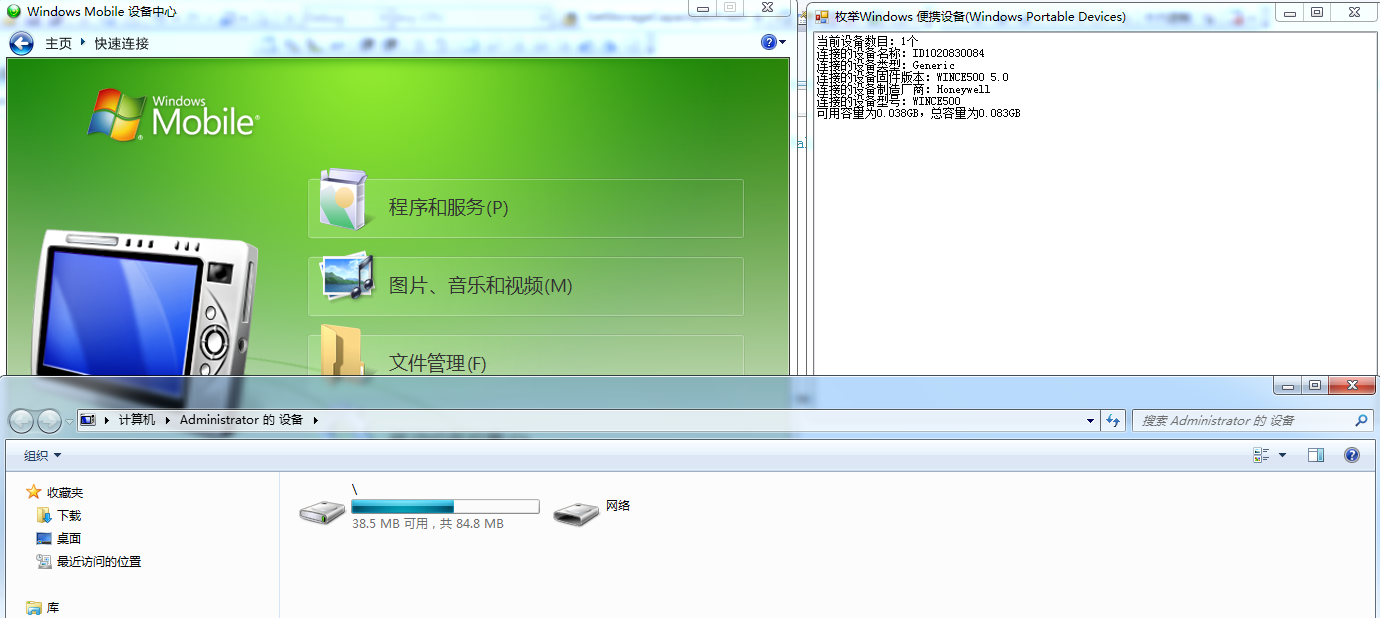
运行截图
一点感想
最近在重构一个PDA程序就是WinCE的。是的老掉牙的设备(系统),工控行业有些地方还在用。早几年前就转了安卓了,这次重构这么个项目其实还是挺用心的。分层开发,用了ORM,还把PDA程序的功能做成了可配置,有时间会另外写文分享。在收集资料的时候发现网上基本上是没有可以使用的源码,现在DIY了一份,送给有缘人吧:
c#使用PortableDeviceApiLib读取便携式设备(WPD:Windows Portable Devices)信息的更多相关文章
- 虚拟机下Linux读取USB设备的问题虚拟机下Linux无法读取USB设备的解决方案
我们在虚拟机中识别USB设备有三种情况导致Linux系统不能读取到USB设备: 1. .当虚拟机的USB服务没有开启的时候 2. 若虚拟机的USB连接的设置选项没有设置好 3. Widows抢先一步, ...
- 读取Android设备的MAC地址
读取Android设备的MAC地址 AndroidUtil.java package com.csdn.android.util; import com.csdn.android.framewor ...
- Windows 10 版本信息
原文 https://technet.microsoft.com/zh-cn/windows/release-info Windows 10 版本信息 Microsoft 已更新其服务模型. 半年频道 ...
- 浅谈.NET(C#)与Windows用户账户信息的获取
原文:浅谈.NET(C#)与Windows用户账户信息的获取 目录 1. 用户账户名称 - 使用Environment类 2. 用户账户信息 - 使用WindowsIdentity和IdentityR ...
- 。 (有些情况下通过 lsof(8) 或 fuser(1) 可以 找到有关使用该设备的进程的有用信息)
umount时目标忙解决办法 标签(空格分隔): ceph ceph运维 osd 在删除osd后umount时,始终无法umonut,可以通过fuser查看设备被哪个进程占用,之后杀死进程,就可以顺利 ...
- USB系列之二:读取USB设备的描述符
在前面的文章中,我们已经给出了USB协议的链接地址,从这篇文章起,我们会涉及到许多USB 1.1的内容,我们的指导思想是先从熟悉USB 1.1协议入手,先使用现成的HCD和USBD,直接面对客户端驱动 ...
- 使用恶意USB设备解锁 Windows & Mac 锁屏状态
NSA专业物理入侵设备——USB Armory,可解锁任意锁屏状态的下的Windows和Mac操作系统,含最新发布的Windows10.及较早的Mac OSX El Capitan / Maveric ...
- 读取注册表获取Windows系统XP/7/8/10类型(使用wcscmp比较wchar[]内容)
很多方案是采用GetVersion.GetVersionEx这两个API来查询操作系统的版本号来判断当前的操作系统是Windows系列中的哪个,在Win10没有出现前,这种方法是行的通的,但是Win1 ...
- 开源的excel读取库libxls在windows下的编译,且支持中文,全网首发
转载请注明出处:http://www.cnblogs.com/superbi/p/5482516.html 到目前为止,网络和官网上并没有关于libxls在windows下支持中文的教程,也没有现成的 ...
随机推荐
- springcloud之服务注册与发现(Eureka)
springcloud服务注册与发现 使用Eureka实现服务治理 作用:实现服务治理(服务注册与发现) 简介: Spring Cloud Eureka是Spring Cloud Netflix项目下 ...
- asp.net C# 实现阿里大鱼和云片网短信接口类
云片网短信通用类 public class YunpianSMS { public YunpianSMS() { } /// <summary> /// 服务器HTTP地址 /// < ...
- 【转】CPU与内存的那些事
下面是网上看到的一些关于内存和CPU方面的一些很不错的文章. 整理如下: 转: CPU的等待有多久? 原文标题:What Your Computer Does While You Wait 原文地址: ...
- python日记
今天学习了Python的一些基本知识,就是简单的输入输出.因为我安装的Python环境是3.6版本的,因此我说的自己体会到的问题都是基于这个版本而得出的问题,说一下今天感觉要注意的要点吧. 1.首先是 ...
- call()与apply() 改变this指向
p.p1 { margin: 0.0px 0.0px 0.0px 0.0px; font: 15.0px Consolas; color: #a5b2b9 } span.Apple-tab-span ...
- 启动关闭zookeeper集群的脚本
启动hadoop Ha集群是,每次都要手动启动每个zk节点,实在是太麻烦了.于是乎自己写了个脚本startAllZK.sh: 需要启动的节点,先在 NODENAME_ARR 数组中配置好,zkServ ...
- python核心编程一书笔记之第一篇
#!/usr/bin/env python# -*- coding:utf-8 -*- #env 是一个命令用来寻找系统中的python解释器.第二条解释使用utf-8编码 在类unix系统中允许py ...
- Asp.net Api中使用OAuth2.0实现“客户端验证”
一.实现继承自OAuthAuthorizationServerProvider的类,实现以"客户端验证"方式传入的相关认证和access_token发放. public class ...
- 在XUnit中用Moq怎样模拟EntityFramework Core下的DbSet
最近在做一个项目的单元测试时,遇到了些问题,解决后,觉得有必要记下来,并分享给需要的人,先简单说一下项目技术框架背景: asp.net core 2.0(for .net core)框架 用Entit ...
- 移动端二三事【三】:transform的注意事项
1.js操作transition时需使用驼峰命名: div.style.WebkitTransform = div.style.transform = "rotate(90deg)" ...