
UNIX文件I/O
第一次用markdown语法写博客,写出来的还比较整齐,感觉博客园对序号的支持不是很好,调了一会才有了比较满意的效果,还有有哪位知道使用markdown如何插入frame?
这边博客主要说了APUE中文件I/O的主要知识点,并且尝试写了一些代码,都列在了博客中。
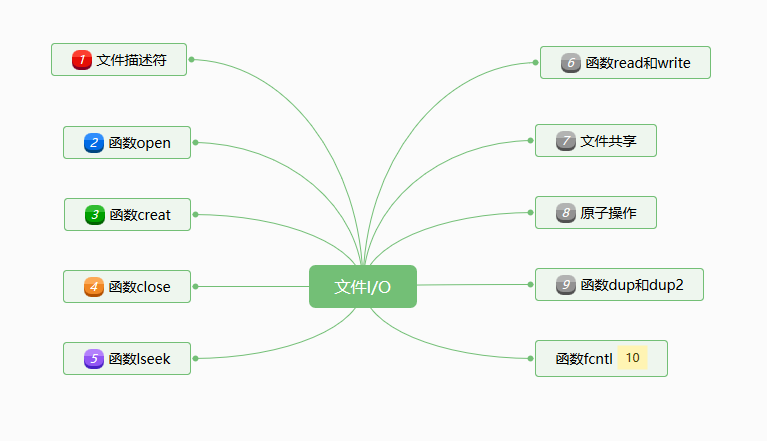
3.1 文件描述符
对于内核而言,所有打开的文件都通过文件描述符引用。文件描述符是一个非负整数。当打开一个现有文件或创建一个新文件时,内核向进程返回一个文件描述符。当读,写一个文件时,使用open或者creat返回的文件描述符标识该文件,并将其作为参数传递给read或者write。
我们把标准输入(0),标准输出(1)和标准错误(2)文件描述符替换为符号常量STDIN_FINENO,STDOUT_FILENO,STDERR_FILENO,系统支持的最大文件描述符数量可以由以下方式获取:
    #include <unistd.h>

    #include <stdio.h>

    #include <sys/resource.h>

    #include <errno.h>

    int main(void)

    {

         /*****************************

         * print file descriptors for

         * standard input

         * standard output

         * standard err

         * ***************************/

         printf("%d\n",STDIN_FILENO);

         printf("%d\n",STDOUT_FILENO);

         printf("%d\n",STDERR_FILENO);

         //printf("%d\n",OPEN_MAX); OPEN_MAX is deprecated

         /*************************************

         * how to get the OPEN_MAX value

         ************************************/

         struct rlimit limit;

         if(getrlimit(RLIMIT_NOFILE,&limit)==-1)

           perror("getrlimit");

         printf("getrlimit=%d\n",(int)limit.rlim_cur);

         return 0;

    }
3.2 open和openat
使用open和openat可以打开或者创建一个文件,下面是使用open和openat的实例:
    #include <fcntl.h>

    #include <stdio.h>

    #define RWRWRW  (S_IRUSR |S_IWUSR|S_IRGRP|S_IWGRP|S_IROTH|S_IWOTH)

    int main(void)

    {

        /*****************************************************************/

        //int open(const char*path,int oflag,.../*mode_t mode*/);

        //int openat(int fd,const char*path,int oflag,.../*mode_t mode*/)

        /****************************************************************/

        /*One of the following five flags must be specified:

        //  O_RDONLY read only

        //  O_WRONLY write only

        //  O_RDWR  read and write

        //   most implementations define O_RDONLY as 0,O_WRONLY as 1,

        //   O_RDWR as 2.

        //  O_EXEC execute-only

        //  O_SEARCH  search-only\

        ****************************************************************/

        /*The following ones are optional:

         *  O_APPEND

         *  O_CLOEXEC

         *  O_CREAT

         *  O_DIRECTORY

         *  O_EXEL

         *  O_NOCTTY

         *  O_NOFOLLOW

         *  O_NONBLOCK

         *  O_SYNC

         *  O_TRUNC

         *  O_TTY_INIT

         *  O_DSYNC

         *  O_RSYNC

         * */

         int fd = openat(0,"/tmp/test.txt",O_WRONLY|O_CREAT,RWRWRW);//0 is ignored if path is absolute path.

         close(fd);

         int dir_fd = open("/tmp",O_RDONLY);

         printf("%d\n",dir_fd);

         fd = openat(dir_fd,"test.txt",O_RDONLY);

         printf("%d\n",fd);

         fd = open("/tmp/test.txt",O_RDWR);

         printf("%d\n",fd);

         int rv = write(fd,"test",4);

         printf("%d\n",rv);

         /*

          *Test if a file exists

          */

         fd = open("/tmp/test.txt",O_CREAT|O_EXCL);

         printf("The file exists,so the open result is %d\n",fd);

    }
fd参数把open和openat区分开,共有三种可能:
- path参数指定的是绝对路径名,在这种情况下,fd参数被忽略,openat就相当于open.
- path参数指定的是相对路径名,fd参数指出了相对路径名在文件系统中的开始地址。fd参数是通过打开相对路径名所在的目录来获取。
- path参数指定了相对路径名,fd参数具有特殊值AT_FDCWD。在这种情况下,路径名在当前工作目录中获取,openat函数在操作上和open函数类似。
3.3 函数creat
#include <stdio.h>

#include <fcntl.h>

#define RWRWRW  (S_IRUSR |S_IWUSR|S_IRGRP|S_IWGRP|S_IROTH|S_IWOTH)

#define RRR  (S_IRUSR| S_IRGRP|S_IROTH)

int main(void)

{

    /********************************************

     * int creat(const char *path,mode_t mode);

     * is equal to

     * open(path,O_WRONLY|OCREAT|O_TRUNC,mode)

     * *****************************************/

    int fd = creat("/tmp/creat.txt",RRR);//-r--r--r-- 1 harlan harlan 0  5月 18 21:49 creat.txt.

    printf("%d\n",fd);

    fd = creat("/tmp/creatRW.txt",RWRWRW);//umask 0002 -rw-rw-r-- 1 harlan harlan 0  5月 18 21:51 creatRW.txt.

    printf("%d\n",fd);

    return 0;

}
3.4 函数close
关闭一个文件是释放该进程加在文件上的所有记录锁。当一个进程终止时,内核自动关闭它所有的打开文件。
3.5 函数lseek
#include <stdio.h>

#include <fcntl.h>

int main(void)

{

    /*

     *off_t lseek(int fd,off_t offset,int whence);

     * */

    int fd = open("/etc/passwd",O_RDONLY);

    int len = lseek(fd,0,SEEK_END);

    printf("The file /etc/passwd 's length is %d\n",len);

    //back to the beginning of the file

    int zero = lseek(fd,0,SEEK_SET);

    printf("The offset of the beginning of the file is %d\n",zero);

    int mid = lseek(fd,len/2,SEEK_CUR);

    printf("Move to the middle of the file %d\n",mid);

}
关于lseek函数中参数offset的解释与参数whence的值有关。
若whence是SEEK_SET,则将该文件的偏移量设置为距文件开始处offset个字节。
若whence是SEEK_CUR,则将该文件的偏移量设置为其当前值加offset,offset可为正或负。
若whence是SEEK_END,则将该文件的偏移量设置为文件长度加offset,offset可正可负。
3.6 函数read和write
如果read成功,则返回读到的字节数。如已达到文件的尾端,则返回0。
#include <unistd.h>

#include <stdio.h>

#include <stdlib.h>

#include <fcntl.h>

#define RRR  (S_IRUSR| S_IRGRP|S_IROTH)

int main(void)

{

    /***************************************************

     * POSIX.1

     * ssize_t read(int fd,void *buf,size_t nbytes)

     * ISO_C

     * int read(int fd,char *buf,unsigned nbytes);

     **************************************************/

    int fd = creat("/tmp/read.txt",RRR);

    int byteNumWrite = write(fd,"abcdefg",7);

    printf("The string \"abcdefg\" is write to read.txt,the real string length wrote to the file is %d\n",

byteNumWrite);//result is 7

    close(fd);

    fd = open("/tmp/read.txt",O_RDONLY);

    char *buf = (char*)malloc(sizeof(char)*8);

    ssize_t byteNumRead = read(fd,buf,8);

    printf("The bytes read from read.txt is %d\n",(int)byteNumRead);//print result is 7

    close(fd);

    return 0;

}
3.7 文件共享
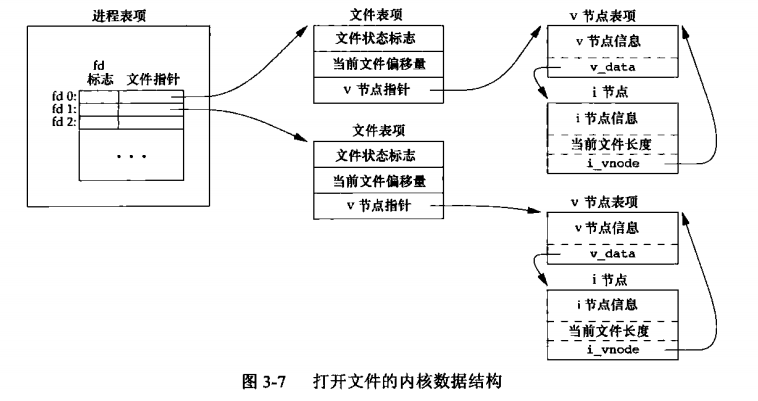
内核使用三种数据结构表示打开文件,它们之间的关系决定了在文件共享方面一个进程对另一个进程可能产生的影响。
- 每个进程在进程表中都有一个记录项,记录项中包含一张打开文件描述符表,可将其视为一个矢量,每个描述符占用一项。于每个文件描述符相关联的是:
- 文件描述符标志(close_on_exec);
- 指向一个文件表项的指针。
- 内核为所有打开文件维持一张文件表。每个文件表项包含:
- 文件状态标志;
- 当前文件偏移量;
- 指向该文件V节点表项的指针。
- 每个打开文件(或设备)都有一个V节点(v-node)结构。
见下图:
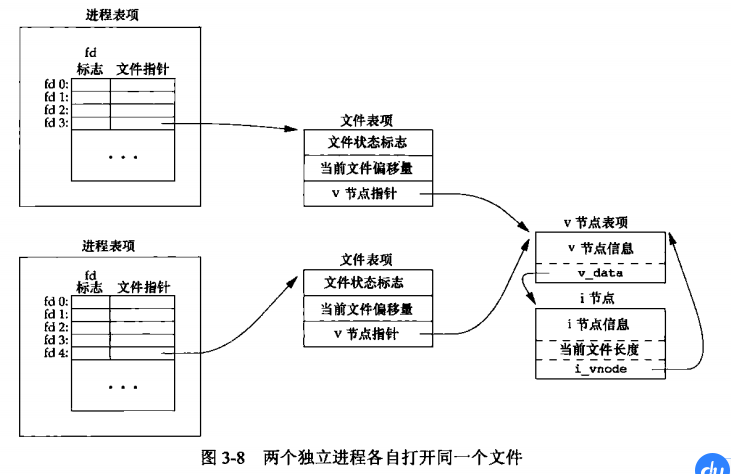
如果两个独立进程各自打开了同一文件,则有下面的关系图:
3.8 原子操作
pread是一个原子操作,它用来执行定位并执行I/O,pread相当于调用lseek后调用read,但pread与这种调用顺序有区别。
- 调用pread时,无法中断其定位和读操作。
- 不更新当前文件偏移量。(见下面的例子)
#include <unistd.h>

#include <fcntl.h>

#include <stdio.h>

#include <stdlib.h>

#define RRR  (S_IRUSR| S_IRGRP|S_IROTH)

off_t getCurOffset(int fd)t

{

    return lseek(fd,0,SEEK_CUR);

}

void printCurOffset(int fd)*

{

    printf("the current file offset is %d\n",(int)getCurOffset(fd));

}

int main(void)

{

    /*****************************************************************

     *ssize_t pread(int fd,void *buf,size_t nbytes,off_t offset);

     *pread will not update the current file offset,see the following examples

     *ssize_t pwrite(int fd,const void * buf,size_t nbytes,off_t offset);

     *******************************************************************/

    int fd = creat("/tmp/pread.txt",RRR);

    int writeBytes = write(fd,"abcdefghij",10);

    close(fd);

    fd = open("/tmp/pread.txt",O_RDONLY);

    printCurOffset(fd);

    char *buf = (char*)malloc(5);

    ssize_t readBytes = pread(fd,buf,4,2);

    buf[4]='\0';

    printf("Read %d bytes:%s\n",(int)readBytes,buf);

    printCurOffset(fd);

    return 0;

}
3.9 函数dup和dup2
dup和dup2都用来复制一个现有的文件描述符。对于dup2,可以自己指定新描述符的值,如果新描述符的值已经打开,则现将其关闭。如果新旧描述符值相等,则直接返回旧描述符值。如果不等,新描述符的FD_CLOEXEC文件描述符标志就会被清除(见下例)。
#include <stdio.h>

int main(int argc,char *argv[])

{

    if(2!=argc)

    {

        printf("The parameter number is not correct!");

    }

    //get the file descriptor

    int fd = atoi(argv[1]);

    char buf[100]={0};

    int NumReadBytes = read(fd,buf,5);

    printf("The number of byte %d: %s\n",NumReadBytes,buf);

}
上面代码命名为read.c,执行下面的命令生成read可执行文件
gcc read.c -o read
#include <fcntl.h>

#include <unistd.h>

#include <sys/stat.h>

#include <stdio.h>

#define RRR  (S_IRUSR| S_IRGRP|S_IROTH)

#define RWRWRW  (S_IRUSR|S_IWUSR| S_IRGRP|S_IWGRP|S_IROTH|S_IWOTH)

void printfdInfo(int fd)

{

    printf("fd num %d\n",fd);

    printf("get FL of /etc/passwd %d\n",fcntl(fd,F_GETFL));

    printf("get FD of /etc/passwd %d\n",fcntl(fd,F_GETFD));

}

void execRead(int fd)

{

    char fdString[4]={0};

    sprintf(fdString,"%d",fd);

    int pid = 0;

    int status = 0;

    if((pid=fork()) != 0)//father process

    {

        //wait for child process finish

        waitpid(pid,&status,0);

    }

    else//child process

    {

        if(execl("read",fdString,NULL)<0)//fd is open in child process

            perror("issue read failed.");

    }

}

void test_FD_CLOEXEC()

{

    //open success

    int fd = open("/etc/passwd",O_RDONLY);

    printfdInfo(fd);//fd is 0

    execRead(fd);//read success

    fcntl(fd,F_SETFD,FD_CLOEXEC);

    printfdInfo(fd);//fd is 1,the fd is closed in child process.

    execRead(fd);//read failed

    close(fd);

}

void test_dup()

{

    int fd = open("/etc/passwd",O_RDONLY);

    int dupfd = dup(fd);

    //FD and FL are all the same.

    printfdInfo(fd);

    printfdInfo(dupfd);

}

void test_dup2()

{

    int fd = open("/etc/passwd",O_RDONLY);

    fcntl(fd,F_SETFD,FD_CLOEXEC);

    int newfd = dup2(fd,13);

    execRead(fd);//read failed,fd is closed.

    execRead(newfd);//the FD_CLOEXEC is cleared.

    close(fd);

    close(newfd);

}

int main(void)

{

    printf("test_FD_CLOEXEC.....................\n");

    test_FD_CLOEXEC();

    printf("test_dup.....................\n");

    test_dup();

    printf("test_dup2.....................\n");

    test_dup2();

    return 0;

}
3.10 函数fcntl
fcntl函数可以改变已经打开文件的属性。fcntl函数有以下5种功能:
- 复制一个已有的文件描述符(cmd=F_DUPFD)
- 获取/设置文件描述符标志(cmd=F_GETFD或者F_SETFD)
- 获取/设置文件状态标志(cmd=F_GETFL或者F_SETFL)
- 获取设置异步i/o所有权(cmd=F_GETOWN或者F_SETOWN)
- 或者/设置记录锁(cmd=F_GETLK,F_SETLK或F_SETLKW)
下面是几个例子:
#include <fcntl.h>

#include <stdio.h>

#include <sys/stat.h>

void printFD(int fd)

{

    printf("The fd num is %d\n",fd);

}

void printFDFlags(int fd,int fdflags)

{

    printf("The file description flags of  %d is %d\n",fd,fdflags);

}

void printFLFlags(int fd,int flflags)

{

    printf("The file status flags of  %d is %d\n",fd,flflags);

}

void F_DUPFD_fcntl()

{

    printf("F_DUPFD_fcntl()..........\n");

    int fd = open("/etc/passwd",O_RDONLY);

    int newfd = fcntl(fd,F_DUPFD,0);//equal to dup(fd)

    printFD(fd);

    printFD(newfd);

    close(fd);

    close(newfd);

}

/*void F_DUPFD_CLOEXEC_fcntl()

{

    int fd = open("/etc/passwd",O_RDONLY);

    int newfd = fcntl(fd,F_DUPFD_CLOEXEC,0);

    int fdI = fcntl(fd,F_GETFD,0);

    printFDI(fd,fdI);

    int newfdI = fcntl(newfd,F_GETFD,0);

    printFDI(newfd,newfdI);

}*/

void F_SET_FD_GET_FD_fcntl()

{

    printf("F_SETFD_GETFD_fcntl()..........\n");

    int fd = open("/etc/passwd",O_RDONLY);

    int fdflag = fcntl(fd,F_GETFD,0);

    printFDFlags(fd,fdflag);

    fcntl(fd,F_SETFD,1);

    fdflag = fcntl(fd,F_GETFD,0);

    printFDFlags(fd,fdflag);

}

/*********************************************************

* note  this command can change only the O_APPEND,

* O_ASYNC, O_DIRECT, O_NOATIME, and O_NONBLOCK flags

*******************************************************/

#define RWRWRW  (S_IRUSR|S_IWUSR| S_IRGRP|S_IWGRP|S_IROTH|S_IWOTH)

void F_SETFL_GETFL_fcntl()

{

    printf("F_SETFL_GETFL_fcntl()..........\n");

    int fd = open("/etc/passwd",O_RDONLY);

    int flflag = fcntl(fd,F_GETFL);

    printFLFlags(fd,flflag);

    fcntl(fd,F_SETFL,O_APPEND);

    flflag = fcntl(fd,F_GETFL);

    printFLFlags(fd,flflag);

}

int main(void)

{

    /**********************************************/

    /* int fcntl(int fd,int cmd,...*//* int arg*///)

    /**********************************************/

    F_DUPFD_fcntl();

    //F_DUPFD_CLOEXEC_fcntl();

    F_SET_FD_GET_FD_fcntl();

    F_SETFL_GETFL_fcntl();

    return 0;

}
UNIX文件I/O的更多相关文章
- Unix文件操作
一.概述 Unix文件操作常用函数包括open.close.creat.lseek.dup.dup2.fcntl等, 其中open.creat. fcntl函数需要包含头文件<fcntl.h&g ...
- UNIX文件的权限之“设置用户ID位”
用stat函数可以获取一个文件的状态信息,原型是这样的: int stat(const char *path, struct stat *buf); 其中结构体stat的结构: struct stat ...
- unix文件操作函数
1. fopen函数 #include <stdio.h> FILE *fopen(const char *path, const char *mode) 返回:文件顺利打开后,指向该流的 ...
- unix文件权限
一.UNIX下关于文件权限的表示方法和解析 SUID 是 Set User ID, SGID 是 Set Group ID的意思. UNIX下可以用ls -l 命令来看到文件的权限.用ls命令所得到的 ...
- Unix文件 I/O(不带缓冲区的)上
简介 Unix系统大多数文件i/o只需要:open.read.write.lseek.close这几个函数.但是某些时候我们也需要fcntl.ioctl.sync等函数配合使用.这些函数都是不带缓冲区 ...
- 使用UltraEdit实现从DOS文件到UNIX文件的批量转换
最近把公司从SVN切到GIT下,因为大多同事在Windows下开发,又碰到换行符问题,找到一个批量转换方法 打开UE->在文件中替换,把^p替换成^n,然后设置好要替换的文件和路径,就开始替换吧 ...
- dos文件批量转换成unix文件
对于经常在windows环境下和linux环境同时使用的文件(如在windows系统下编写,在linux环境下编译的文件), 常常存在这样的问题:由于两种系统的格式文件格式不同,导致程序出现不期望的问 ...
- Unix - 文件中构成一个空洞的分析
lseek函数显示地为一个打开文件设置偏移量,文件偏移量可以大于文件的当前长度,在这种情况下,对该文件的下一次写将加长该文件,并在文件中构成一个空洞,这一点是允许的.位于文件中但没有写过的字节都被读为 ...
- UNIX文件mode_t详解 ... S_IRUSR
打开文件.新建文件和关闭文件操作 打开文件操作使用系统调用函数open(),该函数的作用是建立一个文件描述符,其他的函数可以通过文件描述符对指定文件进行读取与写入的操作.打开文件的一般形式是: ope ...
随机推荐
- (iOS)sqlcipher和FMDB的使用总结(原创)
写这篇文章的原因是之前接触到了关于sqlite数据库加密的问题,一般数据库加密,无非是数据加密和数据库文件加密,当然数据库文件加密对手机效率可能更高一些. 下面就讲一下,自己对sqlcipher和fm ...
- [编织消息框架][JAVA核心技术]动态代理应用8-IRpcReceive实现
private static Map<Short, Map<Byte, Method>> RECEIVE_METHOD_INFO = new HashMap<>() ...
- 【Azure】Azure技能树
- xshell配色Solarized Dark
转自:xshell配色Solarized Dark [Solarized_Dark] text(bold)= magenta(bold)=6c71c4 text= white(bold)=fdf6e3 ...
- 解决Tomcat: Can't load IA 32-bit .dll on a AMD 64-bit platform 问题
错误如下: java.lang.UnsatisfiedLinkError: E:\Program Files\MyEclipse 10\apache-tomcat-7.0.23\bin\tcnativ ...
- 前端随手优化不完全篇-SEO篇
一代码优化概述 关于代码优化的知识是纯理论的知识,学习的很枯燥.在学到CSS时,不免遇到CSS+div进行代码优化的知 识,因此在网上看了一些关于这方面的知识,简单的整合一下,梳理自己所了解的代码优化 ...
- JAVA Struts2 搭建
java struts 2搭建 1.web工程 2.将struts2 用到的jar包,拷贝到webcontent/webinf/lib文件夹.下 3.webcontent 下的web.xml 下 ...
- java类集框架(ArrayList,LinkedList,Vector区别)
主要分两个接口:collection和Map 主要分三类:集合(set).列表(List).映射(Map)1.集合:没有重复对象,没有特定排序方式2.列表:对象按索引位置排序,可以有重复对象3.映射: ...
- Linux基础网络搭建实验
一.实验目标 利用3台虚拟机,搭建vmnet2和vmnet3两个host-only网络,实现两个网络的互联 二.实验环境 内网 外网 网关 IP 192.168.0.10/24 202.3.4.1 ...
- 闭包(匿名函数) php
php中的闭包,之前不理解.以前项目中虽然有用到,也是别人怎么用,自己也跟着怎么用,也没具体去看一下,时间长了就忘了,也不知道闭包是怎么回事.今天网上搜集了关于php闭包相关的文章,看了7,8篇,干货 ...