
Authentication in asp.net
https://docs.microsoft.com/en-us/iis/configuration/system.webserver/security/authentication/
authentication Element (ASP.NET Settings Schema)
Configures an ASP.NET application for custom forms–based authentication.
<authentication mode="Windows">

   <forms

      name=".ASPXAUTH"

      loginUrl="login.aspx"

      defaultUrl="default.aspx"

      protection="All"

      timeout=""

      path="/"

      requireSSL="false"

      slidingExpiration="true"

      cookieless="UseDeviceProfile" domain=""

      enableCrossAppRedirects="false">

      <credentials passwordFormat="SHA1" />

   </forms>

   <passport redirectUrl="internal" />

</authentication>
<forms> Element
loginUrl Specifies the URL to which the request is redirected for logon if no valid authentication cookie is found. The default value is default.aspx.
name Specifies the HTTP cookie to use for authentication. By default, the value of name is .ASPXAUTH. If multiple applications are running on a single server and each application requires a unique cookie, you must configure the cookie name in each application's Web.config file.
timeout Specifies the amount of time, in integer minutes, after which the cookie expires. The default value is 30. If the SlidingExpiration attribute is true, the timeout attribute is a sliding value, expiring at the specified number of minutes after the time the last request was received. To prevent compromised performance, and to avoid multiple browser warnings for users that have cookie warnings turned on, the cookie is updated when more than half the specified time has elapsed. This might result in a loss of precision. Persistent cookies do not time out.
slidingExpiration Specifies whether sliding expiration is enabled. Sliding expiration resets an active authentication cookie's time to expiration upon each request during a single session.
true Specifies that sliding expiration is enabled. The authentication cookie is refreshed and the time to expiration is reset on subsequent requests during a single session. The default for version 1.0 of ASP.NET was true.
false Specifies that sliding expiration is not enabled and the cookie expires at a set interval from the time it was originally issued. The default is false.
Optional attribute.
Defines the default URL that is used for redirection after authentication.
This attribute is new in the .NET Framework version 2.0.
The default is "default.aspx".
Optional attribute.
Specifies the path for cookies that are issued by the application.
The default is a slash (/), because most browsers are case-sensitive and will not send cookies back, if there is a path case mismatch.
上面的部分属性可以在IIS中进行配置


<authentication mode="Forms">

  <forms loginUrl="member_login.aspx"

    cookieless="UseCookies"

    path="/MyApplication" />

</authentication>

FormsAuthentication类中的静态字段
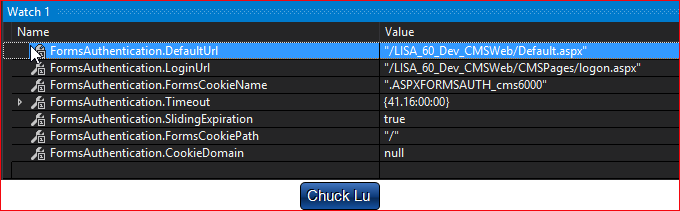
https://stackoverflow.com/questions/879321/formsauthentication-formscookiepath
https://www.quirksmode.org/js/cookies.html
Domain and path
Each cookie also has a domain and a path. The domain tells the browser to which domain the cookie should be sent. If you don't specify it, it becomes the domain of the page that sets the cookie, in the case of this page www.quirksmode.org.
Please note that the purpose of the domain is to allow cookies to cross sub-domains. My cookie
will not be read by search.quirksmode.org because its domain is www.quirksmode.org . When I set the
domain to quirksmode.org, the search sub-domain may also read the cookie.
I cannot set the cookie domain to a domain I'm not in, I cannot make the domain www.microsoft.com .
Only quirksmode.org is allowed, in this case.
The path gives you the chance to specify a directory where the cookie is active.
So if you want the cookie to be only sent to pages in the directory cgi-bin, set the
path to /cgi-bin. Usually the path is set to /, which means the cookie is
valid throughout the entire domain.
This script does so, so the cookies you can set on this page will be sent to any page in the
www.quirksmode.org domain (though only this page has a script that searches for the
cookies and does something with them).
https://en.wikipedia.org/wiki/HTTP_cookie#Domain_and_path
HttpCookie
Provides a type-safe way to create and manipulate individual HTTP cookies.
The HttpCookie class gets and sets properties of individual cookies. The HttpCookieCollection class provides methods to store, retrieve, and manage multiple cookies.
ASP.NET includes two intrinsic cookie collections. The collection accessed through the Cookies collection of the HttpRequest object contains cookies transmitted by the client to the server in the Cookie header. The collection accessed through the Cookies collection of the HttpResponse object contains new cookies created on the server and transmitted to the client in the Set-Cookie HTTP response header.
Gets or sets the virtual path to transmit with the current cookie.
The virtual path to transmit with the cookie. The default is /, which is the server root.
The Path property extends the Domain property to completely describe the specific URL to which the cookie applies.
For example, in the URL http:/www.microsoft.com/asp, the domain is www.microsoft.com and the path is /asp.
Gets or sets the domain to associate the cookie with.
The name of the domain to associate the cookie with. The default value is the current domain.
Setting the Domain attribute limits transmission of the cookie to clients requesting a resource from that domain.
启用windows 授权的话,需要在IIS中打开,参考https://docs.kentico.com/k10/managing-users/user-registration-and-authentication/configuring-windows-ad-authentication
sessionState Element (ASP.NET Settings Schema)
https://msdn.microsoft.com/en-us/library/h6bb9cz9(v=vs.100).aspx
timeout
Optional TimeSpan attribute.
Specifies the number of minutes a session can be idle before it is abandoned. The timeout attribute cannot be set to a value that is greater than 525,600 minutes (1 year) for the in-process and state-server modes.
The session timeout configuration setting applies only to ASP.NET pages. Changing the session timeout value does not affect the session time-out for ASP pages. Similarly, changing the session time-out for ASP pages does not affect the session time-out for ASP.NET pages.
The default is 20 minutes.
https://msdn.microsoft.com/en-us/library/ms178581.aspx
Authentication in asp.net的更多相关文章
- Forms Authentication in ASP.NET MVC 4
原文:Forms Authentication in ASP.NET MVC 4 Contents: Introduction Implement a custom membership provid ...
- Cookies, Claims and Authentication in ASP.NET Core(转载)
Most of the literature concerning the theme of authentication in ASP.NET Core focuses on the use of ...
- Implement JSON Web Tokens Authentication in ASP.NET Web API and Identity 2.1 Part 3 (by TAISEER)
http://bitoftech.net/2015/02/16/implement-oauth-json-web-tokens-authentication-in-asp-net-web-api-an ...
- [转]Implementing User Authentication in ASP.NET MVC 6
本文转自:http://www.dotnetcurry.com/aspnet-mvc/1229/user-authentication-aspnet-mvc-6-identity In this ar ...
- Active Directory Authentication in ASP.NET MVC 5 with Forms Authentication and Group-Based Authorization
I know that blog post title is sure a mouth-full, but it describes the whole problem I was trying to ...
- Basic Authentication in ASP.NET Web API
Basic authentication is defined in RFC 2617, HTTP Authentication: Basic and Digest Access Authentica ...
- ASP.NET MVC:Form Authentication 相关的学习资源
看完此图就懂了 看完下面文章必须精通 Form authentication and authorization in ASP.NET Explained: Forms Authentication ...
- ASP.NET Core Authentication系列(一)理解Claim, ClaimsIdentity, ClaimsPrincipal
前言 首先我们来看一下在ASP.NET时代,Authentication是如何使用的.下面介绍的是System.Web.Security.FormsAuthentication: // 登录 Syst ...
- ASP.NET Core Authentication系列(二)实现认证、登录和注销
前言 在上一篇文章介绍ASP.NET Core Authentication的三个重要概念,分别是Claim, ClaimsIdentity, ClaimsPrincipal,以及claims-bas ...
随机推荐
- 【POJ 1082】 Calendar Game
[题目链接] http://poj.org/problem?id=1082 [算法] 对于每种状态,要么必胜,要么必败 记忆化搜索即可 [代码] #include <algorithm> ...
- input file上传文件
如何使用input[type='file']来上传文件呢? html: //angular<input type="file" (change)="fileChan ...
- 观光奶牛Sightseeing Cows (二分+spfa(dfs))
观光奶牛 农夫约翰已决定通过带他们参观大城市来奖励他们的辛苦工作!奶牛必须决定如何最好地度过他们的空闲时间. 幸运的是,他们有一个详细的城市地图,显示L(2≤L≤1000)主要地标(方便编号为1 .. ...
- QT-项目文件说明
前言:如题. 一.项目文件概述 文件 功能 helloworld.pro 包含了项目信息 helloworld.pro.user 用户信息 hellodialog.h 自定义类hellodialog的 ...
- 转:Eclipse上安装GIT插件EGit及使用
一.Eclipse上安装GIT插件EGit Eclipse的版本eclipse-java-helios-SR2-win32.zip(在Eclipse3.3版本找不到对应的 EGit插件,无法安装) E ...
- 格式化日期字符串 FormatSettings使用
如果 你想要得到 YYYY-MM/DD 这样的字符串 你肯定说这太简单了 直接 ShowMessage(FormatDateTime('YYYY-MM/DD',now)); 运行结果 YYYY-MM ...
- 限制input 内部字数
当输入字数多于限定值后,输入框显示不出来多出的字符 对于input来说,innerHTML 不能查询和更改,只能用value 来 size 属性规定输入字段的宽度 size 属性定义的是可见的字符数 ...
- P1726 上白泽慧音(0分)
题目描述 在幻想乡,上白泽慧音是以知识渊博闻名的老师.春雪异变导致人间之里的很多道路都被大雪堵塞,使有的学生不能顺利地到达慧音所在的村庄.因此慧音决定换一个能够聚集最多人数的村庄作为新的教学地点.人间 ...
- SQL 学习——简序以及学习路线
1.最近发现自己除去简单的SQL语句好像其他的并不怎么懂哎,虽然暂时是android用不到太复杂点的语句,想来总不能一直这样把, 顺带还是看看Sql. 2.画个图规划下自己的学习路线
- Ubuntu 16.04安装Caffe的记录及FCN官方代码的配置
相关内容搜集自官方文档与网络,既无创新性,也不求甚解,我也不了解Caffe,仅仅搭上之后做个记录,方便以后重装 安装依赖项sudo apt-get install libprotobuf-dev li ...