
Android手机间使用socket进行文件互传实例
这是一个Android手机间文件传输的例子,两个手机同时装上此app,然后输入接收端的ip,选择文件,可以多选,点确定,就发送到另一个手机,一个简单快捷文件快传实例。可以直接运用到项目中。
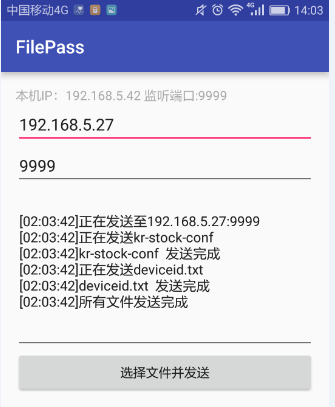
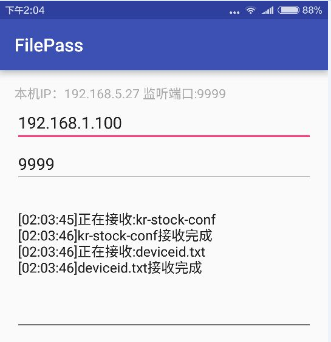
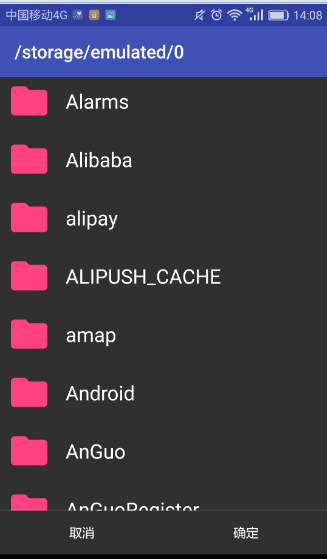
下面是文件选择器:
代码
首先加入文件选择库
compile 'com.nononsenseapps:filepicker:2.5.2'
这个库的地址和用法在:https://github.com/spacecowboy/NoNonsense-FilePicker
activity_main.xml
<RelativeLayout xmlns:android="http://schemas.android.com/apk/res/android"

    xmlns:tools="http://schemas.android.com/tools"

    android:layout_width="match_parent"

    android:layout_height="match_parent"

    android:paddingBottom="@dimen/activity_vertical_margin"

    android:paddingLeft="@dimen/activity_horizontal_margin"

    android:paddingRight="@dimen/activity_horizontal_margin"

    android:paddingTop="@dimen/activity_vertical_margin"

    tools:context=".MainActivity" >

    <TextView

        android:id="@+id/tvMsg"

        android:layout_width="match_parent"

        android:layout_height="wrap_content"

        android:layout_alignParentTop="true"

        android:focusable="false"

        android:focusableInTouchMode="false"

        android:text="TextView"

        android:textColor="#AAA" />

    <EditText

        android:id="@+id/txtIP"

        android:layout_width="match_parent"

        android:layout_height="wrap_content"

        android:layout_below="@+id/tvMsg"

        android:layout_centerVertical="true"

        android:contentDescription="目标IP地址"

        android:ems=""

        android:text="192.168.1.100" />

    <EditText

        android:id="@+id/txtPort"

        android:layout_width="match_parent"

        android:layout_height="wrap_content"

        android:layout_alignLeft="@+id/txtIP"

        android:layout_below="@+id/txtIP"

        android:ems=""

        android:text="" />

    <EditText

        android:id="@+id/et"

        android:layout_width="match_parent"

        android:layout_height="180dp"

        android:layout_alignLeft="@+id/txtIP"

        android:layout_below="@+id/txtPort"

        android:clickable="false"

        android:editable="false"

        android:ems=""

        android:focusable="false"

        android:focusableInTouchMode="false"

        android:gravity="center_vertical|left|top"

        android:inputType="textMultiLine"

        android:longClickable="false"

        android:scrollbarAlwaysDrawVerticalTrack="true"

        android:scrollbarStyle="insideInset"

        android:scrollbars="vertical"

        android:textSize="15dp" >

        <requestFocus />

    </EditText>

    <Button

        android:id="@+id/btnSend"

        android:layout_width="match_parent"

        android:layout_height="wrap_content"

        android:layout_alignLeft="@+id/txtPort"

        android:layout_below="@+id/et"

        android:text="选择文件并发送" />

</RelativeLayout>
MainActivity.class
public class MainActivity extends AppCompatActivity {

    private static final int FILE_CODE = ;

    private TextView tvMsg;

    private EditText txtIP, txtPort, txtEt;

    private Button btnSend;

    private Handler handler;

    private SocketManager socketManager;

    @Override

    protected void onCreate(Bundle savedInstanceState) {

        super.onCreate(savedInstanceState);

        setContentView(R.layout.activity_main);

        tvMsg = (TextView)findViewById(R.id.tvMsg);

        txtIP = (EditText)findViewById(R.id.txtIP);

        txtPort = (EditText)findViewById(R.id.txtPort);

        txtEt = (EditText)findViewById(R.id.et);

        btnSend = (Button)findViewById(R.id.btnSend);

        btnSend.setOnClickListener(new View.OnClickListener(){

            @Override

            public void onClick(View v) {

                Intent i = new Intent(MainActivity.this, FilePickerActivity.class);

                i.putExtra(FilePickerActivity.EXTRA_ALLOW_MULTIPLE, true);

                i.putExtra(FilePickerActivity.EXTRA_ALLOW_CREATE_DIR, false);

                i.putExtra(FilePickerActivity.EXTRA_MODE, FilePickerActivity.MODE_FILE);

                i.putExtra(FilePickerActivity.EXTRA_START_PATH, Environment.getExternalStorageDirectory().getPath());

                startActivityForResult(i, FILE_CODE);

            }

        });

        handler = new Handler(){

            @Override

            public void handleMessage(Message msg) {

                switch(msg.what){

                    case :

                        SimpleDateFormat format = new SimpleDateFormat("hh:mm:ss");

                        txtEt.append("\n[" + format.format(new Date()) + "]" + msg.obj.toString());

                        break;

                    case :

                        tvMsg.setText("本机IP:" + GetIpAddress() + " 监听端口:" + msg.obj.toString());

                        break;

                    case :

                        Toast.makeText(getApplicationContext(), msg.obj.toString(), Toast.LENGTH_SHORT).show();

                        break;

                }

            }

        };

        socketManager = new SocketManager(handler);

    }

    @TargetApi(Build.VERSION_CODES.JELLY_BEAN)

    @Override

    protected void onActivityResult(int requestCode, int resultCode, Intent data) {

        if (requestCode == FILE_CODE && resultCode == Activity.RESULT_OK) {

            final String ipAddress = txtIP.getText().toString();

            final int port = Integer.parseInt(txtPort.getText().toString());

            if (data.getBooleanExtra(FilePickerActivity.EXTRA_ALLOW_MULTIPLE, true)) {

                // For JellyBean and above

                if (Build.VERSION.SDK_INT >= Build.VERSION_CODES.JELLY_BEAN) {

                    ClipData clip = data.getClipData();

                    final ArrayList<String> fileNames = new ArrayList<>();

                    final ArrayList<String> paths = new ArrayList<>();

                    if (clip != null) {

                        for (int i = ; i < clip.getItemCount(); i++) {

                            Uri uri = clip.getItemAt(i).getUri();

                            paths.add(uri.getPath());

                            fileNames.add(uri.getLastPathSegment());

                        }

                        Message.obtain(handler, , "正在发送至" + ipAddress + ":" +  port).sendToTarget();

                        Thread sendThread = new Thread(new Runnable(){

                            @Override

                            public void run() {

                                socketManager.SendFile(fileNames, paths, ipAddress, port);

                            }

                        });

                        sendThread.start();

                    }

                } else {

                    final ArrayList<String> paths = data.getStringArrayListExtra

                            (FilePickerActivity.EXTRA_PATHS);

                    final ArrayList<String> fileNames = new ArrayList<>();

                    if (paths != null) {

                        for (String path: paths) {

                            Uri uri = Uri.parse(path);

                            paths.add(uri.getPath());

                            fileNames.add(uri.getLastPathSegment());

                            socketManager.SendFile(fileNames, paths, ipAddress, port);

                        }

                        Message.obtain(handler, , "正在发送至" + ipAddress + ":" +  port).sendToTarget();

                        Thread sendThread = new Thread(new Runnable(){

                            @Override

                            public void run() {

                                socketManager.SendFile(fileNames, paths, ipAddress, port);

                            }

                        });

                        sendThread.start();

                    }

                }

            }

        }

    }

    @Override

    protected void onDestroy() {

        super.onDestroy();

        System.exit();

    }

    public String GetIpAddress() {

        WifiManager wifiManager = (WifiManager) getSystemService(WIFI_SERVICE);

        WifiInfo wifiInfo = wifiManager.getConnectionInfo();

        int i = wifiInfo.getIpAddress();

        return (i & 0xFF) + "." +

                ((i >>  ) & 0xFF) + "." +

                ((i >>  ) & 0xFF)+ "." +

                ((i >>  ) & 0xFF );

    }

}
SocketManager.class
public class SocketManager {

    private ServerSocket server;

    private Handler handler = null;

    public SocketManager(Handler handler){

        this.handler = handler;

        int port = ;

        while(port > ){

            try {

                server = new ServerSocket(port);

                break;

            } catch (Exception e) {

                port--;

            }

        }

        SendMessage(, port);

        Thread receiveFileThread = new Thread(new Runnable(){

            @Override

            public void run() {

                while(true){

                    ReceiveFile();

                }

            }

        });

        receiveFileThread.start();

    }

    void SendMessage(int what, Object obj){

        if (handler != null){

            Message.obtain(handler, what, obj).sendToTarget();

        }

    }

    void ReceiveFile(){

        try{

            Socket name = server.accept();

            InputStream nameStream = name.getInputStream();

            InputStreamReader streamReader = new InputStreamReader(nameStream);

            BufferedReader br = new BufferedReader(streamReader);

            String fileName = br.readLine();

            br.close();

            streamReader.close();

            nameStream.close();

            name.close();

            SendMessage(, "正在接收:" + fileName);

            Socket data = server.accept();

            InputStream dataStream = data.getInputStream();

            String savePath = Environment.getExternalStorageDirectory().getPath() + "/" + fileName;

            FileOutputStream file = new FileOutputStream(savePath, false);

            byte[] buffer = new byte[];

            int size = -;

            while ((size = dataStream.read(buffer)) != -){

                file.write(buffer,  ,size);

            }

            file.close();

            dataStream.close();

            data.close();

            SendMessage(, fileName + "接收完成");

        }catch(Exception e){

            SendMessage(, "接收错误:\n" + e.getMessage());

        }

    }

    public void SendFile(ArrayList<String> fileName, ArrayList<String> path, String ipAddress, int port){

        try {

            for (int i = ; i < fileName.size(); i++){

                Socket name = new Socket(ipAddress, port);

                OutputStream outputName = name.getOutputStream();

                OutputStreamWriter outputWriter = new OutputStreamWriter(outputName);

                BufferedWriter bwName = new BufferedWriter(outputWriter);

                bwName.write(fileName.get(i));

                bwName.close();

                outputWriter.close();

                outputName.close();

                name.close();

                SendMessage(, "正在发送" + fileName.get(i));

                Socket data = new Socket(ipAddress, port);

                OutputStream outputData = data.getOutputStream();

                FileInputStream fileInput = new FileInputStream(path.get(i));

                int size = -;

                byte[] buffer = new byte[];

                while((size = fileInput.read(buffer, , )) != -){

                    outputData.write(buffer, , size);

                }

                outputData.close();

                fileInput.close();

                data.close();

                SendMessage(, fileName.get(i) + "  发送完成");

            }

            SendMessage(, "所有文件发送完成");

        } catch (Exception e) {

            SendMessage(, "发送错误:\n" + e.getMessage());

        }

    }

}
以上就是全部代码。
下载地址:点这里。
Android手机间使用socket进行文件互传实例的更多相关文章
- find 以及linux 和windows 文件互传
1. find 命令 查找文件或目录 同时也会用到的有 which whereis locate 经常也会遇到一些快捷键 ctrl + l e a w u k ...
- pscp使用详解 Windows与Linux文件互传工具
pscp使用详解 Windows与Linux文件互传工具 pscp使用方法详解:pscp是putty安装包所带的远程文件传输工具,是一款十分常见windows与linux系统之间文件互传的工具,使用方 ...
- 【Linux】windows-linux、linux-linux文件互传
一.Linux下文件互传,scp命令实例 1.Linux下目录复制:本机->远程服务器 scp -r /home/abc/test1(本机目录路径) root@192.168.0.1:/hom ...
- Linux_window与linux之间文件互传,上传下载
window与linux之间文件互传 运行环境:Centos os7 + win8.1 +putty putty:是一个Telnet,ssh,rlogin,纯tcp以及串行接口连接软件,由于linux ...
- linux学习(十)find命令、Linux文件后缀名、Linux和windows文件互传
一.和find相关的几个搜索命令,了解即可. 1.1 which [root@iZ25lzba47vZ ~]# which ls alias ls='ls --color=auto' /usr/bin ...
- 虚拟机VMWare安装苹果系统MacOS详细教程(联网设置,全屏插件、文件互传)
运行环境: VMware® Workstation 12 Pro(自行安装,或者用这个) 推荐(下面以10.11.6版本做的教程,但是安装时推荐使用此版本安装然后升级到10.11.6):MacOS X ...
- Ubuntu 和 Windows 之间进行远程访问和文件互传
1. 利用 Ubuntu 自带软件 Remmina 对另一台 Ubuntu 电脑进行远程访问(同一局域网下) 假设要用 A 电脑来控制 B 电脑,首先需要在 B 电脑上进行桌面共享设置 . 然后打 ...
- Linux 与 Windows 文件互传(VMWare)
虚拟机无桌面的Linux 与 物理机Windows 文件互传有很多种方法,现在先说一种通过共享文件夹的形式,其他方法后续再补充 1. 背景 1) 虚拟机系统:VMWare无桌面的 ...
- lrzsz——一款好用的文件互传工具
日常开发中,经常需要在linux服务器和本地计算机(Windows或者Mac)两者之间传输文件,这时候就需要用到文件传输工具了. 最近偶然发现一款很好用的文件互传工具: lrzsz .墙裂推荐,好用指 ...
随机推荐
- [Python] Slice the data with pandas
For example we have dataframe like this: SPY AAPL IBM GOOG GLD 2017-01-03 222.073914 114.311760 160. ...
- 小贝_php+redis类型组合使用
php_redis类型组合使用 一.类型组合说明 经过前面的文章介绍.已经知道redis有字符串.集合.列表.hash等内置数据类型. 这里以,无序集合为例,进行说明. 集合 set1的简图 1.从简 ...
- 18.angularJS服务
转自:https://www.cnblogs.com/best/tag/Angular/ 服务 AngularJS功能最基本的组件之一是服务(Service).服务为你的应用提供基于任务的功能.服务可 ...
- 21. 【intellij idea】Project Structure 讲解
转自:.https://www.cnblogs.com/zadomn0920/p/6196962.html 项目的左侧面板 项目设置->Project Project Settings -> ...
- POJ 1191 记忆化搜索
(我是不会告诉你我是抄的http://www.cnblogs.com/scau20110726/archive/2013/02/27/2936050.html这个人的) 一开始没有想到要化一下方差的式 ...
- 基于.NET平台常用的框架技术整理
个人整理 部分收藏于:http://www.cnblogs.com/hgmyz/p/5313983.html 自从学习.NET以来,优雅的编程风格,极度简单的可扩展性,足够强大开发工具,极小的学习曲线 ...
- 开源系统源码分析(filter.class.php)
<?php class baseValidater { //最大参数个数 const MAX_ARGS=3; public static function checkBool($var) { r ...
- java.sql.SQLException:错误 The server time zone value 'Öйú±ê׼ʱ¼ä' is unrecognized or represents more than one time zone.
错误 方法 添加后面的内容即可
- i2c tools 使用
1.查询罗列出I2C的控制器总线数目 # i2cdetect -l i2c-0 i2c OMAP I2C adapter I2C adapter i2c-1 i2c OMAP I2C adapter ...
- 关于结构体内存对齐方式的总结(#pragma pack()和alignas())
最近闲来无事,翻阅msdn,在预编译指令中,翻阅到#pragma pack这个预处理指令,这个预处理指令为结构体内存对齐指令,偶然发现还有另外的内存对齐指令aligns(C++11),__declsp ...