
Springmvc中ajax与jason应用
Springmvc中ajax与jason应用
相关依赖包
json数据转换的jar包
jackson-annotations-2.5.4
jackson-core-2.5.4
jackson-databind-2.5.4
spring以及spring的依赖包
bean context aop context core web webmvc expression
未涉及json的ajax请求
简单的表单验证
Controller层java代码
@Controller

public class AjaxCtrl {

	@RequestMapping("/toAjax.do")

	public String toAjax() {

		return "ajax";

	}

	@RequestMapping("/ajax.do")

	@ResponseBody

	public void ajaxJson(@RequestParam("name")String name,HttpServletResponse resp) throws IOException {

		PrintWriter out = resp.getWriter();

		if(name.equals("hm"))

			out.print("该用户已注册");

		else

			out.print("该用户可使用");

	}
注意点:
- 在手动调用getWriter()方法时不可以再添加返回值,否则tomcat会报错(getWriter()方法已存在)。因为在返回值处容器会自动调用getWriter()方法来输出内容,而检测到前面getWriter()已经被调用过,产生冲突。
- 解决:1. 像上面的代码不给出返回值;2. resp.reset(); resp.setContentType("text/html; charset=utf-8"); out.flush; out.close();
- @ResponseBody会将返回的数据自动转换为json格式的数据
相关jsp代码:ajax.jsp
<script src="${pageContext.request.contextPath }/js/jquery-2.1.0.min.js" type="text/javascript"></script>

</head>

<body>

	姓名:<input type="text" id="field" name="name" /><span id="txt"></span>

	<script type="text/javascript">

		$("#field").blur(function(){

			$.post("ajax.do",{'name':$('#field').val()},function(result){

				$("#txt").html(result);

			});

		});

	</script>

</body>
web.xml
<?xml version="1.0" encoding="UTF-8"?>

<web-app xmlns:xsi="http://www.w3.org/2001/XMLSchema-instance"

	xmlns="http://xmlns.jcp.org/xml/ns/javaee"

	xsi:schemaLocation="http://xmlns.jcp.org/xml/ns/javaee http://xmlns.jcp.org/xml/ns/javaee/web-app_3_1.xsd"

	id="WebApp_ID" version="3.1">

	<display-name>springmvc_ajax</display-name>

	<filter>

		<filter-name>characterencoding</filter-name>

		<filter-class>org.springframework.web.filter.CharacterEncodingFilter</filter-class>

		<init-param>

			<param-name>encoding</param-name>

			<param-value>UTF-8</param-value>

		</init-param>

		<init-param>

			<param-name>forceEncoding</param-name>

			<param-value>true</param-value>

		</init-param>

	</filter>

	<filter-mapping>

		<filter-name>characterencoding</filter-name>

		<url-pattern>*.do</url-pattern>

	</filter-mapping>

	<servlet>

		<servlet-name>ajax</servlet-name>

		<servlet-class>org.springframework.web.servlet.DispatcherServlet</servlet-class>

		<init-param>

			<param-name>contextConfigLocation</param-name>

			<param-value>classpath:mvc.xml</param-value>

		</init-param>

		<load-on-startup>1</load-on-startup>

	</servlet>

	<servlet-mapping>

		<servlet-name>ajax</servlet-name>

		<url-pattern>*.do</url-pattern>

	</servlet-mapping>

</web-app>
涉及json格式数据的ajax请求
Controller层java代码
@RequestMapping("/toAjaxJson.do")

	public String toAjaxJson() {

		return "ajaxJson";

	}

	@RequestMapping("/ajaxJson.do")

	@ResponseBody

	public List<User> ajaxJson() {

		List<User> list = new ArrayList<User>();

		list.add(new User(1, "xb", "123"));

		list.add(new User(2, "xc", "234"));

		list.add(new User(3, "xd", "345"));

		list.add(new User(4, "xa", "456"));

		return list;

	}
相关jsp代码:ajaxJson.jsp
<input type="button" id="btn" value="获取json数据">

	<table  width="80%" align="center">

		<tr>

			<th>编号</th>

			<th>姓名</th>

			<th>密码</th>

		</tr>

		<tbody id="content"></tbody>

	</table>

	<script type="text/javascript">

	$(function(){

		$("#btn").click(function(){

			$.get("ajaxJson.do",function(list){

				var field = "";

				for (var i = 0; i < list.length; i++) {

					field +="<tr><td>"+list[i].id+"</td>"+"<td>"+list[i].name+"</td>"+"<td>"+list[i].passwd+"</td></tr>";

				}

				$("#content").html(field);

			});

		});

	});

	</script>
springmvc的核心配置文件:mvc.xml
<?xml version="1.0" encoding="UTF-8"?>

<beans xmlns="http://www.springframework.org/schema/beans"

	xmlns:xsi="http://www.w3.org/2001/XMLSchema-instance"

	xmlns:context="http://www.springframework.org/schema/context"

	xmlns:mvc="http://www.springframework.org/schema/mvc"

	xsi:schemaLocation="http://www.springframework.org/schema/beans http://www.springframework.org/schema/beans/spring-beans.xsd

		http://www.springframework.org/schema/context http://www.springframework.org/schema/context/spring-context-4.1.xsd

		http://www.springframework.org/schema/mvc http://www.springframework.org/schema/mvc/spring-mvc-4.1.xsd">

	<!-- 开启mvc的注解 -->

	<mvc:annotation-driven />

	<!-- 扫描包 -->

	<context:component-scan base-package="com.zrm.controller"></context:component-scan>

	<!-- 配置视图解析器 -->

	<bean id="InternalResourceViewResolver" class="org.springframework.web.servlet.view.InternalResourceViewResolver">

		<property name="prefix" value="/WEB-INF/views/"></property>

		<property name="suffix" value=".jsp"></property>

	</bean>

	<bean id="stringConverter" class="org.springframework.http.converter. StringHttpMessageConverter">

		<property name="supportedMediaTypes">

			<list>

				<value>text/plain;charset=UTF-8</value>

			</list>

		</property>

	</bean>

	<bean id="jsonConverter" class="org.springframework.http.converter.json. "></bean>

	<bean class="org.springframework.web.servlet.mvc.annotation.AnnotationMethodHandlerAdapter">

		<property name="messageConverters">

			<list>

				<ref bean="stringConverter"/>

				<ref bean="jsonConverter"/>

			</list>

		</property>

	</bean>

</beans>
相关类的介绍
StringHttpMessageConverter
官方文档:
An HttpMessageConverter implementation that can read and write Strings from the HTTP request and response. By default, this converter supports all text media types (text/*), and writes with a Content-Type of text/plain.
译文:
一种HttpMessageConverter可以从HTTP请求和响应中读取和写入字符串的实现。默认情况下,此转换器支持所有文字媒体类型(text/*),并用Content-Type中的text/plain类型。
MappingJackson2HttpMessageConverter
官方文档:
An HttpMessageConverter implementation that can read and write JSON using Jackson’s ObjectMapper. JSON mapping can be customized as needed through the use of Jackson’s provided annotations. When further control is needed, a custom ObjectMapper can be injected through the ObjectMapper property for cases where custom JSON serializers/deserializers need to be provided for specific types. By default this converter supports ( application/json).
译文:
一个HttpMessageConverter可以使用Jackson库提供的ObjectMapper类来读取和写入json格式的数据。可以根据需要通过使用Jackson库提供的注解来自定义XML映射。当需要进一步控制时,XmlMapper 可以通过ObjectMapper属性注入自定义,以用于需要为特定类型提供自定义XML序列化器/反序列化器的情况。默认情况下,此转换器支持(application/xml)。
ObjectMapper是Jackson库的主要类,他提供的一些功能用于将Java对象转换为符合jason结构的字符串。
AnnotationMethodHandlerAdapter
注入了AnnotationMethodHandlerAdapter作用是对有RequestMapping注解的控制器进行HTTP路径、HTTP方法和请求参数解析.
项目结构
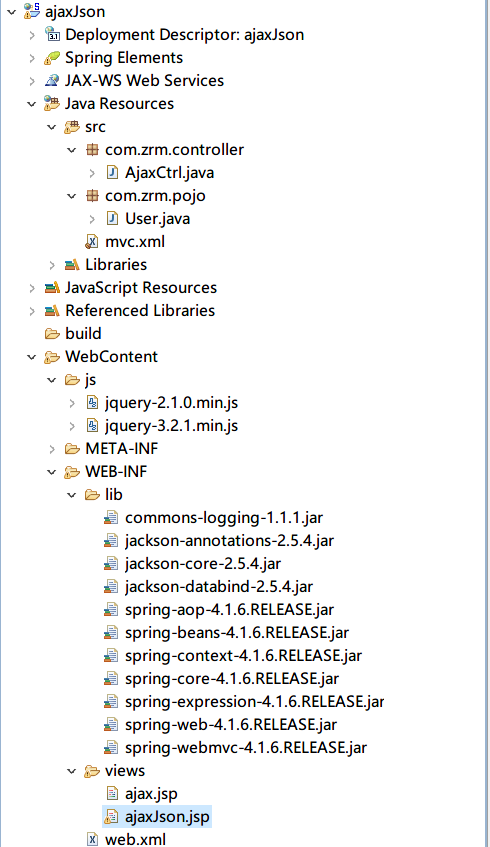
项目源码已上传至 github ajaxJson
Springmvc中ajax与jason应用的更多相关文章
- springMVC中ajax的使用
springMVC中使用ajax有两种方法,第一种是根据servletAPI来使用ajax,第二种是根据springMVC给我们提供的API来使用. 一.根据servletAPI: springMVC ...
- 第五节 关于SpringMVC中Ajax的配置和应用[下午]
成熟,不是学会表达,而是学会咽下,当你一点一点学会克制住很多东西,才能驾驭好人生. 还有一周,祥云19就算结算了,一个半月的相处希望,胖先生算一个合格的老师 小白,小蔡,2婷婷,小猴,小恒,小崔,小龙 ...
- springMVC 中 ajax get 请求和 post 请求的坑以及参数传递
1, ajax 请求 无论为 post ,或者 get ,url中带有?形式的参数,后台都能以String类型变量接收,变量名称和参数名称必须一致 前台ajax: $.ajax( "prod ...
- springMVC中ajax的运用于注意事项
ajax的运用: 注意事项: dataType:"json"在ajax中可写可不写(ajax能够自动识别返回值类型),写了更加规范,可以在ajax识别错误返回值类型的时候,指定返回 ...
- springMVC中ajax和后台数据格式错误
前台ajax: $.ajax("${pageContext.request.contextPath}/hello",// 发送请求的URL字符串. { dataType : &qu ...
- springmvc中ajax处理
1.使用HttpServletResponse处理--不需要配置解析器 @Controller public class AjaxController { @RequestMapping(" ...
- springMVC中ajax的实现
function addDebtResult(){ var repayIds=$("#repayIds").val(); var lateFeeDay=$("#repay ...
- springmvc的ajax返回406问题
在springmvc中ajax请求写为XXX.html,如果在controller的如:@RequestMapping(value="/login/doLogin.html",pr ...
- SpringMVC中出现" 400 Bad Request "错误(用@ResponseBody处理ajax传过来的json数据转成bean)的解决方法
最近angularjs post到后台 400一头雾水 没有任何错误. 最后发现好文,感谢作者 SpringMVC中出现" 400 Bad Request "错误(用@Respon ...
随机推荐
- 【struts2】中method={1}具体解释
我们在使用struts2的时候,有时候为了简化struts2的配置项而採用通配符的方式,例如以下代码: <action name="ajaxregister!*" class ...
- python 004 执行环境对比
对比:os.system os.popen subprocess.Popen subprocess.call 为什么要搞这么多? # --*--encoding: utf-8--*-- import ...
- hdu 4932 Miaomiao's Geometry(暴力枚举)
pid=4932">Miaomiao's Geometry ...
- 垃圾回收GC:.Net自己主动内存管理 上(二)内存算法
垃圾回收GC:.Net自己主动内存管理 上(二)内存算法 垃圾回收GC:.Net自己主动内存管理 上(一)内存分配 垃圾回收GC:.Net自己主动内存管理 上(二)内存算法 垃圾回收GC:.Net自己 ...
- JavaScript模式读书笔记 第4章 函数
2014年11月10日 1.JavaScript函数具有两个特点: 函数是第一类对象 函数能够提供作用域 函数即对象,表现为: -1,函数能够在执行时动态创建,也 ...
- 菜鸟nginx源代码剖析数据结构篇(六) 哈希表 ngx_hash_t(上)
菜鸟nginx源代码剖析数据结构篇(六) 哈希表 ngx_hash_t(上) Author:Echo Chen(陈斌) Email:chenb19870707@gmail.com Blog:Blog. ...
- Android中关于内部存储的一些重要函数
一.简介 Android中,你也可以通过绝对路径以JAVA传统方式访问内部存储空间.但是以这种方式创建的文件是对私有,创建它的应用程序对该文件是可读可写,但是别的应用程序并不能直接访问它.不是所有的内 ...
- 我在Suse 11 Sp3上使用anaconda安装TensorFlow的过程记录
我在Suse 11 Sp3上使用anaconda安装TensorFlow的过程记录 准备安装包: gcc48 glibc--SP4-DVD-x86_64-GM-DVD1.iso tensorflow_ ...
- Java项目打包发布
Java项目打包发布 如果只想发布为一个可执行的jar包,使用eclipse的Export功能就可以了 使用eclipse的Export功能,将项目中的所有package打包为一个pet.jar文件, ...
- C#开发微信公众号——网页开发之微信网页授权
首先咱们先看下公众号的文档里面的介绍 上述图片的文字描述就是讲述了网页授权有什么用,就是为了获取微信用户的基本信息:授权回调域名的规范,说到域名回调的事情就不得不提一下设置网页授权域名 最好将这三个域 ...