
手把手教你开发Nginx模块
前面的哪些话
关于Nginx模块开发的博客资料,网上很多,很多。但是,每篇博客都只提要点,无法"step by step"照着做,对于初次接触Nginx开发的同学,只能像只盲目的蚂蚁瞎燥急!该篇文章没有太多技术深度,只是一步一步说明白Nginx模块的开发过程。
开发环境搭建
工欲善其事,必先利其器。个人推荐Eclipse CDT 作为IDE,原因很简单,代码提示与补全功能很全,完胜Codeblock这类...相信与否,试过就知道。
在ubuntu下搭建开发环境:
- 安装GCC编译器
apt-get install build-essential
- 安装pcre/openssl/zlib开发库
apt-get install libpcre3-dev

apt-get install libssl-dev

apt-get install libzip-dev
必需安装nginx核心模块依赖的pcre,openssl,zilib开发库
- 安装JRE/Eclipse CDT
apt-get install openjdk-8-jre

wget http://ftp.yz.yamagata-u.ac.jp/pub/eclipse//technology/epp/downloads/release/neon/R/eclipse-cpp-neon-R-linux-gtk-x86_64.tar.gz && tzr -xzvf eclipse-cpp-neon-R-linux-gtk-x86_64.tar.gz
- 下载nginx源码
wget http://nginx.org/download/nginx-1.10.1.tar.gz && tar -xzvf nginx-1.10.1.tar.gz
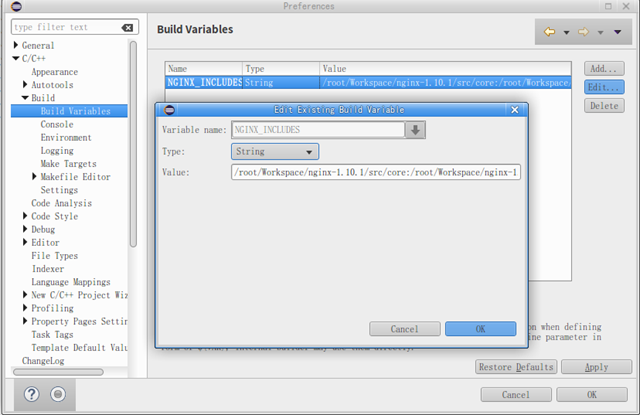
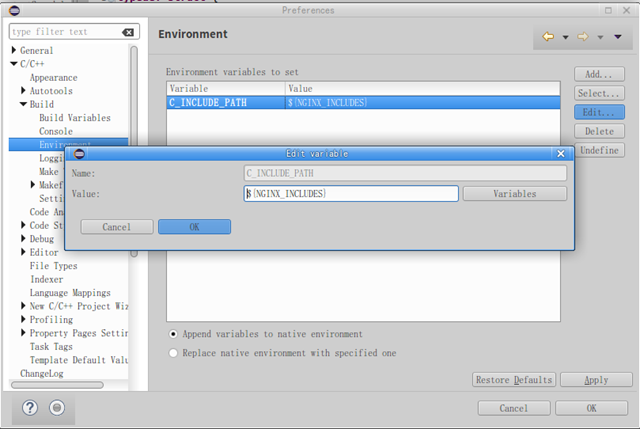
- 配置CDT Build Environment
添加变量,值Nginx src下各模块路径,用冒号分隔,例如:
/root/Workspace/nginx-1.10.1/src/core:/root/Workspace/nginx-1.10.1/src/event:/root/Workspace/nginx-1.10.1/src/http:/root/Workspace/nginx-1.10.1/src/mail:/root/Workspace/nginx-1.10.1/src/stream:/root/Workspace/nginx-1.10.1/src/os/unix
添加环境变量,创建C项目时自动作为-I选项
Nginx模块编译流程
Nginx使用configure脚本分析环境,自动生成objs结果。哪么configure如何编译第三方模块?答案是--add-module指定第三方模块目录,并将目录存为$ngx_addon_dir环境变量。执行$ngx_addon_dir/config脚本,读取模块配置。在config中的环境变量分为2种:小写的本地环境变量,大写的全局环境变量。例如:
ngx_addon_name=ngx_http_mytest_module

HTTP_MODULES="$HTTP_MODULES ngx_http_mytest_module"

NGX_ADDON_SRCS="$NGX_ADDON_SRCS $ngx_addon_dir/ngx_http_mytest_moudle.c"

CORE_LIBS="$CORE_LIBS -lpcre"
- HTTP_MODULES中的ngx_http_mytest_module就是NGX_ADDON_SRCS中源码(如果有多个,都要写上)ngx_http_mytest_module.c中定义的ngx_module_t类型的全局变量。
- 可见,第三方模块的入口点就是ngx_module_t类型全局变量,该变量又关联ngx_http_module_t类型static变量,与ngx_command_t类型static数组。
- 在ngx_http_module_t中定义上下文配置nginx.conf解析的回调方法。
- 在ngx_command_t中定义配置项处理的set回调方法。
- Nginx的全部操作都是异步的。在上述的方法中根据需要又会使用其他handler方法。
以上可以看成Nginx第三方模块的起式。
Upstream例子源码
- config
ngx_addon_name=ngx_http_mytest_module

HTTP_MODULES="$HTTP_MODULES ngx_http_mytest_module"

NGX_ADDON_SRCS="$NGX_ADDON_SRCS $ngx_addon_dir/ngx_http_mytest_module.c"
- 源代码
#include <ngx_config.h>

#include <ngx_core.h>

#include <ngx_http.h>

#include <ngx_stream.h>

typedef struct {

	ngx_http_upstream_conf_t upstream;

} mytest_conf_t;

typedef struct {

	ngx_http_status_t status;

	ngx_str_t backendServer;

} mytest_ctx_t;

static void *mytest_create_loc_conf(ngx_conf_t *cf);

static char *mytest_merge_loc_conf(ngx_conf_t *cf, void *parent, void *child);

static ngx_int_t mytest_upstream_create_request(ngx_http_request_t *r);

static ngx_int_t mytest_upstream_process_status_line(ngx_http_request_t *r);

static ngx_int_t mytest_upstream_process_header(ngx_http_request_t *r);

static void mytest_upstream_finalize_request(ngx_http_request_t *r,

		ngx_int_t rc);

static ngx_int_t mytest_handler(ngx_http_request_t *r);

static char *mytest(ngx_conf_t *cf, ngx_command_t *cmd, void *conf);

static ngx_http_module_t mytest_ctx = {

	NULL,

	NULL,

	NULL,

	NULL,

	NULL,

	NULL,

	mytest_create_loc_conf,

	mytest_merge_loc_conf

};

static ngx_command_t mytest_commands[] = {

	{

		ngx_string("mytest"),

		NGX_HTTP_MAIN_CONF | NGX_HTTP_SRV_CONF | NGX_HTTP_LOC_CONF | NGX_HTTP_LMT_CONF | NGX_CONF_NOARGS,

		mytest,

		NGX_HTTP_LOC_CONF_OFFSET,

		0,

		NULL

	},

	ngx_null_command

};

ngx_module_t ngx_http_mytest_module = {

	NGX_MODULE_V1,

	&mytest_ctx,

	mytest_commands,

	NGX_HTTP_MODULE,

	NULL,

	NULL,

	NULL,

	NULL,

	NULL,

	NULL,

	NULL,

	NGX_MODULE_V1_PADDING

};

static ngx_str_t  mytest_upstream_hide_headers[] =

{

    ngx_string("Date"),

    ngx_string("Server"),

    ngx_string("X-Pad"),

    ngx_string("X-Accel-Expires"),

    ngx_string("X-Accel-Redirect"),

    ngx_string("X-Accel-Limit-Rate"),

    ngx_string("X-Accel-Buffering"),

    ngx_string("X-Accel-Charset"),

    ngx_null_string

};

static void *mytest_create_loc_conf(ngx_conf_t *cf){

	mytest_conf_t *mycf;

	mycf = (mytest_conf_t *)ngx_pcalloc(cf->pool, sizeof(mytest_conf_t));

	if(mycf == NULL){

		return NULL;

	}

	mycf->upstream.connect_timeout = 60000;

	mycf->upstream.send_timeout = 60000;

	mycf->upstream.read_timeout = 60000;

	mycf->upstream.store_access = 0600;

	mycf->upstream.buffering = 0;

	mycf->upstream.bufs.num = 8;

	mycf->upstream.bufs.size = ngx_pagesize;

	mycf->upstream.buffer_size = ngx_pagesize;

	mycf->upstream.busy_buffers_size = 2 * ngx_pagesize;

	mycf->upstream.temp_file_write_size = 2 * ngx_pagesize;

	mycf->upstream.max_temp_file_size = 1024 * 1024 *1024;

	mycf->upstream.hide_headers = NGX_CONF_UNSET_PTR;

	mycf->upstream.pass_headers = NGX_CONF_UNSET_PTR;

	return mycf;

}

static char *mytest_merge_loc_conf(ngx_conf_t *cf, void *parent, void *child){

	mytest_conf_t *prev = (mytest_conf_t *)parent;

	mytest_conf_t *conf = (mytest_conf_t *)child;

	ngx_hash_init_t hash;

	hash.max_size = 100;

	hash.bucket_size = 1024;

	hash.name = "proxy_headers_hash";

	if(ngx_http_upstream_hide_headers_hash(cf,&conf->upstream, &prev->upstream,mytest_upstream_hide_headers,&hash)!=NGX_OK){

		return NGX_CONF_ERROR;

	}

	return NGX_CONF_OK;

}

static ngx_int_t mytest_upstream_create_request(ngx_http_request_t *r){

	static ngx_str_t backendQueryLine = ngx_string("GET /search?q=%V HTTP/1.1\r\nHost: www.google.com.hk\r\nConnection: close\r\n\r\n");

	ngx_int_t queryLineLen = backendQueryLine.len + r->args.len - 2;

	ngx_buf_t *b = ngx_create_temp_buf(r->pool, queryLineLen);

	if(b == NULL) return NGX_ERROR;

	b->last = b->pos + queryLineLen;

	ngx_snprintf(b->pos, queryLineLen, (char *)backendQueryLine.data, &r->args);

	r->upstream->request_bufs = ngx_alloc_chain_link(r->pool);

	if(r->upstream->request_bufs == NULL) return NGX_ERROR;

	r->upstream->request_bufs->buf = b;

	r->upstream->request_bufs->next = NULL;

	r->upstream->request_sent = 0;

	r->upstream->header_sent = 0;

	r->header_hash = 1;

	return NGX_OK;

}

static ngx_int_t mytest_upstream_process_status_line(ngx_http_request_t *r){

	size_t len;

	ngx_int_t rc;

	ngx_http_upstream_t *u;

	mytest_ctx_t *ctx = ngx_http_get_module_ctx(r, ngx_http_mytest_module);

	if(ctx == NULL) return NGX_ERROR;

	u = r->upstream;

	rc = ngx_http_parse_status_line(r, &u->buffer, &ctx->status);

	if(rc == NGX_AGAIN) return rc;

	if(rc == NGX_ERROR){

		ngx_log_error(NGX_LOG_ERR, r->connection->log, 0, "upstream sent to valid HTTP/1.0 header");

		r->http_version = NGX_HTTP_VERSION_9;

		u->state->status = NGX_HTTP_OK;

		return NGX_OK;

	}

	if(u->state){

		u->state->status = ctx->status.code;

	}

	u->headers_in.status_n = ctx->status.code;

	len = ctx->status.end - ctx->status.start;

	u->headers_in.status_line.len = len;

	u->headers_in.status_line.data = ngx_pcalloc(r->pool, len);

	if(u->headers_in.status_line.data == NULL) return NGX_ERROR;

	ngx_memcpy(u->headers_in.status_line.data, ctx->status.start, len);

	u->process_header = mytest_upstream_process_header;

	return mytest_upstream_process_header(r);

}

static ngx_int_t mytest_upstream_process_header(ngx_http_request_t *r){

	ngx_int_t rc;

	ngx_table_elt_t *h;

	ngx_http_upstream_header_t *hh;

	ngx_http_upstream_main_conf_t *umcf;

	umcf = ngx_http_get_module_main_conf(r, ngx_http_upstream_module);

	for(;;){

		rc = ngx_http_parse_header_line(r, &r->upstream->buffer, 1);

		if(rc == NGX_OK){

			h = ngx_list_push(&r->upstream->headers_in.headers);

			if(h == NULL) return NGX_ERROR;

			h->hash = r->header_hash;

			h->key.len = r->header_name_end - r->header_name_start;

			h->value.len = r->header_end - r->header_start;

			h->key.data = ngx_pcalloc(r->pool, h->key.len + 1 + h->value.len + 1 + h->key.len);

			if(h->key.data == NULL) return NGX_ERROR;

			h->value.data = h->key.data + h->key.len + 1;

			h->lowcase_key = h->key.data + h->key.len + 1 + h->value.len + 1;

			ngx_memcpy(h->key.data, r->header_name_start, h->key.len);

			h->key.data[h->key.len]='\0';

			ngx_memcpy(h->value.data, r->header_start, h->value.len);

			h->value.data[h->value.len] = '\0';

			if(h->key.len == r->lowcase_index){

				ngx_memcpy(h->lowcase_key, r->lowcase_header, h->key.len);

			}else{

				ngx_strlow(h->lowcase_key, h->key.data, h->key.len);

			}

			hh = ngx_hash_find(&umcf->headers_in_hash, h->hash, h->lowcase_key, h->key.len);

			if(hh && hh->handler(r, h, hh->offset)!=NGX_OK) return NGX_ERROR;

			continue;

		}

		if(rc == NGX_HTTP_PARSE_HEADER_DONE){

			if(r->upstream->headers_in.server == NULL){

				h = ngx_list_push(&r->upstream->headers_in.headers);

				if(h == NULL) return NGX_ERROR;

				 h->hash = ngx_hash(ngx_hash(ngx_hash(ngx_hash(ngx_hash('s', 'e'), 'r'), 'v'), 'e'), 'r');

				 ngx_str_set(&h->key, "Server");

				 ngx_str_null(&h->value);

				 h->lowcase_key = (u_char *)"server";

			}

			if(r->upstream->headers_in.date == NULL){

				h = ngx_list_push(&r->upstream->headers_in.headers);

				if(h == NULL) return NGX_ERROR;

				h->hash = ngx_hash(ngx_hash(ngx_hash('d', 'a'), 't'), 'e');

				ngx_str_set(&h->key, "Date");

				ngx_str_null(&h->value);

				h->lowcase_key = (u_char *)"date";

			}

			return NGX_OK;

		}

		if(rc == NGX_AGAIN) return NGX_AGAIN;

		ngx_log_error(NGX_LOG_ERR, r->connection->log, 0, "upstream sent invalid header");

		return NGX_HTTP_UPSTREAM_FT_INVALID_HEADER;

	}

}

static void mytest_upstream_finalize_request(ngx_http_request_t *r, ngx_int_t rc){

	ngx_log_error(NGX_LOG_DEBUG, r->connection->log, 0, "mytest_upstream_finalize_request");

}

static char *mytest(ngx_conf_t *cf, ngx_command_t *cmd, void *conf){

	ngx_http_core_loc_conf_t *clcf;

	clcf = ngx_http_conf_get_module_loc_conf(cf,ngx_http_core_module);

	clcf->handler = mytest_handler;

	return NGX_CONF_OK;

}

static ngx_int_t mytest_handler(ngx_http_request_t *r){

	mytest_ctx_t *myctx = ngx_http_get_module_ctx(r, ngx_http_mytest_module);

	if(myctx == NULL){

		myctx = ngx_pcalloc(r->pool, sizeof(mytest_ctx_t));

		if(myctx == NULL) return NGX_ERROR;

		ngx_http_set_ctx(r, myctx, ngx_http_mytest_module);

	}

	if(ngx_http_upstream_create(r)!=NGX_OK){

		ngx_log_error(NGX_LOG_ERR, r->connection->log, 0, "ngx_http_upstream_create() failed");

		return NGX_ERROR;

	}

	mytest_conf_t *mycf = (mytest_conf_t *)ngx_http_get_module_loc_conf(r, ngx_http_mytest_module);

	ngx_http_upstream_t *u = r->upstream;

	u->conf = &mycf->upstream;

	u->buffering = mycf->upstream.buffering;

	u->resolved = (ngx_http_upstream_resolved_t *) ngx_pcalloc(r->pool, sizeof(ngx_http_upstream_resolved_t));

	if(u->resolved == NULL){

		ngx_log_error(NGX_LOG_ERR, r->connection->log, 0, "ngx_pcalloc resolved error. %s", strerror(errno));

		return NGX_ERROR;

	}

	static struct sockaddr_in backendSockAddr;

	struct hostent *pHost = gethostbyname((char *)"www.google.com.hk");

	if(pHost == NULL){

		ngx_log_error(NGX_LOG_ERR, r->connection->log, 0, "gethostbyname fail. %s", strerror(errno));

		return NGX_ERROR;

	}

	backendSockAddr.sin_family = AF_INET;

	backendSockAddr.sin_port = htons((in_port_t)80);

	char *pDmsIP = inet_ntoa(*(struct in_addr *)(pHost->h_addr_list[0]));

	backendSockAddr.sin_addr.s_addr = inet_addr(pDmsIP);

	myctx->backendServer.data = (u_char *)pDmsIP;

	myctx->backendServer.len = strlen(pDmsIP);

	u->resolved->sockaddr = (struct sockaddr *)&backendSockAddr;

	u->resolved->port = htons((in_port_t)80);

	u->resolved->socklen = sizeof(struct sockaddr_in);

	u->resolved->naddrs = 1;

	u->create_request = mytest_upstream_create_request;

	u->process_header = mytest_upstream_process_status_line;

	u->finalize_request = mytest_upstream_finalize_request;

	r->main->count++;

	ngx_http_upstream_init(r);

	return NGX_DONE;

}
注意:《Nginx深入解析》的demo少了这句:“u->resolved->port = htons((in_port_t)80);”,否则报错“2016/09/09 11:24:18 [error] 28352#0: *1 no port in upstream "", client: 127.0.0.1, server: localhost, request: "GET /mytest?q=test HTTP/1.1", host: "localhost"”
- 编译脚本
./configure --prefix=/usr/local/nginx --add-module=/root/Workspace/nginx-modules/ngx_http_mytest_module --with-debug

sudo make

sudo make install
安装后即可到/usr/local/nginx下配置nginx.conf进行测试。
Subrequest例子源码
- config
ngx_addon_name=ngx_http_mytest_module

HTTP_MODULES="$HTTP_MODULES ngx_http_mytest_module"

NGX_ADDON_SRCS="$NGX_ADDON_SRCS $ngx_addon_dir/ngx_http_mytest_module.c"
- 源代码
#include <ngx_config.h>

#include <ngx_core.h>

#include <ngx_http.h>

typedef struct {

	ngx_str_t stock[6];

} mytest_ctx_t;

static ngx_int_t mytest_subrequest_post_handler(ngx_http_request_t *r, void *data, ngx_int_t rc);

static void mytest_post_handler(ngx_http_request_t *r);

static ngx_int_t mytest_handler(ngx_http_request_t *r);

static char *mytest(ngx_conf_t *cf, ngx_command_t *cmd, void *conf);

static ngx_http_module_t mytest_conf = {

	NULL,

	NULL,

	NULL,

	NULL,

	NULL,

	NULL,

	NULL,

	NULL

};

static ngx_command_t mytest_commands[] = {

	{

		ngx_string("mytest"),

		NGX_HTTP_MAIN_CONF | NGX_HTTP_SRV_CONF | NGX_HTTP_LOC_CONF | NGX_CONF_NOARGS,

		mytest,

		NGX_HTTP_LOC_CONF_OFFSET,

		0,

		NULL

	},

	ngx_null_command

};

ngx_module_t ngx_http_mytest_module = {

	NGX_MODULE_V1,

	&mytest_conf,

	mytest_commands,

	NGX_HTTP_MODULE,

	NULL,

	NULL,

	NULL,

	NULL,

	NULL,

	NULL,

	NULL,

	NGX_MODULE_V1_PADDING

};

static ngx_int_t mytest_subrequest_post_handler(ngx_http_request_t *r,

		void *data, ngx_int_t rc) {

	ngx_http_request_t *pr = r->parent;

	mytest_ctx_t *myctx = ngx_http_get_module_ctx(pr, ngx_http_mytest_module);

	pr->headers_out.status = r->headers_out.status;

	if (r->headers_out.status == NGX_HTTP_OK) {

		int flag = 0;

		ngx_buf_t *pRecvBuf = &r->upstream->buffer;

		for (; pRecvBuf->pos != pRecvBuf->last; pRecvBuf->pos++) {

			if (*pRecvBuf->pos == ',' || *pRecvBuf->pos == '\"') {

				if (flag > 0) {

					myctx->stock[flag - 1].len = pRecvBuf->pos

							- myctx->stock[flag - 1].data;

				}

				flag++;

				myctx->stock[flag - 1].data = pRecvBuf->pos + 1;

			}

			if (flag > 6)

				break;

		}

	}

	pr->write_event_handler = mytest_post_handler;

	return NGX_OK;

}

static void mytest_post_handler(ngx_http_request_t *r){

	if(r->headers_out.status != NGX_HTTP_OK){

		ngx_http_finalize_request(r,r->headers_out.status);

		return;

	}

	mytest_ctx_t *myctx = ngx_http_get_module_ctx(r,ngx_http_mytest_module);

	ngx_str_t output_format = ngx_string("stock[%V],Today current price:%V, volumn:%V");

	int bodylen = output_format.len + myctx->stock[0].len + myctx->stock[1].len + myctx->stock[4].len - 6;

	r->headers_out.content_length_n = bodylen;

	ngx_buf_t *b = ngx_create_temp_buf(r->pool, bodylen);

	ngx_snprintf(b->pos,bodylen,(char *)output_format.data, &myctx->stock[0], &myctx->stock[1], &myctx->stock[4]);

	b->last = b->pos + bodylen;

	b->last_buf = 1;

	ngx_chain_t out;

	out.buf = b;

	out.next = NULL;

	static ngx_str_t type = ngx_string("text/plain; charset=GBK");

	r->headers_out.content_type = type;

	r->headers_out.status = NGX_HTTP_OK;

	r->connection->buffered |= NGX_HTTP_WRITE_BUFFERED;

	ngx_int_t ret = ngx_http_send_header(r);

	ret = ngx_http_output_filter(r, &out);

	ngx_http_finalize_request(r,ret);

}

static ngx_int_t mytest_handler(ngx_http_request_t *r){

	mytest_ctx_t *myctx = ngx_http_get_module_ctx(r, ngx_http_mytest_module);

	if(myctx == NULL){

		myctx = ngx_pcalloc(r->pool, sizeof(mytest_ctx_t));

		if(myctx == NULL) return NGX_ERROR;

		ngx_http_set_ctx(r,myctx,ngx_http_mytest_module);

	}

	ngx_http_post_subrequest_t *psr = ngx_pcalloc(r->pool, sizeof(ngx_http_post_subrequest_t));

	if(psr == NULL) return NGX_HTTP_INTERNAL_SERVER_ERROR;

	psr->handler = mytest_subrequest_post_handler;

	psr->data = myctx;

	ngx_str_t sub_prefix = ngx_string("/list=");

	ngx_str_t sub_location;

	sub_location.len = sub_prefix.len + r->args.len;

	sub_location.data = ngx_pcalloc(r->pool, sub_location.len);

	ngx_snprintf(sub_location.data, sub_location.len, "%V%V", &sub_prefix, &r->args);

	ngx_http_request_t *sr;

	ngx_int_t rc = ngx_http_subrequest(r, &sub_location, NULL, &sr, psr, NGX_HTTP_SUBREQUEST_IN_MEMORY);

	if(rc != NGX_OK) return NGX_ERROR;

	return NGX_DONE;

}

static char *mytest(ngx_conf_t *cf, ngx_command_t *cmd, void *conf){

	ngx_http_core_loc_conf_t *clcf = ngx_http_conf_get_module_loc_conf(cf, ngx_http_core_module);

	clcf->handler = mytest_handler;

	return NGX_CONF_OK;

}
- 编译脚本
./configure --prefix=/usr/local/nginx --add-module=/root/Workspace/nginx-modules/ngx_http_mytest_module2 --with-debug

sudo make

sudo make install
手把手教你开发Nginx模块的更多相关文章
- 新书上线:《Spring Boot+Spring Cloud+Vue+Element项目实战:手把手教你开发权限管理系统》,欢迎大家买回去垫椅子垫桌脚
新书上线 大家好,笔者的新书<Spring Boot+Spring Cloud+Vue+Element项目实战:手把手教你开发权限管理系统>已上线,此书内容充实.材质优良,乃家中必备垫桌脚 ...
- 手把手教你开发chrome扩展一:开发Chrome Extenstion其实很简单
手把手教你开发chrome扩展一:开发Chrome Extenstion其实很简单 手把手教你开发chrome扩展一:开发Chrome Extenstion其实很简单 手把手教你开发Chrome扩 ...
- 开发Nginx模块
开发Nginx模块 前面的哪些话 关于Nginx模块开发的博客资料,网上很多,很多.但是,每篇博客都只提要点,无法"step by step"照着做,对于初次接触Nginx开发的同 ...
- 手把手教你开发chrome扩展
转载:http://www.cnblogs.com/walkingp/archive/2011/04/04/2003875.html 手把手教你开发chrome扩展一:开发Chrome Extenst ...
- 手把手教你开发Chrome扩展三:关于本地存储数据
手把手教你开发chrome扩展一:开发Chrome Extenstion其实很简单 手把手教你开发Chrome扩展二:为html添加行为 手把手教你开发Chrome扩展三:关于本地存储数据 HTML5 ...
- 手把手教你开发Chrome扩展二:为html添加行为
手把手教你开发chrome扩展一:开发Chrome Extenstion其实很简单 手把手教你开发Chrome扩展二:为html添加行为 手把手教你开发Chrome扩展三:关于本地存储数据 上一节我们 ...
- 手把手教你开发BLE数据透传应用程序
如何开发BLE数据透传应用程序?什么是BLE service和characteristic?如何开发自己的service和characteristic?如何区分ATT和GATT?有没有什么工具可以对B ...
- 手把手教Linux驱动2-之模块参数和符号导出
通过<手把手教Linux驱动1-模块化编程,玩转module>的学习,我们已经掌握了如何向内核加载一个模块,现在我们学习模块之间如何传递参数. 一.给模块传递参数 当我们加载一个模块到Li ...
- 开发Nginx模块Helloworld
本文是对<深入理解Nginx>一书中的实例进行实战时的记录. 1模块目录结构 my_test_module/ ├── config └── ngx_http_mytest_module.c ...
随机推荐
- mac os 虚拟机安装
https://blog.csdn.net/u011415782/article/details/78505422 感谢
- angular之Http服务
原文 https://www.jianshu.com/p/53e4a4bfad7d 大纲 1.什么是angular服务 2.服务的类别 3.认识angular的Http请求 4.简单实例 5.angu ...
- [CSS] Design for Mobile First with Tachyons
Tachyons provides extensions (-ns, -m, and -l) to many of its classes to help you design for respons ...
- 仿凤凰时时彩代购平台源代码[ASP+MSSQL]完整下载
源代码简单介绍 : 适用范围: 时时彩源代码,时时彩程序,开奖平台源代码,投注平台源代码,仿凤凰时时彩源代码 执行环境: ASP+MSSQL 其它说明:仿凤凰时时彩代购平台源代码.网上售价8000 ...
- php实现 合唱队形(算法想清楚在动)
php实现 合唱队形(算法想清楚在动) 一.总结 一句话总结:写一个最长递增子序列的函数,正反两遍扫一下就好.写函数这样不容易错.这个好像可以用二分来优化. 1.算法题怎么提高正确率和节约时间? 算 ...
- event.relatedTarget、event.fromElement、event.toElement
在标准DOM中,mouseover和mouseout所发生的元素可以通过event.target来访问,相关元素通过event.relatedTarget属性来访问.event.relatedTarg ...
- 洛谷 P2197 nim游戏
洛谷 P2197 nim游戏 题目描述 甲,乙两个人玩Nim取石子游戏. nim游戏的规则是这样的:地上有n堆石子(每堆石子数量小于10000),每人每次可从任意一堆石子里取出任意多枚石子扔掉,可以取 ...
- [GraphQL] Write a GraphQL Mutation
In order to change the data that we can query for in a GraphQL Schema, we have to define what is cal ...
- IDEA使用从Eclipse过来的快捷键
1.Eclipse中的ctrl+shift+o --------> Ctrl + Alt + O 2.Eclipse中快捷键是Ctrl+O ---------> MacOS 下是 cmd+ ...
- [NPM] Run npm scripts when files change with onchange
In this lesson we will look at how we can setup our npm scripts to execute when the file system has ...