
Bootstrap 表单控件状态(验证状态)
在制作表单时,不免要做表单验证。同样也需要提供验证状态样式,在Bootstrap框架中同样提供这几种效果。
1、.has-warning:警告状态(黄色)
2、.has-error:错误状态(红色)
3、.has-success:成功状态(绿色)
使用的时候只需要在form-group容器上对应添加状态类名。
<form role="form">

<div class="form-group has-success">

  <label class="control-label" for="inputSuccess1">成功状态</label>

  <input type="text" class="form-control" id="inputSuccess1" placeholder="成功状态" >

</div>

<div class="form-group has-warning">

  <label class="control-label" for="inputWarning1">警告状态</label>

  <input type="text" class="form-control" id="inputWarning1" placeholder="警告状态">

</div>

<div class="form-group has-error">

  <label class="control-label" for="inputError1">错误状态</label>

  <input type="text" class="form-control" id="inputError1" placeholder="错误状态">

</div>

</form>
运行效果如下或查看右侧结果窗口:
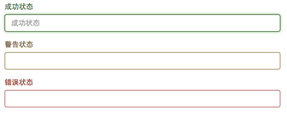
很多时候,在表单验证的时候,不同的状态会提供不同的icon,比如成功是一个对号(√),错误是一个叉号(×)等。在Bootstrap框中也提供了这样的效果。如果你想让表单在对应的状态下显示icon出来,只需要在对应的状态下添加类名“has-feedback”。请注意,此类名要与“has-error”、“has-warning”和“has-success”在一起:
<form role="form">

<div class="form-group has-success has-feedback">

  <label class="control-label" for="inputSuccess1">成功状态</label>

  <input type="text" class="form-control" id="inputSuccess1" placeholder="成功状态" >

  <span class="glyphicon glyphicon-ok form-control-feedback"></span>

</div>

<div class="form-group has-warning has-feedback">

  <label class="control-label" for="inputWarning1">警告状态</label>

  <input type="text" class="form-control" id="inputWarning1" placeholder="警告状态">

  <span class="glyphicon glyphicon-warning-sign form-control-feedback"></span>

</div>

<div class="form-group has-error has-feedback">

  <label class="control-label" for="inputError1">错误状态</label>

  <input type="text" class="form-control" id="inputError1" placeholder="错误状态">

  <span class="glyphicon glyphicon-remove form-control-feedback"></span>

</div>

</form>
运行效果如下或查看右侧结果窗口:
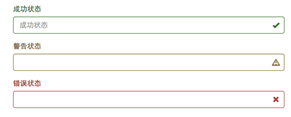
从效果图中可以看出,图标都居右。在Bootstrap的小图标都是使用@font-face来制作(后面的内容中将会着重用一节内容来介绍)。而且必须在表单中添加了一个span元素:
<span class="glyphicon glyphicon-warning-sign form-control-feedback"></span>
Bootstrap 表单控件状态(验证状态)的更多相关文章
- Bootstrap 表单控件状态(禁用状态)
Bootstrap框架的表单控件的禁用状态和普通的表单禁用状态实现方法是一样的,在相应的表单控件上添加属性“disabled”.和其他表单的禁用状态不同的是,Bootstrap框架做了一些样式风格的处 ...
- Bootstrap中表单控件状态(验证状态)
Bootstrap 表单 http://www.runoob.com/try/try2.php?filename=bootstrap3-form-controlstate (这链接里有简介) &l ...
- bootstrap表单带验证
<!DOCTYPE html> <html lang="zh-CN"> <head> <meta charset="utf-8& ...
- Bootstrap之表单控件状态
Bootstrap中的表单控件状态主要有三种:焦点状态,禁用状态,验证状态. 一.焦点状态:该状态告诉用户可输入或选择东西 焦点状态通过伪类“:focus”以实现. bootstrap.css相应 ...
- bootstrap 表单控件 控件状态 控件大小 help-block
bootstrap 表单控件 控件状态 控件大小 help-block <!DOCTYPE html> <html lang="en"> <head& ...
- bootstrapValidator.js,最好用的bootstrap表单验证插件
前言:做Web开发的我们,表单验证是再常见不过的需求了.友好的错误提示能增加用户体验.博主搜索bootstrap表单验证,搜到的结果大部分都是文中的主题:bootstrapvalidator.今天就来 ...
- 基于Bootstrap表单验证
基于Bootstrap表单验证 GitHub地址:https://github.com/chentangchun/FormValidate 使用方式: 1.CSS样式 .valierror { bor ...
- Bootstrap历练实例:表单控件状态(禁用的字段集fieldset)
禁用的字段集 fieldset 对 <fieldset> 添加 disabled 属性来禁用 <fieldset> 内的所有控件. <!DOCTYPE html>& ...
- Bootstrap历练实例:表单控件状态(禁用)
禁用的输入框 input 如果您想要禁用一个输入框 input,只需要简单地添加 disabled 属性,这不仅会禁用输入框,还会改变输入框的样式以及当鼠标的指针悬停在元素上时鼠标指针的样式. < ...
随机推荐
- 卸载完百度影音以后天气助手还在,而且总是自己主动打开ie浏览器,解决方式
今天暴风影音不好用了.我就安装了百度影音,还有意外发现.相同的视频,用百度影音看不清楚,然后我就直接卸载了.结果卸掉以天气小助手还是在,而且总弹白色小框框,各种广告.最忍不了的是还自己主动打开ie浏览 ...
- android 细节之 menu 之 invalidateOptionsMenu
menu 在 android中是个很经常使用的控件,曾经自己做项目的时候通常都是将系统的menu相关方法在activity中直接删去.而且将主题换为fullscreen,然后再在layout中引入自己 ...
- 使用OpenCV滑动条写成的简单调色器,实时输出RGB值
好久没有写博客了,近期在看OpenCV.于是动手写了个简单的RGB调色器,在终端实时输出RGB的值.通过这个程序学习滑动条的使用.程序中主要用到cvCreateTrackbar ,其使用方法例如以下: ...
- pat解题报告【1082】
1082. Read Number in Chinese (25) 时间限制 400 ms 内存限制 32000 kB 代码长度限制 16000 B 判题程序 Standard ...
- iOS:在UITextField中加入图标
//最左側加图片是下面代码 右側相似 UIImageView *imgView = [[UIImageView alloc] initWithImage:[UIImage imageNamed:@&q ...
- codeforce1046 Bubble Cup 11 - Finals 题解
比赛的时候开G开了3h结果rose说一句那唯一一个AC的是羊的心态就崩了.. 这套题感觉质量挺好然后就back了下 A: AI robots 有三个限制条件:相互能够看见和智商的差.使用主席树,可以维 ...
- python chunk 方式读取大文件——本质上还是file read自身支持
参考:https://stackoverflow.com/questions/519633/lazy-method-for-reading-big-file-in-python 最优雅方式: file ...
- [python 基础]python装饰器(二)带参数的装饰器以及inspect.getcallargs分析
带参数的装饰器理解无非记住两点: 1.本质不过在基本的装饰器外面再封装一层带参数的函数 2.在使用装饰器语法糖的时候与普通装饰器不同,必须要加()调用,且()内的内容可以省略(当省略时,admin默认 ...
- [JSOI2016]独特的树叶
https://zybuluo.com/ysner/note/1177340 题面 有一颗大小为\(n\)的树\(A\),现加上一个节点并打乱编号,形成树\(B\),询问加上的节点最后编号是多少? \ ...
- 字符串转为JSON对象
经常写字符串转为JSON对象,但是每次没有说一次就成功的,老是搞错属于哪个包的方法,遂记录一下 JSONObject.parseObject(str);这个方法需要导入包 com.alibaba.fa ...