
C#之用户自定义控件
一、新建用户自定义控件
如下图所示,想通过LED的点击来实现亮和灭使用去控制下位机。
LED亮:

LED灭:

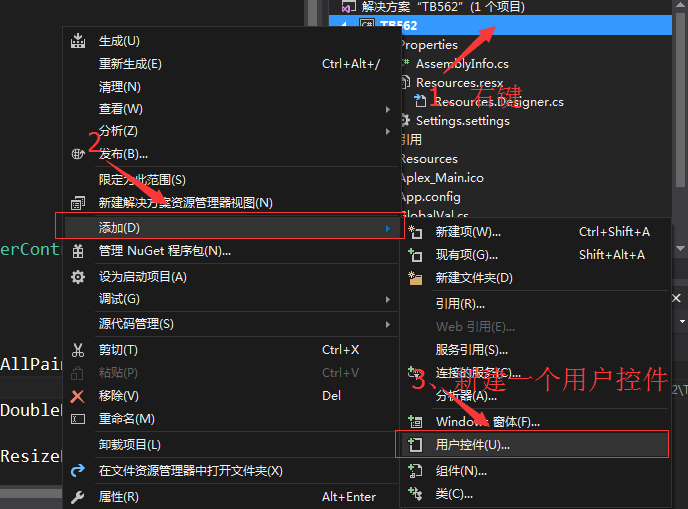
首先新建一个用户控件类,名字为LedControl.cs,如下图所示步骤:
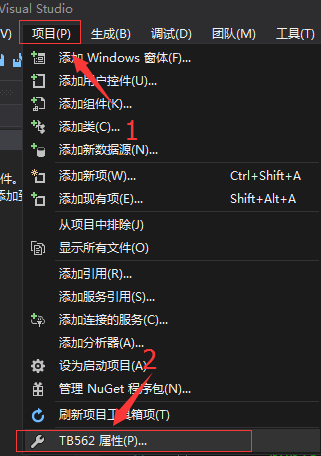
在资源中,添加现有文件中加入图片

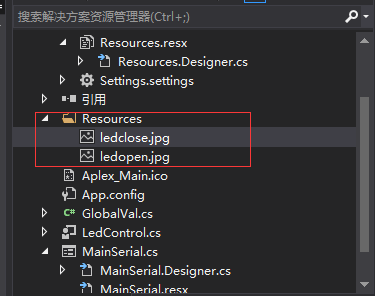
加入的图片可以在Resources中看到列表
编译成功后,在工具箱中看到新建出来的用户控件:

二、新建用户控件的源码及注释
using System;

using System.Collections.Generic;

using System.ComponentModel;

using System.Drawing;

using System.Data;

using System.Linq;

using System.Text;

using System.Threading.Tasks;

using System.Windows.Forms;

namespace TB562

{

    public partial class LedControl : UserControl

    {

        public LedControl()

        {

            InitializeComponent();

            this.SetStyle(ControlStyles.AllPaintingInWmPaint, true);        //禁止擦除背景

            this.SetStyle(ControlStyles.DoubleBuffer, true);                //启用双缓冲,双缓冲为了解决控件刷新闪烁的问题

            this.SetStyle(ControlStyles.ResizeRedraw, true);                //调整大小时重绘

            this.SetStyle(ControlStyles.Selectable, true);                  //控件可以接收焦点

            this.SetStyle(ControlStyles.SupportsTransparentBackColor, true);//透明效果

            this.SetStyle(ControlStyles.UserPaint, true);                   //自绘

            this.BackColor = Color.Transparent;                             //获取系统定义的颜色

            this.Cursor = Cursors.Hand;                                     //表达鼠标移动到控件上面会变成手势光标

            this.Size = new Size(87, 27);                                   //自定义控件的大小尺寸

        }

        //定义一个公共属性

        bool isCheck = false;

        /// <summary>

        /// 是否选中

        /// </summary>

        public bool Checked

        {

            set { isCheck = value;this.Invalidate();}                 // 用Invalidate()使区域无效就可触发该控件的重画

            get { return isCheck; }

        }

        public enum CheckStyle

        {

            style1,

            style2,

            style3,

            style4,

        };

        CheckStyle checkStyle = CheckStyle.style1;//定义多种控件样式选择

        /// <summary>

        /// 样式

        /// </summary>

        public CheckStyle CheckStyleX

        {

            set { checkStyle = value; } //

            get { return checkStyle; }

        }

        public event EventHandler CheckChanged;

        //鼠标点击的触发事件

        private void LedControl_Click(object sender, EventArgs e)

        {

            isCheck = !isCheck;

            this.Invalidate();                              //Invalidate将控件标记为重绘,触发重写OnPaint

        }

        protected override void OnPaint(PaintEventArgs e)   //重写控件的事件

        {

            Bitmap bitMapOn = null;

            Bitmap bitMapOff = null;

            if (checkStyle == CheckStyle.style1)

            {

                bitMapOn = global::TB562.Properties.Resources.ledopen;              //资源文件中图片的文件名ledopen定义

                bitMapOff = global::TB562.Properties.Resources.ledclose;            //资源文件中图片的文件名ledopen定义

            }

            Graphics g = e.Graphics;  //创建画布

            Rectangle rec = new Rectangle(0, 0, this.Size.Width, this.Size.Height);//矩形的位置和大小

            if (isCheck)

            {

                g.DrawImage(bitMapOn, rec);   //画LED灯开的图像

            }

            else

            {

                g.DrawImage(bitMapOff, rec);  //画LED灯关的图像

            }

        }

    }

}
另外要使用自定义控件前还需要先使用,如下:
                    ledControl1.Enabled = true;

                    ledControl2.Enabled = true;

                    ledControl3.Enabled = true;

                    ledControl4.Enabled = true;

                    ledControl5.Enabled = true;

                    ledControl6.Enabled = true;

                    ledControl7.Enabled = true;

                    ledControl8.Enabled = true;

                    ledControl9.Enabled = true;
三、参考文档
https://www.cnblogs.com/dyllove98/archive/2013/07/05/3174536.html
https://www.cnblogs.com/yelanggu/p/6224587.html
http://blog.sina.com.cn/s/blog_752ca76a0100qjub.html
by 羊羊得亿
2018-01-22 ShenZhen
C#之用户自定义控件的更多相关文章
- mvc 母版页、用户自定义控件
母版页(Master) 1.母版页是与Controller无关的,母版页只是一个View文件,而没有任何Controller与之相对应. 2.其实在ASP.NET MVC中View的aspx与母版页并 ...
- WPF中添加Winform用户自定义控件
过程:创建WPF工程->创建Winform用户自定义控件工程->WPF中引用控件->添加到Xaml页面 1.首先在WPF工程的解决方案上右击选择添加新建项目: 选择Windows窗体 ...
- C#用户自定义控件(含源代码)-透明文本框
using System; using System.Collections; using System.ComponentModel; using System.Drawing; using Sys ...
- Winform中用户自定义控件中外部设置子控件属性的方法
假设我们新建立一个用户自定义控件,由一个lable1和pictureBox1组成 此时我们在外部调用该控件,然后想动态改变lable1的值,我们该怎么办? 假设实例化的用户控件名为UserContro ...
- Web用户自定义控件
在新建项的时候,选择Web用户控件,可用来自定义自己的控件,做好后,直接拖到页面即可使用自定义控件与WEB交互,需要在 自定义控件里面 写 属性,如: public string CityID { g ...
- ASP.NET用户自定义控件配置
一直以来开发中碰到要写自定义控件的时候总是习惯性的找度娘,而没有自己记住,结果今天就悲剧了,找了半天才找到,想想还是自己积累起来吧! 第一种配置方式: 配置写在webconfig文件中,位置如下: w ...
- asp.net用户自定义控件传参
asp.net自定义控件传参的方式有2中: ①字段的方式 在自定义控件的.ascx.cs中定义一个字段,然后在调用页面的page_load方法里面传入参数. 如 在自定义控件中设置字段 publ ...
- WinForm用户自定义控件,在主窗体加载时出现闪烁;调用用户控件出现闪烁,需要鼠标才能够显示
转载自:http://www.dotblogs.com.tw/rainmaker/archive/2012/02/22/69811.aspx 解决方案: 在调用用户控件的窗体里面添加一下代码: pro ...
- Silverlight用户自定义控件件中增加属性和方法
下面的例子在用户控件MyCpmzSelect中增加了一个myCaption属性 public static readonly DependencyProperty myCaptionProperty ...
随机推荐
- 洛谷P2197 nim游戏模板
Code: #include<iostream> using namespace std; int main(){ int t; cin>>t; while(t--){ int ...
- ajax发送请求的数据类型
1.如果要传给后台的是json形式的数据 2.如果要传给后台的是formdata形式的数据
- shell脚本备份nginx日志
vim /data/runlog.sh #编辑一个 shell 脚本 #!/bin/bash LOGP ...
- NodeJS学习笔记 进阶 (4)基于express+muter的文件上传(ok)
个人总结:这篇文章主要讲了multer插件的使用,类似于formidable,可以用来处理post表单中的文件上传,读完这篇文章需要10分钟. 摘选自网络 概览 图片上传是web开发中经常用到的功能, ...
- [Bug]Python3.x AttributeError: libtest.so: undefined symbol: fact
写kNN,需要在python中实现kd-tree 思考了一下,在python下写这种算法类的东西,还是十分别扭 于是希望用ctypes调用一下c++动态加载库 于是尝试实现一下 // test.cpp ...
- websocket调试工具
http://www.blue-zero.com/WebSocket/ wss://yy.xxx.com/video/websocket/client.ws
- CMSIS-RTOS的使用
CMSIS-RTOS实现通常作为库提供.要将RTOS功能添加到现有的基于CMSIS的应用程序,需要添加RTOS库(通常是配置文件).RTOS库的可用功能在头文件cmsis_os.h中定义,该文件特定于 ...
- Ubuntu 经常使用软件安装
Chromium 14.04+ FlashPlayer 原理 就是安装一个flash插件而已啊,网上都没有详解. 我们首先在浏览器地址栏输入chrome://plugins, 全部插件都会展示出来了. ...
- ios svn repository
xcode默认自带Git和svn,首先讲下xcode4.6.3下配置svn: 1.检測你的mac中是否安装了svn: (1) 打开终端,输入 svn --version 假设出现下图信息,则说明已经安 ...
- Android开发之蓝牙(Bluetooth)操作(二)--修改本机蓝牙设备的可见性,并扫描周围可用的蓝牙设备
版权声明:本文为博主原创文章,未经博主允许不得转载. 一. 修改本机蓝牙设备的可见性 二. 扫描周围可用的蓝牙设备 Eg: 一. 清单文件AdroidManifest.xml: <?xml v ...