
WPF Template

ControlTemplate
- ControlTemplate:用于定义控件的结构和外观,这样可以将控件外观与控件功能分离开. 在xaml中ControlTemplate通常配置到Style中,通过Style控制控件的结构和外观
- 如果控件继承自ContentControl类,其模板将包含一个ContentPresenter类成员,ContentPresenter用于指定添加内容的位置,下面是一个Button Style,ContentPresenter的标记表明Button的Content应在Grid内垂直且水平居中显示
ContentPresenter example<Style TargetType="Button">

<!--Set to true to not get any properties from the themes.-->

<Setter Property="OverridesDefaultStyle" Value="True"/>

<Setter Property="Template">

<Setter.Value>

<ControlTemplate TargetType="Button">

<Grid>

<Ellipse Fill="{TemplateBinding Background}"/>

<ContentPresenter HorizontalAlignment="Center"

VerticalAlignment="Center"/>

</Grid>

</ControlTemplate>

</Setter.Value>

</Setter>

</Style> - ControlTemplate中也可以添加Trigger,当一个属性发生变化时用于控制一个或者多个属性的变化。如下代码,注意TargetName属性指定了control的名字,满足条件时就会修改该control的属性
ControlTemplate example<ControlTemplate TargetType="ListBoxItem">

<Border Name="ItemBorder" BorderThickness="1" Margin="1" Background="{StaticResource TransparentBrush}">

<ContentPresenter />

</Border>

<ControlTemplate.Triggers>

<Trigger Property="IsSelected" Value="True">

<Setter TargetName="ItemBorder" Property="Background" Value="{StaticResource TransparentBrush}" />

</Trigger>

<Trigger Property="IsMouseOver" Value="True">

<Setter TargetName="ItemBorder" Property="Background" Value="{StaticResource TransparentBrush}" />

</Trigger>

</ControlTemplate.Triggers>

</ControlTemplate> - 如果控件继承自ItemsControl类,其模板将包含一个ItemsPresenter元素,指示何处放置列表项的模板
- 模板绑定:通过使用模板绑定,模板可以从应用模板的控件提取一个值,ContentPresenter之所以能显示Content,就是因为它有一个隐式的模板绑定将ContentPresenter.Content设置为Button.Content,如下代码则设置button content的内边距,如果不把Margin通过TemplateBinding绑定到Padding属性,Button的content 会与侧边重合
TemplateBinding example<ControlTemplate x:key="ButtonTemplate" TargetType="{x:Type Button}">

<Border BorderBrush="Orange" BorderThickness="3" CornerRadius="2"

Background="Red" TextBlock.Foreground="White">

<ContentPresenter RecognizeAccessKey="True"

Margin="{TemplateBinding Padding}">

</ContentPresenter>

</Border>

</ControlTemplate> - 模板与样式:两者都可以改变control的外观,但样式被限制在一定范围,它不能使用由不同子control组成的可视化数替换control的原有外观,如条目2中的椭圆形按钮,仅使用style无法实现.
- WPF编程宝典中提供的能查看每个control的Template的工具,关键代码如下:
TemplateBinding exampleprivate void Window_Loaded(object sender, RoutedEventArgs e)

{

Type controlType = typeof(Control);

List<Type> derivedTypes = new List<Type>();

Assembly assembly = Assembly.GetAssembly(typeof(Control));

foreach (Type type in assembly.GetTypes())

{

if (type.IsSubclassOf(controlType) && !type.IsAbstract && type.IsPublic)

{

derivedTypes.Add(type);

}

}

derivedTypes.Sort(delegate(Type x, Type y)

{

return x.FullName.CompareTo(y.FullName);

});

lstTypes.ItemsSource = derivedTypes;

}

private void lstTypes_SelectionChanged(object sender, SelectionChangedEventArgs e)

{

try

{

Type type = (Type)lstTypes.SelectedItem;

ConstructorInfo info = type.GetConstructor(Type.EmptyTypes);

Control control = (Control)info.Invoke(null);

control.Visibility = Visibility.Collapsed;

grid.Children.Add(control);

ControlTemplate template = control.Template;

XmlWriterSettings setting = new XmlWriterSettings();

setting.Indent = true;

StringBuilder sb = new StringBuilder();

XmlWriter writer = XmlWriter.Create(sb, setting);

System.Windows.Markup.XamlWriter.Save(template, writer);

txtTemplate.Text= sb.ToString();

grid.Children.Remove(control);

}

catch (Exception ex)

{

txtTemplate.Text = string.Format("Error generating tempalte:{0}",ex);

}

}
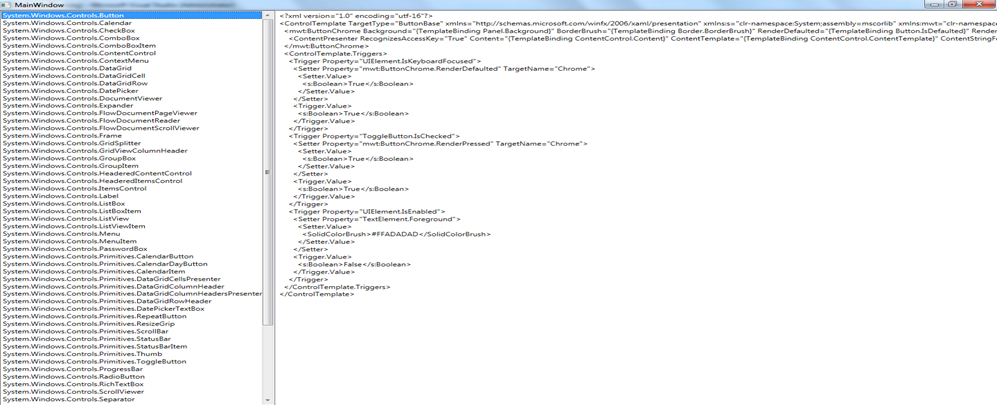
DataTemplate
- DataTemplate支持对数据的表现形式进行自定义,它可以包含任何元素的组合,还应当包含一个或者多个数据绑定表达式,有两种类型的控件支持:
- 内容控件,通过ContentTemplate属性支持数据模板,内容模板用于显示任何放在Content属性中的内容
- 列表控件,继承自ItemsControl的控件,通过ItemTemplate属性支持数据模板,用于显示ItemsSource提供的集合中的每个项。也就是该模板会被用作列表中每个项的ContentTemplate模板,如对于ListBox控件,数据模板会作用与ListBoxItem元素,而对于ComboBox则会作用于ComboBoxItem元素
- DataTemplate支持使用 DataTemplate.DataType来确定使用模板的绑定数据的类型
- 使用下列技术可以使DataTemplate更灵活的表现数据
- DataTrigger:可以根据绑定的数据对象中的属性值使用触发器修改模板中的属性
DataTrigger example<DataTemplate x:Key="DefaultTemplate">

<DataTemplate.Triggers>

<DataTrigger Binding="{Binding Path=CategoryName}" Value="Tools">

<Setter Property="ListBoxItem.Foreground" Value="Red"></Setter>

</DataTrigger>

</DataTemplate.Triggers>

</DataTemplate> - 使用值转换器:实现了IValueConverter接口的类,能够将一个值从绑定的对象转换为可用于设置模板中与格式化相关的属性的值
IValueConverter example<DataTemplate x:Key="DefaultTemplate">

<Image Source="{Binding path=imagePath}" Converters="{StaticResource ImagePathConverter}" />

</DataTemplate> - 使用模板选择器:模板选择器检查绑定的数据对象,并在几个不同的模板之间进行选择。需要继承DataTemplateSelector类,重写SelectTemplate函数。如下代码自定义的SingleHighlightTemplateSelector类包含连个数据模板,并根据属性的值在SelectTemplate函数中选择相应的数据模板
DataTemplateSelector example<ListBox Name="lsProducts" HorizontalContentAlignment="Stretch">

<ListBox.ItemTemplateSelector>

<local:SingleHighlightTemplateSelector

DefaultTemplate="{StaticResource DefaultTemplate}"

HighlightTemplate="{StaticResource HighlighTemplate}"

PropertyoEvaluate="CategoryName"

PropertyValueToHighlight="Travel"></local:SingleHighlightTemplateSelector>

</ListBox.ItemTemplateSelector>

</ListBox>
WPF Template的更多相关文章
- WPF Template模版之DataTemplate与ControlTemplate【一】
WPF Template模版之DataTemplate与ControlTemplate[一] 标签: Wpf模版 2015-04-19 11:52 510人阅读 评论(0) 收藏 举报 分类: -- ...
- WPF Template模版之寻找失落的控件【三】
“井水不犯河水”常用来形容两个组织之间界限分明.互不相干,LogicTree与控件内部这颗小树之间就保持着这种关系.换句话说,如果UI元素树上有个X:Name=“TextBox1”的控件,某个控件内部 ...
- WPF Template模版之DataTemplate与ControlTemplate的关系和应用【二】
1. DataTemplate和ControlTemplate的关系 学习过DataTemplate和ControlTemplate,你应该已经体会到,控件只是数据的行为和载体,是个抽象的概念,至于它 ...
- 【转】WPF Template模版之DataTemplate与ControlTemplate的关系和应用(二)
1. DataTemplate和ControlTemplate的关系 学习过DataTemplate和ControlTemplate,你应该已经体会到,控件只是数据的行为和载体,是个抽象的概念,至于它 ...
- 【转】WPF Template模版之DataTemplate与ControlTemplate(一)
WPF系统不但支持传统的Winfrom编程的用户界面和用户体验设计,更支持使用专门的设计工具Blend进行专业设计,同时还推出了以模板为核心的新一代设计理念. 1. 模板的内涵 作为表现形式,每个控件 ...
- wpf template的code写法
this.Template = XamlReader.Load ("<ControlTemplate xmlns='http://schemas.microsoft.com/clien ...
- .NET: WPF Template
Data Template: 要做一个listBox,里面有车子的简单信息,点了里面的item后就会显示详细信息. car class: using System; using System.Coll ...
- WPF:在ControlTemplate中使用TemplateBinding
A bit on TemplateBinding and how to use it inside a ControlTemplate. Introductio Today I'll try to w ...
- WPF学习(10)模板
在前面一篇我们粗略说了Style和Behaviors,如果要自定义一个个性十足的控件,仅仅用Style和Behaviors是不行的,Style和Behaviors只能通过控件的既有属性来简单改变外观, ...
随机推荐
- 移动端H5页面编辑器开发实战--经验技巧篇
很久前的写的文章了,转载下发到这里 原本地址: https://blog.csdn.net/tech_meizu/article/details/52484775
- crawler4j多线程爬虫统计分析数据
该事例演示了如何在多线程中统计和分析数据: 首先建一个状态实体类CrawlStat: package com.demo.collectingData; /** * 爬虫状态实体类 统计爬虫信息 * @ ...
- Combo Select – jQuery可搜索下拉框插件
今天用到另一款jq插件..插件就是无脑,,引入相关文件,开始撸吧 引入相关文件: <link href="~/Scripts/combo-select/combo.select.css ...
- Spark基本运行流程
不多说,直接上干货! Spark基本运行流程 Application program的组成 Job : 包含多个Task 组成的并行计算,跟Spark action对应. Stage : Job 的调 ...
- 基于Socket的Winform例子
一.直接上效果图 二.Socket握手 三.服务端 Thread threadWatch = null;// 负责监听客户端的线程 Socket socketWatch = null;// 负责监听客 ...
- js文字排序的方法
拼音排序: , b: , b: , b: , b: , b: , b: , b: "不" }]; arr.sort( function compareFunction(param1 ...
- <Android Framework 之路>Android5.1 Camera Framework(二)
上一次讲解了一下CameraService的启动过程,今天梳理一下Camera预览的过程 StartPreview过程 首先,我们还是从应用层的使用入手 Camera.java (packages\a ...
- 配置ip地址四种方法,方便学习linux的朋友
(1)Ifconfig命令 第一种使用ifconfig命令配置网卡的ip地址.此命令通常用来零时的测试用,计算机启动后 ip地址的配置将自动失效.具体用法如下.Ipconfig ethx ip ...
- SQL Server-聚焦聚集索引对非聚集索引的影响
前言 在学习SQL 2012基础教程过程中会时不时穿插其他内容来进行讲解,相信看过SQL Server 2012 T-SQL基础教程的童鞋知道前面写的所有内容并非都是摘抄书上内容,如若是这样那将没 ...
- springboot---web 应用开发-文件上传
一.Spring Boot 默认使用 springMVC 包装好的解析器进行上传 二.添加代码 <form method="POST" enctype="multi ...