
ASP.NET Core 配置 MVC - ASP.NET Core 基础教程 - 简单教程,简单编程
原文:ASP.NET Core 配置 MVC - ASP.NET Core 基础教程 - 简单教程,简单编程
ASP.NET Core 配置 MVC
前面几章节中,我们都是基于 ASP.NET 空项目 模板创建的 HelloWorld 上做开发
通过这个最基本的 HelloWorld 项目,我们了解了很多知识,初窥了 ASP.NET Core,并对 ASP.NET Core 的运行机制有了一个基本的了解
MVC 模式是 Web 开发中最重要的一个模式之一,通过 MVC,我们可以将控制器、模型和视图区分开来
ASP.NET Core 同样支持 MVC 模式,而且是通过中间件的形式来支持 MVC 模式的开发
MVC 中间件
一般情况下,ASP.NET Core 2.1 内置并下载了 Microsoft.AspNetCore.Mvc 程序集
所以我们并不需要使用 NuGet 来做一些额外的安装
我们只需要给我们的应用程序中注册 Microsoft.AspNetCore.Mvc 中间件即可
配置 MVC 中间件
我们需要将 ASP.NET Core MVC 所需的所有服务注册到运行时中
我们在 Startup 类中的 ConfigureServices() 方法中执行此操作
注册完毕后,我们将添加一个简单的控制器,然后使用控制器做一些简单的输出
我们先在跟目录下创建一个目录
Controllers目录,用于存放所有的控制器右键点击 HelloWorld 项目,然后选择 添加 -> 新建文件夹,并把文件夹命名为
Controllers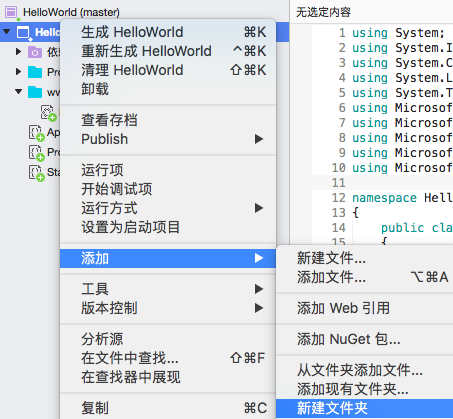
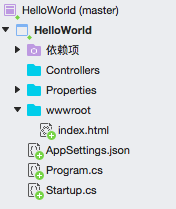
添加完成后 解决方案资源管理器 中显示如下
右键点击
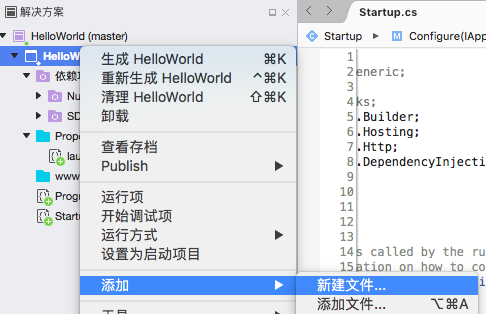
Controllers目录,然后选择 添加 -> 新建文件 打开新建文件对话框如果你的电脑是 Windows ,则是 添加 -> 新建项
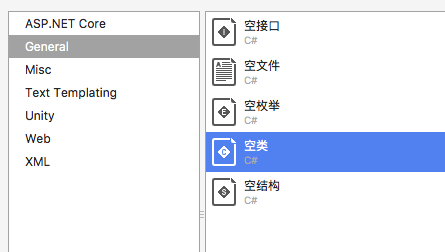
在新建文件对话框中,选中左边的 General,然后选中右边的 空类
如果你的电脑是 Windows ,则是先选中 ASP.NET Core 下的 代码 , 然后选中 类
在名称中输入 HomeController,然后点击右下角的 新建 按钮,创建一个 HomeController.cs 文件
如果你的电脑是 Windows ,则是点击右下角的 新建 按钮

添加完成后 解决方案资源管理器 中显示如下
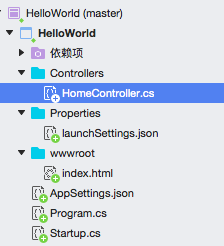
同时可以看到
HomeController.cs中的内容如下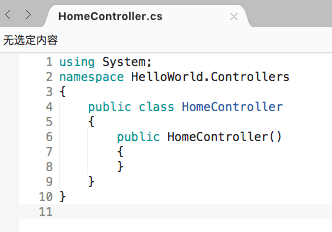
using System;

namespace HelloWorld.Controllers

{

    public class HomeController

    {

        public HomeController()

        {

        }

    }

}
接下来我们将设置
HomeController类为我们的默认控制器,也就是访问/时默认使用HomeController来处理修改
HomeController.cs文件,为类HomeController类添加一个Index()方法public string Index()
{
return "你好,世界! 此消息来自 HomeController...";
}文件全部内容如下
using System;

namespace HelloWorld.Controllers

{

    public class HomeController

    {

        public HomeController()

        {

        }

        public string Index()

        {

            return "你好,世界! 此消息来自 HomeController...";

        }

    }

}
保存 **HomeController.cs
文件,重新启动应用并刷新浏览器,显示的仍然是index.html` 中的内容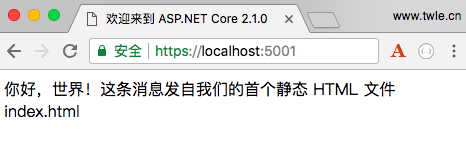
现在,我们删除
wwwroot目录下的index.html文件右键点击
index.html文件,然后选择 删除,在弹出的对话框中点击 删除 按钮然后我们回到
Startup.cs文件中,在Configure()方法中的app.UseFileServer();语句后面添加一条语句app.UseMvcWithDefaultRoute();Startup.cs文件全部代码如下using System;
using System.IO;
using System.Collections.Generic;
using System.Linq;
using System.Threading.Tasks;
using Microsoft.AspNetCore.Builder;
using Microsoft.AspNetCore.Hosting;
using Microsoft.AspNetCore.Http;
using Microsoft.Extensions.DependencyInjection;
using Microsoft.Extensions.Configuration; namespace HelloWorld
{
public class Startup
{
public Startup()
{
var builder = new ConfigurationBuilder()
.SetBasePath(Directory.GetCurrentDirectory())
.AddJsonFile("AppSettings.json");
Configuration = builder.Build();
} public IConfiguration Configuration { get; set; } // This method gets called by the runtime. Use this method to add services to the container.
// For more information on how to configure your application, visit https://go.microsoft.com/fwlink/?LinkID=398940
public void ConfigureServices(IServiceCollection services)
{
} // This method gets called by the runtime. Use this method to configure the HTTP request pipeline.
public void Configure(IApplicationBuilder app, IHostingEnvironment env)
{
if (env.IsDevelopment())
{
app.UseDeveloperExceptionPage();
} app.UseFileServer();
app.UseMvcWithDefaultRoute(); /*
app.Run(async (context) =>
{
var msg = Configuration["message"];
await context.Response.WriteAsync(msg);
});
*/
}
}
}保存 Startup.cs 文件,重新启动应用,会发现启动失败,出错如下
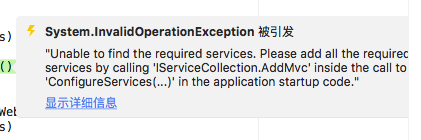
System.InvalidOperationException: "Unable to find the required services. Please add all the required services by calling 'IServiceCollection.AddMvc' inside the call to 'ConfigureServices(...)' in the application startup code."
意思是 ASP.NET Core 没有找到必须的 Mvc 服务
ASP.NET 核心框架本身由具有非常专注的责任的不同小型组件组成
例如,有一个组件必须定位和实例化控制器,但该组件需要位于 ASP.NET Core MVC 的服务集合中才能正常运行
注册 MVC 服务
为了在 ASP.NET Core 中使用 MVC 模式,我们必须在 Startup 类中的 ConfigureServices 方法中添加 AddMvc 服务
public void ConfigureServices(IServiceCollection services)

{

    services.AddMvc();

}
添加成功后,完整的 Startup.cs 文件如下
using System;

using System.IO;

using System.Collections.Generic;

using System.Linq;

using System.Threading.Tasks;

using Microsoft.AspNetCore.Builder;

using Microsoft.AspNetCore.Hosting;

using Microsoft.AspNetCore.Http;

using Microsoft.Extensions.DependencyInjection;

using Microsoft.Extensions.Configuration;

namespace HelloWorld

{

    public class Startup

    {

        public Startup()

        {

            var builder = new ConfigurationBuilder()

                .SetBasePath(Directory.GetCurrentDirectory())

                .AddJsonFile("AppSettings.json");

            Configuration = builder.Build();

        }

        public IConfiguration Configuration { get; set; }

        // This method gets called by the runtime. Use this method to add services to the container.

        // For more information on how to configure your application, visit https://go.microsoft.com/fwlink/?LinkID=398940

        public void ConfigureServices(IServiceCollection services)

        {

            services.AddMvc();

        }

        // This method gets called by the runtime. Use this method to configure the HTTP request pipeline.

        public void Configure(IApplicationBuilder app, IHostingEnvironment env)

        {

            if (env.IsDevelopment())

            {

                app.UseDeveloperExceptionPage();

            }

            app.UseFileServer();

            app.UseMvcWithDefaultRoute();

            /*

            app.Run(async (context) =>

            {

                var msg = Configuration["message"];

                await context.Response.WriteAsync(msg);

            });

            */

        }

    }

}
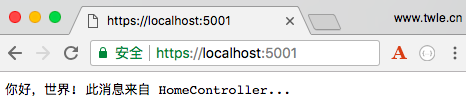
保存 Startup.cs 文件,重新启动应用,刷新浏览器,终于可以看到结果了
ASP.NET Core 配置 MVC - ASP.NET Core 基础教程 - 简单教程,简单编程的更多相关文章
- net core体系-web应用程序-4net core2.0大白话带你入门-4asp.net core配置项目访问地址
asp.net core配置访问地址 .net core web程序,默认使用kestrel作为web服务器. 配置Kestrel Urls有四种方式,我这里只介绍一种.其它方式可自行百度. 在Pr ...
- Asp.net Core基于MVC框架实现PostgreSQL操作
简单介绍 Asp.net Core最大的价值在于跨平台.跨平台.跨平台.重要的事情说三遍.但是目前毕竟是在开发初期,虽然推出了1.0.0 正式版,但是其实好多功能还没有完善.比方说编译时的一些文件编码 ...
- ASP.NET Core Identity 配置 - ASP.NET Core 基础教程 - 简单教程,简单编程
原文:ASP.NET Core Identity 配置 - ASP.NET Core 基础教程 - 简单教程,简单编程 ASP.NET Core Identity 配置 上一章节我们简单介绍了下 Id ...
- ASP.NET Core 配置 EF 框架服务 - ASP.NET Core 基础教程 - 简单教程,简单编程
原文:ASP.NET Core 配置 EF 框架服务 - ASP.NET Core 基础教程 - 简单教程,简单编程 ASP.NET Core 配置 EF 框架服务 上一章节中我们了解了 Entity ...
- ASP.NET Core 配置 Entity Framework Core - ASP.NET Core 基础教程 - 简单教程,简单编程
原文:ASP.NET Core 配置 Entity Framework Core - ASP.NET Core 基础教程 - 简单教程,简单编程 ASP.NET Core 配置 Entity Fram ...
- ASP.NET Core 项目配置 ( Startup ) - ASP.NET Core 基础教程 - 简单教程,简单编程
原文:ASP.NET Core 项目配置 ( Startup ) - ASP.NET Core 基础教程 - 简单教程,简单编程 ASP.NET Core 项目配置 ( Startup ) 前面几章节 ...
- 使用EF Core+CodeFirst建立ASP.NET Core MVC项目
本篇随笔介绍如何使用.NET Core+EF Core创建Web应用程序 首先借用官网的话简单介绍一下ASP.NET Core ASP.NET Core 是一个跨平台的高性能开源框架,用于生成基于云且 ...
- 基于ASP.NET core的MVC站点开发笔记 0x01
基于ASP.NET core的MVC站点开发笔记 0x01 我的环境 OS type:mac Software:vscode Dotnet core version:2.0/3.1 dotnet sd ...
- ASP.NET Core配置Kestrel 网址Urls
ASP.NET Core中如何配置Kestrel Urls呢,大家可能都知道使用UseUrls() 方法来配置. 今天给介绍全面的ASP.NET Core 配置 Urls,使用多种方式配置Urls.让 ...
随机推荐
- linux的任务计划 定时任务 计划任务
例如要定时访问一个指定的url 先看看系统有没有crontab
- 百度地图 layer弹出地图 获取坐标
<!DOCTYPE html> <html lang="en"> <head> <meta charset="UTF-8&quo ...
- Windows Phone 8.1 Tiles, Notifications and Action Center
(1)Tiles Tiles 也就是磁贴,是 Windows Phone 的一大特色. 一个 Tile 其实可以看成是一个 XML,比如: <tile> <visual> &l ...
- bootstrap如何把表单select input button弄在一行
bootstrap很多折叠样式css都已经写好,可以直接用,很方便.但是,如果遇到一些bootstrap文档里面没有的例子,估计很多初学者都懵了,然后会折腾很久也未见得有效.今天主要讲如何把selec ...
- [Angular Testing] Unit Testing -- Test component and service.
Recommend to use angular-cli to generate component and service, so we can get testing templates. ng ...
- deep learning实践经验总结
近期拿caffe来做图片分类.遇到不少问题,同一时候也吸取不少教训和获得不少经验. 先看样例再总结经验. 这是一个2类分类器.分的是条纹衣服和纯色衣服. 先看几张图片. 条纹衣服: 纯色衣服: w ...
- p2p网贷系统的架构设计
p2p网贷系统,标准版已经初步完成了. 最近写点总结,也算是分享吧. 简介:p2p网贷系统,是理财类的互联网金融系统.核心功能,就是理财人用户注册,冲钱,然后投标,标到期之后,收到回款.如果不想 ...
- poj 2689 Prime Distance(大区间筛素数)
http://poj.org/problem?id=2689 题意:给出一个大区间[L,U],分别求出该区间内连续的相差最小和相差最大的素数对. 由于L<U<=2147483647,直接筛 ...
- HelloWorld RabbitMQ
RabbitMQ入门-从HelloWorld开始 从读者的反馈谈RabbitMQ 昨天发完<RabbitMQ入门-初识RabbitMQ>,我陆陆续续收到一些反馈.鉴于部分读者希望结合实例来 ...
- Go语言:正則表達式的使用
Go语言的正則表達式使用非常easy.演示样例代码: package test import ( "fmt" "regexp" ) func RegixBase ...