
js调用ro的webservice
Enabling JavaScript Access on the Server
Drop the JavaScriptHttpDispatcher component onto the server form or data module and connect its Server property to your server channel component. Please pay attention to the default values of its properties: the DefaultFile property is set to index.html, the Folder property is set to .\html and the Path property is set to /js/. This article assumes that these values are left untouched.
Here is a short example of the server components configuration:
lServerChannel := new RemObjectsSDKServerIpHttpServerChannel();

lMessage := new RemObjectsSDKBinMessage();

var lJsDispatsher := new JavaScriptHttpDispatcher(

                          DefaultFile := 'indexhtml',          // default value

                          Path := '/js',                       // default value

                          Folder := 'html',                     // default value

                          Server := lServerChannel              // binding to server channel

                          )
Note: The JavaScriptHttpDispatcher component turns your RemObjects server into a web server, but nothing prevents you from putting your application and library files to any other web server. In this case, you won't need a JavaScriptHttpDispatcher dispatcher, instead you'll need to enable cross-origin access (CORS) support in the server channel by setting its SendCrossOriginHeader property to true and handling its OnSendCrossOriginHeader event if needed.
If you are using JsonMessage, you have to set its WrapResult, SessionIdAsId and SendExtendedException properties to true. For the BinMessage type, its UseCompression property should be disabled, because JavaScript clients don't support BinMessage compression yet.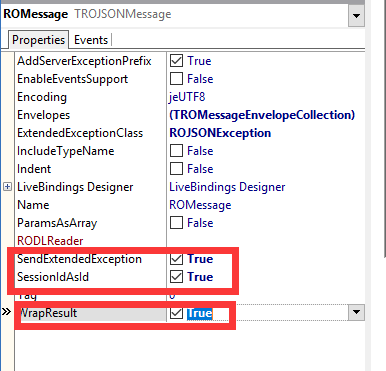
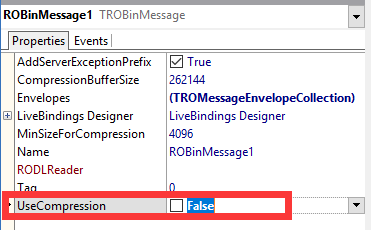
Other message types are not supported.
Interface file generation
Open the server's RODL file. In the RAD Studio click RemObjects menu item. In visual Studio just double-click the .RODL file in Solution Explorer.
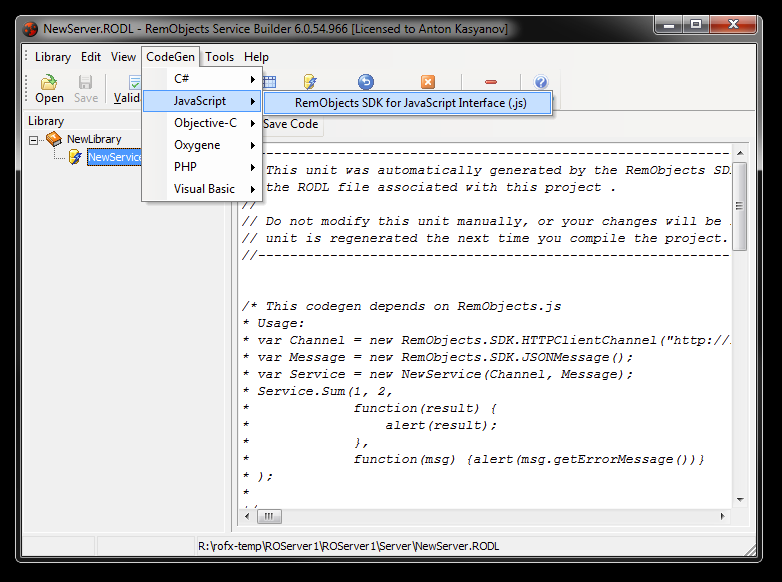
The Service Builder will start. Once it is up click CodeGen, then hit Save code button and save generated JavaScript interface file as NewLibrary_intf.js.
Setting up the client application
In the folder where the server executable file is located, create a subfolder and name it html. Put NewLibrary_intf.js there. Also create html file and save it as index.html to this subfolder.
<html>

  <head>

  </head>

  <body>

    <h1>RemObjects SDK client</h1>

  </body>

</html>
Time to test. Run the server and open http://localhost:8099/js/ in the browser.

Accessing the server
To access the server, the library and generated interface file should
be included into index.html. Also we're adding a link to call method
and a textarea to print results there.
Finally, some coding. We need a channel instance to transfer
requests and responses back and forth, we need a message instance to
encode/decode data and a service proxy instance to hide most
implementation details from us. Proxy method takes callback function as a
parameter and calls it when result has been received from the server.
<html>

  <head>

    <script type="text/javascript" src="RemObjectsSDK.js"></script>

    <script type="text/javascript" src="NewLibrary_intf.js"></script>

  </head>

  <body>

    <h1>RemObjects SDK client</h1>

    <a href="#" onclick="getTime();">Get time</a><br />

    <textarea id="log" rows=10 cols=60></textarea>

    <script type="text/javascript">

      var channel = new RemObjects.SDK.HTTPClientChannel("http://" + window.location.host + "/BIN"); //IE users use JSON

      var message = new RemObjects.SDK.BinMessage();

      var service = new NewService(channel, message);

      function getTime() {

        service.GetServerTime(function(result) {

            document.getElementById("log").value += result + "\n";

        }, RemObjects.UTIL.showError);

      }

    </script>

  </body>

</html>
Note: Internet Explorer doesn't support posting binary data, so JSONMessage should be used. Moreover, in some versions/modes it doesn't support JSON too, then please use any third-party JSON implementation. Most known one - https://github.com/douglascrockford/JSON-js

Conclusion
As you can see, with RemObjects SDK for JavaScript it takes five lines to prepare and another five lines to actually call remote service and get response data from the server.
http://old.wiki.remobjects.com/wiki/How_to_Add_a_RemObjects_SDK_for_JavaScript_Web_Client_to_your_Server_(.NET)
js调用ro的webservice的更多相关文章
- JS调用WebService,发布到IIS,网页提示WebService未定义[已解决]
VS2013中,JS调用WebService,一直运行正常.部署到WindowsServer2008之后,在网页中访问,始终提示网页中有错误,点开之后发现是WebService未定义. 于是上网查解决 ...
- Js 调用 WebService 实例
Html页面代码: <!DOCTYPE html PUBLIC "-//W3C//DTD XHTML 1.1//EN" "http://www.w3.org/TR/ ...
- JS调用webservice服务
webservice服务 webservice服务代码 using System; using System.Collections.Generic; using System.Linq; using ...
- asp.net 练习 js 调用webservice
using System; using System.Collections.Generic; using System.Linq; using System.Web; using System.We ...
- NET-使用Js调用WebService
注:JsWebServiceObject 此类是我做测试示例时为了测试js是否能调用webService中的复合类型而单独新建的一个类 此类中只有名字与年龄的属性. 最近身边的一个朋友做项目,其中有一 ...
- js调用soapWebService服务
js调用soapWebService服务 什么是 SOAP? SOAP 指简易对象访问协议 SOAP 是一种通信协议 SOAP 用于应用程序之间的通信 SOAP 是一种用于发送消息的格式 SOAP 被 ...
- jQuery Ajax 方法调用 Asp.Net WebService 以及调用aspx.cs中方法的详细例子
一.jQuery Ajax 方法调用 Asp.Net WebService (引自Terry Feng) Html文件 <!DOCTYPE html PUBLIC "-//W3C//D ...
- Jquery利用ajax调用asp.net webservice的各种数据类型(总结篇)
原文:Jquery利用ajax调用asp.net webservice的各种数据类型(总结篇) 老话说的好:好记心不如烂笔头! 本着这原则,我把最近工作中遇到的jquery利用ajax调用web服务的 ...
- js调用跨域
web aapi 初体验 解决js调用跨域问题 跨域界定 常见跨域: 同IP不同端口: http:IP:8001/api/user http:IP:8002/api/user 不同IP不同 ...
随机推荐
- 分享tiny4412,emmc烧录u-boot, 支持fastboot模式烧写emmc【转】
本文转载自:http://www.arm9home.net/read.php?tid-80810.html 分享tiny4412,emmc烧录u-boot, 支持fastboot模式烧写emmc ...
- go语言笔记——append是内置的函数!!!new是一个函数!!!调试可以使用闭包,本质上是print调试,尼玛!
内置函数 Go 语言拥有一些不需要进行导入操作就可以使用的内置函数.它们有时可以针对不同的类型进行操作,例如:len.cap 和 append,或必须用于系统级的操作,例如:panic.因此,它们需要 ...
- ngRoute (angular-route.js) 和 ui-router (angular-ui-router.js) 模块有什么不同呢?
ngRoute (angular-route.js) 和 ui-router (angular-ui-router.js) 模块有什么不同呢? 很多文章中都有说道:当时ngRoute在路由配置时用$r ...
- php安全过滤类
/*ansic码-Url码表: http://www.w3school.com.cn/tags/html_ref_urlencode.html ---------------------------- ...
- [Swift通天遁地]六、智能布局-(3)添加edges/top/bottom/leading/trailing的约束
★★★★★★★★★★★★★★★★★★★★★★★★★★★★★★★★★★★★★★★★➤微信公众号:山青咏芝(shanqingyongzhi)➤博客园地址:山青咏芝(https://www.cnblogs. ...
- akka监控
使用akka系统时间就了,你就一定会想着监控的事儿.比如某个actor发送了多少消息.接收了多少消息.消息平均处理时间是多少,当前有多少个actor等等.本来我都用bytebuddy写了个简单的akk ...
- Codeforces 766E
题意:给一棵树(1e5),每个节点上有对应权值(0<=ai<=1e6)定义树上两个节点间的距离为路径中节点的异或,求所有节点对间的距离和(包括节点自身也作为节点对,距离为节点权值). 解题 ...
- 【Leetcode 166】 Fraction to Recurring Decimal
Description: Given two integers representing the numerator and denominator of a fraction, return the ...
- SQL基本操作——约束
我们将主要探讨以下几种约束: 1.NOT NULL 2.UNIQUE 3.PRIMARY KEY 4.FOREIGN KEY 5.CHECK 6.DEFAULT SQL NOTNULL约束:NOT N ...
- java攻城狮之路--复习JDBC(PrepareStatement)
PreparedStatement: 1.可以通过调用 Connection 对象的 preparedStatement() 方法获取 PreparedStatement 对象 2.PreparedS ...