
vue axios应用
编写小的demo应用axios异步请求.
效果图示:
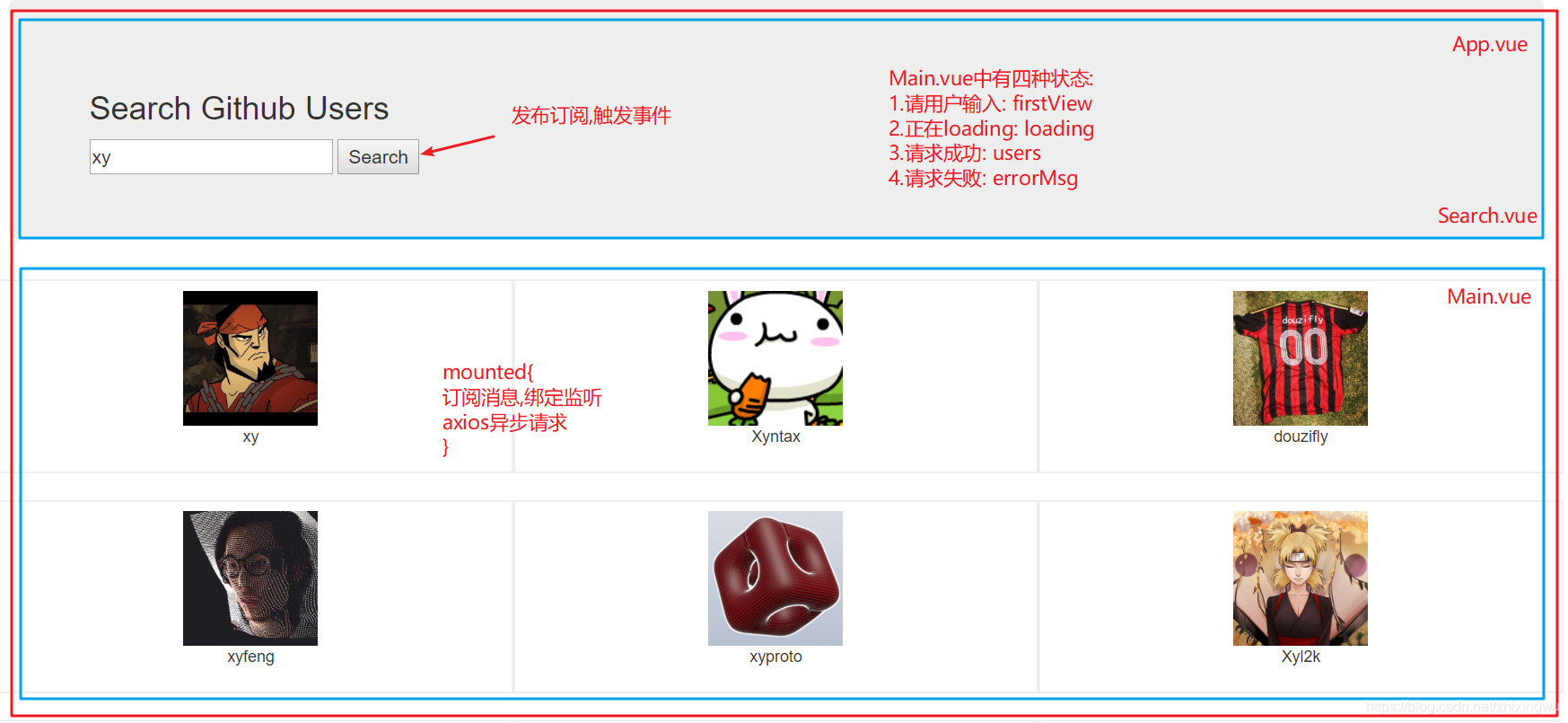
功能: 用户在输入框中输入信息进行搜索,并搜索状态随之改变(四种状态).
项目目录:
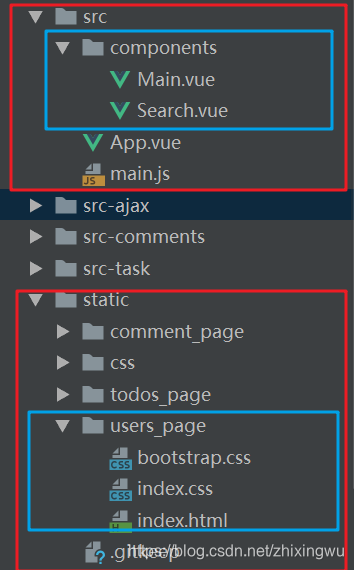
代码:
1.index.html
<!DOCTYPE html>

<html>

  <head>

    <meta charset="utf-8">

    <meta name="viewport" content="width=device-width,initial-scale=1.0">

    <title>vue_demo</title>

    <link rel="stylesheet" href="./static/css/bootstrap.css">

  </head>

  <body>

    <div id="app"></div>

    <!-- built files will be auto injected -->

  </body>

</html>
2.main.js
import Vue from 'vue'

import App from './App'

new Vue({

  el: '#app',

  components: { App },

  template: '<App/>'

})
3.App.vue
<template>

  <div class="container">

    <Search/>

    <users-main/>

  </div>

</template>

<script>

  import Search from './components/Search'

  import Main from './components/Main'

  export default {

    data () {

      return {

      }

    },

    components: {

      Search,

      UsersMain: Main

    }

  }

</script>

<style>

</style>
4.Search.vue
<template>

  <section class="jumbotron">

    <h3 class="jumbotron-heading">Search Github Users</h3>

    <div>

      <input type="text" placeholder="enter the name you search" v-model="searchName"/>

      <button @click="search">Search</button>

    </div>

  </section>

</template>

<script>

  import PubSub from 'pubsub-js'

  export default {

    data() {

      return {

        searchName: ''

      }

    },

    methods: {

      search() {

        // 获取输入信息

        const searchName = this.searchName.trim()

        // console.log(searchName)

        if (searchName){  // 当不为空字符串时

          PubSub.publish('searchInfo', searchName)  // 发布搜索的消息:消息名和数据

        }

      }

    }

  }

</script>

<style>

</style>
5.Main.vue
<template>

  <div>

    <h2 v-if="firstView">请输入用户名进行搜素</h2>

    <h2 v-if="loading">Loading...</h2>

    <h2 v-if="errorMsg">{{errorMsg}}</h2>

    <div class="row">

      <div class="card" v-for="(user,index) in users" :key="index">

        <a :href="user.url" target="_blank">

          <img :src="user.avatar_url" style='width: 100px'/>

        </a>

        <p class="card-text">{{user.name}}</p>

      </div>

    </div>

  </div>

</template>

<script>

  import PubSub from 'pubsub-js'

  import axios from 'axios'

  export default {

    data() {

      return {

        firstView: true,

        loading: false,

        users: null,  // [{url: '', avatar_url: '', name: ''}]

        errorMsg: ''

      }

    },

    mounted() {

      // 订阅搜索的消息,绑定监听; 在点击search按钮后发送ajax请求

      PubSub.subscribe('searchInfo',(msg, searchName) =>{

        // 定义url

        const url = ` https://api.github.com/search/users?q=${searchName}`

        // 更新状态(请求中)

        this.firstView = false

        this.loading = true

        this.users = null   // 这里需重新设置为null,不然加载时会显示上一次users信息

        this.errorMsg = ''

        // 发送ajax请求

        axios.get(url).then(response => {

          // 请求成功

          const result = response.data

          const users = result.items.map(item => ({

            url: item.html_url,

            avatar_url: item.avatar_url,

            name: item.login

          }))

          // 更新状态(成功)

          this.loading = false

          this.users = users

        }).catch(error => {

          // 请求失败(失败)

          this.loading = false

          this.errorMsg = '请求失败'

        })

      })

    }

  }

</script>

<style>

  .card {

    float: left;

    width: 33.333%;

    padding: .75rem;

    margin-bottom: 2rem;

    border: 1px solid #efefef;

    text-align: center;

  }

  .card > img {

    margin-bottom: .75rem;

    border-radius: 100px;

  }

  .card-text {

    font-size: 85%;

  }

</style>
vue axios应用的更多相关文章
- vue axios 取消上次请求
axios.defaults.timeout = 1000 * 5axios.defaults.baseURL = baseUrlvar CancelToken = axios.CancelToken ...
- vue axios拦截器 + 自编写插件 实现全局 loading 效果;
项目需求:用自定义的 .gif 图标实现全局 loading 效果:为避免在每个页面手动添加,且简单高效的实现,经查阅资料,最终采用了 vue axios拦截器 + 自编写 loading 插件:下面 ...
- vue axios使用form-data的形式提交数据的问题
vue axios使用form-data的形式提交数据vue axios request payload form data由于axios默认发送数据时,数据格式是Request Payload,而并 ...
- VUE AXIOS 跨域问题
背景: 后台跨域使用通配符:context.Response.Headers.Add("Access-Control-Allow-Origin", "*"); ...
- vue axios 总结篇
1.npm --save 和 --save-dev 有什么区别 发布到线上的叫生产环境~,在本地开发的时候叫开发环境,--save就是会打包到线上去并且在线上环境能用到的,比如你npm install ...
- 基于Vue + axios + WebApi + NPOI导出Excel文件
一.前言 项目中前端采用的Element UI 框架, 远程数据请求,使用的是axios,后端接口框架采用的asp.net webapi,数据导出成Excel采用NPOI组件.其业务场景,主要是列表页 ...
- vue+axios新手实践实现登陆
vue+axios新手实践实现登陆 https://segmentfault.com/a/1190000015201803 增加 利用HTML5的history.replacestate()修改当前页 ...
- vue+axios+elementUI文件上传与下载
vue+axios+elementUI文件上传与下载 Simple_Learn 关注 0.5 2018.05.30 10:20 字数 209 阅读 15111评论 4喜欢 6 1.文件上传 这里主要 ...
- axios interceptors 拦截 , 页面跳转, token 验证 Vue+axios实现登陆拦截,axios封装(报错,鉴权,跳转,拦截,提示)
Vue+axios实现登陆拦截,axios封装(报错,鉴权,跳转,拦截,提示) :https://blog.csdn.net/H1069495874/article/details/80057107 ...
- Vue+axios(interceptors) 实现http拦截 + router路由拦截 (双拦截)+ 请求自带loading效果
axios interceptors 拦截器 //interceptors.js // vue axios配置 发起请求加载loading请求结束关闭loading // http request 请 ...
随机推荐
- python---注册表操作
手动打开注册表 WIN+R regedit 利用QSettings 一.创建子健和键值对 settings = QSettings("HKEY_CURRENT_USER\\So ...
- iOS中延迟执行和取消的几种方式
公用延迟执行的方法: - (void)delayMethod { NSLog(@"delayMethodEnd"); } 方法一.performSelector 方法 1.延迟执行 ...
- 【ipc-mq】根据mq的key查看使用进程
使用ipcs -q可以得到key与msqid的对应关系,从而找到msgid webadmin@172.172.179.3:/usr/local/webapps/test_ma[17:17:36]$ i ...
- jackson 完整Jar包
Jackson fasterxml和codehaus的区别: 他们是Jackson的两大分支.也是两个版本的不同包名.Jackson从2.0开始改用新的包名fasterxml: 1.x版本的包名是co ...
- c# linq 分组groupby
转载: https://www.cnblogs.com/cncc/p/9846390.html 一.先准备要使用的类: 1.Person类: class Person { public string ...
- win10 搜索框输入没提示
1.点击win, 手动在应用里找到Cortana(小娜) 2. 点右键->更多->应用设置,进入到下面的界面 3. 下拉到最下面,找到“重置”即可
- JavaWeb学习篇之----浏览器缓存问题详解
摘要 1.Etag和Expires中Client 端Http Request Header及Server端Http Reponse Header工作原理. 2.静态下Apache.Lighttpd和N ...
- sweetalert2 全面替代 alert ,从 sweetalert2 弹出 text 到 弹出 Dom 以及模态框和取消 sweetalert2 的 OK 按钮
1. 简易基本版 sweetalert 涵盖日常基本的弹出及对话框 2. 升级版本 sweetalert2 满足常见开发工作中的各种要求 3 取消 OK 按钮, 只需要设置 showConfirmBu ...
- NBU5240备份系统还原数据库--Linux版
利用NBU灾备系统数据库RMAN备份文件还原EHR数据库,将数据库还原到2017-7-10 10:00:00 linux centsos 6.6 原数据库版本 11.2.0.1 IP/hostnam ...
- es入门--curl的使用
文档介绍: 首先要讲什么是文档,我们中大多是java程序员,java是面向对象的,那么在elasticsearch看来:对象和文档是等价的.只不过这个对象是可以被序列化成key-value形式的jso ...