
mybatis 关联查询和嵌套查询的简单示例
两个表:
Customer 顾客表
create table  if not exists customer(
  customer_id int primary key auto_increment,
  first_name varchar(20),
  last_name varchar(20),
  company varchar(20),
  address varchar(20),
  city varchar(20),
  state int ,
  country varchar(20),
  postal_code varchar(20),
  phone varchar(11),
  fax varchar(11),
  email varchar(20),
  support_repld int

);

Invoice 发票表
create table if not exists invoice(
  invoice_id int primary key auto_increment,
  invoice_date date,
  billing_address varchar(20),
  billing_city varchar(20),
  billing_state int ,
  billing_country varchar(20),
  billing_postalCode varchar(20),
  total decimal(10,2),
  customer_id int  references coustomer(customer_id)
);

1、根据两个表合理创建
2、三个类能正确创建出来,并建立友好关系

要求:1、依据发票的id查询发票的信息,请配置映射,要求Invoice与BillingInfo的实例都能正确创建出来。
   2、假定要依据客户的id,查询出客户及其关联的发票信息,请配置映射。

实体类
Customer
package com.oukele.entity_invoice;

import java.util.List;

public class Customer {

    private int customerId;

    private String firstName;

    private String lastName;

    private String company;

    private String address;

    private String city;

    private int state;

    private String country;

    private String postalCode;

    private String phone;

    private String fax;

    private String email;

    private int supportRepId;

    private List<Invoice> invoices;

    public int getCustomerId() {

        return customerId;

    }

    public void setCustomerId(int customerId) {

        this.customerId = customerId;

    }

    public String getFirstName() {

        return firstName;

    }

    public void setFirstName(String firstName) {

        this.firstName = firstName;

    }

    public String getLastName() {

        return lastName;

    }

    public void setLastName(String lastName) {

        this.lastName = lastName;

    }

    public String getCompany() {

        return company;

    }

    public void setCompany(String company) {

        this.company = company;

    }

    public String getAddress() {

        return address;

    }

    public void setAddress(String address) {

        this.address = address;

    }

    public String getCity() {

        return city;

    }

    public void setCity(String city) {

        this.city = city;

    }

    public int getState() {

        return state;

    }

    public void setState(int state) {

        this.state = state;

    }

    public String getCountry() {

        return country;

    }

    public void setCountry(String country) {

        this.country = country;

    }

    public String getPostalCode() {

        return postalCode;

    }

    public void setPostalCode(String postalCode) {

        this.postalCode = postalCode;

    }

    public String getPhone() {

        return phone;

    }

    public void setPhone(String phone) {

        this.phone = phone;

    }

    public String getFax() {

        return fax;

    }

    public void setFax(String fax) {

        this.fax = fax;

    }

    public String getEmail() {

        return email;

    }

    public void setEmail(String email) {

        this.email = email;

    }

    public int getSupportRepId() {

        return supportRepId;

    }

    public void setSupportRepId(int supportRepId) {

        this.supportRepId = supportRepId;

    }

    public List<Invoice> getInvoices() {

        return invoices;

    }

    public void setInvoices(List<Invoice> invoices) {

        this.invoices = invoices;

    }

    @Override

    public String toString() {

        return "Customer{" +

                "customerId=" + customerId +

                ", firstName='" + firstName + '\'' +

                ", lastName='" + lastName + '\'' +

                ", company='" + company + '\'' +

                ", address='" + address + '\'' +

                ", city='" + city + '\'' +

                ", state=" + state +

                ", country='" + country + '\'' +

                ", postalCode='" + postalCode + '\'' +

                ", phone='" + phone + '\'' +

                ", fax='" + fax + '\'' +

                ", email='" + email + '\'' +

                ", supportRepId=" + supportRepId +

                ", invoices=" + invoices +

                '}';

    }

}
BillingInfo
package com.oukele.entity_invoice;

public class BillingInfo {

    private String billingAddress;

    private String billingCity;

    private int billingState;

    private String billingCountry;

    private String billingPostalCode;

    public BillingInfo() {

    }

    public String getBillingAddress() {

        return billingAddress;

    }

    public void setBillingAddress(String billingAddress) {

        this.billingAddress = billingAddress;

    }

    public String getBillingCity() {

        return billingCity;

    }

    public void setBillingCity(String billingCity) {

        this.billingCity = billingCity;

    }

    public int getBillingState() {

        return billingState;

    }

    public void setBillingState(int billingState) {

        this.billingState = billingState;

    }

    public String getBillingCountry() {

        return billingCountry;

    }

    public void setBillingCountry(String billingCountry) {

        this.billingCountry = billingCountry;

    }

    public String getBillingPostalCode() {

        return billingPostalCode;

    }

    public void setBillingPostalCode(String billingPostalCode) {

        this.billingPostalCode = billingPostalCode;

    }

    @Override

    public String toString() {

        return "BillingInfo{" +

                "billingAddress='" + billingAddress + '\'' +

                ", billingCity='" + billingCity + '\'' +

                ", billingState=" + billingState +

                ", billingCountry='" + billingCountry + '\'' +

                ", billingPostalCode='" + billingPostalCode + '\'' +

                '}';

    }

}
Invoice
package com.oukele.entity_invoice;

import java.util.Date;

public class Invoice {

    private int invoiceId;

    private Date invoiceDate;

    private Customer customer;

    private BillingInfo billingInfo;

    private long total;

    public Invoice() {

    }

    public int getInvoiceId() {

        return invoiceId;

    }

    public Customer getCoustomer() {

        return customer;

    }

    public void setCoustomer(Customer customer) {

        this.customer = customer;

    }

    public void setInvoiceId(int invoiceId) {

        this.invoiceId = invoiceId;

    }

    public Date getInvoiceDate() {

        return invoiceDate;

    }

    public void setInvoiceDate(Date invoiceDate) {

        this.invoiceDate = invoiceDate;

    }

    public BillingInfo getBillingInfo() {

        return billingInfo;

    }

    public void setBillingInfo(BillingInfo billingInfo) {

        this.billingInfo = billingInfo;

    }

    public long getTotal() {

        return total;

    }

    public void setTotal(long total) {

        this.total = total;

    }

    @Override

    public String toString() {

        return "Invoice{" +

                "invoiceId=" + invoiceId +

                ", invoiceDate=" + invoiceDate +

                ", customer=" + customer +

                ", billingInfo=" + billingInfo +

                ", total=" + total +

                '}';

    }

}
mybatis配置文件
<?xml version="1.0" encoding="UTF-8" ?>

<!DOCTYPE configuration

        PUBLIC "-//mybatis.org//DTD Config 3.0//EN"

        "http://mybatis.org/dtd/mybatis-3-config.dtd">

<configuration>

    <!--定义一些可以复用的变量-->

    <properties resource="jdbc.properties"></properties>

    <settings>

        <!--<setting name="autoMappingBehavior " value="FULL"/>-->

        <!--配置驼峰映射-->

        <setting name="mapUnderscoreToCamelCase" value="true"/>

    </settings>

    <!--设置别名,简化映射xml的完全限制名的使用-->

    <typeAliases>

        <!--手动-->

        <!--<typeAlias alias="Lnvoice" type="com.oukele.entity.LnvoiceEntity"/>-->

        <!--自动-->

        <package name="com.oukele.entity_invoice"/> <!-- 可以使用 @Alias 注解 -->

        <package name="com.oukele.entity"/>

    </typeAliases>

<!--数据源-->

    <environments default="development">

        <environment id="development">

            <transactionManager type="JDBC"/>

            <dataSource type="POOLED">

                <property name="driver" value="${jdbc.driver}"/>

                <property name="url" value="${jdbc.url}"/>

                <property name="username" value="${jdbc.username}"/>

                <property name="password" value="${jdbc.password}"/>

            </dataSource>

        </environment>

    </environments>

<!--映射文件-->

    <mappers>

        <mapper resource="mapper/EntityMapper2.xml"/>

    </mappers>

</configuration>
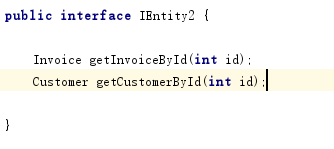
接口方法
映射xml文件
<?xml version="1.0" encoding="UTF-8" ?>

<!DOCTYPE mapper

        PUBLIC "-//mybatis.org//DTD Mapper 3.0//EN"

        "http://mybatis.org/dtd/mybatis-3-mapper.dtd">

<mapper namespace="com.oukele.dao.IEntity2">

    <!-- start 关联查询-->

    <!-- 得到属于Invoice的数据-->

    <select id="getInvoiceById" resultMap="rmInvoice">

       select i.*,c.* from invoice i left join customer c on i.customer_id=c.customer_id  where i.invoice_id=#{id}

    </select>

    <!-- 得到属于Customer的数据 -->

    <select id="getCustomerById" resultMap="rmCustomer">

         select i.*,c.* from invoice i left join customer c on i.customer_id=c.customer_id  where i.customer_id=#{id}

    </select>

    <!--填充Customer类的数据 -->

    <resultMap id="rmCustomer" autoMapping="true" type="Customer">

        <!--使用递归关系     Customer类中的 invoices 要输出要删除,不然会造成递归死循环  -->

        <collection property="invoices" ofType="Invoice" resultMap="rmInvoice" autoMapping="true" javaType="java.util.ArrayList"/>

     </resultMap>

    <!--填充 Invoice类 的数据 -->

    <resultMap id="rmInvoice" autoMapping="true" type="Invoice">

        <association property="billingInfo" autoMapping="true" javaType="BillingInfo"/>

        <association property="customer" autoMapping="true" resultMap="rmCustomer" javaType="Customer"/>

    </resultMap>

    <!--end 关联查询-->

    <!-- start 嵌套查询-->

    <select id="getInvoiceById" parameterType="int" resultMap="rmInvoice">

       select * from invoice  where invoice_id=#{id}

    </select>

    <select id="getBillingInfoById" parameterType="int" resultType="BillingInfo" >

       select

            billing_address,

            billing_city,

            billing_country,

            billing_postalCode,

            billing_state

        from invoice where invoice_id=#{id}

    </select>

    <select id="getCustomerById" resultType="Customer" parameterType="int">

        select c.*,i.* from customer c left  join invoice i on c.customer_id=i.customer_id where i.invoice_id=#{id}

    </select>

    <resultMap id="rmInvoice" autoMapping="true" type="Invoice">

        <association property="billingInfo" autoMapping="true"  column="invoice_id" select="getBillingInfoById"></association>

        <collection property="customer" ofType="Customer" column="invoice_id" select="getCustomerById"></collection>

    </resultMap>

    <!--end 嵌套查询-->

</mapper>
mybatis 关联查询和嵌套查询的简单示例的更多相关文章
- SQL Server 之 子查询与嵌套查询
当由where子句指定的搜索条件指向另一张表时,就需要使用子查询或嵌套查询. 1 子查询 子查询是一个嵌套在select.insert.update或delete语句或其他子查询中的查询.任何允许使用 ...
- SQL数据查询之——嵌套查询
一.概念描述 在SQL语言中,一个 SELECT-FROM-WHERE 语句称为一个查询块.将一个查询块嵌套在另一个查询块的 WHERE 子句或 HAVING 短语的条件中的查询称为 嵌套查询.例如: ...
- SQL基础--查询之三--嵌套查询
SQL基础--查询之三--嵌套查询
- mybatis的嵌套查询(嵌套查询nested select和嵌套结果nested results查询)区别
(转自:http://blog.csdn.net/canot/article/details/51485955) Mybatis表现关联关系比hibernate简单,没有分那么细致one-to-man ...
- Mybatis解决字段与属性不匹配的问题、链表查询、嵌套查询、#{}和${}的区别
1.使用接口结合xml映射文件 创建一个接口,该接口要和映射文件匹配(接口中方法名要和映射文件中的id相同) 映射文件中命名空间要和接口全类名相同 测试: 创建一个与src同级的源文件夹resourc ...
- 数据库开发基础-SQl Server 主键、外键、子查询(嵌套查询)
主键 数据库主键是指表中一个列或列的组合,其值能唯一地标识表中的每一行.这样的一列或多列称为表的主键,通过它可强制表的实体完整性.当创建或更改表时可通过定义 PRIMARY KEY约束来创建主键.一个 ...
- Oracle子查询(嵌套查询)
概念: 所谓子查询,即一个select语句中嵌套了另外的一个或者多个select语句 需求:查找和Smith同部门的所有员工的id和last_name 目标: 员工id,last_name from: ...
- SQL连接查询和嵌套查询详解
连接查询 若一个查询同时涉及两个或两个以上的表,则称之为连接查询.连接查询是数据库中最最要的查询, 包括: 1.等值连接查询 2.自然连接查询 3.非等值连接查询 4.自身连接查询 5.外连接查询 6 ...
- mysql_数据查询_嵌套查询
嵌套查询 一个SELECT-FROM-WHERE语句称为一个查询块. 嵌套查询:将一个查询块嵌套在另一个查询块的WHERE子句或者HAVING短语的条件中的查询. 注:子查询的SELECT语句中不能使 ...
随机推荐
- P1820 【寻找AP数】
超级题目链接 这题程序实现其实并不难,难的是数学的思想及证明,这在真正的比赛考场上其实是不容易想到的 去年的年赛题目也是在往更难的数学思想上靠拢,并不是一味的编程,需要一定的数学基础 这个..数学性质 ...
- python高级 之(五) --- 文件操作
文件操作 """ 在程序中操作的文件内容: 1. 读取文件中的内容 2. 向文件中写入内容 首先: 在程序中与文件建立一个通道,通过通道操作文件指针,达到所要的结果 向文 ...
- 关于虚拟机docker 启动mysql 启动成功但未挂载到端口
首先排查了防火墙和其他权限相关问题 然后检查了mysql 用户权限问题 docker logs 查看日志 正常应该是到3306 问题是我的mysql my.cnf 文件是挂在在本地.当第二次启动容器时 ...
- 常用PostgreSQL HA(高可用)工具收集
PostgreSQL HA Collect: 1.pgpool 2.Pacemaker + Corosync 3.ecox 4.Patroni: A Template for PostgreSQL H ...
- MYSQL—第一部分(简介和windows版本的安装)
一.概述 1.什么是数据库 ? 答:数据的仓库,如:在自己编写的程序中我们创建了一个 db 目录,称其为数据库 2.什么是 MySQL.Oracle.SQLite.Access.MS SQLServe ...
- java多线程的优先性问题
多线程的优先级问题 重点:理解线程优先级的继承性.规则性.随机性 线程的优先级 在操作系统中,线程可以划分优先级,.尽可能多的给优先级高的线程分配更多的CPU资源. 线程的优先级分为1~10,有三个预 ...
- Ruby学习中(条件判断, 循环, 异常处理)
一. 条件判断 详情参看:https://www.runoob.com/ruby/ruby-decision.html 1.详情实例(看看就中了) #---------------# # LOL场均人 ...
- etcd集群安装
etcd 是一个分布式一致性k-v存储系统,可用于服务注册发现与共享配置,具有以下优点:1.简单:相比于晦涩难懂的paxos算法,etcd基于相对简单且易实现的raft算法实现一致性,并通过gRPC提 ...
- Collection接口的子接口——Set接口
https://docs.oracle.com/javase/8/docs/api/java/util/Set.html public interface Set<E> extends ...
- deepin 15.10.1 GTX1060 NVIDIA 驱动安装,双屏显示问题记录
有一段时间没有用Linux了.由于买了个4k的戴尔显示屏,在deepin系统上无法用,从昨晚到现在,总于解决了我的问题! 问题1:无法直接在深度的显卡驱动管理器哪里直接切换,网上看到很多人都有这个问题 ...