
mybatis 关联查询和嵌套查询的简单示例
两个表:
Customer 顾客表
create table  if not exists customer(
  customer_id int primary key auto_increment,
  first_name varchar(20),
  last_name varchar(20),
  company varchar(20),
  address varchar(20),
  city varchar(20),
  state int ,
  country varchar(20),
  postal_code varchar(20),
  phone varchar(11),
  fax varchar(11),
  email varchar(20),
  support_repld int

);

Invoice 发票表
create table if not exists invoice(
  invoice_id int primary key auto_increment,
  invoice_date date,
  billing_address varchar(20),
  billing_city varchar(20),
  billing_state int ,
  billing_country varchar(20),
  billing_postalCode varchar(20),
  total decimal(10,2),
  customer_id int  references coustomer(customer_id)
);

1、根据两个表合理创建
2、三个类能正确创建出来,并建立友好关系

要求:1、依据发票的id查询发票的信息,请配置映射,要求Invoice与BillingInfo的实例都能正确创建出来。
   2、假定要依据客户的id,查询出客户及其关联的发票信息,请配置映射。

实体类
Customer
package com.oukele.entity_invoice;

import java.util.List;

public class Customer {

    private int customerId;

    private String firstName;

    private String lastName;

    private String company;

    private String address;

    private String city;

    private int state;

    private String country;

    private String postalCode;

    private String phone;

    private String fax;

    private String email;

    private int supportRepId;

    private List<Invoice> invoices;

    public int getCustomerId() {

        return customerId;

    }

    public void setCustomerId(int customerId) {

        this.customerId = customerId;

    }

    public String getFirstName() {

        return firstName;

    }

    public void setFirstName(String firstName) {

        this.firstName = firstName;

    }

    public String getLastName() {

        return lastName;

    }

    public void setLastName(String lastName) {

        this.lastName = lastName;

    }

    public String getCompany() {

        return company;

    }

    public void setCompany(String company) {

        this.company = company;

    }

    public String getAddress() {

        return address;

    }

    public void setAddress(String address) {

        this.address = address;

    }

    public String getCity() {

        return city;

    }

    public void setCity(String city) {

        this.city = city;

    }

    public int getState() {

        return state;

    }

    public void setState(int state) {

        this.state = state;

    }

    public String getCountry() {

        return country;

    }

    public void setCountry(String country) {

        this.country = country;

    }

    public String getPostalCode() {

        return postalCode;

    }

    public void setPostalCode(String postalCode) {

        this.postalCode = postalCode;

    }

    public String getPhone() {

        return phone;

    }

    public void setPhone(String phone) {

        this.phone = phone;

    }

    public String getFax() {

        return fax;

    }

    public void setFax(String fax) {

        this.fax = fax;

    }

    public String getEmail() {

        return email;

    }

    public void setEmail(String email) {

        this.email = email;

    }

    public int getSupportRepId() {

        return supportRepId;

    }

    public void setSupportRepId(int supportRepId) {

        this.supportRepId = supportRepId;

    }

    public List<Invoice> getInvoices() {

        return invoices;

    }

    public void setInvoices(List<Invoice> invoices) {

        this.invoices = invoices;

    }

    @Override

    public String toString() {

        return "Customer{" +

                "customerId=" + customerId +

                ", firstName='" + firstName + '\'' +

                ", lastName='" + lastName + '\'' +

                ", company='" + company + '\'' +

                ", address='" + address + '\'' +

                ", city='" + city + '\'' +

                ", state=" + state +

                ", country='" + country + '\'' +

                ", postalCode='" + postalCode + '\'' +

                ", phone='" + phone + '\'' +

                ", fax='" + fax + '\'' +

                ", email='" + email + '\'' +

                ", supportRepId=" + supportRepId +

                ", invoices=" + invoices +

                '}';

    }

}
BillingInfo
package com.oukele.entity_invoice;

public class BillingInfo {

    private String billingAddress;

    private String billingCity;

    private int billingState;

    private String billingCountry;

    private String billingPostalCode;

    public BillingInfo() {

    }

    public String getBillingAddress() {

        return billingAddress;

    }

    public void setBillingAddress(String billingAddress) {

        this.billingAddress = billingAddress;

    }

    public String getBillingCity() {

        return billingCity;

    }

    public void setBillingCity(String billingCity) {

        this.billingCity = billingCity;

    }

    public int getBillingState() {

        return billingState;

    }

    public void setBillingState(int billingState) {

        this.billingState = billingState;

    }

    public String getBillingCountry() {

        return billingCountry;

    }

    public void setBillingCountry(String billingCountry) {

        this.billingCountry = billingCountry;

    }

    public String getBillingPostalCode() {

        return billingPostalCode;

    }

    public void setBillingPostalCode(String billingPostalCode) {

        this.billingPostalCode = billingPostalCode;

    }

    @Override

    public String toString() {

        return "BillingInfo{" +

                "billingAddress='" + billingAddress + '\'' +

                ", billingCity='" + billingCity + '\'' +

                ", billingState=" + billingState +

                ", billingCountry='" + billingCountry + '\'' +

                ", billingPostalCode='" + billingPostalCode + '\'' +

                '}';

    }

}
Invoice
package com.oukele.entity_invoice;

import java.util.Date;

public class Invoice {

    private int invoiceId;

    private Date invoiceDate;

    private Customer customer;

    private BillingInfo billingInfo;

    private long total;

    public Invoice() {

    }

    public int getInvoiceId() {

        return invoiceId;

    }

    public Customer getCoustomer() {

        return customer;

    }

    public void setCoustomer(Customer customer) {

        this.customer = customer;

    }

    public void setInvoiceId(int invoiceId) {

        this.invoiceId = invoiceId;

    }

    public Date getInvoiceDate() {

        return invoiceDate;

    }

    public void setInvoiceDate(Date invoiceDate) {

        this.invoiceDate = invoiceDate;

    }

    public BillingInfo getBillingInfo() {

        return billingInfo;

    }

    public void setBillingInfo(BillingInfo billingInfo) {

        this.billingInfo = billingInfo;

    }

    public long getTotal() {

        return total;

    }

    public void setTotal(long total) {

        this.total = total;

    }

    @Override

    public String toString() {

        return "Invoice{" +

                "invoiceId=" + invoiceId +

                ", invoiceDate=" + invoiceDate +

                ", customer=" + customer +

                ", billingInfo=" + billingInfo +

                ", total=" + total +

                '}';

    }

}
mybatis配置文件
<?xml version="1.0" encoding="UTF-8" ?>

<!DOCTYPE configuration

        PUBLIC "-//mybatis.org//DTD Config 3.0//EN"

        "http://mybatis.org/dtd/mybatis-3-config.dtd">

<configuration>

    <!--定义一些可以复用的变量-->

    <properties resource="jdbc.properties"></properties>

    <settings>

        <!--<setting name="autoMappingBehavior " value="FULL"/>-->

        <!--配置驼峰映射-->

        <setting name="mapUnderscoreToCamelCase" value="true"/>

    </settings>

    <!--设置别名,简化映射xml的完全限制名的使用-->

    <typeAliases>

        <!--手动-->

        <!--<typeAlias alias="Lnvoice" type="com.oukele.entity.LnvoiceEntity"/>-->

        <!--自动-->

        <package name="com.oukele.entity_invoice"/> <!-- 可以使用 @Alias 注解 -->

        <package name="com.oukele.entity"/>

    </typeAliases>

<!--数据源-->

    <environments default="development">

        <environment id="development">

            <transactionManager type="JDBC"/>

            <dataSource type="POOLED">

                <property name="driver" value="${jdbc.driver}"/>

                <property name="url" value="${jdbc.url}"/>

                <property name="username" value="${jdbc.username}"/>

                <property name="password" value="${jdbc.password}"/>

            </dataSource>

        </environment>

    </environments>

<!--映射文件-->

    <mappers>

        <mapper resource="mapper/EntityMapper2.xml"/>

    </mappers>

</configuration>
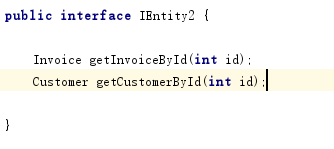
接口方法
映射xml文件
<?xml version="1.0" encoding="UTF-8" ?>

<!DOCTYPE mapper

        PUBLIC "-//mybatis.org//DTD Mapper 3.0//EN"

        "http://mybatis.org/dtd/mybatis-3-mapper.dtd">

<mapper namespace="com.oukele.dao.IEntity2">

    <!-- start 关联查询-->

    <!-- 得到属于Invoice的数据-->

    <select id="getInvoiceById" resultMap="rmInvoice">

       select i.*,c.* from invoice i left join customer c on i.customer_id=c.customer_id  where i.invoice_id=#{id}

    </select>

    <!-- 得到属于Customer的数据 -->

    <select id="getCustomerById" resultMap="rmCustomer">

         select i.*,c.* from invoice i left join customer c on i.customer_id=c.customer_id  where i.customer_id=#{id}

    </select>

    <!--填充Customer类的数据 -->

    <resultMap id="rmCustomer" autoMapping="true" type="Customer">

        <!--使用递归关系     Customer类中的 invoices 要输出要删除,不然会造成递归死循环  -->

        <collection property="invoices" ofType="Invoice" resultMap="rmInvoice" autoMapping="true" javaType="java.util.ArrayList"/>

     </resultMap>

    <!--填充 Invoice类 的数据 -->

    <resultMap id="rmInvoice" autoMapping="true" type="Invoice">

        <association property="billingInfo" autoMapping="true" javaType="BillingInfo"/>

        <association property="customer" autoMapping="true" resultMap="rmCustomer" javaType="Customer"/>

    </resultMap>

    <!--end 关联查询-->

    <!-- start 嵌套查询-->

    <select id="getInvoiceById" parameterType="int" resultMap="rmInvoice">

       select * from invoice  where invoice_id=#{id}

    </select>

    <select id="getBillingInfoById" parameterType="int" resultType="BillingInfo" >

       select

            billing_address,

            billing_city,

            billing_country,

            billing_postalCode,

            billing_state

        from invoice where invoice_id=#{id}

    </select>

    <select id="getCustomerById" resultType="Customer" parameterType="int">

        select c.*,i.* from customer c left  join invoice i on c.customer_id=i.customer_id where i.invoice_id=#{id}

    </select>

    <resultMap id="rmInvoice" autoMapping="true" type="Invoice">

        <association property="billingInfo" autoMapping="true"  column="invoice_id" select="getBillingInfoById"></association>

        <collection property="customer" ofType="Customer" column="invoice_id" select="getCustomerById"></collection>

    </resultMap>

    <!--end 嵌套查询-->

</mapper>
mybatis 关联查询和嵌套查询的简单示例的更多相关文章
- SQL Server 之 子查询与嵌套查询
当由where子句指定的搜索条件指向另一张表时,就需要使用子查询或嵌套查询. 1 子查询 子查询是一个嵌套在select.insert.update或delete语句或其他子查询中的查询.任何允许使用 ...
- SQL数据查询之——嵌套查询
一.概念描述 在SQL语言中,一个 SELECT-FROM-WHERE 语句称为一个查询块.将一个查询块嵌套在另一个查询块的 WHERE 子句或 HAVING 短语的条件中的查询称为 嵌套查询.例如: ...
- SQL基础--查询之三--嵌套查询
SQL基础--查询之三--嵌套查询
- mybatis的嵌套查询(嵌套查询nested select和嵌套结果nested results查询)区别
(转自:http://blog.csdn.net/canot/article/details/51485955) Mybatis表现关联关系比hibernate简单,没有分那么细致one-to-man ...
- Mybatis解决字段与属性不匹配的问题、链表查询、嵌套查询、#{}和${}的区别
1.使用接口结合xml映射文件 创建一个接口,该接口要和映射文件匹配(接口中方法名要和映射文件中的id相同) 映射文件中命名空间要和接口全类名相同 测试: 创建一个与src同级的源文件夹resourc ...
- 数据库开发基础-SQl Server 主键、外键、子查询(嵌套查询)
主键 数据库主键是指表中一个列或列的组合,其值能唯一地标识表中的每一行.这样的一列或多列称为表的主键,通过它可强制表的实体完整性.当创建或更改表时可通过定义 PRIMARY KEY约束来创建主键.一个 ...
- Oracle子查询(嵌套查询)
概念: 所谓子查询,即一个select语句中嵌套了另外的一个或者多个select语句 需求:查找和Smith同部门的所有员工的id和last_name 目标: 员工id,last_name from: ...
- SQL连接查询和嵌套查询详解
连接查询 若一个查询同时涉及两个或两个以上的表,则称之为连接查询.连接查询是数据库中最最要的查询, 包括: 1.等值连接查询 2.自然连接查询 3.非等值连接查询 4.自身连接查询 5.外连接查询 6 ...
- mysql_数据查询_嵌套查询
嵌套查询 一个SELECT-FROM-WHERE语句称为一个查询块. 嵌套查询:将一个查询块嵌套在另一个查询块的WHERE子句或者HAVING短语的条件中的查询. 注:子查询的SELECT语句中不能使 ...
随机推荐
- 云计算共享组件--消息队列rabbitmq(3)
一.MQ 全称为 Message Queue, 消息队列( MQ ) 是一种应用程序对应用程序的通信方法.应用程序通过读写出入队列的消息(针对应用程序的数据)来通信,而无需专用连接来链接它们. 消息传 ...
- win10切换网络位置,加入已经建好的工作网络或者家庭网络时输入密码仍然加不成功时
为了连接办公室的共享打印机,WIN10网络需要加入已经建好的家庭组,本机WIN10已经是专用网络,但是加入家庭组输入家庭组密码后,加不进去: 经过windows错误检测,查出是网络IPV6配置关掉导致 ...
- finereport 填报 单元格 JS 触发 提交SQL 事件
var location = this.options.location; var cr = FR.cellStr2ColumnRow(location); var col = cr.col; var ...
- 【DSP开发】【计算机视觉】EMCV:可在DSP上运行的OpenCV
EMCV:可在DSP上运行的OpenCV EMCV项目主页: http://sf.net/projects/emcv EMCV全称为Embedded Computer Vision Library,是 ...
- 【Linux开发】linux设备驱动归纳总结(八):4.总线热插拔
linux设备驱动归纳总结(八):4.总线热插拔 xxxxxxxxxxxxxxxxxxxxxxxxxxxxxxxxxxxxxxxxxxxxxxxxxxxxxxxxxxxxxxxxxxxxxxxxxxx ...
- SpringCloud(0) 外行人都能看懂的SpringCloud,错过了血亏!
一.前言 只有光头才能变强 认识我的朋友可能都知道我这阵子去实习啦,去的公司说是用SpringCloud(但我觉得使用的力度并不大啊~~)... 所以,这篇主要来讲讲SpringCloud的一些基础的 ...
- C++常见面试题:
一.进程和线程的概念和区别 1.进程是系统进行资源调度的基本单位 2.线程是系统进行运算调度(处理器分配{CPU.内存})的基本单位 二.进程间的通信 进程间的通信共有5种: 1.管道 通常指无名管道 ...
- Python使用pycharm导入pymysql
file->setting->project->project interperter,双击右侧出现的pip,弹出安装包,搜索pymysql->选择第一个->Instal ...
- js中‘0’到底是 true 还是 false
if ('0') alert("'0' is true"); if ('0' == false) alert("'0' is false");结果是,两次都 ...
- c++学习笔记之类和对象(一、类定义)
类和对象是 C++ 的重要特性,它们使得 C++ 成为面向对象的编程语言. 类是创建对象的模板,一个类可以创建多个对象,每个对象都是类类型的一个变量:创建对象的过程也叫类的实例化.每个对象都是类的一个 ...