
[mysql]root用户登录mysql,输入密码后报错:Access denied for user 'root'@'localhost'
问题如下:
wangju@wangju-HP-348-G4:~$ mysql -u root -p

Enter password:

ERROR 1698 (28000): Access denied for user 'root'@'localhost'
解决办法: 分2步
- 配置mysql不用密码也能登录
- 重新配置mysql用户名密码
首先:配置mysql不用密码也能登录
step1:
使用find全局搜索mysql配置文件
root@wangju-HP-348-G4:/home/wangju# find / -name mysqld.cnf

/etc/mysql/mysql.conf.d/mysqld.cnf
step2:
在mysql的配置文件[mysqld]中加入下面这句话:
skip-grant-tables <-- add here
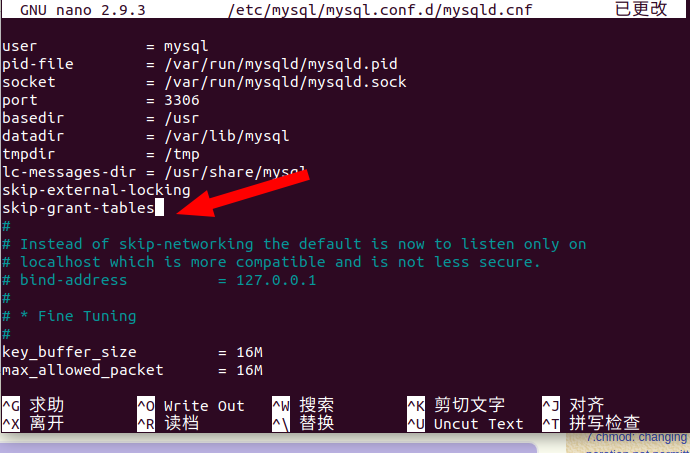
作用:就是让你可以不用密码登录进去mysql。
step3:
保存修改,重新启动mysql
service mysql restart
step4:
在终端上输入mysql -u root -p,遇见输入密码的提示直接回车即可进入mysql
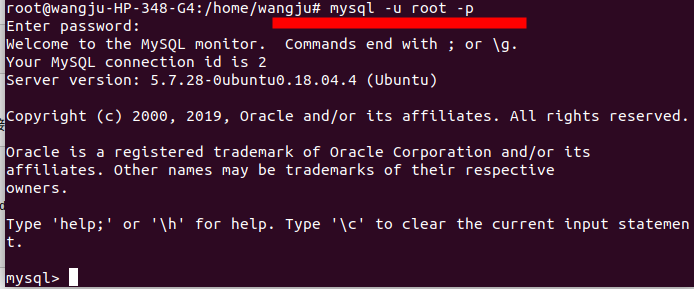
然后:重新配置mysql用户名密码
step1:
进入mysql后分别执行下面三句话配置root用户密码
use mysql;   然后敲回车

update user set authentication_string=password("你的密码") where user="root";  然后敲回车

flush privileges;  然后敲回车
结果如下:
mysql> use mysql;

Reading table information for completion of table and column names

You can turn off this feature to get a quicker startup with -A

Database changed

mysql> update user set authentication_string=password("admin123456") where user="root";

Query OK, 1 row affected, 1 warning (0.02 sec)

Rows matched: 2  Changed: 1  Warnings: 1

mysql> flush privileges;

Query OK, 0 rows affected (0.01 sec)
然后输入quit,退出mysql。
step2:
重新进入到mysqld.cnf文件中去把刚开始加的skip-grant-tables这条语句给注释掉。

再返回终端输入mysql -u root -p,报错:
root@wangju-HP-348-G4:/home/wangju# mysql -u root -p

Enter password:

ERROR 1524 (HY000): Plugin 'auth_socket' is not loaded
再把刚才注释掉的skip-external-locking取消注释,然后重启mysql
执行下面的命令:
use mysql;
#切换数据库

select user,plugin from user;

#查询user表 user列,plugin列的值

#从查询结果可以看出plugin root的字段是auth_socket,把它改为mysql_native_password

update user set authentication_string=password("admin123456"),plugin='mysql_native_password' where user='root';

#更新user表plugin root
执行结果:
mysql> use mysql;

Reading table information for completion of table and column names

You can turn off this feature to get a quicker startup with -A

Database changed

mysql> select user,plugin from user;

+------------------+-----------------------+

| user             | plugin                |

+------------------+-----------------------+

| root             | auth_socket           |

| mysql.session    | mysql_native_password |

| mysql.sys        | mysql_native_password |

| debian-sys-maint | mysql_native_password |

| root             | mysql_native_password |

| tester           | mysql_native_password |

+------------------+-----------------------+

6 rows in set (0.00 sec)

mysql> update user set authentication_string=password("admin123456"),plugin='mysql_native_password' where user='root';

Query OK, 1 row affected, 1 warning (0.00 sec)

Rows matched: 2  Changed: 1  Warnings: 1
再输入select user,plugin from user;回车,我们能看到root用户的字段改成功了。
mysql> select user,plugin from user;

+------------------+-----------------------+

| user             | plugin                |

+------------------+-----------------------+

| root             | mysql_native_password |

| mysql.session    | mysql_native_password |

| mysql.sys        | mysql_native_password |

| debian-sys-maint | mysql_native_password |

| root             | mysql_native_password |

| tester           | mysql_native_password |

+------------------+-----------------------+

6 rows in set (0.00 sec)
step3:
quit退出,再执行step3,重启mysql
结果:
再用mysql -u root -p,回车,输入密码之后,就可以登录成功了
参考文档:
mysql出现ERROR1698(28000):Access denied for user root@localhost错误解决方法
[mysql]root用户登录mysql,输入密码后报错:Access denied for user 'root'@'localhost'的更多相关文章
- linux下mysql登录报错“Access denied for user 'root'@'localhost' (using password: YES”)的处理方法
最近登录某台服务器的mysql时候总报错: Access[root@log01 ~]# mysql -u root -p Enter password: ERROR 1045 (28000): Acc ...
- 网站报错Access denied for user 'root'@'localhost' -问题排查续
网站报错Access denied for user 'root'@'localhost' (using password: YES) 每次的挽救办法就是: /etc/init.d/mysqld st ...
- 运行JavaWeb项目报错Access denied for user 'root'@'localhost' (using password: YES)
问题重现:(以下讨论范围仅限Windows环境): C:\AppServ\MySQL> mysql -u root -p Enter password: ERROR 1045 (28000): ...
- 008-MySQL报错-Access denied for user 'root'@'localhost' (using password: NO)
1.新安装的mysql报错 MySQL报错-Access denied for user 'root'@'localhost' (using password: NO) 解决方案 1.先停掉原来的服务 ...
- mysql登录报错“Access denied for user 'root'@'localhost' (using password: YES”)的处理方法
环境 CentosOS 6.5 ,已安装mysql 情景 root密码忘记,使用普通用户无法登录 解决 问题一 无法使用mysql命令 参考文章:https://www.cnblogs.com/com ...
- MySQL登录报错"Access denied for user 'root'@'localhost' (using password: YES)"
最近登录MySQL时候总报错: # mysql -uroot -p Enter password: ERROR (): Access denied for user 'root'@'localhost ...
- root用户登录mysql后新建用户提示1045错误
执行以下命令查看root权限 show grants for 'root'@'localhost'; 如果没有显示with grant option,说明是root没有拥有新建授权用户的权限(为什么会 ...
- MySQL密码正确却无法本地登录,ERROR 1045 (28000): Access denied for user 'root'@'localhost' (using password: YES)
MySQL密码正确却无法本地登录 报错如下: ERROR 1045 (28000): Access denied for user 'root'@'localhost' (using password ...
- mysql登录遇到ERROR 1045 (28000): Access denied for user 'root'@'localhost' (using password: NO)
执行mysql -uroot -p,出现如下问题 ERROR 1045 (28000): Access denied for user 'root'@'localhost' (using pass ...
随机推荐
- deep_learning_Function_tensorflow_reshape()
numpy.reshape(a, newshape, order='C')[source],参数`newshape`是啥意思? 根据Numpy文档(https://docs.scipy.org/doc ...
- 微软内部封杀 Slack
就在 Slack 在股市上亮相之际,有一家大公司却不允许员工在日常工作中使用这款企业协作和聊天应用软件. 微软已禁止其 100000 多名员工使用免费版 Slack.IT 外媒 GeekWire 报道 ...
- 网上搜到的特别厉害的visio2019激活方法
原文链接:https://blog.csdn.net/godot06/article/details/94141854 步骤如下: 1.电脑新建一个记事本文件.txt(任何地方都可以) 2.复制下面代 ...
- Python with open 使用技巧
在使用Python处理文件的是,对于文件的处理,都会经过三个步骤:打开文件->操作文件->关闭文件.但在有些时候,我们会忘记把文件关闭,这就无法释放文件的打开句柄.这可能觉得有些麻烦,每次 ...
- 阿里云(ecs服务器)使用1-设置安全组
1.进入阿里云的控制台https://ecs.console.aliyun.com/?#/server/region/cn-qingdao,点击管理 2.点击左边的 本实例安全组 3. 点击加入配置规 ...
- oracle 数据库启动停止小结
---登录sqlplus sqlplus /nolog conn / as sysdba shutdown immediate --启动数据库有两种方式 startup 会自动完成重启数据库的所有步 ...
- JavaWeb--ServletContext
https://www.jianshu.com/p/31d27181d542 java类中获取ServletContext的方法 起因是我想要获取一个相对路径,需要用到servletContext的g ...
- linux cp复制目录所有文件
mkdir gpio cp -r build/ /home/yl/gpio 这样就把build目录及所有文件都拷贝到gpio文件夹中.
- std::this_thread::sleep_until
头文件:<thread> (C++11) template<class Clock, class Duration> void sleep_u ...
- Python CGI编程Ⅸ
通过CGI程序传递下拉数据. HTML 下拉框代码如下: dropdown.py 脚本代码如下所示: 修改 dropdown.py 权限: CGI中使用Cookie 在 http 协议一个很大的缺点就 ...