
Run Your Tensorflow Deep Learning Models on Google AI
People commonly tend to put much effort on hyperparameter tuning and training while using Tensoflow&Deep Learning. A realistic problem for TF is how to integrate models into industry: saving pre-trained models, restoring them when necessary, and doing predictions regarding to request input. Fortunately, Google AI helps!
Actually, while a model is trained, tensorflow has two different modes to save it. Most people and blog posts adopt Checkpoint, which refers to 'Training Mode'. The training work continues if someone load the checkpoint. But a drawback is you have to define the architecture once and once again before restore the checkpoint. Another mode called 'SavedModel' is more suitable for serving (release version product). Applications can send prediction requests to a server where the 'SavedModel' is deployed, and then responses will be sent back.
Before that, we only need to follow three steps: save the model properly, deploy it onto Google AI, transform data to required format then request. I am going to illustrate them one by one.
1. Save the model into SavedModel:
In a typical tensorflow training work, architecture is defined first, then it is trained, finally comes to saving part. We just jump to the saving code: the function used here is 'simple_save', and four parameters are session, saving folder, input variable&name, output variable&name.
tf.saved_model.simple_save(sess, 'simple_save/model', \

                           inputs={"x": tf_x},outputs={"pred": pred})
After that, we got the saved model on the target directory:
saved_model.pb
/variables/variables.index
/variables/variables.data-00000-of-00001
2. Deploy SavedModel onto Google AI:
On Google Cloud, files are stored on Google Bucket, so first a Tensorflow model (.pb file and variables folder) need to be uploaded. Then create a Google AI model and a version. Actually there can be multiple versions under a model, which is quite like solving one task by different ways. You can even use several deep learning architectures as
different version, and then switch solutions when request predictions. Versions and Google Bucket location that stores the SavedModel are bound.
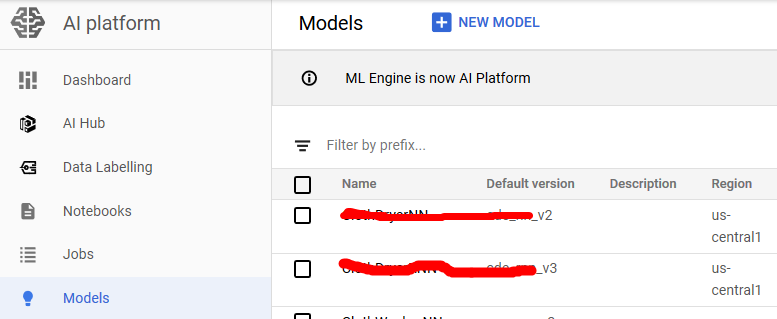
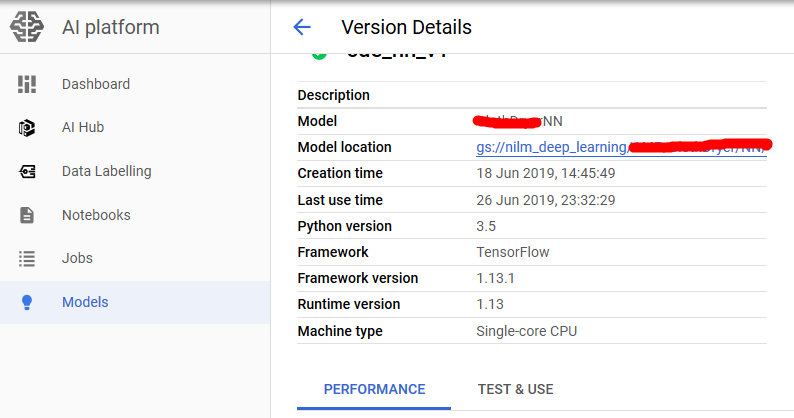
3. Doing online predictions:
Because we request prediction inside the application, and require immediate response, so we choose online prediction. The official code to request is shown below, which is HTTP Request and HTTP Response. The input and output data are all in Json Format. We can transform our input data into List, and call this function.
def predict_json(project, model, instances, version=None):

    """Send json data to a deployed model for prediction.

    Args:

        project (str): project where the AI Platform Model is deployed.

        model (str): model name.

        instances ([Mapping[str: Any]]): Keys should be the names of Tensors

            your deployed model expects as inputs. Values should be datatypes

            convertible to Tensors, or (potentially nested) lists of datatypes

            convertible to tensors.

        version: str, version of the model to target.

    Returns:

        Mapping[str: any]: dictionary of prediction results defined by the

            model.

    """

    # Create the AI Platform service object.

    # To authenticate set the environment variable

    # GOOGLE_APPLICATION_CREDENTIALS=<path_to_service_account_file>

    service = googleapiclient.discovery.build('ml', 'v1')

    name = 'projects/{}/models/{}'.format(project, model)

    if version is not None:

        name += '/versions/{}'.format(version)

    response = service.projects().predict(

        name=name,

        body={'instances': instances}

    ).execute()

    if 'error' in response:

        raise RuntimeError(response['error'])

    return response['predictions']
The response is also in Json format, I wrote a piece of code to transform it into Numpy Array:
def from_json_to_array(dict_list):

    value_list = []

    for dict_instance in dict_list:

        instance = dict_instance.get('pred')

        value_list.append(instance)

    value_array = np.asarray(value_list)

return value_array
Yeah, that's it! Let's get your hands dirty!
Reference:
https://www.tensorflow.org/guide/saved_model
https://cloud.google.com/blog/products/ai-machine-learning/simplifying-ml-predictions-with-google-cloud-functions
https://cloud.google.com/ml-engine/docs/tensorflow/online-predict
Run Your Tensorflow Deep Learning Models on Google AI的更多相关文章
- How to Grid Search Hyperparameters for Deep Learning Models in Python With Keras
Hyperparameter optimization is a big part of deep learning. The reason is that neural networks are n ...
- a Javascript library for training Deep Learning models
w强化算法和数学,来迎接机器学习.神经网络. http://cs.stanford.edu/people/karpathy/convnetjs/ ConvNetJS is a Javascript l ...
- Towards Deep Learning Models Resistant to Adversarial Attacks
目录 概 主要内容 Note Madry A, Makelov A, Schmidt L, et al. Towards Deep Learning Models Resistant to Adver ...
- (转) Awesome Deep Learning
Awesome Deep Learning Table of Contents Free Online Books Courses Videos and Lectures Papers Tutori ...
- What are some good books/papers for learning deep learning?
What's the most effective way to get started with deep learning? 29 Answers Yoshua Bengio, ...
- (转) Deep Learning Resources
转自:http://www.jeremydjacksonphd.com/category/deep-learning/ Deep Learning Resources Posted on May 13 ...
- Machine and Deep Learning with Python
Machine and Deep Learning with Python Education Tutorials and courses Supervised learning superstiti ...
- The Brain vs Deep Learning Part I: Computational Complexity — Or Why the Singularity Is Nowhere Near
The Brain vs Deep Learning Part I: Computational Complexity — Or Why the Singularity Is Nowhere Near ...
- Coursera Deep Learning 2 Improving Deep Neural Networks: Hyperparameter tuning, Regularization and Optimization - week1, Assignment(Regularization)
声明:所有内容来自coursera,作为个人学习笔记记录在这里. Regularization Welcome to the second assignment of this week. Deep ...
随机推荐
- webpack搭建vue项目开发环境【文档向学习】
为何有这篇文章 各个社区已经有无数篇帖子介绍如何使用webpack搭建前端项目,但无论是出于学习webpack的目的还是为了解决工作实际需要都面临着一个现实问题,那就是版本更新.别人的帖子可能刚写好版 ...
- C# log4net 日志写入到数据库
原文:C# log4net 日志写入到数据库 效果图: 1:第一步创建SQL表结构 ? 1 2 3 4 5 6 7 8 9 10 11 12 13 14 15 16 17 18 19 20 21 ...
- go中指针类型的用法小结
代码 // 指针的用法 package main import ( "fmt" ) func main() { var i int = 100 // 输出i的地址 fmt.Prin ...
- 关于JSON使用要注意的地方
1.json 1.JSON对象;(ES5) 1)JSON.stringify() json---js[json字符串--->JavaScript对象] 2 ...
- Nginx针对前端静态资源的缓存处理
当用户上报一个线上的bug后,开发者修改前端代码的bug上新后,用户反映问题依旧存在的问题...这种情况是不是曾经遇到过,这个问题跟浏览器的缓存机制有很大关系(强制缓存和协商缓存,这里我就不介绍具体的 ...
- powerdesigner数据库设计
(1)创建物理数据模型 打开PowerDesigner,然后点击File-->New Model然后选择如下图所示的物理数据模型(物理数据模型的名字自己起,然后选择自己所使用的数据库即可) ( ...
- [USACO07DEC]Sightseeing Cows(负环,0/1分数规划)
[USACO07DEC]Sightseeing Cows Description Farmer John has decided to reward his cows for their hard w ...
- bzoj3772 精神污染 dfs 序+主席树
题目传送门 https://lydsy.com/JudgeOnline/problem.php?id=3772 题解 很简单的一道题目. 上午研究一个题目的时候发现了这个题目是一个弱化版,所以来写了一 ...
- 阿里云ECS VSFTP上传本地文件
开始终端 购买云服务,获得公网IP,内网IP 控制台首页获得 获得终端连接密码 连接终端,输入连接密码 获得终端界面,进入终端 上传文件 ## .安装VSFTP服务器程序 yum install vs ...
- randomForest R 学习笔记
object type randomForest 会根据变量的类型来决定regression或classification.class(iris$Species)是 factor,所以是classif ...