
饿了吗开源组件库Element模拟购物车系统
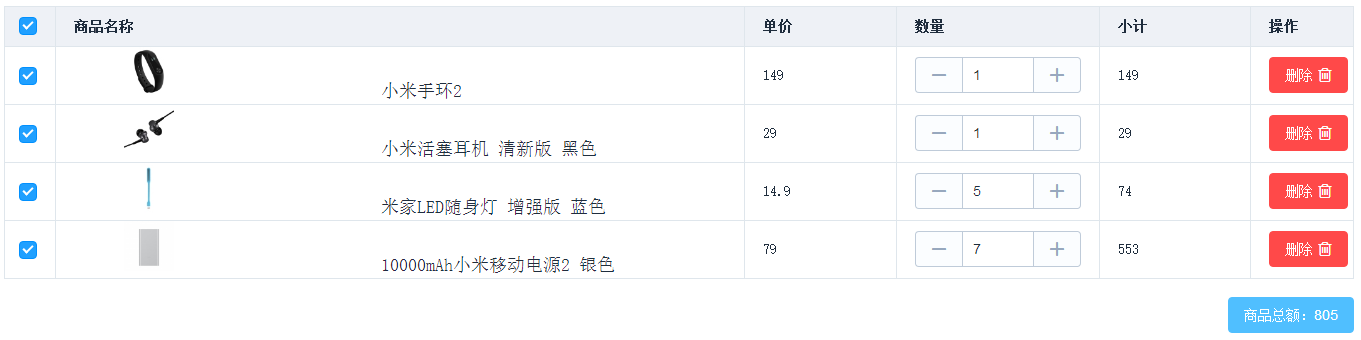
传统的用html+jquery来实现购物车系统要非常的复杂,但是购物车系统完全是一个数据驱动的系统,因此采用诸如Vue.js、angular.js这些框架要简单的多。饿了吗开源的组件库Element是基于Vue.js 2.0实现的,该组件库封装了开发中需要的各种组件,并且提供了友好的API文档供开发者查看,下面就是我用Element实现的一个简单的购物车系统。(https://github.com/iwideal/MyGit/tree/master/HTML/shopping-cart)
首先,我们用Vue.js推荐的命令行工具来搭建项目骨架。

这时候,我们要像maven一样,给项目添加依赖,在package.json文件中添加Element依赖:
  "dependencies": {

    "element-ui": "^1.1.6",

    "vue": "^2.1.0"

  },
添加完依赖之后,这是我们可以在项目中使用依赖了,在main.js文件中,导入ElementUI:
// The Vue build version to load with the `import` command

// (runtime-only or standalone) has been set in webpack.base.conf with an alias.

import Vue from 'vue'

import ElementUI from 'element-ui'

import 'element-ui/lib/theme-default/index.css'

import App from './App.vue'

Vue.use(ElementUI)

/* eslint-disable no-new */

new Vue({

  el: '#app',

  template: '<App/>',

  components: { App }

})
重新安装依赖,走你:
<template>

  <div>

    <el-table

      :data="tableData"

      border

      style="width: 100%"

      @selection-change="selected">

      <el-table-column

        type="selection"

        width="50">

      </el-table-column>

      <el-table-column

        label="商品名称"

        width="680">

        <template scope="scope">

          <div style="margin-left: 50px">

            <img :src="scope.row.goods.img" style="height: 50px;width: 50px">

            <span style="font-size: 18px;padding-left: 200px;">{{scope.row.goods.descript}}</span>

          </div>

        </template>

      </el-table-column>

      <el-table-column

        label="单价"

        width="150"

        prop="price">

      </el-table-column>

      <el-table-column

        label="数量"

        width="200">

        <template scope="scope">

          <div>

            <el-input

              v-model="scope.row.number" @change="handleInput(scope.row)">

              <el-button slot="prepend" @click="del(scope.row)"><i class="el-icon-minus"></i></el-button>

              <el-button slot="append" @click="add(scope.row)"><i class="el-icon-plus"></i></el-button>

            </el-input>

          </div>

        </template>

      </el-table-column>

      <el-table-column

        label="小计"

        width="150"

        prop="goodTotal">

      </el-table-column>

      <el-table-column label="操作">

        <template scope="scope">

          <el-button type="danger" @click="handleDelete(scope.$index, scope.row)">

          删除<i class="el-icon-delete2 el-icon--right"></i>

          </el-button>

        </template>

      </el-table-column>

    </el-table>

    <br>

    <el-button type="info" style="float: right">{{"商品总额:" + moneyTotal}}</el-button>

  </div>

</template>
购物车骨架搭建好之后,我们就可以向里面插入数据了:
data() {

      return {

        tableData: [{

          goods:{

            img:'http://i1.mifile.cn/a1/pms_1474859997.10825620!80x80.jpg',

            descript:'小米手环2',

          },

          price:149,

          number:1,

          goodTotal:149,

        },{

          goods:{

            img:'http://i1.mifile.cn/a1/pms_1482321199.12589253!80x80.jpg',

            descript:'小米活塞耳机 清新版 黑色',

          },

          price:29,

          number:1,

          goodTotal:29,

        },{

          goods:{

            img:'http://i1.mifile.cn/a1/pms_1468288696.74437986!80x80.jpg',

            descript:'米家LED随身灯 增强版 蓝色',

          },

          price:14.9,

          number:1,

          goodTotal:14.9,

        },{

          goods:{

            img:'http://i1.mifile.cn/a1/pms_1476688193.46995320.jpg?width=140&height=140',

            descript:'10000mAh小米移动电源2 银色',

          },

          price:79,

          number:1,

          goodTotal:79,

        }],

        moneyTotal:0,

        multipleSelection:[],

      }

    }
这时候,我们需要对购物车中的各种事件做处理,包括删除商品、增加(减少)商品数量、选中商品等:
methods: {

      handleDelete(index, row) {

        this.$confirm('确定删除该商品?', '提示', {

          confirmButtonText: '确定',

          cancelButtonText: '取消',

          type: 'warning'

        }).then(() => {

          //删除数组中指定的元素

          this.tableData.splice(index,1);

          this.$message({

            type: 'success',

            message: '删除成功!'

          });

        }).catch(() => {

          this.$message({

            type: 'info',

            message: '已取消删除'

          });

        });

      },

      handleInput:function(value){

        if(null==value.number || value.number==""){

          value.number=1;

        }

        value.goodTotal=(value.number*value.price).toFixed(2);//保留两位小数

        //增加商品数量也需要重新计算商品总价

        this.selected(this.multipleSelection);

      },

      add:function(addGood){

        //输入框输入值变化时会变为字符串格式返回到js

        //此处要用v-model,实现双向数据绑定

        if(typeof addGood.number=='string'){

          addGood.number=parseInt(addGood.number);

        };

        addGood.number+=1;

      },

      del:function(delGood){

        if(typeof delGood.number=='string'){

          delGood.number=parseInt(delGood.number);

        };

        if(delGood.number>1){

          delGood.number-=1;

        }

      },

      //返回的参数为选中行对应的对象

      selected:function(selection){

        this.multipleSelection=selection;

        this.moneyTotal=0;

        //此处不支持forEach循环,只能用原始方法了

        for(var i=0;i<selection.length;i++){

          //判断返回的值是否是字符串

          if(typeof selection[i].goodTotal=='string'){

            selection[i].goodTotal=parseInt(selection[i].goodTotal);

          };

          this.moneyTotal+=selection[i].goodTotal;

        }

      },
饿了吗开源组件库Element模拟购物车系统的更多相关文章
- 推荐3个小程序开源组件库——Vant、iView、ColorUI
推荐3个小程序开源组件库 在进行小程序开发时,经常会遇到编写组件方面的阻碍,这让我们花费大量的时间在页面以及 CSS 样式编写上.因此可以使用开源组件库,有些复杂的组件可以直接拿来使用,节省开发时间, ...
- 基于vue2.0前端组件库element中 el-form表单 自定义验证填坑
eleme写的基于vue2.0的前端组件库: http://element.eleme.io 我在平时使用过程中,遇到的问题. 自定义表单验证出坑: 1: validate/resetFields 未 ...
- GearCase UI - 自己构建一套基于 Vue 的简易开源组件库
最近 1 ~ 2 月除了开发小程序之外,还一直在继续深入的学习 Vuejs.利用零碎.闲暇的时间整合了一套基于 Vue 的 UI 组件库.命名为 GearCase UI,意为齿轮盒.现在把该项目进行开 ...
- AndroidUI开源组件库BottomView 第三方自定义UI控件
这里分享一个Android的非常经典实用而且简单方便的第三方UI控件库:BottomView(小米的米UI也用到了这个) 原文 http://blog.csdn.net/opzoonzhuzheng ...
- 官方教程:Apache Kylin和Superset集成,使用开源组件,完美打造OLAP系统
本文转自Apache Kylin公众号apachekylin. Superset 是一个数据探索和可视化平台,设计用来提供直观的,可视化的,交互式的分析体验. Superset 提供了两种分析数据源的 ...
- 如何快速为团队打造自己的组件库(上)—— Element 源码架构
文章已收录到 github,欢迎 Watch 和 Star. 简介 详细讲解了 ElementUI 的源码架构,为下一步基于 ElementUI 打造团队自己的组件库打好坚实的基础. 如何快速为团队打 ...
- 16款优秀的Vue UI组件库推荐
16款优秀的Vue UI组件库推荐 Vue 是一个轻巧.高性能.可组件化的MVVM库,API简洁明了,上手快.从Vue推出以来,得到众多Web开发者的认可.在公司的Web前端项目开发中,多个项目采用基 ...
- [转载]前端——实用UI组件库
https://www.cnblogs.com/xuepei/p/7920888.html Angular UI 组件 ngx-bootstrap 是一套Bootstrap 组件 官网:https:/ ...
- 强烈推荐优秀的Vue UI组件库
Vue 是一个轻巧.高性能.可组件化的MVVM库,API简洁明了,上手快.从Vue推出以来,得到众多Web开发者的认可.在公司的Web前端项目开发中,多个项目采用基于Vue的UI组件框架开发,并投入正 ...
随机推荐
- Python (2) 除法
/ 除法 自动转化为浮动数 // 整除 只保留整数部分 >>> 2/21.0>>> 2//21>>> 1 ...
- 【转载】 原生js判断某个元素是否滚动到底部
document.querySelector('.content').addEventListener('scroll',function () { //读取内容区域的真实高度(滚动条高) // co ...
- 与Swing的相识
参考自http://c.biancheng.net/swing/ Swing是一个用于Java GUI编程(图形界面设计)的工具包(类库):换句话说,java可以用来开发带界面的PC软件,使用到的工具 ...
- 部署至Oracle数据库的注意事项
部署至Oracle数据库的注意事项 安装数据库之前1)检查计算机名,如果是乱码,改一下名字 2)有杀毒软件,能关则关 但是最好征求用户的同意 3)装两个一起解压databa ...
- 自己动手实现一个网络模型 python
转自:https://www.jianshu.com/p/4b30e1dd2252 common_funcs.py import numpy as np import matplotlib.pyplo ...
- delphi exec error 错误处理
有时引用了三方jar后报错 [Exec Error] The command "PATH ..."" exited with code 1 解决方法 1.检测jar文件路 ...
- echart-如何将x轴和y轴的原点进行重合???
设计稿突然让x轴 和y轴重合,我们可以设置图中的这个属性. 不知道还有没有别的设置属性,欢迎评论指出谢谢
- codeforces D Salary Changing
题意:给你n个人,和s块钱,每个人都有一个工资区间,你给所有人都发工资.然后要他们工资的中位数最大. 思路:二分找那个值.那个值要满足至少有n/2+1个工资区间内. #include<cstdi ...
- IDEA插件之自动查找bug工具
打开idea 插件搜索界面 输入 FindBugs-IDEA,安装完成后重启,选中要查找的包,右键找到对应的 FindBugs就可以开始进行自动扫描了
- 《SQL Server 2012 T-SQL基础》读书笔记 - 10.可编程对象
Chapter 10 Programmable Objects 声明和赋值一个变量: DECLARE @i AS INT; SET @i = 10; 变量可以让你暂时存一个值进去,然后之后再用,作用域 ...