
filebeat配置详解
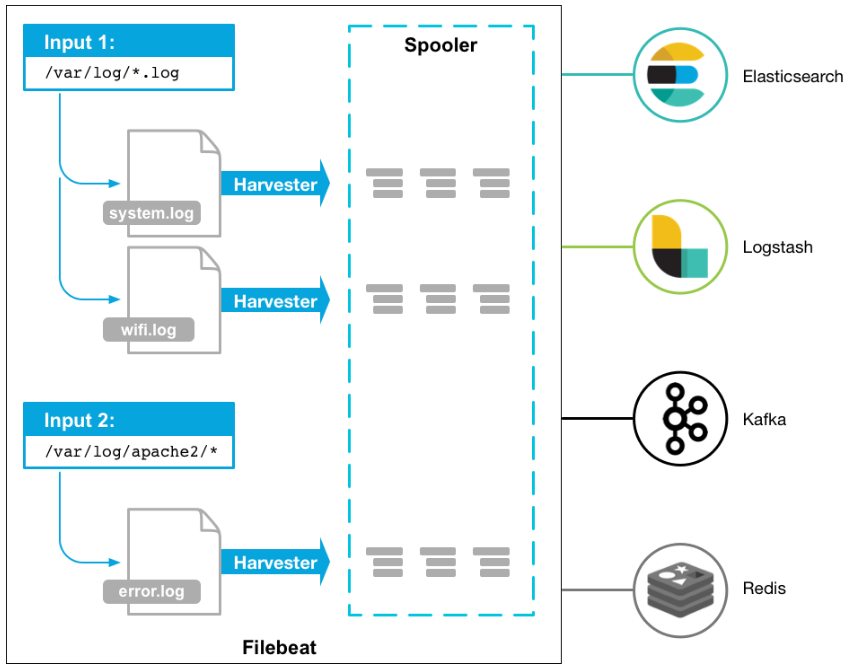
详细讲解,请参考官网:https://www.elastic.co/guide/en/beats/filebeat/current/configuring-howto-filebeat.html
filebeat.yml的格式如下,我们主要了解从log中输入的相应配置
filebeat.inputs:

- input_type: log

paths:

- /var/log/apache/httpd-*.log

document_type: apache

- input_type: log

paths:

- /var/log/messages

- /var/log/*.log
Filebeat Options
input_type: log
指定输入类型
paths
支持基本的正则,所有golang glob都支持,支持/var/log/*/*.log
encoding
plain, latin1, utf-8, utf-16be-bom, utf-16be, utf-16le, big5, gb18030, gbk, hz-gb-2312,

euc-kr, euc-jp, iso-2022-jp, shift-jis, and so on

exclude_lines
支持正则 排除匹配的行,如果有多行,合并成一个单一行来进行过滤
include_lines
支持正则 include_lines执行完毕之后会执行exclude_lines。
exclude_files
支持正则 排除匹配的文件
exclude_files: ['.gz$']
tags
列表中添加标签,用过过滤
filebeat.inputs:
- paths: ["/var/log/app/*.json"]
tags: ["json"]
fields
可选字段,选择额外的字段进行输出
可以是标量值,元组,字典等嵌套类型
默认在sub-dictionary 位置
filebeat.inputs:
- paths: ["/var/log/app/*.log"]
fields:
app_id: query_engine_12
fields_under_root
如果值为ture,那么fields存储在输出文档的顶级位置
如果与filebeat中字段冲突,自定义字段会覆盖其他字段
fields_under_root: true

fields:

instance_id: i-10a64379

region: us-east-1

ignore_older
可以指定Filebeat忽略指定时间段以外修改的日志内容
文件被忽略之前,确保文件不在被读取,必须设置ignore older时间范围大于close_inactive
如果一个文件正在读取时候被设置忽略,它会取得到close_inactive后关闭文件,然后文件被忽略
close_*
close_ *配置选项用于在特定标准或时间之后关闭harvester。 关闭harvester意味着关闭文件处理程序。 如果在harvester关闭后文件被更新,则在scan_frequency过后,文件将被重新拾取。 但是,如果在harvester关闭时移动或删除文件,Filebeat将无法再次接收文件,并且harvester未读取的任何数据都将丢失。
close_inactive
启动选项时,如果在制定时间没有被读取,将关闭文件句柄
读取的最后一条日志定义为下一次读取的起始点,而不是基于文件的修改时间
如果关闭的文件发生变化,一个新的harverster将在scan_frequency运行后被启动
建议至少设置一个大于读取日志频率的值,配置多个prospector来实现针对不同更新速度的日志文件
使用内部时间戳机制,来反映记录日志的读取,每次读取到最后一行日志时开始倒计时
使用2h 5m 来表示
recursive_glob.enabled 递归匹配日志文件,默认false
close_rename
当选项启动,如果文件被重命名和移动,filebeat关闭文件的处理读取
close_removed
当选项启动,文件被删除时,filebeat关闭文件的处理读取
这个选项启动后,必须启动clean_removed
close_eof
适合只写一次日志的文件,然后filebeat关闭文件的处理读取
close_timeout
当选项启动时,filebeat会给每个harvester设置预定义时间,不管这个文件是否被读取,达到设定时间后,将被关闭
close_timeout 不能等于ignore_older,会导致文件更新时,不会被读取
如果output一直没有输出日志事件,这个timeout是不会被启动的,至少要要有一个事件发送,然后haverter将被关闭
设置0 表示不启动
clean_inactived
从注册表文件中删除先前收获的文件的状态
设置必须大于ignore_older+scan_frequency,以确保在文件仍在收集时没有删除任何状态
配置选项有助于减小注册表文件的大小,特别是如果每天都生成大量的新文件
此配置选项也可用于防止在Linux上重用inode的Filebeat问题
clean_removed
启动选项后,如果文件在磁盘上找不到,将从注册表中清除filebeat
如果关闭close removed 必须关闭clean removed
scan_frequency
prospector 检查指定用于收获的路径中的新文件的频率,默认10s
document_type
类型事件,被用于设置输出文档的type字段,默认是log
harvester_buffer_size
每次harvester读取文件缓冲字节数,默认是16384
max_bytes
对于多行日志信息,很有用,最大字节数
json
这些选项使Filebeat解码日志结构化为JSON消息
逐行进行解码json
keys_under_root
设置key为输出文档的顶级目录
overwrite_keys
覆盖其他字段
add_error_key
定一个json_error
message_key
指定json 关键建作为过滤和多行设置,与之关联的值必须是string
multiline
控制filebeat如何处理跨多行日志的选项,多行日志通常发生在java堆栈中
multiline.pattern: '^\['
multiline.negate: true
multiline.match: after
上面匹配是将多行日志所有不是以[符号开头的行合并成一行它可以将下面的多行日志进行合并成一行
Exception in thread "main" java.lang.NullPointerException

at com.example.myproject.Book.getTitle(Book.java:16)

at com.example.myproject.Author.getBookTitles(Author.java:25)

at com.example.myproject.Bootstrap.main(Bootstrap.java:14)

multiline.pattern
指定匹配的正则表达式,filebeat支持的regexp模式与logstash支持的模式有所不同
pattern regexp
multiline.negate
定义上面的模式匹配条件的动作是 否定的,默认是false
假如模式匹配条件'^b',默认是false模式,表示讲按照模式匹配进行匹配 将不是以b开头的日志行进行合并
如果是true,表示将不以b开头的日志行进行合并
multiline.match
指定Filebeat如何将匹配行组合成事件,在之前或者之后,取决于上面所指定的negate
multiline.max_lines
可以组合成一个事件的最大行数,超过将丢弃,默认500
multiline.timeout
定义超时时间,如果开始一个新的事件在超时时间内没有发现匹配,也将发送日志,默认是5s
tail_files
如果此选项设置为true,Filebeat将在每个文件的末尾开始读取新文件,而不是开头
此选项适用于Filebeat尚未处理的文件
symlinks
符号链接选项允许Filebeat除常规文件外,可以收集符号链接。收集符号链接时,即使报告了符号链接的路径,Filebeat也会打开并读取原始文件。
backoff
backoff选项指定Filebeat如何积极地抓取新文件进行更新。默认1s
backoff选项定义Filebeat在达到EOF之后再次检查文件之间等待的时间。
max_backoff
在达到EOF之后再次检查文件之前Filebeat等待的最长时间
backoff_factor
指定backoff尝试等待时间几次,默认是2
harvester_limit
harvester_limit选项限制一个prospector并行启动的harvester数量,直接影响文件打开数
enabled
控制prospector的启动和关闭
filebeat global
spool_size
事件发送的阀值,超过阀值,强制刷新网络连接
filebeat.spool_size: 2048
publish_async
异步发送事件,实验性功能
idle_timeout
事件发送的超时时间,即使没有超过阀值,也会强制刷新网络连接
filebeat.idle_timeout: 5s
registry_file
注册表文件的名称,如果使用相对路径,则被认为是相对于数据路径
有关详细信息,请参阅目录布局部分 默认值为${path.data}/registry
filebeat.registry_file: registry
config_dir
包含额外的prospector配置文件的目录的完整路径
每个配置文件必须以.yml结尾
每个配置文件也必须指定完整的Filebeat配置层次结构,即使只处理文件的prospector部分。
所有全局选项(如spool_size)将被忽略
必须是绝对路径
filebeat.config_dir: path/to/configs
shutdown_timeout
Filebeat等待发布者在Filebeat关闭之前完成发送事件的时间。
Filebeat General
name
设置名字,如果配置为空,则用该服务器的主机名
name: "my-shipper"
queue_size
单个事件内部队列的长度 默认1000
bulk_queue_size
批量事件内部队列的长度
max_procs
设置最大使用cpu数量
geoip.paths
此配置选项目前仅由Packetbeat使用,它将在6.0版中删除
要使GeoIP支持功能正常,GeoLite City数据库是必需的。
geoip:

paths:

  - "/usr/share/GeoIP/GeoLiteCity.dat"

  - "/usr/local/var/GeoIP/GeoLiteCity.dat"
Filebeat reload
属于测试功能
path
定义要检查的配置路径
reload.enabled
设置为true时,启用动态配置重新加载。
reload.period
定义要检查的间隔时间
filebeat.config.inputs:

path: configs/*.yml

reload.enabled: true

reload.period: 10s
一般配置:
###################### Filebeat Configuration Example #########################

# This file is an example configuration file highlighting only the most common

# options. The filebeat.reference.yml file from the same directory contains all the

# supported options with more comments. You can use it as a reference.

#

# You can find the full configuration reference here:

# https://www.elastic.co/guide/en/beats/filebeat/index.html

# For more available modules and options, please see the filebeat.reference.yml sample

# configuration file.

#=========================== Filebeat inputs =============================

#=========================== Filebeat 输入配置 ===========================

filebeat.inputs:

# Each - is an input. Most options can be set at the input level, so

# you can use different inputs for various configurations.

# Below are the input specific configurations.

# 输入filebeat的类型,包括log(具体路径的日志),stdin(键盘输入),redis,udp,docker,tcp,syslog,可以同时配置多个(包括相同类型的)

# 具体的每种类型的配置信息可以通过官网:https://www.elastic.co/guide/en/beats/filebeat/current/configuration-filebeat-options.html 了解

- type: log

  # Change to true to enable this input configuration.

  # 配置是否生效

  enabled: true

  # Paths that should be crawled and fetched. Glob based paths.

  # 指定要监控的日志,可以指定具体得文件或者目录

  paths:

    #- /var/log/*.log (这是默认的,自行可以修改)

    - /usr/local/tomcat/logs/catalina.out

  # Exclude lines. A list of regular expressions to match. It drops the lines that are

  # matching any regular expression from the list.

  # 在输入中排除符合正则表达式列表的那些行。

  #exclude_lines: ['^DBG']

  # Include lines. A list of regular expressions to match. It exports the lines that are

  # matching any regular expression from the list.

  # 包含输入中符合正则表达式列表的那些行(默认包含所有行),include_lines执行完毕之后会执行exclude_lines

  #include_lines: ['^ERR', '^WARN']

  # Exclude files. A list of regular expressions to match. Filebeat drops the files that

  # are matching any regular expression from the list. By default, no files are dropped.

  # 忽略掉符合正则表达式列表的文件

  #exclude_files: ['.gz$']

  # Optional additional fields. These fields can be freely picked

  # to add additional information to the crawled log files for filtering

  # 向输出的每一条日志添加额外的信息,比如“level:debug”,方便后续对日志进行分组统计。

  # 默认情况下,会在输出信息的fields子目录下以指定的新增fields建立子目录,例如fields.level

  # 这个得意思就是会在es中多添加一个字段,格式为 "filelds":{"level":"debug"}

  #fields:

  #  level: debug

  #  review: 1

  #  module: mock

  ### Multiline options

  ### 日志中经常会出现多行日志在逻辑上属于同一条日志的情况,所以需要multiline参数来详细阐述。

  # Multiline can be used for log messages spanning multiple lines. This is common

  # for Java Stack Traces or C-Line Continuation

  # The regexp Pattern that has to be matched. The example pattern matches all lines starting with [

  # 多行匹配正则表达式,比如:用空格开头(^[[:space:]]),或者是否以[开头(^\[)。正则表达式是非常复杂的,详细见filebeat的正则表达式官方链接:https://www.elastic.co/guide/en/beats/filebeat/current/regexp-support.html

  multiline.pattern: ^\[

  # Defines if the pattern set under pattern should be negated or not. Default is false.

  # 该参数意思是是否否定多行融入。

  #multiline.negate: false

  # Match can be set to "after" or "before". It is used to define if lines should be append to a pattern

  # that was (not) matched before or after or as long as a pattern is not matched based on negate.

  # Note: After is the equivalent to previous and before is the equivalent to to next in Logstash

  # 取值为after或before。该值与上面的pattern与negate值配合使用

  # ----------------------------------------------------------------------------------------------------

  #|multiline.pattern|multiline.negate|multiline.match|                      结论                      |

  # ----------------------------------------------------------------------------------------------------

  #|      true      |    true        |    before    |表示匹配行是结尾,和前面不匹配的组成一行完整的日志|

  # ----------------------------------------------------------------------------------------------------

  #|      true      |    true        |    after    |表示匹配行是开头,和后面不匹配的组成一行完整的日志|

  # ----------------------------------------------------------------------------------------------------

  #|      true      |    false      |    before    |表示匹配的行和后面不匹配的一行组成一行完整的日志 |

  # ----------------------------------------------------------------------------------------------------

  #|      true      |    false      |    after    |表示匹配的行和前面不匹配的一行组成一行完整的日志 |

  # ----------------------------------------------------------------------------------------------------

  multiline.match: after

  # Specifies a regular expression, in which the current multiline will be flushed from memory, ending the multiline-message.

  # 表示符合该正则表达式的,将从内存刷入硬盘。

  #multiline.flush_pattern

  # The maximum number of lines that can be combined into one event.

  # If the multiline message contains more than max_lines, any additional lines are discarded. The default is 500.

  # 表示如果多行信息的行数超过该数字,则多余的都会被丢弃。默认值为500行

  #multiline.max_lines: 500

  # After the specified timeout, Filebeat sends the multiline event even if no new pattern is found to start a new event. The default is 5s.

  # 表示超过timeout的时间(秒)还没有新的一行日志产生,则自动结束当前的多行、形成一条日志发出去

  #multiline.timeout: 5

#============================= Filebeat modules ===============================

# 引入filebeat的module配置

filebeat.config.modules:

  # Glob pattern for configuration loading

  path: ${path.config}/modules.d/*.yml

  # Set to true to enable config reloading

  # 是否允许重新加载

  reload.enabled: false

  # Period on which files under path should be checked for changes

  # 重新加载的时间间隔

  #reload.period: 10s

#==================== Elasticsearch template setting ==========================

# Elasticsearch模板配置

setup.template.settings:

  # 数据分片数

  index.number_of_shards: 3

  # 数据分片备份数

  #index.number_of_replicas: 1

  #index.codec: best_compression

  #_source.enabled: false

#================================ General =====================================

# The name of the shipper that publishes the network data. It can be used to group

# all the transactions sent by a single shipper in the web interface.

# 设置filebeat的名字,如果配置为空,则用该服务器的主机名

#name:

# The tags of the shipper are included in their own field with each

# transaction published.

# 额外添加的tag标签

#tags: ["service-X", "web-tier"]

# Optional fields that you can specify to add additional information to the

# output.

# 额外添加的字段和值

#fields:

#  env: staging

#============================== Dashboards =====================================

# dashboards的相关配置

# These settings control loading the sample dashboards to the Kibana index. Loading

# the dashboards is disabled by default and can be enabled either by setting the

# options here, or by using the `-setup` CLI flag or the `setup` command.

# 是否启用仪表盘

#setup.dashboards.enabled: false

# The URL from where to download the dashboards archive. By default this URL

# has a value which is computed based on the Beat name and version. For released

# versions, this URL points to the dashboard archive on the artifacts.elastic.co

# website.

# 仪表盘地址

#setup.dashboards.url:

#============================== Kibana =====================================

# kibana的相关配置

# Starting with Beats version 6.0.0, the dashboards are loaded via the Kibana API.

# This requires a Kibana endpoint configuration.

setup.kibana:

  # Kibana Host

  # Scheme and port can be left out and will be set to the default (http and 5601)

  # In case you specify and additional path, the scheme is required: http://localhost:5601/path

  # IPv6 addresses should always be defined as: https://[2001:db8::1]:5601

  # kibana地址

  #host: "localhost:5601"

  # Kibana Space ID

  # ID of the Kibana Space into which the dashboards should be loaded. By default,

  # the Default Space will be used.

  # kibana的空间ID

  #space.id:

#============================= Elastic Cloud ==================================

# These settings simplify using filebeat with the Elastic Cloud (https://cloud.elastic.co/).

# The cloud.id setting overwrites the `output.elasticsearch.hosts` and

# `setup.kibana.host` options.

# You can find the `cloud.id` in the Elastic Cloud web UI.

#cloud.id:

# The cloud.auth setting overwrites the `output.elasticsearch.username` and

# `output.elasticsearch.password` settings. The format is `<user>:<pass>`.

#cloud.auth:

#================================ Outputs =====================================

# 输出配置

# Configure what output to use when sending the data collected by the beat.

#-------------------------- Elasticsearch output ------------------------------

# 输出到es

#output.elasticsearch:

  # Array of hosts to connect to.

  # ES地址

  # hosts: ["localhost:9200"]

  # ES索引

  # index: "filebeat-%{[beat.version]}-%{+yyyy.MM.dd}"

  # Optional protocol and basic auth credentials.

  # 协议

  #protocol: "https"

  # ES用户名

  #username: "elastic"

  # ES密码

  #password: "changeme"

#----------------------------- Logstash output --------------------------------

# 输出到logstash

output.logstash:

  # The Logstash hosts

  # logstash地址

  hosts: ["localhost:5044"]

  # Optional SSL. By default is off.

  # List of root certificates for HTTPS server verifications

  #ssl.certificate_authorities: ["/etc/pki/root/ca.pem"]

  # Certificate for SSL client authentication

  #ssl.certificate: "/etc/pki/client/cert.pem"

  # Client Certificate Key

  #ssl.key: "/etc/pki/client/cert.key"

#================================ Procesors =====================================

# Configure processors to enhance or manipulate events generated by the beat.

processors:

  #主机相关 信息

  - add_host_metadata: ~

# 云服务器的元数据信息,包括阿里云ECS 腾讯云QCloud AWS的EC2的相关信息

  - add_cloud_metadata: ~

  #k8s元数据采集

  #- add_kubernetes_metadata: ~

  # docker元数据采集

  #- add_docker_metadata: ~

  # 执行进程的相关数据

  #- - add_process_metadata: ~

#================================ Logging =====================================

# Sets log level. The default log level is info.

# Available log levels are: error, warning, info, debug

#logging.level: debug

# At debug level, you can selectively enable logging only for some components.

# To enable all selectors use ["*"]. Examples of other selectors are "beat",

# "publish", "service".

#logging.selectors: ["*"]

#============================== Xpack Monitoring ===============================

# filebeat can export internal metrics to a central Elasticsearch monitoring

# cluster.  This requires xpack monitoring to be enabled in Elasticsearch.  The

# reporting is disabled by default.

# Set to true to enable the monitoring reporter.

#xpack.monitoring.enabled: false

# Uncomment to send the metrics to Elasticsearch. Most settings from the

# Elasticsearch output are accepted here as well. Any setting that is not set is

# automatically inherited from the Elasticsearch output configuration, so if you

# have the Elasticsearch output configured, you can simply uncomment the

# following line.

#xpack.monitoring.elasticsearch:
filebeat配置详解的更多相关文章
- Log4j配置详解(转)
一.Log4j简介 Log4j有三个主要的组件:Loggers(记录器),Appenders (输出源)和Layouts(布局).这里可简单理解为日志类别,日志要输出的地方和日志以何种形式输出.综合使 ...
- logback 常用配置详解<appender>
logback 常用配置详解 <appender> <appender>: <appender>是<configuration>的子节点,是负责写日志的 ...
- [转]阿里巴巴数据库连接池 druid配置详解
一.背景 java程序很大一部分要操作数据库,为了提高性能操作数据库的时候,又不得不使用数据库连接池.数据库连接池有很多选择,c3p.dhcp.proxool等,druid作为一名后起之秀,凭借其出色 ...
- libCURL开源库在VS2010环境下编译安装,配置详解
libCURL开源库在VS2010环境下编译安装,配置详解 转自:http://my.oschina.net/u/1420791/blog/198247 http://blog.csdn.net/su ...
- logback配置详解3<filter>
logback 常用配置详解(三) <filter> <filter>: 过滤器,执行一个过滤器会有返回个枚举值,即DENY,NEUTRAL,ACCEPT其中之一.返回DENY ...
- logback配置详解2<appender>
logback 常用配置详解(二) <appender> <appender>: <appender>是<configuration>的子节点,是负责写 ...
- log4j.properties配置详解
1.Loggers Loggers组件在此系统中被分为五个级别:DEBUG.INFO.WARN.ERROR和FATAL.这五个级别是有顺序的,DEBUG < INFO < WARN < ...
- Log4J日志配置详解
一.Log4j简介 Log4j有三个主要的组件:Loggers(记录器),Appenders (输出源)和Layouts(布局).这里可简单理解为日志类别,日志要输出的地方和日志以何种形式输出.综合使 ...
- Windows下Nginx Virtual Host多站点配置详解
Windows下Nginx Virtual Host多站点配置详解 此教程适用于Windows系统已经配置好Nginx+Php+Mysql环境的同学. 如果您还未搭建WNMP环境,请查看 window ...
随机推荐
- CSS-格式化上下文(Formatting Context)
Formatting Context:指页面中的一个渲染区域,并且拥有一套渲染规则,他决定了其子元素如何定位,以及与其他元素的相互关系和作用. BFC 块级格式化上下文,它是指一个独立的块级渲染区域, ...
- pycharm5.0.4简易使用说明
前言:学习自动化,需要使用pycharm,以下是简易使用说明 1.注册破解 2.行号和背景色 3.打断点 1.注册破解 打开pycharm5.0.4,点击菜单栏的help->register.. ...
- Jmeter接口测试报告模板优化(续)
在之前的基础上又优化了一下: 1.增加了对接口响应时间段的统计,如小于0.5s的请求有多少,0.5-1s的有多少,大于1s的有多少.可以自行修改.且不同范围内的时间字体颜色不一样,便于区分. < ...
- Selenium WebDriver Log4j打印执行日志
在自动化测试脚本的执行过程中,使用log4j在日志文件中打印执行日志,用于监控和后续调试脚本. Log4j.xml 文件 <log4j:configuration xmlns:log4j=&qu ...
- CentOS7 - 安装 VirtualBox
参考资料 最新的可用安装包可以从这里下载 VirtualBox 是 x86 硬件虚拟化产品,功能上与 VMware Server.KVM.及 Xen 类似,但是 VirtualBox 不修改 Linu ...
- redis 集群新增节点,slots槽分配,删除节点, [ERR] Calling MIGRATE ERR Syntax error, try CLIENT (LIST | KILL | GET...
redis reshard 重新分槽(slots) https://github.com/antirez/redis/issues/5029 redis 官方已确认该bug redis 集群重新(re ...
- hdu6575Budget
Problem Description Avin’s company has many ongoing projects with different budgets. His company rec ...
- Recurrent Neural Network(1):Architecture
Recurrent Neural Network是在单个神经元上,除了输入与输出外,添加了一条Recurrent回路.也就是说,节点当前的状态将会影响其未来的状态.下式可以表征此关系: st= f(s ...
- Caused by: java.lang.ClassNotFoundException: com.alibaba.dubbo.common.Version
<dependency> <groupId>com.alibaba.boot</groupId> <artifactId>dubbo-spring-bo ...
- python 转义json串
import re body=r''' {"id":${BXbiztripinfoID_10},"msg":"1234测试审批${__UUID}&qu ...